Memory scanning
Find a value that changes, then narrow the candidates until one address is left.
This page shows each component the lessons can use, with the text that makes it. A component earns its place when it changes how a reader moves through an idea: steps a reader follows in order, alternatives a reader chooses between, detail a reader can skip. It is never decoration. Colour follows the same rule: a lesson’s own colour marks structure that belongs to it, and the reading colours keep their meanings (terms and prompts, code and types, results, cautions).
Every component is plain HTML in the page, so printing, search, and the listening edition keep all of its text, including closed accordions, every tab, and the text of every hover card.
Use a callout for one thing a reader must not miss. Keep it short. Four kinds exist, and each has one meaning: note adds context, tip saves effort, caution warns about a likely mistake, danger warns about harm.
:::tip[Search the whole book]Press <kbd>⌘</kbd> <kbd>K</kbd> to search every lesson at once.:::Use steps for things a reader does, or a program does, in a fixed order. Each step is one action. Write the list as an ordinary numbered list and wrap it.
<Steps>
1. Start the game and note the gold value.2. Scan for that value.3. Spend some gold, then scan for the new value.
</Steps>Use tabs for alternatives to one job: two operating systems, two languages, two
tools. A reader who picks Windows once sees Windows everywhere on the page and in
later lessons, because tabs with the same sync key switch together. Without
JavaScript, and in print, every tab is shown one after another under its label.
<Tabs sync="shell">  <Tab label="PowerShell">
  Run `Get-Process wesnoth` to find the game.
  </Tab>  <Tab label="Command Prompt">
  Run `tasklist | findstr wesnoth` to find the game.
  </Tab></Tabs>
PowerShell
Run Get-Process wesnoth to find the game.
Command Prompt
Run tasklist | findstr wesnoth to find the game.
A code group is tabs whose panels are code, joined to the block:
Rust
let gold: u32 = 40;let total = gold + 10;Lua
local gold = 40local total = gold + 10Use an accordion for material a reader may skip on a first pass: a long listing, an optional check, a closer look. Never hide anything a later section depends on.
<Accordion title="Check the arithmetic yourself"> 100 − 25 = 75, so the new gold value is 75.</Accordion>The price is 25 and the gold was 100. 100 − 25 = 75, so the new value is 75.
Many unrelated values happen to be 100, so the first scan returns far too many candidates.
Use columns to put two or three things side by side: a before and an after, two cases, source and bytes. They stack on narrow screens, in reading order.
<Columns cols={2}> <Column title="Before"> ... </Column> <Column title="After"> ... </Column></Columns>Before the purchase
Gold is 100. The shop shows a price of 25.
After the purchase
Gold is 75. The scan for 75 now has few candidates.
Use cards to offer a few next places to go, with a sentence on what each one covers. Use tiles when each option is better shown with a picture.
Memory scanning
Find a value that changes, then narrow the candidates until one address is left.
Debugging
Pause the game and read the instruction that changed the value.
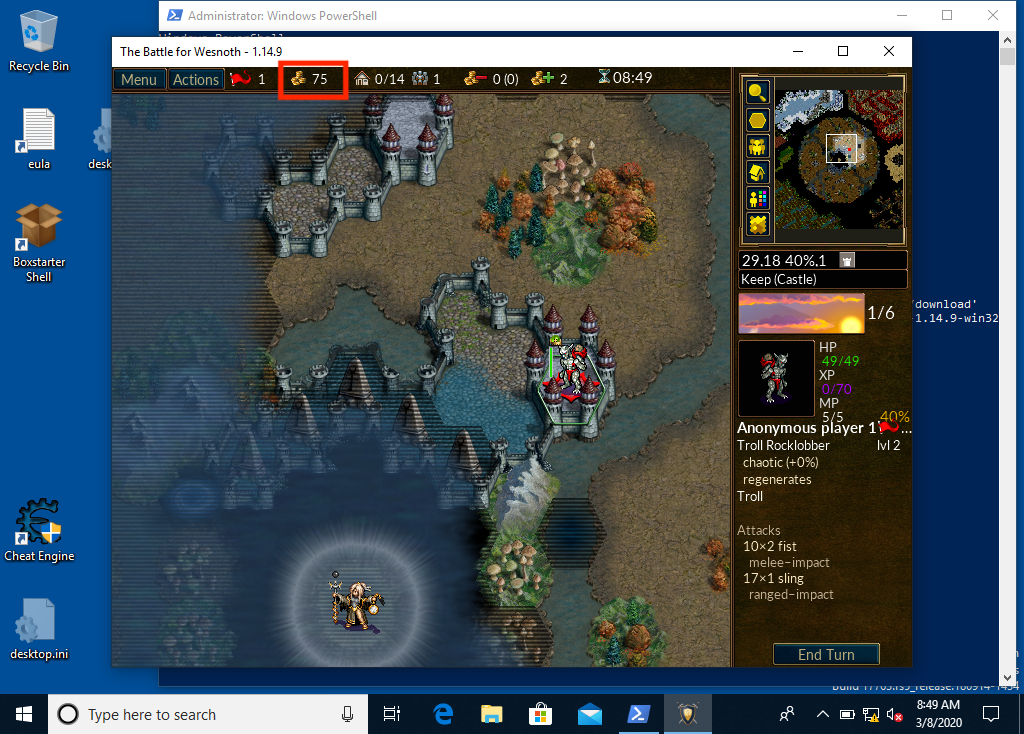
Choose the process
Pick the right program before scanning.
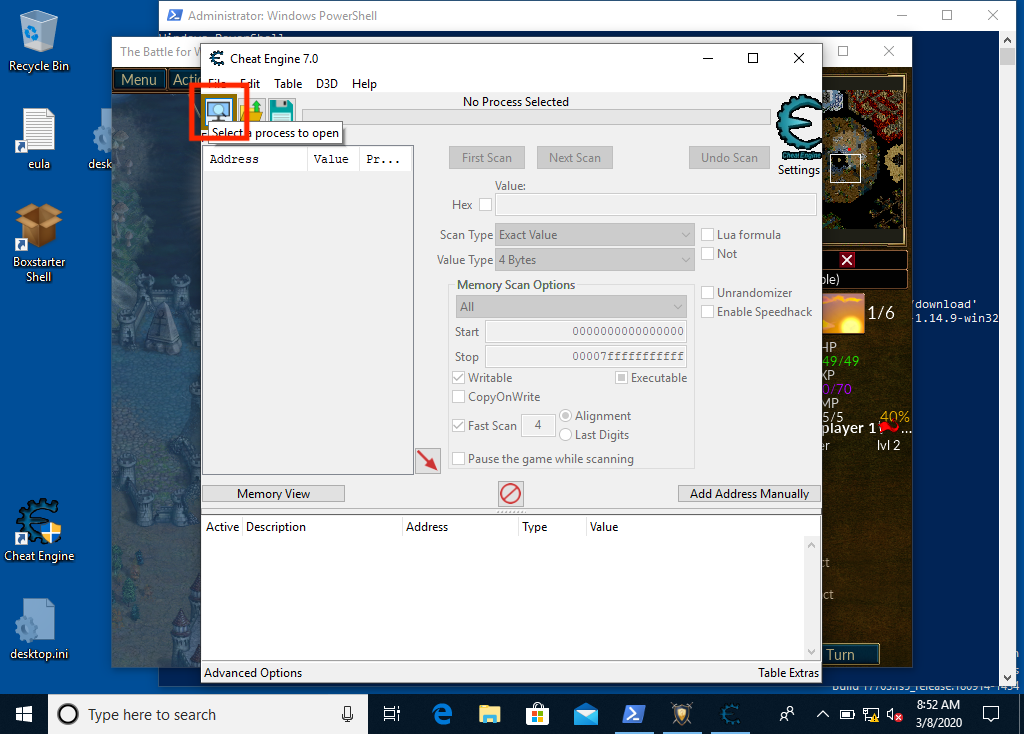
The first scan
See how many candidates one scan returns.
Use a link button for the one next action a page offers, such as starting the first
lesson or opening a reference. A button says “do this next”, so a page needs few of them.
Give the main action primary, an alternative secondary, and a quiet extra minimal.
A path that starts with / is inside the book.
<LinkButton href="/pages/1/01/" variant="primary" icon="right-arrow">Start with Lesson 1.1</LinkButton>Use a frame around a screenshot or figure that needs a caption. The caption is for the eye. Put the full description in the image’s alt text: that is what the listening edition reads, so nothing is read twice.
<Frame caption="The first scan returns many candidates"> </Frame>
Use a badge for a short fact about what follows: who it is for, what it needs. A plain label is neutral. Colour is only for a status: green means safe, amber means take care, red means it changes something. Use an icon only when it adds meaning a word does not.
Optional Windows only Safe lab Needs care Changes the gameOpen a lab from the lesson list then run it.
A hover card opens over a word or phrase when a reader hovers it, moves to it with the keyboard, or taps it. The book writes some itself: a glossary word shows its definition where the book first uses the word, and a mention such as “Lesson 2.1” shows what that lesson covers. Write your own for an extra a reader can do without: an example, a reference, a tip, an alternative, a recommendation, or a closer explanation.
A card is never where the lesson explains something. A reader can turn cards off in the Reader theme panel, and on a phone a card needs a tap, so a card holds only what the lesson reads fine without: never a step, a value, or a definition a later section uses. Keep it to a sentence or two, and use few of them. The text of every card stays in the page, in brackets after its words, so it prints and is read in the listening edition.
Values are stored <HoverCard kind="example" body="The number `0x1234` is stored as the two bytes `34 12`: the small end comes first.">little-endian</HoverCard>.Values are stored little-endian.
The words are what the sentence says; body is what the card says. It can use code,
bold, emphasis, and links. A card can also have a title, and an
href that turns the words into a link and lets the card preview where it goes. Each
kind has one job, shown in its card’s label and in its colour: information for what a
thing is, process for how it works, result for what to do, and caution for what goes wrong.
definition: what a word means, when the glossary does not cover it. The first scan returns many candidates.explanation: a closer second account of an idea, for a reader who wants more. Gold is read as a 32-bit value.reference: where to read more, such as a page of documentation or a tool’s manual. Give an href. The read goes through ReadProcessMemory.example: one concrete case of what the sentence says, with real values or a real output. Bytes are stored little-endian.alternative: another way to do the same job, such as a different tool or method. Find the address with the scanner this book builds.tip: something that saves effort. Change the value before each scan.recommendation: what the book would choose, and why. Run every lab against a practice copy of the game.caution: a likely mistake, or something that cannot be undone. Never write to an unconfirmed address.Hover, focus, or tap any of the underlined words above to see its card. A card on a
link, like the one on ReadProcessMemory, stays a link: the card only previews it.
Use a tooltip for a short explanation of one word or phrase that a reader may not know
and the lesson does not depend on: a sentence or two, with the real numbers if it has
any. It is a hover card of kind explanation whose text goes in a tip attribute, so it
opens on hover, focus, or tap, and its text stays in the page for printing and the
listening edition. A word the book uses in many places belongs in the glossary instead.
A quarter turn is 1.5708 <Tooltip tip="A radian measures an angle by the arc it covers on a circle of radius 1. A full turn is 2π = 6.2832 radians.">radians</Tooltip>.A quarter turn is 1.5708 radians.
Use fields to document a function, a request, or a structure: each name with its type and what it means. They read more clearly than a table when the descriptions are long.
<Fields title="Parameters"> <ParamField name="process" type="HANDLE" required> ... </ParamField></Fields><ResponseField name="return" type="BOOL"> ... </ResponseField>Parameters
processHANDLErequired
A handle to the process whose memory is read. It must allow reading.
address*const c_voidrequired
The address in that process to start reading from.
sizeusizerequired
How many bytes to read.
returnBOOL
Nonzero when every requested byte was read, zero when the read failed.
Use an example for one worked case set apart from the explanation around it. Use a panel for a reference box a reader may return to: a cheat sheet, a small table, a list of terms.
ExampleReading four bytes as a number
The bytes 19 00 00 00, read little-endian, are the number 25. The first byte is the
smallest part, so the value is 0x19 = 25.
Registers at a glance
| Register | Usually holds |
|---|---|
eax |
A result or a number being worked on |
esp |
The top of the stack |
eip |
The next instruction |
Use a file tree to show how a folder is laid out.
Use a colour swatch where a lesson gives a colour as numbers, such as #d85f2aorange and rgb(39, 108, 103)teal.
Use a prompt where a reader will ask an assistant for help. It can be copied, or opened in an assistant, and nothing is sent until the reader clicks.
PromptAsk for a second explanation
I am reading a lesson about scanning a game’s memory for its gold value. Explain, in plain language and with one small example, why the first scan returns so many results and how a second scan narrows them. Do not give me addresses: I will find those myself.
Use a GitHub card where a lesson points at a lab. It shows how long the file is and links to the exact version the book was built from.
access_probe.rs
#[cfg(windows)]
fn main() -> anyhow::Result<()> {
    use anyhow::Context;
    use gha_windows_labs::Process;
    use windows::{
        Win32::System::Threading::{
            PROCESS_NAME_WIN32, PROCESS_QUERY_LIMITED_INFORMATION, QueryFullProcessImageNameW,
        },
        core::PWSTR,
    };

    let process_name = std::env::args()
        .nth(1)
        .unwrap_or_else(|| "wesnoth.exe".to_owned());
    let entry = Process::find(&process_name)?;
    let process = Process::open_with_access(entry, PROCESS_QUERY_LIMITED_INFORMATION)
        .context("Windows denied even limited process information")?;

    let mut path = vec![0_u16; 32_768];
    let mut length = u32::try_from(path.len()).context("path buffer is too large")?;
    // SAFETY: `path` owns `length` writable UTF-16 units, and `length` remains
    // valid while Windows updates it with the number of units actually used.
    unsafe {
        QueryFullProcessImageNameW(
            process.raw_handle(),
            PROCESS_NAME_WIN32,
            PWSTR(path.as_mut_ptr()),
            &mut length,
        )?;
    }
    path.truncate(usize::try_from(length)?);

    println!("Process: {} (PID {})", process.name(), process.id());
    println!("Image:   {}", String::from_utf16_lossy(&path));
    println!("Rights:  PROCESS_QUERY_LIMITED_INFORMATION");
    println!("No memory-read, memory-write, thread, or debug right was requested.");
    Ok(())
}

#[cfg(not(windows))]
fn main() {
    eprintln!("This access-rights lab must run on Windows.");
}Write maths between double dollar signs. A formula on its own line is displayed; one inside a sentence stays in the sentence. A single dollar sign is never maths, so prices and shell variables are safe.
$$% speak: the distance is the square root of the sum of the squared differencesd = \sqrt{(x_2 - x_1)^2 + (y_2 - y_1)^2}$$The distance between two points is
and a value of in a sentence stays on its line. The line that starts
with % speak: is the formula in words, for the listening edition. Leave it out and the
book reads the formula automatically.
MDX reads curly braces in running text as code, so a formula that needs them for
subscripts and groups is safest written with the Math component. Its speak is the
formula in words:
<Math block tex="\Delta_{\text{game}} = \min(\Delta_{\text{real}},\ \Delta_{\max}) \times s" speak="the game delta equals the smaller of the real delta and the maximum delta, times the time scale s" />Wrap a short block of code in SpeedType and the lesson gets a “Practise typing this”
button under it. A reader types the code with the keyboard, the way speedtyper.dev
does: the code stays on screen, dimmed, each correct key lights up the next character,
a wrong key flashes and waits, and Backspace takes the last one back. Enter starts the
next line and the indentation is filled in, so only the code itself is typed. The result
is words per minute, accuracy, and time, and the reader’s best is kept in their browser.
fn spend_if_possible(gold: u32, cost: u32) -> Option<u32> { gold.checked_sub(cost)}<SpeedType id="components-spend" title="Type the spending check">
```rustfn spend_if_possible(gold: u32, cost: u32) -> Option<u32> { gold.checked_sub(cost)}```
</SpeedType>Choose code that is short (about 5 to 15 lines), plain ASCII, and already explained in the
lesson, so typing it fixes the idea in place. Characters a keyboard cannot easily type, such
as an emoji in a comment, are filled in. id names the snippet for the reader’s best and
must be unique across the book.
A fenced mermaid block draws a diagram. The book draws it while building, so a reader’s
browser never has to.
Use it when a reader can work out the answer from what they already know. The question comes first, each wrong pick explains why it fails and lets the reader try again, and the right pick opens the hands-on part in the slot, such as a calculator or a stepped diagram. Without scripts the answer is written out and the slot is open, so print and the listening edition lose nothing.
Predict first
A game stores gold as a 32-bit number. You scan for 100 and find the address 0x1000.
You spend 25 gold, so the game now shows 75. What does a second scan look for?
Answer: The value 75. Gold changed from 100 to 75, so the address you want now holds 75. Scanning for 100 again would find the old copies that did not change.
Now the candidate list is shorter: only addresses that held 100 and now hold 75 remain.
<PredictReveal  id="scan-after-spend"  setup="..."  question="..."  options={[    { label: 'The right answer', correct: true, why: 'Why it is right.' },    { label: 'A tempting wrong answer', why: 'Why it fails.' },  ]}>
What the reader gets after the right pick: a paragraph, a LiveCells calculator or a diagram.
</PredictReveal>
Give two to four options and mark exactly one correct. Every why is plain text; keep each to one or two
sentences.
The list of changes to the book and the site is on its own page, written with
Updates and Update:
<Updates> <Update label="3 October 2026" tags="Reader, Progress" description="Mark lessons done."> ... </Update></Updates>This book grew out of the original Game Hacking Academy by attilathedud and has been rewritten as a beginner-first course. Like the original repository, its source is published under the Apache License 2.0.