Radar Coordinates and Marker Filtering
Follow team and alive filters, local coordinate transforms, radar scale, range clipping, and elevation markers.
Cheatsheet for Lesson 7.8
A one-page summary of “Radar Coordinates and Marker Filtering” you can keep beside your notes. Plain Markdown.
Lesson 7.8 — Radar Coordinates and Marker Filtering: cheatsheet
- Remember: A missing radar marker may result from filtering, coordinate conversion, or drawing—not necessarily a missing entity position.
- Also useful: Radar scale works like map zoom: enlarging each world unit uses more pixels, leaving room for a smaller stretch of the world.
Key terms
- radar hack: This is the exercise the original course called the radar hack.
jne:jnemeans “jump when the previous comparison was not equal.” Replacing the whole branch with NOPs forces execution to fall through to the next instruction.enable_assaultcube_show_all_radar: The compiled implementation isenable_assaultcube_show_all_radar.
Formulas and patterns
[x'] [ cos θ -sin θ ] [x];[y'] = [ sin θ cos θ ] [y]
Review
- Q: What is the best way to infer why one entity appears on radar and another does not? A: Compare entities that differ in one property and trace the branch that uses it
- Q: In the radar pipeline, which stage decides whether a valid entity is allowed on this radar at all? A: Filtering, which applies the radar's rules such as team
A radar is a small rendering pipeline
Section titled “A radar is a small rendering pipeline”A radar normally does not own the authoritative player state. It reads a list of entities, rejects entries it should not show, transforms surviving world positions into radar coordinates, and asks a drawing system to render markers.
That creates several separate questions:
enumeration which entity records are visited?validation which records are active and usable?filtering which valid entities are allowed on this radar?projection where should each marker appear?drawing which icon, color, and size should be used?If an opponent is absent, do not immediately assume its position is missing. The radar loop may read the opponent correctly and skip it at the filtering step. A breakpoint on the team field helps locate that decision.
Track coordinate spaces explicitly
Section titled “Track coordinate spaces explicitly”“Position” is incomplete without a coordinate space. A radar marker commonly passes through these spaces:
- world space: both players have coordinates in the map;
- local-relative space: subtract the local player’s position;
- view-aligned space: rotate so the local facing direction becomes radar-up;
- radar space: scale into pixels or normalized marker units;
- clipped space: clamp or reject markers outside the radar shape.
Put the space and unit into variable and field names: world_metres, relative_xy, or radar_pixels. A sign error can look like a wrong pointer, and a degrees-versus-radians error can look like corrupt data. Test known directions first: directly north, east, south, and west of the local player.
There are two common display conventions:
- north-up: world north remains at the top; the local-player arrow rotates;
- heading-up: the local player’s forward direction remains at the top; the world and other markers rotate by the negative heading.
The code later in this lesson implements heading-up. Applying -yaw is an inverse
rotation: it undoes the local orientation so coordinates are expressed in the
player’s basis.
Start with two contrasting entities
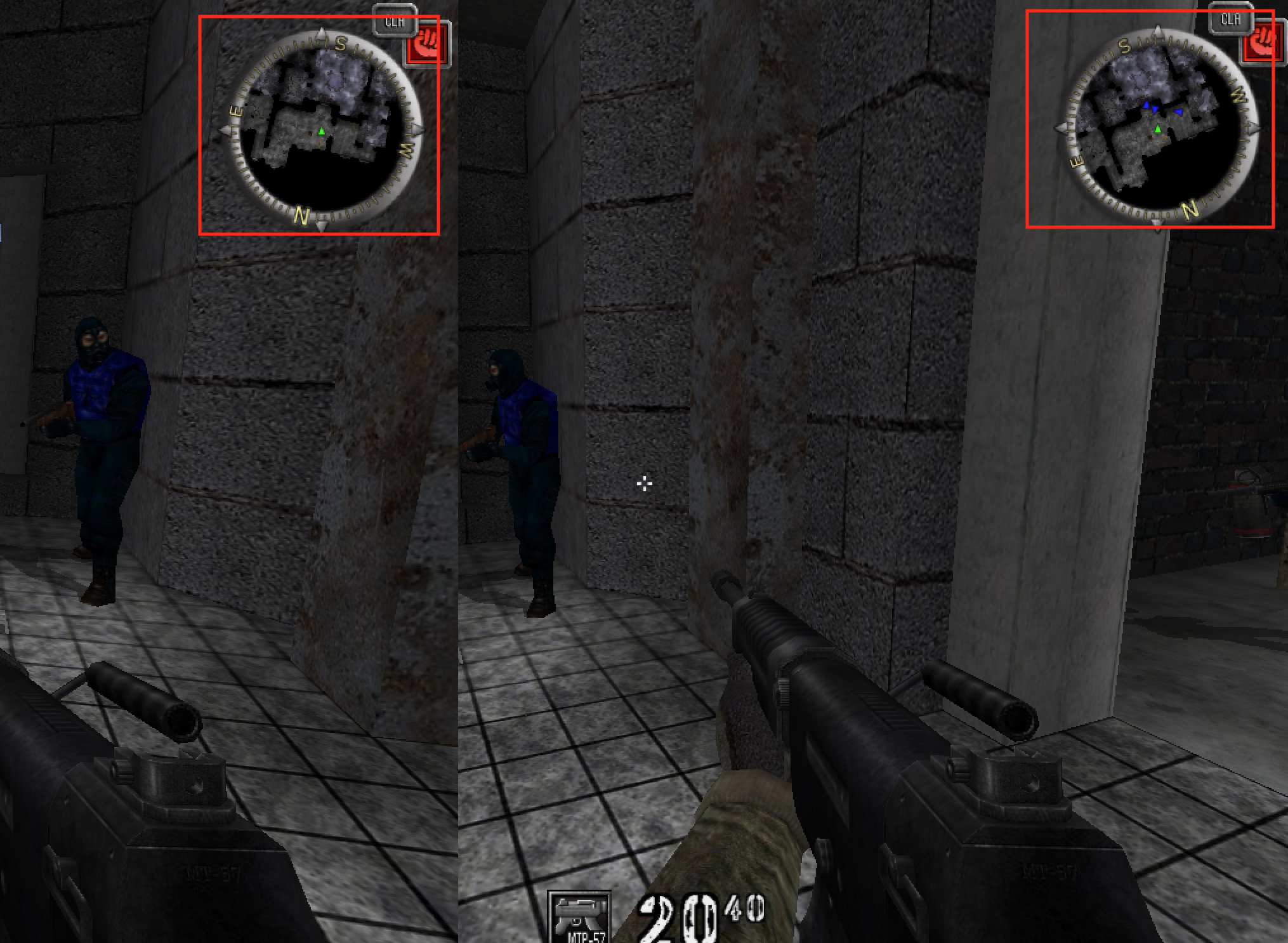
Section titled “Start with two contrasting entities”In an offline AssaultCube match with bots, compare:
- a teammate that appears on radar;
- an opponent that does not.
The radar loop probably visits both and applies a condition before drawing.
Use two contrasting entities because one example cannot distinguish a team filter from an alive, range, or icon check. A teammate and opponent that are both alive, active, and nearby differ mainly by team, which makes the experiment more specific.
Trace the team field
Section titled “Trace the team field”Find the local player’s team value, then compare nearby player records. Validate it by switching teams in a local setup if the target supports that.
Set a read breakpoint on a confirmed remote player’s team field while the radar is visible.

The logic may resemble:
for each player: skip if inactive skip if it is the local player skip if not on local team draw radar markerThe list order, object layout, and exact checks are target-specific. Repeatedly inspect the same two records and note which branch chooses different paths.
Write the team filter before changing it
Section titled “Write the team filter before changing it”Two records with different team IDs can reach the same drawing function, so first state the filter we think the radar uses. The function below receives one copied entity plus the local player’s ID and team. It returns true only for a distinct, active, living teammate with a usable position:
#[derive(Debug)]struct RadarEntity {    id: EntityId,    team: u32,    active: bool,    alive: bool,    position: Vec3,}
fn should_show_teammate(entity: &RadarEntity, local_id: EntityId, local_team: u32) -> bool {    entity.id != local_id        && entity.active        && entity.alive        && entity.team == local_team        && valid_point(entity.position)}
This plain function helps verify your reconstructed team filter against several recorded entities.
Keep “allowed to appear” separate from “has a drawable marker.” An entity can pass team and alive filters but still fail coordinate validation, be outside range, or have no icon. One boolean that merges all stages is difficult to reverse because a missing marker no longer tells you which filter or coordinate check rejected it.
Convert world position to radar position
Section titled “Convert world position to radar position”A radar usually translates the entity relative to the local player, rotates by the camera yaw, scales, then clamps to the radar bounds.
fn rotate_2d(x: f32, y: f32, degrees: f32) -> (f32, f32) {    let radians = degrees.to_radians();    let (sin, cos) = radians.sin_cos();    (x * cos - y * sin, x * sin + y * cos)}
fn radar_offset(local: Vec3, entity: Vec3, yaw: f32, scale: f32) -> (f32, f32) {    let dx = entity.x - local.x;    let dy = entity.y - local.y;    let (rx, ry) = rotate_2d(dx, dy, -yaw);    (rx * scale, ry * scale)}
Axis order and yaw sign must be confirmed for the target.
The subtraction must happen before rotation because the radar is centered on the local player. Rotation and uniform scaling can be exchanged mathematically, but clipping usually happens after both because it is defined in radar coordinates. Writing the stages separately makes those assumptions visible.
The 2D rotation is the matrix:
[x'] [ cos θ -sin θ ] [x][y'] = [ sin θ cos θ ] [y]Its columns are the rotated basis directions. Rotation preserves length because
the basis remains orthonormal: x'² + y'² = x² + y² apart from floating-point
rounding. If marker distance changes while only yaw changes, the transform or units
are wrong.
Map scale and range are one contract
Section titled “Map scale and range are one contract”If pixels_per_world_unit = s, then a relative displacement (x, y) becomes
(sx, sy). A radar with radius R pixels displays an unclamped world radius of
R / s. Doubling s zooms in and halves the visible world range.
Choose one out-of-range policy:
- reject the marker;
- clamp it to the edge and mark it as out-of-range;
- switch to a directional arrow.
For a circular radar, clamp a pixel offset p to radius R:
fn clamp_to_circle(x: f32, y: f32, radius: f32) -> (f32, f32, bool) { let length = x.hypot(y); if !length.is_finite() || radius < 0.0 { return (0.0, 0.0, true); } if length <= radius || length <= f32::EPSILON { return (x, y, false); } let scale = radius / length; (x * scale, y * scale, true)}Clamping x and y independently would clamp to a square, distort direction near corners, and make diagonal markers appear farther from the center.
Rotate a marker, then clamp its radius. This step-by-step trace needs JavaScript. Here is the code and where the run ends.
relative = enemy - local_origin
rotate relative by negative heading
apply uniform scale one
measure pixel offset length
if too far: multiply by radius / length
report the marker and range status
Result: marker (2.971, -7.428), at the radius-eight edge. Its direction is preserved.
Final values: x = 10; y = 4; heading = 1; relative_x = 10; relative_y = 4; rotated_x = 4; rotated_y = -10; length = 10.77; factor = 0.743; marker_x = 2.971; marker_y = -7.428; out_of_range = true.
Read every step of the lesson’s example
Step 1, line 1. Start with the selected inputs and follow how the next operation changes the state.
x = 10; y = 4; heading = 1.
Step 2, line 2. Subtracting the local origin leaves this relative vector.
x = 10; y = 4; heading = 1; relative_x = 10; relative_y = 4.
Step 3, line 3. Rotation changes direction while preserving length.
x = 10; y = 4; heading = 1; relative_x = 10; relative_y = 4; rotated_x = 4; rotated_y = -10.
Step 4, line 4. Scale one leaves the measured offset length unchanged.
x = 10; y = 4; heading = 1; relative_x = 10; relative_y = 4; rotated_x = 4; rotated_y = -10; length = 10.77.
Step 5, line 5. Use radial clamping rather than clipping each coordinate independently.
x = 10; y = 4; heading = 1; relative_x = 10; relative_y = 4; rotated_x = 4; rotated_y = -10; length = 10.77; factor = 0.743; marker_x = 2.971; marker_y = -7.428; out_of_range = true.
Step 6, line 6. Result: marker (2.971, -7.428), at the radius-eight edge. Its direction is preserved.
x = 10; y = 4; heading = 1; relative_x = 10; relative_y = 4; rotated_x = 4; rotated_y = -10; length = 10.77; factor = 0.743; marker_x = 2.971; marker_y = -7.428; out_of_range = true.
An accepted teammate position E minus local position L gives a relative vector. Negative-yaw rotation aligns the heading with radar-up while preserving length. Uniform scale produces a pixel offset outside radius R. Multiplication by R over its length moves the marker radially to the edge, where a dashed ring marks it out of range.
Read the steps
- Copy the teammate and local-player facts into one observation. The map positions are schematic. L names the local position and E the entity position.
- This record passes the identity, active, alive, team, and coordinate checks. A failed record would stop here.
- Subtract L from E. The same displacement starts at the radar centre, so L becomes the origin for drawing.
- Rotate by negative yaw for this heading-up convention. The heading arrow becomes radar-up. The entity displacement turns with it and keeps the same length.
- Multiply both offset coordinates by the same pixels-per-world-unit scale s. The vector shortens together in this drawing, preserving its direction.
- The scaled point lies beyond radius R. Multiply its entire vector by R divided by its length. The marker slides straight toward the centre until it meets the circular edge.
- Draw the bounded marker with an out-of-range flag. The dashed ring distinguishes a clamped marker from an entity that is truly at that position. Height can have a separate symbol.
Positions, yaw, scale, and radius are schematic. The lesson gives the operations symbolically. Confirm axis order and yaw sign for the target before using them.
Show elevation separately from horizontal position
Section titled “Show elevation separately from horizontal position”A top-down radar discards one world axis. That is a projection, not proof that height is irrelevant. Floors above and below may share the same 2D position. Common encodings use an up/down arrow, brightness, marker shape, or a height limit. Keep the height policy as a separate setting from the team/visibility filter, so changing how height is drawn cannot change which markers appear.
Prefer a separate lab display
Section titled “Prefer a separate lab display”Instead of patching the game’s team condition, use your copied snapshots to print or draw a separate local observer. That leaves the game’s own marker filtering and drawing untouched and makes your model easy to compare.
Patch the actual AssaultCube radar branch
Section titled “Patch the actual AssaultCube radar branch”The radar pipeline and pure team filter above explain what the branch controls. The following automated branch patch applies the verified patch ownership from Lesson 8.3 to one pinned build.
This is the exercise the original course called the radar hack.
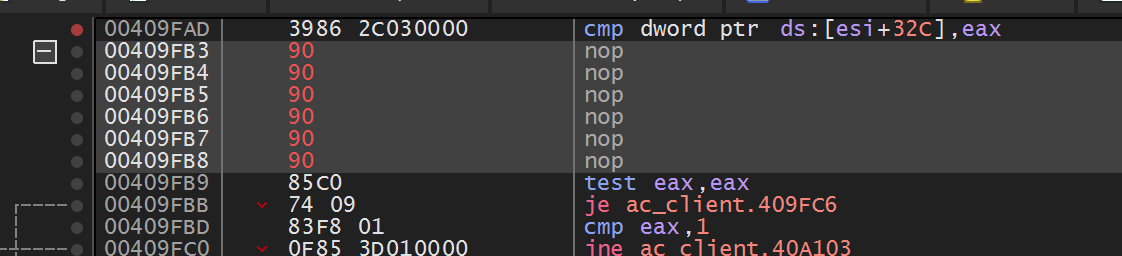
In AssaultCube 1.2.0.2, breaking on the team field while the radar draws leads through 0x00415322 and eventually to the six-byte team comparison at 0x00409FB3. NOPing that comparison lets the existing radar draw path handle every player:
const RADAR_TEAM_FILTER: usize = 0x0040_9FB3;const SHOW_ALL_PLAYERS: [u8; 6] = [0x90; 6];
let mut radar_patch = LocalPatch::apply_masked(    RADAR_TEAM_FILTER,    &[Some(0x0F), Some(0x85), None, None, None, None],    &SHOW_ALL_PLAYERS,)?;
0F 85 is the opcode for a six-byte near jne. Its remaining four bytes
hold a signed relative destination. The masked verifier checks the opcode and
captures all six live bytes, so restoration returns the exact original branch
destination instead of guessing it.
jne means “jump when the previous comparison was not equal.” Replacing the
whole branch with NOPs forces execution to fall through to the next instruction.
It does not change the entity list or team field; it changes only this decision
in the radar path. That difference is why instruction-level explanations must
name both the data and the control flow.
Join a local team game with bots. Before the patch, the radar shows teammates. After the patch, it should also show the opposing team. Restore the original bytes and verify the team filter returns.
What to verify
Section titled “What to verify”- dead and inactive players disappear;
- the local player is not duplicated;
- rotation follows camera yaw;
- markers remain bounded;
- invalid coordinates stop the update;
- team changes update the classification.
Also verify invariants that expose coordinate errors:
- rotating in place preserves every marker’s radial distance;
- translating the local player and entity equally leaves the relative marker fixed;
- doubling world distance doubles unclamped pixel distance;
- directly forward maps to the documented radar-up direction;
- a marker crossing the edge follows one consistent reject/clamp policy;
- entities on different floors use the documented height cue.
Diagnose radar failures
Section titled “Diagnose radar failures”Radar failures
| Symptom | Check first |
|---|---|
| all markers orbit the wrong way | yaw sign/inverse rotation |
| marker distance changes when turning | rotation formula or degree/radian mix |
| diagonal markers stick to corners | square clamp used for circular radar |
| marker drifts as both players move together | subtraction order or mixed snapshots |
| upstairs and downstairs overlap | missing height policy |
| marker flickers at maximum range | noisy distance and no hysteresis |
As with fog of war, the concrete patch is tied to AssaultCube’s offline local state. A server-owned visibility model would require a different explanation of where the authoritative state lives.
The compiled implementation is
enable_assaultcube_show_all_radar.
After injection, F3 toggles it.
game_hooks.rs
Show the codeHide the code
//! Exact x86 hooks used by the version-pinned course targets.

#![cfg(target_arch = "x86")]

use std::{
    ptr,
    sync::atomic::{AtomicBool, Ordering},
};

use anyhow::{Context, Result};
use windows::Win32::UI::Input::KeyboardAndMouse::{
    INPUT, INPUT_0, INPUT_MOUSE, MOUSEEVENTF_LEFTDOWN, MOUSEEVENTF_LEFTUP, MOUSEINPUT, SendInput,
};

use super::{LocalPatch, input_structure_size, near_jump};

const WESNOTH_PLAYER_ROOT: usize = 0x017E_ED18;
const WESNOTH_GAME_OFFSET: usize = 0x0A90;
const WESNOTH_GOLD_OFFSET: usize = 0x0004;
const WESNOTH_TERRAIN_HOOK: usize = 0x00CC_AF8A;
const WESNOTH_TERRAIN_RESUME: usize = 0x00CC_AF90;

const AC_TRIGGER_HOOK: usize = 0x0040_AD9D;
const AC_TRIGGER_ORIGINAL: usize = 0x0046_07C0;
const AC_TRIGGER_RESUME: usize = 0x0040_ADA2;
const AC_RECOIL_STORE: usize = 0x0045_BAAD;
const AC_RADAR_FILTER: usize = 0x0040_9FB3;

const URT_RENDER_HOOK: usize = 0x0052_D2FD;
const URT_RENDER_RESUME: usize = 0x0052_D303;

pub static TARGET_UNDER_CROSSHAIR: AtomicBool = AtomicBool::new(false);

/// Resolves Wesnoth's two pointers and writes the live gold field.
///
/// # Safety
/// Call only inside 32-bit Wesnoth 1.14.9 after a local match has started.
unsafe fn set_wesnoth_gold(amount: u32) -> Result<()> {
    // SAFETY: the caller verified the target build; volatile access makes the
    // actual memory operation visible at this exact point.
    let player = unsafe { ptr::read_volatile(WESNOTH_PLAYER_ROOT as *const u32) } as usize;
    anyhow::ensure!(
        player != 0,
        "start a Wesnoth match before using the terrain hook"
    );

    let side_pointer_address = player
        .checked_add(WESNOTH_GAME_OFFSET)
        .context("Wesnoth side-pointer address overflowed")?;
    // SAFETY: the verified player structure owns a 32-bit pointer at +0xA90.
    let side = unsafe { ptr::read_volatile(side_pointer_address as *const u32) } as usize;
    anyhow::ensure!(side != 0, "Wesnoth side pointer is null");

    let gold_address = side
        .checked_add(WESNOTH_GOLD_OFFSET)
        .context("Wesnoth gold address overflowed")?;
    // SAFETY: the verified side structure owns its four-byte gold field at +4.
    unsafe { ptr::write_volatile(gold_address as *mut u32, amount) };
    Ok(())
}

pub fn write_wesnoth_gold(amount: u32) -> Result<()> {
    // SAFETY: the DLL worker calls this only after matching wesnoth.exe. The
    // pointer resolver still rejects the normal "no active match" null state.
    unsafe { set_wesnoth_gold(amount) }
}

extern "C" fn wesnoth_cave_body() {
    // A naked cave cannot return `Result`, so the worker verifies the target and
    // this tiny body simply leaves the game unchanged if the match is not ready.
    // SAFETY: the cave is installed only after the exact Wesnoth hook bytes
    // match; the helper checks every nullable pointer in the live chain.
    let _ = unsafe { set_wesnoth_gold(888) };
}

#[unsafe(naked)]
unsafe extern "C" fn wesnoth_terrain_cave() {
    core::arch::naked_asm!(
        "pushfd",
        "pushad",
        "call {body}",
        "popad",
        "popfd",
        // Replay the behavior of the six bytes replaced at the hook site.
        "mov eax, dword ptr [ecx]",
        "lea esi, [esi]",
        "jmp {resume}",
        body = sym wesnoth_cave_body,
        resume = const WESNOTH_TERRAIN_RESUME,
    );
}

extern "C" fn record_crosshair_target(value: u32) {
    TARGET_UNDER_CROSSHAIR.store(value != 0, Ordering::Release);
}

#[unsafe(naked)]
unsafe extern "C" fn assaultcube_trigger_cave() {
    core::arch::naked_asm!(
        // The removed instruction was this call. Run it first so EAX contains
        // the game's real target-under-crosshair result.
        "call {original}",
        "pushfd",
        "pushad",
        "push eax",
        "call {record}",
        "add esp, 4",
        "popad",
        "popfd",
        "jmp {resume}",
        original = const AC_TRIGGER_ORIGINAL,
        record = sym record_crosshair_target,
        resume = const AC_TRIGGER_RESUME,
    );
}

#[unsafe(naked)]
unsafe extern "C" fn urban_terror_render_cave() {
    core::arch::naked_asm!(
        "pushfd",
        "pushad",
        "mov dword ptr [ebx + 4], 0x0D",
        "popad",
        "popfd",
        // Replay the complete instruction that the detour replaced.
        "mov dword ptr [0x0102AE98], ebx",
        "jmp {resume}",
        resume = const URT_RENDER_RESUME,
    );
}

fn six_byte_detour(hook: usize, cave: usize) -> Result<[u8; 6]> {
    let jump = near_jump(hook, cave)?;
    let mut replacement = [0x90_u8; 6];
    replacement[..5].copy_from_slice(&jump);
    Ok(replacement)
}

pub fn install_wesnoth_terrain_hook() -> Result<LocalPatch> {
    // mov eax,[ecx] ; lea esi,[esi+eiz]
    const ORIGINAL: [u8; 6] = [0x8B, 0x01, 0x8D, 0x74, 0x26, 0x00];
    let cave = wesnoth_terrain_cave as *const () as usize;
    let replacement = six_byte_detour(WESNOTH_TERRAIN_HOOK, cave)?;
    LocalPatch::apply(WESNOTH_TERRAIN_HOOK, &ORIGINAL, &replacement)
}

pub fn install_assaultcube_trigger_hook() -> Result<LocalPatch> {
    // call 0x004607C0, encoded relative to the end of this instruction.
    const ORIGINAL: [u8; 5] = [0xE8, 0x1E, 0x5A, 0x05, 0x00];
    let cave = assaultcube_trigger_cave as *const () as usize;
    let replacement = near_jump(AC_TRIGGER_HOOK, cave)?;
    LocalPatch::apply(AC_TRIGGER_HOOK, &ORIGINAL, &replacement)
}

pub fn install_urban_terror_memory_wallhook() -> Result<LocalPatch> {
    // mov dword ptr [0x0102AE98],ebx
    const ORIGINAL: [u8; 6] = [0x89, 0x1D, 0x98, 0xAE, 0x02, 0x01];
    let cave = urban_terror_render_cave as *const () as usize;
    let replacement = six_byte_detour(URT_RENDER_HOOK, cave)?;
    LocalPatch::apply(URT_RENDER_HOOK, &ORIGINAL, &replacement)
}

pub fn enable_assaultcube_no_recoil() -> Result<LocalPatch> {
    // fstp dword ptr [ebx+0x44] -> fstp st(0), nop
    LocalPatch::apply(AC_RECOIL_STORE, &[0xD9, 0x5B, 0x44], &[0xDD, 0xD8, 0x90])
}

pub fn enable_assaultcube_show_all_radar() -> Result<LocalPatch> {
    // 0F 85 is a six-byte near JNE. Capture its four-byte destination exactly,
    // NOP the full branch, and let LocalPatch restore all six captured bytes.
    LocalPatch::apply_masked(
        AC_RADAR_FILTER,
        &[Some(0x0F), Some(0x85), None, None, None, None],
        &[0x90; 6],
    )
}

pub fn send_left_mouse(pressed: bool) -> Result<()> {
    let flags = if pressed {
        MOUSEEVENTF_LEFTDOWN
    } else {
        MOUSEEVENTF_LEFTUP
    };
    let input = INPUT {
        r#type: INPUT_MOUSE,
        Anonymous: INPUT_0 {
            mi: MOUSEINPUT {
                dx: 0,
                dy: 0,
                mouseData: 0,
                dwFlags: flags,
                time: 0,
                dwExtraInfo: 0,
            },
        },
    };
    // SAFETY: `input` is a fully initialized INPUT value and the structure size
    // is the one expected by this build of Windows.
    let sent = unsafe { SendInput(&[input], input_structure_size()) };
    anyhow::ensure!(sent == 1, "SendInput sent {sent} of 1 mouse event");
    Ok(())
}Recover the filtering rule
What is the best way to infer why one entity appears on radar and another does not?
Controlled comparisons reveal a predicate. Team, visibility, alive state, range, and update timing are candidate inputs that should be tested separately.
Finished Lesson 7.8?
Mark it done and the lesson list shows a beside it. A chapter whose lessons are all done is marked done too. Progress is saved in this browser only.
Plain Markdown, saved in this browser.
This book grew out of the original Game Hacking Academy by attilathedud and has been rewritten as a beginner-first course. Like the original repository, its source is published under the Apache License 2.0.