Byte Signatures and Pattern Scanning
See how byte patterns locate candidate instructions across known builds, and why wildcards and semantic checks matter.
Cheatsheet for Lesson 5.7
A one-page summary of “Byte Signatures and Pattern Scanning” you can keep beside your notes. Plain Markdown.
Lesson 5.7 — Byte Signatures and Pattern Scanning: cheatsheet
- Remember: A good signature keeps the stable bytes and wildcards the ones that legitimately change. It must find the same instruction in every build you support.
- Also useful: Think of searching a library by a book's first line: one hit is a lead, many hits mean your quote is too common, and none means wrong library.
Key terms
E8:E8is a call, and the four bytes after it hold a relative distance to the target, measured from the end of the call instruction.
Review
- Q: Why does a byte pattern use wildcards for some positions? A: Displacements or addresses may vary between builds while the surrounding opcode structure stays meaningful
- Q: A code pattern matches six executable locations in the exact supported build. What is the safest next step? A: Refine the signature and verify the surrounding instructions until one meaning is proven
The Rust primer extension explains bounded slices and overlapping scan windows with a small local example before those ideas are applied here.
Why patterns help
Section titled “Why patterns help”Lesson 5.2 recovered a live address by adding the current module base to a known RVA. That works for the exact build whose RVA you measured. After a game update, the gold-changing instruction may move within the module, so the old RVA can point at different code even when the base calculation is perfect.
A byte pattern searches the current module for a distinctive instruction sequence. It gives us a candidate location to check in each explicitly supported build; it does not by itself prove that the candidate is still the gold-changing instruction.
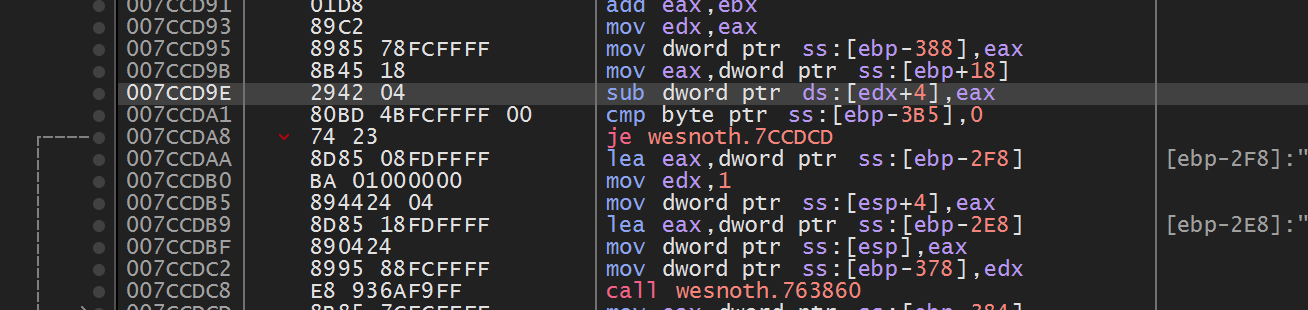
Some bytes encode registers or opcodes and stay stable. Others encode addresses or displacements and may change.
What a signature actually describes
Section titled “What a signature actually describes”The CPU sees one continuous byte stream. The disassembler groups that stream into instructions, and each instruction may contain several kinds of information:
| Part | Plain-English meaning | Usually stable? |
|---|---|---|
| Opcode | Which operation to perform, such as subtract or call | Often |
| ModR/M and SIB | Which registers and addressing shape to use | Often |
| Displacement | A field offset or distance from another address | Sometimes |
| Immediate | A number stored directly inside the instruction | Depends on what the number controls |
| Relative target | How far a call or jump travels | Often changes when code moves |
Suppose two supported builds both subtract a value and then load a nearby field. The instruction shape may stay recognizable while the relative call target between those instructions moves. A useful signature keeps the stable shape and places wildcards over the changing target bytes.
Written out, that comparison looks like this. The same two instructions, taken from two builds of one game:
build A: 29 47 04 E8 3C 91 FF FFbuild B: 29 47 04 E8 A8 2D FE FF ~~~~~~~~ ~~ ~~~~~~~~~~~ identical | these four differ | still the same call opcodeThe first three bytes are sub dword ptr [edi+4], eax: the operation, the
registers, and the field offset, none of which the compiler had any reason to
change. E8 is a call, and the four bytes after it hold a relative distance
to the target, measured from the end of the call instruction. That distance
shifts whenever either the calling code or the called function moves, even by a
single byte, even though it still calls exactly the same function.
So the signature keeps the first four bytes and wildcards the last four:
29 47 04 E8 ?? ?? ?? ??Wildcards are not “bytes we forgot.” Each one here has a stated reason — “relative call displacement, changes whenever code moves” — and that written reason is the difference between a wildcard and a shrug. Too few wildcards make the signature fragile. Too many make it common and ambiguous.
A signature can overfit one recording
Section titled “A signature can overfit one recording”A pattern overfits when it memorizes accidental details from one executable instead of describing the instruction identity you meant to find. An exact 30-byte sequence may work perfectly on the build used to create it and fail after an unrelated compiler layout change. The opposite mistake is a pattern so loose that it matches ordinary code everywhere.
| Pattern behavior | Meaning | Correct response |
|---|---|---|
| one match only in the design build | may be overfitted | compare another build you actually intend to support |
| many matches in the design build | under-specified | add stable decoded context |
| one decoded candidate in every declared profile | appropriately scoped | keep each build fingerprint and semantic check |
When supporting two exact builds, design the candidate signature with one build and test it against the other before calling it version-tolerant. Then reverse the test: bytes from each build should locate the same kind of instruction, not merely return one arbitrary address.
Do not weaken a pattern until it matches an unknown build and then declare success. If the course supports only one build, an exact fingerprint plus a build-specific signature is more honest than pretending the signature is portable. The goal is a pattern that finds the same instruction in every build you named, not the longest or shortest possible byte string.
When a moved field changes the instruction’s length
Section titled “When a moved field changes the instruction’s length”A field offset is a displacement, and moving the field can change more than the
displacement’s own bytes. mov eax, [ecx+offset] has two encodings. When the
offset fits in one signed byte (−128 to 127, so at most 0x7F here), the
compiler uses the short form: 8B 41 and that one byte, three bytes in all. A
larger offset needs the long form: 8B 81 and four displacement bytes, six in
all. The second byte is the ModR/M byte, and its top two bits say which form
follows: 41 is 01 000 001 in binary, one displacement byte, and 81 is
10 000 001, four.
So a field that moves from 0x138 to 0x140 turns 8B 81 38 01 00 00 into
8B 81 40 01 00 00. One byte differs, and 8B 81 ?? ?? ?? ?? covers both
builds, with one stated reason for all four wildcards: the field moved. A field
that moves from 0x7C to 0x84 changes the shape instead: 8B 41 7C in one
build, 8B 81 84 00 00 00 in the other, and every later byte sits three places
further on.
Predict first
Build A reads a field with 8B 41 7C, which is mov eax, [ecx+0x7C]. In build B a new 8-byte field before it moves it to 0x84.
Which pattern finds the instruction in both builds?
Answer: No single pattern: one per build, each checked by decoding. The builds encode different instruction shapes, three bytes against six. A pattern per build, each required to match once and to decode as mov eax, [ecx+offset], states that difference instead of hiding it.
Same shape, different displacement
Build A
Build B
Pattern that covers both builds
2 of 14 bytes differ, all inside the two displacements. The whole displacement is the field offset, so every byte of it becomes a wildcard for one stated reason: the field moved.
Represent exact and wildcard bytes
Section titled “Represent exact and wildcard bytes”A written signature such as 29 47 04 E8 ?? ?? ?? ?? contains two different
kinds of instruction: compare this byte exactly, or accept any byte at this
position. Represent that choice in the type rather than reserving a magic
value like zero. The matcher below receives copied code bytes, a starting
offset, and that typed pattern; it returns false when the whole pattern
would run past the buffer.
#[derive(Clone, Copy, Debug, Eq, PartialEq)]enum PatternByte {    Exact(u8),    Any,}
fn matches_at(bytes: &[u8], offset: usize, pattern: &[PatternByte]) -> bool {    // 📏 Ask for the whole candidate window at once. Near the buffer end, an    // incomplete window is simply “not a match” instead of an indexing panic.    let Some(window) = bytes.get(offset..offset.saturating_add(pattern.len())) else {        return false;    };
    // 🔍 `Any` consumes exactly one byte too; it relaxes equality, not length.    window.iter().zip(pattern).all(|(found, expected)| {        matches!(expected, PatternByte::Any)            || matches!(expected, PatternByte::Exact(value) if value == found)    })}
The safe matcher makes wildcard meaning and range failure explicit:
The original matcher accepts an exact byte pattern and compares each byte by direct indexing. A candidate near the buffer end can panic, and the byte list has no separate way to express a wildcard.
fn matches_at(bytes: &[u8], offset: usize, pattern: &[u8]) -> bool { for index in 0..pattern.len() { if pattern[index] != bytes[offset + index] { // May pass the buffer end. return false; } } true}Request the complete bounded window first. Then compare each byte with a PatternByte enum item: Exact requires equality, while Any still consumes one byte but accepts any value. An empty pattern is excluded by the caller’s pattern validation.
Improved code
fn matches_at(bytes: &[u8], offset: usize, pattern: &[PatternByte]) -> bool { let Some(window) = bytes.get(offset..offset.saturating_add(pattern.len())) else { return false; }; window.iter().zip(pattern).all(|(found, expected)| { matches!(expected, PatternByte::Any) || matches!(expected, PatternByte::Exact(value) if value == found) })}Show the diff
fn matches_at(bytes: &[u8], offset: usize, pattern: &[u8]) -> bool { for index in 0..pattern.len() { if pattern[index] != bytes[offset + index] { // May pass the buffer end. return false; } } truefn matches_at(bytes: &[u8], offset: usize, pattern: &[PatternByte]) -> bool { let Some(window) = bytes.get(offset..offset.saturating_add(pattern.len())) else { return false; }; window.iter().zip(pattern).all(|(found, expected)| { matches!(expected, PatternByte::Any) || matches!(expected, PatternByte::Exact(value) if value == found) })}Takeaway: validate a complete candidate range before comparing its contents.
saturating_add also keeps the end of the window from wrapping to a small
number.
Lesson 3.3’s checked slices and iterator chains explain
get, zip, and all step by step. The function only borrows the copied
bytes and the pattern, so it never copies the module again.
Scan safely
Section titled “Scan safely”One safe comparison is not a scan yet. The next function tries every start position where the full pattern could fit, collecting offsets in the local buffer. If the buffer has three bytes and the pattern has two, both starts 0 and 1 must be considered; start 1 is easy to miss with an exclusive range.
fn find_all(bytes: &[u8], pattern: &[PatternByte]) -> Vec<usize> {    // ⚠️ An empty pattern would otherwise appear to match between every byte,    // and subtracting a longer pattern would underflow.    if pattern.is_empty() || pattern.len() > bytes.len() {        return Vec::new();    }
    // ✅ The inclusive end keeps the final legal starting position searchable.    (0..=bytes.len() - pattern.len())        .filter(|&offset| matches_at(bytes, offset, pattern))        .collect()}
For n input bytes and an m-byte pattern, this simple algorithm does at most roughly n × m comparisons. That is easy to reason about and fast enough for bounded course modules. More advanced search algorithms matter only after measurement shows this loop is the bottleneck.
The early return handles two important edge cases. An empty pattern would otherwise “match” at every offset, and subtracting a longer pattern length from the input length would underflow.
Parse a friendly pattern
Section titled “Parse a friendly pattern”The scanner’s type is precise, but writing PatternByte::Exact eight times
for every trial is awkward. A small parser turns the familiar spaced hex form
into that type. A mistyped token becomes an error before any memory is scanned:
fn parse_pattern(text: &str) -> anyhow::Result<Vec<PatternByte>> {    text.split_whitespace()        .map(|token| match token {            "?" | "??" => Ok(PatternByte::Any),            hex => Ok(PatternByte::Exact(u8::from_str_radix(hex, 16)?)),        })        .collect()}
let pattern = parse_pattern("29 47 04 E8 ?? ?? ?? ??")?;
collect() is doing extra work here: the iterator produces Result<PatternByte> values and combines them into Result<Vec<PatternByte>>. The first invalid hex token stops the parse and returns its error. No half-parsed pattern escapes.
This is the same illustrative two-build pattern we just derived, so the four
?? tokens still mean the call’s changing relative distance. The runnable
Wesnoth lab below uses a different, exact three-byte signature from its one
pinned executable; it does not claim that hypothetical call follows the real
gold instruction.
Scan the correct range
Section titled “Scan the correct range”Do not scan an entire process by default. Locate the intended module and executable section, copy that bounded region, and scan the local buffer.
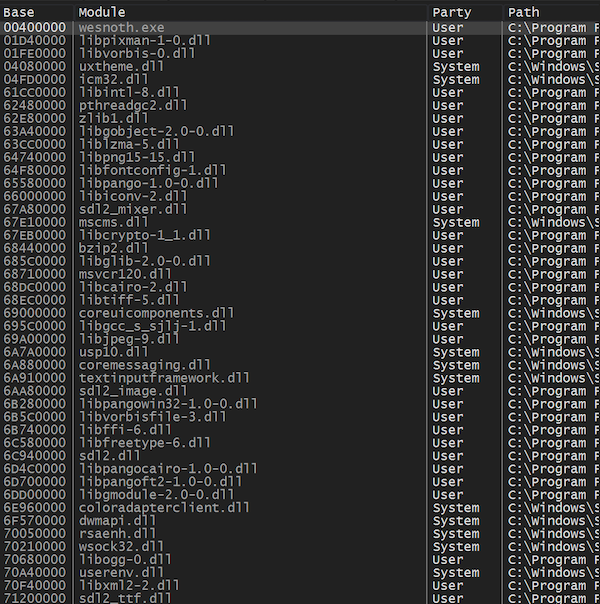
For a PE image, confirm:
- DOS and PE signatures;
- section table bounds;
- executable characteristic;
- virtual address plus size stays in the module.
Libraries such as goblin can parse PE files, but live in-memory images still need careful address and section validation.
This separation matters. ReadProcessMemory works at the Windows boundary and can fail because a page changed. Once the bytes are in a local Vec<u8>, the matching loop uses only checked slices: no remote pointers, no changing protections, and no partial Windows reads during comparisons.
Require one match
Section titled “Require one match”The scan returns a list because one pattern can occur more than once. Before turning an offset into a candidate instruction address, make the three possible counts explicit. Returning the first entry would disguise an ambiguous signature as a successful find.
fn unique_match(matches: &[usize]) -> anyhow::Result<usize> { // 🎯 “First result wins” hides ambiguity. All three match counts are // handled explicitly so a weak pattern cannot choose code by accident. match matches { [only] => Ok(*only), [] => anyhow::bail!("pattern was not found"), many => anyhow::bail!("pattern is ambiguous: {} matches", many.len()), }}Picking the first of five matches is not version tolerance.
The three outcomes mean different things:
- zero matches means the build, range, or pattern assumption is wrong;
- one match means the signature has located one candidate, which still needs semantic verification;
- several matches mean the signature does not contain enough identity.
Do not “fix” ambiguity by silently lengthening the scan to another unrelated section. Extend the pattern into the instructions around the intended one until only it matches.
Verify surrounding meaning
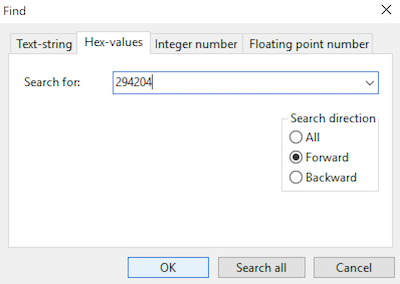
Section titled “Verify surrounding meaning”After a match:
- disassemble the surrounding bytes;
- confirm whole expected instructions;
- verify the relative target or field offset;
- check the supported module fingerprint;
- reject an unknown build.
Test edge cases
Section titled “Test edge cases”A two-byte pattern at the end of a three-byte buffer exercises the range boundary that ordinary middle-of-buffer examples miss. The expected offset is 1, so this test catches an accidental exclusive upper bound:
#[test]fn finds_match_at_last_possible_offset() { let bytes = [0x10, 0x20, 0x30]; let pattern = [PatternByte::Exact(0x20), PatternByte::Exact(0x30)]; assert_eq!(find_all(&bytes, &pattern), vec![1]);}Follow that boundary test as two candidate windows. All byte values below are
hexadecimal; offset 1 must be included in the scan:
Include the final legal pattern start. This step-by-step trace needs JavaScript. Here is the code and where the run ends.
buffer = [10, 20, 30] hexadecimal
pattern = selected bytes
last_start = buffer_length - pattern_length
try every start from zero through last_start
compare every byte in that window
report all matches and the boundary
Result: matches 1. The last legal offset is included.
Final values: pattern = pair; pattern_length = 2; last_start = 1; start = 1; match = true; matches = 1.
Read every step of the lesson’s example
Step 1, line 1. Start with the selected inputs and follow how the next operation changes the state.
pattern = pair.
Step 2, line 2. The selected pattern occupies 2 byte(s).
pattern = pair; pattern_length = 2.
Step 3, line 3. The final legal start is 1. A negative value means no window fits.
pattern = pair; pattern_length = 2; last_start = 1.
Step 4, line 4. Compare the bounded window at offset 0.
pattern = pair; pattern_length = 2; last_start = 1; start = 0; match = false.
Step 5, line 4. Compare the bounded window at offset 1.
pattern = pair; pattern_length = 2; last_start = 1; start = 1; match = true.
Step 6, line 6. Result: matches 1. The last legal offset is included.
pattern = pair; pattern_length = 2; last_start = 1; start = 1; match = true; matches = 1.
A buffer of three bytes, 10 20 30, and a two-byte pattern, 20 30. The pattern is tried at offset 0, where 10 does not equal 20, and then at offset 1, where both bytes match. Offset 1 is the final legal start, so the search must include it.
Read the steps
- The scanner has copied three bytes from the game, 10 20 30, and is looking for the two-byte pattern 20 30. Both positions must match exactly; this pattern has no wildcards.
- How many places can the pattern start? The last legal start is 3 − 2 = 1, so the offsets to try are 0 through 1, inclusive: two candidate windows.
- Offset 0: the window holds 10 and 20. The first exact byte, 10, is not 20, so this window does not match, and the second byte is never needed.
- Slide the pattern one byte to offset 1: the window holds 20 and 30.
- Both exact comparisons pass: 20 = 20 and 30 = 30. This is the final legal window, and it holds the only match.
- find_all returns offset 1, so the test expects [1]. If the loop stopped one start too early, with an exclusive upper bound, it would skip this window and report nothing.
A range boundary is part of correctness. Matching bytes still leaves the separate checks for build identity and instruction meaning.
Also test empty patterns, all wildcards, a pattern longer than input, no matches, overlapping matches, and multiple matches.
A useful test asks the program to do something and checks an observable result. It does not merely repeat the code it is supposedly checking:
// ❌ This only proves that a two-item array has two items.#[test]fn pattern_has_the_length_we_just_wrote() { let pattern = [0x20, 0x30]; assert_eq!(pattern.len(), 2);}By contrast, the boundary test above can catch a real off-by-one bug. That is the standard to use when AI or autocomplete suggests tests too: ask what incorrect implementation would make the test fail. If the answer is “none,” the test is decoration.
A pattern only finds where bytes match. It does not replace target-version checks or instruction decoding.
Read the complete program as a pipeline
Section titled “Read the complete program as a pipeline”The executable at the end of the lesson has five phases:
Process::open_by_namefinds the exact target and owns its Windows process handle.process.modulereturns the current base and mapped size ofwesnoth.exe.process.regionsasks Windows how that module is divided and keeps readable executable regions.- Each accepted region is copied before
.windows(3)compares local slices. - The program prints every match and refuses success unless the match count is exactly one.
Notice what it does not do: it does not scan every allocation, patch the result, or assume matching bytes prove the instruction’s meaning. Those are separate decisions with separate checks.
Run it against Wesnoth
Section titled “Run it against Wesnoth”The course binary opens the live 32-bit wesnoth.exe, finds its current main-module base, visits its readable executable regions, and searches for the exact gold-subtraction instruction bytes 29 42 04. Those are measured bytes from the pinned Wesnoth build, not the illustrative 29 47 04 E8 ... sequence above. It prints every match and refuses to call the result usable unless there is exactly one.
.\target\i686-pc-windows-msvc\release\pattern_scanner.exeThe complete executable is pattern_scanner.rs. Shared ToolHelp module discovery, memory-region validation, and bounded reads are in process.rs.
Complete lab source: pattern_scanner.rs
pattern_scanner.rs
Show the codeHide the code
#[cfg(windows)]
fn main() -> anyhow::Result<()> {
    use gha_windows_labs::Process;

    const PATTERN: [u8; 3] = [0x29, 0x42, 0x04];
    let process = Process::open_by_name("wesnoth.exe", false)?;
    let (base, size) = process.module("wesnoth.exe")?;
    let end = base
        .checked_add(size)
        .ok_or_else(|| anyhow::anyhow!("Wesnoth module range overflowed"))?;
    let mut matches = Vec::new();

    for region in process.regions(base, end)? {
        if !region.readable || !region.executable {
            continue;
        }
        let start = region.base.max(base);
        let region_end = region.base.saturating_add(region.size).min(end);
        if start >= region_end {
            continue;
        }
        let bytes = process.read_bytes(start, region_end - start)?;
        matches.extend(
            bytes
                .windows(PATTERN.len())
                .enumerate()
                .filter_map(|(offset, window)| (window == PATTERN).then_some(start + offset)),
        );
    }

    anyhow::ensure!(
        !matches.is_empty(),
        "gold-subtraction pattern was not found"
    );
    for address in &matches {
        println!("{address:#010x}: 29 42 04  ; sub dword ptr [edx+4],eax");
    }
    anyhow::ensure!(
        matches.len() == 1,
        "pattern is ambiguous: {} matches; inspect each before patching",
        matches.len()
    );
    Ok(())
}

#[cfg(not(windows))]
fn main() {
    eprintln!("This live pattern scanner must run on Windows.");
}#[cfg(windows)]fn main() -> anyhow::Result<()> { use gha_windows_labs::Process;
const PATTERN: [u8; 3] = [0x29, 0x42, 0x04]; let process = Process::open_by_name("wesnoth.exe", false)?; let (base, size) = process.module("wesnoth.exe")?; let end = base .checked_add(size) .ok_or_else(|| anyhow::anyhow!("Wesnoth module range overflowed"))?; let mut matches = Vec::new();
for region in process.regions(base, end)? { // 🔒 Code signatures belong in executable image pages, not heaps or // unrelated readable allocations that happen to share three bytes. if !region.readable || !region.executable { continue; } // 📏 Clip Windows' page-sized region to the exact module interval. let start = region.base.max(base); let region_end = region.base.saturating_add(region.size).min(end); if start >= region_end { continue; } // 🔍 Copy once, then scan safe local slices while the game keeps running. let bytes = process.read_bytes(start, region_end - start)?; matches.extend( bytes .windows(PATTERN.len()) .enumerate() .filter_map(|(offset, window)| (window == PATTERN).then_some(start + offset)), ); }
anyhow::ensure!( !matches.is_empty(), "gold-subtraction pattern was not found" ); for address in &matches { println!("{address:#010x}: 29 42 04 ; sub dword ptr [edx+4],eax"); } anyhow::ensure!( matches.len() == 1, "pattern is ambiguous: {} matches; inspect each before patching", matches.len() ); Ok(())}
#[cfg(not(windows))]fn main() { eprintln!("This live pattern scanner must run on Windows.");}A three-byte match identifies a candidate only; patching requires a separately verified address and expected bytes.
When results are wrong
Section titled “When results are wrong”When a scan result is wrong
| Symptom | Most likely question to ask |
|---|---|
| No matches | Is this the exact supported executable and correct architecture? |
| Many matches | Is the signature too short or too full of wildcards? |
| Read failure | Did the region change, or was its protection classified incorrectly? |
| Match points into data | Did the scan include a non-executable section? |
| Correct bytes, wrong behavior | Did you decode enough surrounding instructions and verify the function? |
Error messages should preserve this distinction. “Scanner failed” is not actionable; “pattern matched six locations in executable regions” tells the learner exactly which assumption to revisit.
Match stable bytes
Why does a byte pattern use wildcards for some positions?
A good signature anchors the stable context and treats relocation-sensitive bytes as unknown. Wildcards relax equality; they do not change what the CPU executes.
Finished Lesson 5.7?
Mark it done and the lesson list shows a beside it. A chapter whose lessons are all done is marked done too. Progress is saved in this browser only.
Plain Markdown, saved in this browser.
This book grew out of the original Game Hacking Academy by attilathedud and has been rewritten as a beginner-first course. Like the original repository, its source is published under the Apache License 2.0.