World-to-Screen Projection and Overlays
Follow a 3D point through world, view, clip, normalized, and screen coordinates, with the field of view, aspect ratio, and each camera's viewport, to place stable overlays.
Cheatsheet for Lesson 7.9
A one-page summary of “World-to-Screen Projection and Overlays” you can keep beside your notes. Plain Markdown.
Lesson 7.9 — World-to-Screen Projection and Overlays: cheatsheet
- Remember: Perspective division makes the same world-sized object occupy fewer screen pixels as its depth increases.
- Also useful: Projected depth belongs to the camera’s depth convention; use world or view-space distance when displaying a range in metres.
Key terms
w: Ifwis zero, the division is undefined.screen_y: Sincescreen_yis proportional toview_y / view_depth, the scale factor that sendstan(fov_y / 2)to1is its reciprocal:y_scale = 1 / tan(fov_y / 2).aspect: At the same depthd, the frustum's half-width must beaspecttimes its half-height, becauseaspectis defined aswidth / height.x_scale: definef = 1 / tan(fov_y / 2), they_scalefrom the previous section, so the matrix's first entry,f/aspect, isx_scale.ndc_z:ndc_zis produced by the projection and perspective divide.
Formulas and patterns
ndc_x = clip_x / clip_w;ndc_y = clip_y / clip_w
Review
- Q: Why check clip-space w before the perspective divide? A: A zero or negative w can mean the point is on or behind the camera plane
- Q: The transform produces a finite
clip_wof−0.4. What should the observer do before the perspective divide? A: Reject the point as behind the usable camera half-space
World-to-screen uses the view-projection transform
Section titled “World-to-screen uses the view-projection transform”An ESP-style observer needs to answer:
Where would this 3D point appear on the 2D screen?
The reliable answer uses the game’s view-projection matrix. Hand-tuned angle formulas can teach geometry, but a matrix handles camera rotation, field of view, aspect ratio, and perspective together.
The matrix is not magic screen-coordinate data. It is a compact composition of specific coordinate changes. If its convention, snapshot time, or viewport does not match the rendered frame, the resulting pixels can be precise arithmetic and still describe the wrong image.
Name every coordinate space
Section titled “Name every coordinate space”“World to screen” is not one mysterious jump. It is a pipeline of smaller changes, and every stage answers a different question:
world space where the entity exists in the game world ↓ view transformcamera space where the entity is relative to the camera ↓ projection transformclip space (x, y, z, w) a perspective-aware position before division ↓ divide x, y, and z by wnormalized device coordinates a small standard cube used for clipping ↓ viewport transformscreen pixels where the overlay may drawThis tour chooses a world point (2, 1, -4) and a camera at (1, 0, 0)
looking along negative Z. Its right and up directions match the world axes.
Subtracting the camera position gives (1, 1, -4). Choose an 800-by-800
viewport so the aspect ratio is one. A 90-degree vertical field of view
gives 1 / tan(45°) = 1. Choose near and far distances of one and nine;
the depth formula below then gives (9 + 1) / (1 - 9) = -1.25 and
2 × 9 × 1 / (1 - 9) = -2.25. These settings make every conversion visible.
Try changing the camera, field of view or nearer depth. The muted marker shows the nearer point when it passes clipping; the coloured marker shows twice that depth.
The inverse camera pose makes the point camera-relative. Its ray crosses a projection plane; dividing by depth gives normalized coordinates. The viewport maps those coordinates to pixels. Doubling depth moves the marker halfway toward the centre, with the first marker retained as a small grey reference.
Read the steps
- Choose a world point (2,1,−4), a camera at (1,0,0), and an 800 by 800 square viewport. The camera looks down negative Z; its right and up axes match the world.
- The inverse camera pose subtracts (1,0,0). The point becomes (1,1,−4) relative to the camera. The whole top view shifts left while the point–camera relationship stays the same.
- A 90-degree vertical view gives f=1/tan(45°)=1. Square aspect is 800/800=1. Thus clip X and Y stay 1, while W=−view Z=4. Near 1 and far 9 give clip Z=(−1.25×−4)−2.25=2.75.
- The anchor passes clipping: W is positive, X=1 and Y=1 lie between −4 and 4, and Z=2.75 also lies between −4 and 4. This accepted point may continue to the viewport.
- Divide by W=4. Normalized X and Y are 1/4=0.25; normalized Z is 2.75/4=0.6875. The ray intersects the projection plane one quarter of a horizontal unit from its centre.
- Map normalized coordinates into pixels. X=(0.25+1)×800/2=500. Screen Y points down, so Y=(1−0.25)×800/2=300. The marker appears right of and above the centre.
- Double the depth from 4 to 8 without changing relative X or Y. W becomes 8, so both normalized offsets halve to 1/8=0.125. The pixel moves to (450,350), closer to the centre.
Declared convention: column vectors, negative Z forward, OpenGL depth. The muted dot is the first valid marker; the coloured dot is the farther point.
Naming the stages makes bugs easier to locate. A marker that rotates the wrong way usually points to the view transform. A marker that stretches after a resolution change points to the viewport or aspect ratio. A point behind the camera that appears mirrored points to the perspective divide or clipping.
The w value is not another world direction;
Why perspective uses w shows how it carries depth.
Reject unusable w values before dividing, then reject points outside the
target API’s depth interval. OpenGL commonly uses -1..=1 after projection;
Direct3D commonly uses 0..=1. The matrix and convention must come from the
same game pipeline.
The view matrix is the inverse camera pose
Section titled “The view matrix is the inverse camera pose”A camera pose says where the camera exists in world space. Rendering needs the opposite question: where does the world appear relative to the camera? Therefore the view matrix is the inverse of the camera’s world transform.
For an orthonormal camera basis, inverse rotation is its transpose. The translation
is not simply -camera_position; it is the negative position expressed along the
camera basis. In dot-product form, that is the view transform from
Lesson 7.1: subtract the camera
position, then take the dot product of the result with each camera axis.
If positions track correctly until the camera rotates, the translation may be right while the basis order, handedness, or inverse operation is wrong.
Why perspective uses w
Section titled “Why perspective uses w”Far-away objects look smaller. After the matrix transformation, perspective division divides the transformed x, y, and z by w:
ndc_x = clip_x / clip_wndc_y = clip_y / clip_wThis creates perspective because the projection matrix is built so that the
resulting w carries the point’s distance from the camera: dividing by w
divides by depth. Ignoring signs and API details, for a symmetric perspective
camera:
screen_x ∝ view_x / view_depthscreen_y ∝ view_y / view_depthDouble the depth while keeping the sideways offset unchanged and the point moves
half as far from the screen center, so an object twice as far away covers half
as much screen. A perspective matrix stores this division in w so the GPU can
delay it until after clipping.
If w is zero, the division is undefined. In the convention used in this
lesson, where a point in front of the camera has a positive w, a negative w
puts the point behind the camera — and the division still yields a perfectly
ordinary-looking coordinate, with both signs flipped. This is the classic
overlay bug: an enemy standing directly behind the player gets drawn on screen
in front, mirrored to the opposite side, with the box sliding the wrong way as
they move. Nothing crashes and no number looks obviously wrong, so
world-to-screen code must skip any point whose w is at or below a small
positive threshold before producing pixels, as the clip_w test in
Transform a point does.
What field of view and aspect ratio change
Section titled “What field of view and aspect ratio change”The vertical field of view fov_y determines how much of the world fits from top
to bottom. The aspect ratio is width / height. A common perspective scale is:
y_scale = 1 / tan(fov_y / 2)x_scale = y_scale / aspectHere is where that comes from. Picture the frustum at some depth d straight
ahead of the camera. Half the vertical field of view is the angle from the
center line up to the top edge of what the camera sees, so — for a right
triangle with that angle and an adjacent side of length d — the frustum’s
half-height at that depth is d × tan(fov_y / 2). A point sitting exactly on
that top edge has view_y = d × tan(fov_y / 2), and it needs to land at the
very top of the screen, NDC y = 1. Since screen_y is proportional to
view_y / view_depth, the scale factor that sends tan(fov_y / 2) to 1 is
its reciprocal: y_scale = 1 / tan(fov_y / 2).
Concrete numbers make the zoom effect visible. At fov_y = 90°, half the angle
is 45° and tan(45°) = 1, so y_scale = 1. Narrow the field of view to
60°: half the angle is 30°, tan(30°) ≈ 0.577, and y_scale ≈ 1.732 — a
bigger multiplier, so the same view_y / view_depth now produces a larger NDC
value and the scene looks zoomed in. A smaller field of view makes
tan(fov_y / 2) smaller, so the scale grows and the view zooms in.
One practical trap sits in that formula. Trigonometric functions take
radians,
not degrees. Passing 90.0 where 1.5708 was expected produces a scale that
is wrong by a wide margin, and the symptom is a scene that looks nothing like a
camera view rather than an obviously wrong number. Convert at the boundary and
put the unit in the variable name.
x_scale reuses that number instead of deriving a separate one. At the same
depth d, the frustum’s half-width must be aspect times its half-height,
because aspect is defined as width / height. Dividing y_scale by aspect
shrinks the horizontal scale by exactly that factor, so the wider half-width
still maps to NDC x = 1. Skip that division and a widescreen monitor
squashes the image horizontally instead of showing more of the scene.
One concrete perspective matrix
Section titled “One concrete perspective matrix”Conventions must be attached to formulas. Under these assumptions:
- column vectors;
- right-handed camera space looking down
-Z; - vertical field of view
fov_y; - aspect ratio
width / height; - OpenGL NDC depth
-1..1; - positive near and far distances with
0 < near < far;
define f = 1 / tan(fov_y / 2), the y_scale from the previous section, so the
matrix’s first entry, f/aspect, is x_scale. One projection matrix is:
[ f/aspect 0 0 0 ][ 0 f 0 0 ][ 0 0 (far+near)/(near-far) 2far·near/(near-far) ][ 0 0 -1 0 ]Multiplying a view-space point gives clip_w = -view_z, so points in front have
positive w. This exact matrix is not portable to a left-handed or Direct3D depth
convention. Its purpose is to show where assumptions live.
Clipping happens before perspective division
Section titled “Clipping happens before perspective division”In homogeneous clip space, the standard OpenGL visible volume satisfies:
-w ≤ x ≤ w-w ≤ y ≤ w-w ≤ z ≤ wFor a Direct3D-style depth range, z is commonly constrained by 0 ≤ z ≤ w while x
and y use the same bounds. A triangle crossing a plane is clipped into a smaller
polygon; it is not discarded merely because one vertex is outside.
Point labels are simpler: if their single anchor lies outside, reject or clamp the label according to the chosen off-screen-label behavior. Do not use a point-label boundary check to reason about whether an entire triangle should render.
The playground below uses one declared convention so every sign and axis has a
meaning. It deliberately treats forward as positive +Z, unlike the -Z
projection example above; this makes the depth control read naturally and shows
why formulas cannot be separated from their coordinate convention. Move the
point sideways, vertically, and through depth; then change
the vertical field of view. Watch how camera-space coordinates become NDC and
finally pixels.
Move one camera-space point through perspective
Convention: the camera looks along +Z, +X points right, +Y points up, and the viewport is 1280 × 720.
Represent the matrix
Section titled “Represent the matrix”The projection routine needs three separate pieces of data: sixteen matrix values, a screen position for successful projections, and the renderer’s accepted depth range. Naming them here keeps a Direct3D depth convention from accidentally being applied to an OpenGL matrix:
#[derive(Clone, Copy, Debug)]struct Mat4 {    values: [[f32; 4]; 4],}
#[derive(Clone, Copy, Debug)]struct ScreenPoint {    x: f32,    y: f32,    depth: f32,}
#[derive(Clone, Copy, Debug)]enum DepthConvention {    OpenGl,    Direct3D,}
impl DepthConvention {    fn contains(self, z: f32) -> bool {        match self {            Self::OpenGl => (-1.0..=1.0).contains(&z),            Self::Direct3D => (0.0..=1.0).contains(&z),        }    }}
First determine whether the target stores matrices row-major or column-major. Test with a known point while the camera is stationary.
There are three independent questions:
- are consecutive values a row or a column (storage layout)?
- does the math use row or column vectors (multiplication convention)?
- is the candidate already
view × projection,projection × view, or one component only (composition)?
A wrong answer to the first and a wrong answer to the second can cancel, and neither the identity matrix nor a still camera reveals it. Validate identity, translation, and a known 90-degree rotation together rather than repeatedly transposing until one screenshot looks plausible.
Optional reference: how two layout mistakes cancel
Those three interact in a way that actively hides mistakes. Transposing a matrix swaps its rows and columns, and switching between row-vector and column-vector multiplication has precisely the same effect on the arithmetic. Two wrong answers therefore cancel, and the transform appears to work — for the wrong reasons:
storage layout read wrong -> effectively transposes the matrixmultiplication convention wrong -> transposes it straight backon screen -> correct, and still wrongWhat makes this hard to catch is that the easiest test cannot detect it. The identity matrix is symmetric, so transposing it changes nothing and it passes under every combination of the three choices. A camera sitting still is nearly as forgiving. A translation matrix and a 90-degree rotation matrix are not symmetric, so under a cancelled pair of mistakes they are the first things to break.
Transform a point
Section titled “Transform a point”One row-major form looks like:
fn world_to_screen(    point: Vec3,    matrix: Mat4,    width: f32,    height: f32,    depth_convention: DepthConvention,) -> Option<ScreenPoint> {    if !valid_point(point) || width <= 0.0 || height <= 0.0 {        return None;    }
    let m = matrix.values;    let clip_x = point.x * m[0][0] + point.y * m[0][1]        + point.z * m[0][2] + m[0][3];    let clip_y = point.x * m[1][0] + point.y * m[1][1]        + point.z * m[1][2] + m[1][3];    let clip_z = point.x * m[2][0] + point.y * m[2][1]        + point.z * m[2][2] + m[2][3];    let clip_w = point.x * m[3][0] + point.y * m[3][1]        + point.z * m[3][2] + m[3][3];
    if !clip_w.is_finite() || clip_w <= 0.001 {        return None; // behind the camera or too close to project    }
    let ndc_x = clip_x / clip_w;    let ndc_y = clip_y / clip_w;    let ndc_z = clip_z / clip_w;
    if !ndc_x.is_finite() || !ndc_y.is_finite() || !ndc_z.is_finite() {        return None;    }
    if !depth_convention.contains(ndc_z) {        return None; // closer than the near plane or beyond the far plane    }
    Some(ScreenPoint {        // 🗺️ Convert normalized coordinates from -1..1 into screen pixels.        // `midpoint` expresses the halfway step without overflowing the sum.        x: ndc_x.midpoint(1.0) * width,        y: (-ndc_y).midpoint(1.0) * height,        depth: ndc_z,    })}
The positive-w front-facing test belongs to the projection convention described above. Some
pipelines use a different sign. Determine the front-facing half-space with a point
known to be directly ahead. The small epsilon avoids enormous coordinates near the
camera plane, but it is a policy threshold in clip-space units, not a universal
constant.
The midpoint calls implement:
screen_x = viewport_x + (ndc_x + 1) × viewport_width / 2screen_y = viewport_y + (1 - ndc_y) × viewport_height / 2The y flip assumes an upper-left pixel origin. OpenGL’s traditional viewport origin is lower-left, and UI/window systems commonly use upper-left. Confirm which layer the overlay draws into.
Several cameras, one world
Section titled “Several cameras, one world”A camera is an object with a position and a turn like any other, plus a projection and a few settings: which surface it draws into (the window, or an off-screen image), which rectangle of that surface (its viewport), and when it draws compared with the other cameras (its order). A split screen, a minimap, a rear-view mirror, and a security monitor inside the game each use another camera. A camera that draws into an off-screen image makes a texture that a material can then show on a mirror or a monitor. Every formula in this lesson works for each camera separately, using that camera’s viewport rather than the whole window.
ExampleA 1920 × 1080 window with two players and a minimap
| Camera | Viewport (x, y, width, height) | Aspect | Centre of its picture |
|---|---|---|---|
| player 1 | (0, 0, 960, 1080) | 960 ÷ 1080 = 0.889 | (480, 540) |
| player 2 | (960, 0, 960, 1080) | 960 ÷ 1080 = 0.889 | (960 + 480, 540) = (1440, 540) |
| minimap | (1664, 0, 256, 256) | 256 ÷ 256 = 1 | (1664 + 128, 128) = (1792, 128) |
The window’s own aspect is 1920 ÷ 1080 = 1.778. Give player 1’s camera that value
instead of 0.889, and its horizontal scale, y_scale ÷ aspect, comes out
0.889 ÷ 1.778 = 0.5 times what it should be, so the picture is squeezed to half its
width. And a world point that projects to the middle of player 2’s picture belongs at
pixel x = 1440, not at 480.
The minimap’s viewport lies inside player 2’s, so the minimap must draw later. The camera with the lower order draws first, and a later camera can paint over what is already there instead of clearing it, which is how a minimap sits on top of the main picture. Which objects each camera draws is decided by the layer filters, culling, and visibility tests in Lesson 7.2.
In memory, a game with several cameras can hold several view-projection matrices. The
one that belongs to the picture you draw over is the one that changes when you turn
that player’s view, and its viewport is the rectangle to use in the pixel conversion
above. world_to_screen counts pixels from the top left of the viewport whose
width and height it receives, so add the viewport’s own origin to get window
pixels: for player 2, the centre of the picture is (480, 540) inside the
viewport and (960 + 480, 540) in the window.
Depth after projection is not world distance
Section titled “Depth after projection is not world distance”ndc_z is produced by the projection and perspective divide. For a perspective
camera it is nonlinear with view-space distance. Two points separated by one metre
near the camera can have a much larger depth-buffer difference than two points one
metre apart near the far plane.
Use Euclidean or view-space distance for range labels. Use projected depth to test
the clip range or compare against a compatible depth buffer. Do not display
ndc_z as metres.
If all markers move incorrectly, the likely problem is matrix layout or coordinate conventions—not a random “scale constant.”
Find the matrix by behavior
Section titled “Find the matrix by behavior”A view matrix changes when the camera moves or rotates. A projection matrix changes with field of view, aspect ratio, or resolution.
Search for a group of 16 floats and compare:
- camera still versus rotating;
- same camera at two resolutions;
- one known world point projected through a candidate.
A pattern scanner may later locate the code or global pointer that produces the matrix.
Candidate-matrix invariants help reject false positives:
- all 16 values are finite;
- the camera-dependent portion changes smoothly with camera movement;
- the projection scale changes predictably with field of view/aspect ratio;
- a point directly ahead projects near the center;
- farther points with the same direction approach the same screen coordinate;
- multiplying by an identity test matrix leaves a test point unchanged.
Read a coherent snapshot
Section titled “Read a coherent snapshot”Camera, matrix, players, and viewport size should come from roughly the same frame. If the game updates them while an external tool is reading, markers may jitter.
Use one bounded read pass:
struct FrameSnapshot { matrix: Mat4, viewport: (f32, f32), depth_convention: DepthConvention, players: Vec<PlayerSnapshot>,}Validate every float and cap player count.
“Roughly the same frame” is measurable. Attach a sequence number before and after the read when the target exposes one, and retry if it changed. Without a sequence, read the matrix twice around the entity batch and reject the sample if it changed materially. This does not create atomicity, but it detects many torn snapshots.
Draw only visible, valid points
Section titled “Draw only visible, valid points”A correct projection may still return None for a point behind the camera
or outside the view. Build labels only from valid player snapshots whose
positions survive world_to_screen; the result is a list of text and screen
points that the overlay can draw without touching game memory again:
#[derive(Debug)]struct Label {    text: String,    screen: ScreenPoint,}
fn build_labels(frame: &FrameSnapshot, local_team: u32) -> Vec<Label> {    let (width, height) = frame.viewport;
    frame.players.iter()        .filter(|player| player.is_valid_target(local_team))        .filter_map(|player| {            let screen = world_to_screen(                player.head,                frame.matrix,                width,                height,                frame.depth_convention,            )?;            let on_screen = (0.0..=width).contains(&screen.x)                && (0.0..=height).contains(&screen.y);            on_screen.then(|| Label {                text: format!("#{}", player.id.0),                screen,            })        })        .collect()}
Use sanitized copied text for names. Never follow a remote string pointer indefinitely; set a byte limit and require valid encoding.
Use a separate window
Section titled “Use a separate window”An external transparent overlay is usually easier to reason about than calling an internal text function:
observer reads owned snapshots→ world_to_screen returns pixels→ overlay draws labels→ overlay clears and repeatsThe overlay should ignore mouse input, match the target’s client area, and stop when the target closes.
Match the client area, not the outer window rectangle. Borders and title bars shift the origin. DPI scaling can make logical UI units differ from physical pixels, and borderless/fullscreen modes may change which coordinate system the compositor uses. Recalculate when the window moves, resizes, changes monitor, or changes DPI.
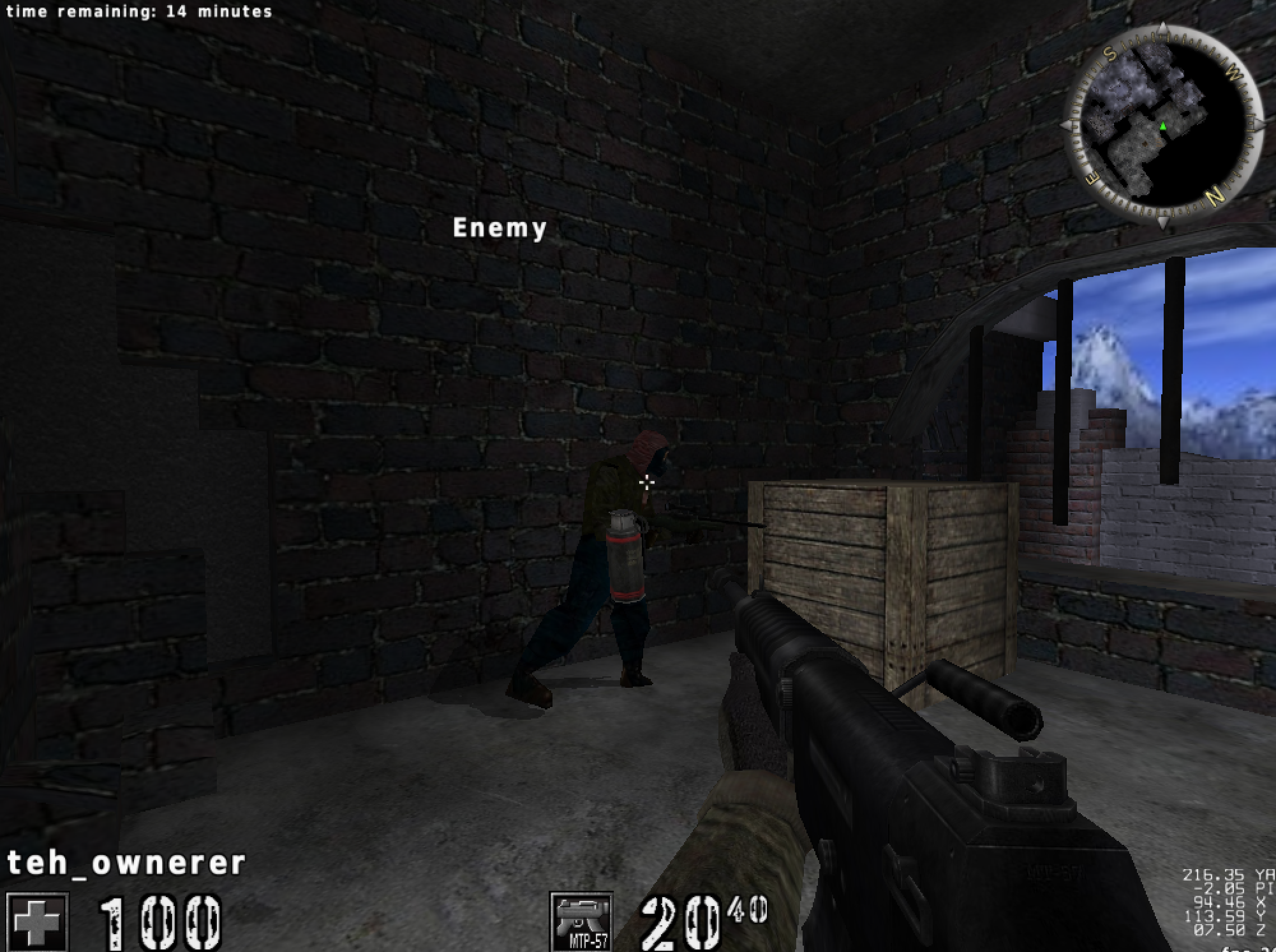
Reproduce the original in-game AssaultCube ESP
Section titled “Reproduce the original in-game AssaultCube ESP”The world-to-screen function and separate overlay already let you test the geometry. This exact-build in-game implementation applies the detours and DLL lifecycle from Lesson 8.3 to the game’s own print path.
The original 1.2.0.2 lab uses the same globals and player layout as the aimbot, plus these confirmed facts:
virtual screen: 2400 × 1800screen center: (1200, 900)print-text function: 0x0041_9880final print hook: 0x0040_BE7Ehook resume: 0x0040_BE83player name: 16 bytes at player + 0x225For this specific virtual viewport, the experimentally calibrated projection is:
fn assaultcube_legacy_screen(    current: Angles,    desired: Angles,) -> Option<(u32, u32)> {    let yaw_difference = shortest_angle_delta(desired.yaw, current.yaw);    let pitch_difference = current.pitch - desired.pitch;
    let x = 1200.0 + yaw_difference * -30.0;    let y = 900.0 + pitch_difference * 25.0;    ((0.0..=2400.0).contains(&x) && (0.0..=1800.0).contains(&y))        .then_some((x as u32, y as u32))}
Iterate players 1..count, calculate each desired angle, and publish the projected position and name pointer into fixed atomic slots. The render hook reads those slots and calls 0x00419880 with the confirmed x, y, and text arguments. The player object owns the fixed 16-byte name field for the frame; the code never scans past that verified field while calculating its address.
The overwritten bytes at 0x0040BE7E are themselves a five-byte near call to 0x00419880. The installer calculates those expected bytes, refuses an unknown build, and replaces the call with a near jump to this compiled cave:
#[unsafe(naked)]unsafe extern "C" fn assaultcube_esp_cave() {    core::arch::naked_asm!(        // Replay the original print call with an empty string, then add labels.        "lea ecx, [{empty}]",        "call {print}",        "pushfd",        "pushad",        "call {draw}",        "popad",        "popfd",        "jmp {resume}",        empty = sym EMPTY_TEXT,        print = const 0x0041_9880,        draw = sym draw_esp_names,        resume = const 0x0040_BE83,    );}
pub fn install_assaultcube_esp_hook() -> anyhow::Result<LocalPatch> {    let expected = near_call(0x0040_BE7E, 0x0041_9880)?;    let replacement = near_jump(        0x0040_BE7E,        assaultcube_esp_cave as *const () as usize,    )?;    LocalPatch::apply(0x0040_BE7E, &expected, &replacement)}
Start with the literal text Enemy at (0x100, 0x100) to prove the print call. Then use one bot, calibrate left/center/right, add pitch, add its name, and finally loop through all players. The finished result is the named ESP shown below.
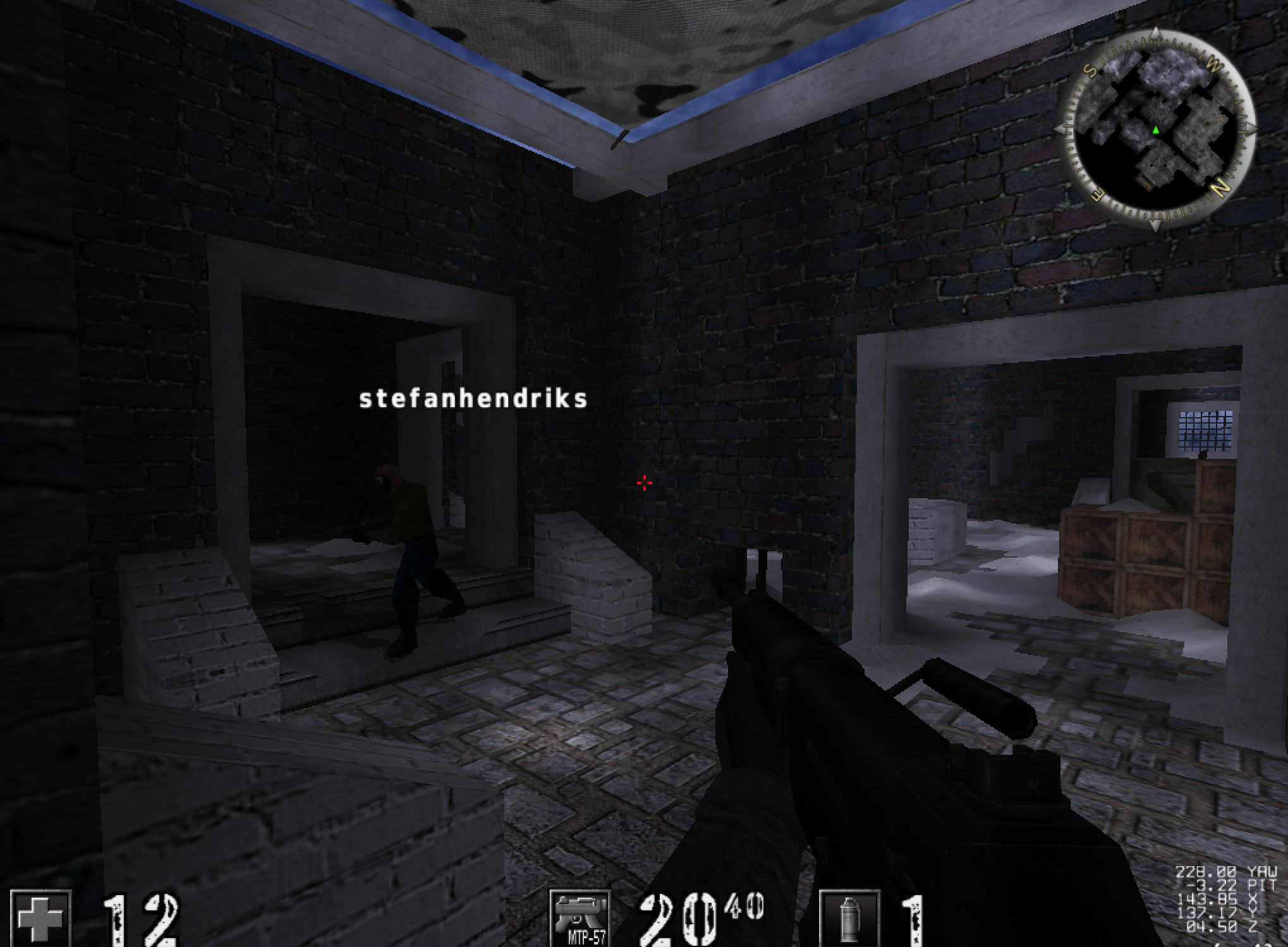
The matrix-based overlay earlier in this lesson is the more general technique. This target-specific section keeps the exact reverse-engineered internal print route so readers can reproduce the original game hack.
Build and inject the course DLL, enter a local AssaultCube bot match, and press F5. Press F5 again or End to drop LocalPatch and restore the exact original call:
.\target\i686-pc-windows-msvc\release\injector.exe ` ac_client.exe ` .\target\i686-pc-windows-msvc\release\gha_windows_labs.dllThe entire working update loop, projection, internal x86 calling convention, cave, and installer are in assaultcube_tools.rs. The F5 worker logic is in dll.rs.
assaultcube_tools.rs
Show the codeHide the code
//! AssaultCube 1.2.0.2 aimbot and ESP, ported from the original course code.

#![cfg(target_arch = "x86")]

use std::{
    arch::asm,
    ptr,
    sync::atomic::{AtomicI32, AtomicUsize, Ordering},
};

use anyhow::Result;

use super::{LocalPatch, near_call, near_jump};

const LOCAL_PLAYER_ROOT: usize = 0x0050_9B74;
const ENTITY_LIST_ROOT: usize = 0x0050_F4F8;
const PLAYER_COUNT: usize = 0x0050_F500;
const MAX_PLAYERS: usize = 32;

const POSITION_X: usize = 0x04;
const POSITION_Y: usize = 0x08;
const POSITION_Z: usize = 0x0C;
const VIEW_YAW: usize = 0x40;
const VIEW_PITCH: usize = 0x44;
const PLAYER_NAME: usize = 0x225;
const DEAD_FLAG: usize = 0x338;

const ESP_HOOK: usize = 0x0040_BE7E;
const ESP_RESUME: usize = 0x0040_BE83;
const PRINT_TEXT: usize = 0x0041_9880;

static ESP_X: [AtomicI32; MAX_PLAYERS] = [const { AtomicI32::new(-1) }; MAX_PLAYERS];
static ESP_Y: [AtomicI32; MAX_PLAYERS] = [const { AtomicI32::new(-1) }; MAX_PLAYERS];
static ESP_NAME: [AtomicUsize; MAX_PLAYERS] = [const { AtomicUsize::new(0) }; MAX_PLAYERS];
static EMPTY_TEXT: [u8; 1] = [0];

#[derive(Clone, Copy, Debug)]
struct Vec3 {
    x: f32,
    y: f32,
    z: f32,
}

#[derive(Clone, Copy, Debug)]
struct Angles {
    yaw: f32,
    pitch: f32,
}

unsafe fn read_u32(address: usize) -> u32 {
    // SAFETY: callers pass fields from the version-pinned AssaultCube profile.
    unsafe { ptr::read_volatile(address as *const u32) }
}

unsafe fn read_f32(address: usize) -> f32 {
    // SAFETY: callers pass aligned float fields from the verified player layout.
    unsafe { ptr::read_volatile(address as *const f32) }
}

fn local_player() -> Option<usize> {
    // SAFETY: this is the verified global player-pointer slot.
    let player = unsafe { read_u32(LOCAL_PLAYER_ROOT) } as usize;
    (player != 0).then_some(player)
}

fn player_count() -> usize {
    // SAFETY: this global is a signed player count in the supported build.
    let raw = unsafe { ptr::read_volatile(PLAYER_COUNT as *const i32) };
    raw.clamp(0, MAX_PLAYERS as i32) as usize
}

fn entity_at(index: usize) -> Option<usize> {
    if index >= player_count() {
        return None;
    }
    // SAFETY: this global contains the start of the 32-bit entity pointer array.
    let list = unsafe { read_u32(ENTITY_LIST_ROOT) } as usize;
    if list == 0 {
        return None;
    }
    let slot = list.checked_add(index.checked_mul(4)?)?;
    // SAFETY: the clamped index selects one pointer-sized array slot.
    let entity = unsafe { read_u32(slot) } as usize;
    (entity != 0).then_some(entity)
}

fn position(entity: usize) -> Option<Vec3> {
    // SAFETY: the entity was obtained from the verified list.
    let result = unsafe {
        Vec3 {
            x: read_f32(entity + POSITION_X),
            y: read_f32(entity + POSITION_Y),
            z: read_f32(entity + POSITION_Z),
        }
    };
    [result.x, result.y, result.z]
        .iter()
        .all(|value| value.is_finite() && value.abs() < 100_000.0)
        .then_some(result)
}

fn view_angles(entity: usize) -> Option<Angles> {
    // SAFETY: the verified player layout stores yaw and pitch at these offsets.
    let result = unsafe {
        Angles {
            yaw: read_f32(entity + VIEW_YAW),
            pitch: read_f32(entity + VIEW_PITCH),
        }
    };
    (result.yaw.is_finite() && result.pitch.is_finite()).then_some(result)
}

fn is_alive(entity: usize) -> bool {
    // SAFETY: the verified layout stores zero for a living player here.
    unsafe { read_u32(entity + DEAD_FLAG) == 0 }
}

fn aim_from_to(from: Vec3, to: Vec3) -> (f32, Angles) {
    let dx = to.x - from.x;
    let dy = to.y - from.y;
    let dz = to.z - from.z;
    let horizontal = dx.hypot(dy);

    let yaw = dy.atan2(dx).to_degrees() + 90.0;
    let pitch = dz.atan2(horizontal).to_degrees();
    (horizontal, Angles { yaw, pitch })
}

pub fn assaultcube_aim_once() -> Result<()> {
    let Some(player) = local_player() else {
        return Ok(());
    };
    let Some(player_position) = position(player) else {
        return Ok(());
    };
    let mut closest: Option<(f32, Angles)> = None;

    // Index zero is the local player in the course build.
    for index in 1..player_count() {
        let Some(enemy) = entity_at(index) else {
            continue;
        };
        if !is_alive(enemy) {
            continue;
        }
        let Some(enemy_position) = position(enemy) else {
            continue;
        };
        let candidate = aim_from_to(player_position, enemy_position);
        if closest.is_none_or(|current| candidate.0 < current.0) {
            closest = Some(candidate);
        }
    }

    if let Some((_, angles)) = closest {
        // SAFETY: player is live and both values were calculated from finite data.
        unsafe {
            ptr::write_volatile((player + VIEW_YAW) as *mut f32, angles.yaw);
            ptr::write_volatile((player + VIEW_PITCH) as *mut f32, angles.pitch);
        }
    }
    Ok(())
}

fn shortest_angle_difference(from: f32, to: f32) -> f32 {
    (from - to + 180.0).rem_euclid(360.0) - 180.0
}

pub fn assaultcube_update_esp() -> Result<()> {
    let Some(player) = local_player() else {
        return Ok(());
    };
    let Some(player_position) = position(player) else {
        return Ok(());
    };
    let Some(player_view) = view_angles(player) else {
        return Ok(());
    };
    let count = player_count();

    for index in 1..MAX_PLAYERS {
        if index < count {
            let Some(enemy) = entity_at(index) else {
                continue;
            };
            let Some(enemy_position) = position(enemy) else {
                continue;
            };
            let (_, target) = aim_from_to(player_position, enemy_position);
            let yaw_difference = shortest_angle_difference(player_view.yaw, target.yaw);
            let pitch_difference = player_view.pitch - target.pitch;
            let x = (1200.0 + yaw_difference * -30.0).round() as i32;
            let y = (900.0 + pitch_difference * 25.0).round() as i32;
            ESP_X[index].store(x, Ordering::Release);
            ESP_Y[index].store(y, Ordering::Release);
            ESP_NAME[index].store(enemy + PLAYER_NAME, Ordering::Release);
        } else {
            ESP_X[index].store(-1, Ordering::Release);
            ESP_Y[index].store(-1, Ordering::Release);
            ESP_NAME[index].store(0, Ordering::Release);
        }
    }
    Ok(())
}

unsafe fn print_text(text: *const u8, x: u32, y: u32) {
    // The game's function expects text in ECX and x/y as two stack arguments.
    // The caller removes those eight argument bytes, matching the original code.
    // SAFETY: PRINT_TEXT and the calling convention are verified for 1.2.0.2.
    unsafe {
        asm!(
            "mov ecx, {text}",
            "push {y}",
            "push {x}",
            "call {function}",
            "add esp, 8",
            text = in(reg) text,
            x = in(reg) x,
            y = in(reg) y,
            function = in(reg) PRINT_TEXT,
            clobber_abi("C"),
        );
    }
}

extern "C" fn draw_esp_names() {
    for index in 1..player_count() {
        let x = ESP_X[index].load(Ordering::Acquire);
        let y = ESP_Y[index].load(Ordering::Acquire);
        let name = ESP_NAME[index].load(Ordering::Acquire);
        if !(0..=2400).contains(&x) || !(0..=1800).contains(&y) || name == 0 {
            continue;
        }
        // SAFETY: the entity name pointer and internal print function belong to
        // the current verified frame. The cave saved all general registers.
        unsafe { print_text(name as *const u8, (x + 200) as u32, y as u32) };
    }
}

#[unsafe(naked)]
unsafe extern "C" fn assaultcube_esp_cave() {
    core::arch::naked_asm!(
        // Replay the original print call but use an empty string so the normal
        // center-screen text does not get printed twice.
        "lea ecx, [{empty}]",
        "call {print}",
        "pushfd",
        "pushad",
        "call {draw}",
        "popad",
        "popfd",
        "jmp {resume}",
        empty = sym EMPTY_TEXT,
        print = const PRINT_TEXT,
        draw = sym draw_esp_names,
        resume = const ESP_RESUME,
    );
}

pub fn install_assaultcube_esp_hook() -> Result<LocalPatch> {
    let expected = near_call(ESP_HOOK, PRINT_TEXT)?;
    let cave = assaultcube_esp_cave as *const () as usize;
    let replacement = near_jump(ESP_HOOK, cave)?;
    LocalPatch::apply(ESP_HOOK, &expected, &replacement)
}

#[cfg(test)]
mod tests {
    use super::shortest_angle_difference;

    #[test]
    fn angular_difference_wraps_at_the_seam() {
        assert!((shortest_angle_difference(359.0, 1.0) + 2.0).abs() < f32::EPSILON);
        assert!((shortest_angle_difference(1.0, 359.0) - 2.0).abs() < f32::EPSILON);
    }
}
dll.rs
Show the codeHide the code
//! DLL entry points and the small hotkey worker used by the course labs.

#![cfg(target_arch = "x86")]

use std::{
    ffi::c_void,
    path::Path,
    sync::{
        OnceLock,
        atomic::{AtomicBool, Ordering},
    },
    thread,
    time::Duration,
};

use anyhow::{Context, Result};
use windows::Win32::{
    Foundation::{HINSTANCE, HMODULE},
    System::{LibraryLoader::DisableThreadLibraryCalls, SystemServices::DLL_PROCESS_ATTACH},
    UI::Input::KeyboardAndMouse::{GetAsyncKeyState, VK_END, VK_F1, VK_F2, VK_F3, VK_F4, VK_F5},
};
use windows::core::BOOL;

use super::{
    LocalPatch, OPENGL_CHAMS, OPENGL_OFF, OPENGL_WALLHACK, TARGET_UNDER_CROSSHAIR,
    assaultcube_aim_once, assaultcube_update_esp, enable_assaultcube_no_recoil,
    enable_assaultcube_show_all_radar, enable_wesnoth_map_reveal, install_assaultcube_esp_hook,
    install_assaultcube_trigger_hook, install_urban_terror_memory_wallhook,
    install_urban_terror_opengl_hook, install_wesnoth_stat_hook, install_wesnoth_terrain_hook,
    run_flare_farming_bot, run_wyrmsun_macro, send_left_mouse, set_urban_terror_opengl_mode,
    write_wesnoth_gold,
};

static STARTED: OnceLock<()> = OnceLock::new();
static STOP: AtomicBool = AtomicBool::new(false);

fn pressed_once(virtual_key: i32) -> bool {
    // SAFETY: GetAsyncKeyState accepts any virtual-key integer and returns a
    // value. The low bit means the key was pressed since the previous query.
    unsafe { GetAsyncKeyState(virtual_key) & 1 != 0 }
}

fn toggle(
    slot: &mut Option<LocalPatch>,
    install: impl FnOnce() -> Result<LocalPatch>,
) -> Result<()> {
    if let Some(mut patch) = slot.take() {
        patch.restore()?;
    } else {
        *slot = Some(install()?);
    }
    Ok(())
}

fn current_process_name() -> Result<String> {
    let executable = std::env::current_exe().context("Windows did not report the game path")?;
    let name = Path::new(&executable)
        .file_name()
        .context("the game path has no file name")?
        .to_string_lossy()
        .into_owned();
    Ok(name)
}

fn run_assaultcube() -> Result<()> {
    let mut trigger = None;
    let mut no_recoil = None;
    let mut radar = None;
    let mut esp = None;
    let mut aimbot_enabled = false;
    let mut mouse_down = false;

    while !STOP.load(Ordering::Acquire) {
        if pressed_once(VK_F1.0.into()) {
            if trigger.is_some() && mouse_down {
                send_left_mouse(false)?;
                mouse_down = false;
            }
            toggle(&mut trigger, install_assaultcube_trigger_hook)?;
            if trigger.is_none() {
                TARGET_UNDER_CROSSHAIR.store(false, Ordering::Release);
            }
        }
        if pressed_once(VK_F2.0.into()) {
            toggle(&mut no_recoil, enable_assaultcube_no_recoil)?;
        }
        if pressed_once(VK_F3.0.into()) {
            toggle(&mut radar, enable_assaultcube_show_all_radar)?;
        }
        if pressed_once(VK_F4.0.into()) {
            aimbot_enabled = !aimbot_enabled;
        }
        if pressed_once(VK_F5.0.into()) {
            toggle(&mut esp, install_assaultcube_esp_hook)?;
        }

        if aimbot_enabled {
            assaultcube_aim_once()?;
        }
        if esp.is_some() {
            assaultcube_update_esp()?;
        }

        let wants_mouse_down = trigger.is_some() && TARGET_UNDER_CROSSHAIR.load(Ordering::Acquire);
        if wants_mouse_down != mouse_down {
            send_left_mouse(wants_mouse_down)?;
            mouse_down = wants_mouse_down;
        }
        if pressed_once(VK_END.0.into()) {
            break;
        }
        thread::sleep(Duration::from_millis(8));
    }

    if mouse_down {
        send_left_mouse(false)?;
    }
    // Dropping these values restores the original instructions in reverse
    // lexical order after the worker has stopped using them.
    drop(esp);
    drop(radar);
    drop(no_recoil);
    drop(trigger);
    Ok(())
}

fn run_wesnoth() -> Result<()> {
    write_wesnoth_gold(999)?;
    let mut terrain = None;
    let mut stat = None;
    let mut map = None;

    while !STOP.load(Ordering::Acquire) {
        if pressed_once(VK_F1.0.into()) {
            toggle(&mut terrain, install_wesnoth_terrain_hook)?;
        }
        if pressed_once(VK_F2.0.into()) {
            toggle(&mut stat, install_wesnoth_stat_hook)?;
        }
        if pressed_once(VK_F3.0.into()) {
            toggle(&mut map, enable_wesnoth_map_reveal)?;
        }
        if pressed_once(VK_END.0.into()) {
            break;
        }
        thread::sleep(Duration::from_millis(20));
    }
    drop(map);
    drop(stat);
    drop(terrain);
    Ok(())
}

fn run_urban_terror() -> Result<()> {
    let mut memory_wallhook = None;
    let mut opengl_hook = None;
    let mut opengl_mode = OPENGL_OFF;

    while !STOP.load(Ordering::Acquire) {
        if pressed_once(VK_F1.0.into()) {
            toggle(&mut memory_wallhook, install_urban_terror_memory_wallhook)?;
        }
        if pressed_once(VK_F2.0.into()) {
            if opengl_mode == OPENGL_WALLHACK {
                set_urban_terror_opengl_mode(OPENGL_OFF)?;
                drop(opengl_hook.take());
                opengl_mode = OPENGL_OFF;
            } else {
                if opengl_hook.is_none() {
                    opengl_hook = Some(install_urban_terror_opengl_hook(OPENGL_WALLHACK)?);
                }
                set_urban_terror_opengl_mode(OPENGL_WALLHACK)?;
                opengl_mode = OPENGL_WALLHACK;
            }
        }
        if pressed_once(VK_F3.0.into()) {
            if opengl_mode == OPENGL_CHAMS {
                set_urban_terror_opengl_mode(OPENGL_OFF)?;
                drop(opengl_hook.take());
                opengl_mode = OPENGL_OFF;
            } else {
                if opengl_hook.is_none() {
                    opengl_hook = Some(install_urban_terror_opengl_hook(OPENGL_CHAMS)?);
                }
                set_urban_terror_opengl_mode(OPENGL_CHAMS)?;
                opengl_mode = OPENGL_CHAMS;
            }
        }
        if pressed_once(VK_END.0.into()) {
            break;
        }
        thread::sleep(Duration::from_millis(8));
    }

    set_urban_terror_opengl_mode(OPENGL_OFF)?;
    drop(opengl_hook);
    drop(memory_wallhook);
    Ok(())
}

fn run_lab() -> Result<()> {
    let process = current_process_name()?.to_ascii_lowercase();
    match process.as_str() {
        "wesnoth.exe" => run_wesnoth(),
        "ac_client.exe" => run_assaultcube(),
        "quake3-urt.exe" => run_urban_terror(),
        "flare.exe" => run_flare_farming_bot(&STOP),
        "wyrmsun.exe" => run_wyrmsun_macro(&STOP),
        _ => anyhow::bail!("{process:?} is not a configured course target"),
    }
}

/// Windows calls this under the loader lock. Do only the one documented,
/// loader-safe optimization here; the injector calls `gha_start` afterward.
#[unsafe(no_mangle)]
pub extern "system" fn DllMain(instance: HINSTANCE, reason: u32, _reserved: *mut c_void) -> BOOL {
    if reason == DLL_PROCESS_ATTACH {
        // SAFETY: `instance` is the module Windows is currently attaching.
        let _ = unsafe { DisableThreadLibraryCalls(HMODULE(instance.0)) };
    }
    BOOL::from(true)
}

/// Exported with the Windows thread-procedure signature so the injector can
/// call it safely after LoadLibraryW has returned and released the loader lock.
#[unsafe(no_mangle)]
pub extern "system" fn gha_start(_argument: *mut c_void) -> u32 {
    if STARTED.set(()).is_err() {
        return 1; // already running
    }
    STOP.store(false, Ordering::Release);
    let started = thread::Builder::new()
        .name("gha-tool-worker".into())
        .spawn(|| {
            if let Err(error) = run_lab() {
                eprintln!("game lab stopped: {error:#}");
            }
        });
    if started.is_err() {
        return 2;
    }
    0
}

#[unsafe(no_mangle)]
pub extern "system" fn gha_stop(_argument: *mut c_void) -> u32 {
    STOP.store(true, Ordering::Release);
    0
}The original ESP recording shows labels moving with the view. Follow one label while the camera turns: a stable label requires the player position, camera state, projection, and draw location to agree each frame.
Download Player labels following the AssaultCube view videoDebug the transform visually
Section titled “Debug the transform visually”Test in this order:
- one stationary point directly ahead;
- move the camera left and right;
- move closer and farther;
- test a point behind the camera;
- resize or change resolution;
- move a point across the near and far clip planes;
- add several entities.
If a point behind the camera appears mirrored, the w rejection is missing or wrong.
Projecting a 3D box is not just two points
Section titled “Projecting a 3D box is not just two points”To draw a 2D rectangle around a 3D bounds, transform all eight corners of an
axis-aligned box and take the min/max of the surviving screen coordinates. Two
opposite corners are insufficient after rotation. If the box crosses the near
plane, some corners have unusable w; a rigorous result clips its edges against
the near plane before taking bounds. Simply dropping those corners can make the box
collapse or jump.
An oriented bounding box requires its local corners to pass through the object’s world transform first. A skeletal model may need pose-derived bounds because its rest-pose box no longer tightly encloses the animation.
Gizmos: the same projection, used by developers
Section titled “Gizmos: the same projection, used by developers”Engine developers draw overlays with this same projection to see what the game cannot
show on its own. A gizmo, or debug drawing, is a shape drawn for a single frame: a
line, an arrow, a box around a collision shape, a circle for a light’s reach, the axes
of an object, or a text label. The code calls something like line(a, b, colour) on
every frame, the engine projects the two ends to pixels, and the line is drawn on top.
When the code stops calling, the line is gone. Nothing was added to the game world.
The axes gizmo is the simplest. By convention red, green, and blue stand for the x,
y, and z directions. For an object at (10, 5, 0), with each axis drawn 1 unit long,
the engine projects four points and draws three lines from the first:
origin (10, 5, 0) -> pixel Ax end (11, 5, 0) -> pixel B red line A to By end (10, 6, 0) -> pixel C green line A to Cz end (10, 5, 1) -> pixel D blue line A to DA bounding-box gizmo projects the box’s eight corners, as above, and joins them with 12 edges. A text gizmo puts a label at one projected point, which is what the labels of the overlay in this lesson are. An editor’s transform gizmo adds interaction: the three arrows are picked with the mouse ray from Lesson 7.5, and dragging moves the selected object along the chosen axis.
This is why a gizmo is a useful check on your own work. If the axes drawn at a player’s feet do not stay glued to the player when the camera turns, the projection, the snapshot, or the viewport is wrong, and the failure table below tells you which to suspect.
Diagnose world-to-screen failures
Section titled “Diagnose world-to-screen failures”World-to-screen failures
| Symptom | First check |
|---|---|
| every point mirrored horizontally | x basis/handedness |
| markers rotate opposite the camera | view transform/inverse |
| correct in center, wrong near edges | projection FOV or aspect ratio |
| correct at one resolution only | viewport dimensions or stale aspect ratio |
| fixed offset from every object | client-area origin/DPI/window border |
| jitter while camera or entities move | incoherent snapshots |
| behind-camera labels flip onto screen | w sign/rejection |
| labels vanish too early in depth | wrong OpenGL/Direct3D depth convention |
| box jumps near the camera | no near-plane edge clipping |
Keep the observer in an offline match with bots. The transferable skill is the 3D-to-2D transformation pipeline used in editors, accessibility tools, debug HUDs, and visualization software.
Reject points behind the camera
Why check clip-space w before the perspective divide?
Dividing blindly can create infinities or mirrored screen coordinates for points that should not be drawn.
Finished Lesson 7.9?
Mark it done and the lesson list shows a beside it. A chapter whose lessons are all done is marked done too. Progress is saved in this browser only.
Plain Markdown, saved in this browser.
This book grew out of the original Game Hacking Academy by attilathedud and has been rewritten as a beginner-first course. Like the original repository, its source is published under the Apache License 2.0.