Render Categories and Color Probes
Use temporary color to distinguish render categories while accounting for materials, lighting, blending, color space, and the several passes that draw one frame.
Cheatsheet for Lesson 7.4
A one-page summary of “Render Categories and Color Probes” you can keep beside your notes. Plain Markdown.
Lesson 7.4 — Render Categories and Color Probes: cheatsheet
- Remember: Count both incorrect highlights and missed targets; a few convincing colored players cannot establish a reliable classifier.
- Also useful: Treat the first draw filter as a hypothesis written on a sticky label, then use the colored result to check where the label belongs.
Key terms
- chams: This technique is often called chams.
- pass: The engine renders the scene several times for different purposes, in order, and each sweep is a pass.
Formulas and patterns
precision = true_positive / (true_positive + false_positive);recall = true_positive / (true_positive + false_negative)
Review
- Q: Why temporarily color one suspected render category at a time? A: One controlled change links a recorded call pattern to a visible model group
- Q: What is a temporary solid colour (chams) used for in this course? A: As a visual debugger that shows which draw calls a classification rule actually catches
Color is a debugging label
Section titled “Color is a debugging label”A solid temporary color can answer a classification question:
Do these draw calls all belong to player models, or did our filter catch unrelated geometry?
This technique is often called chams. In this course it is a visual debugger for an offline target.
A pixel’s color has several contributors
Section titled “A pixel’s color has several contributors”“Set the color to red” sounds simple, but the final framebuffer value may combine:
vertex color× sampled texture× material/light result→ fragment output→ blending with the existing framebuffer→ display conversionMultiplication is only one common model; a shader can compute anything. In the fixed-function path used here, disabling selected arrays and textures reduces the number of active contributors so the diagnostic color is easier to interpret.
Alpha does not automatically mean transparency. Blending must be enabled with specific source/destination blend factors and a combination formula, and draw order still matters. Likewise, RGB values may be interpreted as linear light or sRGB-encoded display values. A debug color only needs to be distinctive, but exact color comparison requires knowing the framebuffer’s color-space conversion.
Separate classification from styling
Section titled “Separate classification from styling”Before changing a draw’s color, turn what we observed into an explicit
category. In this course build, the first trial labels a draw with more than
500 indices as OtherPlayer; all other draws remain Unknown. This index-count classifier will be judged by the colored results, not assumed true because it compiled:
#[derive(Clone, Copy, Debug, Eq, PartialEq)]enum RenderCategory {    LocalPlayer,    OtherPlayer,    Weapon,    World,    Unknown,}
#[derive(Clone, Copy, Debug)]struct DrawSample {    count: i32,    texture: u32,    call_site: usize,}
fn classify(sample: DrawSample) -> RenderCategory {    if sample.count > 500 {        RenderCategory::OtherPlayer    } else {        RenderCategory::Unknown    }}
For this exact Urban Terror build, count > 500 is the original course filter. It is intentionally simple so the color result can help you test what the filter catches.
Keep the classifier pure. It should not call OpenGL or change memory, which makes it easy to test with recorded samples.
Purity also makes uncertainty visible. Return Unknown when the sample does not
match any category. A confident-looking wrong label is harder to diagnose than
an explicit unknown.
recorded draw state ──► pure classifier ──► category │ ▼ temporary debug styleMeasure classification errors
Section titled “Measure classification errors”A colored result gives immediate feedback, but “some players turned red” is not enough. Count four outcomes across a small labeled capture:
| Outcome | Name |
|---|---|
| player colored | true positive |
| non-player colored | false positive |
| player left unchanged | false negative |
| non-player left unchanged | true negative |
Changing a threshold usually trades false positives against false negatives. Add independent features only when experiments show they help: call site, texture, model transform, or another stable render property. Avoid piling on conditions that merely memorize one map and graphics setting.
For a labeled set, calculate:
precision = true_positive / (true_positive + false_positive)recall = true_positive / (true_positive + false_negative)Precision asks “when the classifier says player, how often is it right?” Recall asks “of all player draws, how many did it find?” If a denominator is zero, report the metric as undefined instead of inventing a perfect score.
Keep the recorded samples separate from the classifier implementation. Then a new classifier can be scored against the same samples, so a change in precision or recall comes from the classifier and not from a different capture.
This board needs JavaScript to move things around. Here is the lesson’s sorting:
- Coloured, not a player
- Crate with a player-sized vertex count. The rule coloured it but it is not a player: a false positive. A vertex count is a quick first filter, not a durable identifier.
- Coloured player
- Player, standing. The rule coloured it and it really is a player: a true positive.
- Player, running. Coloured and really a player: a true positive.
- Player, far away. Coloured and really a player: a true positive.
- Player, aiming. Coloured and really a player: a true positive.
- Player left unchanged
- Player drawn in the shadow pass. A player draw the rule left unchanged: a false negative. The same player appears in several passes, and a filter that recognises one does not recognise them all.
- Player portrait in the HUD. Another pass of the same player (the HUD portrait) that the rule did not recognise: a false negative.
- Not coloured and not a player
- Wall. Not a player and not coloured: a true negative. Correct, and it does not show up in precision or recall.
- Sky. Not a player and not coloured: a true negative.
- Floor. Not a player and not coloured: a true negative.
Apply color for one draw
Section titled “Apply color for one draw”The rendering layer can choose a debug style:
#[derive(Clone, Copy)]struct DebugColor {    red: f32,    green: f32,    blue: f32,    alpha: f32,}
fn category_color(category: RenderCategory) -> Option<DebugColor> {    match category {        RenderCategory::OtherPlayer => Some(DebugColor {            red: 0.95,            green: 0.25,            blue: 0.12,            alpha: 1.0,        }),        _ => None,    }}
Each channel is a fraction of full brightness, so a paint program shows it as that
fraction times 255. Here 0.95 × 255 = 242.25 (242), 0.25 × 255 = 63.75 (64), and
0.12 × 255 = 30.6 (31): rgb(242, 64, 31)the other-player colour,
a strong red-orange that is easy to tell from a game’s own palette.
At the hook boundary:
- capture the current texture/color/depth state;
- apply the debug state;
- forward exactly one draw;
- restore every captured value.
The state must cover both server-side values such as enable flags and client array state such as color or texture-coordinate arrays. Capturing only the visible color is insufficient if the original draw obtains its color from a bound array.
Understand the build-specific Urban Terror fallback
Section titled “Understand the build-specific Urban Terror fallback”The pure classifier and restoration of the original whole-draw state above are the general lesson. The following fallback is an optional exact-build in-process case. It applies the hook lifecycle from Lesson 8.3 at a less convenient point inside the draw function.
The clean design above wraps one whole draw: capture, change, draw, restore. The
course’s Urban Terror 4.3.4 cave is different. It runs in the middle of
glDrawElements, so it cannot surround the call and restore a snapshot after
that same draw. Instead, it applies a debug state to player-sized draws and
puts assumed engine defaults back on the next ordinary draw.
The fallback uses these functions and constants:
type GlToggle = unsafe extern "system" fn(capability: u32);type GlColor4f = unsafe extern "system" fn(r: f32, g: f32, b: f32, a: f32);
const GL_COLOR_MATERIAL: u32 = 0x0B57;const GL_COLOR_ARRAY: u32 = 0x8076;const GL_TEXTURE_COORD_ARRAY: u32 = 0x8078;
For comparison, a whole-call wrapper can make the color transition explicit around one call:
// SAFETY: every pointer was resolved from the current opengl32.dll and this// hook runs on the thread with the current OpenGL context.unsafe {    gl_disable_client_state(GL_TEXTURE_COORD_ARRAY);    gl_disable_client_state(GL_COLOR_ARRAY);    gl_enable(GL_COLOR_MATERIAL);    gl_color4f(1.0, 0.6, 0.6, 1.0);
    original(mode, count, element_type, indices);
    gl_enable_client_state(GL_TEXTURE_COORD_ARRAY);    gl_enable_client_state(GL_COLOR_ARRAY);    gl_disable(GL_COLOR_MATERIAL);    gl_color4f(1.0, 1.0, 1.0, 1.0);}
The first gl_color4f call sets the highlight, (1.0, 0.6, 0.6), which is
rgb(255, 153, 153)light red because 0.6 × 255 = 153. The
last one resets the colour to rgb(255, 255, 255)white.
The pinned Urban Terror cave runs inside glDrawElements, so it cannot
literally use that whole-call wrapper. For player-sized draws, its companion
depth calls use depth_range(0.0, 0.0) and depth_func(GL_ALWAYS) so the
highlighted geometry passes the depth test. On the next ordinary draw, the
fallback sets depth_range(0.0, 1.0) and depth_func(GL_LEQUAL) along with
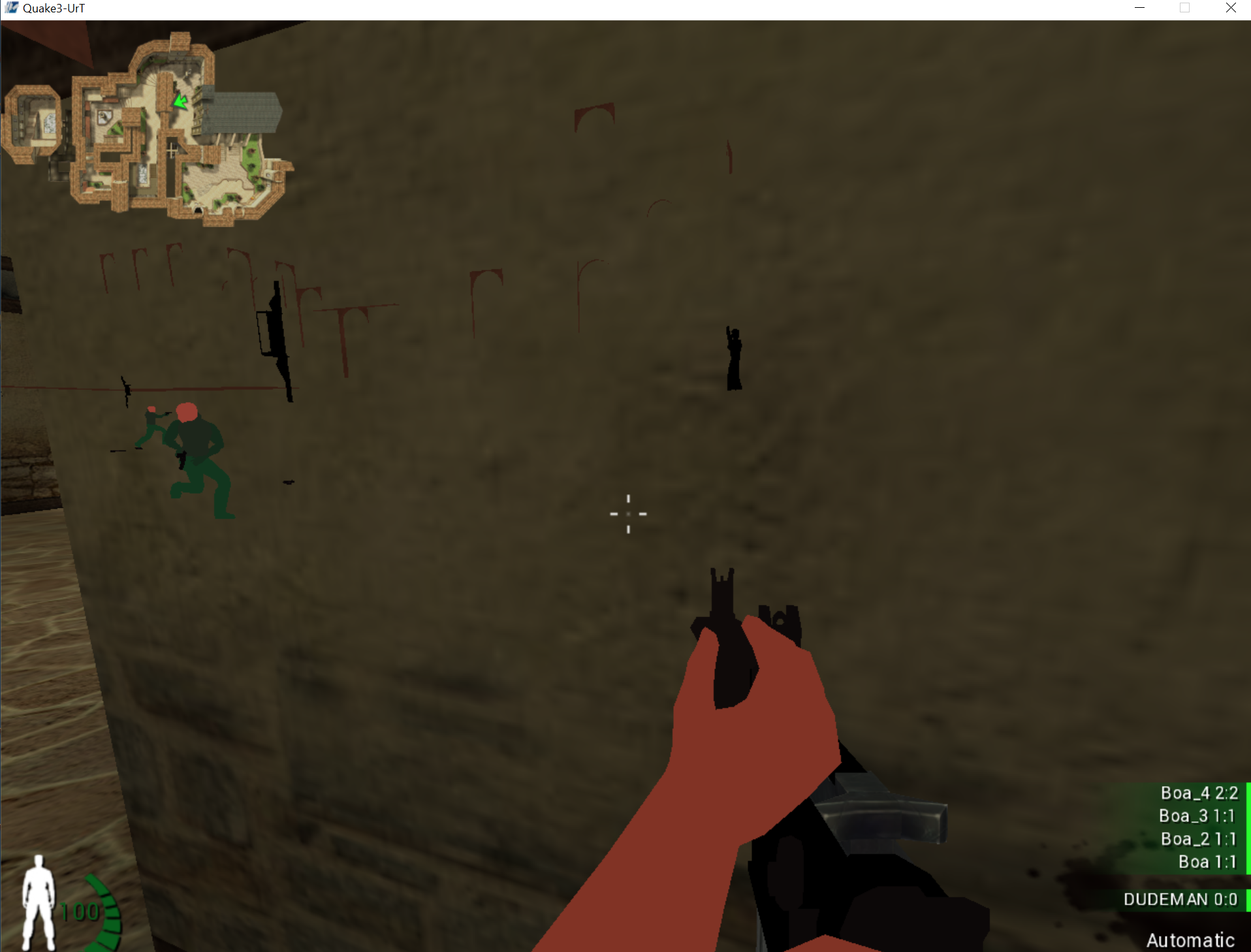
the color defaults shown above. Player-sized models should appear through
walls in bright red. If the HUD, world, or later effects stay tinted, those
assumed defaults did not match the state owned by that render pass.
Try count <= 500, count > 500, and no filter while logging samples. The visual differences let you prove which calls your classifier actually catches instead of treating the threshold as magic.
The compiled DLL uses a naked x86 cave inside Urban Terror’s glDrawElements
path. It resolves all seven required OpenGL exports, switches to
OPENGL_CHAMS, and applies this documented fallback from the render thread.
Inject it and press F3 to toggle
chams; press End to restore normal rendering and the original instruction:
.\target\i686-pc-windows-msvc\release\injector.exe ` Quake3-UrT.exe ` .\target\i686-pc-windows-msvc\release\gha_windows_labs.dllRead the full implementation in opengl_hooks.rs, especially apply_urban_terror_gl_state and urban_terror_opengl_cave. Nothing is hidden behind a placeholder.
opengl_hooks.rs
Show the codeHide the code
//! Urban Terror 4.3.4 OpenGL wallhack/chams hook from the original course lab.

#![cfg(target_arch = "x86")]

use std::sync::atomic::{AtomicU32, AtomicUsize, Ordering};

use anyhow::{Context, Result};
use windows::{
    Win32::System::LibraryLoader::{GetModuleHandleW, GetProcAddress},
    core::{s, w},
};

use super::{LocalPatch, near_jump};

pub const OPENGL_OFF: u32 = 0;
pub const OPENGL_WALLHACK: u32 = 1;
pub const OPENGL_CHAMS: u32 = 2;

const GL_LEQUAL: u32 = 0x0203;
const GL_ALWAYS: u32 = 0x0207;
const GL_COLOR_MATERIAL: u32 = 0x0B57;
const GL_COLOR_ARRAY: u32 = 0x8076;
const GL_TEXTURE_COORD_ARRAY: u32 = 0x8078;

static OPENGL_MODE: AtomicU32 = AtomicU32::new(OPENGL_OFF);
static DRAW_RETURN: AtomicUsize = AtomicUsize::new(0);
static DEPTH_FUNC: AtomicUsize = AtomicUsize::new(0);
static DEPTH_RANGE: AtomicUsize = AtomicUsize::new(0);
static COLOR_4F: AtomicUsize = AtomicUsize::new(0);
static ENABLE: AtomicUsize = AtomicUsize::new(0);
static DISABLE: AtomicUsize = AtomicUsize::new(0);
static ENABLE_CLIENT_STATE: AtomicUsize = AtomicUsize::new(0);
static DISABLE_CLIENT_STATE: AtomicUsize = AtomicUsize::new(0);

type GlDepthFunc = unsafe extern "system" fn(u32);
type GlDepthRange = unsafe extern "system" fn(f64, f64);
type GlColor4f = unsafe extern "system" fn(f32, f32, f32, f32);
type GlState = unsafe extern "system" fn(u32);

fn address(slot: &AtomicUsize) -> Option<usize> {
    let value = slot.load(Ordering::Acquire);
    (value != 0).then_some(value)
}

// This mid-glDrawElements cave cannot wrap one whole draw, so the non-highlight
// branch restores the defaults observed in the pinned Urban Terror 4.3.4 build.
// It is deliberately not advertised as a general OpenGL state snapshot. A
// reusable hook should capture/query the exact previous state at a boundary
// where it can restore that state immediately after forwarding one draw.
extern "C" fn apply_urban_terror_gl_state(count: u32) {
    let mode = OPENGL_MODE.load(Ordering::Acquire);
    let (Some(depth_func), Some(depth_range)) = (address(&DEPTH_FUNC), address(&DEPTH_RANGE))
    else {
        return;
    };
    // SAFETY: install_urban_terror_opengl_hook resolved these opengl32 exports
    // and stored function pointers with their documented Windows ABI.
    let depth_func: GlDepthFunc = unsafe { std::mem::transmute(depth_func) };
    // SAFETY: same proof as above for glDepthRange.
    let depth_range: GlDepthRange = unsafe { std::mem::transmute(depth_range) };

    let highlighted = mode != OPENGL_OFF && count > 500;
    // SAFETY: a current Urban Terror render context called this hook.
    unsafe {
        if highlighted {
            depth_range(0.0, 0.0);
            depth_func(GL_ALWAYS);
        } else {
            depth_range(0.0, 1.0);
            depth_func(GL_LEQUAL);
        }
    }

    if mode != OPENGL_CHAMS {
        return;
    }
    let (Some(color), Some(enable), Some(disable), Some(enable_client), Some(disable_client)) = (
        address(&COLOR_4F),
        address(&ENABLE),
        address(&DISABLE),
        address(&ENABLE_CLIENT_STATE),
        address(&DISABLE_CLIENT_STATE),
    ) else {
        return;
    };
    // SAFETY: each address was resolved from the matching named OpenGL export.
    let color: GlColor4f = unsafe { std::mem::transmute(color) };
    // SAFETY: `enable` is the address returned for the glEnable export.
    let enable: GlState = unsafe { std::mem::transmute(enable) };
    // SAFETY: `disable` is the address returned for the glDisable export.
    let disable: GlState = unsafe { std::mem::transmute(disable) };
    // SAFETY: this address came from glEnableClientState, which has this ABI.
    let enable_client: GlState = unsafe { std::mem::transmute(enable_client) };
    // SAFETY: this address came from glDisableClientState, which has this ABI.
    let disable_client: GlState = unsafe { std::mem::transmute(disable_client) };

    // SAFETY: these are standard OpenGL 1.1 state calls on the render thread.
    unsafe {
        if highlighted {
            disable_client(GL_TEXTURE_COORD_ARRAY);
            disable_client(GL_COLOR_ARRAY);
            enable(GL_COLOR_MATERIAL);
            color(1.0, 0.6, 0.6, 1.0);
        } else {
            enable_client(GL_TEXTURE_COORD_ARRAY);
            enable_client(GL_COLOR_ARRAY);
            disable(GL_COLOR_MATERIAL);
            color(1.0, 1.0, 1.0, 1.0);
        }
    }
}

#[unsafe(naked)]
unsafe extern "C" fn urban_terror_opengl_cave() {
    core::arch::naked_asm!(
        "pushfd",
        "pushad",
        // At this point in glDrawElements, EBX holds the index count. This is
        // the value the original C++ course cave recovered from saved EBX.
        "push ebx",
        "call {apply}",
        "add esp, 4",
        "popad",
        "popfd",
        // Replay all six bytes replaced at glDrawElements + 0x16.
        "mov esi, dword ptr [esi + 0xA18]",
        "jmp dword ptr [{resume}]",
        apply = sym apply_urban_terror_gl_state,
        resume = sym DRAW_RETURN,
    );
}

fn resolve(
    module: windows::Win32::Foundation::HMODULE,
    name: windows::core::PCSTR,
) -> Result<usize> {
    // SAFETY: the module is live and every caller passes a static export name.
    let function = unsafe { GetProcAddress(module, name) }
        .context("required opengl32 export was not found")?;
    Ok(function as *const () as usize)
}

pub fn install_urban_terror_opengl_hook(mode: u32) -> Result<LocalPatch> {
    anyhow::ensure!(
        matches!(mode, OPENGL_WALLHACK | OPENGL_CHAMS),
        "invalid OpenGL lab mode"
    );
    // SAFETY: the name is a static, zero-terminated UTF-16 string.
    let opengl = unsafe { GetModuleHandleW(w!("opengl32.dll")) }
        .context("opengl32.dll is not loaded yet; enter a rendered game")?;

    DEPTH_FUNC.store(resolve(opengl, s!("glDepthFunc"))?, Ordering::Release);
    DEPTH_RANGE.store(resolve(opengl, s!("glDepthRange"))?, Ordering::Release);
    COLOR_4F.store(resolve(opengl, s!("glColor4f"))?, Ordering::Release);
    ENABLE.store(resolve(opengl, s!("glEnable"))?, Ordering::Release);
    DISABLE.store(resolve(opengl, s!("glDisable"))?, Ordering::Release);
    ENABLE_CLIENT_STATE.store(
        resolve(opengl, s!("glEnableClientState"))?,
        Ordering::Release,
    );
    DISABLE_CLIENT_STATE.store(
        resolve(opengl, s!("glDisableClientState"))?,
        Ordering::Release,
    );
    let draw_elements = resolve(opengl, s!("glDrawElements"))?;
    let hook = draw_elements
        .checked_add(0x16)
        .context("glDrawElements hook address overflowed")?;
    DRAW_RETURN.store(hook + 6, Ordering::Release);
    OPENGL_MODE.store(mode, Ordering::Release);

    // mov esi,dword ptr [esi+0xA18]
    const ORIGINAL: [u8; 6] = [0x8B, 0xB6, 0x18, 0x0A, 0x00, 0x00];
    let jump = near_jump(hook, urban_terror_opengl_cave as *const () as usize)?;
    let mut replacement = [0x90_u8; 6];
    replacement[..5].copy_from_slice(&jump);
    LocalPatch::apply(hook, &ORIGINAL, &replacement)
}

pub fn set_urban_terror_opengl_mode(mode: u32) -> Result<()> {
    anyhow::ensure!(
        matches!(mode, OPENGL_OFF | OPENGL_WALLHACK | OPENGL_CHAMS),
        "invalid OpenGL lab mode"
    );
    OPENGL_MODE.store(mode, Ordering::Release);
    Ok(())
}
Avoid global state leaks
Section titled “Avoid global state leaks”OpenGL is a state machine. A color or depth change remains active until another call changes it. If the menu turns orange, the wrapper did not restore something.
Keep state changes in the narrowest possible scope and test:
- normal models before the target draw;
- the target model;
- normal models after it;
- menus and text;
- level reloads.
Also test early returns and errors. Scope guards help with CPU state, but graphics APIs may require restoration on the render thread while the correct context is current. A guard dropped on another thread is not equivalent cleanup.
A frame is several passes
Section titled “A frame is several passes”Most frames are not drawn in one sweep. The engine renders the scene several times for different purposes, in order, and each sweep is a pass. A pass starts by clearing its target to a clear colour, and clearing depth to its farthest value, so the last frame’s picture is not left behind:
- Shadows. The shadow pass draws the scene’s depth as seen from the light into a texture called a shadow map. In the main pass, each pixel’s position is converted to the light’s view and compared with the stored depth: if something nearer was stored, the pixel is in shadow. A surface point 7.50 away from the light would be compared with its own stored depth, 7.50, and rounding could make it shadow itself, so the test uses a small bias: shadowed only if the stored depth is less than 7.50 − 0.05 = 7.45. It is not, so the point is lit.
- Sky and fog. A skybox is a cube texture drawn so that it always looks
infinitely far away. Fog blends a surface toward a haze colour with distance. With
the fog starting at 10 and ending at 50, a surface 30 away has the factor
(50 − 30) ÷ (50 − 10) = 0.5, so a surface ofrgb(200, 100, 50)in hazergb(150, 150, 150)is drawn asrgb(175, 125, 100). - Post-processing. The finished picture is stored as a texture and a full-screen rectangle is drawn with a shader that reads it. Bloom blurs the brightest parts and adds them back, and colour grading remaps colours. Tone mapping compresses HDR (high dynamic range) values, where lighting can produce colours above 1.0, into the 0 to 1 range a display can show, as Lesson 7.2 works through with numbers.
- Render to texture. A pass can draw into an off-screen texture, not the screen. The texture can then be used as a mirror, a security-camera monitor, a minimap, or a screen shown inside the 3D world.
- More than one camera. Each camera draws into its own rectangle, or its own texture. Split-screen is two cameras drawing into the left and right halves of one window.
- Forward and deferred. A forward renderer lights each object as it draws it. A deferred renderer first draws position, normal, and colour for every pixel into extra textures, then lights the pixels in one later pass, which makes many lights affordable but handles see-through surfaces less easily.
Distinguish a category from a render pass
Section titled “Distinguish a category from a render pass”The same player may appear in several passes: shadow, depth prepass, main color, outline, reflection, or HUD portrait. A filter that recognizes one of those draws does not automatically recognize the object everywhere. Conversely, a call site may draw many categories through a shared material pass.
When color appears twice, through a mirror, or only in a shadow, add the current framebuffer, shader/program, and pass position to the draw sample before changing the category predicate.
Identify a category with more than one number
Section titled “Identify a category with more than one number”A vertex count can be a quick first filter, not a durable identifier. Combine independent draw properties and return Unknown when they disagree.
fn likely_player(sample: DrawSample, profile: &TargetProfile) -> bool { profile.player_counts.contains(&sample.count) && profile.player_textures.contains(&sample.texture) && profile.player_call_sites.contains(&sample.call_site)}Version the profile and refuse to activate on an unrecognized build.
Verify the color test
Section titled “Verify the color test”The exact-build result has four observable checks:
- the normal frame is unchanged with classification disabled;
- only the intended offline model category changes color;
- the exact-build fallback leaves no visible state leak across the tested frame, while a reusable whole-draw wrapper restores captured state after every call;
- unknown samples remain unknown instead of being forced into a category.
Design a visual experiment
Why temporarily color one suspected render category at a time?
Changing one reversible thing at a time means any visible difference can come only from the selected rule, so the colored group shows exactly what that rule catches.
Finished Lesson 7.4?
Mark it done and the lesson list shows a beside it. A chapter whose lessons are all done is marked done too. Progress is saved in this browser only.
Plain Markdown, saved in this browser.
This book grew out of the original Game Hacking Academy by attilathedud and has been rewritten as a beginner-first course. Like the original repository, its source is published under the Apache License 2.0.