How Text Becomes Bytes in a Game
Trace visible text to bytes, understand encodings and terminators, and build checked strings at FFI boundaries.
Cheatsheet for Lesson 3.11
A one-page summary of “How Text Becomes Bytes in a Game” you can keep beside your notes. Plain Markdown.
Lesson 3.11 — How Text Becomes Bytes in a Game: cheatsheet
- Remember: Text length is ambiguous: bytes, code units, characters and what you see on screen can all differ, so say which one you mean.
- Also useful: Choose the bytes before applying Base64. UTF-8
HIgivesSEk=, while the UTF-16LE bytes48 00 49 00giveSABJAA==. The visible text alone does not determine a Base64 result.
Key terms
e: The last row isefollowed by a combining acute accent, which displays as a singleébut is two separate scalars.- ASCII: ASCII defines a 7-bit repertoire: 128 values, numbered 0 through 127, covering basic Latin letters, digits, punctuation, and control codes.
CString: Returningas_ptr()from a function after theCStringis dropped creates a dangling pointer.
Review
- Q: Why is finding readable text in memory not enough to identify a complete string? A: You also need its encoding, its length rule or terminator, and its lifetime
- Q: In text encoding terms, what is a code unit? A: One storage slot of an encoding, such as a byte in UTF-8
Text is bytes plus an agreement
Section titled “Text is bytes plus an agreement”The screen may show “Ford,” but memory stores bytes. An encoding explains how bytes represent characters.
Common forms include:
- UTF-8—used by
Stringandstr; - UTF-16—many Windows “wide” APIs;
- older single-byte encodings;
- null-terminated C strings.
Keep four layers separate:
- a character is the human idea, such as
é; - a code point is the Unicode number assigned to that character idea;
- a code unit is one storage unit used by an encoding, such as
u8for UTF-8 oru16for UTF-16; - the bytes are the actual memory representation, with byte order relevant for multi-byte code units.
One visible character can use several code units. That is why byte count, UTF-16 unit count, Unicode scalar count, and what a reader sees on screen are not interchangeable lengths. Four short examples show every column coming apart:
text UTF-8 bytes UTF-16 units scalars visible"A" 1 1 1 1"é" (U+00E9) 2 1 1 1"🎮" (U+1F3AE) 4 2 1 1"e" + U+0301 3 2 2 1The last row is e followed by a combining acute accent, which displays as a
single é but is two separate scalars. The practical consequence: a buffer
sized from “the name is at most 16 characters” can be far too small, and code
that truncates a string at a fixed byte count can cut a character in half and
produce bytes that no longer decode. Always say which of these four lengths a
number refers to.
That final row is one grapheme cluster, the unit approximating a character a reader perceives.
U+00E9: 2 bytes
add the markers
Marker bits, then the payloadwrite as hex
UTF-8 bytes in memoryU+00E9 needs 8 bits. One byte carries only 7, so UTF-8 uses 2 bytes, which carry 11: C3 A9.
This interactive lab needs JavaScript. The lesson text around it still explains the same idea.
Compare ASCII, Unicode, and Base64 with the same text
Section titled “Compare ASCII, Unicode, and Base64 with the same text”ASCII defines a 7-bit repertoire: 128 values, numbered 0 through 127, covering basic Latin letters, digits, punctuation, and control codes. An ASCII value fits in an 8-bit byte with its top bit zero, as RFC 20 describes. Values above 127 belong to some other encoding, not standard ASCII.
Unicode preserves those ASCII assignments within a much larger repertoire.
Its code points identify characters; UTF-8 and UTF-16 choose their stored code
units and bytes. The Unicode UTF FAQ
explains that relationship. Compare the same two-letter text, HI, in each
representation. No terminator or byte-order mark is included:
View of HI |
Representation | What to count |
|---|---|---|
| Unicode code points | U+0048 U+0049 |
Two code points: H and I. |
| ASCII / UTF-8 bytes, in hex | 48 49 |
Two bytes, with decimal values 72 and 73. |
| Those bytes, in binary | 01001000 01001001 |
Sixteen bits, displayed as two 8-bit bytes. |
| UTF-16LE bytes, in hex | 48 00 49 00 |
Four bytes for two 16-bit code units. |
| Base64 of the ASCII / UTF-8 bytes | SEk= |
Four output symbols representing the original two bytes. |
Base64 encodes bytes as ASCII text. It is reversible without a secret key,
so encoding is not encryption. Standard Base64 uses the 64-symbol alphabet
A–Z, a–z, 0–9, +, /; = is padding. RFC 4648
defines these rules.
For 48 49, join the 16 bits and append two zero pad bits to complete a
six-bit group: 010010 000100 100100. The group values are 18, 4, and 36,
which select S, E, and k. Two input bytes leave one = padding symbol,
so the result is SEk=.
Below, HI is worked out bit by bit; type your own text to see how each step changes:
Worked example for HI
Base64SEk=
1 Each character is one byte
ASCII gives each character a number from 32 to 126, and that number fits in one byte of 8 bits. Here it is as decimal, hexadecimal and binary.
| Character | Decimal | Hex | Binary |
|---|---|---|---|
H | 72 | 48 | 01001000 |
I | 73 | 49 | 01001001 |
- H is code 72. In hex, 72 = 4 × 16 + 8, so 48. In binary, 72 = 64 + 8, so 01001000.
- I is code 73. In hex, 73 = 4 × 16 + 9, so 49. In binary, 73 = 64 + 8 + 1, so 01001001.
2 Join the bits, then cut them into groups of six
2 bytes × 8 = 16 bits. 16 ÷ 6 = 2.67, so 3 groups of six bits (the last one completed with 2 zero bits). 3 symbols need 1 “=” to reach 4, a multiple of four.
Top: each byte with its character and hex value. Bottom: the same bits, in the same columns, cut into groups of six, each with its value and symbol. Hatched zeros were added to finish the last group; they are not part of the data.
3 Each group is a number, and each number is a symbol
The Base64 alphabet runs A to Z (0 to 25), a to z (26 to 51), 0 to 9 (52 to 61), then + (62) and / (63).
| Group | Bits | Value | Symbol |
|---|---|---|---|
| 1 | 010010 | 18 | S |
| 2 | 000100 | 4 | E |
| 3 | 100100 | 36 | k |
- 010010 = 16 + 2 = 18; 18 is in 0 to 25, the capital letters (A is 0), so the symbol is S.
- 000100 = 4; 4 is in 0 to 25, the capital letters (A is 0), so the symbol is E.
- 100100 (1001 plus 2 added zero bits) = 32 + 4 = 36; 36 is in 26 to 51, the small letters (a is 26): 36 − 26 = 10, so the symbol is k.
4 Pad to a multiple of four symbols
Base64 output comes in blocks of four symbols. 3 symbols is not a multiple of four, so 1 “=” sign is added to make 4. They carry no data: they only tell the decoder how many bytes were missing.
The same text in five forms
| Form | This text | How to tell it |
|---|---|---|
| Text (ASCII) | HI | Readable characters. |
| Binary | 01001000 01001001 | Only 0 and 1, in groups of 8. |
| Decimal | 72 73 | Numbers; for printable ASCII always from 32 to 126. |
| Hexadecimal | 48 49 | Digits 0 to 9 and letters A to F, two per byte. |
| Base64 | SEk= | Letters, digits, + and /, with = at the end when the groups run short. |
The base64url variant in RFC 4648
replaces + with - and / with _. Some protocols allow omitted =
padding; follow the receiving protocol’s rule. The example needs neither
replacement character, so its padded base64url form is also SEk=.
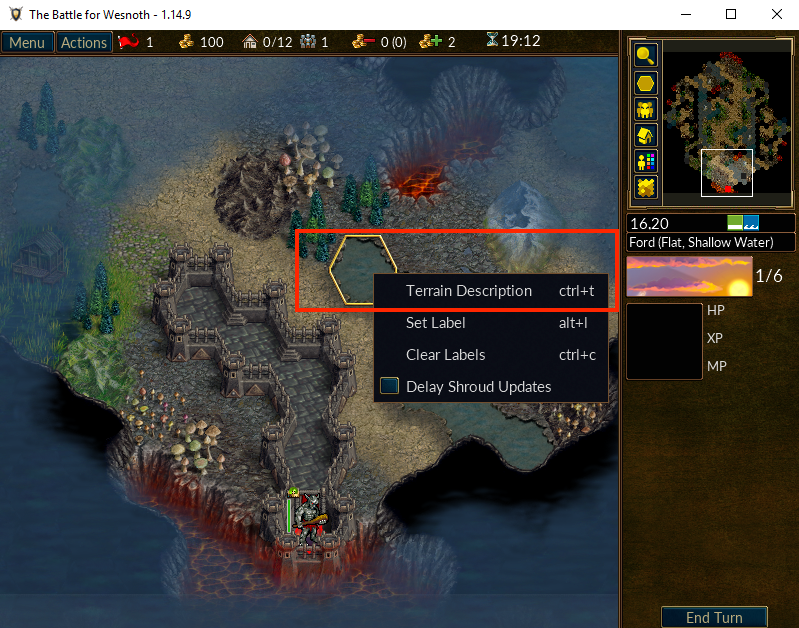
Locate a known string
Section titled “Locate a known string”In the offline Wesnoth target, open a terrain description and search memory for one distinctive phrase using the appropriate text encoding.
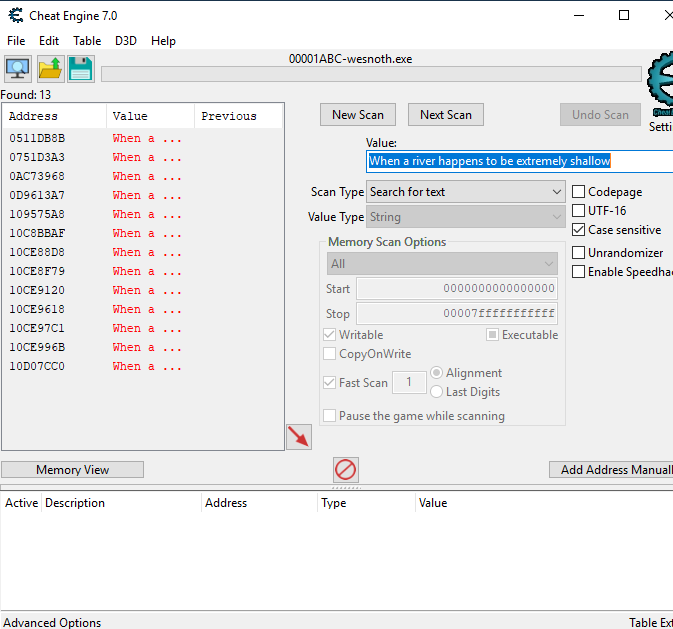
Change the selected tile and repeat. A static label may stay at one address, while a formatted output buffer changes.
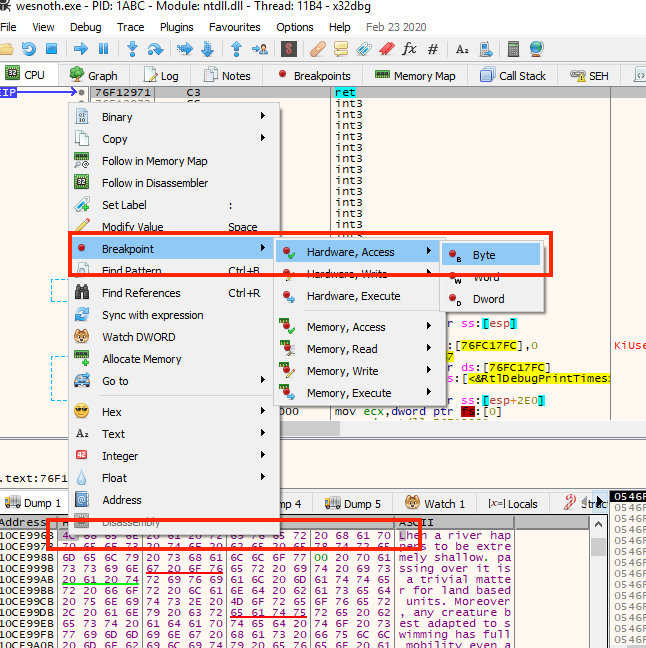
Set a read breakpoint on the first byte of a promising string, trigger the description, and inspect the code that consumes its address.
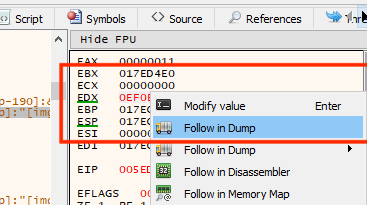
Follow the pointer in the dump and identify:
- where the string begins;
- where it ends;
- whether a zero terminator follows it;
- which encoding makes the bytes readable;
- whether the memory is static or temporary.
Endianness is not encoding
Section titled “Endianness is not encoding”Endianness controls byte order inside multi-byte numbers. Encoding controls how bytes represent text. They are different ideas.
For UTF-16 little-endian, the letter A is code unit 0x0041, stored as:
41 00Decode a copied UTF-16 buffer only after locating its terminator:
fn decode_utf16le(bytes: &[u8]) -> Result<String, &'static str> {    if bytes.len() % 2 != 0 {        return Err("UTF-16 needs an even byte count");    }
    let units = bytes.chunks_exact(2)        .map(|pair| u16::from_le_bytes([pair[0], pair[1]]));
    char::decode_utf16(units)        .map(|result| result.map_err(|_| "invalid UTF-16"))        .collect()}
For copied bytes 41 00 00 00, the caller first finds the two-byte zero
terminator and passes the preceding 41 00 slice. The function rebuilds
0x0041 as one UTF-16 unit and returns Ok("A"). Passing an odd number of
bytes returns an error instead of silently dropping the last byte.
Use CString for C boundaries
Section titled “Use CString for C boundaries”Many C-style functions expect a zero byte at the end:
use std::ffi::CString;
let label = CString::new("Rust lab")    .expect("the label has no interior zero byte");
let pointer = label.as_ptr();
CString adds the terminator and rejects an interior \0, which would make a C function think the string ended early.
Keep the CString alive for as long as the foreign function may use pointer. Returning as_ptr() from a function after the CString is dropped creates a dangling pointer.
Also determine whether the foreign function copies the text during the call or stores the pointer for later. “The call returned” ends the borrow only in the first case. Ownership and lifetime are part of the string contract just as much as encoding and termination.
Observe a print function
Section titled “Observe a print function”The debugger may reveal a call that receives a string pointer and screen or layout information. Calling it yourself requires knowing its:
- calling convention;
- parameter order and types;
- ownership of the string;
- required thread;
- lifetime of any returned or stored pointer.
Do not guess a signature from one register. Collect several calls with different strings and compare them.
Trace a real text call before changing it
Section titled “Trace a real text call before changing it”On the Den of Onis map in offline Wesnoth 1.14.9, right-click a Ford tile
and open Terrain Description. Search for a distinctive part of its text,
then set a read breakpoint on a confirmed byte and open the description again.
In the book’s run, the live string began at 0x10CE996B. Stepping out reached
the print path at 0x005ED114: edx led to the text object and the call at
0x005ED129 printed it.
At this point, answer the text questions: which bytes were read, where does the string end, who owns its buffer, and does the print call keep the pointer? The breakpoint and the changing description provide the evidence. They do not require an injected DLL.
Once you have copied a bounded byte range into your own tool, a read-only check can separate the terminator from the text. This example assumes you already verified UTF-8; another encoding needs its own decoder:
let copied = b"Ford\0unused";let end = copied.iter().position(|&byte| byte == 0).unwrap();let text = std::str::from_utf8(&copied[..end]).unwrap();assert_eq!(text, "Ford");The zero ends this C-style string; bytes after it do not belong to the displayed text. In a live process, cap the copy length before searching for the zero so a missing terminator cannot make the tool read indefinitely.
Lesson 8.3
returns to this exact call after teaching patch ownership and DLL lifecycle.
There, the debugger cave changes one letter, and the complete F2 hook displays
the second player’s gold. The original call, verified five-byte patch,
near_call/near_jump code, naked cave, and restoration are preserved
with that worked implementation.
Prefer an overlay for new UI
Section titled “Prefer an overlay for new UI”Calling an undocumented internal print routine can be fragile. For new tool UI, a separate overlay or console is often easier to version, test, and remove.
Use an internal function only when the lesson is specifically about understanding that function and the target profile is exact.
Keep the text contract together
Section titled “Keep the text contract together”The bytes of a string need an encoding before they become text. UTF-16LE
often has a zero high byte for an ASCII-range letter; that byte alone does
not end the string. A C-style terminator marks the end of the encoded
sequence, and CString owns a terminated buffer while rejecting interior
zeros. The pointer passed to a print function is useful only while that
buffer remains alive, so tracing a text call means checking both its bytes
and its lifetime. That is one part of a larger function contract: the caller
and callee must also agree on argument positions, return values, and ownership.
What a DLL Function Promises Its Caller reconstructs those
promises later, before the in-process DLL labs.
We can now interpret a game’s primitive values, objects, collections, and text without confusing their representation with their meaning. The next chapter asks how those pieces form a changing world. Game Engines: Input, Simulation, and Rendering starts by separating the engine’s reusable machinery from one game’s movement, damage, timers, and content.
Interpret text bytes
Why is finding readable text in memory not enough to identify a complete string?
Bytes become text only under an encoding and boundary rule. FFI code must also respect whether the memory stays valid while another API reads it.
Finished Lesson 3.11?
Mark it done and the lesson list shows a beside it. A chapter whose lessons are all done is marked done too. Progress is saved in this browser only.
Plain Markdown, saved in this browser.
This book grew out of the original Game Hacking Academy by attilathedud and has been rewritten as a beginner-first course. Like the original repository, its source is published under the Apache License 2.0.