Breakpoints: One Moment of Program State
Pause on an instruction or memory access, inspect registers, memory, and the call stack, and continue without losing the thread.
Cheatsheet for Lesson 2.4
A one-page summary of “Breakpoints: One Moment of Program State” you can keep beside your notes. Plain Markdown.
Lesson 2.4 — Breakpoints: One Moment of Program State: cheatsheet
- Remember: A breakpoint says that something happened, not why. The action you just took and the call stack tell you the reason.
- Also useful: Think of a sticky note over one word in a book: the debugger covers a byte with a marker and keeps the original word safe to put back.
Key terms
u32: Watching four bytes does not tell the debugger that they are au32.nop:nopmeans “no operation.” Replacing an instruction with one or morenopbytes is a quick, temporary way to test what that instruction does.
Review
- Q: What is the main purpose of a breakpoint in a reversing experiment? A: Pause one path so registers, memory, and the stack can be read
- Q: A write breakpoint on the player's health fires while damage is taken. What is the best next step? A: Check the call stack, then heal, load, and respawn to compare
What a breakpoint does
Section titled “What a breakpoint does”A breakpoint asks the debugger to pause when a specific event happens. The two kinds we use most are:
- code breakpoint — pause when the CPU reaches an instruction;
- memory breakpoint — pause when code reads, writes, or executes at an address.
The pause is useful because the thread’s register state and instruction location are still available. A code breakpoint normally stops before its instruction; a data watchpoint may report an access after the instruction performed it. Inspect the triggering access and the state at the pause before deciding which side of that instruction the debugger shows.
A breakpoint tells you that one condition happened, not why. A write breakpoint on health may fire for damage, healing, loading, respawning, and initialization, all through the same instruction. The action you performed just before the pause, and the call stack at the pause, tell those uses apart.
A pause is one instant on one thread
Section titled “A pause is one instant on one thread”A process can contain many threads. When one thread hits a breakpoint, another may have updated nearby state just before the debugger stopped everything. The snapshot is real, but it is not automatically the whole causal story.
Four kinds of context explain a pause:
- time: what player action immediately preceded the pause;
- thread: which thread executed the instruction;
- data: which registers and memory locations the instruction used; usually only two registers matter, the one that forms the memory address and the one the value moves into or out of;
- control: which call path and branches led here.
Repeating the same action shows whether the breakpoint is useful. A useful breakpoint fires at a consistent point for the behavior you are studying. A noisy breakpoint may still be correct, but it needs a stronger filter such as a specific thread, object pointer, call site, or condition.
This is the difference between a trace and an explanation. A trace records what executed. An explanation shows why the input and current state selected that path, and survives repeated tests.
Memory breakpoints
Section titled “Memory breakpoints”A hardware breakpoint uses CPU debug registers to watch a small address range. It is ideal when you know the gold address but not the instruction that changes it.
The debug registers can watch for a write, for a read or write, or for an execute — x86 has no read-only setting. A debugger that offers a pure read breakpoint implements it another way, usually with page protection.
Choose the narrowest event that answers your question:
- write when looking for code that changes a value;
- read when looking for code that uses a value;
- access only when you truly need both.
Access breakpoints can fire constantly. More pauses do not automatically mean more understanding.
Hardware watchpoints are limited resources—x86 provides only a small number of debug-address registers per thread—and supported widths/alignment are restricted. A debugger may emulate larger memory watches with guarded pages, which is noisier because unrelated data on the same page can trigger.
Be precise about the event:
- an instruction reads when it needs the old bytes;
- it writes when it stores new bytes;
- a read-modify-write instruction such as
sub [address], eaxdoes both; - execute means the watched bytes are being treated as code.
Watching four bytes does not tell the debugger that they are a u32. Width is
about overlapping addresses. Type meaning still comes from the instruction and
behavior.
Code breakpoints
Section titled “Code breakpoints”Once a memory breakpoint identifies the instruction that writes gold, a code breakpoint can stop at that instruction on later runs. That makes it easier to compare its callers and branch conditions without watching every write to the field.
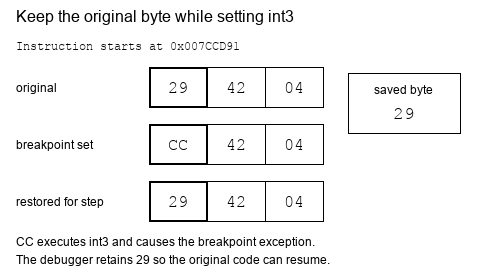
On x86, a debugger often implements a software breakpoint by temporarily replacing the first byte of an instruction with 0xCC, the int3 instruction.
Use a concrete three-byte subtraction as the byte-level example below:
sub dword ptr [edx+4], eax subtracts the value in eax from a four-byte
field at address edx+4. The debugger changes only its first instruction byte
to set the breakpoint.
sub dword ptr [edx+4], eaxint3int3 and stops; the debugger keeps the original 29 to put back.When the CPU executes int3, Windows reports a breakpoint exception. The debugger:
- pauses the process;
- restores the original byte;
- lets you inspect or step;
- replaces the breakpoint when execution continues.
That bookkeeping is why you should remove breakpoints through the debugger instead of editing the byte by hand.
It also means a software breakpoint is not invisible. While it is set, the
program’s own code genuinely contains 0xCC where the original byte used to
be, and nothing prevents the program from reading its own bytes and noticing.
A routine that adds up the bytes of a function and compares the total against
a figure recorded when the game was built will disagree the moment you place a
breakpoint inside that function.
Notice what such a routine has actually established: that its code changed. It has not detected a debugger, and it cannot tell your breakpoint apart from any other modification to those bytes. Chapter 13 returns to this, because it is the same self-checking idea used to notice a patch.
How a software breakpoint pauses and resumes
Section titled “How a software breakpoint pauses and resumes”The original instruction still has to execute. A debugger normally handles the
0xCC pause in two events:
The instruction pointer needs rewinding because the CPU has already consumed
the one-byte int3. The one-instruction step lets the real instruction run
before the breakpoint byte is restored. Lesson 6.10 models this as explicit
Armed and Stepping states so the byte is never restored at the wrong time.
On x86, single stepping uses the trap flag in the thread’s flags register. When set, the CPU raises a debug exception after the next instruction. The flag belongs to one thread, which is why debugger state records thread IDs.
Follow the subtraction example through both events. The saved 29 byte must
be executable for one instruction before CC can safely be installed again:
Restore, execute once, then re-arm. This step-by-step trace needs JavaScript. Here is the code and where the run ends.
save original byte 29; write CC
CPU stops at the breakpoint
restore 29 and rewind the instruction pointer
run one original instruction with the trap flag
after its single-step stop, write CC again
report whether original work ran once
Result: original instruction executed 1 time(s). Byte restoration and re-arm order are separate operations.
Final values: order = after; site = 0x007CCD91; byte = CC; executed = 1; ip = 0x007CCD91.
Read every step of the lesson’s example
Step 1, line 1. Start with the selected inputs and follow how the next operation changes the state.
order = after.
Step 2, line 2. The breakpoint interrupts before the original subtraction completes.
order = after; site = 0x007CCD91; byte = CC; executed = 0.
Step 3, line 3. Restore byte 29 and return the instruction pointer to its start.
order = after; site = 0x007CCD91; byte = 29; executed = 0; ip = 0x007CCD91.
Step 4, line 4. The trap flag permits one original instruction, then stops the CPU.
order = after; site = 0x007CCD91; byte = 29; executed = 1; ip = 0x007CCD91.
Step 5, line 5. Only now re-arm the breakpoint.
order = after; site = 0x007CCD91; byte = CC; executed = 1; ip = 0x007CCD91.
Step 6, line 6. Result: original instruction executed 1 time(s). Byte restoration and re-arm order are separate operations.
order = after; site = 0x007CCD91; byte = CC; executed = 1; ip = 0x007CCD91.
Three code bytes, 29 42 04, at 0x007CCD91. The debugger swaps the first byte for CC and keeps the original. When the CPU hits it, the debugger restores the 29, rewinds the instruction pointer, runs exactly one real instruction with the trap flag set, and only after the single-step event writes CC back.
Read the steps
- The breakpoint is armed: the first byte is CC (int3) instead of the original 29. The debugger keeps the 29 so it can put the subtraction back.
- The CPU reaches 0x007CCD91 and executes the one-byte int3. Windows reports a breakpoint event. The instruction pointer has already moved past that byte, to 0x007CCD92.
- Restore and rewind: write the saved 29 back and move eip to 0x007CCD91, so the whole subtraction is available again.
- Run one real instruction: turn on the trap flag for this thread and continue. The restored subtraction executes, and only then does the CPU report a one-instruction step.
- The single-step event: the original instruction has finished, and eip is at the next one, 0x007CCD94. This second event is the moment the debugger can put the breakpoint back without trapping on it immediately.
- Re-arm: write CC back at 0x007CCD91 and turn stepping off. The debugger can now continue, or keep the process paused.
The breakpoint event restores the instruction; the single-step event restores the breakpoint. Those are different moments.
Step, step over, and run to return
Section titled “Step, step over, and run to return”When paused at a call, you have choices:
| Action | What it does |
|---|---|
| Step into | Enter the called function |
| Step over | Run the called function and pause after it |
| Run to return | Continue until the current function returns |
| Resume | Continue until another event pauses the process |
Step into code you need to understand. Step over code that is not part of your question.
“Step over” is not one special CPU instruction. At a call, the debugger can
place a temporary breakpoint at the instruction after the call and resume. If
the call never returns normally, that temporary breakpoint may never fire.
“Run to return” relies on the current call frame and can be confused by tail calls, exceptions, corrupted stacks, or optimized code. These controls are convenient ways to express a debugging goal, not guarantees about source-level functions.
nop: do nothing once
Section titled “nop: do nothing once”nop means “no operation.” Replacing an instruction with one or more
nop bytes is a quick, temporary way to test what that instruction does.
This is a separate action from setting a breakpoint: it changes what
the game executes after you resume.
sub [ecx+30h], eaxIf this removes gold and you temporarily replace the whole instruction with nop bytes, recruiting may stop costing gold. That result supports your theory.
NOPing an instruction removes all of its effects, including effects that are easy to overlook. Arithmetic instructions often update flags used by the next conditional branch. A floating-point store may also pop a value from an x87 stack. A test that appears visually correct can still damage later control flow or machine state.
sub [ecx+30h], eax: three bytesnopnopnopnops30 as the start of an xor instruction that swallows the bytes after it.Before patching, ask:
- How many complete bytes does the instruction occupy?
- Which registers, memory, flags, or special stacks does it change?
- Does later code rely on those changes?
- What should visibly change in the game if the patch works?
- How will the original bytes be restored?
Represent debug events as explicit states
Section titled “Represent debug events as explicit states”Later, our debugger will receive the same breakpoint events from Windows. We will model them with an enum:
enum DebugEvent { Breakpoint { thread_id: u32, address: usize }, ProcessExited { code: u32 }, Other,}An enum gives each event a clear shape. Pattern matching then forces us to decide how every event should be handled instead of silently ignoring surprises.
The next lesson uses x64dbg’s built-in breakpoint controls rather than a custom debugger. Start with the gold address, watch a write, and use the paused registers and instruction to check whether affordability guards the gold write. The enum becomes useful later when we write our own event-handling code.
Pause and inspect
What is the main purpose of a breakpoint in a reversing experiment?
A breakpoint stops one thread at a chosen moment so its registers, memory, and call stack can be read, without making the paused state permanent.
Finished Lesson 2.4?
Mark it done and the lesson list shows a beside it. A chapter whose lessons are all done is marked done too. Progress is saved in this browser only.
Plain Markdown, saved in this browser.
This book grew out of the original Game Hacking Academy by attilathedud and has been rewritten as a beginner-first course. Like the original repository, its source is published under the Apache License 2.0.