The Rendering Pipeline and Its State
See how objects become pixels through meshes, materials, light, shaders, rasterization, depth testing, transparency, visibility flags and layers, culling, render passes, HDR and anti-aliasing, the renderer's own copy of the world, and the 2D case, and the state that gives each draw its meaning.
Cheatsheet for Lesson 7.2
A one-page summary of “The Rendering Pipeline and Its State” you can keep beside your notes. Plain Markdown.
Lesson 7.2 — The Rendering Pipeline and Its State: cheatsheet
- Remember: Depth comparison, depth writes, and enabling the test are separate settings; record which one actually changed.
- Also useful: Imagine overlapping guest lists: an object appears for a camera when at least one of its layer memberships is on that camera’s accepted list.
Key terms
- mesh: A mesh is usually a collection of vertices plus enough information to connect them into primitives.
depth_test_enabled: Changingdepth_test_enabledis different from changing the depth comparison fromLESStoALWAYS, and both are different from leaving the test on while disabling depth writes.- pass: The engine renders the scene several times for different purposes, and each sweep is a pass: shadows, then the solid objects, the sky, the see-through objects, full-screen effects, and finally menus and text.
- main world: The main world holds the game: positions, health, and what is hidden.
- pipelined rendering: That overlap is called pipelined rendering.
- tilemap: A tilemap is a grid of tile numbers.
Formulas and patterns
geometry + topology + transforms + shaders + textures + render state = draw meaning
Review
- Q: A render flag is most useful when you can connect it to what? A: A conditional branch whose two paths produce different drawing behavior
- Q: An object is on screen in the game's logic, but no draw call is submitted for it. Which stage should you inspect first? A: Culling or entity selection, because the work stops before a call exists
Use a setting as an anchor
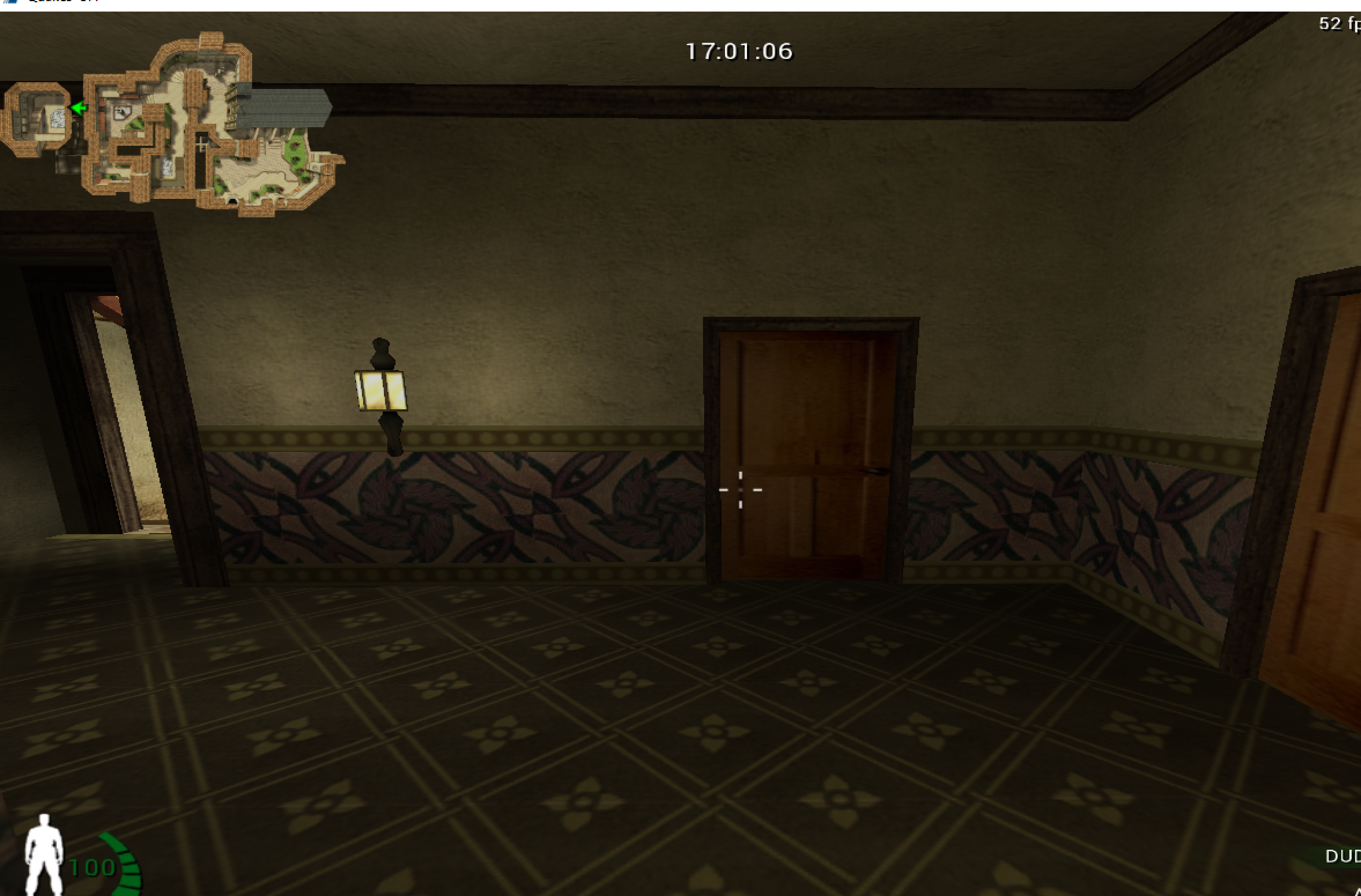
Section titled “Use a setting as an anchor”Urban Terror 4.3.4 has console variables that visibly affect rendering. In an offline local session, toggling entity drawing gives us a clean experiment.
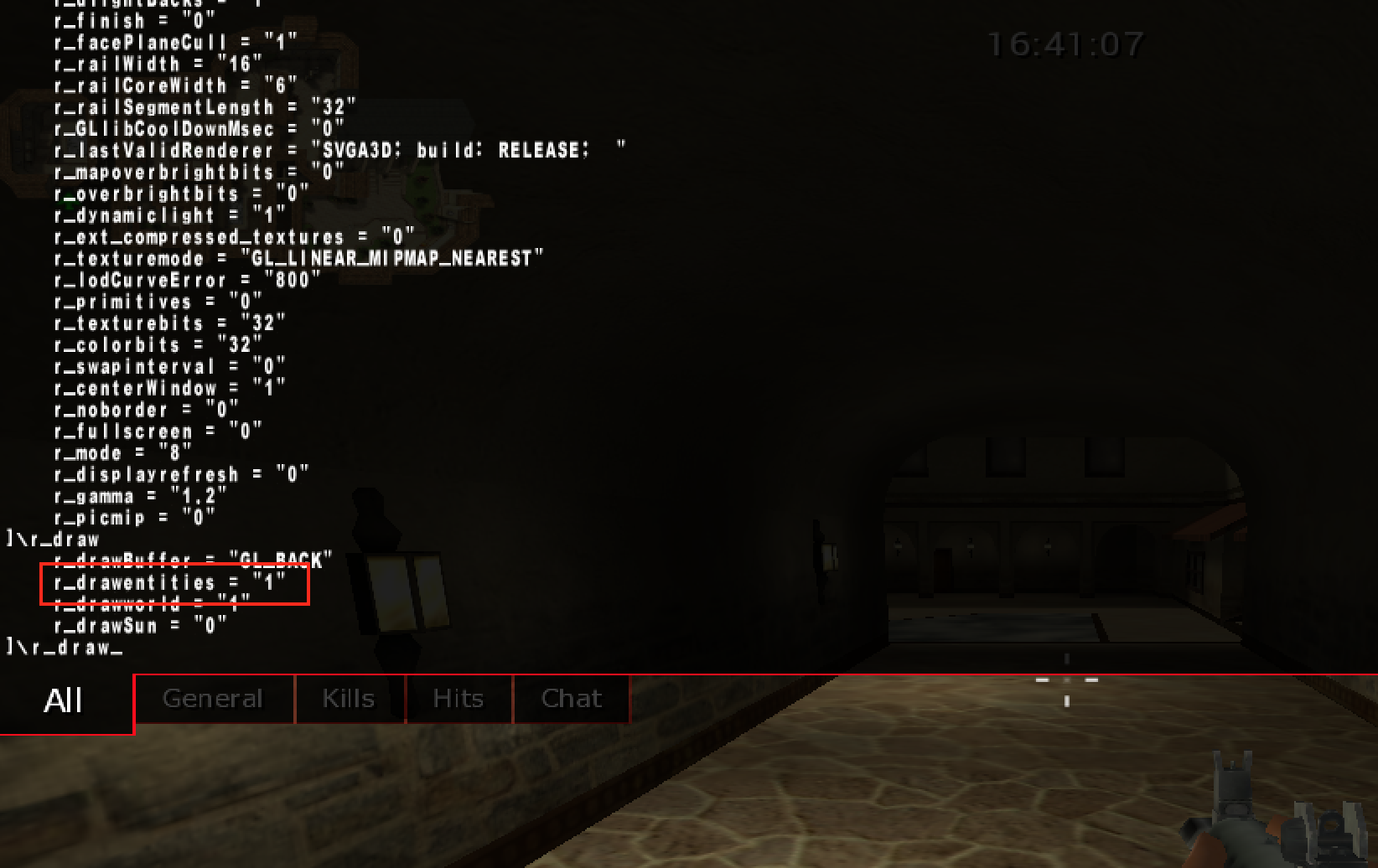
When entities disappear, the game is likely checking a flag before submitting their draw work.
Follow state through the rendering pipeline
Section titled “Follow state through the rendering pipeline”A frame crosses several representations before pixels appear:
game objects -> visible draw list -> vertices and materials -> GPU commands -> fragments -> framebufferA CPU-side flag can stop an entity before a draw call exists. Graphics state can change how an existing draw is tested. A shader can change the final color. Similar screenshots can therefore come from very different layers.
Find the earliest stage where the output first goes wrong. If no call is submitted, inspect culling or entity selection. If the call exists but pixels disappear, inspect transforms, clipping, depth, and blending. Keeping those stages separate prevents the vague conclusion that “rendering is broken.”
The names differ between graphics APIs, but the responsibilities remain useful:
- the game decides which objects exist and which may be visible;
- a draw submission selects geometry, shader programs, textures, and state;
- a vertex shader transforms each submitted vertex and may calculate values for later stages;
- primitive assembly groups vertices into triangles, lines, or points;
- clipping trims or rejects primitives outside the camera’s clip volume;
- rasterization finds the pixel-sized fragments covered by each primitive;
- a fragment shader computes candidate colors and other outputs;
- depth/stencil tests and blending decide how candidates affect stored pixels.
A fragment is not yet a final pixel. Several triangles may produce fragments for the same pixel, and tests may reject most of them.
1 Vertices, joined by the indices 0, 1, 2
v0 (0, 0)v1 (8, 0)v2 (0, 4)Positions are in pixels, with y growing downward. The indices 0, 1, 2 join the three vertices into one triangle.
2 Rasterize: which pixel centres are inside?
8 × 4 pixels, row y = 0 at the topA pixel is covered when its centre lies inside the triangle. The slanted edge from v1 to v2 leaves 7, 5, 3 and 1 covered pixels in the four rows: 16 fragments.
3 Colour each fragment, test it, store it
shadefragment shadertestdepth: keepwrite16 pixelsThe fragment shader colours each fragment. Nothing nearer is stored, so all pass the depth test and 16 framebuffer pixels change.
Each stage hands its result to the next: three vertex records become one triangle, the triangle covers 16 pixel centres, and those fragments are coloured and stored.
Geometry is vertices plus an interpretation
Section titled “Geometry is vertices plus an interpretation”A mesh is usually a collection of vertices plus enough information to connect them into primitives. A vertex is a record, not merely a position:
| Attribute | What it commonly represents |
|---|---|
| position | model-space location |
| normal | local surface direction used for lighting |
| texture coordinate | location in a 2D image |
| color | per-vertex tint or data |
| bone indices/weights | how an animation skeleton moves the vertex |
An index buffer stores integer vertex references. For example, two triangles
forming a square can share four vertices instead of duplicating six. In an indexed
draw, count usually says how many indices to consume—not how many unique vertices,
triangles, or objects exist. With triangle topology and no primitive restart,
count / 3 is the submitted triangle count, but clipping and degenerate triangles
mean it is still not the number of visible triangles.
Materials, textures, and light
Section titled “Materials, textures, and light”A mesh says where the surface is. A material says how that surface looks: its base colour, the image wrapped over it, and how it answers light.
The image is a texture. Each vertex carries a texture coordinate (u, v), a
position inside the image from 0 to 1 on each side, and the rasterizer blends those
coordinates across the triangle so every pixel knows where to look. On a 256 × 256
texture, (u, v) = (0.25, 0.75) points at pixel (0.25 × 256, 0.75 × 256) = (64, 192).
Whether v counts from the top or the bottom of the image differs between graphics
APIs.
Light is worked out from the normal, the direction the surface faces. The
simplest model, diffuse lighting, makes a surface brightest when it faces the
light and dark when it faces away. With N the unit normal and L the unit
direction from the surface toward the light, the brightness is the larger of 0 and
the dot product N · L (Lesson 4.4). For N = (0, 0, 1) and L = (0.6, 0, 0.8), the
dot product is 0 + 0 + 0.8 = 0.8, so a surface of colour rgb(200, 100, 50) is drawn as
(200 × 0.8, 100 × 0.8, 50 × 0.8), which is rgb(160, 80, 40). Tilt the surface until the dot
product is 0 or negative and it receives no light from that source.
Realistic engines add to this. Physically based rendering (PBR) describes a material with a few measured-looking properties, such as how rough the surface is and whether it is metal, usually stored as more textures, and a shader turns them into the highlights and reflections the eye expects. A vertex colour is a tint stored per vertex and blended across the triangle. A material also states how it treats transparency: fully opaque, cut out wherever a texture’s alpha is low, or blended.
Render state is context for interpreting a draw
Section titled “Render state is context for interpreting a draw”A draw call does not contain every fact needed to explain its pixels. Its meaning depends on state already bound to the graphics context:
geometry + topology + transforms + shaders + textures + render state = draw meaningImportant state includes face culling, depth comparison, depth writes, stencil
operations, blending, scissor rectangles, color masks, and the current framebuffer.
Changing depth_test_enabled is different from changing the depth comparison from
LESS to ALWAYS, and both are different from leaving the test on while disabling
depth writes.
Search for the flag
Section titled “Search for the flag”Scan for the flag’s current integer value. Toggle it, filter, and repeat. Then set a read breakpoint on a confirmed candidate and render one frame.
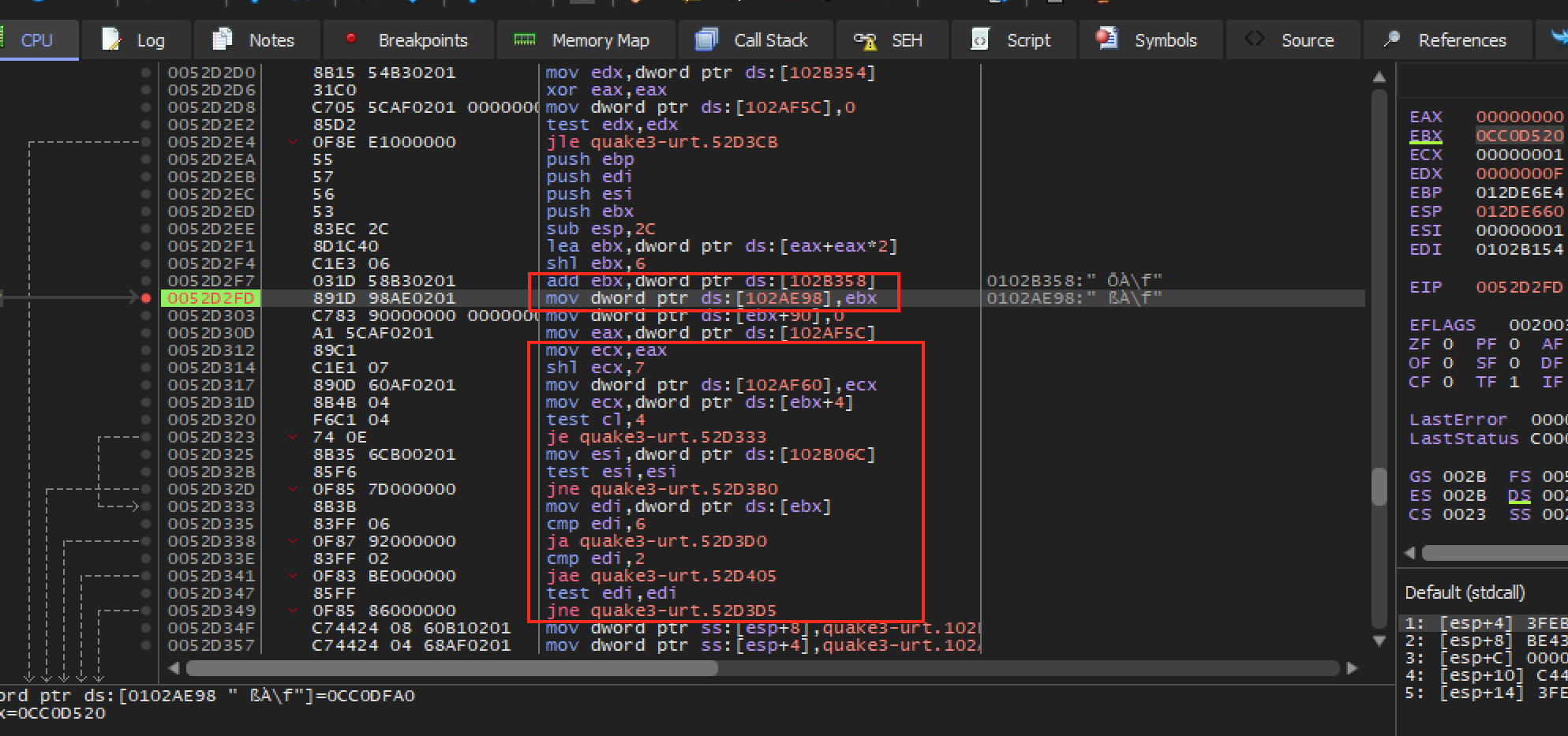
Look for a conditional pattern:
cmp dword ptr [render_flag], 0je skip_entitiescall draw_entitiesYour actual build may use test instead of cmp, invert the condition, or store the setting in a structure.
Name the behavior, not just the address
Section titled “Name the behavior, not just the address”Store the decoded settings in a type whose field names say what each value controls:
#[derive(Debug)]struct RenderSettingsSnapshot {    draw_entities: bool,    depth_test_enabled: bool,}
fn decode_bool(raw: u32) -> Result<bool, u32> {    match raw {        0 => Ok(false),        1 => Ok(true),        unexpected => Err(unexpected),    }}
Rejecting unexpected values protects you from silently using the wrong address.
Trace into an entity record
Section titled “Trace into an entity record”Pause where one entity is prepared for drawing. Compare the pointer across:
- the local player;
- another player;
- a weapon;
- a map object.
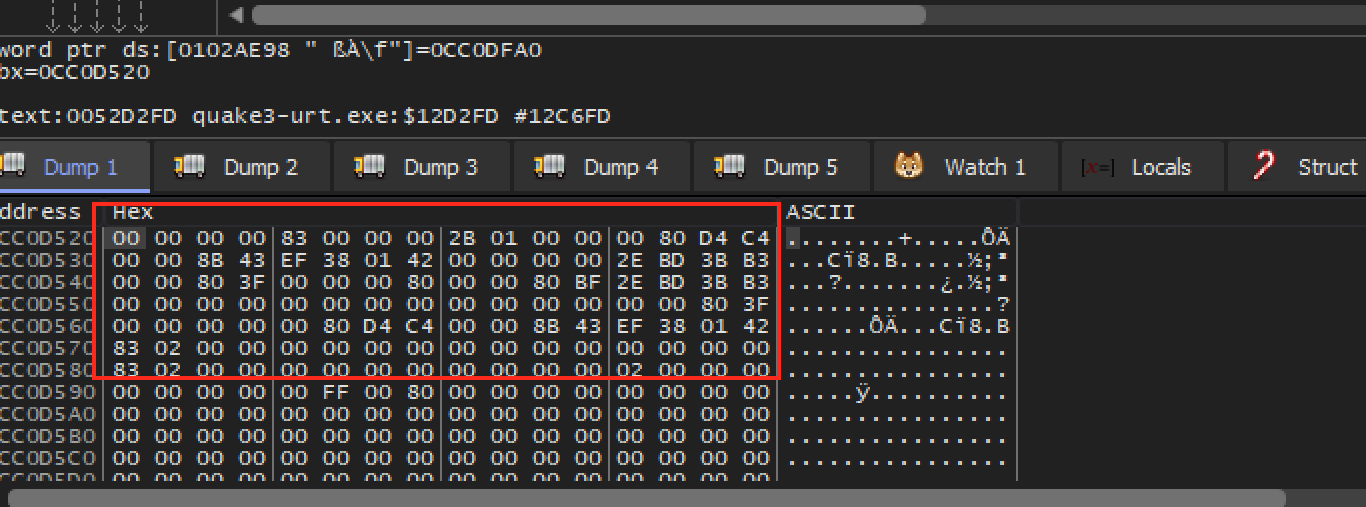
Put only confirmed fields into the layout type:
struct EntityLayout { kind: usize, position: usize, model_id: usize, team: usize,}One field rarely identifies a category by itself. Combine several fields.
Depth testing in plain English
Section titled “Depth testing in plain English”After geometry is transformed and clipped, it produces candidate screen fragments. Each fragment carries a depth value. The depth test compares that value with the one already stored for the same screen location. When the comparison passes, the fragment may update the color and depth buffers; when it fails, the nearer surface remains.
Depth is therefore not a distance flag stored on one entity. It is a per-fragment comparison performed after projection. If depth testing is disabled or changed to always pass, later fragments can appear on top even when their geometry is behind a wall.
There are two related operations:
- depth test: compare the candidate fragment’s stored depth with the current depth-buffer value;
- depth write: if the fragment survives, optionally replace the stored value.
Transparent objects often keep the depth test but disable depth writes and render back-to-front. Turning off the test entirely is not equivalent.
Perspective depth is normally nonlinear. More of the depth buffer’s numeric precision is concentrated near the camera. With the traditional mapping, making the near plane extremely small compared with the far plane wastes precision and can cause two nearby surfaces to alternate visibility, called z-fighting. Modern engines may use a floating-point reversed-z buffer, where farther values and the comparison direction are reversed to improve precision. Never hard-code “small depth means near” until the projection and comparison convention are confirmed.
The depth buffer answers “which submitted fragment wins at this sample?” It does not answer whether an object is logically visible to gameplay. Collision queries, portals, fog-of-war systems, and server state may use entirely different data; Lesson 9.2 shows why a server should not send a hidden enemy’s position at all.
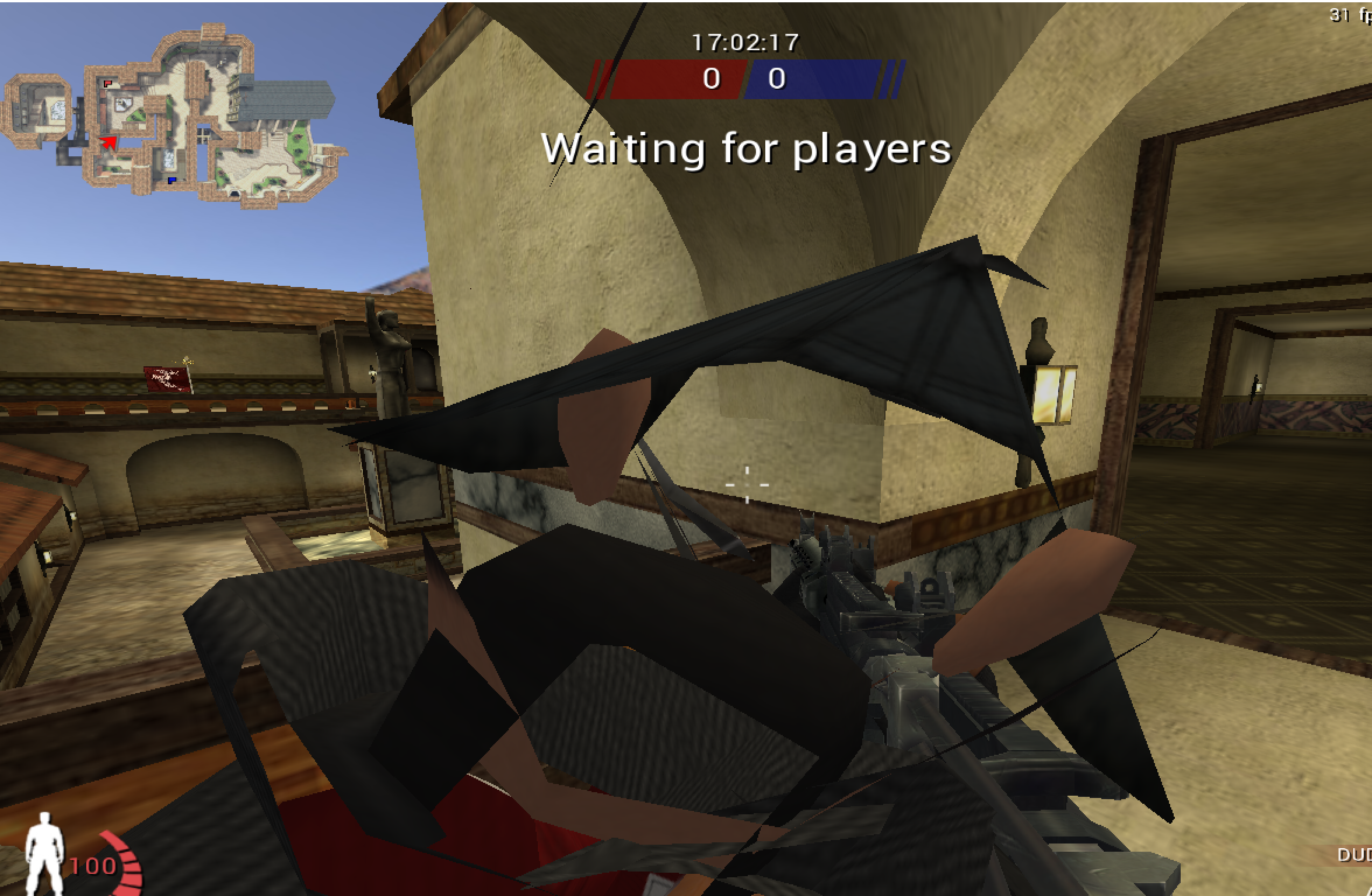
That visual result shows the depth-test behavior changed; it does not prove which objects a call represents. You still need classification tests.
Transparency and draw order
Section titled “Transparency and draw order”When a see-through surface is drawn over the pixels already stored, the new colour and the old one are mixed by the new colour’s alpha, from 0 (invisible) to 1 (solid):
result = source × alpha + destination × (1 − alpha)A red fragment rgb(255, 0, 0) with alpha 0.25 over a blue-ish background
rgb(0, 0, 200) gives red 255 × 0.25 + 0 × 0.75 = 63.75, green 0, and
blue 0 × 0.25 + 200 × 0.75 = 150, which rounds to rgb(64, 0, 150): the
background shows through, tinted.
Because the mix uses what is already there, order matters. Swap two see-through layers and the result changes. So engines draw all the solid objects first, with depth writes on, and then the see-through ones from the farthest to the nearest, with depth writes off, as described above. Other blend modes combine colors differently: additive blending simply adds the colours, which suits glows and sparks.
Two-dimensional games rely on exactly this. A sprite is a picture with transparent edges, and sprites are drawn in layer order, back to front.
Skipping what cannot be seen
Section titled “Skipping what cannot be seen”The cheapest triangle is one that is never drawn, so engines throw work away early.
- Frustum culling skips objects outside the camera’s view volume (the frustum from
Lesson 7.1). Each object gets a bounding sphere (Lesson 4.4), and the sphere is tested
against the volume’s edges. In a flat example, put the camera at the origin looking
along
+xwith a 90° view, so the visible wedge is where|y| ≤ x. An object of radius 1 centred at(10, 12)is(12 − 10) ÷ √2 = 1.41beyond the upper edge, which is more than its radius, so it is skipped entirely. One centred at(10, 10.5)is only0.5 ÷ √2 = 0.35beyond it, less than its radius, so it still crosses the edge and is drawn. A debug view that draws the frustum and highlights the skipped objects shows which ones were culled. - Back-face culling skips triangles that face away from the camera. A triangle with
normal
(0, 0, 1)seen from a camera in the direction(0, 0, −1)has a dot product of −1, which is negative, so its back is showing and it is not drawn. - Occlusion culling skips objects hidden behind others.
- Levels of detail swap a model for a cheaper one as it gets far away, and a visibility range hides an object past a set distance.
All of this happens before any draw call exists, which is why the symptom “an object is absent from the visible list” in the table below points at the game, not the GPU.
Who decides whether an object is drawn
Section titled “Who decides whether an object is drawn”Culling is the last of several decisions. Before it, the engine has already asked three questions about each object:
- Its own setting. An object is visible, hidden, or inherited, which means it follows its parent.
- The result after its parents. The engine combines each object’s setting with its parent’s, from the root down. An inherited object under a hidden parent is hidden, so hiding the tank hides its turret and its barrel. This result is another value derived once per frame from the settings, like the world transform in Lesson 7.1.
- The view. For each camera, the object must lie inside the camera’s view volume (the culling above) and share at least one render layer with it.
A render layer is one bit of a number. Every object and every camera carries a mask,
a number whose set bits name the layers it belongs to or can see, and a camera draws an
object only if the two masks share a set bit. The test is a bitwise AND, which
compares two numbers bit by bit and keeps a bit only where both have it: 011 AND 101
is 001, so 3 AND 5 is 1. A result that is not zero means the masks share a layer. Take
three layers: the world is bit 0 (value 1), the first-person weapon is bit 1 (value 2),
and the minimap icon is bit 2 (value 4).
ExampleWhich camera draws which object
The main camera’s mask is 1 + 2 = 3, which is 011 in binary, and the minimap camera’s
mask is 1 + 4 = 5, which is 101.
| Object | Mask | Main camera: 3 AND mask | Minimap camera: 5 AND mask |
|---|---|---|---|
| tree | 1 (001) |
1, drawn | 1, drawn |
| weapon | 2 (010) |
2, drawn | 0, not drawn |
| icon | 4 (100) |
0, not drawn | 4, drawn |
The weapon is drawn by the main camera only and the icon by the minimap only, although all three objects live in the same world. An object that fails one of these three questions never reaches a draw call, so it is absent from the visible list, which is the first row of the table at the end of this lesson.
This builder needs JavaScript. Here is the lesson’s worked example.
camera mask AND object mask: with the lesson’s numbers, 011 AND 010, which gives 010. Camera mask 011 (main camera) AND object mask 010 (weapon) = 010. That is not zero, so the two masks share a layer (the first-person weapon) and the camera draws the object.
When an object that should appear does not, the cause is usually one of these, and each leaves a different trace:
An object that should appear does not
| Cause | What it looks like |
|---|---|
| Its own setting, or a parent’s, is hidden | gone from every camera at every distance |
| It shares no render layer with the camera | drawn by one camera and absent from another |
| It is behind the camera or past the camera’s far limit | appears when the camera turns round or moves closer; an object 1,500 units away is never drawn by a camera whose far limit is 1,000 |
| Its scale is 0 on every axis | everything collapses to one point, which has no area to draw; a scale of 0 on one axis flattens it into a sheet that vanishes when seen edge-on |
| Its triangles are wound the wrong way for back-face culling | the outside is invisible and the inside shows |
| A lit material has no light | drawn, but dark or black, so against a dark background it looks absent |
| In 2D, its depth lies outside the camera’s depth range | a camera that sees depths from −1,000 to 0 never draws a sprite at depth 5 |
Most frames are not drawn in one sweep. The engine renders the scene several times
for different purposes, and each sweep is a pass: shadows, then the solid
objects, the sky, the see-through objects, full-screen effects, and finally menus
and text. The shadow pass stores the depth seen from the light, and a pixel is in
shadow only if the stored depth is less than its own distance minus a small
bias, so a surface 7.50 from the light with a bias of 0.05 is compared with
7.45 and does not shadow itself. Fog keeps the share
(fog end − distance) ÷ (fog end − fog start) of a surface’s own colour, 0.5 for a
surface 30 away in fog from 10 to 50.
Lesson 7.4 follows each pass,
because the same object can be drawn in more than one of them.
Wider colours and smoother edges
Section titled “Wider colours and smoother edges”HDR needs wider pixels
Section titled “HDR needs wider pixels”An ordinary picture keeps each colour channel in 8 bits, which is 256 levels from 0 to
1, so nothing can be brighter than 1.0. Lighting can produce more. Say a sunlit wall
comes out at 1.4 and a lamp at 12.0. In an 8-bit picture both are cut off at 1.0 and
look equally bright. HDR rendering draws into a texture whose channels are wider
and floating-point, commonly 16 bits each, so the difference survives until the
tone-mapping step at the end of the frame compresses the result into the 0 to 1
range of the display. A simple tone-mapping formula, c ÷ (1 + c), turns a value of
4.0 into 0.8, a value of 1.0 into 0.5, and a value of 0.5 into 0.33, so bright values
are squeezed more than dim ones. With it, the wall becomes 1.4 ÷ 2.4 = 0.58 and
the lamp 12 ÷ 13 = 0.92: still different, and both displayable.
The wider pixels cost memory. A 1920 × 1080 picture has 1920 × 1080 = 2,073,600 pixels. With 4 channels of 1 byte it takes 2,073,600 × 4 = 8,294,400 bytes, about 8.3 MB. With 4 channels of 2 bytes it takes 2,073,600 × 8 = 16,588,800 bytes, about 16.6 MB.
HDR is also what makes bloom mean something. Bloom is a full-screen effect that blurs the brightest parts of the picture and adds them back, and it blurs only the part of each pixel above a threshold, here 1.0. The wall has 1.4 − 1.0 = 0.4 above it and the lamp has 12.0 − 1.0 = 11.0, so the lamp glows 11.0 ÷ 0.4 = 27.5 times as strongly. In the 8-bit picture both had 0 above the threshold, and nothing could glow.
Smoothing jagged edges
Section titled “Smoothing jagged edges”The edge of a diagonal shape comes out as stair-steps, because each pixel is either inside the shape or outside it. Anti-aliasing hides the steps. Three common methods work in different places:
MSAA
Multisample anti-aliasing tests coverage at several points inside each pixel. With
4 sample points per pixel, written 4×, a triangle that covers 3 of the 4 points of an
edge pixel contributes 3 ÷ 4 = 0.75 of its colour. Over a blue background
rgb(0, 0, 200), a red triangle rgb(255, 0, 0) covering
3 of 4 points gives 0.75 × (255, 0, 0) + 0.25 × (0, 0, 200) = (191.25, 0, 50), drawn as
rgb(191, 0, 50).
The shader still runs once per pixel, so the extra cost is memory: colour and depth are stored for every sample. The colour samples alone take 2,073,600 pixels × 4 samples × 4 bytes = 33,177,600 bytes, about 33.2 MB, which is four times the 8.3 MB of one sample per pixel. MSAA smooths the edges of triangles but not sharp patterns that a shader or a texture draws inside a triangle.
FXAA
Fast approximate anti-aliasing works on the finished picture. It looks for pixels where the brightness changes sharply from one neighbour to the next and blurs across those edges. It stores no extra samples and costs one full-screen pass over the 2,073,600 pixels, so it is cheap, and it also smooths edges drawn by shaders and textures. Its price is that it blurs text and fine texture detail too, because it cannot tell the edge of a shape from a sharp line in a picture.
TAA
Temporal anti-aliasing shifts the camera by a fraction of a pixel on every frame, called jitter, and blends each pixel with the same pixel’s colour from earlier frames. With 8 different jitter positions, a pixel has been sampled at 8 places after 8 frames, for the cost of keeping one extra copy of the picture. To find where a pixel was last frame, the engine needs a motion vector for it. Where the vectors are wrong, such as behind a transparent surface, old colours linger and leave a ghost trail behind a moving object.
The renderer works from its own copy
Section titled “The renderer works from its own copy”Many engines keep two worlds. The main world holds the game: positions, health, and what is hidden. The render world holds what drawing needs: meshes, materials, lights, and the final transforms. Once per frame an extract step copies the data that drawing needs from the first into the second. The renderer then works only from its copy, so the game can start simulating the next frame while the renderer is still drawing this one. That overlap is called pipelined rendering.
Suppose simulating a frame takes 6 ms and drawing it takes 8 ms. The extract copy takes a little time of its own, which the figures ignore:
| Arrangement | Time per frame | Frames per second |
|---|---|---|
| one stage after the other | 6 + 8 = 14 ms | 1000 ÷ 14 = 71 |
| overlapped | the slower stage, 8 ms | 1000 ÷ 8 = 125 |
Overlapping has a price. What is drawn comes from the state copied at extract, so it is one frame behind the simulation that is already working on the next one.
For memory work this means a game’s positions can exist twice, once in each world. The render copy is overwritten from the main copy at every extract, so editing it changes the picture only until the next extract, while editing the main copy changes state used by the simulation and future drawing. A hook on a draw call (Lesson 7.10) sees the render copy, and the movement and damage calculations read the main one. Lesson 8.8 shows how to avoid mixing values from different frames.
Two-dimensional rendering uses the same pipeline
Section titled “Two-dimensional rendering uses the same pipeline”A 2D game does not need a different machine. A sprite is a quad, two triangles made from four vertices, with a texture on it, drawn by an orthographic camera (Lesson 7.1) with alpha blending and layers (above).
Many small pictures are packed into one large image, a sprite sheet or texture
atlas, so that one texture serves many sprites. Picking a frame means choosing the
texture coordinates for its rectangle. Take a 256 × 256 sheet of 4 × 4 frames, each
64 × 64 pixels. Frame number 5, counting from 0, is in column 5 mod 4 = 1 and row
5 ÷ 4 = 1 (dropping the remainder), so it covers pixels x from 64 to 128 and y from 64
to 128. As texture coordinates that is u from 64 ÷ 256 = 0.25 to 0.5 and v from
0.25 to 0.5. Animation is choosing the frame from the clock: at 8 frames per second,
the frame number is the whole part of time × 8, wrapped around the number of frames.
Flipping a sprite swaps its left and right u values.
Scaling a sprite into a box while keeping its shape uses the smaller of the two ratios. A 64 × 32 sprite fitted into a 100 × 100 box has ratios 100 ÷ 64 = 1.5625 and 100 ÷ 32 = 3.125, so it is scaled by 1.5625 and ends up 100 × 50.
A tilemap is a grid of tile numbers. Drawing it means turning each number into a quad that points at the right part of the atlas. A screen of 20 × 15 tiles is 300 quads, which is 600 triangles, and the engine can send all of them to the GPU as one draw call from one atlas instead of 300 separate calls. This is the same grid Lesson 4.5 reads as game state, now seen as pictures.
Pixel-art games often draw the whole scene into a small texture, such as 320 × 180, and then enlarge it by a whole number, 4, to 1280 × 720. Whole-number scaling keeps every pixel a crisp square, which is called pixel snapping.
Keep experiments frame-local
Section titled “Keep experiments frame-local”Graphics state is shared. If you change a setting for one draw:
- save the previous state;
- apply the temporary state;
- perform the one draw;
- restore the previous state.
Forgetting restoration can break the entire frame, menus, or later effects.
A restore guard returns the previous graphics state when its owner leaves scope:
struct RestoreOnDrop<F: FnOnce()>(Option<F>);
impl<F: FnOnce()> Drop for RestoreOnDrop<F> {    fn drop(&mut self) {        if let Some(restore) = self.0.take() {            restore();        }    }}
The actual graphics calls may need FFI, but the “restore no matter how this scope exits” pattern stays in ordinary safe code.
Older OpenGL behaves like a state machine: many calls change context state that later draw calls inherit. Treat each temporary change as a scoped transaction. Capture the exact old value, apply the experiment, perform the intended draw, and restore even on early return. “Set it back to the usual default” is weaker than restoring the value that was actually present.
Also restore state on the same thread and context where it was captured. OpenGL context state belongs to a current context; a worker thread cannot safely repair render-thread state merely because it has the same function pointers.
Separate visibility failures by stage
Section titled “Separate visibility failures by stage”Use the earliest observable difference to narrow the cause:
Visibility failures by stage
| Symptom | Likely stage |
|---|---|
| object absent from visible list | game filtering or CPU culling |
| draw call absent | submission/batching path |
| vertices leave clip volume | transform, camera, or clipping |
| fragments exist but fail depth | depth state or existing occluder |
| fragments pass but write no color | color mask, shader discard, stencil |
| color appears but looks wrong | shader inputs, texture, lighting, blend, color space |
This table is a diagnostic order, not proof. Some engines merge or reorder stages, and GPU-driven pipelines can construct visible lists on the GPU.
The flag trace above leads to an exact-build in-process feature: the Urban Terror 4.3.4 memory wallhack, which detours the entity loop and writes the render flag for every entity. It is in Lesson 8.8, after the DLL and detour lessons that its installation depends on.
Trace a graphics decision
A render flag is most useful when you can connect it to what?
The flag is data; the branch supplies behavior. Repeatedly toggling one known setting helps prove which code reads it and how rendering changes.
Finished Lesson 7.2?
Mark it done and the lesson list shows a beside it. A chapter whose lessons are all done is marked done too. Progress is saved in this browser only.
Plain Markdown, saved in this browser.
This book grew out of the original Game Hacking Academy by attilathedud and has been rewritten as a beginner-first course. Like the original repository, its source is published under the Apache License 2.0.