Protocol Capture and Message Framing
Learn how a short local capture reveals message direction, boundaries, and the bytes associated with one game action.
Cheatsheet for Lesson 9.3
A one-page summary of “Protocol Capture and Message Framing” you can keep beside your notes. Plain Markdown.
Lesson 9.3 — Protocol Capture and Message Framing: cheatsheet
- Remember: A capture records traffic. Controlled actions and repeat comparisons connect those bytes to meaning.
- Also useful: Picture TCP as one long ribbon: reads cut pieces from it, while your parser identifies complete messages.
Key terms
- socket: A socket is an operating-system object representing one endpoint.
- encapsulation: This wrapping is encapsulation.
- OSI model: The OSI model names seven conceptual layers: application, presentation, session, transport, network, data link, and physical.
- WebSocket: A WebSocket is a two-way framed-message protocol, useful for browser lobby chat.
wesnothd: For the Wesnoth 1.14.9 lab, keep15000: that iswesnothd’s default listening port.read_exact:read_exactis appropriate only after a validated frame length tells you exactly how many bytes belong to the next piece.
Formulas and patterns
tcp.port == 15000
Review
- Q: Which capture method best reveals how one local game action is encoded? A: Record a quiet baseline, do one action, then compare changed bytes and timing
- Q: How can a TCP stream carry one game message? A: It may be split across segments, or share one with other messages
Separate network layers before capturing
Section titled “Separate network layers before capturing”Lesson 9.1 showed that one game message can arrive across two TCP reads. A packet capture lets us inspect the bytes on the way, but its packet rows are not automatically game-message rows. We will send one distinctive lobby message, then follow its bytes in both directions.
An application message is not the same thing as an IP packet or TCP segment. Each layer has a different job:
game protocol message login, chat, lobby updateTCP byte stream ordered, reliable bytes between two socketsIP packet routed data between host addresseslink/loopback capture what the capture interface recordsTCP may split one game message across several segments or combine bytes from several messages in one segment. Retransmissions can repeat packet data. The receiving application sees an ordered stream, so protocol parsing needs its own framing rule such as a length prefix or delimiter.
This board needs JavaScript to move things around. Here is the lesson’s sorting:
- Game protocol message
- A login message. Login, chat and lobby updates are game protocol messages. That is the level your parser works at.
- A length prefix saying where a message ends. The receiver sees an ordered stream, so protocol parsing needs its own framing rule such as a length prefix or a delimiter.
- TCP byte stream
- Bytes arrive in order, none missing. That is the TCP promise: an ordered, reliable stream of bytes between two sockets.
- The four-tuple: source address and port, destination address and port. A TCP connection is identified by these four values, which is why one connection reads differently in each direction.
- One game message split across several segments. TCP may split one message across several segments or combine bytes from several messages into one. A segment boundary is not a message boundary.
- IP packet
- Routing data between host addresses. Moving data between hosts by address is the IP packet’s job.
- Capture
- The row you see in the capture tool. A capture records bytes and timing at one point. A row there is not automatically a game message, and it cannot say why it was sent.
A socket is an operating-system object representing one endpoint. A TCP connection is identified by source address, source port, destination address, and destination port—the four-tuple used below.
Follow a join request beyond loopback
Section titled “Follow a join request beyond loopback”Our capture stays local. To understand the wider journey, imagine a client
joining match 42 and downloading its map from assets.example. Configuration,
name lookup, delivery, and game permission solve different parts of that trip.
Find a destination before connecting
Section titled “Find a destination before connecting”On a typical IPv4 LAN, DHCP gives a device an address lease and network configuration; options can supply a router and DNS servers. It configures the device, not the remote game’s identity. DHCP and its options specify that exchange. Static configuration and other address-assignment systems are also possible.
DNS resolves a name such as assets.example to records including IP
addresses. A resolver can reuse an answer until its cache lifetime expires;
name resolution does not deliver the map. The client then connects to the
chosen endpoint. DNS concepts
explain this separate lookup.
HTTP is the web’s request/response protocol. HTTPS carries that exchange over an authenticated, encrypted connection. A CDN can serve a cached map from an edge location. A cache miss may require an origin fetch; DNS answer caching and content caching have different lifetimes. Account requests still need their own authentication and cache policy. Cloudflare’s request journey shows these boundaries.
Control DISCOVER (broadcast)
Step 1: New device to DHCP server
The device has no address yet, so it shouts to everyone on the LAN: is there a DHCP server?
Control OFFER: 192.168.1.40
Step 2: DHCP server to New device
The server proposes an address and a lease time, plus the router and DNS server addresses.
Control REQUEST: I accept 192.168.1.40
Step 3: New device to DHCP server
The device accepts one offer. If several servers answered, this tells the others to withdraw.
Control ACK: lease confirmed
Step 4: DHCP server to New device
The lease is now recorded. The device configures itself; it has learned nothing about any game server yet.
A device with no address asks the network for a lease. The reply also names the router and the DNS servers.
Request assets.example?
Step 1: Client to Resolver
The client asks the resolver it was configured with (often learned through DHCP).
Alone Check cache: nothing fresh
Step 2: Resolver (alone)
A cached answer that has not expired would end the lookup here.
Request assets.example?
Step 3: Resolver to Site's DNS
The resolver asks the name servers responsible for the name. Root and top-level referrals are left out to keep the picture short.
Reply CNAME assets.example.cdn.example
Step 4: Site's DNS to Resolver
The site points its name at the CDN’s name. The site’s DNS does not hold the file or the final address.
Request assets.example.cdn.example?
Step 5: Resolver to CDN's DNS
The resolver now asks the CDN’s name servers about the CDN’s own name.
Reply A 203.0.113.7 · TTL 30 s
Step 6: CDN's DNS to Resolver
The CDN chooses an edge near the resolver and sets a short lifetime, so it can steer players elsewhere soon.
Reply 203.0.113.7
Step 7: Resolver to Client
The resolver remembers the answer for 30 seconds and returns it. The client has an address, not the map.
A resolver follows the name to the CDN and returns one address. Nothing is downloaded yet.
Request HTTPS: GET /maps/42.bin
Step 1: Client to CDN edge
The client connects to 203.0.113.7, completes the TLS handshake, then asks for the map.
Alone Cache lookup: fresh copy found
Step 2: CDN edge (alone)
The edge may reuse a stored copy while the origin’s cache rules say it is still fresh.
Reply 200 OK + map bytes
Step 3: CDN edge to Client
The map arrives from a nearby machine; the origin never saw this request.
After the connection and TLS handshake, a nearby edge answers from its cache.
Request HTTPS: GET /maps/42.bin
Step 1: Client to CDN edge
The request is the same as before; the client cannot tell hit from miss.
Alone Cache lookup: miss
Step 2: CDN edge (alone)
The edge has no usable copy.
Request GET /maps/42.bin
Step 3: CDN edge to Regional cache
A larger regional cache is asked before the distant origin.
Request GET /maps/42.bin (miss too)
Step 4: Regional cache to Origin
The regional cache also misses, so it fetches from the origin storage.
Reply 200 OK + map bytes
Step 5: Origin to Regional cache
The origin supplies the file. The regional cache stores a copy if the response headers allow it.
Reply 200 OK + map bytes
Step 6: Regional cache to CDN edge
The edge receives the file and can store it too.
Reply 200 OK + map bytes
Step 7: CDN edge to Client
The player waits for the whole chain once. The next nearby request is a hit until the copy expires.
A miss climbs the cache hierarchy toward the origin, and each cache may keep the answer on the way back.
An IPv4 lease configures the client. DNS returns an address; only the later HTTPS connection retrieves the asset from the CDN, with an origin fetch on a cache miss.
Wrap the bytes across a LAN
Section titled “Wrap the bytes across a LAN”A LAN, or local area network, joins nearby devices through links such as Ethernet or Wi-Fi. In this example, an Ethernet frame carries an IP packet, which carries a UDP datagram, which carries game bytes. This wrapping is encapsulation. A switch forwards link frames; a router forwards the IP packet onto another link with a new link frame. Physical signaling carries the bits on each link.
The OSI model names seven conceptual layers: application, presentation, session, transport, network, data link, and physical. The Internet’s TCP/IP model commonly groups application work, transport, Internet/IP, and link work. These models describe responsibilities, not seven mandatory headers. Our existing layer board remains useful: identify the job before assigning a name. Internet host requirements organize the protocol suite by these responsibilities.
A 24-byte message becomes a 32-byte datagram, a 52-byte IP packet and a 70-byte frame: 46 of 70 bytes (66%) are wrapping.
Sending computer
User space Game code calls send()
The message sits in the program’s own memory. The program hands it to the socket API; it builds no headers itself.
Kernel The kernel copies it into the socket’s send buffer
The operating system copies the bytes out of the program’s memory into a buffer owned by the socket. send() can return once the copy is made; that says nothing about arrival.
Kernel The transport layer adds its header
UDP adds 8 bytes: ports, length, checksum. TCP adds 20: ports, sequence and acknowledgement numbers, flags, window, checksum. The result is a datagram (UDP) or a segment (TCP).
Kernel The IP layer adds the IP header
Twenty bytes with the source and destination addresses, a time-to-live and the protocol number. The kernel also consults its routing table to choose the next hop and the outgoing interface. The result is a packet.
Kernel The packet waits in an output queue
When several packets are ready, a queue decides which one the card gets next. Linux calls this the queueing discipline, or qdisc. Other systems have comparable queues under other names.
Kernel The link layer wraps it in an Ethernet frame
A 14-byte header holds the next hop’s MAC address, this card’s MAC address and the EtherType (0x0800 means IPv4). A 4-byte check sequence goes at the end, usually computed by the card. A frame shorter than 64 bytes is padded.
Network card The driver hands the frame to the card, which sends bits
The driver places a descriptor for the frame in a ring buffer in memory. The card reads the frame by direct memory access and turns each byte into signals on the cable or radio: bits.
Between the computers
On the wire A switch forwards the frame
A switch reads only the Ethernet header and sends the frame out of the port where the destination MAC address was last seen. The IP packet inside is untouched.
On the wire A router moves the packet onto the next link
The router throws away the old Ethernet header and check sequence, lowers the IP time-to-live by one, recalculates the IP header checksum and wraps the same packet in a new frame. The transport header and the data are not touched.
Receiving computer
Network card The receiving card accepts the frame
The card checks the destination MAC address and the check sequence; a damaged frame is dropped. A good frame is written into a ring buffer in memory by direct memory access, and the card raises an interrupt.
Kernel An interrupt, then deferred processing
The CPU pauses its work to run a short interrupt handler, which schedules the longer work for later. On Linux that is a softirq run by ksoftirqd; on Windows it is a deferred procedure call. That work empties the ring buffer.
Kernel The Ethernet header is removed
The EtherType says the payload is IPv4, so the packet goes to the IP layer. The link header and trailer have done their one-hop job.
Kernel The IP header is checked and removed
The kernel verifies the header checksum and that the destination address is this computer, then reads the protocol number (17 means UDP, 6 means TCP) to choose the transport layer.
Kernel The transport layer finds the socket
The destination port (for TCP, the whole four-tuple) identifies the socket. TCP also acknowledges, reorders and discards duplicates. The data is placed in the socket’s receive buffer.
User space Game code calls recv()
The kernel copies the bytes from the receive buffer into the program’s memory. Only now does the program see them. With TCP, one recv() need not return exactly what one send() sent, so the game must mark its own message boundaries.
Complete journey shown.
| OSI layer | TCP/IP model | Unit of data |
|---|---|---|
| 7. ApplicationHTTP, FTP, your game protocol | Application | Data |
| 6. PresentationEncoding, compression, TLS encryption | ||
| 5. SessionKeeping a conversation open | ||
| 4. TransportTCP, UDP | Transport | Segment (TCP) or datagram (UDP) |
| 3. NetworkIP; routers | Internet | Packet |
| 2. Data linkEthernet, Wi-Fi; switches | Link | Frame |
| 1. PhysicalCables, radio, the network card | Bit |
Maximum data in one Ethernet frame: 1,500 bytes of IP packet, so 1460 bytes of TCP data or 1,472 bytes of UDP data without fragmentation.
The same game bytes are wrapped inside a UDP datagram or TCP segment, an IP packet and an Ethernet frame. A router replaces the link wrapper for the next hop. The OSI/TCP-IP mapping is conceptual, not a literal count of wire headers.
Choose the delivery contract, then the application protocol
Section titled “Choose the delivery contract, then the application protocol”If middle bytes are lost, TCP recovers them before exposing later bytes in its ordered stream. UDP can deliver a later datagram without the missing one; the game decides whether to replace stale state or add its own recovery. Neither transport acknowledgment proves the server accepted a purchase. TCP and UDP specify those different contracts.
TCP Gives the game bytes in order, so one missing packet holds back everything after it.
| Row | 0 | 1 | 2 | 3 | 4 | 5 | 6 | 7 |
|---|---|---|---|---|---|---|---|---|
| Sent | 1 | 2 | 3✕ | 4 | 5 | 3↻ | ||
| Arrives | 1 | 2 | 4 | 5 | 3 | |||
| Held back | 4 | 45 | ||||||
| Game receives | 1 | 2 | 345 |
UDP Gives the game each datagram as it arrives, in whatever order, and never resends.
| Row | 0 | 1 | 2 | 3 | 4 | 5 | 6 | 7 |
|---|---|---|---|---|---|---|---|---|
| Sent | 1 | 2 | 3✕ | 4 | 5 | |||
| Arrives | 1 | 2 | 4 | 5 | ||||
| Game receives | 1 | 2 | 4 | 5 |
- 1 sent
- 1✕ lost on the way
- 1↻ sent again by TCP
- 1 reaches the computer
- 1 held back
- 1 handed to the game
TCP resends message 3 and gives the game all 5 in order, finishing at tick 7. Messages that had already arrived were held back: message 4 waits 3 ticks; message 5 waits 2 ticks. UDP gives the game messages 1, 2, 4 and 5 as each arrives and never delivers 3 on its own: the game decides whether to ask again or move on to newer data.
The timer is a simplification: real TCP can resend sooner when later packets arrive and the receiver keeps repeating the same acknowledgement. The ordering rule is real. TCP also needs a three-packet handshake before its first data; UDP can send at tick 0.
What each wrapper costs: a 8-byte UDP header or a 20-byte TCP header
UDP · 8 bytes
TCP · 20 bytes without options
- Source port
- Identifies the sending socket on its computer.
- Destination port
- Identifies the receiving socket on its computer.
- Length
- Header plus data, in bytes.
- Checksum
- Detects corrupted bits in the header and data.
- Sequence number
- Position in the byte stream of the first data byte in this segment.
- Acknowledgement number
- The next byte the sender of this segment expects to receive.
- Offset
- Header length in 32-bit words; 5 means 20 bytes.
- Reserved + flags
- Flag bits such as SYN, ACK, FIN and RST say what kind of segment this is.
- Window
- How many more bytes the sender of this segment will accept (flow control).
- Urgent pointer
- Used only with the URG flag, which is rarely used.
TCP application messages still need framing: a lost packet changes timing, not message boundaries.
A socket is the local operating-system endpoint already introduced above.
A WebSocket is a two-way framed-message protocol, useful for browser lobby
chat. The RFC 6455 handshake uses
HTTP/1.1 Upgrade; wss protects the exchange with TLS, Transport Layer Security, which
authenticates the server and protects data in transit. HTTP/3 also has a WebSocket mapping,
so an Upgrade handshake is not universal. Game authorization remains separate.
QUIC v1 runs over UDP but supplies its own reliable streams and loss recovery, using TLS 1.3 for connection security. HTTP/3 maps HTTP requests and responses onto QUIC. Loss affecting one stream need not block unrelated stream delivery, although streams share connection congestion limits. QUIC is not “unreliable HTTP,” and HTTP/3 is not a synonym for every game’s UDP protocol. The standards are QUIC v1, QUIC with TLS, and HTTP/3.
Secure WebSocket (RFC 6455)
HTTP/3 (RFC 9114)
- Game message
- The text or bytes your game sends, such as "join lobby 7". Your own rules decide what it means and who may send it.
- WebSocket frame
- A small header (opcode, length, a mask on frames the client sends) followed by the message. Frames keep message boundaries that raw TCP does not have.
- TLS 1.3 record
- Encrypts and authenticates the frames. The server’s certificate proves who it is.
- TCP connection
- Delivers the TLS bytes reliably and in order. One lost packet holds back everything after it on this connection.
- TCP socket
- The program’s endpoint for this connection, named by local and remote address and port. A socket is an operating-system object, not a message format.
- IP packets and link frames
- Routers move the packets; each link wraps them in its own frame.
- Game request
- An HTTP request such as a map download or an account call.
- HTTP/3 frames
- HEADERS and DATA frames carried on one request stream.
- QUIC streams
- Independent ordered byte streams inside one QUIC connection. Loss on one stream need not stall the others.
- QUIC packets with TLS 1.3
- QUIC does its own loss recovery, congestion control and encryption. TLS 1.3 is part of its handshake.
- UDP socket
- A datagram endpoint. Each QUIC packet travels inside one UDP datagram.
- IP packets and link frames
- The same delivery path as before.
- Application meaning
- Protection
- Delivery
- Routing and links
Inside one QUIC datagram (after the handshake)
- UDP header Visible to the network
- Source port, destination port, length and checksum. Routers, firewalls and address translators read these, so they cannot be hidden.
- Flags byte Header-protected
- Says this is a short-header packet and holds the key phase and packet-number length. Some of its bits are masked by header protection.
- Destination connection ID Visible to the network
- Lets the receiver find the connection even if the sender’s address changed, for example when a phone moves from Wi-Fi to mobile data.
- Packet number Header-protected
- Counts packets so the receiver can acknowledge them. Header protection hides it from observers.
- STREAM frame Encrypted and authenticated
- Stream ID, offset, length and a slice of that stream’s data. The offset lets the receiver put slices back in order even if packets arrive out of order.
- Other frames Encrypted and authenticated
- Acknowledgements, flow-control updates and more can share the same packet with STREAM frames.
- Authentication tag Encrypted and authenticated
- A checksum only the two endpoints can compute. If any protected byte changed on the way, the packet is rejected.
Handshake packets use a longer header with version and both connection IDs; this is the layout most packets have afterwards. Sizes follow QUIC version 1 (RFC 9000 and RFC 9001).
To compare how these protocols begin, step through one conversation for each.
Control TCP handshake: SYN
Step 1: Client to Server
HTTP/1.1 normally runs on TCP, so the connection is set up first. The three handshake packets are drawn as one step here.
Request GET /lobby HTTP/1.1
Step 2: Client to Server
The request names a method, a path and headers. HTTP itself is readable text.
Reply 200 OK + body
Step 3: Server to Client
The response carries a status code, headers and the content. The connection can stay open for the next request.
A connection first, then one request and one response.
Control TCP handshake first
Step 1: Client to Server
TLS rides on a TCP connection, so TCP is set up before any TLS message.
Encrypted ClientHello + key share
Step 2: Client to Server
The client offers its supported algorithms and a public key share.
Encrypted ServerHello + key share + certificate
Step 3: Server to Client
Both sides combine the key shares into the same session keys. The certificate proves the server’s identity, and it already travels encrypted.
Encrypted Finished
Step 4: Client to Server
The client checks the certificate and confirms the handshake. Now encrypted application data can flow.
Encrypted Encrypted: GET /lobby
Step 5: Client to Server
The HTTP request is the same text as before, but an observer on the path sees only encrypted bytes.
Encrypted Encrypted: 200 OK + body
Step 6: Server to Client
The response is protected in the same way.
The same request, after both sides have agreed on keys.
Encrypted Initial: ClientHello + key share
Step 1: Client to Server
QUIC runs over UDP datagrams and includes TLS 1.3 in its own handshake, so transport and security start together.
Encrypted Initial/Handshake + certificate
Step 2: Server to Client
The server answers with its key share and certificate, protected as the handshake proceeds.
Encrypted Finished + first request
Step 3: Client to Server
The client can send its HTTP/3 request on a new stream as soon as the keys are ready.
Encrypted Stream 0: HTTP response
Step 4: Server to Client
Each request uses its own stream, identified by a stream ID.
Encrypted Stream 4: another request
Step 5: Client to Server
Streams are independent. A lost packet carrying one stream need not stall the other stream, although both share the connection’s congestion limits.
QUIC joins the transport handshake and TLS 1.3, then carries independent streams.
Request GET /chat + Upgrade: websocket
Step 1: Client to Server
The handshake is an ordinary HTTP/1.1 request that asks to switch protocols. With wss it runs inside TLS.
Reply 101 Switching Protocols
Step 2: Server to Client
The server agrees. From now on the same connection carries WebSocket frames, not HTTP messages.
Data Frame: join lobby 7
Step 3: Client to Server
The client sends a framed message whenever it likes.
Data Frame: lobby 7 roster
Step 4: Server to Client
The server can reply at any moment; no new request is needed.
Data Frame: player joined
Step 5: Server to Client
The server can also push a message nobody asked for. That is why it suits live chat.
An HTTP request turns the connection into a two-way message channel.
Control SYN
Step 1: Client to Server
The client proposes a connection and its starting sequence number.
Control SYN + ACK
Step 2: Server to Client
The server agrees, proposes its own starting number and acknowledges the client’s.
Control ACK
Step 3: Client to Server
The client acknowledges the server’s number. Both sides now agree on the connection.
Data Data: 100 bytes (seq 1–100)
Step 4: Client to Server
Every byte has a sequence number so the receiver can put bytes in order and spot gaps.
Control ACK 101
Step 5: Server to Client
The acknowledgement names the next byte the server expects, which confirms bytes 1 to 100.
Control FIN
Step 6: Client to Server
The client has nothing more to send and starts closing its direction.
Control ACK + FIN
Step 7: Server to Client
The server acknowledges and closes its own direction too.
Control ACK
Step 8: Client to Server
The final acknowledgement finishes the close. The client keeps the connection record briefly to catch stray late packets.
Reliable ordered bytes need a handshake, acknowledgements and a teardown.
Data Datagram: position update #41
Step 1: Client to Server
There is no handshake. The first packet already carries game data.
Data Datagram: world snapshot
Step 2: Server to Client
Any reply is another independent datagram, sent when the server decides to send it.
Data Datagram: position update #42
Step 3: Client to Server
If a datagram vanishes nothing is resent for you. The game’s own sequence numbers can show the gap.
No setup, no acknowledgements, no automatic resend.
Request EHLO, MAIL FROM, RCPT TO
Step 1: Sender’s app to Sender’s server
SMTP is a text conversation. The client names itself, the sender and the recipient before any message is sent.
Data DATA: headers + body
Step 2: Sender’s app to Sender’s server
Then the message itself, ending with a line that holds only a dot.
Reply 250 OK, queued
Step 3: Sender’s server to Sender’s app
The server accepts responsibility for delivering the message.
Request Relay: the same SMTP commands
Step 4: Sender’s server to Recipient’s server
The server finds the recipient domain’s mail server through DNS and repeats the conversation with it.
Reply 250 OK, accepted
Step 5: Recipient’s server to Sender’s server
The receiving server takes the message.
Alone Store in the recipient’s mailbox
Step 6: Recipient’s server (alone)
Reading mail later uses other protocols such as IMAP. SMTP only moves the message along.
A short text conversation hands the message from one mail server to the next.
Control Control: USER, PASS
Step 1: Client to Server
Commands travel on the control connection (port 21). Plain FTP sends the password unencrypted; SFTP and FTPS are the protected options.
Control Control: 230 logged in
Step 2: Server to Client
Numeric reply codes say what happened.
Control Control: PASV
Step 3: Client to Server
The client asks the server to open a port for a data connection.
Control Control: 227 use this data port
Step 4: Server to Client
The reply holds the address and port for the data connection.
Control Control: RETR map42.bin
Step 5: Client to Server
The client names the file it wants.
Data Data connection: file bytes
Step 6: Server to Client
The file travels on the second connection, separate from the commands.
Control Control: 226 transfer complete
Step 7: Server to Client
The control connection reports the end of the transfer.
One connection carries commands; a second connection carries each file.
Other names belong at other boundaries
Section titled “Other names belong at other boundaries”Publishing the map might use FTP, which separates control and data connections, or SFTP, which transfers files over encrypted SSH. SFTP is different from FTPS, FTP secured with TLS. A web server might use FastCGI to pass requests to a persistent application worker; the player’s side still uses HTTP. Web3 applications may use blockchain-backed records, but a ledger is not a replacement for sockets or real-time match transport. Likewise, Base64 only encodes bytes: an encoded login value has not thereby been encrypted.
With those boundaries separate, return to the controlled local capture. We can now ask which interface, direction, and protocol layer produced each row.
Capture answers “what crossed,” not “why”
Section titled “Capture answers “what crossed,” not “why””A network trace records bytes and timing at one capture point. It does not contain the sender’s variable names, the receiver’s interpretation, or any record of which UI action caused which packet. That link comes from changing one thing at a time:
- capture a quiet baseline;
- perform exactly one distinctive local action;
- repeat the action with one changed input;
- compare both directions and several repetitions;
- confirm the candidate fields in the open-source client or server.
Build a controlled capture
Section titled “Build a controlled capture”Use the course’s local Wesnoth server setup or your own toy client and server. Keep both endpoints inside the lab VM.
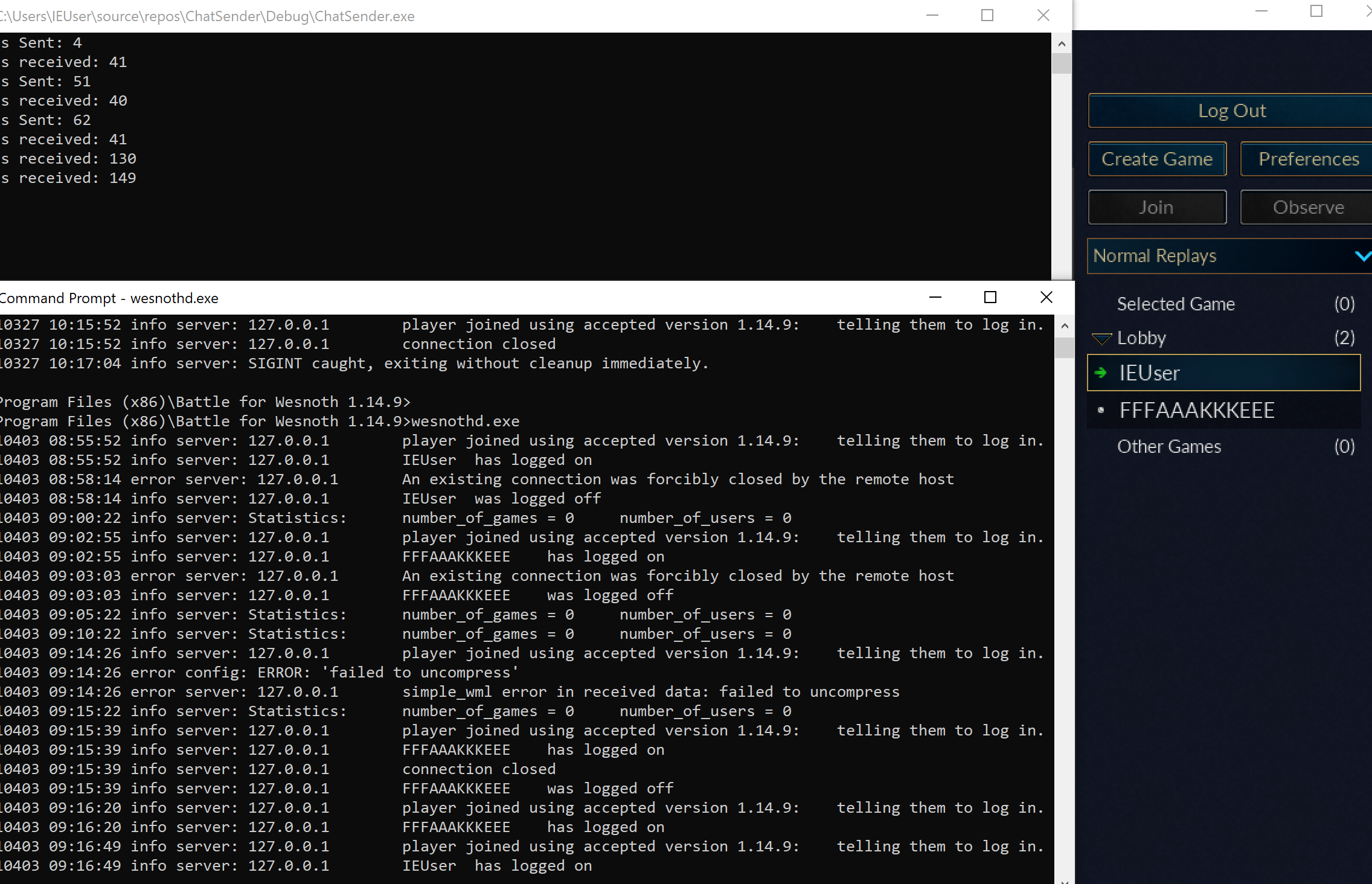
Start Wireshark, choose the loopback adapter when client and server share the machine, and begin capture before connecting.
Capturing on the wrong interface produces an empty-looking experiment. Traffic
to 127.0.0.1 stays on the loopback path rather than crossing the physical Wi-Fi
or Ethernet adapter.
Reduce noise
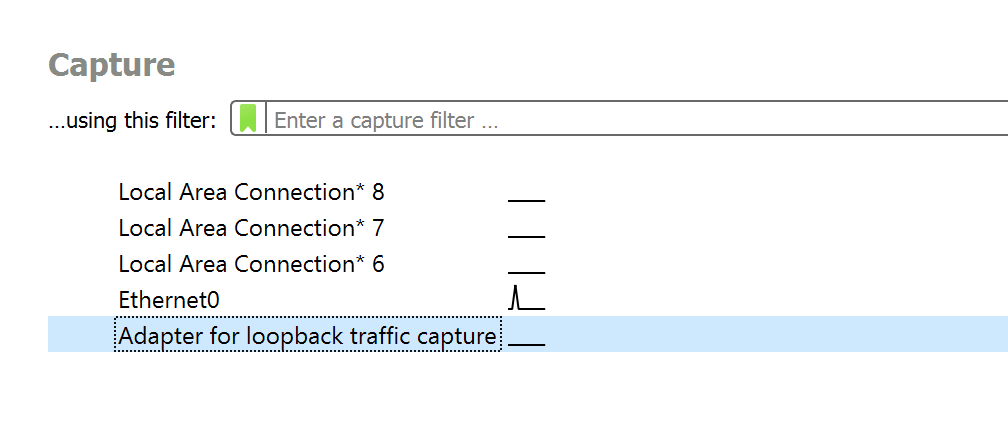
Section titled “Reduce noise”Filter by the known local port. Wireshark has two filter boxes, and each has its own syntax for the same job:
Display filter (hides rows afterwards)
tcp.port == 15000Capture filter (never records the rest)
tcp port 15000A display filter can be changed at any time, because everything was recorded. A capture filter keeps the file small, but a packet it dropped cannot be recovered, so use the display filter while you are still learning what to look for.
For the Wesnoth 1.14.9 lab, keep 15000: that is wesnothd’s default listening port. Launch wesnothd.exe, choose Connect to Server in the game, and enter localhost:15000.
Perform the actions at known times, so each burst of packets can be matched to the action just before it:
00:00 connect00:02 enter username00:05 join lobby00:08 send "hello-17"00:12 disconnectA distinctive message such as hello-17 is easier to find than “hi.”
Direction matters
Section titled “Direction matters”One connection has one four-tuple, and each direction reads it the other way round:
client IP : client port → server IP : server portserver IP : server port → client IP : client portThe client port is often temporary. The server port is the stable listening port.
The server first owns a listening socket on port 15000. Accepting a client
creates a separate connected socket while the listener remains available for
other clients. The client normally receives an ephemeral local port selected by
Windows.
Follow the stream
Section titled “Follow the stream”Wireshark’s “Follow TCP Stream” view reassembles TCP bytes for easier inspection.
Remember: this is still a stream, not necessarily a list of messages. Look for:
- fixed-size headers;
- length fields;
- magic bytes;
- repeated separators;
- readable text;
- compressed-looking regions;
- request/response pairs.
“Follow TCP Stream” performs reassembly for inspection. Your client still
has to handle partial reads: read() may return fewer bytes than requested even
when more bytes will arrive later. read_exact is appropriate only after a
validated frame length tells you exactly how many bytes belong to the next
piece.
Reassembly also chooses an order from sequence numbers and removes retransmitted overlap. Preserve the original packet capture alongside any exported stream fixture so later questions about direction, timing, or retransmission can still be answered.
Export a tiny fixture
Section titled “Export a tiny fixture”Save only the bytes for one clearly labeled action. A small binary fixture is excellent for parser tests.
#[test]fn parses_recorded_local_chat_frame() { let bytes = include_bytes!("fixtures/local-chat-frame.bin"); let message = parse_frame(bytes).expect("fixture should parse"); assert!(matches!(message, Message::Chat { .. }));}Do not store secrets, account tokens, or other people’s traffic in fixtures.
Compare two captures
Section titled “Compare two captures”Repeat the same action with exactly one changed input:
Capture A: send "red"Capture B: send "blue"Compare lengths and differing byte ranges. If only one region changes, it may contain the text. If the whole payload changes, compression or encryption may be involved.

Identify the real Wesnoth handshake
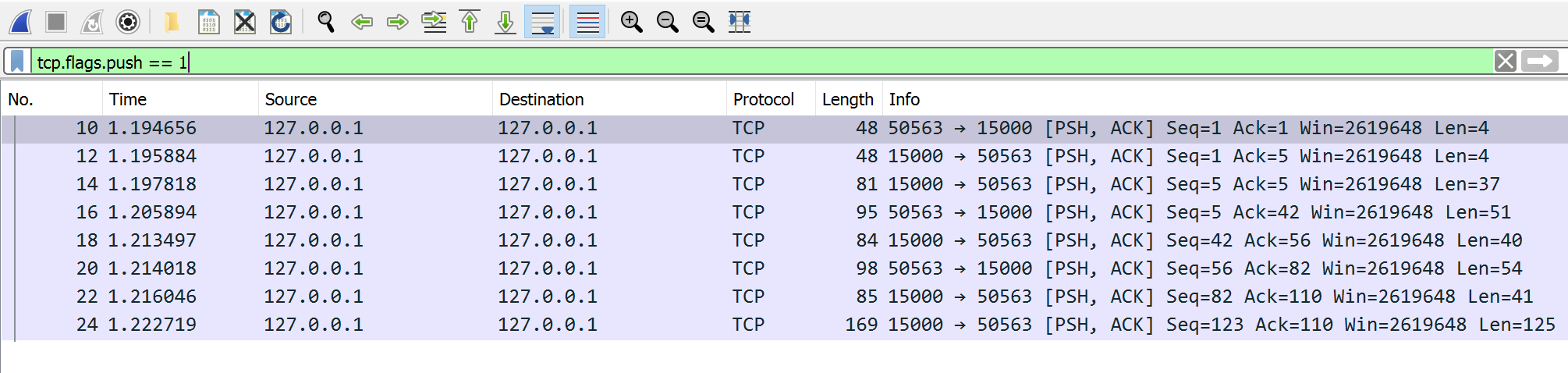
Section titled “Identify the real Wesnoth handshake”Add this display filter so Wireshark shows client/server data rather than every TCP acknowledgement:
tcp.port == 15000 && tcp.flags.push == 1The first client payload in a Wesnoth 1.14.9 connection is exactly four zero bytes:
00 00 00 00Replay only those four bytes from a tiny TCP client. The local server responds with 41 bytes across the observed replies, proving that the zeros begin protocol negotiation. The next client frame identifies version 1.14.9; the following frame logs in with the chosen username.
After the four-byte frame length, both of those later frames begin with gzip magic bytes 1F 8B. For example, a captured version frame begins:
00 00 00 2F 1F 8B 08 00 ...└─ length 47 ┘ └─ gzip dataDo the same controlled capture with usernames IEUser and FFFAAAKKKEEE. The second name makes repeated-character compression easier to notice. Put together, the Wesnoth 1.14.9 connection works like this:
target: Wesnoth 1.14.9 + local wesnothdtransport: TCPserver: 127.0.0.1:15000negotiation: 00 00 00 00normal frame: u32 big-endian compressed length + gzip(Simple WML)login order: negotiation → version → username → lobbyCapture facts the parser needs
Section titled “Capture facts the parser needs”A useful frame fixture records:
- the start of one frame;
- the field that gives its size, or another reliable delimiter;
- its direction;
- one input and the bytes that changed because of it.
Find message structure
Which capture method best reveals how one local game action is encoded?
A controlled capture reduces noise and supports cause-and-effect reasoning. TCP still requires you to infer framing because reads do not preserve application messages.
Finished Lesson 9.3?
Mark it done and the lesson list shows a beside it. A chapter whose lessons are all done is marked done too. Progress is saved in this browser only.
Plain Markdown, saved in this browser.
This book grew out of the original Game Hacking Academy by attilathedud and has been rewritten as a beginner-first course. Like the original repository, its source is published under the Apache License 2.0.