Brightness, reading palette, text size, comments and reading sound.Adds page background, hover cards, button corners, code colours, width and layout.Everything, including diagram styling, motion, inline code, depth and fine details.
Reading sound Off
Sound starts off. Play when you want it.
Original sounds, released into the public domain under CC0.
Margin comments
Hide author and reader comments without deleting them.
Page brightness
Lesson text size
Reading palette
More options
Reader finish
Modern adds semantic colours and refined controls. Soft depth adds frost and shadows.
Page background
Hover cards
Definitions, examples, tips, and lesson summaries that open over words and links. Off also removes the underlines.
Chat button
Which corner the button for asking questions about the book sits in. Top corners stop short of the lesson list and contents; at the bottom right it sits under the Notes button. It takes the colour of the chapter you are reading.
Notes button
Where the 📝 Notes button sits on lessons. Hidden leaves a thin tab on the edge; Alt + N brings it back.
Settings panel
Popover opens under the button. Side sheet slides in from the right with a dimmed page behind it.
Sidebar and header contrast
Original keeps the dark lesson list and header. Unified tints them to match the page and palette.
Reading width
How wide the lesson text column is. Standard is about 70 characters a line.
Table of contents
Light or dark for the “On this page” panel on the right, whatever the page is.
Lesson spacing
Code brightness
Syntax colours
Moving effects
System respects reduced motion while still advancing steps. On Play enables moving effects when you start a diagram. Off keeps manual steps.
Fine-tuning
Depth
Flat is the original. Soft adds faint shadows to diagram boxes, cards and buttons and lifts them slightly on hover.
Inline code
Classic keeps the badge look. Soft quiets the background and border for paragraphs full of keywords.
Floating buttons
Docked shows the Notes and chat buttons normally. Minimal makes them small icons that fade until you point at them.
Gradients
Use flat colours for headings, cards and diagram backgrounds.
Diagram background
Changes diagram surfaces; labels and role colours remain readable.
Diagram boxes
Heading rectangles
Diagram label backgrounds
Diagram frames
Diagram size
Page grid
Time per step
Semantic colours
Ligatures
What the colours mean
Terms, inputs, and data
Code and processing
Results and tips
Cautions
These colours follow your theme; their meanings stay the same. Data tables and diagram explanations use the information colour; code panels use processing. The lesson header and navigation identify its chapter. Correct answers are green; errors are red.
Alt + T palette · Alt + D page · Alt + C code · Alt + S syntax · Alt + H semantic · Alt + L ligatures · Alt + N lesson list · Alt + O on this page
10. Game Files, Mods, and Artifact Trust — print chapter
A live memory edit affects the current game session. What if a change should
still be there after the game closes and reopens? The game must save some state
to storage and load it again later. For the Flare character used in the next
lesson, the visible Physical attribute starts at 5; its save includes
build=5,1,1,2. That line gives us a specific question: which file stores
the value, and can the game still load it after a controlled edit?
The chapter starts with readable saves, then opens a binary save byte by byte.
The same care with formats carries into textures, unit definitions, and mod
archives. Manifests, signatures, and encryption answer later questions:
which files changed, who approved them, and who can read them?
The file is a durable representation of part of the running state. It is not the same bytes at the same memory address: the game writes a format it knows how to read later. We will locate and copy the real file before changing its contents.
Saves are only one kind of game file. Games also load:
settings and configuration;
saves and profiles;
maps and level scripts;
textures, models, and sounds;
localization text;
unit or item definitions;
archives that bundle many files.
If a supported mod file can express your idea, use it. File-based changes are easier to inspect, share, version, and undo than live memory patches.
A game world built from many resources: textures, models, sounds, and maps.
From a file to something on screen: loading an asset
A file on disk is not what the game draws. An asset is any file the game loads, such as
a texture, a model, a sound, or a level, and loading one takes several steps:
The game asks for the asset by path, and the engine hands back a handle at once,
a small ID like the entity IDs of Lesson 4.1. The data has not arrived yet.
A background task (Lesson 4.1) reads the file and decodes it. A PNG’s compressed
bytes become raw pixels. A 256 × 256 image that takes 40 KB on disk becomes
256 × 256 × 4 bytes (red, green, blue, and alpha) = 262,144 bytes. A mipmap chain adds
half-size copies, 128 × 128 down to 1 × 1, for distant surfaces, and the copies add
about a third more: 262,144 × 4 ÷ 3 ≈ 349,525 bytes.
The pixels are uploaded to the graphics card’s memory. Only then is the asset
ready. Until then the handle says “loading,” and the engine draws a stand-in or nothing.
The engine keeps a cache, so a second request for the same path gets the same handle and
no second copy. This is the shared asset behind the separate instances of Lesson 1.3.
There are a few variations. An embedded asset is compiled into the executable, so a
small icon needs no file. A generated asset is built while the game runs, such as a
texture drawn by code. A web asset is downloaded. A loading screen waits for every
handle it asked for and moves on when the count of unfinished ones reaches 0.
This explains two things you will meet. A replacement file is found by its path, so a
mod must keep the name, the folder, and the format (Lesson 10.4). And memory holds the
decoded pixels, not the PNG, so a scan of the process finds raw image data and never the
file’s own bytes.
Loading is the first half of an asset’s life. The rest depends on who still holds its
handle.
In Bevy and engines like it, a handle comes in two kinds. A strong handle keeps the
asset alive, and the engine counts them. A weak handle names the asset without
keeping it alive, so a lookup can use it without delaying the moment the asset is
freed. When the count of strong handles reaches 0, the engine frees the decoded data,
and the copy on the graphics card goes with it.
ExampleA 256 × 256 bullet texture with 40 bullets
The level’s loader holds one strong handle, and every bullet that draws the texture holds
another.
Moment
Strong handles
Texture in memory?
the level has loaded, no bullets yet
1
yes, 349,525 bytes with its mipmaps
40 bullets are fired
1 + 40 = 41
yes
all 40 bullets despawn
1
yes
the level unloads and its loader lets go
0
freed
So a scan for the decoded pixels finds them only between the first request and the
moment the last handle is dropped. After the level changes, the same address can hold
something else, as entity addresses do (Lesson 4.1).
One file can hold several assets. A 3D model file typically holds meshes, materials,
textures, animations, and scenes, and the engine gives each part its own handle, named
by the file’s path and a label, such as ship.glb#Mesh0. A model with 3 meshes,
2 materials, 1 texture, 2 animations, and 1 scene gives 3 + 2 + 1 + 2 + 1 = 9 assets
from one path, and the cache described above keeps one copy of each.
The engine announces changes to assets. When an asset is added, modified, or removed, it
sends an asset event, and a system can react to the event instead of checking. A
system that builds a collision shape when its mesh finishes loading then runs once, on
the event. Checking every frame for the 5 seconds the mesh takes to load would run it
5 × 60 = 300 times to learn the same thing.
A game under development usually also supports hot reloading. It watches its asset folder, and
when a file’s modification time (Explanation: Every file records when it was last changed, and the operating system updates that time on each save. A watcher only has to compare the time it saw last with the time now.) changes, it decodes the file again, replaces the data
behind the same handle, and sends a “modified” event. Everything holding the handle
shows the new version on its next draw, with no restart. A shipped game usually turns
the watcher off and reads each file once, when the level loads. What a replaced file
does depends on which of these the game does:
When a replaced file shows up
How the game gets the asset
When your replacement shows
it watches its folder, as a development build does
on the next frame
it reads the file when a level loads
the next time that level loads
it reads from an archive
after the archive is rebuilt and the level loads again
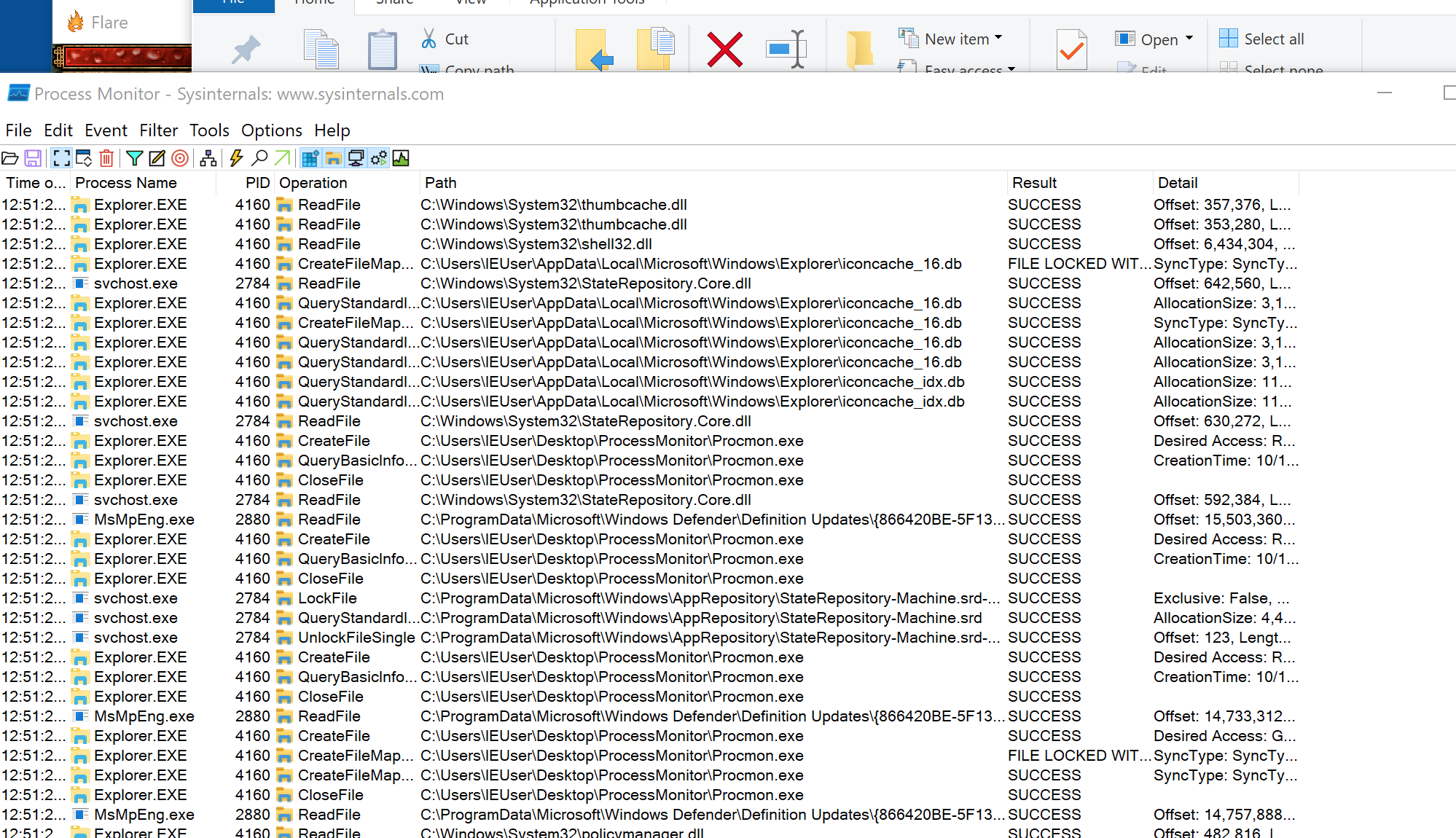
We know the Flare attribute is saved, but a folder may contain several saves, backups, and shared stashes. Use Process Monitor (Reference: Microsoft Sysinternals' Process Monitor records file, registry, and process events on Windows as they happen. Download it from Microsoft's own page.) inside the VM to see which paths the game opens when you:
start the game;
load a save;
enter one map;
change one setting;
close the game.
Filter by the target process (Tip: In Process Monitor, press Ctrl+L to open the filter dialog. Choose Process Name, is, and the game's executable name, then click Add. Add Operation, is, WriteFile to see only writes.) and operations such as CreateFile, ReadFile, and WriteFile.
For this experiment, create a disposable character and choose Save & Exit once. A write to avatar.txt near that action is a candidate; Lesson 10.2 confirms the path and the build= field before changing it.
This helper takes the path of an existing file. With avatar.txt, it writes
avatar.txt.gha-backup and returns success only if the copy succeeds. It uses
the anyhow dependency for an error that includes the failed path; an existing
backup is an error rather than a reason to overwrite it. Keep the original
bytes and record a hash.
// Report only bytes actually read, not the buffer's unused zeroes.
bytes.truncate(read);
Ok(bytes)
}
For first_bytes(path, 16), the buffer has room for 16 bytes and the returned
vector contains the bytes obtained by that read. A read can return fewer;
this is a quick identification helper, not validation of an entire header.
Common “magic” bytes include:
PNG 89 50 4E 47 0D 0A 1A 0A
ZIP 50 4B 03 04
gzip 1F 8B
A file with no readable text may be compressed, encrypted, or simply binary.
This interactive lab needs JavaScript. The lesson text around it still explains the same idea.
A file is only a numbered sequence of bytes. Its format defines where each field begins and ends, and what its bytes mean: text, a count, an offset into the same file, and so on. For example, a four-byte count and a four-byte offset occupy the same space but mean different things. Two parsers using the same format must agree on the fields in the same bytes.
The Flare line build=5,1,1,2 is a small text-format example: the = ends
the field name and commas separate four numbers.
Lesson 10.2 parses it by those rules
before changing a value.
header → version and counts
table → where entries begin
data → the actual records or assets
footer → optional checksum or index
That sketch describes one possible binary layout, not the layout of Flare’s
text save. A PNG begins with the fixed bytes shown above; a different binary
format might begin with a count telling its parser how many records follow.
For either format, field sizes and boundaries have to come from its documented layout, not a guess based on the file extension.
Text formats use character encodings and visible separators. Binary formats use fixed fields, lengths, offsets, and flags. Neither kind is automatically safer or simpler; both need a parser that rejects impossible sizes and missing fields.
Compression and archives are also different ideas. Compression tries to represent data in fewer bytes. An archive gives many named entries one container. ZIP normally does both, but a ZIP entry can also be stored without compression.
A checksum is a compact value calculated from other bytes to detect accidental changes. A cryptographic signature additionally uses a key to prove who produced the data. Renaming or recompressing a file does not recreate a valid signature.
meaning validation: known version, valid IDs, legal ranges, consistent references
A file can pass one stage and fail the other. A well-formed save might refer to an unknown unit type, while a familiar unit name can appear inside a truncated file. Keeping the stages separate produces precise errors and stops friendly-looking text from bypassing boundary checks.
Use a cursor or checked slice ranges rather than repeatedly calculating raw indexes. Every parser step should either consume a proven range or return an error without changing the input file.
Blind replacement can alter comments, unrelated fields, encodings, checksums, or lengths.
Parsing creates a data model that is intentionally smaller and clearer than the file representation. Preserve fields you do not understand when the format allows round trips, and distinguish “missing,” “present with a default value,” and “present with an unknown value.” Those cases may serialize differently even when the game currently displays the same result.
A data model specifies the values, relationships, and constraints that
matter to a program. A character model might name attributes, inventory entries,
and item IDs. A file format specifies how a chosen part of that model is
represented for storage. The raw bytes are another layer below that format.
The Flare line build=5,1,1,2 illustrates the separation. At the game level,
the first value is the Physical attribute. At the format level, it is the first
comma-separated number in a particular named field. At the byte level, the
digit 5 occupies a position in encoded text. A raw byte search cannot by
itself recover the attribute’s role or prove that an unrelated occurrence of
the digit is the same field.
Different storage models expose different relationships:
Model
A possible game use
What the structure makes explicit
Nested document, such as JSON or XML
One save with a character and inventory entries
Containment and named fields
Relational tables
Character rows and item rows linked by owner IDs
Records, keys, and relationships between tables
Graph of nodes and edges
Map locations joined by traversable routes
Connections, and properties of each connection
These are options, not a claim that every game uses a database or every map
needs a graph database. Choose a model for the questions and updates it must
support. The storage implementation then chooses a byte representation and
access structures. A parser or query interface hides some lower-level details,
but its constraints still affect the layer above.
Persistent records, caches, and indexes have different jobs
Lesson 9.1 separated three
jobs: a durable record survives a restart, a cache keeps a result that can be
rebuilt, and a search index finds matching records without checking every one.
Game files have the same split; a decoded texture is a cache.
Suppose a mod changes a texture file. The game may still display its previously
decoded copy until the asset is reloaded or the cache is invalidated. Editing
the durable source and changing a cached representation are therefore different
operations. Conversely, deleting a rebuildable cache is different from deleting
the player’s only save.
Indexes need to remain consistent with the data they describe, and caches need
a policy for becoming stale. When an edit appears to have no effect, check
which representation the game currently reads before concluding that the edit
failed. The running object, its serialized record, and an access structure can
all describe related information while having different lifetimes.
These editing steps become easier to remember as one file journey. The
starting hash identifies the untouched original; the diff shows exactly what
the serializer changed; the disposable profile tells us whether the game
accepts the new representation:
identify the exact file
→ copy and hash the original
→ parse into typed data
→ change one field
→ serialize to a new file
→ compare the diff
→ test in a disposable profile
Change one field at a time, as with memory patches: when a single change breaks the load, the diff names the field that caused it.
Lesson 10.1 followed one Flare character’s Physical value from running state into avatar.txt. Now we will prove the exact path, change that file once, and ask Flare to load it. Use Flare 1.12 with a disposable character. Start Process Monitor and filter to the game process.
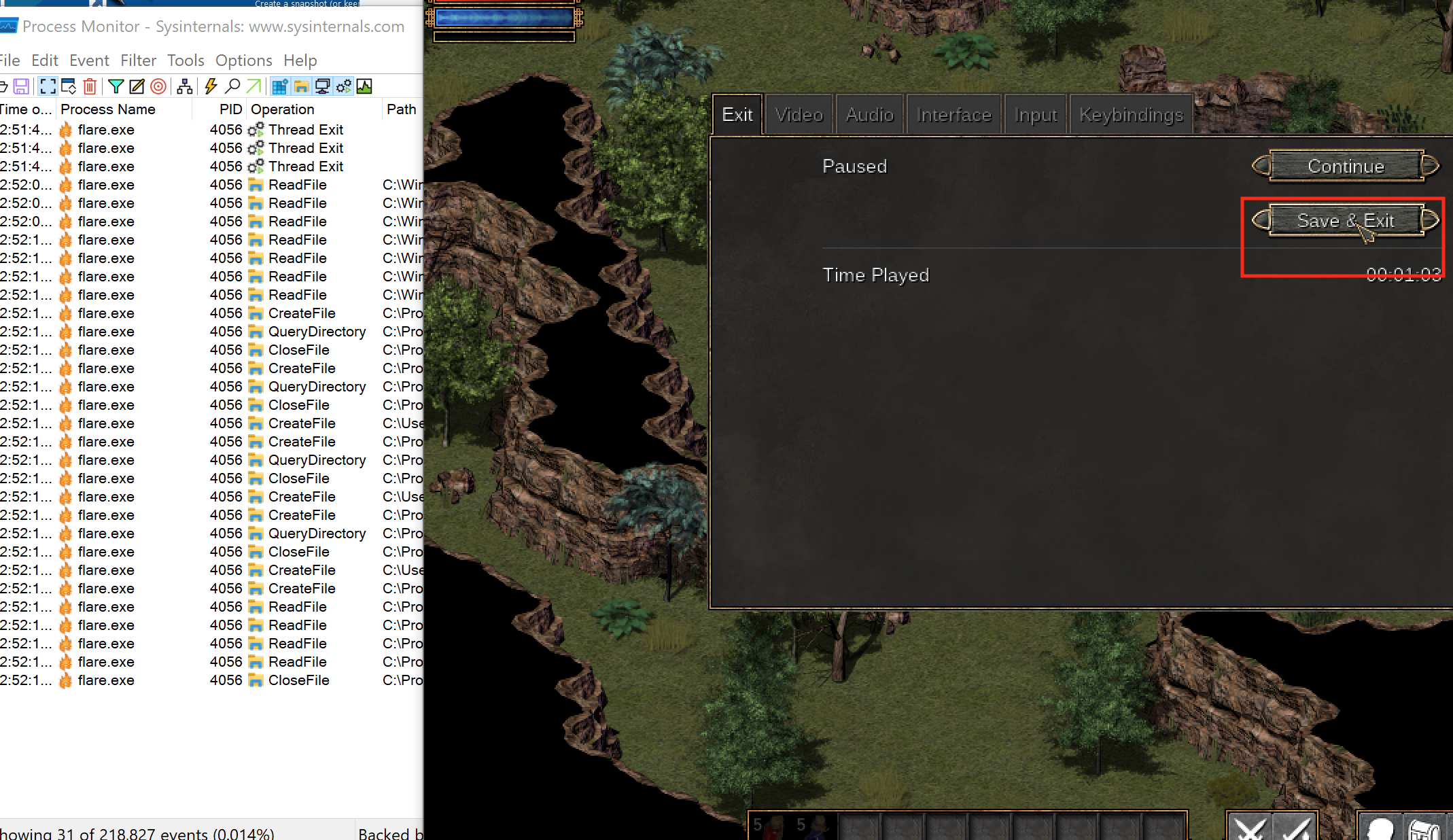
Filtering Process Monitor to the target process.
Save the game once, then look for file writes near that timestamp.
A likely save-data path in the capture.
Close the game before editing. Many games keep state in memory and overwrite the save during shutdown.
For the actual Flare 1.12 lab, filter Process Name is flare.exe, create a character in the Empyrean campaign, then choose Save & Exit. The important writes are:
Open avatar.txt first. It contains the character XP and build values; stash_HC.txt is the shared hardcore stash. Copy both files before changing either one.
Compare two disposable saves from the same character. Make one intended change through the game, such as spending one available point on Physical, and record the visible result. For example:
save A has build=5,1,1,2;
save B has build=6,1,1,2 after Physical rises from 5 to 6;
.filter_map(|(index, (a, b))| (a != b).then_some(index))
.collect()
}
If the files differ almost everywhere, compression, encryption, timestamps, or a checksum may be involved.
This helper compares only the shared prefix because zip ends with the shorter file. Check the two total lengths separately; an inserted field or newline also counts as a difference.
The two-save comparison is a controlled experiment, not proof that every changed
byte belongs to gold. Games may update play time, random state, timestamps, object
order, or integrity data during the same save. Repeat the comparison with several
values and one intentional change at a time. A real field should follow the chosen
change consistently; unrelated changing bytes are background state.
This small example makes the field names visible, but collecting directly into a map would keep only one of two repeated build= lines. The complete editor below checks that the target line occurs exactly once and preserves the other lines and their newline style.
Then require the exact field and change its complete value:
letbuild = values.get_mut("build").context("save has no build field")?;
*build = "30,30,30,30".to_owned();
In the exact Flare 1.12 capture, the new character has:
xp=0
build=5,1,1,2
The four build numbers are Physical, Mental, Offense, and Defense. The original visible hack changes them to:
build=30,30,30,30
Reloading the disposable character shows all four values as 30.
The magic number and the version say what the file is
The book’s invented binary GSAV save records Nia at level 3 with 250
gold. Its first four bytes are 47 53 41 56. As ASCII codes they are:
0x47 = 4 × 16 + 7 = 71: G;
0x53 = 5 × 16 + 3 = 83: S;
0x41 = 4 × 16 + 1 = 65: A;
0x56 = 5 × 16 + 6 = 86: V.
That fixed starting pattern is a magic number. The loader checks it
before treating bytes as fields. A PNG likewise has a fixed signature;
renaming either file changes neither its bytes nor its format.
The next two bytes, 01 00, are the little-endian layout version 1.
A loader uses the version to select a known layout; an editor must refuse
an unknown version because fields may have moved. The
GSAV lab returns UnsupportedVersion for anything
other than 1.
The length byte says how many bytes of text follow. There is no end marker.
The checksum follows the text, so it starts at 12 + 3 = 15. Changing
the name to the five-byte Grace moves it to 12 + 5 = 17 and grows the
whole save to 17 + 4 = 21 bytes. A tool assuming offset 15 would now
read the wrong field.
Check the prefix against the actual file size before trusting it. A
damaged byte C8 means 12 × 16 + 8 = 200; its claimed name ends at
12 + 200 = 212, beyond a 19-byte file. The lab requires
12 + length + 4 to equal the real size and returns an error otherwise.
Other formats end the text with a terminator, often C’s 00 byte. A prefix
counts bytes; a terminator marks the end. A nearby number matching the
text’s byte count is a clue, then test it with names of different lengths.
Neither convention measures the number of displayed characters.
The important change is that the original path is not used as scratch space:
The original helper writes directly to the closed game’s disposable save file. Opening it for replacement truncates the old contents before the new data is completely written, so a failure can leave a partial save.
fs::write(path, contents)?; // Truncates the original before writing finishes.
Ok(())
}
Use prepare then replace: exclusively create a sibling temporary file, write and flush it, close its handle, then request replacement. With create_new(true), a leftover temporary file causes an error instead of being overwritten; inspect or remove it before retrying.
fs::write(path, contents)?; // Truncates the original before writing finishes.
let temporary = path.with_extension("gha-new");
let mut file = fs::OpenOptions::new()
.write(true)
.create_new(true)
.open(&temporary)?;
file.write_all(contents)?;
file.sync_all()?;
drop(file);
fs::rename(&temporary, path)?;
Ok(())
}
Takeaway: construct the complete replacement away from the original, and keep a backup until the game accepts it.
On Windows, replacing an existing file may require a platform-specific replace operation. Keep the backup until the game successfully loads the new save.
Use four explicit stages: prepare, validate, commit, recover:
Prepare: read the original and build new bytes somewhere else.
Validate: confirm the target field, format, ranges, and complete output.
Commit: replace the directory entry in one filesystem operation.
Recover: keep enough information to return to the last known-good save.
Atomic replacement and durability solve different problems. Atomic means an
observer should see the old file or the new file, not a half-written mixture.
Durable means completed data survives the failures the system promises to
handle. Flushing the temporary file improves durability, but no single call can make
the edit, the game’s other save files, cloud synchronization, and a power failure
one universal transaction.
The property we are designing is crash consistency: after interruption, the
files should describe an old valid state, a new valid state, or an unambiguous
recoverable state. “The normal path completed once” is weaker; crash consistency
also accounts for every point where execution could stop.
Design the on-disk states so each one has an obvious response:
Files present
Meaning
Safe response
original only
no edit in progress
open normally
original + temporary
preparation was interrupted
validate or remove only the temporary
new original + backup
replacement completed
test the new save; retain backup
missing original + backup
recovery is needed
restore backup before launching
Do not choose by modification time alone. Validate the expected filename, format,
and contents, then ask the user before replacing the only known-good copy.
Windows VMWatch it happenPrepare a new save while keeping the original recoverable
The original avatar.txt contains xp=0 and build=5,1,1,2. A separate temporary file receives xp=0 and build=30,30,30,30, is flushed and closed, then replaces the original in one operation. The original values survive in the backup. The game reload shows all four attributes as 30.
Read the steps
Close the game. avatar.txt still contains xp=0 and build=5,1,1,2. Keep these original bytes while preparing a replacement.
Require exactly one build= line. Preserve every other line and the existing newline style.
Prepare all four new attributes as 30. The original file is unchanged; xp remains 0.
Write the complete replacement to a temporary sibling. Flush its bytes and close its handle before replacing the original.
One replacement operation installs the complete new file and preserves the original as a backup. An existing backup would make this lab refuse.
Reload the disposable character. All four visible attributes are 30. Keep the backup until the game has accepted and saved the edited state.
File movement depicts one directory replacement, with complete old and new contents. Flushing improves durability; the backup remains available for recovery.
This simulation needs JavaScript. The lesson text around it works through the same numbers.
Close Flare, build the Windows lab workspace, and pass the exact save path and new build value:
The tool requires exactly one build= line, preserves CRLF versus LF, writes and flushes a sibling temporary file, and uses the windows crate’s ReplaceFileW with write-through. Windows installs the new file atomically and places the original at avatar.txt.gha-backup. It refuses to overwrite an existing backup.
The backup is part of the tool’s data model, not clutter to delete immediately. The
edit is not considered successful until Flare parses the new file, loads the
character, and later saves it normally. That final save matters because the game
wrote it: if the edited value is still there, the change survived the game’s own
loader and serializer.
#[cfg(windows)]fn main() -> anyhow::Result<()> { use std::{ fs::{self, File}, io::Write, path::PathBuf, }; use anyhow::Context; use gha_windows_labs::replace_file_with_backup; let mut arguments = std::env::args().skip(1); let path = PathBuf::from( arguments .next() .context("usage: flare_save_editor <avatar.txt> <field> <new-value>")?, ); let field = arguments.next().context("missing field name")?; let new_value = arguments.next().context("missing new value")?; anyhow::ensure!( field .chars() .all(|ch| ch.is_ascii_alphanumeric() || ch == '_'), "field names may contain only ASCII letters, digits, and underscores" ); anyhow::ensure!( !new_value.chars().any(|ch| matches!(ch, '\r' | '\n')), "the new value must stay on one line" ); let text = fs::read_to_string(&path).with_context(|| format!("could not read {}", path.display()))?; let newline = if text.contains("\r\n") { "\r\n" } else { "\n" }; let ended_with_newline = text.ends_with('\n'); let mut matches = 0_usize; let mut output_lines = Vec::new(); for line in text.lines() { let replacement = line .split_once('=') .filter(|(key, _)| key.trim() == field) .map(|_| { matches += 1; format!("{field}={new_value}") }); output_lines.push(replacement.unwrap_or_else(|| line.to_owned())); } anyhow::ensure!( matches == 1, "expected exactly one {field}= line, found {matches}; no file was changed" ); let mut output = output_lines.join(newline); if ended_with_newline { output.push_str(newline); } let temporary = path.with_extension("txt.gha-new"); let backup = path.with_extension("txt.gha-backup"); anyhow::ensure!( !temporary.exists(), "temporary file already exists at {}", temporary.display() ); { let mut file = File::create(&temporary)?; file.write_all(output.as_bytes())?; file.sync_all()?; } if let Err(error) = replace_file_with_backup(&path, &temporary, &backup) { let _ = fs::remove_file(&temporary); return Err(error); } println!( "Changed {field} in {}. Original saved at {}.", path.display(), backup.display() ); Ok(())}#[cfg(not(windows))]fn main() { eprintln!("This file replacement lab uses ReplaceFileW and must run on Windows.");}
// 🔁 Replacement failed, so remove only our disposable temporary file;
// `path` still names the untouched original.
let_ = fs::remove_file(&temporary);
returnErr(error);
}
println!(
"Changed {field} in {}. Original saved at {}.",
path.display(),
backup.display()
);
Ok(())
}
#[cfg(not(windows))]
fnmain() {
eprintln!("This file replacement lab uses ReplaceFileW and must run on Windows.");
}
Read it in five chunks: validate the three arguments, locate exactly one field, preserve the file’s newline style, flush a temporary file, then ask Windows to install it while keeping a backup. If any earlier chunk fails, the original save is untouched.
If one small value change also changes a separate fixed-size region, the file may contain a checksum. Lesson 10.8 works through the GSAV sum; Lesson 10.3 keeps the exact two-save hex comparison.
Do not patch until you understand:
which bytes are covered;
which algorithm is used;
where the expected checksum is stored;
byte order;
whether a secret key is involved.
If the format is cryptographically signed, use supported modding tools instead of attempting to defeat the signature.
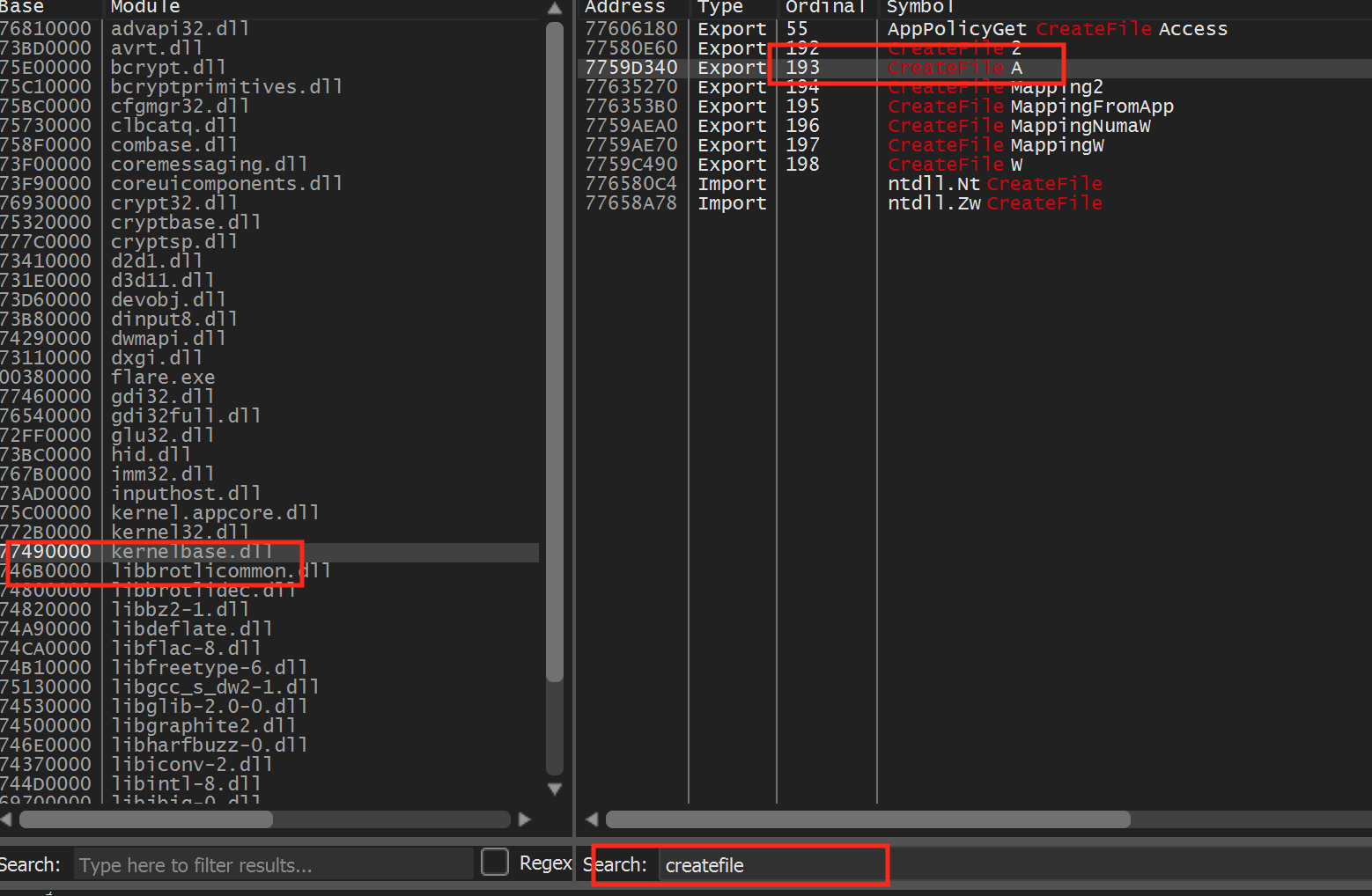
Process Monitor can show the file read, and a debuggerbreakpoint on file APIs can show the buffer passed into parsing.
A file read observed in the debugger.
In 32-bit Flare on Windows, open x64dbg’s Symbols tab, choose kernelbase.dll, find CreateFileA, and break at its first instruction. Saving the game puts the same avatar.txt path on the stack, independently confirming the location found with Process Monitor.
The aim is to learn the format, not to disable validation.
If loading fails, restore the backup and compare the serializer’s whitespace, encoding, terminators, ordering, and integrity field.
Flare made its fields readable as text. A different game may store the same
kind of character state as raw bytes. The next lesson keeps the same
copy–compare–edit–reload discipline but shows how to read that binary layout
with a hex editor.
Lesson 10.2 edited Flare’s text avatar.txt save. Its
build=5,1,1,2 line records a character whose Physical attribute is 5 and
is readable in any text editor. Many saves are not. They store numbers as raw bytes, the
same way a u32 sits in memory, because that is smaller and faster to load.
Open one in a text editor and most bytes turn into boxes, blanks, or stray
symbols. Worse, saving it from a text editor can quietly change bytes, for
example by converting line endings, which corrupts the file.
A hex editor shows a file as what it is: a numbered sequence of bytes, each
written as two hexadecimal digits. In byte-overwrite mode, it can save the
exact replacement bytes without decoding the whole file as text.
HxD and ImHex are common examples; they show the same three columns, so nothing
in this lesson depends on which one you use.
This lesson uses a toy save format made for the book, GSAV, and a Rust lab
that reads and writes it. Here is the complete save for a character called Nia,
at level 3, with 250 gold. It is 19 bytes long:
47 53 41 56 01 00 FA 00 00 00 03 03 4E 69 61 4A 03 00 00
Everything here applies to offline, single-player saves. A value kept on a
game’s server is not in any file on your disk.
00000000 47 53 41 56 01 00 FA 00 00 00 03 03 4E 69 61 4A GSAV........NiaJ
00000010 03 00 00 ...
The offset column on the left gives the position of the first byte on each
row, counted in hex from the start of the file. A row holds 16 bytes, numbered
00 to 0F along the top, so the second row starts at byte 16, which is
0x10 (1 × 16 + 0).
The byte column in the middle shows each byte as two hex digits. To find
the offset of any byte, add its row offset and its column number: the last
byte sits on row 00000010 in column 02, so its offset is
0x10 + 0x02 = 0x12, which is 16 + 2 = 18.
The character column on the right shows each byte as a character.
ASCII is the standard table that gives every English letter, digit, and
common symbol a number from 0 to 127. Bytes from 0x20 (a space) to 0x7E
(~) are printable ASCII and appear as themselves; every other byte appears
as a dot.
The character column is where text stands out: GSAV at the start and Nia in
the middle. It also shows things that are not text. The byte at 0x0F is 4A,
which is 4 × 16 + 10 = 74, the ASCII code for the letter J, so the column shows
a J even though that byte is part of a number. Nothing in the file marks
which bytes are meant as text, so the editor shows every byte both ways.
Each byte belongs to one field of the format. A strip of 16 boxes is one row:
0x0047
0x0153
0x0241
0x0356
0x0401
0x0500
0x06FA
0x0700
0x0800
0x0900
0x0A03
0x0B03
0x0C4E
0x0D69
0x0E61
0x0F4A
magic GSAV
version
gold
level, length
name Nia
sum
Row 00000000: sixteen bytes and the fields they belong to. Byte 0x0A is the level and 0x0B the name's length. The checksum starts at 0x0F and runs on into the next row.
0x1003
0x1100
0x1200
rest of the checksum
Row 00000010: the last three bytes. The checksum starts at 0x0F on the first row and ends here, so one field can straddle two rows.
The full layout, with offsets in hex and in decimal:
An offset in a file is a distance in bytes from the file’s first byte: offset
0x06 means “skip six bytes, then read.” It is not a memory address. When the
game loads this save, it reads the bytes and copies each field into its own
structures somewhere in its memory, so the gold that sat at file offset 6 ends
up at an address that has nothing to do with 6 and usually changes from one run
to the next. Two things follow:
Changing byte 6 on disk does not change a running game. The game sees the new
value only when it loads the file again, and a game that is still running can
overwrite the edit when it saves on exit, so close it first.
An address found with a memory scanner cannot be typed into a hex editor’s
“go to offset” box, or the other way round. Lesson 5.1 met the
same split for executables, where the section table translates between file
offsets and addresses.
The magic number and the version say what the file is
47 53 41 56 spells GSAV in ASCII. This fixed starting pattern is a
magic number: the loader refuses other formats before decoding fields.
The next two bytes, 01 00, give layout version 1. An unknown version must
be refused because its fields may have moved. The lab returns
UnsupportedVersion in that case.
Games for x86 PCs usually write numbers to disk exactly as they sit in memory,
which is little endian: the byte worth the least comes first. Lesson 1.8 explains why
each box is worth 256 times the one before it. Gold occupies offsets 6 to 9,
which hold FA 00 00 00. 0xFA is 15 × 16 + 10 = 250 and the other three
bytes are 0, so the gold is 250. Try other values: changing gold only
overwrites these four bytes, and no later field moves.
How the save stores goldType a gold value and read the four bytes a hex editor shows at offsets 0x06 to 0x09, lowest byte first.
Offsets 0x06 to 0x09 of the save
A u32, lowest byte first: what the save holds
The four gold bytes
offset 0x06offset 0x09
FA× 1
00× 256
00× 65,536
00× 16,777,216
↓ read lowest byte first
Add each byte times its place
250 = 250
Two wrong readings of a number
Same bytes, biggest first
0xFA000000 = 4,194,304,000
Typed as the text "250"
32 35 303 character bytes, not a u32
250 is stored as FA 00 00 00. Read biggest byte first, the same four bytes would mean 4,194,304,000.
The version works the same way with two bytes: 01 00 is 1 × 1 + 0 × 256 = 1.
The level at offset 10 is a single byte, 03, so there is no order to get
wrong: it is 3.
Reading in the wrong order gives a number that is obviously off, which makes a
useful check: read biggest byte first, FA 00 00 00 is 0xFA000000, which is
250 × 16,777,216 = 4,194,304,000 gold. When one byte
order gives a plausible value and the other gives billions, the plausible one is
almost always the right one.
A length-prefixed string stores its byte count before its text. Here
offset 11 contains 03, so the next three bytes, 4E 69 61, spell Nia.
The checksum begins at offset 12 + 3 = 15. A five-byte name moves it to
offset 17 and grows the whole file to 21 bytes.
The layout above was handed to you. A real game’s layout usually is not, so its
fields are found by comparison, the byte-level version of
Lesson 10.2’s two-save diff: save once, change exactly one value in the game, save again, and compare
the two files. Most hex editors have a compare view that highlights the bytes
that differ.
Suppose Nia earns 1,000 gold, taking her from 250 to 1,250, and nothing else
changes. Offsets 0x00 to 0x05 are identical in both saves, so the strips
start at 0x06:
0x06FA
0x0700
0x0800
0x0900
0x0A03
0x0B03
0x0C4E
0x0D69
0x0E61
0x0F4A
0x1003
0x1100
0x1200
Save A, with 250 gold.
0x06E2
0x0704
0x0800
0x0900
0x0A03
0x0B03
0x0C4E
0x0D69
0x0E61
0x0F36
0x1003
0x1100
0x1200
gold
checksum
Save B, with 1,250 gold. Exactly three bytes differ: 0x06, 0x07, and 0x0F.
Offsets 6 and 7 changed from FA 00 to E2 04. 0xE2 is 14 × 16 + 2 = 226,
so reading lowest byte first gives 226 + 4 × 256 = 226 + 1,024 = 1,250: the new
gold. Gold therefore starts at offset 6. Offsets 8 and 9 hold 00 in both
saves, so they could be the upper half of a 4-byte gold field or something
unrelated that happens to be zero. Two bytes can hold at most
256 × 256 − 1 = 65,535, so a third save with more gold than that settles it: if
byte 8 changes, the field is wider than two bytes.
Offset 0x0F changed as well, from 4A to 36, although nothing else in the
game changed. A byte that changes whenever any other value changes is the mark
of a checksum, the subject of the next section.
In a real game the diff also catches bytes that change on their own, such as
play time, a timestamp, or a random seed.
Lesson 10.2 separates those by
repeating the comparison with several values; the real field follows the
in-game number every time.
The final four bytes store a checksum, computed from the bytes before
them. This toy format adds those bytes and stores the sum as a
little-endian u32. The original save’s sum is 842:
The stored bytes 4A 03 00 00 also mean 74 + 3 × 256 = 842.
Editing gold changes its contribution to that sum. For 1,250 gold,
E2 04 00 00 contributes 226 + 4 = 230 in place of 250, so the new sum
is 842 − 250 + 230 = 822. Its checksum is 36 03 00 00. The complete
consistent file is:
Changing gold to 9,999 without updating the checksum instead gives a
computed sum of 646 while the stored value stays 842, so the loader
refuses the file. The lab validates the original before editing and
recomputes the checksum afterward; giving existing damage a fresh checksum
would conceal it.
A hex editor writes straight back to the file it opened, so a few mechanical
details decide whether an edit can be undone:
Keep an untouched copy of the save before the first edit, and keep it until
the game has loaded the edited save and saved it again. A wrong byte is only
undone by that copy.
Type over bytes; do not insert them. Hex editors have an overwrite mode,
which replaces bytes in place, and an insert mode, which adds bytes and
pushes everything after them along. In a fixed layout, one inserted byte moves
every later field: the loader then reads the checksum from the wrong place and
finds the file one byte too long. Changing gold overwrites exactly four bytes.
A longer name is the one edit that must insert bytes. Renaming Nia to Grace
means inserting two bytes, changing the length byte from 03 to 05, and
recomputing the checksum at its new offset, 17. Getting any one of the three
wrong makes the loader refuse the file.
A program that edits saves should write the result to a temporary file and
then replace the original in one step, as in Lesson 10.2, so a crash mid-write cannot leave half a
save.
Everything above depends on each field being stored as plain bytes at a known
place. Two common designs break that assumption:
A compressed save stores an encoded form of the data. gzip, a common
compression format, starts its files with 1F 8B, the same bytes Lesson 9.3
found at the start of Wesnoth’s network payloads. The gold field is not
anywhere in the file as plain bytes, and changing one compressed byte changes
how everything after it decompresses; gzip’s own CRC-32 at the end of the
stream then fails. The file has to be decompressed, edited, and compressed
again with a tool that understands the format.
An encrypted save looks like random bytes: no readable text in the
character column, and every value from 00 to FF appearing about equally
often. Changing the encrypted bytes, the ciphertext, changes what they
decrypt to in ways nobody can choose, and authenticated encryption, covered in
Lesson 10.10, refuses the altered file outright. Without the key
there is nothing to edit.
The two-save comparison tells these cases apart quickly. A plain format changes
a handful of bytes, as it did above; a compressed file, or one encrypted afresh
on every save, changes almost everything from the first difference onward. If
the save turns out to be text after all, Lesson 10.2’s key/value editing is
simpler than any hex edit.
//! Parse, validate, and patch a toy binary save file.//!//! The format is small enough to read by eye in a hex editor. Every field sits//! at a fixed offset except the name, whose length is stored in the byte just//! before it, so the checksum's offset depends on that length://!//! ```text//! offset size field//! 0 4 magic: the ASCII bytes "GSAV" (47 53 41 56)//! 4 2 format version, u16 little endian//! 6 4 gold, u32 little endian//! 10 1 level, u8//! 11 1 name length n, u8//! 12 n name, ASCII//! 12 + n 4 checksum, u32 little endian: the sum of every earlier byte//! ```//!//! The example save for `Nia`, level 3, with 250 gold is 19 bytes long://!//! ```text//! 47 53 41 56 01 00 FA 00 00 00 03 03 4E 69 61 4A 03 00 00//! ```//!//! Everything here works on byte slices in memory, so the rules can be tested//! without touching a real save.//!//! ```text//! cargo run --bin hex_save_lab//! cargo test --bin hex_save_lab//! ```use std::cmp::Ordering;use std::fmt::{self, Write as _};/// The four bytes every save starts with: `G`, `S`, `A`, `V` in ASCII.const MAGIC: [u8; 4] = *b"GSAV";/// The only format version this parser has a layout for.const SUPPORTED_VERSION: u16 = 1;const MAGIC_OFFSET: usize = 0;const VERSION_OFFSET: usize = 4;const GOLD_OFFSET: usize = 6;const LEVEL_OFFSET: usize = 10;const NAME_LENGTH_OFFSET: usize = 11;const NAME_OFFSET: usize = 12;const CHECKSUM_SIZE: usize = 4;/// The smallest possible save: the 12-byte fixed header, an empty name, and/// the four checksum bytes.const MIN_SAVE_SIZE: usize = NAME_OFFSET + CHECKSUM_SIZE;/// Bytes per row in the hex dump, as most hex editors show them.const HEX_ROW: usize = 16;/// Two hex digits per byte plus one space between neighbours.const HEX_COLUMN_WIDTH: usize = HEX_ROW * 3 - 1;/// The example save exactly as it would sit on disk.const EXAMPLE_SAVE: [u8; 19] = [ 0x47, 0x53, 0x41, 0x56, // magic "GSAV" 0x01, 0x00, // version 1 0xFA, 0x00, 0x00, 0x00, // gold 250 0x03, // level 3 0x03, // name length 3 0x4E, 0x69, 0x61, // "Nia" 0x4A, 0x03, 0x00, 0x00, // checksum 0x34A = 842];/// The decoded contents of one save.#[derive(Clone, Debug, PartialEq, Eq)]struct Save { version: u16, gold: u32, level: u8, name: String,}/// Everything that can make a byte slice unusable as a save.#[derive(Clone, Debug, PartialEq, Eq)]enum SaveError { /// The slice ends before a field the format requires. TooShort { needed: usize, found: usize }, /// Bytes remain after the checksum, so the length byte and the file size /// disagree. TrailingBytes { expected: usize, found: usize }, /// The first four bytes are not `GSAV`, so this is some other kind of file. BadMagic([u8; 4]), /// A version this parser has no layout for. UnsupportedVersion(u16), /// The name is not plain ASCII, or is too long for its one-byte length. BadName, /// The stored checksum does not equal the sum of the bytes it covers. ChecksumMismatch { stored: u32, computed: u32 },}impl fmt::Display for SaveError { fn fmt(&self, formatter: &mut fmt::Formatter<'_>) -> fmt::Result { match self { Self::TooShort { needed, found } => { write!( formatter, "save is too short: needs {needed} bytes, found {found}" ) } Self::TrailingBytes { expected, found } => { write!( formatter, "save has extra bytes: expected {expected}, found {found}" ) } Self::BadMagic(magic) => write!(formatter, "not a GSAV save: starts {magic:02X?}"), Self::UnsupportedVersion(version) => { write!(formatter, "save version {version} is not supported") } Self::BadName => write!(formatter, "the name must be ASCII and at most 255 bytes"), Self::ChecksumMismatch { stored, computed } => write!( formatter, "checksum mismatch: stored {stored}, computed {computed}" ), } }}impl std::error::Error for SaveError {}/// Copies `N` bytes starting at `offset`, or reports how many bytes the read/// needed if the slice ends first.fn read_array<const N: usize>(bytes: &[u8], offset: usize) -> Result<[u8; N], SaveError> { let end = offset.saturating_add(N); bytes .get(offset..end) .and_then(|slice| <[u8; N]>::try_from(slice).ok()) .ok_or(SaveError::TooShort { needed: end, found: bytes.len(), })}/// Overwrites `N` bytes starting at `offset`, exactly like typing over them in/// a hex editor's overwrite mode. Nothing after the field moves.fn write_array<const N: usize>( bytes: &mut [u8], offset: usize, value: [u8; N],) -> Result<(), SaveError> { let found = bytes.len(); let end = offset.saturating_add(N); let slot = bytes .get_mut(offset..end) .ok_or(SaveError::TooShort { needed: end, found })?; slot.copy_from_slice(&value); Ok(())}/// Adds up every byte in `covered`.////// A valid save covers at most the 12 header bytes plus a 255-byte name, 267/// bytes in all, and 267 × 255 = 68,085 is far below the `u32` limit, so the/// sum never actually wraps. Wrapping addition only keeps an oversized input/// from panicking.fn checksum(covered: &[u8]) -> u32 { covered .iter() .copied() .map(u32::from) .fold(0, u32::wrapping_add)}/// Decodes and validates a complete save.////// The checks run in the order a loader needs them: enough bytes for the fixed/// header, the magic, the version, a length byte that agrees with the file/// size, the checksum over everything before it, and readable text.fn parse(bytes: &[u8]) -> Result<Save, SaveError> { if bytes.len() < MIN_SAVE_SIZE { return Err(SaveError::TooShort { needed: MIN_SAVE_SIZE, found: bytes.len(), }); } let magic = read_array::<4>(bytes, MAGIC_OFFSET)?; if magic != MAGIC { return Err(SaveError::BadMagic(magic)); } let version = u16::from_le_bytes(read_array::<2>(bytes, VERSION_OFFSET)?); if version != SUPPORTED_VERSION { return Err(SaveError::UnsupportedVersion(version)); } // The name's length decides where the checksum lives, so the file size // must agree with it before any later field is read. let [name_length] = read_array::<1>(bytes, NAME_LENGTH_OFFSET)?; let checksum_offset = NAME_OFFSET + usize::from(name_length); let expected = checksum_offset + CHECKSUM_SIZE; match bytes.len().cmp(&expected) { Ordering::Less => { return Err(SaveError::TooShort { needed: expected, found: bytes.len(), }); } Ordering::Greater => { return Err(SaveError::TrailingBytes { expected, found: bytes.len(), }); } Ordering::Equal => {} } // In bounds: the length check above made `bytes.len()` equal // `checksum_offset + 4`. let covered = &bytes[..checksum_offset]; let stored = u32::from_le_bytes(read_array::<4>(bytes, checksum_offset)?); let computed = checksum(covered); if stored != computed { return Err(SaveError::ChecksumMismatch { stored, computed }); } let name_bytes = &covered[NAME_OFFSET..]; if !name_bytes.is_ascii() { return Err(SaveError::BadName); } let [level] = read_array::<1>(bytes, LEVEL_OFFSET)?; Ok(Save { version, gold: u32::from_le_bytes(read_array::<4>(bytes, GOLD_OFFSET)?), level, name: name_bytes.iter().copied().map(char::from).collect(), })}/// Serializes a save and writes a fresh checksum over every byte before it.fn encode(save: &Save) -> Result<Vec<u8>, SaveError> { if save.version != SUPPORTED_VERSION { return Err(SaveError::UnsupportedVersion(save.version)); } if !save.name.is_ascii() { return Err(SaveError::BadName); } let name_length = u8::try_from(save.name.len()).map_err(|_| SaveError::BadName)?; let checksum_offset = NAME_OFFSET + save.name.len(); let mut bytes = vec![0_u8; checksum_offset + CHECKSUM_SIZE]; write_array(&mut bytes, MAGIC_OFFSET, MAGIC)?; write_array(&mut bytes, VERSION_OFFSET, save.version.to_le_bytes())?; write_array(&mut bytes, GOLD_OFFSET, save.gold.to_le_bytes())?; write_array(&mut bytes, LEVEL_OFFSET, [save.level])?; write_array(&mut bytes, NAME_LENGTH_OFFSET, [name_length])?; bytes[NAME_OFFSET..checksum_offset].copy_from_slice(save.name.as_bytes()); let sum = checksum(&bytes[..checksum_offset]); write_array(&mut bytes, checksum_offset, sum.to_le_bytes())?; Ok(bytes)}/// Changes the gold field in a copy of the save and recomputes the checksum,/// the way a correct save editor must.////// The original is validated first, so a damaged save is never "repaired" by/// giving it a checksum that matches its damage.fn patch_gold(original: &[u8], gold: u32) -> Result<Vec<u8>, SaveError> { let save = parse(original)?; let checksum_offset = NAME_OFFSET + save.name.len(); let mut patched = original.to_vec(); write_array(&mut patched, GOLD_OFFSET, gold.to_le_bytes())?; let sum = checksum(&patched[..checksum_offset]); write_array(&mut patched, checksum_offset, sum.to_le_bytes())?; Ok(patched)}/// The edit that breaks the save: the gold bytes change, the checksum does not.fn patch_gold_without_checksum(original: &[u8], gold: u32) -> Result<Vec<u8>, SaveError> { parse(original)?; let mut patched = original.to_vec(); write_array(&mut patched, GOLD_OFFSET, gold.to_le_bytes())?; Ok(patched)}/// Lists every offset where two files hold different bytes, as a hex editor's/// compare view does. Bytes present in only the longer file count as/// different.fn differing_offsets(left: &[u8], right: &[u8]) -> Vec<usize> { let shared = left.len().min(right.len()); let longer = left.len().max(right.len()); left.iter() .zip(right) .enumerate() .filter_map(|(offset, (a, b))| (a != b).then_some(offset)) .chain(shared..longer) .collect()}/// The character a hex editor shows for one byte: printable ASCII as itself,/// everything else as a dot.fn printable(byte: u8) -> char { if byte == b' ' || byte.is_ascii_graphic() { char::from(byte) } else { '.' }}/// Formats bytes the way a hex editor shows them: an offset column, sixteen/// bytes per row in hex, and a character column.fn hex_dump(bytes: &[u8]) -> String { let width = HEX_COLUMN_WIDTH; let mut dump = String::new(); for (row, chunk) in bytes.chunks(HEX_ROW).enumerate() { let offset = row * HEX_ROW; let hex = chunk .iter() .map(|byte| format!("{byte:02X}")) .collect::<Vec<_>>() .join(" "); let text: String = chunk.iter().copied().map(printable).collect(); // Writing into a `String` cannot fail, so the result carries nothing. let _ = writeln!(dump, "{offset:08X} {hex:<width$} {text}"); } dump}fn main() -> Result<(), SaveError> { println!("1. The example save, as a hex editor shows it"); print!("{}", hex_dump(&EXAMPLE_SAVE)); let save = parse(&EXAMPLE_SAVE)?; let checksum_offset = NAME_OFFSET + save.name.len(); println!("\n2. Decoded: {save:?}"); println!( " sum of bytes 0 to {} = {}", checksum_offset - 1, checksum(&EXAMPLE_SAVE[..checksum_offset]) ); println!( " encoding those fields again gives the same bytes: {}", encode(&save)? == EXAMPLE_SAVE ); println!("\n3. The same save with 1,250 gold and a recomputed checksum"); let richer = patch_gold(&EXAMPLE_SAVE, 1250)?; print!("{}", hex_dump(&richer)); println!( " offsets that differ from the original: {:?}", differing_offsets(&EXAMPLE_SAVE, &richer) ); println!("\n4. Gold set to 9,999 without fixing the checksum"); let broken = patch_gold_without_checksum(&EXAMPLE_SAVE, 9999)?; match parse(&broken) { Ok(save) => println!(" unexpectedly accepted: {save:?}"), Err(error) => println!(" the loader refuses it: {error}"), } println!("\n5. Other damage the parser refuses"); let mut wrong_magic = EXAMPLE_SAVE; wrong_magic[MAGIC_OFFSET] = b'X'; let cases: [(&str, &[u8]); 3] = [ ("first byte typed over with X", &wrong_magic), ("file cut off after 10 bytes", &EXAMPLE_SAVE[..10]), ("last checksum byte missing", &EXAMPLE_SAVE[..18]), ]; for (label, bytes) in cases { match parse(bytes) { Ok(save) => println!(" {label}: unexpectedly accepted {save:?}"), Err(error) => println!(" {label}: {error}"), } } println!("\n6. A five-letter name moves the checksum from offset 15 to 17"); let grace = encode(&Save { name: String::from("Grace"), ..save })?; print!("{}", hex_dump(&grace)); Ok(())}#[cfg(test)]mod tests { use super::{ checksum, differing_offsets, encode, hex_dump, parse, patch_gold, patch_gold_without_checksum, Save, SaveError, EXAMPLE_SAVE, NAME_LENGTH_OFFSET, }; fn nia() -> Save { Save { version: 1, gold: 250, level: 3, name: String::from("Nia"), } } #[test] fn the_example_decodes_to_its_documented_fields() { assert_eq!(parse(&EXAMPLE_SAVE), Ok(nia())); } #[test] fn the_example_checksum_is_the_byte_sum_842() { // 305 (GSAV) + 1 (version) + 250 (gold) + 3 + 3 + 280 (Nia) = 842. assert_eq!(checksum(&EXAMPLE_SAVE[..15]), 842); assert_eq!(842, 0x34A); assert_eq!(EXAMPLE_SAVE[15..], [0x4A, 0x03, 0x00, 0x00]); } #[test] fn encoding_the_fields_reproduces_the_example_bytes() { assert_eq!(encode(&nia()).as_deref(), Ok(&EXAMPLE_SAVE[..])); } #[test] fn patching_gold_to_1250_rewrites_gold_and_checksum() { let patched = patch_gold(&EXAMPLE_SAVE, 1250).expect("the example is valid"); // 1250 = 0x4E2, and 842 - 250 + (0xE2 + 0x04) = 822 = 0x336. assert_eq!( patched, [ 0x47, 0x53, 0x41, 0x56, 0x01, 0x00, 0xE2, 0x04, 0x00, 0x00, 0x03, 0x03, 0x4E, 0x69, 0x61, 0x36, 0x03, 0x00, 0x00, ] ); assert_eq!(checksum(&patched[..15]), 822); assert_eq!(parse(&patched).map(|save| save.gold), Ok(1250)); } #[test] fn comparing_two_saves_finds_the_gold_and_checksum_bytes() { let patched = patch_gold(&EXAMPLE_SAVE, 1250).expect("the example is valid"); assert_eq!(differing_offsets(&EXAMPLE_SAVE, &patched), vec![6, 7, 15]); } #[test] fn gold_patched_without_the_checksum_is_rejected() { let broken = patch_gold_without_checksum(&EXAMPLE_SAVE, 9999).expect("the example is valid"); // 9999 = 0x270F, and 842 - 250 + (0x0F + 0x27) = 646. assert_eq!(broken[6..10], [0x0F, 0x27, 0x00, 0x00]); assert_eq!( parse(&broken), Err(SaveError::ChecksumMismatch { stored: 842, computed: 646, }) ); } #[test] fn one_changed_level_byte_moves_the_sum_by_one() { let mut edited = EXAMPLE_SAVE; edited[10] = 4; assert_eq!( parse(&edited), Err(SaveError::ChecksumMismatch { stored: 842, computed: 843, }) ); } #[test] fn wrong_magic_is_rejected_before_anything_else() { let mut wrong = EXAMPLE_SAVE; wrong[0] = b'X'; assert_eq!(parse(&wrong), Err(SaveError::BadMagic(*b"XSAV"))); } #[test] fn an_unknown_version_is_rejected() { let mut newer = EXAMPLE_SAVE; newer[4] = 2; assert_eq!(parse(&newer), Err(SaveError::UnsupportedVersion(2))); } #[test] fn short_files_are_rejected() { assert_eq!( parse(&[]), Err(SaveError::TooShort { needed: 16, found: 0, }) ); assert_eq!( parse(&EXAMPLE_SAVE[..10]), Err(SaveError::TooShort { needed: 16, found: 10, }) ); assert_eq!( parse(&EXAMPLE_SAVE[..18]), Err(SaveError::TooShort { needed: 19, found: 18, }) ); } #[test] fn a_length_byte_larger_than_the_file_is_rejected() { let mut lying = EXAMPLE_SAVE; lying[NAME_LENGTH_OFFSET] = 200; // 12 header bytes + 200 name bytes + 4 checksum bytes = 216. assert_eq!( parse(&lying), Err(SaveError::TooShort { needed: 216, found: 19, }) ); } #[test] fn trailing_bytes_are_rejected() { let mut longer = EXAMPLE_SAVE.to_vec(); longer.push(0); assert_eq!( parse(&longer), Err(SaveError::TrailingBytes { expected: 19, found: 20, }) ); } #[test] fn a_longer_name_moves_the_checksum() { let grace = Save { name: String::from("Grace"), ..nia() }; let bytes = encode(&grace).expect("the name is short ASCII"); // 12 + 5 = 17, so the checksum sits at 17..21 and the file is 21 bytes. // 559 (bytes 0 to 10) + 5 (length) + 482 (Grace) = 1046 = 0x416. assert_eq!(bytes.len(), 21); assert_eq!(bytes[17..], [0x16, 0x04, 0x00, 0x00]); assert_eq!(parse(&bytes), Ok(grace)); } #[test] fn names_that_do_not_fit_the_format_are_refused() { let accented = Save { name: String::from("Zoë"), ..nia() }; let too_long = Save { name: "A".repeat(256), ..nia() }; assert_eq!(encode(&accented), Err(SaveError::BadName)); assert_eq!(encode(&too_long), Err(SaveError::BadName)); } #[test] fn the_dump_matches_a_hex_editor_row() { let dump = hex_dump(&EXAMPLE_SAVE); let mut lines = dump.lines(); assert_eq!( lines.next(), Some("00000000 47 53 41 56 01 00 FA 00 00 00 03 03 4E 69 61 4A GSAV........NiaJ") ); let second = lines.next().expect("19 bytes need two rows"); assert!(second.starts_with("00000010 03 00 00 ")); assert!(second.ends_with(" ...")); assert_eq!(lines.next(), None); }}
hex_save_lab.rs implements the GSAV
format in portable safe Rust:
every offset is a named constant, such as GOLD_OFFSET (6) and
NAME_LENGTH_OFFSET (11), so no bare numbers are scattered through the code;
parse checks, in the loader’s order, that the file is long enough, the magic
is GSAV, the version is 1, the length byte agrees with the file size, and
the stored checksum equals the recomputed sum, and it returns a distinct
SaveError for each failure, such as BadMagic, TooShort, or
ChecksumMismatch, instead of panicking;
patch_gold overwrites the four gold bytes in a copy and then recomputes the
checksum, while patch_gold_without_checksum makes the broken edit so its
rejection can be seen;
patch_gold runs parse on the original first, because recomputing the
checksum of an already damaged save would give the damage a valid checksum;
hex_dump prints bytes in the three-column layout above, and
differing_offsets is the compare view.
Its tests pin every number in this lesson: the sum 842, the recomputed 822, the
rejected 646, the differing offsets 6, 7, and 15, and the checksum’s move to
offset 17 for a five-letter name. Build and run it with:
cargo run --manifest-path rust-labs/Cargo.toml --bin hex_save_lab
cargo test --manifest-path rust-labs/Cargo.toml --bin hex_save_lab
The save has shown why a file offset and a live memory address answer different
questions. The same byte-reading habit helps with other game resources: next
we connect a visible surface to a texture file, then follow the files that
define units and bundle mods.
Lesson 10.2 changed the build= character-stat line in Flare’s avatar.txt save and reloaded the character. Another stored resource controls what a game draws: an image file. We can use the same identify → copy → change one thing → reload → verify method, this time looking for a visible mark on a texture.
In the offline Urban Terror target, choose a distinctive wall, sign, or object. Walk close enough to see its texture clearly.
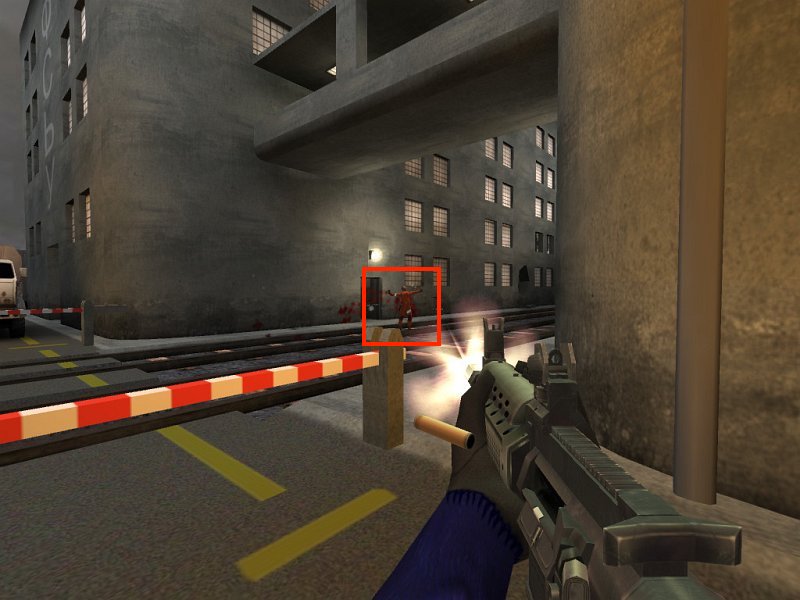
A distinctive in-game surface to replace.
Search the game’s resource folders or archives for likely image names. Thumbnail tools and image dimensions can narrow the list.
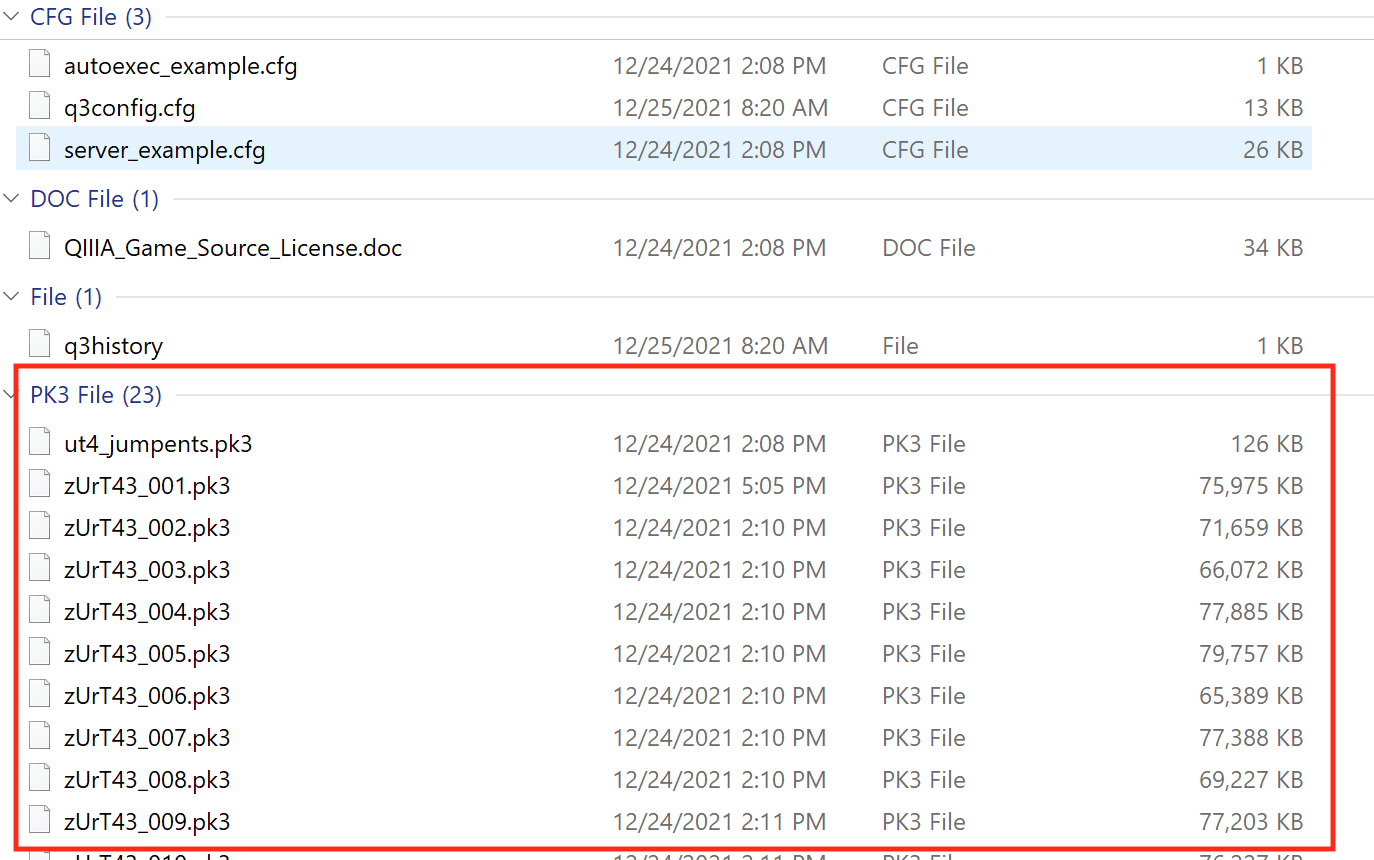
Urban Terror’s q3ut4 folder contains .pk3 files. A PK3 is a ZIP archive with a game-specific extension; its first two bytes are the ZIP magic PK. For this exact lab, open:
q3ut4\zUrT43_001.pk3
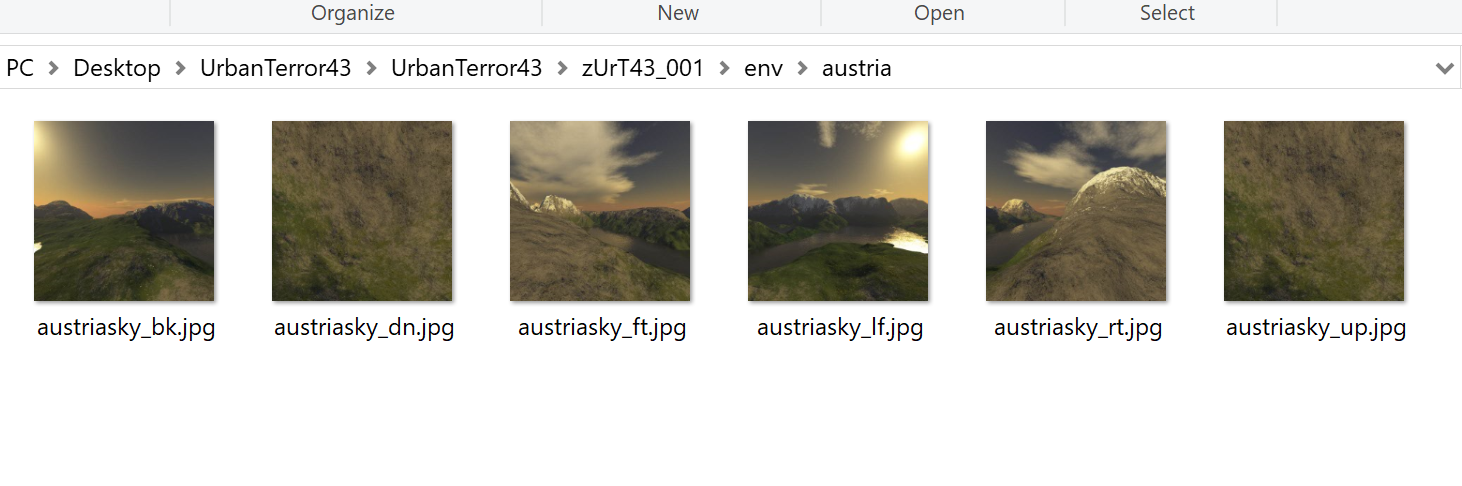
Inside it, browse to env\austria. These six images form the Austria map’s skybox.
Extract zUrT43_001.pk3 to a work folder. Keep the original PK3 as a backup. The extracted tree has the sky images three folders down:
DirectoryzUrT43_001/the work folder you extracted into
Directorybotfiles/
…
Directoryenv/
Directoryaustria/
austriasky_dw.jpgthe downward-facing image to copy
austriasky_up.jpg the file to replace
Directoryfonts/
…
…
In that tree:
delete env\austria\austriasky_up.jpg;
copy env\austria\austriasky_dw.jpg;
rename the copy to austriasky_up.jpg;
ZIP the archive’s contents (botfiles, env, fonts, and the other root folders), not the outer work folder;
name the new archive zUrT43_001.pk3 and place it in q3ut4.
Start a local match on ut4_austria and look upward. The top of the sky now uses the downward-facing image. That unmistakable result proves you found, modified, and repacked the real game resource correctly.
The program opens the PK3 as ZIP, reads env/austria/austriasky_dw.jpg, rebuilds every archive entry, substitutes those bytes only for env/austria/austriasky_up.jpg, flushes the new archive, and atomically installs it with ReplaceFileW. The untouched original becomes zUrT43_001.pk3.gha-backup, and the tool refuses to replace any other PK3 name or overwrite that backup.
The full implementation is urbanterror_pk3.rs. It uses the current zip crate API documented through Context7 and the shared Windows replacement helper in file_replace.rs.
"Replaced {UP} with {DOWN}. Original archive saved at {}.",
backup.display()
);
Ok(())
}
#[cfg(not(windows))]
fnmain() {
eprintln!("This PK3 replacement lab uses ReplaceFileW and must run on Windows.");
}
The loop rebuilds every entry instead of modifying ZIP bytes in place. Only the exact UP path receives replacement bytes, and replaced == 1 catches both “wrong archive” and “duplicate path” mistakes before Windows installs anything.
With those dependencies in Cargo.toml, this function opens one image and
prints its dimensions and color format. The result tells you whether the file
still has the properties the game expects before you replace an asset.
A tiny marker in one corner is enough to prove which image the game loaded,
without redesigning the whole texture. This function takes an RGBA image,
limits the marked square to 16 pixels on either side, and returns the changed
copy for the reversible archive replacement:
The marker is orange-red, rgb(255, 64, 32): red 255, green 64, blue 32, with alpha 255 (fully opaque). Write to a new path first and compare dimensions and color type.
Urban Terror reads this image from inside its archive. Whether another engine
prefers a loose file at the same path is part of its load order, which
Lesson 10.5 works through for mods.
A model’s texture coordinates map its surface to the image, so one texture can repeat, rotate, or cover many surfaces. Changing the image may affect more places than the one you first noticed. If the replacement appears upside down, the file and the engine disagree about which edge v = 0 names (Lesson 7.1).
A coordinate outside 0 to 1 is handled by the texture’s addressing mode. With repeat, u = 2.5 is treated as 0.5, so the image tiles. With clamp, it is treated as 1.0, so the edge pixels smear outward.
A texture is one image. A 3D model contains arrays of vertex positions and other attributes, plus indices and references that connect them into surfaces and scenes. glTF is an open format for 3D models and scenes from the Khronos Group, the same
group that maintains OpenGL, and it is a good example because it is plain about its own
structure. A glTF model is a JSON description of what is in the model, in .gltf text
with its binary data alongside, or all packed in one .glb file. Reading it is the
two-stage parse from Lesson 10.1: first check that the bytes are valid JSON of the right
shape, then check that what the JSON says makes sense.
The JSON is a set of lists that point at each other by position. The smallest useful model
is one triangle:
Follow the chain from the top. The scene lists node 0. Node 0 holds mesh 0, and moves it 2
units up with a translation (a node can also have a rotation, stored as a quaternion
from Lesson 7.1, a scale, and children, which is the parent and child arrangement of
Lesson 7.1). The mesh’s one primitive says its vertex positions are in accessor 1 and its
indices are in accessor 0. An accessor says how to read a stretch of bytes: accessor 1
is VEC3 (three numbers per item) of componentType 5126 (a 4-byte float), count 3, so
each vertex is 3 × 4 = 12 bytes and the three vertices take 3 × 12 = 36 bytes. Accessor 0
is SCALAR of 5123 (a 2-byte unsigned integer), count 3, which is 3 × 2 = 6 bytes, the three
indices. A buffer view is a slice of the buffer: view 0 is bytes 0 to 6 and view 1 is
bytes 8 to 44, because the indices are padded with 2 bytes so that the floats start on a
4-byte boundary. The buffer is 8 + 36 = 44 bytes in all.
Because a model file is untrusted input, a loader checks every one of those links. Does
the accessor name a buffer view that exists? Does its offset plus count × item size fit
inside that view? Accessor 1 needs 0 + 36 = 36 bytes and its view is 36 long, so it fits. A
file that claims count 1,000,000 for the same view needs 1,000,000 × 12 = 12,000,000
bytes, and must be rejected before anything is allocated or read.
The rest of a model hangs off the same pattern: materials (colours, textures, and
whether the surface is opaque, cut out, or blended, as Lesson 7.2 explained), skins
(the skeleton, with the bone indices and weights of Lesson 7.6), animations (lists of
times and values for a node’s translation, rotation, or scale, played with the
interpolation of Lesson 4.4), and free-form extras where a game can store its own data.
A scene viewer is a tool that does nothing but load such a file and show it, which is the
quickest way to see what a model contains.
A sound is stored as a list of samples, measurements of the sound wave taken many
times a second. CD-quality audio takes 44,100 samples a second for each of 2 channels
(left and right), each sample 2 bytes. That is 44,100 × 2 × 2 = 176,400 bytes a second, or
10,584,000 bytes, about 10 MiB, a minute. A three-minute song would take about 30 MiB, so
music is stored compressed (Ogg Vorbis and MP3 are common) and streamed, decoded a
chunk at a time, while a short sound effect is decoded once and kept in memory.
This builder needs JavaScript. Here is the lesson’s worked example.
samples per second × channels × bytes per sample × seconds: with the lesson’s numbers, 44,100 × 2 × 2 × 60, which gives 10,584,000. 44,100 × 2 × 2 = 176,400 bytes every second, so 60 s is 10,584,000 bytes, about 10 MiB.
Several sounds play at once, but the sound card takes one stream, so the engine mixes
them: for every sample it adds the playing sounds’ samples, each scaled by its own volume.
With samples running from −1 to 1, two sounds at 0.7 and 0.6 add to 1.3, which is past the
limit, so it is cut to 1.0 and the sound distorts. Engines lower volumes or add a limiter
to avoid that.
The sound card asks for audio in small buffers. A buffer of 1,024 samples at 44,100 samples
a second lasts 1,024 ÷ 44,100 = 0.0232 seconds, about 23 ms. If the engine has not filled
the next one by then, the listener hears a click. So audio runs on its own thread with its
own deadline, apart from the frame loop, as Lesson 6.6 describes.
Some properties are simple to compute:
Pitch. Playing samples faster raises the pitch: a rate of 2.0 is an octave higher, since
every frequency doubles. A pure test tone of 440 hertz is generated as sin(2π × 440 × t),
and at 44,100 samples a second one cycle is 44,100 ÷ 440 ≈ 100 samples long.
Position. A sound that comes from a place gets quieter with distance, say by
1 ÷ distance, and is placed left or right by the dot product (Lesson 4.4) of the
direction to it with the listener’s right-hand direction. With the listener facing +y,
so that right is +x, a sound at (3, 4, 0) is 5 away, in the direction (0.6, 0.8, 0), so
its pan is 0.6, to the right, and its loudness is 1 ÷ 5 = 0.2. Splitting that between the
ears by (1 − pan) ÷ 2 and (1 + pan) ÷ 2 gives a left volume of 0.2 × 0.2 = 0.04 and a
right volume of 0.2 × 0.8 = 0.16.
Triggers. A sound effect usually plays in response to an event, such as “coin 42 was
collected” (Lesson 1.3). The music follows the game’s state, and changing tracks is a
cross-fade like the animation blend of Lesson 7.6: halfway through a 2-second fade, the old
track is at volume 0.5 and the new one at 0.5.
The pan above gives a single number for left and right. A spatial audio mode instead
puts two ears on the listener, a fixed gap apart along its right-hand direction, and
works out the volume at each ear from that ear’s own distance. Take a gap of 2, so the
ears are at (−1, 0, 0) and (1, 0, 0), and the same sound at (3, 4, 0). The left ear
is √((3 − (−1))² + 4²) = √32 = 5.66 away and the right ear is
√((3 − 1)² + 4²) = √20 = 4.47 away. Using the 1 ÷ distance attenuation formula, the left ear hears
1 ÷ 5.66 = 0.177 and the right ear 1 ÷ 4.47 = 0.224. The right ear is louder by a factor
of 0.224 ÷ 0.177 = 1.26, much less than the factor of 4 (0.16 ÷ 0.04) that the simple
pan gave, because two ears this close together differ little in distance.
How quickly a sound fades with distance is its falloff. Two common choices, for a
sound that plays at full volume out to 1 unit and, for the linear one, reaches silence
at 50 units:
Two falloff curves
Distance
Inverse: 1 ÷ d
Linear: 1 − (d − 1) ÷ 49
5
1 ÷ 5 = 0.2
1 − 4 ÷ 49 = 0.92
10
1 ÷ 10 = 0.1
1 − 9 ÷ 49 = 0.82
50
1 ÷ 50 = 0.02
1 − 49 ÷ 49 = 0
Inverse falloff halves the volume each time the distance doubles, and it never reaches
silence, so a game also sets a distance beyond which the sound is not mixed at all,
which saves the work. Linear falloff stays loud nearby and reaches 0 exactly at its
limit.
Like a texture, a replacement sound has to match what the game expects: the same path and
format, and usually the same sample rate and channel count.
Lesson 10.4 replaced an Urban Terror skybox image while keeping the required file shape. A game may also load editable definitions that control behavior. Flare’s unit files let us change one enemy without finding a live pointer or rewriting executable code.
Flare defines many items, enemies, powers, and maps in text files. That makes it an excellent modding target.
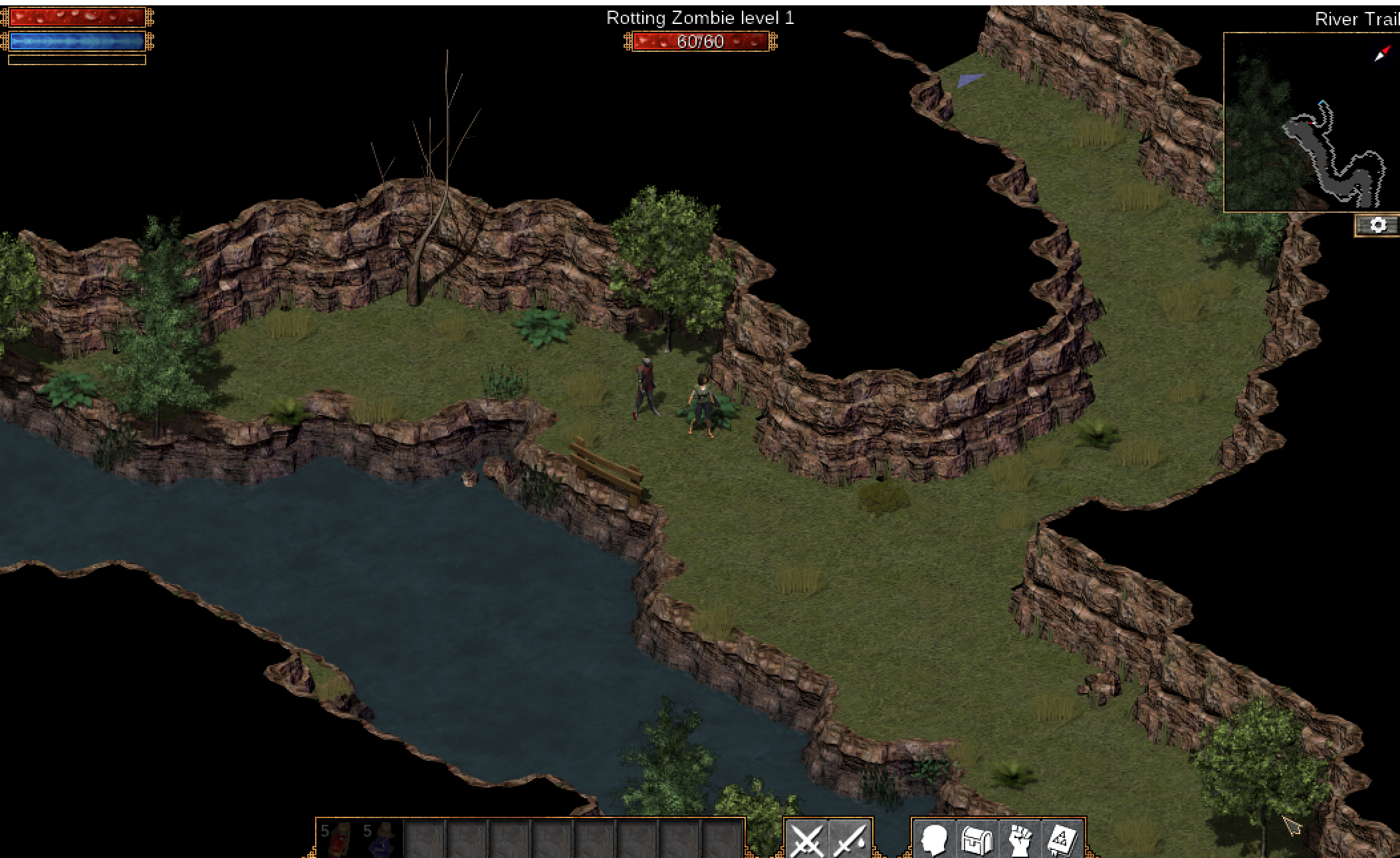
A Flare enemy in the original game.
Find the unit definition by searching for a visible name or asset path. Copy the definition into a separate mod folder instead of editing the base game.
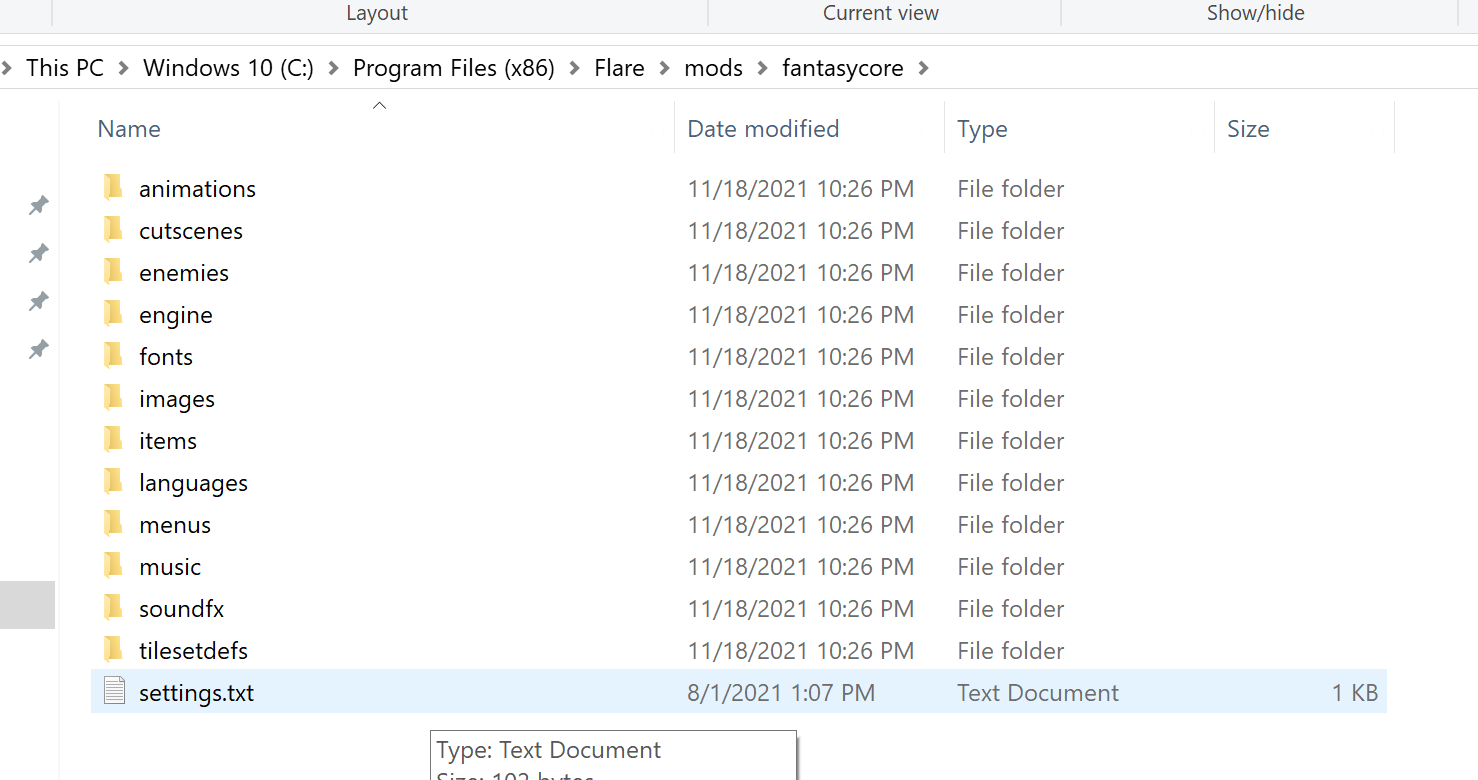
In the standard Windows install, start here:
C:\Program Files (x86)\Flare\mods
mods.txt normally lists fantasycore followed by empyrean_campaign. Lower entries override higher entries.
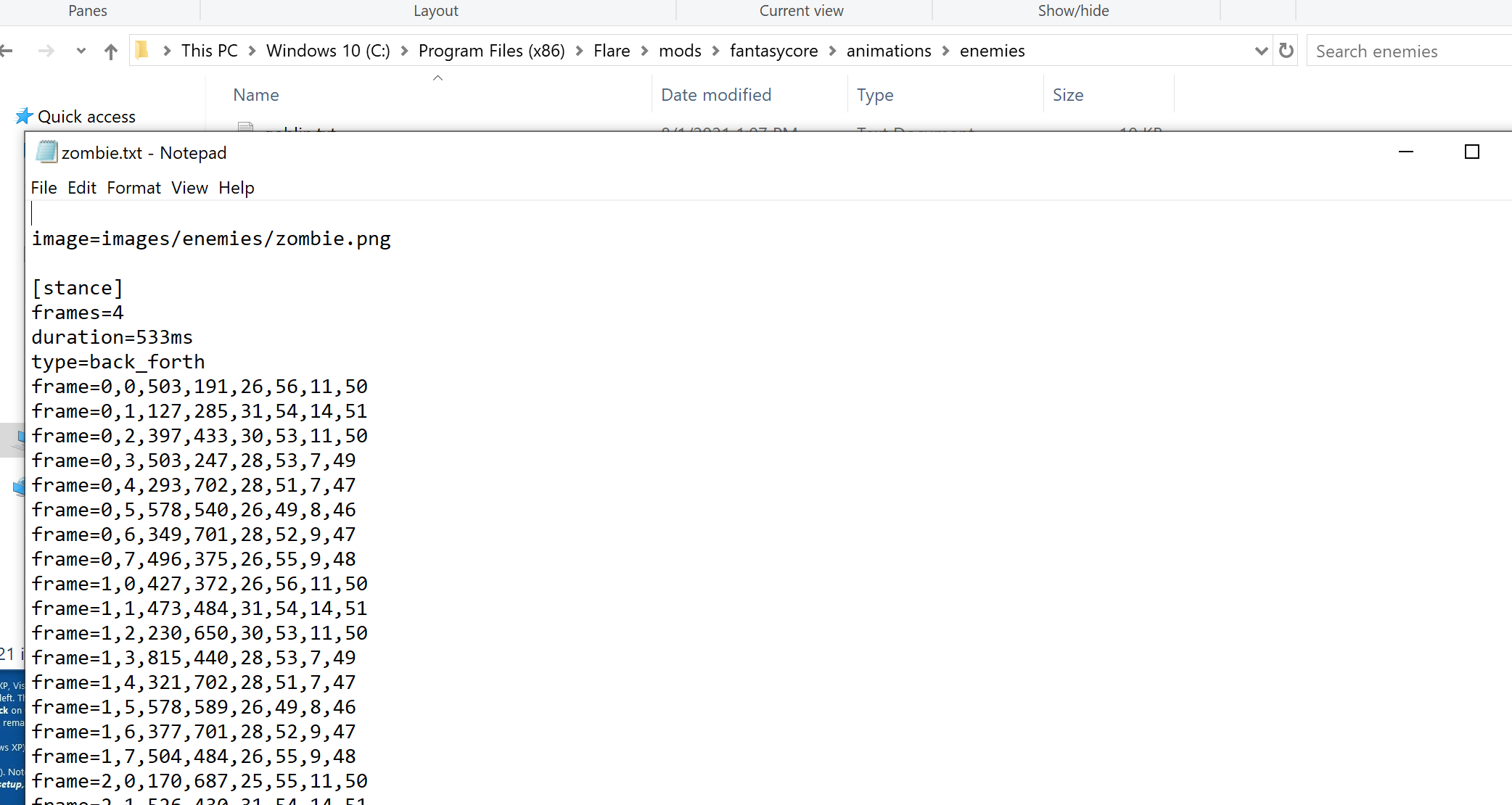
The base file points to shared animation data. The campaign file supplies the visible name and combat statistics. In a copied mod, override lvl1_zombie_rotting.txt, give the enemy a new name, lower its HP, and raise its movement speed. Load the first area containing a Rotting Zombie: it should display the new name, die quickly, and move faster.
The original lesson’s exact visible data hack is:
INCLUDE enemies/base/zombie.txt
name=MOOOOO
level=1
categories=zombie,undead,dungeon,grassland
rarity=common
xp=2
# combat stats
stat=hp,1
speed=20
turn_delay=1ms
chance_pursue=10
power=melee,1,1
stat=accuracy,1
stat=avoidance,10
stat=poise,20
stat=dmg_melee_min,1
stat=dmg_melee_max,1
cooldown=1800ms
# loot
loot=loot/level_1.txt
Put this at gha_rotting_zombie\enemies\lvl1_zombie_rotting.txt and list gha_rotting_zombie after empyrean_campaign in mods.txt. Because later mods override earlier ones at the same relative path, Flare uses this record while still following the INCLUDE to the shared zombie behavior and animation. The three mods then sit side by side:
Directorymods/
mods.txtthe load order: fantasycore, empyrean_campaign, then gha_rotting_zombie
Directoryfantasycore/
Directoryenemies/
Directorybase/
zombie.txtthe shared animation data, reached by INCLUDE
Directoryempyrean_campaign/
Directoryenemies/
lvl1_zombie_rotting.txtthe original name and combat statistics
Directorygha_rotting_zombie/your mod
Directoryenemies/
lvl1_zombie_rotting.txt wins, because this mod is listed last
anyhow::ensure!(!self.id.trim().is_empty(), "id cannot be empty");
anyhow::ensure!(
self.id.chars().all(|c| c.is_ascii_lowercase() || c == '_' || c.is_ascii_digit()),
"id must use lowercase ASCII, digits, or underscores"
);
anyhow::ensure!(!self.name.trim().is_empty(), "name cannot be empty");
anyhow::ensure!((1..=100).contains(&self.level), "level is out of range");
anyhow::ensure!((1..=1_000_000).contains(&self.hp), "hp is out of range");
anyhow::ensure!(self.speed.is_finite() && self.speed > 0.0, "speed must be positive");
Ok(())
}
}
The typed struct above teaches validation. For the real repeatable stat= lines, preserve the key and parse the first comma-separated item as the stat name and the second as its numeric value. Do not collect them into a map keyed only by stat, because that would discard all but one line.
Copy or create only assets your mod changes. Keep paths relative and verify case sensitivity—Windows may accept a path that Linux rejects.
Follow the animation reference from zombie.txt to its animation file, then follow that file to the zombie sprite sheet (zombie.png). Make a copy inside your mod with the same relative path and paint a blue background behind every animation frame. Do not resize the sheet or move frames: the animation file selects fixed rectangles from it.
Use a disposable map or developer spawn command. Place one unit in an empty area.
A custom unit placed in a test area.
Test:
spawn and idle animation;
movement and collision;
damage and death;
save and reload;
missing-asset behavior;
uninstall by removing the mod.
When the modified Rotting Zombie runs onto the screen with the changed name, statistics, and blue sprite background, you have changed the actual unit’s data and artwork—not a stand-in format.
A working unit on one machine is not yet an installable mod. The manifest
names this package, states its version, and pins the Flare build whose data
layout and asset paths we tested. Those fields give a player or installer a
quick compatibility check before copying the new unit files:
name = "gha-training-slime"
version = "0.1.0"
target_game = "Flare 1.12"
description = "Adds one low-level training enemy."
The file list, any dependencies, and load order belong in the same package
record. Without them, removing or updating the mod becomes guesswork even
when the unit definition itself is valid.
A mod that replaces an existing asset also records the original’s path and
hash, so the change can be checked and removed. The marked texture from
Lesson 10.4 needs only this:
name: orange-corner-texture
target: Urban Terror 4.3.4
source path: textures/example/wall.tga
original sha256: ...
changes: 16×16 orange marker in top-left
uninstall: remove the mod folder
Do not redistribute original copyrighted assets when a small patch, generated replacement, or installation script is enough.
Prefer supported data files when they meet the goal
The course began by changing one number in live memory. It ends with a supported, versioned, removable mod.
Both approaches teach how games represent behavior, but the file-based mod has strong advantages:
the diff is readable;
the game can validate it;
users can install and remove it;
updates are easier to track;
no raw process memory is involved.
This board needs JavaScript to move things around. Here is the lesson’s sorting:
Live patch only
You must find a live pointer or rewrite code. A unit file lets you change an enemy without finding a live pointer or rewriting executable code. A live patch has to do one of those.
Raw process memory is involved. A live patch works inside the running process. The file-based mod involves no raw process memory.
Both
Teaches how a game represents behaviour. The lesson says both approaches teach how games represent behaviour, which is why the course starts with a live number and ends with a mod.
Can change one enemy’s stats. Either way the goal can be the same: change one number such as an enemy’s hit points.
Data mod only
The change is a readable diff. A text definition shows exactly what changed, line by line.
The game can validate it. The game checks the definition through its own rules when it loads it, so a mistake is caught there.
Players can install and remove it. It is a package in its own folder with a manifest, so removing it leaves the base game untouched.
Updates are easy to track. A manifest names the version and the tested game build (for example Flare 1.12), so compatibility is a quick check.
When a supported extension point exists, choose it.
The texture and unit mods in Lessons 10.4 and 10.5 are easy to inspect when they
remain small. To share or install many such files, we may put them in an
archive. An installer must decide where each archived name will land before
copying any bytes into the game folder.
A .zip can claim that an entry is named:
textures/grass.png
It can also claim:
../../Windows/System32/example.dll
C:\Users\Player\startup.bat
If an installer joins those names directly onto the chosen mod directory, ..
or an absolute path can escape the folder. Joining is not a containment
operation — it is string concatenation with a separator, and it will happily
build a path that leads somewhere else entirely:
Look closely at what makes this dangerous. The joined path does begin with
the mod folder, so a check like “does this start with my destination?” passes.
The escape happens later, when the operating system resolves each .. while
opening the file. Absolute entry names are worse still: joining an absolute
path onto a base discards the base completely, so the result is simply whatever
path the archive asked for.
Predict first
An installer joins each entry name onto C:\Games\Wesnoth\mods and accepts the result only if the joined text starts with that folder.
Does that check stop the entry name textures/../../save.dat?
Answer: No: the text starts with the mod folder, yet the file lands in C:\Games\Wesnoth. textures goes one folder down, the first .. comes back to mods, and the second .. climbs to C:\Games\Wesnoth. The prefix check only read the text, which still begins with the mod folder.
Where does this archive entry land?The installer extracts into C:\Games\Wesnoth\mods. Pick an entry name: the first row walks its parts, the checks below decide.
Walk the name, then check it
Walk the parts from the mod folder
Each part, and the depth after it
texturesdepth 1
..depth 0
..depth −1: above mods
save.datnot checked
↓ resolve every ..
What opening the joined path reaches
C:\Games\Wesnoth\save.datoutside the mod folder
Two checks (green: right call, red: fooled)
Joined text starts with …\mods\ ?
accepts, but the file escapes
Depth never goes below 0 ?
refuses
The joined text still starts with the mod folder, so the prefix check accepts it, yet opening it climbs out to C:\Games\Wesnoth\save.dat. The depth rule refuses at the first part that goes above the mod folder.
Each .. climbs one level, so three of them undo the three folders below the
drive root, and every part after that walks down a path the mod folder
never contained. Counting the depth part by part catches it at the first ..
that would go above the mod folder.
The safe rule is therefore simple: every extracted file must remain beneath one destination root after validation.
Containment is stronger than removing suspicious text. Paths can use repeated separators, mixed slash styles, drive prefixes, device names, case differences, links, or components that normalize away. Parse the path into components and accept only an explicitly safe relative form.
Also distinguish the planned path from the filesystem object reached at write time. A directory inside the destination can be replaced by a link or reparse point after validation. For a local mod installer, extract into a newly created private staging directory, reject links, avoid following reparse points, and perform final moves only after the whole staged tree passes inspection.
A safe installer treats extraction as a pipeline with a decision point before anything reaches the live game folder:
Failure at any earlier stage discards the staged copy instead of leaving a half-installed mod behind.
The zip crate exposes enclosed_name, which rejects names that would escape
the extraction root. The following stage function demonstrates the order of
checks on a newly created directory beneath a private parent controlled by
the installer. It never writes into the working game directory. A caller must
discard this staging directory on any error and perform the later manifest,
format, and replacement checks before installation:
anyhow::ensure!(written <= MAX_ENTRY, "entry exceeds actual size limit");
anyhow::ensure!(written == declared, "entry size differs from header");
}
Ok(())
}
The per-entry limit, 64 × 1,024 × 1,024 = 67,108,864 bytes (64 MiB), bounds
one decompressed file; Urban Terror’s .pk3 asset archives are ZIP files under
another extension. take(MAX_ENTRY + 1) allows one extra byte solely to
detect an oversized entry. A simple take(MAX_ENTRY) would silently write a
truncated file and could make the archive appear to have been extracted. The
declared size is checked before copying and compared with the actual byte
count afterward. The total cap and entry-count cap address different problems:
many individually small entries can still exhaust disk space or time.
This stage function demonstrates bounded extraction, not the whole mod
installer. Before moving its files into the game, resolve case-insensitive
collisions on the target filesystem, validate asset formats and the manifest,
show the replacement plan, and retain originals for uninstall.
Check an archive entry before staging bytes. This step-by-step trace needs JavaScript. Here is the code and where the run ends.
root = private staging directory
validate the entry name components
check declared decompressed size <= 64 MiB
count actual bytes while copying
accept only the complete bounded entry
report staged bytes without installing them
Result: 32 MiB staged for later format and manifest validation. Passing one path check alone does not approve an entire archive.
An archive with 50,000 tiny files can cause trouble even if every path is enclosed. Limits are part of parsing.
Apply limits before and during extraction. Declared compressed and uncompressed sizes are claims from the archive; count the bytes actually written and maintain a checked running total. Stop with an error if either the declaration or the real output crosses policy.
The declared size is checked first because it costs nothing, but only the
counted bytes are trusted: an entry that declares 10 bytes and then produces
more is caught by the count, not by the declaration.
Renaming an executable to grass.png does not make it an image. For formats you understand, inspect the magic bytes — fixed bytes at the start of a file that identify its format — and parse headers:
fnlooks_like_png(bytes: &[u8]) -> bool {
bytes.starts_with(b"\x89PNG\r\n\x1a\n")
}
The escaped string in that code is eight bytes, and each one is there to catch a
particular kind of damage:
089
150
24E
347
40D
50A
61A
70A
not ASCII
PNG
CR LF
DOS end of file
LF
The PNG signature, numbered from 0. The highlighted bytes exist to detect a damaged transfer.
0x89 is 8 × 16 + 9 = 137. ASCII, the standard table of character codes, stops
at 127, so no plain text file starts with this byte, and a transfer that strips
the top bit (worth 128) from every byte turns it into 137 − 128 = 9, 0x09,
which no longer matches. Bytes 1 to 3 are the ASCII codes for P, N, and G,
so the format’s name is readable in a hex editor. 0D 0A is a Windows line
ending (carriage return, line feed) and the final 0A is a Unix one: a transfer
that converts line endings in either direction inserts or deletes a byte, so the
damage is caught before any pixels are decoded. 0x1A is the character old DOS
tools treated as the end of a text file, which stopped them printing the binary
data after it.
Magic bytes are still not a complete security check, but they catch obvious mismatches. A real image decoder should validate dimensions and allocation limits before loading pixels.
Create tiny archives in your own test suite containing:
../escape.txt;
an absolute path;
two names differing only by letter case;
a zero-byte file;
a declared huge file;
a valid nested texture;
an interrupted temporary output.
Success means valid files land in staging and every invalid archive fails without changing the game. This is defensive engineering for a file format the program does not control. 🛡️
A responsible mod installer knows exactly what it changed. A manifest is a machine-readable receipt containing:
mod identifier and version;
supported game build;
relative destination path;
original file hash, if a file existed;
installed file hash;
backup location;
operation time and status.
Do not store absolute paths inside a portable manifest. Keep a trusted game root separately and resolve enclosed relative paths beneath it.
Treat installation as a reversible state transition with a durable journal, not
as an unrecorded sequence of file copies:
Restoration also checks what exists now. This step-by-step trace needs JavaScript. Here is the code and where the run ends.
read the selected inputs
evaluate each stated condition
combine the required conditions
perform the effect only when accepted
otherwise retain the old state
report the result and its limits
Result: this model restores and verifies the original bytes before marking Restored.
Final values: edited = no; backup = yes; installed_matches = true; backup_matches = true; accepted = true; status = Restored; file = original bytes.
Read every step of the lesson’s example
Step 1, line 1. Start with the selected inputs and follow how the next operation changes the state.
edited = no; backup = yes.
Step 2, line 2. Owning an old manifest does not authorize overwriting a later edit or restoring a changed backup.
Watch it happenThe backup and manifest give a replacement its route back
A replacement checks the current original hash, makes a backup, installs new contents, and records the installed hash. Uninstall verifies both the current installed file and the backup original hash. It restores through a temporary file, hashes the restored output, and marks Restored only after the output matches the original hash. Hash labels are symbolic rather than sample digests.
Read the steps
Plan a replacement at the relative destination. Record the expected original hash, new hash, and backup location.
Compute the current file hash and compare it with the planned original hash. A mismatch stops the replacement.
Copy the original file to its backup before replacing the destination. The manifest advances to BackedUp.
Install the planned mod file. Its contents take the game destination while the original stays in the backup.
Write the manifest status Installed and keep the installed hash. That receipt describes the reached state after interruption.
Before uninstalling, verify two hashes: the current file must match the installed hash, and the backup must match the recorded original hash. A mismatch stops restoration.
Copy the verified backup into a temporary restore file. Keep the destination in place while preparing its replacement.
Replace the destination through the temporary file. Hash the restored output and compare it with the recorded original hash. Mark Restored only after that verification succeeds.
This depicts replacing an existing file. Creating a new file needs a different undo action: remove it only while its installed hash still matches.
The manifest records which state was reached. After a crash, that record tells
the recovery code whether an original file still needs restoring.
Installing a new file and replacing an existing one need different undo
actions. A new file can later be removed; a replaced file needs its backup
restored. Record that distinction, the expected hashes, and the stage each
operation has reached before writing anything:
#[derive(Clone,Debug)]
enumPlannedChange {
Create {
relative_path: String,
new_sha256: [u8; 32],
},
Replace {
relative_path: String,
old_sha256: [u8; 32],
new_sha256: [u8; 32],
backup_relative_path: String,
},
}
#[derive(Clone,Copy,Debug,Eq,PartialEq)]
enumChangeStatus {
Planned,
BackedUp,
Installed,
Restored,
}
The distinction between Create and Replace prevents an uninstaller from deleting a file that existed before the mod.
Undoing a created fileA new file is undone by removing it. The expected hash is checked before the installer touches anything.
Mod installerGame folderBackup
1
DataWrite the new file
Step 1: Mod installer to Game folder
Nothing existed at this path, so there is nothing to back up.
2
RequestUndo: check the installed file’s hash
Step 2: Mod installer to Game folder
Before removing anything, confirm the file is still the one this installer wrote.
3
ControlRemove the installed file
Step 3: Mod installer to Game folder
The game folder is back to how it started.
All 3 steps shown
A new file is undone by removing it. The expected hash is checked before the installer touches anything.
Undoing a replaced fileA replaced file needs its backup. The expected hashes are checked before either file is changed.
Mod installerGame folderBackup
1
RequestCheck the original’s hash
Step 1: Mod installer to Game folder
Confirm the file to replace is the expected original before touching it.
2
DataSave the original
Step 2: Game folder to Backup
The original is copied to the backup first, so it can come back.
3
DataWrite the replacement
Step 3: Mod installer to Game folder
Only now is the original’s path overwritten.
4
RequestUndo: check the replacement’s hash
Step 4: Mod installer to Game folder
Confirm the file is still the replacement this installer wrote.
5
DataRestore the backup
Step 5: Backup to Game folder
The saved original goes back to its path, and the folder is as it was.
All 5 steps shown
A replaced file needs its backup. The expected hashes are checked before either file is changed.
An install plan may be correct when created and stale five minutes later
after a game update. Compare the file’s current hash with the hash recorded
when the plan was made. If they differ, this replacement must stop instead
of overwriting someone else’s change:
"the game file changed after this plan was created"
);
Ok(())
}
This is an optimistic concurrency check. If the player updates the game or installs another mod between planning and installation, stop instead of overwriting an unexpected file.
An installer can crash after making a backup but before copying the replacement. The installer’s manifest stores the transaction in recoverable stages:
Planned -> BackedUp -> Installed
-> Restored
Write the updated manifest to a temporary file, flush it, validate that it parses, then replace the old manifest. The receipt is part of the modification, not optional documentation.
The book’s invented GSAV format makes the byte-integrity question concrete.
Its offline character Nia has level 3, 250 gold, and this complete 19-byte save:
47 53 41 56 01 00 FA 00 00 00 03 03 4E 69 61 4A 03 00 00
The last four bytes are a checksum: a number computed from the other bytes
and stored beside them, so the loader can detect damage. This format uses the
simplest checksum there is. It adds up every byte from offset 0 to the byte
just before the checksum and stores the total as a little-endian u32. For
Nia’s save, bytes 0 to 14 add up like this:
The stored checksum, lowest byte first: 842, which is 0x34A because 842 = 3 × 256 + 74.
The loader repeats that sum every time it opens the file:
Validate bytes before interpreting a save. This step-by-step trace needs JavaScript. Here is the code and where the run ends.
encode the 15-byte GSAV payload
sum the payload bytes
store the checksum, or corrupt it
check header, version, length and checksum
interpret the accepted fields
report why the record was accepted or refused
Result: accepted Nia, level 3, gold 250. A recomputable checksum is not evidence of an authorized writer.
Watch it happenBytes enter the checksum; checked fields become a record
The exact 19-byte GSAV file is checked for its header, version and length. Copies of the first 15 byte values enter an accumulator and sum to 842. The four stored checksum bytes also decode to 842. The accepted record contains Nia, level 3, and gold 250.
Read the steps
Read the unchanged sample: 19 bytes. Offsets locate fields inside the file.
Bytes 47 53 41 56 spell GSAV. Bytes 01 00 decode as little-endian version 1, so this loader recognizes the layout.
Offset 11 holds length 3. Twelve fixed bytes plus three name bytes plus four checksum bytes exactly fill the 19-byte file.
Copy each byte value into the adder. The file stays unchanged. Sum bytes 0 through 14, stopping before the stored checksum.
The computed sum is 842. Stored bytes 4A 03 00 00 decode as 74 + 3 × 256 = 842. The totals match.
Only after those checks does the loader accept the record: FA 00 00 00 gives 250 gold, offset 10 gives level 3, and 4E 69 61 spells Nia.
The adder consumes copies of byte values. A checksum mismatch refuses the file before the game receives a record.
Now type gold over as 9,999 and change nothing else. 9,999 is 39 × 256 + 15,
and 39 = 2 × 16 + 7 = 0x27 while 15 = 0x0F, so 9,999 is 0x270F and its
little-endian bytes are 0F 27 00 00.
Predict first
The last four bytes still say 4A 03 00 00, which is 842. What does the loader do with the edited file?
Answer: It refuses the save as corrupt. The old gold bytes FA 00 00 00 added 250 to the total; the new 0F 27 00 00 add 15 + 39 = 54. The total becomes 842 − 250 + 54 = 646 while the stored checksum still says 842, so the loader refuses the file.
Edit Nia’s gold and run the loader’s checkThe loader adds bytes 0x00 to 0x0E and compares the total with the stored checksum. Change the gold and decide what happens to the checksum.
The gold bytes now add 54 instead of 250, so the loader computes 646 while the file still says 842.
The fix is to do what the game does when it saves: recompute the checksum. For
1,250 gold, the gold bytes E2 04 00 00 add 226 + 4 = 230 instead of 250, so
the total is 842 − 250 + 230 = 822. That is 3 × 256 + 54, and 54 = 3 × 16 + 6 =
0x36, so the checksum is 0x336, stored as 36 03 00 00: exactly what save B
contained. The complete edited file is:
A plain sum has a blind spot: adding numbers in a different order gives the same
total, so swapping two bytes goes unnoticed. The 64,000 example above is that
swap: 00 FA 00 00 still adds up to 250, so the file loads. That is why real formats more often
use a CRC-32, a 32-bit checksum designed to change when bytes are reordered, or
a hash. The editing procedure stays the same: work out which bytes are covered,
which algorithm runs, where the result is stored, and in which byte order, as
listed in Lesson 10.2. If the
check uses a secret key, as a MAC does, or a digital signature, it cannot be
recomputed without that key; Lesson 10.10 explains why.
The manifest in Lesson 10.7 records the bytes before and after a mod installation. Its hash detects an unexpected later change. To decide whether a downloaded game or mod came from the publisher you expected, we need a different question: who approved these bytes?
A SHA-256 hash is a fingerprint of exact bytes. Change one byte and the fingerprint should change dramatically. A saved baseline can answer:
“Are these bytes identical to the bytes I recorded earlier?”
It cannot answer who created the original file. A hash does not create trust; it
only moves trust from wherever you obtained the hash onto the bytes now on
your disk.
Changing one bit of the input changes about half of the 256 bits of a SHA-256 fingerprint, so it shows that bytes changed but not where or how much. The interactive version needs JavaScript; the lesson text around it explains the same idea.
That distinction has practical teeth. If you download mod.zip and
mod.zip.sha256 from the same page, and someone is able to change that page,
they can change both — and the two will agree perfectly:
Verification reports success and has proven nothing. A hash is only worth
checking when it reached you by a route the attacker does not control: a signed
release, a genuinely separate channel, or a value you recorded yourself from a
copy you already had reason to trust.
If an attacker changes both mod.zip and the hash published next to it, the two agree and the check proves nothing. A hash you recorded yourself, or a publisher’s signature, would expose the swap. The interactive version needs JavaScript; the lesson text around it explains the same idea.
An Authenticode signature connects the file’s digest to a signing certificate and asks Windows to apply a trust policy. It can help answer:
“Does this file still match a signature made by a publisher whose certificate chain Windows trusts under this policy?”
Neither answer proves that software has no bugs or that you personally intended to install this version.
A digital signature is a number computed from a file’s hash with a secret
key, which anyone can check with a matching key that is not secret. It fixes the
compromised-page problem above: an attacker who controls the page can replace
the file and the hash, but cannot produce a signature that checks out, because
they do not have the secret.
That needs public-key cryptography, where keys are made in pairs. The
private key never leaves the publisher. The public key is given to
everyone; for Authenticode it travels inside the publisher’s certificate. The
pair has one property that makes everything work: a signature made with the
private key is accepted by the matching public key and by no other, and knowing
the public key does not let anyone work out the private one.
Walk the two ways it can fail. Change one byte of the file and your machine
computes a different hash, so the signature no longer matches it. Replace the
signature with one the attacker made using their own key pair, and it only
checks out against the attacker’s public key, whose certificate Windows does
not trust.
A comparison often used for public keys is an open padlock: you hand out as many
as you like and keep the only key, so anyone can lock a box for you and only you
can open it. That picture describes encrypting a message to someone. A
signature runs the other way: only the private-key holder can make one, and
anyone can check it. Nothing is hidden, either; a signed file stays perfectly
readable. The signature only proves which key approved these exact bytes.
Why can nobody forge one? Real keys are numbers hundreds of digits long, chosen
so that checking a signature takes a fraction of a millisecond while making one
without the private key would take longer than the age of the universe. The same
kind of gap shows up with small numbers. Multiplying 7 × 17 = 119 is quick.
Given only 119, finding the two numbers means trying divisors: 2 fails, 3 fails,
5 fails, and 7 gives 119 ÷ 7 = 17. Checking a proposed answer is one division.
RSA, a common signature scheme, builds its keys on this gap between multiplying
and factoring, with numbers so large that the trying never finishes.
The same machinery sits behind the padlock icon in a web browser, driver
signing in Lesson 12.7, and a console’s secure boot in
Lesson 13.6. Its limits are the
ones this lesson keeps returning to: a signature says who approved the bytes,
not that the bytes are safe, and if a publisher’s private key is stolen, the
thief can sign anything until the certificate is revoked.
Many open-source game builds are unsigned, self-built, or distributed in archives without Authenticode. Wesnoth, AssaultCube, or Urban Terror files can legitimately report “no embedded signature,” depending on the exact build and distributor.
Treat the result as one fact:
Result
Reasonable next question
Trusted signature
Does the publisher and file version match the source I expected?
No embedded signature
Does the official project publish hashes or reproducible release artifacts?
Explicitly distrusted
Why did Windows policy reject this publisher/signature?
Other failure
Was the file damaged, unsupported, expired, or checked under a limited classroom policy?
WinVerifyTrust returns a status code, not a Result
The Win32 function returns a LONG. Microsoft’s return-value contract says only exact zero means the requested trust action succeeded. Do not use HRESULT-style “success if nonnegative” logic.
The original helper treats every nonnegative status as trusted, confusing this result with status types whose nonnegative values indicate success. WinVerifyTrust has a different contract: only exactly zero reports success.
Before: accept every nonnegative trust status
fnexplain_trust(status: i32) {
ifstatus >= 0 { println!("trusted"); } // Incorrect for WinVerifyTrust.
else { println!("trust check failed with status {status:#010x}"); }
}
Use the function’s own success contract, and keep every unknown nonzero status visible as a failure. A successful offline check still has the policy limits described below.
Improved code
fnexplain_trust(status: i32) {
ifstatus == 0 { println!("trusted"); }
else { println!("trust check failed with status {status:#010x}"); }
}
Show the diff
fn explain_trust(status: i32) {
if status >= 0 { println!("trusted"); } // Incorrect for WinVerifyTrust.
if status == 0 { println!("trusted"); }
else { println!("trust check failed with status {status:#010x}"); }
}
Takeaway: do not reuse another API’s success test just because both results are integers.
Known nonzero values help us print plain-English explanations. Unknown statuses remain failures and are printed in hexadecimal for investigation.
WINTRUST_FILE_INFO points to the file path. WINTRUST_DATA describes how the trust provider should work:
WTD_UI_NONE prevents pop-up dialogs;
WTD_CHOICE_FILE selects the file-info union member;
WTD_STATEACTION_VERIFY begins verification and may create provider state;
WTD_STATEACTION_CLOSE releases that state afterward;
WTD_DISABLE_MD2_MD4 refuses two obsolete digest algorithms;
WTD_REVOKE_NONE skips revocation checking in this offline classroom run;
WTD_CACHE_ONLY_URL_RETRIEVAL avoids network retrieval in this reproducible lab.
Those last two choices have a tradeoff: the result does not include a fresh revocation check. A release pipeline with network access should define and test a stricter revocation policy instead of treating this offline classroom result as the final word.
#[cfg(windows)]mod app { use std::{ ffi::OsStr, fs::File, io::Read, mem::size_of, os::windows::ffi::OsStrExt, path::{Path, PathBuf}, }; use anyhow::Context; use sha2::{Digest, Sha256}; use windows::{ Win32::{ Foundation::{ HANDLE, HWND, TRUST_E_EXPLICIT_DISTRUST, TRUST_E_NOSIGNATURE, TRUST_E_PROVIDER_UNKNOWN, TRUST_E_SUBJECT_FORM_UNKNOWN, TRUST_E_SUBJECT_NOT_TRUSTED, }, Security::WinTrust::{ WINTRUST_ACTION_GENERIC_VERIFY_V2, WINTRUST_DATA, WINTRUST_DATA_0, WINTRUST_FILE_INFO, WTD_CACHE_ONLY_URL_RETRIEVAL, WTD_CHOICE_FILE, WTD_DISABLE_MD2_MD4, WTD_REVOKE_NONE, WTD_STATEACTION_CLOSE, WTD_STATEACTION_VERIFY, WTD_UI_NONE, WTD_UICONTEXT_EXECUTE, WinVerifyTrust, }, }, core::PCWSTR, }; fn sha256(path: &Path) -> anyhow::Result<String> { let mut file = File::open(path)?; let mut hasher = Sha256::new(); let mut buffer = [0_u8; 64 * 1_024]; loop { let count = file.read(&mut buffer)?; if count == 0 { break; } hasher.update(&buffer[..count]); } Ok(format!("{:x}", hasher.finalize())) } fn verify_authenticode(path: &Path) -> i32 { let wide_path: Vec<u16> = OsStr::new(path) .encode_wide() .chain(std::iter::once(0)) .collect(); let mut file_info = WINTRUST_FILE_INFO { cbStruct: size_of::<WINTRUST_FILE_INFO>() as u32, pcwszFilePath: PCWSTR(wide_path.as_ptr()), hFile: HANDLE::default(), pgKnownSubject: std::ptr::null_mut(), }; let mut trust_data = WINTRUST_DATA { cbStruct: size_of::<WINTRUST_DATA>() as u32, dwUIChoice: WTD_UI_NONE, fdwRevocationChecks: WTD_REVOKE_NONE, dwUnionChoice: WTD_CHOICE_FILE, Anonymous: WINTRUST_DATA_0 { pFile: &mut file_info, }, dwStateAction: WTD_STATEACTION_VERIFY, dwProvFlags: WTD_CACHE_ONLY_URL_RETRIEVAL | WTD_DISABLE_MD2_MD4, dwUIContext: WTD_UICONTEXT_EXECUTE, ..Default::default() }; let mut action = WINTRUST_ACTION_GENERIC_VERIFY_V2; // SAFETY: both structures contain valid sizes and pointers that remain // alive through the call. UI is disabled and the file path is terminated. let status = unsafe { WinVerifyTrust( HWND::default(), &mut action, (&mut trust_data as *mut WINTRUST_DATA).cast(), ) }; trust_data.dwStateAction = WTD_STATEACTION_CLOSE; // SAFETY: closes provider state created by the verification call. The // same live structures and action identifier are supplied once more. let _ = unsafe { WinVerifyTrust( HWND::default(), &mut action, (&mut trust_data as *mut WINTRUST_DATA).cast(), ) }; status } fn meaning(status: i32) -> &'static str { if status == 0 { "trusted Authenticode signature" } else if status == TRUST_E_NOSIGNATURE.0 { "no embedded signature was found" } else if status == TRUST_E_EXPLICIT_DISTRUST.0 { "the publisher or signature is explicitly distrusted" } else if status == TRUST_E_SUBJECT_NOT_TRUSTED.0 { "the trust policy rejected the file" } else if status == TRUST_E_PROVIDER_UNKNOWN.0 { "Windows has no matching trust provider" } else if status == TRUST_E_SUBJECT_FORM_UNKNOWN.0 { "the provider does not understand this file form" } else { "verification failed with another trust-provider status" } } pub fn run() -> anyhow::Result<()> { let path = std::env::args_os() .nth(1) .map(PathBuf::from) .context("usage: signature_check <game.exe-or-dll>")?; anyhow::ensure!(path.is_file(), "{} is not a file", path.display()); let hash = sha256(&path).with_context(|| format!("could not hash {}", path.display()))?; let status = verify_authenticode(&path); println!("File: {}", path.display()); println!("SHA-256: {hash}"); println!( "Trust: {} (status {:#010x})", meaning(status), status as u32 ); println!("The cache-only check did not modify the file."); Ok(()) }}#[cfg(windows)]fn main() -> anyhow::Result<()> { app::run()}#[cfg(not(windows))]fn main() { eprintln!("This Authenticode lab must run on Windows.");}
PCWSTR is only a pointer. It does not own the UTF-16 vector. wide_path, file_info, and trust_data all remain local variables until both WinVerifyTrust calls finish, so every pointer stays valid.
This is why the unsafe comment names lifetimes instead of saying only “Windows API call.” A useful safety comment explains the exact facts the compiler cannot verify.
In the Windows VM, build the checker from windows-labs and give it one EXE
path at a time. Record each reported hash beside the exact file and build;
the signature result applies only to the file you supplied.
A SHA-256 value belongs to one exact file, so it means something only next to the game version and download source it came from. Re-run the tool after installing a mod or update: every file that changed gets a new hash, which is expected for the files the mod or update replaced and unexplained for any other.
Some Windows components are signed through catalogs rather than an embedded
signature. This lab checks the embedded signature on the selected game EXE. If
you expand it to inventory every DLL loaded beside the game, add explicit
catalog-signature handling instead of reporting those files as simply unsigned.
Combine this lesson with module_inventory: inventory tells you what actually loaded, the hash identifies exact bytes, and Authenticode adds one publisher-trust signal.
Two files can both call themselves “Wesnoth 1.14.9” and still contain different bytes. A distribution may rebuild the executable, a mod may replace data, or a repair tool may update one DLL without changing the folder name.
That matters because much of what this course builds depends on exact bytes:
an RVA belongs to one module layout;
a byte pattern belongs to one compiled instruction sequence;
an original-byte check belongs to one supported patch site;
a PK3 edit belongs to one archive and path layout.
A cryptographic hash turns all file bytes into a fixed-size fingerprint. This lab uses SHA-256. Change one byte and the resulting digest should change dramatically.
Two files with the same label but different bytesA label says what someone claims. A digest is computed from the bytes themselves.
1Same label, one different byte
File A
Label
version 1.2
Bytes
01
02
03
File B
Label
version 1.2
Bytes
01
02
04
Both say “version 1.2”, but File A ends 03 and File B ends 04.
2So their SHA-256 digests differ
File A
SHA-256
digest A
File B
SHA-256
digest B
Any change to the bytes changes the digest, whatever the label says: these are not the same file.
3Compare against a trusted baseline
Trusted baseline
Known good digest
digest of the trusted file
Unknown file
↓ compare
Computed digest
digest of this file
Check the bytes or the digest against a known good copy instead of relying on the label.
All 3 steps shown
A label says what someone claims. A digest is computed from the bytes themselves.
Several different facts identify a build, and each one answers a separate
question:
Fact
Question it answers
Important limit
Version label
What release does the program claim?
Different builds can share it.
Live module path
Which file did this process map?
A path does not identify its bytes.
Architecture and PE fields
What layout family is this file?
Many builds share those fields.
SHA-256 digest
Do all bytes match the baseline?
The baseline must already be trusted.
Trusted manifest or signature
Who supplied the expected identity?
It does not prove the live file matches.
For a reproducible lesson, confirm the live path and architecture, then compare
its SHA-256 digest with a trusted record. No single friendly version string does
all of those jobs.
If today’s digest equals a trusted earlier digest, the file bytes match that earlier file. The hash does not prove who created the file or whether the original was safe.
The word trusted matters. If an attacker can replace both a file and its manifest, a perfect hash comparison proves only that the two replacements agree. Keep the baseline somewhere the experiment does not rewrite, such as a read-only lab snapshot or version-controlled record.
The byte count is not a substitute for SHA-256. It is extra context that makes a mismatch easier to explain.
The tool rejects tabs and newlines in paths because those characters would make
the small text format ambiguous. If this game-file manifest grows to store mod
IDs, signatures, several hashes, or nested package information, move to a
defined format such as JSON, CBOR, or a signed catalog. The lab stays text-only
so you can see the separators, field meanings, and rejected input forms.
read returns the number of buffer bytes filled. A return value of zero means end of file. Only &buffer[..count] goes into the hash; hashing the unused remainder would produce the wrong answer.
The original helper reads the entire file into one byte vector, then hashes it. A large archive therefore needs an equally large temporary allocation; Path, File, Sha256 and the hash traits are the same helpers used above.
Before: read the whole file
fnsha256(path: &Path) -> anyhow::Result<String> {
letmuthasher = Sha256::new();
letbytes = std::fs::read(path)?;
hasher.update(bytes);
Ok(format!("{:x}", hasher.finalize()))
}
The improvement is streaming: reuse one buffer, and feed only the bytes filled by each read into the hasher. The digest still describes the complete file.
Streaming keeps memory use roughly constant. A 4 GB game archive does not require a 4 GB Vec just to calculate its fingerprint.
Reading a whole file into memory needs memory as big as the file. The lesson’s loop reads one fixed 64 KiB buffer at a time, so a 4 GiB archive needs only 64 KiB of buffer, at the price of many more read calls. The interactive version needs JavaScript; the lesson text around it explains the same idea.
.with_context(|| format!("refusing to replace {}", manifest.display()))?;
If the manifest already exists, creation fails. Updating a trusted baseline should be a conscious review step, not something the verifier performs automatically after detecting a change.
Create separate manifests for the exact course builds of AssaultCube and Urban Terror. Do not add save files, logs, or configuration files that are expected to change every run.
A supported mod changes files on purpose. Treat it as a separate known state:
clean-install.manifest
course-mod.manifest
Do not update clean-install.manifest until a changed file looks clean again. Keep the original baseline, and create a second, reviewed manifest after the intended change, so each known state has its own list of digests.
In the Urban Terror texture lab from Lesson 10.4, a tool replaces a texture
inside the zUrT43_001.pk3 archive. Before the tool runs, the archive’s digest
belongs to the clean state. The tool keeps the untouched original as
zUrT43_001.pk3.gha-backup, so that backup must hash to the same clean digest;
if it does not, the original was not preserved. The rebuilt zUrT43_001.pk3
has a new digest, which belongs to the modded state.
The program hashes a file and later another tool may open it. The file could change between those actions. This is called a time-of-check/time-of-use race.
For this lab, close the game and mod tools while verifying. A launcher that must
verify a versioned mod immediately before starting the game needs a stronger
design: it can keep the checked file handle open, require a signed package, or
let one trusted updater own both verification and launch.
An on-disk hash confirms the file. A live patcher should still check:
the live module name and range;
the supported architecture;
a version-specific RVA or unique pattern;
the exact original bytes at the final address.
Each check covers a gap the others leave. The on-disk hash cannot tell which copy of the file the process actually mapped, or whether anything changed the bytes in memory after loading; the original-byte check at the final address can. A patch should go ahead only when every check passes.
The manifest has identified the file and build. Before reading through an old
offset table, we still need to establish that the new build uses the same
object layout. The next lesson recovers that layout from several independent
clues; process access rights then determine which operations Windows permits.
Lesson 10.8 used a hash to compare exact files and a signature to check a publisher’s approval. Suppose instead that a save contains private data and the owner wants to keep its contents unreadable on disk. That calls for encryption and a plan for the key. The related words are easy to mix up, but their jobs are not interchangeable:
Five tools, five jobs
Tool
Reversible?
Secret required?
Main job
Encoding
Yes
No
Represent data, such as Base64 or UTF-8
Hash
No
No
Produce a fixed-size fingerprint
MAC
No
Yes
Detect changes made without the secret key
Encryption
Yes, with key
Yes
Hide the plaintext
AEAD
Yes, with key
Yes
Hide plaintext and authenticate it and its context
AEAD means authenticated encryption with associated data. It is usually the right starting point for a new encrypted file or message because confidentiality without tamper detection is incomplete.
The lab uses symmetric encryption: one key both locks and unlocks, so
whoever encrypts and whoever decrypts must hold the same secret. It is
efficient for large payloads, but it leaves a problem: the key has
to reach the other side without anyone copying it on the way.
Public-key cryptography uses a public/private key pair, as
Lesson 10.8 showed for
signatures. In a public-key encryption scheme, anyone with your public key
can protect a small message for you, while your private key is needed to open
it. Picture giving out open padlocks and keeping their key. That picture does
not explain key agreement, where two sides contribute information and
derive shared secret material without sending the finished secret. Nor does
the padlock tell you whose public key you received: identity must be checked
separately.
Network protocols combine these jobs. In a certificate-authenticated TLS 1.3
connection, a handshake authenticates the server and establishes shared
secret material; both sides derive symmetric traffic keys from it, and
authenticated encryption protects the records. The handshake does not simply
send a browser-generated traffic key inside the server’s public-key padlock.
See the TLS 1.3 specification.
The save lab has no remote recipient to agree with: the owner seals and opens
the file on the same PC. Its harder question is where to keep the long-lived
key, not how to transport it across a network.
Before choosing an algorithm, write four plain-English statements:
Asset: what information or game state needs protection?
Adversary: what can the person you are defending against read, change, or
execute?
Property: do you need confidentiality, integrity, authenticity,
availability, or some combination?
Trust boundary: which program, account, or server is allowed to hold the
key and make the final decision?
For an offline single-player save, the player controls the same PC that must decrypt
the save. Encryption can protect the file from casual disclosure or accidental
editing, but it cannot create a server-like secret boundary by itself. If the game
ships a key and must use it locally, a determined owner can observe that use. For a
server-authoritative multiplayer profile, the server can keep the authoritative key
and state outside the client’s control.
This does not make local encryption useless. It makes its promise precise. Security
engineering starts by choosing a realistic promise, then checks whether the
mechanism actually enforces it.
The lab uses XChaCha20-Poly1305 from the RustCrypto chacha20poly1305 crate. One envelope contains:
+0x00nonce, 24 bytes
+0x18ciphertext, same length as the plaintext
end − 0x1016-byte Poly1305 tag
One sealed envelope, in the order seal writes it. split_at_checked(24) in the decryption code is what separates the nonce from everything after it.
The nonce is not a password and does not need to be hidden. It must be unique for messages protected by the same key. XChaCha20’s larger nonce makes random generation practical, but the program still stores it with the ciphertext so decryption can use the same value.
Some information should remain readable but must not be silently swapped. The lab authenticates this context:
save-slot:3|format:1
If someone moves the ciphertext to slot four or claims it uses another format, opening it fails.
The associated data is not encrypted; it is included in the authentication calculation.
Put together, sealing the 19-byte GSAV save and opening it twice looks like this:
Seal the 19-byte save, then open it twiceSealing writes nonce, ciphertext and tag. Opening recomputes the tag before it returns a single byte.
1Seal: four inputs, one envelope
What seal takes
Save bytes (plaintext)
47 53 41 56 … 4A 03 00 0019 bytes
Secret key
32 bytes, kept apart from the file
Nonce
24 random bytes, new for every seal
Context (associated data)
save-slot:3|format:1readable, but authenticated
Envelope on disk, bytes 0 to 58
nonce, ciphertext, tag
nonce24 bytes
ciphertext19 bytes
tag16 bytes
The envelope is 24 + 19 + 16 = 59 bytes, offsets 0 to 58. The key is not in it.
2Open the untouched envelope
Envelope on disk, bytes 0 to 58
nonce, ciphertext, tag
nonce24 bytes
ciphertext19 bytes
tag16 bytes
open, with the same key and context
Tag recomputed from the envelope
equals the stored tag
open returns
the 19 save bytes
The recomputed tag matches, so the save bytes come back.
3Open after one ciphertext byte changed
Envelope on disk, bytes 0 to 58
nonce, ciphertext, tag
nonce24 bytes
ciphertext, 1 byte changed19 bytes
tag16 bytes
open, with the same key and context
Tag recomputed from the envelope
differs from the stored tag
open returns
AuthenticationFailed, and no bytes
The recomputed tag no longer matches, so open refuses and returns none of the bytes.
All 3 steps shown
Sealing writes nonce, ciphertext and tag. Opening recomputes the tag before it returns a single byte.
Authenticated context belongs to one envelope. This step-by-step trace needs JavaScript. Here is the code and where the run ends.
saved_context = slot 3, format 1
requested_context = selected_slot, format 1
compare the contexts used by authentication
combine with the assumed byte-tag result
return plaintext only after authentication
report failure without partial plaintext
Result: the original context and assumed valid bytes permit opening.
Here the inputs are a 32-byte key, the save bytes, and context such as save
slot and format version. seal generates a fresh nonce, encrypts and
authenticates the save plus its context, then stores the nonce before the
ciphertext so the opener can use the same nonce later. The key stays outside
the returned envelope:
Do not return partly decrypted data after an authentication error. Do not explain whether the key, nonce, tag, context, or ciphertext was wrong to an untrusted caller; one generic failure avoids turning error messages into an oracle.
Perfect encryption code with a key committed to Git is still broken. A save
editor or local game tool that protects player data needs answers to:
Where is the key created?
Is it unique per user, device, or save?
Where is it stored?
Which process may request it?
How is it rotated?
What happens to old saves?
How is it erased from temporary buffers?
For a Windows game tool, protected operating-system storage may be more
appropriate than a constant in the executable. A server-authoritative game may
keep important secrets on the server instead of trusting every client. The
correct choice depends on what game data the key protects and who must be able
to open it.
The demo uses a visible repeated key only to make one local round trip
repeatable. A real save or profile tool must load protected key material instead
of compiling the key into the executable.
Taking the key is the realistic attack, because guessing it is hopeless. Trying
every possible key, a brute-force attack, always works in the end; the
question is when the end arrives. Work it out for a 128-bit key.
Each extra bit doubles the number of keys, so 128 bits give 2¹²⁸ keys. To size
that, use 2¹⁰ = 1,024, which is a little more than 1,000: every 10 bits multiply
the count by about 1,000. 128 bits is twelve groups of 10 bits plus 8 more, so
2¹²⁸ is roughly 1,000¹² × 2⁸ = 256 × 10³⁶. Each 1,024 is slightly more than
1,000, which lifts the exact value to about 3.4 × 10³⁸.
Now be generous to the attacker: a billion computers, each testing a trillion
keys every second, is 10⁹ × 10¹² = 10²¹ keys per second. A year has
60 × 60 × 24 × 365 = 31,536,000 seconds, about 3.2 × 10⁷, so that is about
3.2 × 10²⁸ keys a year. Dividing gives
3.4 × 10³⁸ keys ÷ 3.2 × 10²⁸ keys per year ≈ 1.1 × 10¹⁰ years
about 11 billion years to try them all, close to the 13.8-billion-year age of the
universe. The lab’s key is 256 bits, and 2²⁵⁶ is 2¹²⁸ multiplied by itself, so its
count is that enormous number squared.
Brute force stops being hopeless when the secret is small. A six-letter
lowercase password has 26⁶ possibilities: 26 × 26 × 26 = 17,576, and
17,576 × 17,576 = 308,915,776. At a billion guesses per second, that is all of
them in about a third of a second. That is why encryption keys are random 128- or
256-bit values rather than passwords, and why a password that must protect a key
is first run through a deliberately slow key-derivation function, so each guess
costs the attacker real time.
Think of a key as having a lifecycle rather than merely a location:
Generation needs a cryptographically secure random source. Storage needs an access
boundary. Use should keep the plaintext and key alive for no longer than necessary.
Rotation needs a way to distinguish old envelopes and either read or migrate them.
Retirement needs a policy for old backups. Recovery needs an answer for a lost key;
otherwise “secure” may simply mean “the player’s save is gone forever.”
Availability is part of the design. An authenticated file that correctly rejects one
flipped bit still needs backups, version metadata, and a recovery path. Integrity
without recovery can detect damage while leaving the player unable to continue.
During the course fixture’s execution, you may see plaintext where the program uses it, the key where the crypto API receives it, and ciphertext where the file is written. That does not mean encryption “does nothing.” Encryption protects data outside the trusted processing moment, such as at rest or in transit.
Use breakpoints and data-flow tracing to follow the fixture’s complete key lifecycle: creation, use, storage, rotation, and destruction. A partial trace can make a correct design look broken.
Also keep a checksum separate from a cryptographic authenticator. A checksum
detects accidental corruption, but anyone who can edit the file can recompute
an unkeyed one, as
Lesson 10.8 did for the GSAV save.
A valid MAC or AEAD tag requires the secret key.
✅ Generate a fresh nonce as required by the algorithm.
✅ Authenticate file version, slot, identity, or message type as associated data.
✅ Treat authentication failure as a hard stop.
❌ Do not invent a cipher from XOR, rotation, and a checksum.
❌ Do not hardcode real save/profile keys in source code.
❌ Do not reuse a nonce with the same key.
❌ Do not log keys or decrypted secrets.
The file lessons have now taken a saved value from readable text to binary
fields, mod assets, archives, integrity checks, and encrypted payloads. Each
format defines its own fields, boundaries, and validation checks. The shared habit is to identify the bytes, parse them within bounds, verify the expected form, and keep a way back. Chapter 10
follows a different kind of game mod: a Lua script that the game deliberately
loads and runs through a limited host interface.