Brightness, reading palette, text size, comments and reading sound.Adds page background, hover cards, button corners, code colours, width and layout.Everything, including diagram styling, motion, inline code, depth and fine details.
Reading sound Off
Sound starts off. Play when you want it.
Original sounds, released into the public domain under CC0.
Margin comments
Hide author and reader comments without deleting them.
Page brightness
Lesson text size
Reading palette
More options
Reader finish
Modern adds semantic colours and refined controls. Soft depth adds frost and shadows.
Page background
Hover cards
Definitions, examples, tips, and lesson summaries that open over words and links. Off also removes the underlines.
Chat button
Which corner the button for asking questions about the book sits in. Top corners stop short of the lesson list and contents; at the bottom right it sits under the Notes button. It takes the colour of the chapter you are reading.
Notes button
Where the 📝 Notes button sits on lessons. Hidden leaves a thin tab on the edge; Alt + N brings it back.
Settings panel
Popover opens under the button. Side sheet slides in from the right with a dimmed page behind it.
Sidebar and header contrast
Original keeps the dark lesson list and header. Unified tints them to match the page and palette.
Reading width
How wide the lesson text column is. Standard is about 70 characters a line.
Table of contents
Light or dark for the “On this page” panel on the right, whatever the page is.
Lesson spacing
Code brightness
Syntax colours
Moving effects
System respects reduced motion while still advancing steps. On Play enables moving effects when you start a diagram. Off keeps manual steps.
Fine-tuning
Depth
Flat is the original. Soft adds faint shadows to diagram boxes, cards and buttons and lifts them slightly on hover.
Inline code
Classic keeps the badge look. Soft quiets the background and border for paragraphs full of keywords.
Floating buttons
Docked shows the Notes and chat buttons normally. Minimal makes them small icons that fade until you point at them.
Gradients
Use flat colours for headings, cards and diagram backgrounds.
Diagram background
Changes diagram surfaces; labels and role colours remain readable.
Diagram boxes
Heading rectangles
Diagram label backgrounds
Diagram frames
Diagram size
Page grid
Time per step
Semantic colours
Ligatures
What the colours mean
Terms, inputs, and data
Code and processing
Results and tips
Cautions
These colours follow your theme; their meanings stay the same. Data tables and diagram explanations use the information colour; code panels use processing. The lesson header and navigation identify its chapter. Correct answers are green; errors are red.
Alt + T palette · Alt + D page · Alt + C code · Alt + S syntax · Alt + H semantic · Alt + L ligatures · Alt + N lesson list · Alt + O on this page
2. Following Instructions and Addresses — print chapter
The first scan showed where gold might be stored. This chapter follows that
lead into instructions. A debugger first makes the running program visible;
the build process explains why that view differs from source code; assembly
then gives us the vocabulary to trace a purchase check and its subtraction. From there we recover a path
to state after addresses move and examine what a temporary control-flowdetour must preserve. The debugger lessons can also be revisited by tool
action: read assembly, set a breakpoint, follow a caller, or check an address
path.
A debugger can pause and inspect a running program
A memory scanner answers, “Where might this value live?” A debugger answers, “Which instruction just touched it?” In the Lesson 1.9 experiment, a purchase narrowed many candidate addresses to one changing gold value. Suppose it fell from 100 to 75 when you recruited a unit. Which instruction made that subtraction?
The address gives us a route into the running program. A write
breakpoint asks the debugger to pause when an instruction stores to
those four bytes. At the pause, we can compare the address and the amount
being subtracted with the gold address and unit price we already know.
One match is a lead; another purchase can test it. Lesson 2.5 performs
the experiment in x64dbg.
A pause shows the instruction and the values it will useThe write breakpoint stops the game just before the instruction that stores to gold. One step runs only that instruction.
1Paused before the write
Next instruction
sub dword ptr [ebx+30h], eaxsubtract eax from gold
Values now
eax = 25the unit price
gold = 100
Nothing has changed yet: eax holds the price and gold still holds 100.
2One step later
Values now
eax = 25unchanged
gold = 75100 − 25
Only that instruction ran: 100 − 25 = 75 was written back, which matches the purchase.
All 2 steps shown
The write breakpoint stops the game just before the instruction that stores to gold. One step runs only that instruction.
When a debugger pauses a process, you can inspect:
the next instruction the CPU will run;
register values;
the call stack;
nearby memory;
the condition flags used by branches.
This is not a special “hacking mode.” Developers use the same ideas to find bugs in their own programs.
Scrolling through thousands of instructions hoping one looks important rarely
works. The visible gold value gives you a way in:
Which instruction changes my gold when I recruit a unit?
Then:
Find the gold address with a memory scanner.
Set a breakpoint on writes to that address.
Perform exactly one gold-changing action, so the pause can be tied to that
action.
Inspect the instruction that triggered the pause.
You used a visible value as a trail back to the code. The pause is evidence of one execution, not a guarantee that the same instruction serves only recruitment. A later test can distinguish those possibilities.
Different practice targets may use 32-bit or 64-bit code, different calling
conventions, and different build settings. The technique carries over from a
worked example; its addresses and register choices do not.
Lesson 1.2 introduced registers as the CPU’s small working places.
The 32-bit Wesnoth build uses x86 registers named eax, ebx,
ecx, and edx. In a 64-bit x86 program, their wider relatives
are rax, rbx, rcx, and rdx. The diagram shows how one
64-bit register overlaps its smaller views: eax names the low 32
bits of rax, ax its low 16, and al its low 8. In the
Wesnoth lab, you will inspect eax; the wider view helps when you
meet a 64-bit target later.
11
22
33
44
55
66
77
88
rax: all 64 bits, 0x1122334455667788
eax: the low 32 bits, 0x55667788
ax: the low 16, 0x7788
al: 0x88
One register, written most significant byte first, the way a debugger shows it. The shorter names are views of its low end, not separate registers. Writing eax also clears the upper half of rax; writing ax or al leaves the rest alone.
Each name selects a width of the same working value. When tracing
Wesnoth, use the 32-bit name and ask what instruction last wrote it.
Memory, registers, and the stack answer different questions
Registers are the values this thread needs immediately. Memory holds far more
data but is slower to access. The stack is one memory area used to organize
function calls.
Suppose the debugger stops here:
subdword ptr [ebx+30h], eax
eax contains one immediate input, perhaps a price;
ebx contains a base address, perhaps the start of a player-side record;
30h is an offset, a distance from that base;
[ebx+30h] means “access memory at the calculated address”;
dword ptr says the memory operation is four bytes wide.
ebx →side object starts
· · ·
+30hgold
offset 30h: 48 bytes along
[ebx+30h] names the four bytes 48 bytes past the address in ebx. The instruction subtracts eax from them and writes the result back.
The register names alone do not prove those meanings. If ebx held
0x5000, for example, ebx+30h would name 0x5030 because
30h is 48 in decimal. Compare the calculated
address with the gold address, compare eax with the known unit price, and
repeat the action. If the address equals the gold address and eax equals the
price every time, this instruction is the one that spends gold.
The call stack answers another question: “Which chain of function calls
brought this thread here?” A low-level update function may be called by a
recruit action, an AI simulation, and a save loader. The caller tells you which
of those uses triggered this pause.
The first trace needs only a verified pause and the values visible there.
To understand how those values reach the debugger, follow the exchange
between the game, Windows, and the debugger.
A debugger is a separate process. It requests the required process and thread
access rights from Windows, and Windows begins sending it debug events. An
event can mean:
a process or thread started;
a DLL was loaded;
an exception happened;
a breakpoint was reached;
the process exited.
When an event stops a thread, the debugger can ask Windows for that thread’s
context. A context is a snapshot of its registers, including the
instruction pointer that says where the CPU will continue. The debugger can
also copy memory from the process and show the copied bytes in friendlier
forms.
The target and debugger do not merge into one program. Windows remains the
gatekeeper between them:
Many debuggers pause the rest of the process while you inspect one event. That
prevents other game threads from changing registers and memory while you read
them, but it also means audio, rendering, and network work temporarily stop.
Disassembly translates machine-code bytes into assembly instructions. It is a snapshot of what the bytes could mean.
Debugging watches those instructions run. It lets you see what the registers and memory contain at that exact moment.
Reading code without running it is called static analysis. Watching it run
is dynamic analysis. They answer different questions:
View
What it can establish
Disassembly
possible instructions, branch targets, referenced constants, and call relationships
Live debugging
the path actually taken, concrete register values, live addresses, and the thread that executed it
Neither view replaces the other. The disassembly shows paths that one test run
did not take. The live debugger shows which path a real game event actually
took, and with which values.
A decompiler goes one step further and guesses at higher-level expressions,
loops, and function arguments. Those guesses can be useful, but the machine
code is the final record of what the CPU executes. A friendly decompiler name
such as player_health is only a guess until the program’s behavior matches
it.
This simulation needs JavaScript. The lesson text around it works through the same numbers.
Compilation keeps the effects a computer must perform, but it can discard many
choices that only helped the original programmer. Local names, comments, source
file boundaries, and the exact spelling of a loop may be gone. Optimizations can
inline a function, reuse one register for unrelated values, remove a variable, or
turn a branch into arithmetic.
A decompiler therefore works upward through several reconstructions:
Every upward step is useful, but it adds interpretation. Two different source
programs can compile to the same machine behavior, so exact original source is
often unknowable. What you can recover is a description that matches what the
machine code does, not a perfect transcript of the original source.
Pseudocode is a draft, and most decompilers let you rename values and change
types in it:
rename a value once its use is clear from the code and from live values;
change a type when instruction width, signedness, API contracts, and live
values agree;
check the control-flow graph — the map of which instruction can run after
which, built by following every jump — when an if or loop looks strange;
return to assembly when one incorrect type makes later expressions look
impossible.
This prevents a common failure chain: one guessed pointer becomes a guessed
structure, which gives every field a confident-looking but incorrect name.
At source level, the compiler chooses registers for you. Recall the
guarded purchase in Lesson 1.4: if the player has at least 25 gold,
subtract 25; otherwise, leave gold unchanged. The compiler may express
that decision as a comparison, branch, and subtraction. In a debugger,
you see those pieces and the current register values instead of the
original variable names. Check both an affordable and an unaffordable
attempt: if the subtraction runs only in the first case, you have evidence that affordability guards the write. Before learning the assembly vocabulary, we need to explain how a named purchase function becomes this machine-level view.
Use the VM snapshot and offline target from section one. Attach x64dbg, pause the game, look at the CPU view, then resume without changing anything.
Success for this lesson is simple: you can pause and resume the process, and
you know which panels show instructions, registers, memory, and the stack.
How Source Becomes a Running Process explains how those
instructions and addresses were produced. The following assembly lesson
teaches how to read them, and the later gold-write lab
returns to the purchase question in x64dbg.
Lesson 2.2
How Source Becomes a Running Process
The debugger shows instructions and addresses, while the programmer wrote
functions, fields, and variable names. Why are those two views different?
And why can an address found by a memory scan move after a restart even
though the game still checks affordability and subtracts the same cost?
These differences come from the stages that turn source into a running
process. First, distinguish several ways a language implementation can
run code. Then we can follow the native executable used in the Windows
memory labs and see which facts survive a restart, which require the
exact build, and which must be rediscovered after an update.
Source code can take different routes to execution
Source code is the text a programmer edits. A CPU eventually executes
machine instructions, but the source does not always become a standalone
machine-code file first. Two routes used in this book are:
Rust application: source becomes native code before the program runs.
Lua script: source becomes instructions for the Lua virtual machine
when a game loads the script.
Compilation translates code from one representation to another. The
Rust route above compiles ahead of time to native instructions for a
particular target. A virtual machine is a program that understands its
own instruction set. Its bytecode is instructions for that virtual
machine, not the x86 instructions a debugger shows for the CPU. Lua also
compiles when it loads a source chunk; its virtual machine then
interprets the resulting bytecode by carrying out those instructions.
This is why “compiled” and “interpreted” are not mutually exclusive labels.
The Lua reference manual
describes this load-and-execute sequence. Lesson 11.2
shows what changes when a game embeds a Lua interpreter.
A REPL is a way to interact with a language tool: read a line,
evaluate it, print the answer, then loop for another line.
For instance, an interactive Lua session can evaluate 2 + 3 and show
5 immediately. A file can contain the same calculation and be run later.
REPL describes the interaction, not whether the tool uses bytecode,
native compilation, or dynamic typing. The Lua interpreter
manual describes both interactive
and file-based use.
The route to execution is separate from when a type mismatch is
detected. The same job, giving one variable a number and then text, goes
differently in each language:
Rust: statically typed
Rust is statically typed: every value has a type known to the compiler,
often inferred without an explicit annotation. This fragment fails to compile,
because one variable cannot hold both a u32 number and a string:
letmutscore: u32 = 7;
score = "seven"; // rejected by the compiler
Lua: dynamically typed
Lua is dynamically typed: values have types, and a variable can refer to
a number at one moment and text at another. This code can make both
assignments, but its final arithmetic operation fails when run:
score = 7
score = "seven"
print(score + 1) -- error: text cannot be used as this number
The difference is about where that particular mistake is caught. Rust
can still have run-time errors, and Lua catches some mistakes, such as
malformed syntax, while loading code. Neither typing style alone tells
you whether code is compiled to native instructions, compiled to
bytecode, or entered through a REPL. The Rust data-types
chapter and the
Lua reference manual
give the language-specific rules.
The rest of this lesson follows the native executable route used for
Rust tools and the Windows game builds in the early memory labs. Lua’s
virtual-machine route returns when we study scripting.
A Windows EXE is an executable file for a program. A DLL (dynamic-link
library) is compiled code that a running program can load and call. Once
loaded, either one is a module with a starting address and a range of
code and data in the process.
A file address becomes a live address through its RVA. This step-by-step trace needs JavaScript. Here is the code and where the run ends.
preferred_base = 0x400000
image_gold = 0x4A3010
gold_rva = image_gold - preferred_base
Windows chooses the selected live base
live_gold = live_base + gold_rva
report relocation and unchanged field offset
Result: live gold at 0xAF3010. Relocation moves the image; it does not redefine the player’s field layout.
Watch it happenFrom source files to a running process
One program changes form in six stages. The source line player.health -= damage becomes an instruction using the distance 0x30; the global gold gets the address 0x004A3010 in the linked image; the file records a preferred base of 0x00400000; Windows loads it at 0x00A50000 and shifts that address by 0x00650000 to 0x00AF3010; then threads run the instructions at those live addresses.
Read the steps
Source files describe the program for its author: names, types, comments. player.health and gold are names a person chose.
Compile: the compiler turns each source file into an object file and fixes the layout. The name health is gone; only its distance from the object base, 0x30, is left. gold still has no address.
Link: the linker resolves names and lays out the image. It gives gold an address inside it: the preferred base 0x00400000 plus 0x0A3010 is 0x004A3010.
File on disk: the EXE records its preferred base and the imports it will need. Every address inside is written as if the image will sit at that base.
Load: Windows maps the image at 0x00A50000 instead. It adds the difference, 0x00A50000 - 0x00400000 = 0x00650000, to every stored address, so gold moves from 0x004A3010 to 0x00AF3010.
Run: threads execute the instructions from the mapped image, at the live addresses the loader chose.
Follow one compiled route: source becomes object files, a linked image, and finally a process whose live addresses the loader chose.
Each stage keeps what the next stage needs. A release build may omit
information that helped the programmer but is unnecessary for execution.
Debug information can preserve some names separately; we will distinguish
that case below.
The compiler decides layout, and stops needing your names
The compiler translates source into object code, often stored in .obj
files by the Microsoft toolchain used for these Windows C++ examples. Two
of its decisions matter throughout this book.
First, it chooses field order, padding, and alignment under the language’s layout requirements.
For an example player structure, it may leave unused bytes between fields
so each field starts at an address suited to its type (Example: In a C or C++ structure, a one-byte field followed by a four-byte field normally puts the second at offset 4, so the 3 bytes between them are padding: 1 + 3 = 4.). Those gaps are
padding, explored in the later object-layout lesson.
Second, the machine instruction no longer needs the word health. The
name helped the programmer refer to the field; the instruction uses its
distance from the object base. If health begins 48 bytes into the object, a
debugger may show the read as [ecx+0x30]: the address held in the ecx
register, plus hexadecimal 0x30, which is decimal 48.
Lesson 2.3 explains registers and this
notation. A normal release executable often omits local and field names,
though debug information can preserve them. A missing name is not evidence
that it was encrypted or hidden.
Function names survive slightly longer, because the linker still has work to do
with them.
The linker resolves names, then it does not need them either
Your game is many object files plus libraries, and one file’s call to a function
defined in another may still be an unresolved reference. The linker matches
references to definitions it has, lays the sections out into the final image,
and records the references that a loader must finish later. A call to an
internal game function can be resolved here; a call into a DLL still needs the
DLL’s address at run time.
After that, many internal names have served their purpose. Debug
information can be kept — the Microsoft toolchain often puts it in a
separate .pdb file — but the EXE does not need it to run. Imports and
exports can still carry names in the executable; the next section shows
why an imported function name may remain.
This explains why a debugger may show an imported Windows function’s name
but only a numeric address for an internal game function. A binary without
debug symbols is not necessarily obfuscated; it may simply lack source
names that execution does not require.
Two things the linker deliberately leaves unfinished
Not everything can be decided at build time, and the two exceptions are exactly
the ones later chapters spend time on.
Where the module will be. The linker does not know which address Windows
will choose, so it records a preferred base and includes a table of every
location that would need adjusting if a different base is used. An offset
measures a distance from the beginning of that module. The later
address-movement lesson uses the distinction: for the same
build, that distance can stay fixed while the loader chooses a different
starting address.
Where the DLL functions will be. The linker knows the game calls
MessageBoxW in user32.dll, but not the address, which will not exist until
the DLL is mapped. So it writes down the requirement — which DLL, which
function — and leaves a table of slots for the loader to fill with real
addresses. That table is the Import Address Table (Reference: Microsoft's PE format specification describes the import tables, including the Import Address Table, field by field.):
on diska reference to the name MessageBoxW in user32.dll
in memorythe address of MessageBoxW, written by the loader
One Import Address Table slot. The game's code calls through the slot, so the call works only once the loader has written the real address there.
Lesson 8.4hooks a program’s own copy of this table — a technique that works
precisely because the linker left the address for someone else to fill in.
The loader maps the sections into memory with the right permissions, applies
those relocations if it picked a different base, fills in the import table,
prepares thread-local storage (data kept separately for each thread), and
runs the initialisation code. The later loader-boundary lessons
follow these details. They explain why a DLL’s DllMain initialisation
function cannot safely perform every task a normal function can.
The executable-file chapter will compare the two layouts:
content arranged for storage on disk and content arranged for execution
in memory. The loader is the connection between them; file positions do
not automatically equal positions in the running process.
Suppose the linker placed an instruction 0x1350 bytes from the beginning of
the game’s module. In one run, Windows loads that module at 0x00400000; in
another, it loads it at 0x00600000. The instruction did not move within the
module, even though its absolute address changed:
Run
Module base
Instruction offset
Instruction address
first
0x00400000
0x1350
0x00401350
second
0x00600000
0x1350
0x00601350
The same distinction applies inside an object, but the starting point is
different. If the compiler put health at +0x30 within a player object,
and that object begins at 0x01A2B000 in the first run, its health field is at
0x01A2B030. A newly created player at 0x0208C000 puts the same field at
0x0208C030. The module offset measures from the loaded module; the field
offset measures from that particular object. Neither offset alone is a
complete address. Later pointer work uses this distinction every time it adds
an offset to a base address.
Predict first
The same build runs a third time, and Windows loads the game's module at 0x00A10000.
Where is the instruction from the table now?
Answer: 0x00A11350. The instruction is still 0x1350 bytes into the module, so add that offset to this run’s base: 0x00A10000 + 0x00001350 = 0x00A11350.
Base + offset = this run’s addressThe offset is fixed by the build. Change the base the loader chose and only the absolute address moves.
Add the offset to this run’s base
This run
Base (find it every run)
0x00400000
↓ add, digits lined up on the right
Offset (fixed by the build)
+ 0x00001350
↓ equals
Address to read this run
0x00401350
What to write down
Address − base
0x00401350 − 0x00400000 = 0x1350the offset; the address changes with the base
0x00400000 + 0x00001350 = 0x00401350. Next run, find the new base and add the same 0x1350: the offset is what you keep.
The practical payoff is knowing which kinds of location survive a new game
version.
What you found
Safe to reuse?
Why
A raw address from one run
No reliable reuse after a restart
The module or object may have a different base
An offset from the module base
Usually after a restart of the same build
The linker fixed its place within that image
A field offset like +0x30
Usually for objects of that type in the same build
The compiler chose the layout
A byte pattern
Verify it in each build
Compilation or linking can change its bytes
“Health is 48 bytes in”
Recheck after a rebuild
A new field earlier in the structure may shift it
That last row is the one Lesson 14.1 turns into a migration procedure. In
this fixed-order example, inserting a field moves the later fields and
leaves the earlier ones in place. A different field-order or alignment requirement can change more, so
measure the new build rather than assuming the same shift everywhere:
+0x00id
+0x04health
+0x08max_health
+0x0Cgold
The player structure in one build.
+0x00id
+0x04armor
+0x08health
+0x0Cmax_health
+0x10gold
each moved 4 bytes later
The next build adds armor. id keeps its offset; every field after the new one moves.
Optimization is why the code does not match the source
One more consequence, and it explains a lot of confusing disassembly. An
optimising build is allowed to produce anything that behaves the same. It can
paste a small function into each of its callers so no call remains, keep a
variable only in a register so it never touches memory, drop a variable whose
result is never used, reorder work, and merge two identical functions.
So when a function you expected is missing, the usual explanation is not that
it was hidden. It is that the compiler decided the fastest way to do that work
did not involve a separate function. This is also why a debug build and a
release build of the same source can be so different to read, and why an
address or offset belongs to the exact build it came from.
The compiler chooses field layouts and may remove or transform source
functions. The linker fixes positions within a native image and records
DLL imports; the loader chooses a run-time base and fills in external
addresses. A module-relative offset can therefore survive a restart of
the same build while a raw address changes. Rebuilding after a field
insertion can shift later offsets, so old offsets need rechecking.
Release binaries may omit source names even while import names or
separate debug information remain.
We now know why a debugger can show addresses and transformed operations
instead of the source’s original names. How Assembly Describes a Running
Game gives those operations a readable vocabulary and follows a gold purchase through its comparison, branch, and subtraction.
Lesson 2.3
How Assembly Describes a Running Game
For an unfamiliar operation, use the instruction reference:
it explains operand forms, changed values and flags, with an adjustable
worked trace for each instruction.
A CPU does not run source code or even the words mov and sub. It runs machine code: bytes whose bit patterns mean operations for one CPU architecture. Continue the 100-to-75 gold purchase from Lesson 2.1: this first instruction loads its price, 25, into a register. Later instructions will compare and subtract it.
Assembly language is a human-readable spelling of those operations. For 32-bit x86, these five bytes:
B8
19
00
00
00
opcode
the number 25, little endian
B8 means “put the 32-bit number that follows into eax.” The four bytes after it are that number.
can be shown as:
moveax, 25
The byte B8 selects one form of mov. The next four bytes hold 25 as a little-endian 32-bit number. The readable instruction and the bytes describe the same CPU action at different levels.
An assembler travels from assembly text to machine code. A disassembler travels from machine code to assembly text. A debugger includes a disassembler and also shows the live register and memory values while the instructions execute.
Assembly preserves machine effects, not the author’s original explanation. A
release build usually does not retain friendly variable names, comments, source
loops, or the exact class boundaries that produced it. Optimization may inline two
functions into one, remove a variable completely, or replace multiplication with a
different but equivalent instruction sequence.
Therefore, disassembly shows what the machine does; it is not recovered source code. A decompiler
can suggest source-like structure, but you still verify its types, signs, widths,
branches, and calling convention against the actual instructions.
This book’s historical game builds are 32-bit x86 programs. Their main registers are named eax, ebx, ecx, edx, esi, edi, esp, ebp, and eip.
A 64-bit x86 program uses wider names such as rax and rip. ARM uses a different instruction set and different register names. Assembly is not one universal language; it is the readable face of a particular processor architecture.
The examples use Intel syntax, where the destination normally appears before the source:
moveax, ebx; copy ebx into eax
Other tools may display AT&T syntax with a different order and punctuation. Pick one syntax while learning so the notation does not hide the idea.
In plain English: “Take the 32-bit number stored four bytes after the address in edx, subtract eax, and store the answer back in that same memory location.”
This one sentence is far more useful than memorizing that opcode29 means a form of subtraction.
eip is the instruction pointer. It is not a normal game variable. It tells the CPU where this thread is executing. A jump, call, return, exception, or debugger action can change it.
On the ordinary path, eip advances by the length the decoder just found.
The five bytes 29 42 04 85 C0 decode from offset 0 as
sub dword ptr [edx+4], eax (3 bytes) and then test eax, eax (2 bytes), so
the next instruction starts at 0 + 3 + 2 = 5.
Predict first
Suppose eip points at offset 1 instead, one byte inside the sub. What does the CPU do?
Answer: It decodes different instructions from the same bytes. The CPU keeps no list of where instructions begin. At offset 1 the byte 42 is a complete instruction, inc edx, and 04 85 is add al, 85h: real instructions the program never meant.
Each instruction’s length sets where the next one startseip moves past the bytes the instruction used: 0 + 3 = 3, then 3 + 2 = 5.
1eip = 0: 3 bytes, next start 0 + 3 = 3
Bytes 29 42 04 85 C0
offset 0offset 4
29 42 04sub dword ptr [edx+4], eax
85 C0not decoded yet
29 42 04 is one instruction, so decoding continues at offset 3.
2eip = 3: 2 bytes, next start 3 + 2 = 5
Bytes 29 42 04 85 C0
offset 0offset 4
29 42 04sub dword ptr [edx+4], eax
85 C0test eax, eax
85 C0 is the next instruction. The one after it starts at offset 5.
All 2 steps shown
eip moves past the bytes the instruction used: 0 + 3 = 3, then 3 + 2 = 5.
Starting one byte late decodes other instructionsThe same bytes, decoded from offset 1. Each result is a real instruction; none is what the program meant.
1eip = 1: 42 is inc edx, next start 2
Bytes 29 42 04 85 C0
offset 0offset 4
29skipped
42inc edx
04 85 C0not decoded yet
The byte 42 is a complete one-byte instruction.
2eip = 2: 04 85 is add al, 85h, next start 4
Bytes 29 42 04 85 C0
offset 0offset 4
29skipped
42inc edx
04 85add al, 85h
C0not yet
04 means “add the next byte to al”, so 85 becomes its number.
3eip = 4: C0 swallows what follows
Bytes 29 42 04 85 C0
offset 0offset 4
29skipped
42inc edx
04 85add al, 85h
C0 …needs 2+ more bytes
C0 starts a shift or rotate that needs at least two more bytes, so it eats the start of the next real instruction at offset 5.
All 3 steps shown
The same bytes, decoded from offset 1. Each result is a real instruction; none is what the program meant.
The register value 0xFFFF_FFFF is only 32 one-bits. An instruction may interpret those bits as:
unsigned integer 4,294,967,295;
signed integer -1;
four bytes;
part of a pointer;
a bit mask where every switch is on.
FF
FF
FF
FF
as a u32: 4,294,967,295
as an i32: −1
The bits are identical. Only the instruction that uses them chooses the reading.
Source-level types give those bits a declared meaning. In disassembly, only the instruction that uses the bits, and the code around it, tells you which meaning applies.
You do not need to memorize the whole x86 instruction set. Start with a handful of verbs, but always connect each verb to the CPU, registers, memory, and control flow described above.
The same four bytes can be displayed as hexadecimal, a signed integer, an
unsigned integer, a float, four characters, or an instruction. Changing the
debugger’s display format does not convert the target’s memory. It changes only
the question you ask about those bits.
Use the program’s operations to choose the view:
a floating-point instruction supports a float interpretation;
sign extension or a signed conditional jump supports a signed integer;
a memory dereference supports an address interpretation;
repeated one-byte reads ending at zero support a C-string interpretation;
bytes that decode into valid-looking instructions are code only if control
flow actually reaches them.
This last point matters because a code section can contain alignment bytes,
constants, and jump tables. A disassembler can produce a plausible instruction
from almost any byte sequence. What makes bytes code is that execution reaches
them: a jump, call, or fall-through from other code leads there, or a debugger
sees the CPU run them.
Square brackets mean “use the memory at this address”:
moveax, [rcx] ; read 4 bytes from the address in rcx
mov [rcx], eax; write 4 bytes to that address
Without brackets, rcx is a number. With brackets, that number is treated as an address.
For the 32-bit course games, the same examples usually use ecx instead of rcx:
moveax, [ecx] ; read four bytes from memory
mov [ecx], eax; write four bytes to memory
0x500064
0x500100
0x500200
0x500300
mov eax, [ecx] copies these four bytes: eax = 100
Suppose ecx holds 0x5000. mov eax, ecx copies the number 0x5000 itself. The brackets in mov eax, [ecx] go to that address and copy what is stored there.
The instruction decides the size. byte ptr means one byte, word ptr means two, dword ptr means four, and qword ptr means eight.
x86 stores a multi-byte integer with its least-significant byte first. The value 0x12345678 appears in memory as:
+078
+156
+234
+312
the value 0x12345678
The number is not reversed when the CPU uses it. This is only the byte order in memory. The conversion helpers u32::from_le_bytes and to_le_bytes make the chosen byte order explicit.
Starting at 25, those four operations leave value at 32: add 10, subtract
3, add 1, subtract 1. The assembly operations would do the same arithmetic
if eax started at 25. The debugger lets us check the actual register value
before and after each instruction instead of assuming that starting point.
cmp performs a comparison and updates flags. A jump reads those flags:
cmpeax, 0
je player_is_dead
je means “jump if equal.” Common jumps include:
Jumps after a compare
Instruction
Meaning after cmp left, right
je / jz
equal / zero
jne / jnz
not equal / not zero
jg
greater, signed
jl
less, signed
ja
above, unsigned
jb
below, unsigned
jmp
always jump
Signed and unsigned matter because the same bits can be read in different ways. 0xFFFF_FFFF is 4,294,967,295 as a u32, but -1 as an i32.
That choice decides which branch actually runs. Imagine a price of
0xFFFFFFFF arriving at a gold check while the player holds 100 gold:
jb (unsigned): is 100 below 4,294,967,295? yes -> refuse the purchase
jl (signed): is 100 less than -1? no -> allow it, then subtract
-1, which adds a gold
Identical bits, identical cmp, opposite outcomes. When you are reading a
check that guards something valuable, the signedness of the jump is not a
footnote — it is very often the entire bug.
The assertion passes because -1_i32 and u32::MAX have the same four-byte
pattern on this target. A signed jump treats that pattern as −1; an unsigned
jump treats it as 4,294,967,295. The branch instruction determines which
meaning controls the next step.
eflags is a register containing many one-bit results. Common ones include:
Flag
Plain-English question it helps answer
ZF, zero flag
Was the result zero?
CF, carry flag
Did unsigned arithmetic carry or borrow?
SF, sign flag
Is the result’s top bit set?
OF, overflow flag
Did signed arithmetic overflow its range?
cmp eax, ebx behaves like a subtraction that throws away the numeric answer but keeps the flags. je, jg, ja, and the other conditional jumps interpret those flags in different combinations.
This is why signed and unsigned jumps differ even though the register bits are identical.
Here are the flags after the two comparisons in the gold check at the end of
this lesson:
ZF0
CF0
SF0
OF0
Gold 100 compared with price 25: 100 − 25 = 75. The result is not zero and nothing was borrowed, so je and jb both fall through.
ZF0
CF1
SF1
OF0
Gold 20 compared with price 25: 20 − 25 needs a borrow. CF = 1 makes jb jump. SF differs from OF, which makes jl jump as well.
Lesson 1.10 develops bit masks, shifts, and rotations before
we use their assembly forms. It is a useful optional detour when these
operations are new to you.
call jumps into a function and remembers where to return. ret goes back.
call calculate_damage
; execution continues here after `ret`
The stack is a last-in, first-out area used for return addresses, saved registers, and some local values:
pushrbx
; use rbx
poprbx
ret
On 32-bit x86, the stack grows toward lower addresses. push eax subtracts four from esp and stores eax there. pop eax loads four bytes and adds four back to esp.
0x0019FF30older data, where esp pointed before
0x0019FF2C25, the value in eax
esp after push eax
push eax with eax = 25. The stack pointer moves down four bytes and the value lands there. pop eax reads it back and moves esp up again.
call target is roughly:
push address_of_the_next_instruction
jump target
ret roughly pops that saved address into eip. If a hook adds an unmatched push, ret may treat some unrelated value as an address and jump into nonsense.
Follow the call calculate_damage above through its return. The saved address
belongs to the caller’s next instruction; it is separate from the address of
calculate_damage:
Watch it happenA call saves the way back; ret uses it
A listing shows a call to calculate_damage at 0x00401020. The address of the next instruction, 0x00401025, is pushed onto a stack that grows leftward, and esp moves from 0x0019FF30 to 0x0019FF2C. The function pushes and pops ebx, then ret moves the saved address into eip, esp returns to 0x0019FF30, and execution resumes after the call.
Read the steps
The caller reaches call calculate_damage at 0x00401020. Execution must enter the function, and later continue at the instruction just after this call.
call pushes the address of the next instruction, 0x00401020 + 5 = 0x00401025, onto the stack. esp drops by four, from 0x0019FF30 to 0x0019FF2C. That saved address is the route back.
Execution jumps to calculate_damage at 0x00401100. The function pushes ebx and later pops it, so the return address is on top again when ret runs.
ret takes the saved address from the stack and puts it in eip, then adds four back to esp. An unmatched push would leave some other value where ret expects the address.
Execution continues at 0x00401025, immediately after the call.
The function’s entry address tells call where to go; the saved return address tells ret where to come back.
An ordinary near ret does not search for “the main program.” It takes the
return address currently on top of the stack. If main calls add_bonus,
and add_bonus calls add_one, the first return goes to add_bonus; its
return goes to main. The last-in, first-out order keeps these two
continuations separate.
The labels below stand for addresses in a simplified 32-bit x86 example.
Each near call saves one four-byte return address; each plain ret removes
one. There are no stack arguments or saved local registers in this model.
Change the starting score and watch the two slots as well as ESP.
Two calls need two return addresses. This step-by-step trace needs JavaScript. Here is the code and where the run ends.
Memory: 0x0FF8 = after_one (old bytes) (outside active stack); 0x0FFC = after_bonus (outside active stack).
The returned-to instruction is the one after the matching call, not the
instruction that made the call. Also, popping a slot moves the stack pointer;
it does not clear the old bytes. Those bytes alone are no longer evidence
that the return address is still part of the active stack.
Call/return cheatsheet:call records where execution should resume; nested calls add newer return slots; ret uses the newest active slot. A calling convention separately specifies arguments, preserved registers, and stack requirements.
Calling conventions are agreements between functions
Which registers must the called function preserve?
Who removes stack arguments?
Where is the return value placed?
The course’s 32-bit games commonly expose cdecl, stdcall, and thiscall boundaries. The three differ mainly in who removes the arguments from the stack after the call. cdecl leaves that job to the caller, which is also what lets a cdecl function such as printf accept a varying number of arguments—only the caller knows how many it pushed. stdcall makes the callee remove its own arguments before returning. In a typical 32-bit thiscall, ecx carries the object pointer—the value an object method treats as self or this—while other arguments use the stack, and the callee cleans up like stdcall.
Do not identify a calling convention from one register alone. Inspect how the caller prepares arguments and how the callee returns. A wrong convention can leave esp incorrect even when the function address is right.
On 64-bit Windows, ordinary integer and pointer arguments start in rcx, rdx,
r8, and r9; floating-point arguments use the matching XMM argument
registers. The caller also reserves stack space for the register arguments and
keeps the stack correctly aligned. There is one main Windows x64 convention,
so do not carry the old 32-bit cdecl versus stdcall cleanup distinction into
64-bit code.
A calling convention is more than an argument list. It is the complete border
contract between caller and callee:
Read both sides of a call. Code before call explains what the caller offers;
the callee’s first uses explain what it expects; code after the return shows what
the caller believes survived.
Read it as: “Start at the address in rcx, move forward 0x30 bytes, then read a 32-bit value.” If rcx points to a player object, offset 0x30 might be a field such as health.
A typed struct expresses the idea by name:
#[repr(C)]
structPlayerSnapshot {
id: u32,
team: u32,
health: u32,
}
#[repr(C)] asks the compiler for a predictable C-compatible field layout. We only rely on a layout after confirming its offsets; guessing a struct from one screenshot is not enough.
lea (“load effective address”) is the one common instruction where brackets
do not mean a memory access:
moveax, [rcx+rdx*4] ; eax = the four-byte value stored at rcx + rdx*4
learax, [rcx+rdx*4] ; rax = the address rcx + rdx*4 itself; nothing is read
lea rax, [rcx+rdx*4] stores the address
rcx + rdx*4 itself and reads nothing; mov eax, [rcx+rdx*4] reads the
four-byte value stored there into the four-byte eax (the eight-byte rax
would take the next element too). A *4 scale usually steps through an array of
four-byte elements, so with rdx = 2 the address is rcx+8. Compilers also
use lea for plain arithmetic, so not every result is a pointer.
Lesson 5.4 traces lea beside mov with addresses you
can change.
rcx+010
rcx+420
rcx+830
rcx+1240
element 2
An array of four-byte numbers, with rdx = 2. lea rax, [rcx+rdx*4] puts the address rcx+8 in rax. mov eax, [rcx+rdx*4] reads the number stored there, 30.
Reading only downward through the listing works for a tiny straight-line function.
Larger functions need two connected maps.
Data flow asks where a value came from and where it goes next. If eax is
compared, trace backward to the instruction that last wrote eax. If [ecx+0x30]
is changed, trace how ecx obtained the suspected player address and who later
reads that field.
Control flow asks which instruction can run next. A straight sequence with one
entry and one exit is often called a basic block. Conditional jumps connect
blocks into a graph:
The graph explains the decision even when the compiler has rearranged the blocks.
Source-level if, match, loops, early returns, and error paths all become control-flow
edges of this kind.
Use both maps together. A branch tells you when a write occurs; data flow tells
you what it changes. Guessing from only one of them is how a nearby animation
counter gets mislabeled as health or a failure path gets mistaken for the normal
path.
Suppose ecx points to a player and gold is the four-byte field at offset 4:
moveax, [esp+4] ; read the price argument
cmpdword ptr [ecx+4], eax
jb cannot_afford ; unsigned gold < price
subdword ptr [ecx+4], eax
moveax, 1; return true
ret4; return and remove one 4-byte stack argument
cannot_afford:
xoreax, eax; eax = 0, meaning false
ret4
The same listing as a control-flow graph. Each box is a basic block, and the
only decision is the jb:
Three details in that listing puzzle almost everyone the first time.
Why [esp+4] and not [esp]? The call that reached this function pushed
a return address onto the stack, so that address is now sitting at [esp]. The
argument the caller pushed just before the call is one slot further in, at
[esp+4]. Whenever you see a function collecting its arguments from +4, +8,
+12, the saved return address is what those offsets are stepping over.
0x0019FF34the caller's own data
0x0019FF30the price argument, 25
0x0019FF2Cthe return address, pushed by call
[esp+4]
[esp]
The stack as the function begins. esp points at the return address, so the argument the caller pushed just before the call is one slot further in.
Why xor eax, eax instead of mov eax, 0? Both leave zero in eax. Any
value exclusive-ORed with itself is zero, and the xor form assembles to fewer
bytes, so compilers emit it constantly. Read xor register, register as “set
this register to zero” and keep going.
Why does ret have a number after it?ret 4 returns and discards four
bytes of arguments from the stack, so the function cleans up after itself. A
plain ret leaves that job to the caller. Which form a function uses is fixed
by its calling convention, and getting it wrong corrupts esp: execution
returns to the correct place, and from that point on the caller’s stack is off
by four bytes.
Trace it with gold = 100 and price = 25:
Step
Important state
enter
ecx = player, [ecx+4] = 100, [esp+4] = 25
mov
eax = 25
cmp
flags describe 100 - 25; unsigned-below is false
jb
branch is not taken
sub
[ecx+4] = 75
mov
eax = 1 return value
ret 4
caller resumes and the argument is removed
Now trace gold = 20. The jb branch skips the subtraction and returns zero. That is assembly comprehension: follow state changes and rebuild the higher-level decision.
Assembly text is a readable rendering of machine bytes for one CPU
architecture; x86 and ARM bytes need different decoders. In the x86 trace,
eip locates the next instruction, esp marks the stack top, and eflags
holds one-bit results that branches can use. Brackets such as [edx+4] mean
read or write memory at the calculated address; edx+4 without brackets is
only an address calculation. A call saves a return address on the stack,
and ret uses it to resume the caller. The calling convention completes that
contract by fixing where arguments and results go and who removes arguments
from the stack. Breakpoints in the next lesson let you inspect those facts
while a real instruction is paused.
A breakpoint asks the debugger to pause when a specific event happens. The two kinds we use most are:
code breakpoint — pause when the CPU reaches an instruction;
memory breakpoint — pause when code reads, writes, or executes at an address.
The pause is useful because the thread’s register state and instruction location
are still available. A code breakpoint normally stops before its instruction;
a data watchpoint may report an access after the instruction performed it.
Inspect the triggering access and the state at the pause before deciding which
side of that instruction the debugger shows.
A breakpoint tells you that one condition happened, not why. A write breakpoint
on health may fire for damage, healing, loading, respawning, and
initialization, all through the same instruction. The action you performed just
before the pause, and the call stack at the pause, tell those uses apart.
A process can contain many threads. When one thread hits a breakpoint, another may have updated nearby state just before the debugger stopped everything. The snapshot is real, but it is not automatically the whole causal story.
Four kinds of context explain a pause:
time: what player action immediately preceded the pause;
thread: which thread executed the instruction;
data: which registers and memory locations the instruction used; usually only two registers matter, the one that forms the memory address and the one the value moves into or out of;
control: which call path and branches led here.
Repeating the same action shows whether the breakpoint is useful. A useful breakpoint fires at a consistent point for the behavior you are studying. A noisy breakpoint may still be correct, but it needs a stronger filter such as a specific thread, object pointer, call site, or condition.
This is the difference between a trace and an explanation. A trace records what executed. An explanation shows why the input and current state selected that path, and survives repeated tests.
A hardware breakpoint uses CPU debug registers to watch a small address range. It is ideal when you know the gold address but not the instruction that changes it.
DR00x0550A034
DR1unused
DR2unused
DR3unused
DR7which of DR0 to DR3 are on, what each watches, and how many bytes
One thread's debug registers with a write watchpoint on four bytes of gold. Four address slots are all there are.
The debug registers can watch for a write, for a read or write, or for an
execute — x86 has no read-only setting. A debugger that offers a pure read
breakpoint implements it another way, usually with page protection.
Choose the narrowest event that answers your question:
write when looking for code that changes a value;
read when looking for code that uses a value;
access only when you truly need both.
Access breakpoints can fire constantly. More pauses do not automatically mean more understanding.
Hardware watchpoints are limited resources—x86 provides only a small number of
debug-address registers per thread—and supported widths/alignment are
restricted. A debugger may emulate larger memory watches with guarded pages,
which is noisier because unrelated data on the same page can trigger.
Be precise about the event:
an instruction reads when it needs the old bytes;
it writes when it stores new bytes;
a read-modify-write instruction such as sub [address], eax does both;
execute means the watched bytes are being treated as code.
Watching four bytes does not tell the debugger that they are a u32. Width is
about overlapping addresses. Type meaning still comes from the instruction and
behavior.
Once a memory breakpoint identifies the instruction that writes gold, a
code breakpoint can stop at that instruction on later runs. That makes
it easier to compare its callers and branch conditions without watching
every write to the field.
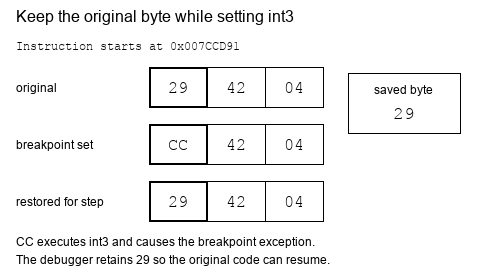
On x86, a debugger often implements a software breakpoint by temporarily replacing the first byte of an instruction with 0xCC, the int3 instruction.
Use a concrete three-byte subtraction as the byte-level example below:
sub dword ptr [edx+4], eax subtracts the value in eax from a four-byte
field at address edx+4. The debugger changes only its first instruction byte
to set the breakpoint.
0x007CCD9129
42
04
sub dword ptr [edx+4], eax
The three-byte subtraction before a software breakpoint is installed.
0x007CCD91CC
42
04
int3
The same bytes with a breakpoint set. The CPU now executes int3 and stops; the debugger keeps the original 29 to put back.
When the CPU executes int3, Windows reports a breakpoint exception. The debugger:
pauses the process;
restores the original byte;
lets you inspect or step;
replaces the breakpoint when execution continues.
That bookkeeping is why you should remove breakpoints through the debugger instead of editing the byte by hand.
The subtraction starts as 29 42 04. The debugger keeps 29 while CC replaces the first byte, then restores 29 before stepping. Optional slow replay shows set, trap, and restore; Pause returns to this overview.
It also means a software breakpoint is not invisible. While it is set, the
program’s own code genuinely contains 0xCC where the original byte used to
be, and nothing prevents the program from reading its own bytes and noticing.
A routine that adds up the bytes of a function and compares the total against
a figure recorded when the game was built will disagree the moment you place a
breakpoint inside that function.
Notice what such a routine has actually established: that its code changed. It
has not detected a debugger, and it cannot tell your breakpoint apart from any
other modification to those bytes. Chapter 13 returns to this, because it is
the same self-checking idea used to notice a patch.
The original instruction still has to execute. A debugger normally handles the
0xCC pause in two events:
The instruction pointer needs rewinding because the CPU has already consumed
the one-byte int3. The one-instruction step lets the real instruction run
before the breakpoint byte is restored. Lesson 6.10 models this as explicit
Armed and Stepping states so the byte is never restored at the wrong time.
On x86, single stepping uses the trap flag in the thread’s flags register.
When set, the CPU raises a debug exception after the next instruction. The flag
belongs to one thread, which is why debugger state records thread IDs.
Follow the subtraction example through both events. The saved 29 byte must
be executable for one instruction before CC can safely be installed again:
Restore, execute once, then re-arm. This step-by-step trace needs JavaScript. Here is the code and where the run ends.
save original byte 29; write CC
CPU stops at the breakpoint
restore 29 and rewind the instruction pointer
run one original instruction with the trap flag
after its single-step stop, write CC again
report whether original work ran once
Result: original instruction executed 1 time(s). Byte restoration and re-arm order are separate operations.
Final values: order = after; site = 0x007CCD91; byte = CC; executed = 1; ip = 0x007CCD91.
Read every step of the lesson’s example
Step 1, line 1. Start with the selected inputs and follow how the next operation changes the state.
order = after.
Step 2, line 2. The breakpoint interrupts before the original subtraction completes.
order = after; site = 0x007CCD91; byte = CC; executed = 0.
Step 3, line 3. Restore byte 29 and return the instruction pointer to its start.
order = after; site = 0x007CCD91; byte = 29; executed = 0; ip = 0x007CCD91.
Step 4, line 4. The trap flag permits one original instruction, then stops the CPU.
order = after; site = 0x007CCD91; byte = 29; executed = 1; ip = 0x007CCD91.
Step 5, line 5. Only now re-arm the breakpoint.
order = after; site = 0x007CCD91; byte = CC; executed = 1; ip = 0x007CCD91.
Step 6, line 6. Result: original instruction executed 1 time(s). Byte restoration and re-arm order are separate operations.
order = after; site = 0x007CCD91; byte = CC; executed = 1; ip = 0x007CCD91.
Watch it happenA breakpoint needs one instruction to get past itself
Three code bytes, 29 42 04, at 0x007CCD91. The debugger swaps the first byte for CC and keeps the original. When the CPU hits it, the debugger restores the 29, rewinds the instruction pointer, runs exactly one real instruction with the trap flag set, and only after the single-step event writes CC back.
Read the steps
The breakpoint is armed: the first byte is CC (int3) instead of the original 29. The debugger keeps the 29 so it can put the subtraction back.
The CPU reaches 0x007CCD91 and executes the one-byte int3. Windows reports a breakpoint event. The instruction pointer has already moved past that byte, to 0x007CCD92.
Restore and rewind: write the saved 29 back and move eip to 0x007CCD91, so the whole subtraction is available again.
Run one real instruction: turn on the trap flag for this thread and continue. The restored subtraction executes, and only then does the CPU report a one-instruction step.
The single-step event: the original instruction has finished, and eip is at the next one, 0x007CCD94. This second event is the moment the debugger can put the breakpoint back without trapping on it immediately.
Re-arm: write CC back at 0x007CCD91 and turn stepping off. The debugger can now continue, or keep the process paused.
The breakpoint event restores the instruction; the single-step event restores the breakpoint. Those are different moments.
When paused at a call, you have choices (Tip: In x64dbg, F7 steps into, F8 steps over, Ctrl+F9 runs until the function returns, and F9 resumes. F2 sets or clears a breakpoint on the selected instruction.):
Action
What it does
Step into
Enter the called function
Step over
Run the called function and pause after it
Run to return
Continue until the current function returns
Resume
Continue until another event pauses the process
Step into code you need to understand. Step over code that is not part of your question.
“Step over” is not one special CPU instruction. At a call, the debugger can
place a temporary breakpoint at the instruction after the call and resume. If
the call never returns normally, that temporary breakpoint may never fire.
“Run to return” relies on the current call frame and can be confused by tail
calls, exceptions, corrupted stacks, or optimized code. These controls are
convenient ways to express a debugging goal, not guarantees about source-level
functions.
nop means “no operation.” Replacing an instruction with one or more
nop bytes is a quick, temporary way to test what that instruction does.
This is a separate action from setting a breakpoint: it changes what
the game executes after you resume.
sub [ecx+30h], eax
If this removes gold and you temporarily replace the whole instruction with nop bytes, recruiting may stop costing gold. That result supports your theory.
NOPing an instruction removes all of its effects, including effects that are
easy to overlook. Arithmetic instructions often update flags used by the next
conditional branch. A floating-point store may also pop a value from an x87
stack. A test that appears visually correct can still damage later control flow
or machine state.
29
41
30
sub [ecx+30h], eax: three bytes
The original instruction.
90
90
90
nop
nop
nop
All three bytes replaced. The subtraction is gone, and so are the flags it would have set.
90
90
30
two nops
leftover
Only two bytes replaced. The CPU decodes the leftover 30 as the start of an xor instruction that swallows the bytes after it.
Before patching, ask:
How many complete bytes does the instruction occupy?
Which registers, memory, flags, or special stacks does it change?
Does later code rely on those changes?
What should visibly change in the game if the patch works?
Later, our debugger will receive the same breakpoint events from Windows. We will model them with an enum:
enumDebugEvent {
Breakpoint { thread_id: u32, address: usize },
ProcessExited { code: u32 },
Other,
}
An enum gives each event a clear shape. Pattern matching then forces us to decide how every event should be handled instead of silently ignoring surprises.
The next lesson uses x64dbg’s built-in breakpoint controls rather than a
custom debugger. Start with the gold address, watch a write, and use the
paused registers and instruction to check whether affordability guards the gold write. The enum
becomes useful later when we write our own event-handling code.
In the previous memory lab, we found the current gold. Now we want to know:
Which instruction subtracts the price of a recruited unit?
Use the same offline Wesnoth 1.14.9 target and restore your clean VM snapshot before starting.
For a concrete run, suppose you start at 100 gold and recruit a unit
costing 15. The expected result is 85. Use the actual price and gold
shown in your match when checking the paused instruction.
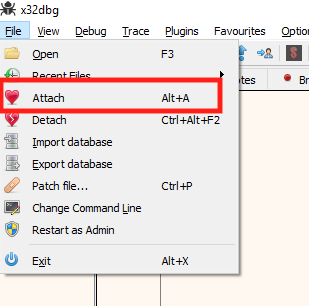
Launch Wesnoth, begin a local match, and find the gold address again. Then attach x64dbg (Reference: The x64dbg documentation covers every view and menu used in this lesson.) to the running process.
x64dbg's Attach command hooks the debugger to the running game.
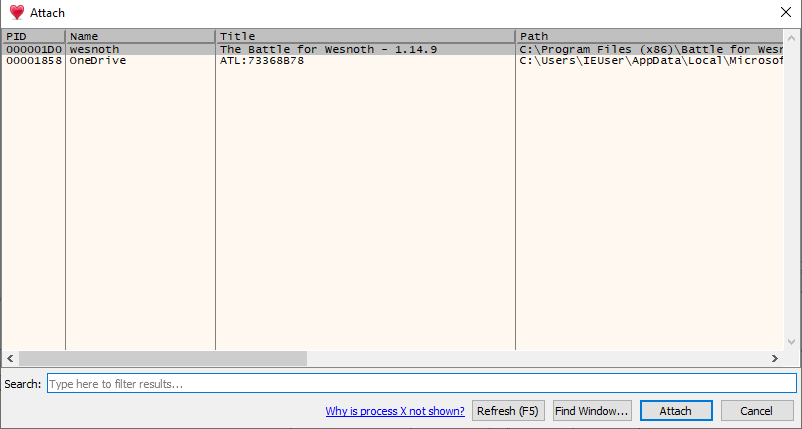
Choose the Wesnoth process from the list.
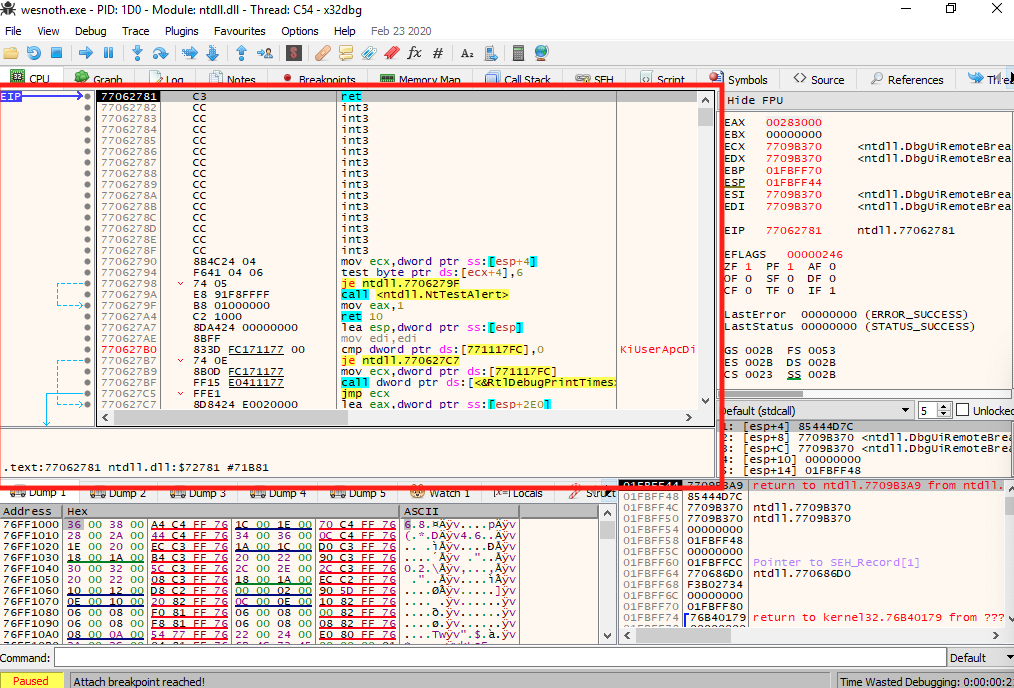
The CPU view contains four useful areas:
disassembly—the instructions near the current position;
registers—the CPU’s current scratch values;
dump—raw memory;
stack—return addresses and temporary data.
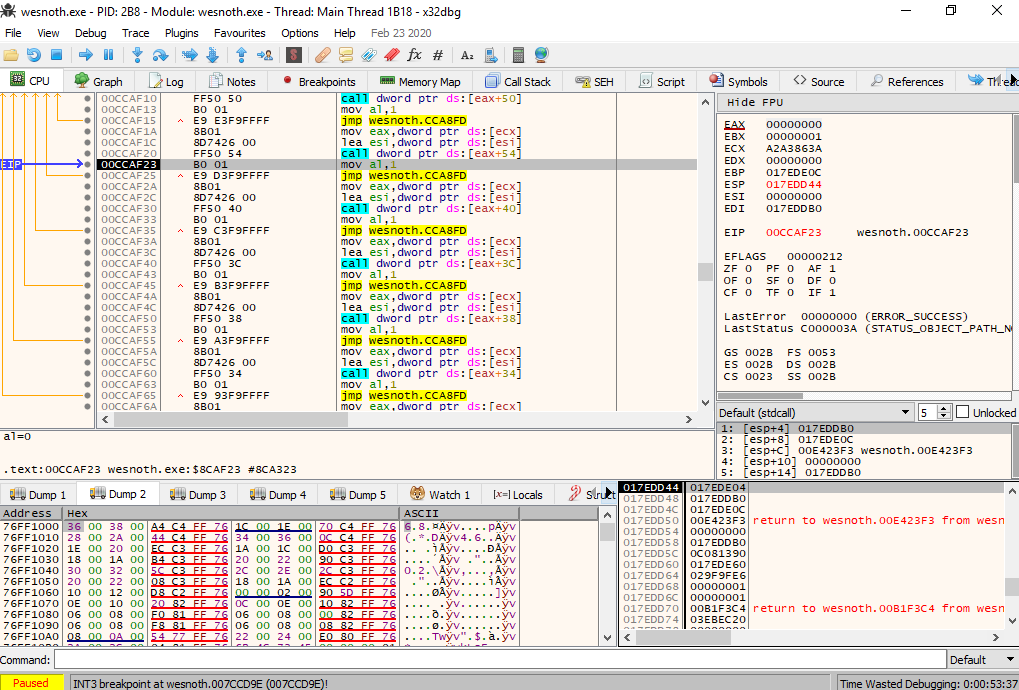
The CPU view: disassembly, registers, dump, and stack.
Attaching may pause in Windows system code. That is normal. Resume the process before triggering your experiment.
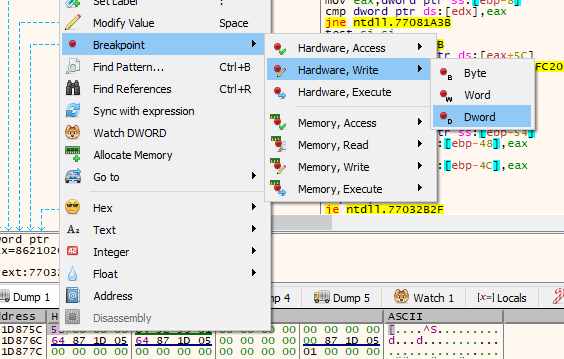
Set a hardware breakpoint on write, covering four bytes at the gold address.
The lesson uses x64dbg, but any debugger that can watch an address will do:
x64dbg
Select the four bytes in the dump, right-click, and choose Breakpoint, then
Hardware, Write, then Dword.
WinDbg
Type ba w4 followed by the address, for example ba w4 0A3C1230, to break on a
four-byte write. Then type g to let the game run.
Cheat Engine
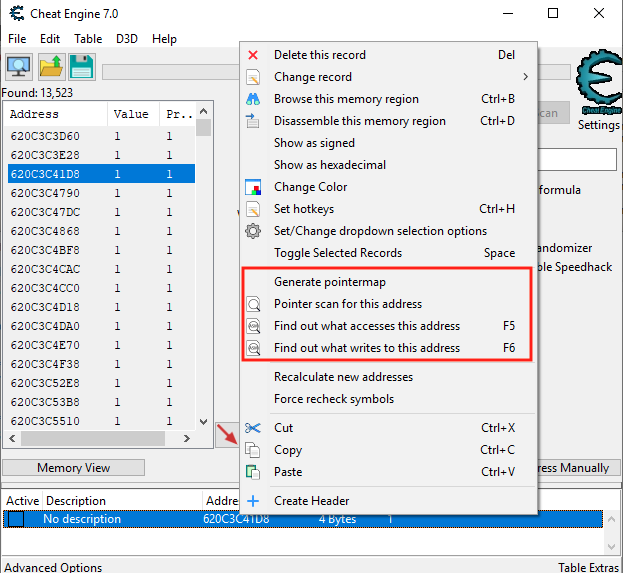
Right-click the gold entry in the address list and choose Find out what writes
to this address. Cheat Engine lists each instruction that writes it, with a
count.
A hardware memory breakpoint does not replace the game’s instruction bytes.
The debugger programs special CPU debug registers with an address, access type,
and width. When an instruction writes across that watched range, the CPU raises
a debug exception and Windows reports it to the debugger.
The width matters. Gold is believed to be a four-byte value, so watch all four
bytes. Watching one byte can still trigger, but it hides whether the game wrote
the complete integer or only part of it.
This breakpoint watches a data address, not one fixed instruction. If three
different functions write gold, the same watch can reveal all three. A software
breakpoint placed on a code address answers the opposite question: “When does
this exact instruction execute?”
Select the four bytes, right-click, then Breakpoint, Hardware, Write, Dword.
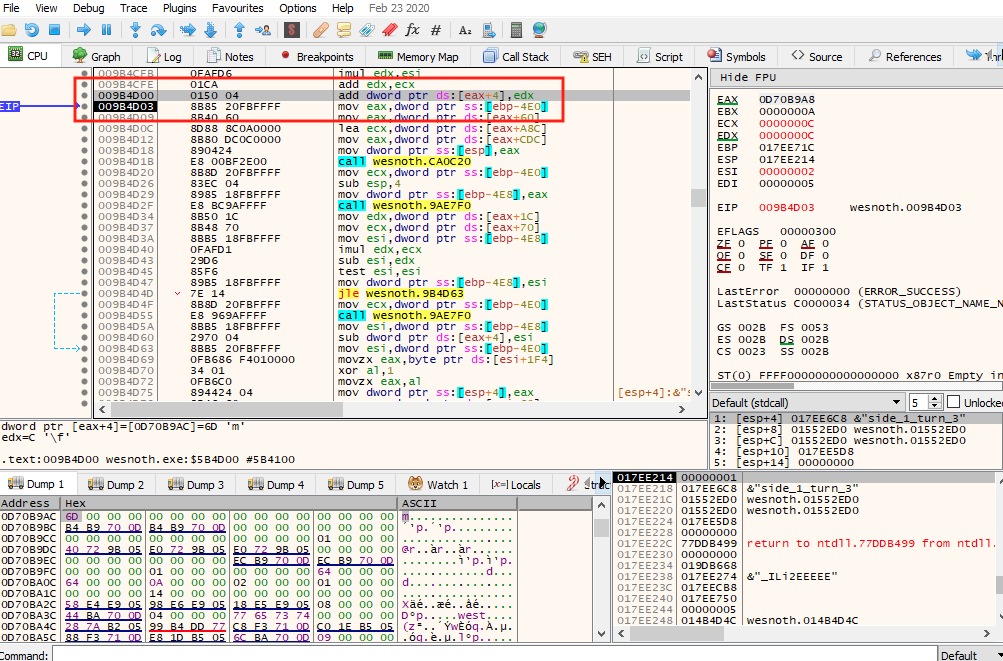
Resume the game and recruit one unit. The debugger should pause close to an instruction that resembles:
subdword ptr [reg+offset], eax
Do not copy the exact register or offset from this page. Read the
instruction in your own debugger. A hardware data breakpoint can report
an access after the instruction has run, so the highlighted next
instruction may not be the one that wrote gold. Use the breakpoint’s
access information and nearby disassembly to identify the triggering
write, then confirm that its calculated destination is your gold
address. Builds and runs can differ.
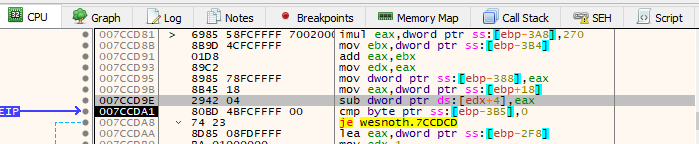
The debugger paused at the instruction that changes gold.
Apply the five questions to the paused instruction:
What is read? The current gold and the price in a register.
What is written? Four bytes at the gold field.
How many bytes?dword ptr means 32 bits.
Signed or unsigned? Test nearby comparisons before deciding.
Where next? The following instruction unless a branch changes the path.
Now compare the price register with the unit’s price. In the example
run, it should be 15 and the destination should be the gold address
that changed from 100 to 85. Matching both is stronger evidence than
recognizing sub alone.
For sub dword ptr [reg+offset], eax, the complete before-and-after effect is:
address = register value + offset
old = 32-bit value read from address
new = old - low 32 bits of eax
store new at address
update arithmetic flags
That last line matters. Later branches may inspect zero, sign, carry, or overflow flags. Replacing the subtraction changes both the stored gold and those flags. Before a temporary patch, step forward and check whether nearby conditional jumps consume them.
The effective address calculation does not dereference reg and then add an offset to the loaded value. It adds the offset to the register first, then reads memory at the resulting address. Keep “calculate an address” separate from “read the value at that address.”
eax, ax, ah, and al are views of the same register family, not four
independent containers. eax selects 32 bits, ax its low 16, ah bits 15–8,
and al bits 7–0. In the course’s 32-bit target, eax is the full-width view.
The diagram also shows the wider rax available in 64-bit mode.
One register, five namesRAX, EAX, AX, AH and AL are not five registers. They are five names for parts of one 64-bit register, drawn here as eight bytes.
Byte number, 7 on the left (most significant) to 0 on the right (least significant)
76543210
RAX
EAX
AX
AH
AL
Before: RAX = 0x1122334455667788
11
22
33
44
55
66
77
88
After mov eax, 0xAABBCCDD: RAX = 0x00000000AABBCCDD
00zero
00zero
00zero
00zero
AAset
BBset
CCset
DDset
set written by the instruction
zero cleared by the 32-bit rule
same left alone
mov eax, 0xAABBCCDD changes RAX from 0x1122334455667788 to 0x00000000AABBCCDD. Bytes 3 to 0 were written. Bytes 7 to 4 were cleared by the zero-extension rule: 11 22 33 44 became 00 00 00 00.
RAX (bits 63 to 0, 8 bytes)
Replaces all eight bytes.
EAX (bits 31 to 0, 4 bytes)
Replaces bytes 3 to 0 and clears bytes 7 to 4 to zero. This is a real x86-64 rule: a 32-bit write always zero-extends into the full register.
AX (bits 15 to 0, 2 bytes)
Replaces bytes 1 and 0. Bytes 7 to 2 keep their old values.
AH (bits 15 to 8, 1 byte)
Replaces byte 1 only. Every other byte keeps its old value.
AL (bits 7 to 0, 1 byte)
Replaces byte 0 only. Every other byte keeps its old value.
The same starting value, five different writes
Start with RAX = 0x1122334455667788, whose bytes from byte 7 down to byte 0 are 11 22 33 44 55 66 77 88. Each row below starts again from that value.
Instruction
RAX afterwards
What happened to the bytes
mov al, 0xEE
0x11223344556677EE
Byte 0 was written. Bytes 7 to 1 were not touched.
mov ah, 0xEE
0x112233445566EE88
Byte 1 was written. Bytes 7 to 2 and byte 0 were not touched.
mov ax, 0xEEFF
0x112233445566EEFF
Bytes 1 to 0 were written. Bytes 7 to 2 were not touched.
mov eax, 0xAABBCCDD
0x00000000AABBCCDD
Bytes 3 to 0 were written. Bytes 7 to 4 were cleared by the zero-extension rule: 11 22 33 44 became 00 00 00 00.
mov rax, 0x8899AABBCCDDEEFF
0x8899AABBCCDDEEFF
Bytes 7 to 0 were written.
The AH and AL names exist because the 8086 had 8-bit halves; the 32-bit and 64-bit names were added later as the register grew. The zero-extension rule for EAX applies in 64-bit mode. In 32-bit mode (this course's target programs) EAX is the whole register and there is no RAX. Microsoft documents the x64 rules in its x64 architecture reference.
In 64-bit mode, a write to eax also clears rax bits 63–32. Writes to
ax, ah, or al preserve bits outside the selected part. Microsoft’s
x64 register reference
documents this distinction. For the gold instruction, the operand width
still tells us that exactly four memory bytes are changed.
treat the four bytes at that final address as the destination;
subtract the lower 32 bits of eax from that destination;
store the result back to the same four bytes;
update CPU flags for later branches.
The bracketed expression accesses memory. Without brackets, esi+30h would be
an address calculation rather than a read or write of the bytes at that
address.
Read the live value of esi in the register panel and add 0x30 yourself. For
example, if esi holds 0x0A3C1200, the destination is
0x0A3C1200 + 0x30 = 0x0A3C1230. If the sum equals the candidate gold address,
this instruction writes the gold you found.
One instruction, step by step: sub dword ptr [esi+30h], eax. This step-by-step trace needs JavaScript. Here is the code and where the run ends.
; sub dword ptr [esi+30h], eax
address = esi + 0x30
old     = read_u32(address)
new     = old - eax  ; low 32 bits
write_u32(address, new)
flags   = ZF, SF, CF, OF from this result
The flags are set from the result: ZF (zero) 0, SF (top bit) 0, CF (borrow) 0, OF (signed overflow) 0. Later conditional jumps read these flags, not the stored gold, so a patch that removes this instruction removes them too.
Final values: esi = 0x0A3C1200; eax = 15; address = 0x0A3C1230; old = 100; new = 85; flags = ZF=0 SF=0 CF=0 OF=0.
Read every step of the lesson’s example
Step 1, line 1. Before it runs: esi holds 0x0A3C1200 and eax holds the price, 15. The four bytes at 0x0A3C1230 hold the gold, 100, stored lowest byte first as 64 00 00 00.
Step 6, line 6. The flags are set from the result: ZF (zero) 0, SF (top bit) 0, CF (borrow) 0, OF (signed overflow) 0. Later conditional jumps read these flags, not the stored gold, so a patch that removes this instruction removes them too.
esi = 0x0A3C1200; eax = 15; address = 0x0A3C1230; old = 100; new = 85; flags = ZF=0 SF=0 CF=0 OF=0.
Copy the original instruction bytes first, so you can write them back. Then temporarily replace the entire subtraction instruction with the same number of nop bytes (Example: The length comes from the encoding. sub [edx+4], eax is the three bytes 29 42 04, so it takes three 90 bytes. sub [edx+0x1234], eax is the six bytes 29 82 34 12 00 00, so it takes six. The disassembly's bytes column shows the count.).
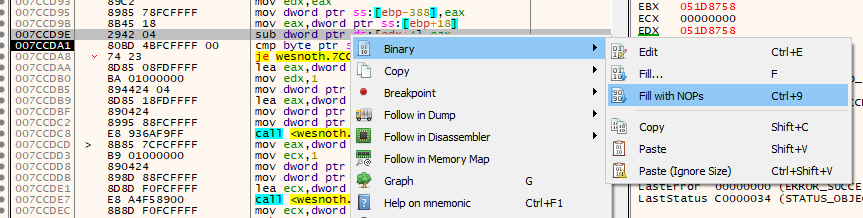
Fill the whole instruction with nop bytes.
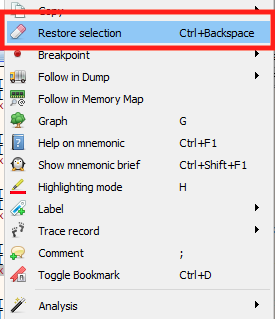
Resume and recruit another unit. If gold no longer decreases, this instruction is the one that subtracts the price. Restore the original bytes immediately afterward.
The instruction after patching: only nop bytes remain.
Remove the breakpoint through x64dbg’s Breakpoints tab and confirm the original instruction is restored.
The Breakpoints tab lists every breakpoint and removes it.
The scan gave us a candidate value; the write breakpoint gave us a
specific instruction and the register values from one recruitment.
The reversible patch checked its effect, but the instruction may also
run for other gold-changing actions. Lesson 2.6
follows the call path to identify which event, caller, and affordability check selected this gold write.
Lesson 2.6
Tracing an Action Through Its Callers
Finding one instruction is useful. Understanding the surrounding feature is better.
In an offline Wesnoth 1.14.9 match, recruiting a unit reduces the player’s
four-byte gold value by that unit’s price. The instruction that writes the
reduced gold is our anchor. Set a code breakpoint on the instruction you
verified in the debugger, recruit one unit, and let the breakpoint fire.
The breakpoint paused on the gold subtraction during a recruit.
The current function probably handles a small part of recruitment. To discover who asked for that work, look at the call stack or run until the function returns.
Run until return: execution continues until the current function finishes.
Now you are back in the caller. Repeat this carefully to move from the low-level write toward the broader decision that requested it.
When x86 executes call, it places a return address on the stack before jumping to the callee. That address points to the instruction the caller expects to run next. A debugger’s call stack combines return addresses with known module ranges and function information to show the nested route that reached the breakpoint.
The call stack a debugger shows is a reconstruction, and it may be incomplete. Optimizations can inline functions, reuse stack space, or omit traditional frame pointers. Confirm an important caller by returning to it or placing a breakpoint at its call site and reproducing the action.
Distinguish the frame from the object it points to
The stack is one place a running function keeps its bookkeeping and temporary
values. It is not the home of every object the function uses:
Storage role
Typical contents
Lifetime to check
Thread stack
Active call frames, saved return addresses, some local values
The current frame ends when the function returns; the thread has its own stack.
Heap allocation
Dynamically allocated objects or buffers
The allocation lasts until its owner releases it, which may be later than this call.
Static or module data
Globals, constants, and other long-lived data
Data remains for the program or module lifetime.
These are roles in virtual memory, not three physical kinds of RAM. Windows
describes thread stacks
and heaps;
Microsoft’s C++ storage-duration guide
explains why a local static value can survive repeated calls. A compiler can
also keep a local in a register or eliminate it entirely.
Three places, three lifetimesA pointer inside a stack frame can refer to a heap block with a different lifetime. Step through one call to watch each place start and end on its own. Positions are schematic.
1The program is running
Module data: lasts as long as the program
MAX_UNITS
6live
Thread stack: lasts as long as each call
Caller’s frame
unit = not setlive
recruit() frame
—not created yet
Heap: lasts until its owner frees it
Unit block
—not created yet
Static data exists. The caller’s frame is on the stack. The heap holds no Unit yet, and its variable unit is not set.
2Call recruit()
Module data: lasts as long as the program
MAX_UNITS
6live
Thread stack: lasts as long as each call
Caller’s frame
unit = not setlive
recruit() frame
count = 3, p = not setlive
Heap: lasts until its owner frees it
Unit block
—not created yet
The call creates a new frame on the stack, with room for count and the pointer p. p holds no address yet.
3Allocate a Unit on the heap
Module data: lasts as long as the program
MAX_UNITS
6live
Thread stack: lasts as long as each call
Caller’s frame
unit = not setlive
recruit() frame
count = 3, p = 0x00A41F00live
Heap: lasts until its owner frees it
↓ p points here
Unit block
at 0x00A41F00: Unit { hp: 10 }live
The allocator hands back a block at 0x00A41F00. That number is stored in p, so p, a slot inside the stack frame, now refers to an object that is not inside the frame.
4recruit() returns the pointer
Module data: lasts as long as the program
MAX_UNITS
6live
Thread stack: lasts as long as each call
Caller’s frame
unit = 0x00A41F00live
recruit() frame
released; old bytes may lingerreleased
Heap: lasts until its owner frees it
↓ unit points here
Unit block
at 0x00A41F00: Unit { hp: 10 }live
Returning ends the frame, so count and p are released. The heap block is not part of the frame, so it stays. The caller received the number 0x00A41F00 and keeps it in unit.
5The owner frees the block
Module data: lasts as long as the program
MAX_UNITS
6live
Thread stack: lasts as long as each call
Caller’s frame
unit = 0x00A41F00 (dangling)live
recruit() frame
released; old bytes may lingerreleased
Heap: lasts until its owner frees it
Unit block
freedreleased
Freeing ends the block’s life. The caller’s variable still holds 0x00A41F00, but that number now names memory the program no longer owns: a dangling pointer. Static data is untouched throughout.
All 5 steps shown
A pointer inside a stack frame can refer to a heap block with a different lifetime. Step through one call to watch each place start and end on its own. Positions are schematic.
Here is an illustrative near call with no arguments, not an address from
Wesnoth. A five-byte call at 0x00401020 must resume at 0x00401025.
Start with esp = 0x0012FF90 and caller ebp = 0x0012FFC0:
Step
Stack pointer
What is saved or restored
call
0x0012FF8C
Four-byte return address 0x00401025.
push ebp; mov ebp, esp
0x0012FF88
Old EBP is saved; new EBP marks this frame.
sub esp, 0x10
0x0012FF78
Sixteen bytes are available for locals below EBP.
mov esp, ebp; pop ebp
0x0012FF8C
Local space is released and caller EBP is restored.
Plain ret
0x0012FF90
Saved address becomes EIP, so execution resumes after the call.
A conventional EBP frame makes the saved return address visible at EBP + 4. The values below are illustrative and the call has no arguments.
Follow one call through the stackA near call with no arguments at 0x00401020. Each step shows the three registers that move and the four-byte stack words, higher addresses at the top.
All 8 steps shown
Frame at its fullest, while the function body runs.
The frame at its fullest, while the function body runsThe body uses the locals at [ebp-0x10] to [ebp-1]. ESP and EBP stay put. EIP moves on 10 bytes, from 0x00401106 to 0x00401110, where leave is.
ESP0012FF78changed
EBP0012FF88changed
EIP00401110changed
0012FF90caller datacaller’s last pushed word (ESP pointed here before the call) live
0012FF8C00401025return address live
EBP0012FF880012FFC0saved EBP (the caller’s) live
0012FF84not initialisedlocal, [ebp-4] live
0012FF80not initialisedlocal, [ebp-8] live
0012FF7Cnot initialisedlocal, [ebp-0xC] live
ESP0012FF78not initialisedlocal, [ebp-0x10] live
0012FF74—below the frame: not in use empty
The instructions
00401020E8 DB 00 00 00call 0x00401100
00401025(the next caller instruction)
0040110055push ebp
004011018B ECmov ebp, esp
0040110383 EC 10sub esp, 0x10
00401106(function body, 10 bytes, not shown)
00401110C9leave
00401111C3ret
EIP always holds the address of the next instruction to run, so the highlighted line is the one that runs next. The addresses are illustrative.
All 8 steps as text
Step 1before the call
ESP is 0x0012FF90, the caller’s last pushed word. EBP is 0x0012FFC0, the caller’s frame base. EIP is 0x00401020, the call instruction.
Step 2call 0x00401100
The return address is the next instruction: 0x00401020 + 5 = 0x00401025. call pushes it: ESP = 0x0012FF90 − 4 = 0x0012FF8C, and 0x00401025 is stored there. EIP becomes the call target 0x00401100 (displacement 0xDB from the end of the call).
Step 3push ebp
ESP = 0x0012FF8C − 4 = 0x0012FF88. The caller’s EBP, 0x0012FFC0, is stored there so it can be restored later.
Step 4mov ebp, esp
EBP = ESP = 0x0012FF88. From now on [ebp+4] = 0x0012FF8C is the return address and locals live below EBP.
Step 5sub esp, 0x10
ESP = 0x0012FF88 − 0x10 = 0x0012FF78. The sixteen bytes from 0x0012FF78 to 0x0012FF87 are reserved for locals; nothing has initialised them.
Step 6function body runs
The body uses the locals at [ebp-0x10] to [ebp-1]. ESP and EBP stay put. EIP moves on 10 bytes, from 0x00401106 to 0x00401110, where leave is.
Step 7leave
leave is mov esp, ebp (ESP = 0x0012FF88) followed by pop ebp: EBP = the word at 0x0012FF88 = 0x0012FFC0, then ESP = 0x0012FF88 + 4 = 0x0012FF8C. The locals are released; their bytes are not erased.
Step 8ret
ret pops the return address: EIP = the word at 0x0012FF8C = 0x00401025, then ESP = 0x0012FF8C + 4 = 0x0012FF90. Execution resumes right after the call.
Releasing stack space does not erase it: after leave and ret the old bytes are still in memory, but they are no longer part of any live frame. A compiler can also omit the EBP frame; this is the conventional layout.
What can a write past the end of a local buffer reach?
Suppose the function copies bytes into a 8-byte local buffer and never checks the length. A copy goes from lower to higher addresses, so past the end of the buffer lie, in order, the rest of the frame: saved EBP, the return address, then the caller’s own data. Choose how many bytes the copy writes.
0012FF94untouchedcaller’s data
0012FF90untouchedcaller’s data
0012FF8C4 of 4 bytes writtenreturn address
0012FF884 of 4 bytes writtensaved EBP
0012FF844 of 4 bytes writtenbuffer, bytes 5 to 8
0012FF804 of 4 bytes writtenbuffer, bytes 1 to 4
0012FF7Cuntouchedanother local
0012FF78untouchedanother local
8 bytes went past the buffer: the first 4 damaged the saved EBP and 4 bytes reached the return address. When the function runs ret, the CPU loads EIP from those bytes, so the function returns wherever the written data says. This is the classic stack buffer overflow bug.
The same write with and without a cookie, for 8, 12, 16 and 20 bytes
The same write, with and without a cookie. Byte n lands n − 1 bytes above the start of the buffer.
Bytes written
Words damaged, no cookie
Words damaged, with a cookie
8
only the buffer
only the buffer
12
saved EBP
stack cookie; the program stops before ret
16
saved EBP, return address
stack cookie, saved EBP; the program stops before ret
20
saved EBP, return address, caller’s data
stack cookie, saved EBP, return address; the program stops before ret
Why bounds checks, cookies, DEP and ASLR exist
Bounds check
Compare the number of bytes to copy with the buffer size before copying, or use calls that take the size. With the check, the write never leaves the buffer and nothing else is needed.
Stack cookie
The compiler places a secret value between the locals and the saved EBP and checks it before the function returns. A copy that runs upward through the frame must cross the cookie, so the check fails and the program stops before ret runs. (Visual C++ calls this /GS.)
DEP / NX
Data Execution Prevention marks stack and heap memory as not executable, so bytes that were only ever data cannot be run as code even if the CPU is pointed at them.
ASLR
Address space layout randomisation places stacks, heaps and modules at different addresses on each run or boot, so a real program’s return address is not a number anyone can know in advance. The values on this page are fixed only so you can follow the arithmetic.
Memory-safe code
Rust’s checked indexing and slice copies panic on a length that does not fit instead of writing past the end. The protection is gone inside unsafe code and in C-style APIs.
These are defences, not a guarantee: they make the bug harder to use, and the fix is still to remove it.
Optional exploration
Follow a cdecl call and its cleanup
A bounded 32-bit near call with one four-byte integer argument. The helper adds seven, returns its result in EAX, and the cdecl caller releases the argument. This is an illustrative calling convention, not executed code.
Play starts only when chosen. Step works one action at a time.
12 / 12: add esp, 4 ; caller cleanup
The cdecl caller releases its four-byte argument. ESP is back at 0x0012FF90; EAX remains 28.
argument21
ESP0x0012FF90
EBP0x0012FFC0
EAX result28
resume address0x00401025
0x0012FF8Ccaller argument21
0x0012FF88saved return address0x00401025
0x0012FF84saved EBP0x0012FFC0
0x0012FF80reserved local worduninitialized
0x0012FF7Creserved local worduninitialized
0x0012FF78reserved local worduninitialized
0x0012FF74reserved local worduninitialized
Outlined slots are live. Released slots show possible leftover bytes, not live objects. Reserved local values are uninitialized.
ESP
0x0012FF90
EBP
0x0012FFC0
EAX
28 (0x0000001C)
EIP after return
0x00401025
Complete default worked example and listing
This reference keeps the default values. The live picture above follows your input and selected step.
Action
Worked state
before the caller pushes its argument
ESP 0x0012FF90; EBP 0x0012FFC0; EAX not set
push argument
ESP 0x0012FF8C; EBP 0x0012FFC0; EAX not set
call helper ; five-byte call at 0x00401020
ESP 0x0012FF88; EBP 0x0012FFC0; EAX not set
push ebp
ESP 0x0012FF84; EBP 0x0012FFC0; EAX not set
mov ebp, esp
ESP 0x0012FF84; EBP 0x0012FF84; EAX not set
sub esp, 0x10
ESP 0x0012FF74; EBP 0x0012FF84; EAX not set
mov eax, [ebp+8]
ESP 0x0012FF74; EBP 0x0012FF84; EAX 21
add eax, 7
ESP 0x0012FF74; EBP 0x0012FF84; EAX 28
mov esp, ebp
ESP 0x0012FF84; EBP 0x0012FF84; EAX 28
pop ebp
ESP 0x0012FF88; EBP 0x0012FFC0; EAX 28
ret
ESP 0x0012FF8C; EBP 0x0012FFC0; EAX 28
add esp, 4 ; caller cleanup
ESP 0x0012FF90; EBP 0x0012FFC0; EAX 28
caller: push argument
        call helper  ; at 0x00401020, next EIP 0x00401025
        add esp, 4   ; cdecl caller releases argument
helper: push ebp
        mov ebp, esp
        sub esp, 0x10
        mov eax, [ebp+8]
        add eax, 7
        mov esp, ebp
        pop ebp
        ret
A plain RET pops the return address, leaving the argument for caller cleanup. Released stack bytes can remain readable without being live objects. Compilers can omit this conventional EBP frame.
Intel’s CALL and RET descriptions
define the instruction behavior. The EBP prologue is a conventional frame
layout, not something call creates by itself. Releasing or popping stack
space need not erase its old bytes, so readable leftovers do not prove a
local object is still alive. The compiler caveats above explain why a real
optimized call may have a different layout.
Establish context by following the observed call chain
Here, establishing context means connecting a stored change to the
specific player, requested action, operands, and checks that caused it.
At the gold write, knowing “subtract 25” is incomplete: is that an item
price, a fine, or a different player’s payment?
The original course called the move from a small helper toward its callers
bubbling. Treat that name as a method, not a promise that every caller
has a recoverable source name. Record each confirmed level:
Context cheatsheet: keep these levels together when following a write toward its callers.
Level
Question it can answer
Evidence to keep
Gold write
Which field changed, and by how much?
Receiver address, amount, before/after values
Spending helper
Which check allowed the subtraction?
Taken comparison and its operands
Purchase handler
What did the amount mean?
Item price passed to the helper
Action dispatcher
What requested this handler?
Selected command and matching call site
Reproduce one action, confirm its write, inspect the caller, and repeat until
you can explain that action. Compare a second action that shares the helper:
it can reach the same write for a different reason. A breakpoint above the
shared helper needs that caller context to distinguish them.
The same gold write can have different callers. This step-by-step trace needs JavaScript. Here is the code and where the run ends.
Step 6, line 9. Now inspect the recorded path. spend_gold identifies the affected player and subtraction, but the helper name alone does not identify the action.
The final steps inspect a recorded path; they do not rewind or repeat a
purchase. In a live debugger, Run until return executes the rest of the
current function. Step over executes a call and pauses after it returns;
Step into follows its executed instructions. None undoes previous writes.
Note the current values again after running, and distinguish an inferred call
stack from a call site you reproduced. Inlining and tail calls can remove an
ordinary call/return boundary.
The constants will not have friendly names in the debugger. You create those names from experiments.
Triggering one menu item at a time shows which branch each one takes. In one run
of this book’s build:
Action: Recruit
Compared value: 3
Taken destination: 0x00CC_A140
Action: Terrain description
Compared value: 5
Taken destination: 0x00CC_AF20
Those destinations belong to one run of one build, and yours will not match.
What carries over is the shape: two actions, two constants, two different
branch targets, all from the same comparison chain.
A comparison chain choosing a menu action. This step-by-step trace needs JavaScript. Here is the code and where the run ends.
cmp eax, 3  ; MENU_RECRUIT?
je  handle_recruit
cmp eax, 5  ; MENU_DESCRIPTION?
je  show_description
cmp eax, MENU_CANCEL  ; ...and so on down the chain
je  close_menu
This one run gave you a pairing: the number 3 leads to the Recruit handler. Naming it is your model of the code, not something the program says.
Final values: eax = 3; ZF = 1; next = 0x00CCA140 (handle_recruit); your_name = MenuAction::Recruit = 3.
Read every step of the lesson’s example
Step 1, line 1. The menu code has put the chosen action's number, 3, in eax. The comparison chain starts.
eax = 3.
Step 2, line 1. cmp eax, 3 subtracts without storing and records the result in the flags. 3 - 3 is 0, so the zero flag becomes 1.
eax = 3; ZF = 1.
Step 3, line 2. je means jump if equal, which reads ZF = 1. It is 1, so the jump is taken and the next instruction run is at the Recruit handler.
eax = 3; ZF = 1; next = 0x00CCA140 (handle_recruit).
Step 4, line 2. This one run gave you a pairing: the number 3 leads to the Recruit handler. Naming it is your model of the code, not something the program says.
Once each constant is matched to an action, the anonymous numbers become an
enum:
#[repr(u32)]
enumMenuAction {
Recruit = 3,
TerrainDescription = 5,
}
The enum is your model, not a claim about the original source type.
The comparison value alone is not enough. Where it came from matters: a register, a stack argument, or a field inside a menu object, and whether another branch changed it before the dispatcher. Those details distinguish “menu command ID” from a temporary loop counter that merely happened to equal 3.
The gold instruction tells you where a change happens. The menu dispatcher tells you why execution reached it.
That distinction matters:
patching the subtraction changes the stored cost result;
changing a branch may select a different feature;
hooking the dispatcher lets you observe every menu action.
Do not make all three changes at once. Test one layer at a time.
This is also a lesson about abstraction levels. The subtraction is a low-level side effect. The recruitment function groups validation and side effects into one operation. The dispatcher chooses among operations. Moving upward explains more behavior but also adds more unrelated branches, so stop when the original question is answered.
“Backward” does not simply mean scrolling upward in the disassembly. It means following the facts that had to be true for the anchor instruction to run.
A data dependency asks where an operand came from. If eax is the price, find the instruction or argument that produced eax.
A control dependency asks which comparison allowed this block to run. If a branch skipped the subtraction, determine what value controlled that branch.
A call dependency asks which caller requested this operation and what arguments it supplied.
Compilers can move calculations away from the source statement that inspired them. The instruction immediately above the anchor may be unrelated, while the important value was loaded twenty instructions earlier or passed by the caller. Track one value and one decision at a time.
A practical stopping condition is: stop tracing callers when you can name the input, the decision, and the observable result in plain English. Going farther may reveal the whole menu framework, but it no longer answers the focused gold question.
Put the anchor from Lesson 2.5 back on screen and ask all three of them about
it. Writing sub dword ptr [esi+0x30], eax in the middle, each question pulls
in a different direction:
call dependency who asked for this work?
| (the caller, and what it passed)
v
data --> sub [esi+0x30], eax <-- control
where did which comparison let
esi and eax this line run at all?
come from?
They are genuinely different searches, and the answers usually live in
different places. eax may have been loaded two instructions above, or handed
in by the caller and untouched since. esi is the one that matters most here:
find where it was set and you have the object the field belongs to, which is
the whole of Lesson 2.8. The comparison that guarded the block may sit
immediately above, or in the caller, having already decided this purchase was
affordable before the call was made.
Answering them one at a time matters. The common way to get lost is to chase eax upward, notice an interesting branch
on the way, follow that instead, and end up unable to say which question you
were answering.
A branch in the code that chooses between menu operations.
The call stack lists the one route that reached your breakpoint this time. The
code itself can list every route. A direct call is the byte E8 followed by a
four-byte distance, stored lowest byte first, which the CPU adds to the address
of the next instruction. Work out that target for every call in the module,
keep the ones that land on the first byte of the function you are in, and you
have its callers. Each one is a cross-reference: a place in the code that
refers to this address. In x64dbg, right-click the function’s first instruction
and choose Find references to, then Selected Address(es).
Take an illustrative helper that starts at 0x00402000. A call at 0x00401020
stores DB 0F 00 00, which read lowest byte first is 0x00000FDB. The next
instruction starts at 0x00401020 + 5 = 0x00401025, and
0x00401025 + 0xFDB = 0x00402000, so this call is a caller. A distance whose
top bit is set counts as
a negative number, which lets a call
reach backward; the calculator’s second example works one out.
The two lists answer different questions. A cross-reference shows that an
instruction can call the helper, and the call stack shows which caller did.
An indirect call such as call eax takes its target from a register while the
game runs, so it never appears in the cross-reference list.
Predict first
During one recruit the call stack showed a single caller, at 0x00401020. The cross-reference list also has a call at 0x00403100 whose target is 0x00402000.
What does the second call site tell you?
Answer: Some other action can reach the same helper, and a breakpoint on 0x00403100 shows which. Both calls land on 0x00402000, so the helper serves at least two callers. Breaking on the second call site and trying other actions that spend gold names the one that uses it.
Where does this call land?A direct call stores a signed distance, lowest byte first. The CPU adds it to the address of the next instruction. A call that lands on the helper’s first byte is one of its callers.
From the call bytes to its target
Five bytes at 0x00401020
The call instruction
0x004010200x00401024
E8call
DBlowest
0F
00
00highest
Work out the target
The four bytes, read lowest byte first
0x00000FDB = +4059top bit clear, so positive
↓ the distance is measured from here
Next instruction = call address + 5
0x00401020 + 5 = 0x00401025
↓ add
Target = next instruction + distance
0x004020000x00401025 + 0xFDB
Compared with the helper
Verdict
Lands exactly on the helper at 0x00402000: a caller
0x00401025 + 0xFDB = 0x00402000, the helper’s first byte, so this call is one of its callers.
The recovered behavior fits in a few lines of pseudocode:
when the player chooses a menu item:
if it is Recruit:
check the tile
check the price
create the unit
subtract gold
otherwise:
run the matching menu action
Pseudocode separates the idea from register names and addresses, so the same sketch describes the function in any build even though every address changes. Parts whose purpose is not known yet can keep neutral names instead of invented ones:
if candidate_action == 3: # Recruit in all three trials
check unknown_flag # the branch exists; its purpose is unknown
call create_unit_candidate # a unit appeared every time this ran
The gold write supplied a known starting instruction. Its return address and
call stack led to the caller; recruiting and opening Terrain Description
supplied contrasting cases for the menu branch. The small pseudocode model
names only behavior those cases supported. That route from an observed write
to a caller, branch, and named action also works when the compiler has removed
the original source names.
That explanation identifies the action and its checks, but the address of its instruction still belongs
to one run. The next question is how to find the same game state after a restart:
why addresses move, and which relationships between objects can survive the
move. Once those are clear, we can return to changing control flow itself.
You find gold at 0x1234_5678, restart the game, and the address is different. Nothing is broken. The address was never a permanent identity.
Two common reasons are:
dynamic allocation — the game asks for memory while it runs;
ASLR, short for Address Space Layout Randomization — Windows loads modules at different base addresses between runs.
Virtual addresses belong to one process. The same numeric address in two different processes can name completely different physical memory, and a freed address can later be reused for another allocation in the same process.
Every address involves three separate things, location, identity, and lifetime:
a location is the virtual address used for this access;
an identity is the game object or field that lives there;
a lifetime is the interval during which that mapping remains valid.
An address gives only the first item. The code that uses it, the objects that
point to it, and repeated access patterns show the identity. Allocation and game events determine the
lifetime. A reusable tool must rediscover or validate the location instead of
treating yesterday’s address as permanent identity.
ASLR can load a module at a different base address on another run. Within one
exact executable build, a global’s relative virtual address (RVA) in the image
is fixed even when the module base changes. The loader maps sections at their
defined relative locations and applies relocations where needed. Thus a tool
can rediscover the base and add the verified RVA; it must not assume ASLR picks
a new base on every launch or that a rebuilt game keeps the same RVA:
module base + relative offset = current address
If wesnoth.exe loads at 0x1400_0000 and a global pointer is at offset 0x01A2_B3C0, the current address is:
0x1400_0000 + 0x01A2_B3C0 = 0x15A2_B3C0
usize is the integer type normally used for an address-sized number:
A stable module location may hold a pointer to an object, which holds a pointer to another object, which contains gold:
Each arrow that says “read pointer” means:
calculate an address;
read a pointer-sized value from it;
treat the result as the next address.
The last step may be a field address rather than another pointer.
Pointer size follows the target architecture. A 32-bit process stores a pointer in four bytes; a 64-bit process normally uses eight. Reading eight bytes from a 32-bit pointer field consumes neighboring data, while reading four from a 64-bit pointer truncates the address. The reader must use the target’s bitness, not the host’s.
At every link, distinguish three different numbers:
the address where a pointer is stored;
the pointer value read from that address;
the field offset added to that pointer value.
Writing the chain as numbered equations makes accidental double-dereferences visible.
Walked with real numbers, the chain in the diagram above looks like this:
module base 0x1400_0000
+ root offset 0x01A2_B3C0 -> 0x15A2_B3C0 an address holding a pointer
read the pointer there -> 0x0453_1180 the player manager
0x0453_1180 + 0x18 -> 0x0453_1198 an address holding a pointer
read the pointer there -> 0x0691_A200 the current player
0x0691_A200 + 0x30 -> 0x0691_A230 the address of the gold field
read four bytes there -> 250 the value you wanted
Notice the rhythm: add, read, add, read — and then at the last step, add and
stop. That final + 0x30 produces the address of gold, not a pointer to
somewhere else. Reading a pointer there instead would take the number 250,
treat it as an address, and try to read memory at 0x0000_00FA.
That is the “one dereference too many” mistake, and it has a recognizable
signature: the error names a very small address. Ordinary game values —
health, gold, ammunition — are small numbers, so when one is mistakenly used
as an address it points at the very bottom of the address space, where nothing
is mapped. An error mentioning an address below a few thousand almost always
means you dereferenced a value instead of a pointer.
Predict first
Restart the game. Windows loads wesnoth.exe at 0x13A2_0000 this time, and the game allocates its manager and player objects at new heap addresses.
You walk the same path: root offset 0x01A2_B3C0, then + 0x18, then + 0x30. Where do you end up?
Answer: At this run’s gold field. The root slot moved with the module to 0x13A2_0000 + 0x01A2_B3C0 = 0x1544_B3C0, and the game stored this run’s manager address in it. Each read picks up a pointer the game wrote in this run, so the walk follows the objects to their new places.
One pointer path, three runs of the gameThe offsets stay the same. The module base and the heap objects can move on every start, and each read picks up the pointer the game stored in this run.
Run 1: add, read, add, read, add
Module base + 0x01A2B3C0
0x14000000module base
0x15A2B3C0root slot
Read it, then + 0x18
0x04531180manager
0x04531198slot
Read it, then + 0x30
0x0691A200player
0x0691A230gold field
Read 4 bytes there
250gold
Gold is at 0x0691A230 in this run. Choose another run: the addresses change, the offsets do not.
Cheat Engine can search for pointer paths automatically:
Cheat Engine's pointer scan searches for pointer paths automatically.
A result is not automatically correct. Validate it across several clean restarts. Prefer paths that:
begin inside a known module;
use a short chain;
work on the exact documented game version;
end at the expected value;
fail safely when a pointer is null or unreadable.
A pointer scan finds numeric relationships that existed in its snapshots. It does not prove ownership. Large offsets, very long chains, and links through short-lived allocations are more likely to be coincidences. Normal gameplay tests—opening menus, changing maps, loading a save—exercise those ownership assumptions.
Do not scatter raw address math around a program. Give it a type:
#[derive(Clone,Copy,Debug)]
structAddress(usize);
implAddress {
fnoffset(self, amount: usize) -> Option<Self> {
self.0.checked_add(amount).map(Self)
}
}
This wrapper does not prove that an address is readable. It does stop us from accidentally mixing an address with an ordinary game value, and it gives one place for overflow checks.
The operating-system call that reads another process still belongs behind a carefully reviewed unsafe boundary. The rest of the pointer-chain algorithm can remain safe, ordinary code.
anyhow::ensure!(object != 0, "null final object pointer");
object.checked_add(field_offset)
.context("field address overflowed")
}
The final field address is returned without reading another pointer. Keeping that distinction in the function signature and variable names prevents the common “one dereference too many” mistake.
The change from loose arithmetic to a deliberate chain is easier to see as a
diff:
The original helper adds the root offset, two link offsets and the field offset as if they were all distances inside one allocation. Here those arguments describe a two-link pointer path: each intermediate slot stores the address of another object.
Before: add every offset without following pointers
Separate address arithmetic from dereferencing. At each link, calculate the slot, read the pointer stored there, and reject null; only the final field is read as gold. These offsets are inputs recovered for your own exact lab build, not universal game addresses.
Use offline, 32-bit Wesnoth 1.14.9. Find the current player’s gold again and
set a write breakpoint on its four bytes. Instead of recruiting, end a turn
so income changes that value.
Wesnoth's income display at the end of a turn.
When the breakpoint fires, inspect the instruction that reached the gold field. In the 32-bit Wesnoth 1.14.9 build used by this book, income reaches:
The breakpoint fires on the instruction that adds income.
009B4D00 adddword ptr [eax+4], edx
Read that line like a sentence: “add the income in edx to the 32-bit number four bytes after the object in eax.” eax points at the current side record, eax + 4 is its gold field, and edx contains the income.
These addresses are exact only for Wesnoth 1.14.9 32-bit. If your instruction differs, use your build’s values instead of forcing these numbers onto it.
Set a breakpoint on the call above the income write. At entry, eax is zero; after stepping over the call, it holds the side-record pointer. Step into that call on the next turn. The useful path begins with:
moveax, dword ptr [ecx+60]
; later, follow that pointer and add 0xA90
; the gold field is another 4 bytes into the side record
At 0x009AE7F7, read ecx. Restart Wesnoth, recreate the same local match, and break there again. In this book’s build, ecx remains 0x017EECB8. The complete path is:
[[0x017EECB8 + 0x60] + 0xA90] + 0x4
Because 0x017EECB8 + 0x60 is 0x017EED18, later labs use the shorter form:
[[0x017EED18] + 0xA90] + 0x4
Square brackets mean “read the pointer stored here.” A plus sign means “move this many bytes from that address.”
Each dereference moves from one object to another. The observed root
0x017EED18 is an absolute address for the pinned course build, not an
RVA. Confirm that it still points into the expected module in your run. A
portable profile would store the root’s RVA and first discover the module’s
current base, as Lesson 2.7 explained. The heap objects reached afterward may
move between runs, which is why the path reads their current addresses rather
than saving yesterday’s final address.
A path is stable only under stated conditions. It may depend on:
the exact executable build;
a local match being active;
the current player or side object existing;
the same layout and pointer width;
each intermediate page being readable at the moment of use.
Validate every edge, not only the final gold. A non-null pointer can still be stale or point to the wrong object. Check module ranges, page protections, alignment, and a few field invariants before trusting the final value.
In Cheat Engine, add a pointer entry by hand using the module and the offsets you observed.
Adding a pointer entry by hand: the module, then each offset.
Be careful about order. A displayed list of offsets may be applied from the module outward or shown in reverse depending on the tool. For this exact build, enter base address 0x017EED18, first offset 0xA90, and final offset 0x4. The resolved value should equal the gold shown in the game.
The finished pointer entry, resolving to the gold value.
The path is stable only for the target version and states you tested. The
absolute root in this example also depends on the module loading where it did
in the verified course run; a relocated module requires base-plus-RVA
resolution. Game updates can change layouts and offsets. Document:
game version and architecture;
module name;
offsets in traversal order;
the expected final type;
how many restarts passed;
known states where the chain is unavailable.
Chapter 3 turns this verified path into an external program. First, the final
two lessons in this chapter ask a different question: what must be preserved
when execution takes a temporary detour through new instructions?
The pointer path gives us a repeatable way to find data, but it cannot add
behavior. Replacing the gold-changing instruction with nop was useful for
one quick test, but it could only remove behavior. What if we want to observe
values, add a check, or run several instructions and then resume the game?
A code cave is a spare executable area used for extra code. A detour redirects execution there and then returns.
The road-diversion image behind the name is worth taking literally, because
every part of it maps onto something you have to get right. You put a sign at
one junction sending traffic down a side road that rejoins the main road
further along. You have not demolished the main road, so traffic can be
restored by removing the sign. The side road must rejoin — a diversion that
just stops leaves everyone stranded, which is what a detour with no return jump
does. And the sign has to replace a whole junction, not half of one, which is
the instruction-boundary problem below.
On x86, one instruction may be 1 byte and another may be 7 bytes. A typical near jump needs 5 bytes. You must replace whole instructions until you have enough room.
The reason is that the CPU keeps no map of where instructions begin. It starts
decoding at whatever address it is handed and reads forward, letting each
opcode announce how many bytes it consumes. Start it one byte late and every
instruction from that point on is decoded from the wrong position.
Take the six-byte span this lesson hooks:
0x10008B
01
0x10028D
74
26
00
mov eax, [ecx]
lea esi, [esi]
Two whole instructions, six bytes.
A five-byte jump written over it covers 8B 01 8D 74 26 and strands the final
00. When the cave later returns to 0x1005, the CPU does not see “the
leftover tail of a lea.” It sees a fresh byte stream beginning with 00,
which starts a completely different instruction that swallows whatever follows
as its operands. Execution continues confidently into nonsense, and the crash
usually surfaces somewhere unrelated a few instructions later — which is what
makes this mistake so hard to diagnose after the fact.
0x1000E9
??
??
??
??
0x100500
jmp to the cave
stranded
Bad: exactly five bytes copied. The cave returns to 0x1005, and the CPU starts a new instruction at the orphaned 00.
0x1000E9
??
??
??
??
90
jmp to the cave
nop
Good: both whole instructions covered, the spare byte filled with nop. The cave returns to 0x1006, the first untouched byte.
So you round up to the next instruction boundary: cover all six bytes and fill
the spare sixth byte with a nop. The return address is the hook address plus
the total number of whole bytes replaced.
Make room without cutting an instruction. This step-by-step trace needs JavaScript. Here is the code and where the run ends.
sizes = [2, 4]
covered = 0
take the next whole instruction
repeat until covered >= jump_size
padding = covered - jump_size
resume = hook_start + covered
Result: cover 6 bytes and resume at 0x1006, a complete instruction boundary.
For the pinned Wesnoth 1.14.9 build, the Terrain Description menu reaches a
six-byte span at 0x00CC_AF8A: 8B 01 8D 74 26 00. The first two bytes
encode mov eax,[ecx]; the other four encode an alignment lea. A jump
needs five bytes, so it must cover both whole instructions and resume at
0x00CC_AF90, the first untouched byte.
This short x86 sketch puts code beside the flow diagram above. The two
instructions near the end replay the behavior removed from the hook site;
the final jump lands after all six covered bytes:
pushfd; save the interrupted flags
pushad; save the 32-bit general registers
call extra_logic ; observe or change something
popad
popfd
moveax, [ecx] ; replay the first covered instruction
leaesi, [esi] ; replay the second covered instruction
jmp0x00CCAF90; first untouched Wesnoth instruction
Where eip goes during one trip through the detourThe six bytes at 0x00CCAF8A now hold a jump and a nop. The two instructions they held run in the cave instead, exactly once.
1At 0x00CCAF8A: jump to the cave
Hook site, 6 bytes
0x00CCAF8A0x00CCAF8F
E9 rel32jmp cave
90nop
The game reaches the hook site. Its six bytes are now a five-byte jump and a nop.
2In the cave: extra work, then the saved bytes
Cave: the added work
save
extra logic
restore
Cave: the saved bytes
8B 01mov eax,[ecx]
8D 74 26 00lea esi,[esi]
jmp back
The extra logic runs between save and restore. Then the two whole instructions the jump covered run here, once.
3Back at 0x00CCAF90
Game code again
jmp backfrom the cave
0x00CCAF90first untouched instruction
jmp back lands on 0x00CCAF8A + 6 = 0x00CCAF90, the first byte the patch did not touch.
All 3 steps shown
The six bytes at 0x00CCAF8A now hold a jump and a nop. The two instructions they held run in the cave instead, exactly once.
extra_logic is a placeholder, not a ready-to-install hook. The exact
implementation also has to verify the original bytes, encode a reachable
relative jump, and restore the patch when disabled.
Lesson 2.10 uses x64dbg to trace that route with breakpoints before adding
behavior. Lesson 8.3 then builds the
full DLL version: checked gold pointer path, naked x86 cave, relative jump
bytes, saved registers and flags, injector commands, F1 toggle, and restoration.
The exact code and stack diagram live beside that runnable implementation.
A detour begins and ends at machine-code boundaries. The surrounding program can:
allocate and own buffers;
calculate and verify addresses;
decode instructions with a library;
build a patch plan;
restore original bytes automatically;
expose a small safe API.
The final jump bytes and an in-process hook still require unsafe code and a
small amount of assembly. Typed code manages the larger, error-prone lifecycle:
Before writing, compare the bytes in memory with original. If they differ, stop. The target may be a different version or another tool may already have changed it.
A patch is not complete until it has a cleanup path. Plan restoration before applying the detour:
store the exact original bytes;
restore them when the feature is disabled;
restore them when the tool exits normally;
make repeated enable/disable operations safe.
This habit will shape the wrappers we build later.
The key distinction is lifecycle code versus boundary code. The manager owns
the patch, validates the target, reports failures, and restores state. Assembly describes
the few CPU instructions that must run at the exact hijacked boundary.
Lesson 2.10
What a Working Detour Must Preserve
This lesson follows the Terrain Description menu in offline, 32-bit Wesnoth
1.14.9. A six-byte instruction span in that path will become a temporary
detour. Use x64dbg to trace every hop before automating its lifecycle in
Lesson 8.3.
A hook site is the address where normal execution is redirected. A
detour is that redirection. A code cave is executable storage holding
the added instructions. A return address is the first untouched instruction
where normal execution resumes.
Some tools use the word trampoline for a small block that replays displaced
instructions and jumps back. Names vary, but every working detour must answer
the same questions:
Where do we leave the original path?
Which complete instructions did we remove?
Where will the new code live?
What machine state must it preserve?
Where does normal execution resume?
How will every changed byte be restored?
The CPU has no concept of “our patch.” It only follows the instruction pointer.
A single wrong length or destination sends that pointer into unrelated bytes.
Right-click a tile and open Terrain Description to trigger this path. It
gives us an easy local-menu event without changing competitive or networked
behavior.
The terrain-description function that the detour starts from.
Pause the game and choose a hook site with enough complete instructions for a jump. Building the detour takes five facts about that site. For the exact course build they are:
Hook address: 0x00CC_AF8A
Original instructions: mov eax,[ecx] / alignment lea
Original bytes: 8B 01 8D 74 26 00
Total byte length: 6
Return address: 0x00CC_AF90
The byte count comes from instruction decoding, not subtraction by guesswork. 8B 01 is the two-byte mov eax,[ecx], and 8D 74 26 00 is a four-byte lea that changes nothing and exists only as alignment padding, so the two instructions cover 2 + 4 = 6 bytes. The return address is the first byte after them: 0x00CCAF8A + 6 = 0x00CCAF90, because 0x8A is 8 × 16 + 10 = 138, and 138 + 6 = 144 = 9 × 16 = 0x90.
Do not continue until the return address points to the first untouched instruction.
x86 instructions have different lengths. A five-byte jump cannot safely replace
the first five bytes of a six-byte instruction. The overwrite must end exactly
on an instruction boundary, even when that means replacing six, eight, or more
bytes and filling unused space with nop.
For this historical debugger exercise, locate executable padding inside the controlled module.
Empty-looking padding near the end of the module, where a cave can fit.
“Looks empty” is enough for this one debugger experiment, not for a repeatable
hook installer. A detour installed whenever the game starts should allocate
its own cave, request the needed page protection, verify the hook bytes, and
release or restore everything during shutdown. Here we use existing padding so
you can see the control-flow idea before building that machinery in chapter 6.
The hook interrupts a function in the middle of its work. Registers, flags, and
stack entries may already carry values needed by later instructions.
The cave must normally:
save any register or flag it will change but the original code expects;
run the added behavior;
restore that machine state;
replay the complete displaced instructions exactly once;
jump to the first untouched instruction.
Replaying an instruction twice is just as wrong as skipping it. Changing the
stack pointer without undoing the change can make a later ret jump to garbage.
These delayed failures are why a hook may appear to work once and crash later.
Predict first
The game reaches the hook with ecx = 0x0A3C1000, the object that the displaced mov eax,[ecx] reads. The cave's extra logic sets ecx to 1 for its own work.
The cave forgets to restore ecx, then replays mov eax,[ecx]. What happens?
Answer: It reads from address 0x00000001 and faults. mov eax,[ecx] uses the current ecx, which is 1. Nothing is mapped at address 1, so the read faults. Saving ecx before the extra logic and restoring it afterwards would have put 0x0A3C1000 back.
One trip through a detour. This step-by-step trace needs JavaScript. Here is the code and where the run ends.
hook:  jmp cave  ; 6 bytes: jmp + nop padding
cave:  push ecx  ; save what we will change
       mov ecx, 1  ; added behaviour borrows ecx
       pop ecx  ; restore it
       mov eax, [ecx]  ; replay displaced instruction
       lea esi, [esi+0]  ; replay displaced instruction
       jmp 0x00CCAF90  ; first untouched instruction
Jump to 0x00CCAF90, which is 0x00CCAF8A + 6, the first byte after the displaced instructions. The game continues with ecx, eax and the stack exactly as if the detour had never been there.
Final values: ip = 0x00CCAF90; ecx = 0x0A3C1000; eax = 0x00000007; stack = empty.
Read every step of the lesson’s example
Step 1, line 1. The game reaches 0x00CCAF8A. The six bytes there used to be 8B 01 8D 74 26 00, which is mov eax,[ecx] (2 bytes) plus an alignment lea (4 bytes). Now they hold a jump to the cave and a nop, so the CPU goes to the cave instead.
Step 5, line 5. Replay the first displaced instruction exactly once: mov eax,[ecx] reads the value at 0x0A3C1000, which is 7, into eax. The game gets the value it would have got without the detour.
ip = in the cave; ecx = 0x0A3C1000; eax = 0x00000007; stack = empty.
Step 6, line 6. Replay the second displaced instruction. This lea only pads alignment and changes nothing, but it must still be replayed so the byte count adds up.
ip = in the cave; ecx = 0x0A3C1000; eax = 0x00000007; stack = empty.
Step 7, line 7. Jump to 0x00CCAF90, which is 0x00CCAF8A + 6, the first byte after the displaced instructions. The game continues with ecx, eax and the stack exactly as if the detour had never been there.
The lasting result is your map of the detour, not the temporary patch.
After this debugger-only round trip, Lesson 8.3
implements the same map in a DLL. It verifies the six bytes, replaces them
with E9 rel32 90, runs a naked x86 cave, sets Wesnoth gold to 888, replays
the removed behavior, jumps to 0x00CCAF90, and restores the bytes when
disabled. The complete source is also in
game_hooks.rs.
//! Exact x86 hooks used by the version-pinned course targets.#![cfg(target_arch = "x86")]use std::{ ptr, sync::atomic::{AtomicBool, Ordering},};use anyhow::{Context, Result};use windows::Win32::UI::Input::KeyboardAndMouse::{ INPUT, INPUT_0, INPUT_MOUSE, MOUSEEVENTF_LEFTDOWN, MOUSEEVENTF_LEFTUP, MOUSEINPUT, SendInput,};use super::{LocalPatch, input_structure_size, near_jump};const WESNOTH_PLAYER_ROOT: usize = 0x017E_ED18;const WESNOTH_GAME_OFFSET: usize = 0x0A90;const WESNOTH_GOLD_OFFSET: usize = 0x0004;const WESNOTH_TERRAIN_HOOK: usize = 0x00CC_AF8A;const WESNOTH_TERRAIN_RESUME: usize = 0x00CC_AF90;const AC_TRIGGER_HOOK: usize = 0x0040_AD9D;const AC_TRIGGER_ORIGINAL: usize = 0x0046_07C0;const AC_TRIGGER_RESUME: usize = 0x0040_ADA2;const AC_RECOIL_STORE: usize = 0x0045_BAAD;const AC_RADAR_FILTER: usize = 0x0040_9FB3;const URT_RENDER_HOOK: usize = 0x0052_D2FD;const URT_RENDER_RESUME: usize = 0x0052_D303;pub static TARGET_UNDER_CROSSHAIR: AtomicBool = AtomicBool::new(false);/// Resolves Wesnoth's two pointers and writes the live gold field.////// # Safety/// Call only inside 32-bit Wesnoth 1.14.9 after a local match has started.unsafe fn set_wesnoth_gold(amount: u32) -> Result<()> { // SAFETY: the caller verified the target build; volatile access makes the // actual memory operation visible at this exact point. let player = unsafe { ptr::read_volatile(WESNOTH_PLAYER_ROOT as *const u32) } as usize; anyhow::ensure!( player != 0, "start a Wesnoth match before using the terrain hook" ); let side_pointer_address = player .checked_add(WESNOTH_GAME_OFFSET) .context("Wesnoth side-pointer address overflowed")?; // SAFETY: the verified player structure owns a 32-bit pointer at +0xA90. let side = unsafe { ptr::read_volatile(side_pointer_address as *const u32) } as usize; anyhow::ensure!(side != 0, "Wesnoth side pointer is null"); let gold_address = side .checked_add(WESNOTH_GOLD_OFFSET) .context("Wesnoth gold address overflowed")?; // SAFETY: the verified side structure owns its four-byte gold field at +4. unsafe { ptr::write_volatile(gold_address as *mut u32, amount) }; Ok(())}pub fn write_wesnoth_gold(amount: u32) -> Result<()> { // SAFETY: the DLL worker calls this only after matching wesnoth.exe. The // pointer resolver still rejects the normal "no active match" null state. unsafe { set_wesnoth_gold(amount) }}extern "C" fn wesnoth_cave_body() { // A naked cave cannot return `Result`, so the worker verifies the target and // this tiny body simply leaves the game unchanged if the match is not ready. // SAFETY: the cave is installed only after the exact Wesnoth hook bytes // match; the helper checks every nullable pointer in the live chain. let _ = unsafe { set_wesnoth_gold(888) };}#[unsafe(naked)]unsafe extern "C" fn wesnoth_terrain_cave() { core::arch::naked_asm!( "pushfd", "pushad", "call {body}", "popad", "popfd", // Replay the behavior of the six bytes replaced at the hook site. "mov eax, dword ptr [ecx]", "lea esi, [esi]", "jmp {resume}", body = sym wesnoth_cave_body, resume = const WESNOTH_TERRAIN_RESUME, );}extern "C" fn record_crosshair_target(value: u32) { TARGET_UNDER_CROSSHAIR.store(value != 0, Ordering::Release);}#[unsafe(naked)]unsafe extern "C" fn assaultcube_trigger_cave() { core::arch::naked_asm!( // The removed instruction was this call. Run it first so EAX contains // the game's real target-under-crosshair result. "call {original}", "pushfd", "pushad", "push eax", "call {record}", "add esp, 4", "popad", "popfd", "jmp {resume}", original = const AC_TRIGGER_ORIGINAL, record = sym record_crosshair_target, resume = const AC_TRIGGER_RESUME, );}#[unsafe(naked)]unsafe extern "C" fn urban_terror_render_cave() { core::arch::naked_asm!( "pushfd", "pushad", "mov dword ptr [ebx + 4], 0x0D", "popad", "popfd", // Replay the complete instruction that the detour replaced. "mov dword ptr [0x0102AE98], ebx", "jmp {resume}", resume = const URT_RENDER_RESUME, );}fn six_byte_detour(hook: usize, cave: usize) -> Result<[u8; 6]> { let jump = near_jump(hook, cave)?; let mut replacement = [0x90_u8; 6]; replacement[..5].copy_from_slice(&jump); Ok(replacement)}pub fn install_wesnoth_terrain_hook() -> Result<LocalPatch> { // mov eax,[ecx] ; lea esi,[esi+eiz] const ORIGINAL: [u8; 6] = [0x8B, 0x01, 0x8D, 0x74, 0x26, 0x00]; let cave = wesnoth_terrain_cave as *const () as usize; let replacement = six_byte_detour(WESNOTH_TERRAIN_HOOK, cave)?; LocalPatch::apply(WESNOTH_TERRAIN_HOOK, &ORIGINAL, &replacement)}pub fn install_assaultcube_trigger_hook() -> Result<LocalPatch> { // call 0x004607C0, encoded relative to the end of this instruction. const ORIGINAL: [u8; 5] = [0xE8, 0x1E, 0x5A, 0x05, 0x00]; let cave = assaultcube_trigger_cave as *const () as usize; let replacement = near_jump(AC_TRIGGER_HOOK, cave)?; LocalPatch::apply(AC_TRIGGER_HOOK, &ORIGINAL, &replacement)}pub fn install_urban_terror_memory_wallhook() -> Result<LocalPatch> { // mov dword ptr [0x0102AE98],ebx const ORIGINAL: [u8; 6] = [0x89, 0x1D, 0x98, 0xAE, 0x02, 0x01]; let cave = urban_terror_render_cave as *const () as usize; let replacement = six_byte_detour(URT_RENDER_HOOK, cave)?; LocalPatch::apply(URT_RENDER_HOOK, &ORIGINAL, &replacement)}pub fn enable_assaultcube_no_recoil() -> Result<LocalPatch> { // fstp dword ptr [ebx+0x44] -> fstp st(0), nop LocalPatch::apply(AC_RECOIL_STORE, &[0xD9, 0x5B, 0x44], &[0xDD, 0xD8, 0x90])}pub fn enable_assaultcube_show_all_radar() -> Result<LocalPatch> { // 0F 85 is a six-byte near JNE. Capture its four-byte destination exactly, // NOP the full branch, and let LocalPatch restore all six captured bytes. LocalPatch::apply_masked( AC_RADAR_FILTER, &[Some(0x0F), Some(0x85), None, None, None, None], &[0x90; 6], )}pub fn send_left_mouse(pressed: bool) -> Result<()> { let flags = if pressed { MOUSEEVENTF_LEFTDOWN } else { MOUSEEVENTF_LEFTUP }; let input = INPUT { r#type: INPUT_MOUSE, Anonymous: INPUT_0 { mi: MOUSEINPUT { dx: 0, dy: 0, mouseData: 0, dwFlags: flags, time: 0, dwExtraInfo: 0, }, }, }; // SAFETY: `input` is a fully initialized INPUT value and the structure size // is the one expected by this build of Windows. let sent = unsafe { SendInput(&[input], input_structure_size()) }; anyhow::ensure!(sent == 1, "SendInput sent {sent} of 1 mouse event"); Ok(())}
Chapter 3 uses the verified addresses and types from this chapter to build an
external memory tool. The DLL hook remains a later application of this same
control-flow model.