Brightness, reading palette, text size, comments and reading sound.Adds page background, hover cards, button corners, code colours, width and layout.Everything, including diagram styling, motion, inline code, depth and fine details.
Reading sound Off
Sound starts off. Play when you want it.
Original sounds, released into the public domain under CC0.
Margin comments
Hide author and reader comments without deleting them.
Page brightness
Lesson text size
Reading palette
More options
Reader finish
Modern adds semantic colours and refined controls. Soft depth adds frost and shadows.
Page background
Hover cards
Definitions, examples, tips, and lesson summaries that open over words and links. Off also removes the underlines.
Chat button
Which corner the button for asking questions about the book sits in. Top corners stop short of the lesson list and contents; at the bottom right it sits under the Notes button. It takes the colour of the chapter you are reading.
Notes button
Where the 📝 Notes button sits on lessons. Hidden leaves a thin tab on the edge; Alt + N brings it back.
Settings panel
Popover opens under the button. Side sheet slides in from the right with a dimmed page behind it.
Sidebar and header contrast
Original keeps the dark lesson list and header. Unified tints them to match the page and palette.
Reading width
How wide the lesson text column is. Standard is about 70 characters a line.
Table of contents
Light or dark for the “On this page” panel on the right, whatever the page is.
Lesson spacing
Code brightness
Syntax colours
Moving effects
System respects reduced motion while still advancing steps. On Play enables moving effects when you start a diagram. Off keeps manual steps.
Fine-tuning
Depth
Flat is the original. Soft adds faint shadows to diagram boxes, cards and buttons and lifts them slightly on hover.
Inline code
Classic keeps the badge look. Soft quiets the background and border for paragraphs full of keywords.
Floating buttons
Docked shows the Notes and chat buttons normally. Minimal makes them small icons that fade until you point at them.
Gradients
Use flat colours for headings, cards and diagram backgrounds.
Diagram background
Changes diagram surfaces; labels and role colours remain readable.
Diagram boxes
Heading rectangles
Diagram label backgrounds
Diagram frames
Diagram size
Page grid
Time per step
Semantic colours
Ligatures
What the colours mean
Terms, inputs, and data
Code and processing
Results and tips
Cautions
These colours follow your theme; their meanings stay the same. Data tables and diagram explanations use the information colour; code panels use processing. The lesson header and navigation identify its chapter. Correct answers are green; errors are red.
Alt + T palette · Alt + D page · Alt + C code · Alt + S syntax · Alt + H semantic · Alt + L ligatures · Alt + N lesson list · Alt + O on this page
4. Game State and Bounded Decisions — print chapter
The previous chapters followed values into instructions and turned remote
bytes into typed objects and collections. The next question is larger:
which system moves them, resolves collisions, applies damage, and advances timers?
A health update might be native code, a cooldown calculation a script, and a
unit’s starting health loaded from a data file. Finding the relevant function
or definition starts with separating game-specific behavior from the engine
services that execute it.
The game loop reads input, checks whether actions are allowed, updates
positions and health, and draws the result. Games need other machinery too: something loads the level, stores
objects, and calls the renderer. A game engine supplies much of this
reusable machinery. Knowing where it stops and the game begins tells you
which technique in this book will work on a given problem.
Many games need the same kinds of machinery, even when their weapons, maps, and art are
different:
a game loop that reads input, updates the world, and draws a frame, over
and over (Lesson 1.3);
a renderer that turns the world into pixels;
a way to load art, sound, levels, and settings from disk;
a model of the world: what objects exist, where they are, what they hold;
collision, when objects can meet walls or one another;
sound, input, menus, and sometimes networking and scripting.
Not every game needs every item: a text adventure may have no renderer or
collision system. For games that do need these pieces, reusing them can save
substantial work. A game about tanks and a game about farming can share the
window, input, loading, and rendering machinery while supplying different
behavior: armor damage for tanks, crop growth for farming.
A game engine is that reusable machinery: the software that runs the loop,
draws the frames, loads the files, and manages the objects, on which a
particular game’s content and behavior—such as what a hit does or what a unit
costs—are built.
A renderer’s basic shape is a triangle joined from three corner points
called vertices. Rasterization finds the pixels the triangle covers, and a
pixel stage then gives each of those pixels its colour:
Which pixels does one triangle cover?Vertices A (0, 0) and B (8, 0) sit on the top edge of an 8 × 5 pixel screen. Move vertex C; a pixel is a candidate when its centre lies inside triangle ABC.
Vertices, then the pixels they cover
Three vertices joined into one triangle
Vertices
A (0, 0)
B (8, 0)
C (0, 5)
Pixel centres: filled = inside the triangle
x 0x 7
20 of 40 pixel centres lie inside triangle ABC. Those 20 pixels are the candidates; the pixel stage gives each a colour, and the other 20 keep the background.
A spreadsheet program is a useful comparison, because it holds up when you push
on it. The program supplies the grid, the formulas, and the recalculation; each
spreadsheet file supplies its own numbers and formulas. A bug in how the program
recalculates breaks every spreadsheet you open. A wrong formula in one file
breaks only that file. And two files made in the same program share the same
structure, so once you understand one, the next is easier to read. All three
statements hold for engines and games too, which is exactly what makes the split
worth learning.
Games also use libraries. A useful first distinction is who controls the
main loop and calls whose code.
Your code calls a library. SDL, for example, is a library that Wesnoth’s engine
uses to open a window, read the keyboard, and play sound. It has no idea what a
unit or a map is; it waits to be asked.
An engine often calls your code. It may own the loop and call the game’s
update and draw functions at the moments it chooses. The game is a guest in a
loop the engine runs. Those update and draw functions are
callbacks: the game hands them to the engine, and the engine decides
when to run them.
This is a way to reason about control flow, not a rigid test for what a project
may call an engine. Engine code can call libraries, and game code can call
engine functions too.
Outside games, software that works this way is called a framework. A web
framework owns the loop that waits for requests and calls the handler you
registered for each address, so the same question — who calls whom — sorts
those tools too.
This matters later in a practical way. A repeated call near frame presentation
can be a useful meeting point when you verify that the game actually reaches it.
That is why Lesson 7.10 hooks Present: this game’s rendering path calls it to
show finished frames, making it a good place to observe them.
Before the first frame, the application starts up. It reads its settings from a file,
such as the resolution, the volume, and the key bindings. It creates the window, and it
sets up each part of the engine. Engines package those parts as plugins. A plugin is
a module that registers what it needs, such as its systems and the event types it uses,
with the application when it is added, and a plugin group adds several together, such
as the window, the input, the renderer, and the audio. The game itself is then a small
plugin of its own, and swapping one plugin, say for a different renderer, changes one part
without touching the rest. Changed settings are written back to the file, so they persist
the way a save does (Chapter 10).
An engine that owns the loop does the same few jobs on every pass through it, in
the same order:
Gather input. Ask the operating system which keys, buttons, and mouse
movements happened since the last pass, and turn them into actions
(Lesson 1.3).
Update the world. Move objects, resolve contacts, apply damage, count
timers down, and choose character actions.
Draw. Build the picture of the world as it is now.
Present. Hand the finished picture to the display, and, with vertical
sync on, wait for the display’s next refresh.
Frame time and frame rate are reciprocals of each other:
tframe=fps1000ms
A display that refreshes 60 times each second takes a new picture every
1 ÷ 60 = 0.01667 seconds, which is 16.67 milliseconds. All four jobs must fit in
that frame budget, or the display refreshes before the new picture is ready
and shows the old one again. A frame that takes 25 ms gives 1 ÷ 0.025 = 40 frames
per second; one that takes 8.33 ms gives 120. This is why tools report frame
time, in milliseconds, as well as frames per second. Frame times add up, so a
4 ms update plus a 10 ms draw is a 14 ms frame, but frame rates do not add.
Lesson 1.3 showed that movement needs elapsed time: distance = speed × time. An
engine measures the delta time, the seconds since the previous frame, and
hands it to every update. Physics prefers steady steps, though. If one frame
moves a fast ball 3 pixels and the next moves it 30, a contact test that looks
only at positions can jump the ball clean over a wall 10 pixels thick. So many
engines run physics in a fixed timestep, such as 1/60 second, and carry the
leftover real time into the next frame:
ExampleThree frames of fixed steps
Frame
Real time since the last frame (ms)
Time waiting to be simulated (ms)
Fixed steps run (16.67 ms each)
Left over (ms)
1
20.00
0 + 20.00 = 20.00
1
20.00 − 16.67 = 3.33
2
20.00
3.33 + 20.00 = 23.33
1
23.33 − 16.67 = 6.67
3
30.00
6.67 + 30.00 = 36.67
2
36.67 − 33.33 = 3.33
After 70 ms of real time the game has run 4 steps, which is 4 × 16.67 = 66.67 ms
of game time, and 3.33 ms is waiting. The two add back to 70 ms, so no time was
lost. A slow frame runs several steps to catch up, and a quick one runs none.
A game loop turning frames into fixed steps. This step-by-step trace needs JavaScript. Here is the code and where the run ends.
STEP = 1000 / 60;  waiting = 0  # ms of game time per step
each frame, real_ms has passed:
    waiting = waiting + real_ms
    while waiting >= STEP:
        run_one_step()  # rules advance by STEP
        waiting = waiting - STEP
    draw()  # blend by what is left
After 70.00 ms of real time the game ran 4 steps, which is 66.67 ms of game time, with 3.33 ms waiting. 66.67 + 3.33 = 70.00 ms, so no time was lost.
Step 7, line 7. Draw the frame. 3.33 ms is still waiting, which is 20% of the way to the next step, so many engines blend the last two steps by that fraction.
Step 13, line 7. Draw the frame. 6.67 ms is still waiting, which is 40% of the way to the next step, so many engines blend the last two steps by that fraction.
Step 22, line 7. After 70.00 ms of real time the game ran 4 steps, which is 66.67 ms of game time, with 3.33 ms waiting. 66.67 + 3.33 = 70.00 ms, so no time was lost.
What is drawn after a frame is usually partway between two steps. The 3.33 ms
left over is 3.33 ÷ 16.67 = 20% of the way to the next step, and many engines
blend the last two steps by that fraction, so motion looks smooth even though
the simulation advances in fixed steps (Lesson 4.4 shows how that blend is computed).
This tells you something when you scan memory. A value the simulation changes moves
once per step, and a value the drawing code keeps (an on-screen animation timer,
an interpolated position) can change once per frame. Counting how often a value
changes tells you which loop owns it.
A cooldown is a timer built the same way. When an ability is used, the game
stores how long remains, say 5.0 seconds, and subtracts the delta time on every
step: after 60 steps of 1/60 second the value has fallen by 1.0 to 4.0, and after
300 steps it reaches 0 and the ability is ready. Some games instead store the
moment it becomes ready (now + 5.0) and compare it with the clock. Either way the
cooldown is a number in memory that you can scan for.
The delta time an update receives is not always the time that really passed. Engines
keep two clocks. Real time is the wall clock (Explanation: The time a clock on a wall shows. It keeps running whatever the game does, so pausing the game cannot stop it.): it never stops, and a loading
spinner or a menu animation uses it. Game time is the clock used for simulated movement and cooldowns. Each frame
the engine takes the real time since the last frame, limits it to a maximum, and
multiplies it by a time scale:
Δgame=min(Δreal,Δmax)×s
A scale of 1 is normal speed, 0.5 is slow motion, 2 is fast forward, and 0 is a
pause. A pause stops game time but not real time, which is why a paused game still
draws its menu and answers the mouse. The scale also stretches every timer that
counts game time:
ExampleOne 16.67 ms frame at four time scales
Time scale
Game time added by the frame
A 5.0 s cooldown ends after
1 (normal)
16.67 ms
5.0 ÷ 1 = 5.0 s of real time
0.5 (slow motion)
16.67 × 0.5 = 8.33 ms
5.0 ÷ 0.5 = 10.0 s
2 (fast forward)
16.67 × 2 = 33.33 ms
5.0 ÷ 2 = 2.5 s
0 (paused)
0 ms
never, while paused
The limit bounds the simulation time added after a stalled frame. A laptop that sleeps, or a
window held still by the mouse for 3 seconds, would otherwise hand the next update a
delta of 3.0 s. A ball moving 150 pixels a second would jump 150 × 3.0 = 450 pixels
at once, straight through any wall, and a fixed-step loop would owe 3.0 ÷ (1/60) =
180 steps. Bevy’s default limit is 250 ms, so the longest delta any frame can add is
0.25 s, and at 60 steps a second the loop owes at most 0.25 ÷ (1/60) = 15 steps.
The limit also ends a failure called the spiral of death. Suppose each fixed step
takes 20 ms of real time to compute but advances game time by only 16.67 ms. While
the engine computes one step, the real clock moves 20 ms, so the next frame owes
20 ms of game time, which is 20 ÷ 16.67 = 1.2 times as much as the step paid off.
The frame after that owes 1.2 times as much again. Each step leaves the game
20 − 16.67 = 3.33 ms further behind real time, so after 60 steps it is 60 × 3.33 =
200 ms behind, and running more steps to catch up only adds more debt. The clamp
throws the excess away, so the game falls behind real time and runs in slow motion
instead of freezing.
Scanning memory is easier with this in mind. A game’s elapsed time may exist twice:
one value that always rises, and one that stops during a pause. A cooldown that
compares itself with the second pauses with the game, and one that compares itself
with the first keeps running behind the pause menu.
Reading a 3 MB file can take 30 ms. If the update waited for it, the game would
miss 30 ÷ 16.67 = 1.8, so two, refreshes. Engines give slow jobs, such as loading
files, decoding sound, or planning a path across a big map, to worker
threads (Lesson 6.6) as tasks. The main loop starts a task and keeps
running frames. When the task finishes, it sends its result through a
channel, a queue that one thread fills and another empties, and the main loop
checks the channel once per frame.
The result arrives on a frame nobody can predict, so the game has to handle
“not ready yet” with a loading screen or a stand-in. Lesson 6.11 uses the same
channel to move records from a game to a recorder without stalling it.
Engines measure themselves. A diagnostic is a named measurement with a short
history, such as frame time over the last 120 frames, that can be switched on and
off while the game runs. An FPS overlay draws such numbers on the screen. A
log records events as lines of text, each with a severity such as error,
warning, info, or debug, to a console or a file.
An average can hide a stutter. Four frames of 16, 16, 16, and 66 ms average
(16 + 16 + 16 + 66) ÷ 4 = 28.5 ms, or 1000 ÷ 28.5 = 35 frames per second, even
though three frames in four were fine. The 66 ms frame is the one a player feels,
so a good diagnostic also reports the slowest frame.
The build changes the measurement as much as the code does. A debug build leaves
out most optimizations so that mistakes are easier to find, and engine code that loops
over thousands of entities can run many times slower in it than in a release
build. Suppose a system takes 0.4 ms in a release build and 12 ms in a debug build.
That is 12 ÷ 0.4 = 30 times slower, and 12 ms alone is 12 ÷ 16.67 = 72% of the frame
budget. A frame time means little until you know which kind of build produced it.
Lesson 1.3 gave things identities, and Lesson 3.10 showed an engine keeping each
kind of field in its own collection. Many engines make that the whole design. In an
entity component system (ECS):
an entity is only an identity, a number (with a generation, so a reused
number is told apart from the old one, as Lesson 3.10 explained);
a component is a plain bundle of data attached to an entity, such as
Position, Velocity, or Health;
a system is a function that runs on every update for all the entities that
have a particular set of components.
A movement system says: for every entity with both Position and Velocity, add
velocity × delta time to position. A wall has a Position but no Velocity, so
the movement system never touches it, and nobody wrote an “if wall” test. What an
entity does comes from which components it has, not from what kind of object it
is.
Entity
Components
Movement system
Collision system
Draw system
tank
Position, Velocity, Size, Sprite
runs
runs
runs
wall
Position, Size, Sprite
skips
runs
runs
coin
Position, Size, Sprite, Pickup
skips
runs
runs
hidden trigger
Position, Size
skips
runs
skips
In memory, each kind of component sits in its own run. Ten thousand Position
components of two 4-byte floats each take 10,000 × 8 = 80,000 bytes in one
stretch, which is what Lesson 3.10 called a component pool. A system walks that
stretch from start to end, and a scan finds the whole run at once.
Entity updates also need coordination:
A system should not add or remove entities while it is looping over them, or the
loop could skip some and visit others twice. Instead it queues commands
(spawn this, despawn that, add this component), and the engine applies them
together at a safe moment between systems. A delayed command is one the
engine holds back until a timer ends, such as removing an effect after 2
seconds.
Disabling an entity hides it from the systems without deleting it. A marker
component such as Disabled makes the queries skip it. Its identity and data
stay in memory, so it can come back unchanged. Despawning is different: the
identity is freed and may be reused.
An observer is code that runs when something happens, such as an entity
being created, a component being removed, or “coin 42 was collected” (the
event from Lesson 1.3), instead of checking every frame whether it happened.
Lesson 6.8 follows how systems share data through resources and events, how the
engine decides which system runs first and which can run at the same time, and how
it notices only what changed.
Once the world is made of entities, the engine needs a way to create many of them
at once. A scene is a group of entities with their components that can be
created together: a level, a menu screen, or one character with all its parts. A
scene usually lives in a file (a data format, Chapter 10) and is spawned at run
time: the engine reads the file, creates the entities, and fills in the
components.
Entities in a scene can form a hierarchy. A tank can have a child for its
turret and a grandchild for the gun barrel. A child’s position is stored
relative to its parent, so moving the tank moves the turret and the barrel
with it, and despawning the tank despawns them too. Lesson 7.1 works out how a
child’s position becomes a world position.
Games also organize scenes into states: a menu, a loading screen, the match,
the game-over screen. Entering a state spawns its scene, and leaving it despawns
it. A loading screen waits for every file the next scene needs. It counts the
files still loading, and when the count reaches 0 it switches to the match. This
matters when you hunt for addresses: the entities of one scene are freed when the
scene is left, so an address found in one level can mean nothing in the next.
The games in this book cover most of the ways a game can relate to its engine:
Game
Engine
Typical places to inspect behavior and configuration
Wesnoth 1.14.9
its own engine, written for this game
C++ engine code, WML data files, Lua scripts
AssaultCube 1.2.0.2
Cube, an open-source engine
C++ engine code
Urban Terror 4.3.4
ioquake3, the continuation of the open-sourced Quake III engine
C++ engine code
Flare 1.12
Flare, an engine built to run content packages
text data files
Wyrmsun 5.0.1
Wyrmgus, a fork of the Stratagus strategy engine
Lua scripts and data
Flare shows the split most clearly. Flare is the engine; a campaign such as the
Empyrean Campaign from Lesson 10.2 is a content package the engine loads. Swap the
content package and the same executable runs a different game.
A spending calculation is implemented in code; a price or starting health
value may come from a data file or script. Identify that source before changing
a live value. It tells you which technique applies and when the game might
replace your edit with a newly calculated or loaded value.
Wesnoth shows two of them side by side:
Gold during a match
A number in memory, updated by native engine code. Change it with the scan from
Lesson 1.9 and it changes for this match. Start a new match and it begins from the
scenario’s starting gold again.
A unit's hit points
They come from a unit definition in a WML data file. Change one unit’s hit points
in memory and that single unit changes. Recruit another of the same type and it
arrives with the file’s value, because every new unit is built from the definition
on disk. Change the definition file instead, and units created after the game reloads
that edited definition use the new value.
Choose according to whether you want to change one live unit or the definition
that future units will load. That distinction explains why a memory edit can be
overwritten while a reloaded definition produces the change again.
The data-file row deserves special attention. When a game exposes a file for
customization, editing it may be the simplest route. Keep a copy of the
original: a game update can still replace a file or change its format. Chapter 10 opens with this decision.
Engines are built by developers who need to debug them, and many ship with those
debugging tools still inside.
The rendering lessons will use some of these tools. Lesson 7.2 uses Urban Terror’s console variables
— named settings the engine exposes — to switch entity drawing on and off.
Lessons 7.5 and 7.6 open AssaultCube’s console with ~ and use commands such as
idlebots 1, dbgpos 1, and showstats 1 to freeze the bots and print
positions on screen.
Those tools are gifts. A console variable that toggles a feature gives you a
clean experiment: flip it, and whatever changes in memory is connected to that
feature. A debug command that prints your position tells you what value to scan
for. Check what the engine already offers before reaching for a debugger.
Other developer tools are drawn by the engine itself:
A debug overlay prints live numbers, such as frame time, on the screen.
Debug drawing, called gizmos in some engines, draws shapes for a single
frame without creating any game object: a line, an arrow, a box around a
collision shape, the three coloured axes of an object’s own directions, a circle
for a light’s reach, a text label. The code calls something like
draw_line(a, b, colour) on every frame, and when it stops calling, the shape
is gone. An editor’s transform gizmo is the interactive version: three
arrows you drag to move, turn, or scale a selected object. Lesson 7.9 draws the
same kind of overlay over someone else’s game.
An editor lets designers place entities and save scenes, and draws a grid on the
ground so the scale and the position of things can be read. A viewer shows
one kind of data on its own, such as a 3D model or the buttons of a game
controller, without running the whole game.
A stress test deliberately runs a heavy load, such as ten thousand sprites,
and watches the frame time to find where the game breaks down. If each sprite
costs 0.002 ms, 10,000 of them cost 20 ms, which is already over the 16.67 ms
budget. Lesson 7.11 shows where such costs come from.
The parts fit together in a game small enough to hold in your head. In Breakout, a
paddle at the bottom of the screen bounces a ball upward into rows of bricks.
Entities and components. The paddle has Position, Size, and
PlayerControlled. The ball has Position, Velocity, and Size. Each of the
40 bricks has Position, Size, and Brick.
Systems, in order, every fixed step. Read input into the paddle’s velocity.
Move everything that has a Velocity. Test the ball against the walls, the
paddle, and the bricks. A hit brick is despawned by a command and adds 1 to the
score. If the ball falls below the paddle, switch the game’s state to game over.
After the steps, draw every entity that has a Position and a sprite.
State. The score, the bricks left, and the lives are numbers in memory. So
is the mode: menu, playing, or game over.
ExampleOne step of Breakout
One step, with real numbers. The ball is at x = 794 with a velocity of 150 pixels
per second to the right, and a step is 1/60 second:
move = 150 × (1/60) = 2.5 pixels
new x = 794 + 2.5 = 796.5
ball size = 16 pixels wide, so its right edge is 796.5 + 8 = 804.5
the wall is at x = 800, and 804.5 is past it, so the ball hits the wall
reply = velocity x becomes −150, and x is moved back to 800 − 8 = 792
Nothing in that step names Breakout. It is the position update and wall-collision response from
Lesson 1.3 run by systems over entities, in the order the engine’s loop calls
them.
This lesson names the parts. The lessons below explain how each one works, and
the small runnable examples of an open-source engine such as
Bevy (Reference: The example gallery of the Bevy engine: small programs that each show one engine part, such as sprites, lighting, audio, UI, or picking.)
show nearly every one in a few dozen lines.
Most commercial games are built on a small number of large engines. Three you
will meet often:
Unity — game logic is usually written in C#, which changes how you find
data, as Lesson 6.2 explains;
Unreal — C++ engine code, with a visual scripting system called
Blueprints;
Godot — an open-source engine whose games are scripted in its own
GDScript language or in C#.
Games built on the same engine may share code, naming patterns, and file
formats. Object layouts also depend on the game’s code and engine version, so
use a familiar pattern as a clue and verify it in the next game.
Lesson 6.2 shows how to tell which engine a game uses from the files beside its
executable. Do that first. It takes a minute, and it tells you which of the rows
in the table above you are dealing with.
An engine supplies reusable machinery; the game adds its particular
weapon values, damage routines, missions, and content. A library responds when your code calls it, while an
engine also calls game code at the points it controls. The course games
use different engines, so a health update or unit definition may live in data,
a script, native code, or managed code. A memory edit lasts for a running process; a
data-file edit can persist when the file is loaded again. Engine
consoles and debug commands expose named state that can help identify
the right layer before changing it.
To describe a match, a tool needs more than one verified field: it needs
the players and values that belong together at one moment. From One
Player to a Game-State Snapshot builds that view while keeping
the engine’s changing state separate from the tool’s local copy.
The engine owns and updates the match; our tool owns only the values it
copies. A gold scan gives us one value for one player. In a strategy match,
that is rarely enough: several sides may have the same gold while their
identities and income differ. An observer has to turn verified fields into
a useful view of the whole match without pretending it owns the game’s
changing state.
The remaining lessons grow that observer into a model of game behavior.
Snapshots and tile grids explain what the world contains; coordinates
describe where it is; feedback, paths, and events explain how a tool reacts.
A bounded recorder makes observations useful over time. Finally, an NPC
shows how the game itself senses and chooses.
An observer reads state and presents it without trying to become the game’s
state owner. It separates three layers:
remote bytes → validated copied snapshot → display or analysis
The remote process may change immediately after the read. PlayerSnapshot is
therefore a copy of the values at one moment, not a live reference into Wesnoth.
This distinction keeps the rest of the program safe and makes timestamps and
failed reads honest.
A useful observer also has a sampling rate. Reading once per second answers
strategy-level questions such as gold and income. Reading thousands of times
per second adds overhead without making those slow values more truthful.
We already traced one player’s gold. Strategy games usually store several similar player records in an array, vector, or table.
An array places fixed-size records next to one another. A table may instead
contain pointers to separately allocated records. The address pattern tells
them apart:
inline records: base + index × record_size
pointer table: read pointer at base + index × pointer_size
For an illustrative inline table starting at 0x1000 with 32-byte records,
player index 2 begins at 0x1040: two strides of 0x20 bytes after the base.
In a pointer table, that same calculation locates a pointer slot; reading the
slot gives the record address. The two layouts require different read steps.
This interactive lab needs JavaScript. The lesson text around it still explains the same idea.
The inline formula applies only once the debugger shows a consistent stride
between real players.
The goal is not to guess a distance and hope. We will use two known players and the debugger to learn how the game indexes them.
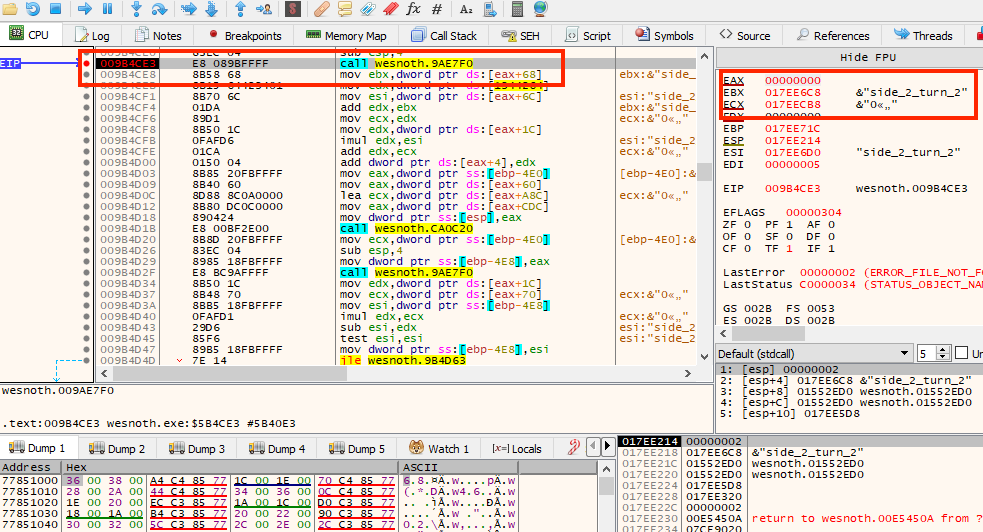
Set a breakpoint on the gold update used at the end of a turn. Each time the instruction runs, read the object pointer it uses.
The income breakpoint: each hit lets you read the object the instruction used.
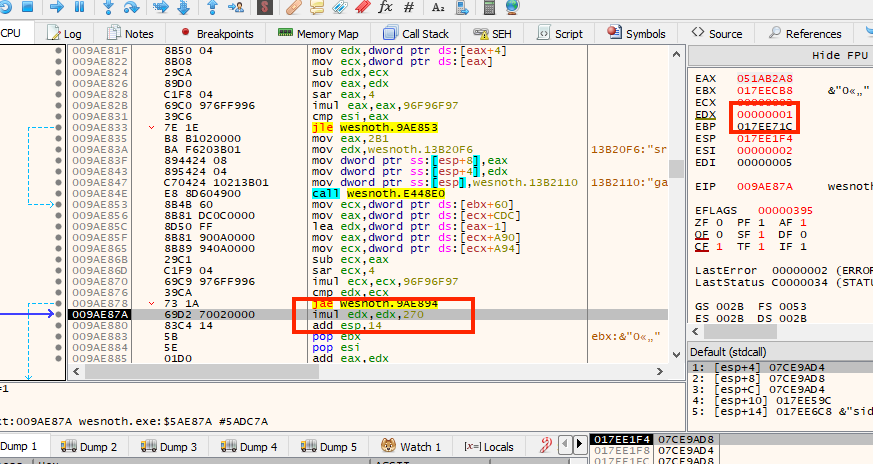
If the function loops through players, the object pointer should change while the instruction stays the same. Nearby 32-bit x86 instructions may calculate an index in this shape:
imuleax, edx, record_size
addeax, player_table
That pair is the collection indexing introduced in Lesson 1.3 and the
scaled-offset formula examined in Lesson 3.10, written as two instructions.
The three-operand imul multiplies the index in edx by a constant and puts
the result in eax; the add then moves that distance from the table’s start.
This is an illustrative shape, not a claimed byte-for-byte Wesnoth listing.
The constant is the useful part. You do not have to infer the record size by
finding two players and subtracting their addresses — the instruction states
it, because the compiler had to know the stride to generate this code at all.
Read it off, then confirm it against two real players rather than trusting a
single instruction.
An indexed address calculation inside one instruction.
This suggests:
record address = table base + player index × record size
Two known players confirm it: their record addresses should differ by exactly one record size. That difference gives the stride, not yet the complete layout of a record.
slot: u32::try_from(index)?, // ✅ Reject an index that cannot fit the model.
gold: process.read_u32(gold_address)?,
income: process.read_i32(income_address)?,
})
}
PlayerSnapshot owns copied values. It does not pretend that remote memory is a safe local reference.
The layout object keeps the offsets apart from the values read through them.
gold: 4 means “gold sits four bytes from each record’s base in this build.”
Storing the number does not make it true; range checks and behavior tests
decide whether it still holds for this exact build.
Compare that with silently skipping records that fail:
The original helper reads each player and keeps only successful rows. A failed row disappears without an error, so the returned list can look complete even when the layout is wrong or the game changed during capture.
Validate the known lab limit of sixteen players first, then collect results into one Result<Vec<_>>. Any failed read rejects the whole claimed snapshot instead of quietly shortening it.
Improved code
fnread_players(
process: &Process,
table: usize,
count: usize,
layout: &PlayerLayout,
) -> anyhow::Result<Vec<PlayerSnapshot>> {
anyhow::ensure!(count <= 16, "unexpected player count: {count}");
Once read_players has returned validated snapshots, display one line per
side. The loop uses each snapshot’s slot, gold, and signed income; {:+}
shows whether income adds to or drains gold. A failed read ends with an error
before the dashboard can present a partial set as complete.
This is the exercise the original course called the stathack.
The income breakpoint at 0x009B4CE3 reveals that Wesnoth advances through player records in steps of 0x270 bytes. The paths for the first two players are:
player 1 gold: [[0x017E_ED18] + 0xA90] + 0x004
player 2 gold: [[0x017E_ED18] + 0xA90] + 0x274
└─ 0x270 + 4
Those paths become a real reader:
constPLAYER_ROOT: usize = 0x017E_ED18;
constGAME_OFFSET: usize = 0x0A90;
constPLAYER_RECORD_SIZE: usize = 0x0270;
constGOLD_IN_RECORD: usize = 0x0004;
fnwesnoth_player_gold(
process: &Process,
player_index: usize,
) -> anyhow::Result<u32> {
anyhow::ensure!(player_index < 9, "unexpected player index");
Create a two-local-player match, end one turn for each player, and print indices 0 and 1. Spend gold with each side separately. Only the matching row should change. You have now rebuilt the original Wesnoth state observer.
If one player has impossible values, stop and revisit the table base, record size, count, or offsets.
The key upgrade is conceptual: instead of “address plus magic number,” we now have a named layout, checked math, a bounded collection, and owned snapshots.
Lesson 4.3
Why Snapshots Need Guarded Actions
The observer in the previous lesson copied player state for display. A tool
that changes state faces a harder problem: gold can change after the read but
before the write. If income arrives in that gap, a blind write may overwrite
it. We need a pipeline that treats every observation as temporary evidence.
find process → read pointer → calculate address → write value → print success
That can work once, but every step depends on facts collected earlier. The game may restart, change maps, end a turn, replace an object, or update the value while the tool is still running.
A more reliable tool separates six phases:
Repeated reads can expose a changing snapshot. This step-by-step trace needs JavaScript. Here is the code and where the run ends.
read the selected inputs
evaluate each stated condition
combine the required conditions
perform the effect only when accepted
otherwise retain the old state
report the result and its limits
Result: retain the current gold and recapture; the observed values did not stay stable.
Final values: income = 30; late = no; first_capture = 100; second_capture = 130; captures_agree = false; fresh_check_matches = true; accepted = false; gold_after = 130.
Read every step of the lesson’s example
Step 1, line 1. Start with the selected inputs and follow how the next operation changes the state.
income = 30; late = no.
Step 2, line 2. Comparing observations can reject visible instability, but cannot prevent every change after the last read.
income = 30; late = no; first_capture = 100; second_capture = 130; captures_agree = false; fresh_check_matches = true.
Step 3, line 3. Accept only when the required conditions all hold.
Watch it happenCapture twice, recheck, then write, and read back
A pointer chain in game memory leads to a gold value of 100. The tool captures it twice, but income changes the gold to 130 in between, so the two captures differ and are discarded. Two new captures agree, the snapshot is kept, a fresh capture just before the write still matches, the tool writes 500, and reading back gives 500.
Read the steps
The tool wants to write 500 into the game’s gold. It does not trust one read, so it first captures the whole pointer chain: player, side, gold address, and gold.
Attempt 1, capture 1: the four values are read and kept together as one snapshot.
Capture 2 reads the chain again. While it runs, income arrives and the game changes the gold from 100 to 130.
The two snapshots differ in the gold field, so the tool refuses to act on either one. A blind write would have overwritten the income.
Attempt 2: the tool throws the pair away and captures twice more. This time both captures agree in all four fields.
The tool keeps that snapshot. The caller asked for Some(500), so it will propose a write. (None would mean observe only.)
Recheck, then write: one more capture right before the write. Only if it still equals the snapshot does the write happen.
Read back: the tool reads the gold again and compares it with the 500 it asked for. Equal means the write took effect.
This follows the write branch when snapshots agree; None remains observation-only and a changed snapshot stops the write.
The important idea is not extra code. It is that data crosses a gate before the tool acts on it. A raw address read once may already be out of date. A Snapshot captured twice with equal results was consistent at that moment. A write happens only if a fresh capture, taken immediately before it, still equals the snapshot.
Income changes gold before the writeA snapshot is evidence from one moment. A fresh capture right before the write catches a change the first reading could not know about.
ToolGame
1
DataSnapshot: gold = 100
Step 1: Game to Tool
The tool reads every field it needs; gold is one field of the whole Snapshot. It now holds a picture that was true for one instant.
2
AloneIncome: gold 100 → 110
Step 2: Game (alone)
The game keeps running while the tool decides. The stored 100 is already out of date.
3
DataFresh Snapshot: gold = 110
Step 3: Game to Tool
The tool does not trust the old reading. It captures again immediately before the action, and the fresh Snapshot contains 110.
4
Alone110 ≠ 100: refuse 888
Step 4: Tool (alone)
Whole-Snapshot equality fails because one field changed, so the requested 888 is refused. This check still cannot make the game’s later changes atomic.
All 4 steps shown
A snapshot is evidence from one moment. A fresh capture right before the write catches a change the first reading could not know about.
eprintln!("snapshot attempt {attempt} changed while it was being read; retrying");
}
anyhow::bail!("Wesnoth state did not stay stable for two consecutive captures")
}
This is a small optimistic consistency check. The tool does not stop the game. It assumes a short read will usually see a quiet moment, then checks that assumption.
⚠️ Two equal reads are not a mathematical proof that no intermediate state existed. They are a practical gate for a tiny offline lab. A debugger pause, a game-provided snapshot API, or a version counter is stronger when a larger structure must be perfectly atomic.
The retry cap matters too. A loop that waits forever for stability can make a broken tool look frozen.
write exactly four little-endian bytes to the verified gold field;
read the field back and require the requested result.
In the code below, observed is the snapshot the caller approved. A fresh
snapshot must match it before any write; afterward, a read-back must equal
replacement. Each added line enforces one arrow in the diagram.
The original helper writes to the gold address in a previously captured snapshot, then reports success. The target may have changed since that snapshot; the function also never checks what was stored.
Before: write through a cached snapshot
fnreplace_gold(
process: &Process,
observed: Snapshot,
replacement: u32,
) -> anyhow::Result<()> {
process.write_u32(observed.gold_address, replacement)?; // May be stale.
Ok(())
}
A guarded action checks its precondition immediately before writing and its postcondition afterward. Matching snapshots reduce stale-address mistakes; they still cannot prevent the game changing between the check and the write.
Improved code
fnreplace_gold(
process: &Process,
observed: Snapshot,
replacement: u32,
) -> anyhow::Result<()> {
letcurrent = stable_snapshot(process)?;
anyhow::ensure!(current == observed, "state changed; nothing was written");
let written = process.read_u32(observed.gold_address)?;
anyhow::ensure!(written == replacement, "write did not reach its postcondition");
Ok(())
}
Takeaway: recheck the state you approved, then verify the result of the write.
This is not a database transaction: Windows cannot automatically roll back the game. It is a guarded action with a checked precondition and postcondition. That pattern also fits toggles, patches, save editors, configuration tools, and mod installers.
#[cfg(windows)]fn main() -> anyhow::Result<()> { use anyhow::Context; use gha_windows_labs::Process; const PLAYER_ROOT: usize = 0x017E_ED18; const GAME_OFFSET: usize = 0x0A90; const GOLD_OFFSET: usize = 0x0004; const MAX_GOLD: u32 = 1_000_000; #[derive(Clone, Copy, Debug, Eq, PartialEq)] struct Snapshot { player: usize, side: usize, gold_address: usize, gold: u32, } fn pointer32(process: &Process, address: usize, label: &str) -> anyhow::Result<usize> { // 📏 Pointer width belongs to the 32-bit game, not to the Rust tool. let value = process .read_u32(address) .with_context(|| format!("could not read {label} at {address:#010x}"))? as usize; anyhow::ensure!(value != 0, "{label} was null; start a local match first"); Ok(value) } fn capture(process: &Process) -> anyhow::Result<Snapshot> { // 🧭 Resolve every address with checked arithmetic before reading it. let player = pointer32(process, PLAYER_ROOT, "player root")?; let side_pointer = player .checked_add(GAME_OFFSET) .context("player + game offset overflowed")?; let side = pointer32(process, side_pointer, "current side")?; let gold_address = side .checked_add(GOLD_OFFSET) .context("side + gold offset overflowed")?; let gold = process.read_u32(gold_address)?; Ok(Snapshot { player, side, gold_address, gold, }) } fn stable_snapshot(process: &Process) -> anyhow::Result<Snapshot> { for attempt in 1..=5 { let first = capture(process)?; let second = capture(process)?; if first == second { return Ok(first); } eprintln!("snapshot attempt {attempt} changed while it was being read; retrying"); } anyhow::bail!("Wesnoth state did not stay stable for two consecutive captures") } let mut arguments = std::env::args().skip(1); let replacement = match arguments.next().as_deref() { None => None, Some("--set") => Some( arguments .next() .context("--set requires a gold value")? .parse::<u32>() .context("gold must be an unsigned decimal number")?, ), Some(other) => anyhow::bail!("unknown argument {other:?}; use no argument or --set GOLD"), }; anyhow::ensure!(arguments.next().is_none(), "too many arguments"); if let Some(value) = replacement { anyhow::ensure!( value <= MAX_GOLD, "gold exceeds the lab limit of {MAX_GOLD}" ); } // 🔒 Read-only mode never requests VM_WRITE or VM_OPERATION rights. let process = Process::open_by_name("wesnoth.exe", replacement.is_some())?; anyhow::ensure!( process.is_32_bit()?, "this profile requires 32-bit Wesnoth 1.14.9" ); let observed = stable_snapshot(&process)?; println!("Stable Wesnoth snapshot:"); println!(" player: {:#010x}", observed.player); println!(" side: {:#010x}", observed.side); println!(" gold address:{:#010x}", observed.gold_address); println!(" gold: {}", observed.gold); if let Some(value) = replacement { // ⚠️ The game kept running after observation. Rebuild the whole pointer // path and require the exact same evidence immediately before writing. let current = stable_snapshot(&process)?; anyhow::ensure!( current == observed, "state changed after confirmation; nothing was written" ); process.write_u32(observed.gold_address, value)?; // ✅ Read back the postcondition instead of assuming the write succeeded. let written = process.read_u32(observed.gold_address)?; anyhow::ensure!( written == value, "read-back value was {written}, expected {value}" ); println!("Changed gold from {} to {written}.", observed.gold); } else { println!("Observation only. Run with `--set GOLD` for the guarded local-lab write."); } Ok(())}#[cfg(not(windows))]fn main() { eprintln!("This live snapshot pipeline must run on Windows.");}
The visible gold should become 888. End the match and run it again: the tool should report a null or unstable object instead of writing to address zero.
The snapshot carries player and side identity along with gold and its
address, so a changed object path invalidates a proposed action. Two equal
captures are a bounded consistency check, not a lock on the running game.
Observation mode therefore keeps a read-only handle. When an action is
requested, a fresh precondition check guards the only write, and a read-back
checks its postcondition before the tool reports success.
Lesson 4.4
Coordinates, Vectors, and Directions
A map tells us which places exist. Coordinates let a tool compare those places:
where is the player, how far away is an enemy, and which way does a movement
point? Begin with two positions on a grid, then turn their difference into
distance and direction. The same operations work in two dimensions or three.
A 2D game often describes a position with x and y.
A 2D game world: every position is an (x, y) pair.
Picture a player at (2, 3) on that map and an enemy at (5, 7). The enemy
is 3 units farther along x and 4 along y. Those differences form an arrow
from the player to the enemy. Its straight-line length is 5: a right triangle
with sides 3 and 4 has a long side of √(3² + 4²) = √25 = 5.
A 3D game adds a third axis. If the enemy is also 12 units above the player,
the arrow becomes (3, 4, 12) and its length becomes
√(3² + 4² + 12²) = √169 = 13. The same subtraction and distance idea grew
by one coordinate; no new kind of measurement was required.
This interactive lab needs JavaScript. The lesson text around it still explains the same idea.
That arrow turns positions into useful questions: how far away is a target,
which direction should a character move, and is the target inside a guard’s
view? We will use the same spatial language for automation and NPC decisions.
The later camera lessons extend it to projecting the world onto a screen.
Rust can store the three numbers together:
#[derive(Clone,Copy,Debug,PartialEq)]
structVec3 {
x: f32,
y: f32,
z: f32,
}
Each field is an f32, a 32-bit floating-point number that can hold fractions as
well as whole coordinates. #[derive(...)] asks Rust to generate conveniences
such as copying and printing this small record; none of those traits changes the
geometry. A Vec3 is not special hardware. It is a vector: an ordered group
of numbers that we choose to treat as one mathematical object. The order matters
because each slot has a role. Swapping x and z changes the meaning even
when the three numbers stay the same.
Vectors are useful because one operation can apply to the whole idea. Adding a movement vector to a position moves the position. Subtracting two positions gives the difference between them.
Games disagree about which axis means “up.” Never assume. Move in one direction at a time and observe which field changes.
A 3D game world: the same idea with a third coordinate.
Self inside impl Vec3 means Vec3; self is the vector whose method was
called. The subtraction uses enemy minus player, so the result points from
the player to the enemy. length() squares each difference, adds the three
squares, and takes the square root. These exact coordinates produce the
(3, 4, 12) arrow and distance 13 calculated above. Reversing the operands
would point the arrow backward while leaving its length unchanged.
The :? in println! uses the Debug implementation generated for Vec3,
so the program prints all three fields alongside the distance. Put this block
after the Vec3 declaration to run the example.
A point and a direction can both be stored as three floats, but the allowed math is
different:
Expression
Meaning
point − point
direction and distance between places
point + direction
a new place after moving
direction + direction
combined movement
point + point
usually has no useful geometric meaning
This is a good example of why a memory layout does not tell the whole story. Three
adjacent floats could be a position, velocity, color, scale, or Euler angles. Watch
how the game uses them before assigning a name.
The length of a direction is its distance. Normalizing divides by that length so
the result keeps only direction and has length one. Check for a near-zero length
first; there is no meaningful direction from a point to itself.
fnnormalized(value: Vec3) -> Option<Vec3> {
letlength = value.length();
if !length.is_finite() || length <= f32::EPSILON {
returnNone;
}
Some(Vec3 {
x: value.x / length,
y: value.y / length,
z: value.z / length,
})
}
For (3, 4, 0), length is 5, so the returned vector is
Some((0.6, 0.8, 0)): it points the same way and its length is 1.
Option expresses the case where no usable direction exists. When the points
coincide, division by zero cannot produce a meaningful aim direction, so the
function returns None rather than letting invalid numbers spread into later
camera calculations. is_finite also rejects infinity and NaN from a damaged
or stale snapshot.
The dot product measures alignment. For two normalized directions it is near
1 when they face the same way, 0 when perpendicular, and -1 when opposite.
A field-of-view test can compare the camera’s forward direction with the direction
to a target. This avoids turning both vectors into angles merely to ask whether they
point roughly the same way.
For vectors a = (aₓ, aᵧ, a_z) and b = (bₓ, bᵧ, b_z):
a · b = aₓbₓ + aᵧbᵧ + a_zb_z
if a and b have length 1:
a · b = cos(θ)
That second line is why a dot product can become an angle with
acos(clamp(dot, -1, 1)). Clamp first because floating-point rounding can produce
1.0000001, which is outside the mathematical input range of acos.
Worked through, a field-of-view test is three multiplications and two
additions. Suppose the camera faces straight along positive x, and a target
sits ahead and a little to the side:
dot = (1.0 x 0.8) + (0.0 x 0.6) + (0.0 x 0.0) = 0.8
0.8 is the cosine of roughly 37 degrees, so the target sits about 37 degrees
off the centre of view. If visibility accepts directions at most 45 degrees from the centre of view, you
never need acos at all: compare the dot product against cos(45°), which is
about 0.707, and anything above that threshold is inside the cone. Comparing
cosines is cheaper than converting to angles, and it sidesteps the rounding
trap described above.
Blending values: interpolation, easing, and following
Subtracting positions gives a direction. The reverse question is just as common:
given two values, what is the value some fraction of the way between them? A
character walks from one tile to the next, a colour fades, a camera slides toward
a target. The answer is linear interpolation, usually called lerp. Start at
a and add the fraction t, from 0 to 1, of the way to b:
p=a+(b−a)t
At t = 0 the result is a, at t = 1 it is b, and at t = 0.25 it is a
quarter of the way. For numbers, a = 2 and b = 10 give
2 + (10 − 2) × 0.25 = 4. For a vector, blend each coordinate on its own: from
(2, 3) to (5, 7), halfway (t = 0.5) is (2 + 3 × 0.5, 3 + 4 × 0.5) = (3.5, 5). A
colour is three numbers too, so a half blend of red rgb(255, 0, 0) and blue
rgb(0, 0, 255) is (127.5, 0, 127.5), which a display stores as
rgb(128, 0, 128), a purple.
Lesson 4.1 left 3.33 ms over after a 16.67 ms step, so t = 3.33 ÷ 16.67 = 0.2.
If a ball’s x was 794 after the earlier step and 796.5 after the later one, the
picture shows 794 + (796.5 − 794) × 0.2 = 794.5. That is the blend the engine uses
to draw motion between its steps.
A straight lerp moves at one speed, so it starts and stops abruptly. Easing
reshapes t before it is used, so the motion can begin gently, end gently, or
both. Here are four reshapings, with the value each gives at five moments:
Curve
Formula
t = 0
t = 0.25
t = 0.5
t = 0.75
t = 1
linear
t
0
0.25
0.5
0.75
1
ease in (starts slowly)
t × t
0
0.0625
0.25
0.5625
1
ease out (ends slowly)
1 − (1 − t)²
0
0.4375
0.75
0.9375
1
smoothstep (both ends)
3t² − 2t³
0
0.15625
0.5
0.84375
1
Take an object that moves from x = 0 to x = 100 in one second. A quarter of the
way through, the linear curve has put it at 25, the ease-in curve at 6.25 (it is
still getting started), the ease-out curve at 43.75 (it is already slowing), and
smoothstep at 15.625. Every curve starts at 0 and ends at 1, so every one reaches
the same place; they differ in how they get there.
A camera or a character that chases a target can close a fraction of the
remaining gap on every update:
position = position + (target - position) × k
With a gap of 10 and k = 0.2, the gap after each update is 10, then 10 × 0.8 = 8,
then 6.4, then 5.12, then 4.096. The follower moves fast while it is far away and
slows as it arrives, which looks smooth.
One fixed k has a flaw: a game running 120 updates a second closes the gap twice
as often as one running 60. The fix is to tie k to the time that passed. With a
stiffness s per second, use k = 1 − e^(−s × dt). For s = 10:
at 60 updates a second, dt = 1/60, so k = 1 − e^(−0.1667) = 1 − 0.8465 = 0.1535;
at 120 updates a second, dt = 1/120, so k = 1 − e^(−0.0833) = 1 − 0.9200 = 0.0800.
Two 120-per-second updates leave (1 − 0.0800)² ≈ 0.8465 of the gap, the same as one
60-per-second update, so the camera follows the same way on either machine.
The lerp formula does not forbid a t above 1. With t = 1.5 it continues the same
line beyond b, and that is extrapolation: a guess about a value past the last
one known. A game needs it when its newest information is already old. A client that
receives another player’s position 10 times a second, every 0.10 s, still draws 60
pictures a second. Between two updates it can show a past state that lies between
two known points (interpolation), or guess the present from the last two
(extrapolation).
Take an update of x = 100 at 0.00 s and one of x = 106 at 0.10 s, so the speed is
(106 − 100) ÷ 0.10 = 60 units a second. At 0.15 s, t = (0.15 − 0.00) ÷ 0.10 = 1.5,
and the guess is 100 + (106 − 100) × 1.5 = 109. Now suppose the player stopped at
106, and the update for 0.20 s says so. The interpolated view draws the state from
0.10 s earlier, so both neighbouring updates are always known:
ExampleA player who stops at x = 106
Draw time
Where the player is
Interpolated view (shows the state 0.10 s earlier)
Extrapolated view (the newest two updates)
0.10 s
106
state at 0.00 s: 100, late by 6
106
0.15 s
106
state at 0.05 s: 100 + 6 × 0.5 = 103, late by 3
106 + 60 × 0.05 = 109, 3 too far
0.19 s
106
state at 0.09 s: 100 + 6 × 0.9 = 105.4, late by 0.6
106 + 60 × 0.09 = 111.4, 5.4 too far
0.20 s
106
state at 0.10 s: 106
the update arrives, the speed is 0, and the view shows 106
The interpolated view is always behind the truth, by 0.10 s here, but it only ever
shows places the player really was. The extrapolated view is never behind, but when
the guess is wrong it overshoots and then snaps back: from 111.4 to 106 in one
frame. When you read another player’s position from a client’s memory, the value may
be one of these display values rather than the server’s own (Chapter 8).
A path that turns smoothly, such as a camera flight or the arc of a thrown item, is
built from curves called splines. The simplest piece is a quadratic Bézier
curve. It starts at P0, ends at P2, and is pulled toward a control point P1
without reaching it:
B(t)=(1−t)2P0+2(1−t)tP1+t2P2
For P0 = (0, 0), P1 = (5, 10), and P2 = (10, 0), the point halfway along is
0.25 × (0, 0) + 0.5 × (5, 10) + 0.25 × (10, 0) = (2.5 + 2.5, 5) = (5, 5). The
curve rises to 5 even though the control point is at 10. Longer paths chain many
such pieces so that each one starts where the last ended, heading the same way;
that is what a cubic spline does.
Blending turning angles needs more care than blending positions, because 350° and
10° are only 20° apart. Lesson 7.1 shows how orientations are blended.
The length of a direction is a distance, and a distance answers a contact
question. Games give objects cheap stand-in shapes, called bounding volumes,
and test those instead of the full model. The simplest is a circle (a sphere in
3D). Two circles touch when the distance between their centres is less than the
sum of their radii.
Use the player at (2, 3) and the enemy at (5, 7) from earlier in this lesson.
Their distance is 5, and its square is 3² + 4² = 25. With both radii 2, the sum is 4
and 4² = 16. Since 25 is more than 16, the circles do not touch. With radii 2 and
3.5 the sum is 5.5 and 5.5² = 30.25, which is more than 25, so they do. Comparing
squared values gives the same answer without the square root.
A box that stays lined up with the axes is stored as its smallest and largest
corner. Two such boxes overlap only if their ranges overlap on every axis. Box A
spans x from 0 to 4 and y from 0 to 3, and box B spans x from 3 to 7 and y from 2 to
6. The x ranges share 3 to 4, and the y ranges share 2 to 3, so the boxes overlap.
Move B to span x from 5 to 9 and they no longer do: 4 is less than 5, so one axis
is enough to rule out contact.
These cheap tests are why a game’s collision tests can differ from its pictures, as
Lesson 1.3 noted. Lesson 7.5 tests rays against such shapes, and Lesson 7.2 uses
them to skip drawing things that are out of view.
A position names a place. Subtracting two positions gives a direction with
a length; normalizing keeps only the direction. A dot product compares
alignment, which lets a decision ask whether a target lies inside a view
cone without calculating its angle first. Interpolation blends two values by a
fraction, easing reshapes that fraction, and a bounding volume turns a distance
into a contact test. Keep the coordinate meanings and units consistent before
using any of these results.
A player record is one object. A map asks the same memory question thousands
of times: which tile is this, and what does this player know about it? In a
Wesnoth match, terrain and visibility may describe the same location but live
in different layers of state. Coordinates give us a way to relate them.
On a three-column, two-row map, tile (2, 1) becomes index 1 × 3 + 2 = 5.
Tile (3, 1) is outside the map and returns None. The checked multiplication
also refuses dimensions so large that the index would overflow usize.
Never trust coordinates from remote memory until they pass bounds checks.
The formula only works after you know what x, y, width, and the base address mean. Games may store rows from top to bottom or bottom to top, pad each row, split terrain and visibility into separate layers, or keep one visibility layer per team.
For a candidate grid, recover these facts separately:
origin: which tile is (0, 0);
axis direction: which way increasing x and y move;
stride: how many elements or bytes separate two rows;
element width: how many bytes represent one tile;
layer: terrain, occupancy, visibility, or another property;
owner: global map state or one player’s derived view.
If the row stride includes padding, y * width + x is wrong even when the first row looks perfect. The byte address becomes base + y * row_stride + x * element_size. Verify it with tiles on different rows and near both edges of the map.
Predict first
A map is 3 tiles wide and 2 tall, one byte per tile. The game pads every row to 4 bytes, so each row ends with one unused byte.
Counting from byte 0, which byte holds tile (2, 1)?
Answer: Byte 6. Skip one whole row of 4 bytes (1 × 4 = 4), then move 2 tiles along it: 4 + 2 = 6. Bytes 3 and 7 are the padding.
One tile, two layers, one indexA map 3 tiles wide and 2 tall, stored as two flat layers of one byte per tile. Pick a tile and a row stride: the same index finds the tile in both layers.
Index, then the same byte in each layer
Index from (x, y)
Bounds x < 3 and y < 2, then y × row stride + x
(2, 1) is on the map
1 × 4 + 2 = 6byte 6 in both layers
Two layers in memory, one byte per tile
Terrain, row y = 0
byte 0byte 3
grass
water
rock
pad
Terrain, row y = 1
byte 4byte 7
tree
road
grassbyte 6
pad
Visibility, row y = 0
byte 0byte 3
seen
fog
seen
pad
Visibility, row y = 1
byte 4byte 7
seen
fog
seenbyte 6
pad
Skip 1 row of 4 bytes (1 × 4 = 4), then move 2 along: byte 6. Both layers keep tile (2, 1) at that byte.
Visibility is often a derived view of terrain, units, teams, and line-of-sight checks for range and blocking terrain. A cached visibility layer can be useful to read without being the source of truth, because the game rebuilds it from those inputs. What matters is which system recomputes it and when.
In an offline Wesnoth match, compare a currently visible tile with a tile hidden by fog. Search for the observed visibility value, reveal or hide the tile through normal gameplay, and filter again.
A short list of tile candidates, found by comparing a visible tile with a fogged one.
Repeat with several tiles. You are testing whether candidates belong to:
Set a write breakpoint on a confirmed tile and move a unit so visibility updates.
The instruction that writes map tiles when visibility updates.
Look for:
a base pointer to map data;
row or column math;
a player or team index;
the value written for hidden, explored, and visible states.
Do not assume a value such as 0xFFFF_FFFF means “visible.” It may mean -1, a bit mask, or an uninitialized sentinel. Collect examples for every state you name.
Suppose repeated observations show 0 for hidden tiles, 1 for explored
tiles, and 2 for visible tiles in this exact build. Decode those raw values
into named states so later code cannot confuse visibility with terrain. Keep
every other number as Unknown until it has been investigated.
#[derive(Clone,Copy,Debug,Eq,PartialEq)]
enumVisibility {
Hidden,
Explored,
Visible,
Unknown(u32),
}
fndecode_visibility(raw: u32) -> Visibility {
matchraw {
0 => Visibility::Hidden,
1 => Visibility::Explored,
2 => Visibility::Visible,
other => Visibility::Unknown(other),
}
}
Keep Unknown. Silently treating a new value as visible would hide the fact that the byte has a state the model does not know about.
Give the reader a verified layer base and map dimensions. It first checks
width × height, caps the tile count, copies four bytes per tile from the
game process, then decodes each copied u32 with the mapping above. The
result is an owned vector of visibility states, not a pointer into live game
memory.
fnread_visibility_layer(
process: &Process,
base: usize,
width: usize,
height: usize,
) -> anyhow::Result<Vec<Visibility>> {
lettile_count = width.checked_mul(height)
.context("map dimensions overflowed")?;
anyhow::ensure!(tile_count <= 1_000_000, "map is unexpectedly large");
The unwrap is safe here because chunks_exact(4) guarantees every chunk has four bytes, but an explicit conversion helper can make that invariant clearer in shared code.
The original course called this exercise the map hack.
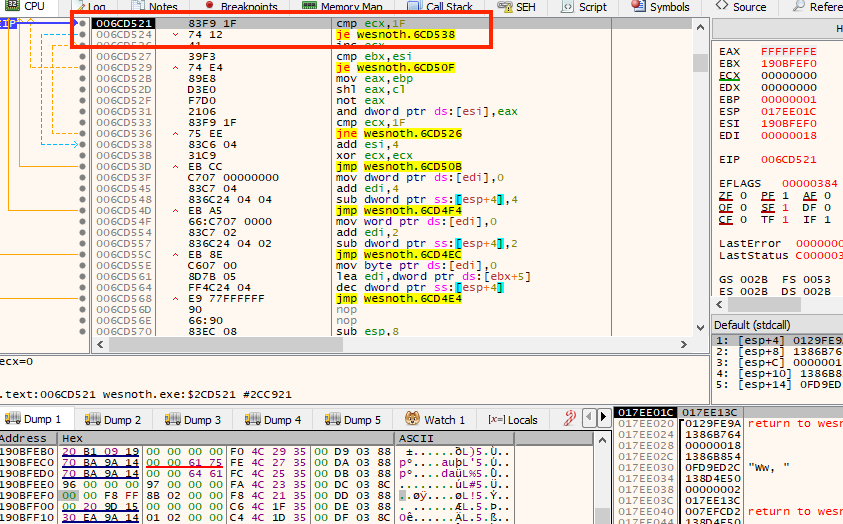
For Wesnoth 1.14.9, the write-breakpoint trail leads to 0x006CD519. The original eight-byte sequence updates a visibility column.
This build does not store one u32 per tile the way the model earlier in this
lesson does. It packs 32 tiles into a single 32-bit column, one bit per
tile, so the instructions below are bit-level field assignment rather than the
y * width + x array indexing shown above. mov eax, ebp then shl eax, cl
builds a single set bit, shifted into the position cl names — the bit that
belongs to one specific tile in that column. not eax flips every bit, which
turns that into a mask that is 0 at the tile’s position and 1 everywhere
else. and dword ptr [esi], eax applies the mask to the stored column,
clearing only that one tile’s visibility bit while leaving the other 31 alone.
Replacing that full span with the following bytes forces the column bits to 1 using or [esi], 0xFF:
constMAP_VISIBILITY_HOOK: usize = 0x006C_D519;
constORIGINAL: [u8; 8] = [
0x8B, 0xC5, // mov eax,ebp
0xD3, 0xE0, // shl eax,cl
0xF7, 0xD0, // not eax
0x21, 0x06, // and dword ptr [esi],eax
];
constREVEAL_PATCH: [u8; 8] = [
0x90, 0x90, 0x90, // remove the original value preparation
0x83, 0x0E, 0xFF, // or dword ptr [esi], -1
0x90, 0x90,
];
The observation, grid model, and debugger experiment above are the core
exercise here. For an automated repeat after Lesson 8.3 teaches patch
ownership and DLL lifecycle, the verified patch object expresses the same
byte check and restoration in code:
letplan = PatchPlan::new(
MAP_VISIBILITY_HOOK,
&ORIGINAL,
&REVEAL_PATCH,
)?;
letmutpatch = plan.apply(&process)?;
Move a unit in a local match. As each visibility column is updated, every bit becomes 0xFFFF_FFFF, revealing the map as shown above. Call patch.restore() and start a fresh map to confirm fog behaves normally again.
The expected bytes are no longer an unnamed profile placeholder: they encode
the four instructions shown in the debugger. The injected implementation is
enable_wesnoth_map_reveal.
After injection, F3 toggles it and End restores it.
Fog of war is a per-player view over shared map data. The experiment shows how a grid and per-player visibility state can be represented; a different build may pack the same relationship into different bytes.
Lesson 4.6
Automation as a Feedback Loop
In a Wyrmsun local match, a bot that presses Recruit whenever gold is high
could queue several workers before the first purchase appears on screen. A
useful macro needs to know whether it has requested an action, whether the
game accepted it, and when to stop trying.
An open-loop macro sends inputs and assumes they worked. A reliable test bot
closes the loop by observing the result:
sense → validate → decide → act once → observe the outcome → correct or stop
↑ |
└────────────────────── next fresh snapshot ────────────────────┘
These stages have different jobs:
Stage
Question
Sense
What does the current snapshot report?
Validate
Is it complete, current, and plausible?
Decide
Which single action is allowed by the policy?
Act
How is that one request sent through the validated adapter?
Confirm
Did game state change in the expected way?
Correct
Should the bot retry, choose another state, or stop?
The sleep between ticks only limits the rate. It does not prove success. Menus,
animation locks, pauses, missed input, and object replacement can all make an
action request produce no outcome. Keep “requested recruit” separate from
“worker count increased,” and never treat the first as proof of the second.
For testing, record snapshots and feed them through the decision function. The
same sequence should produce the same decisions without launching the game.
The bot needs a state for each distinct obligation. Acting remembers that a
recruitment was requested, Cooldown stores how long to wait after a
confirmed action, and Recovering carries a reason for a failed one. A
single enum value means the bot occupies only one of these states at a time.
#[derive(Debug)]
enumMacroState {
Waiting,
Ready,
Acting { attempt: u32 },
Cooldown { ticks_left: u32 },
Recovering { reason: String },
Stopped,
}
Impossible combinations disappear. We cannot accidentally be both Acting and Cooldown.
The game snapshot below is a copy of facts the bot has validated, not the
bot’s intention. next_state receives that copy, the current macro state,
and a stop request. It chooses one next state without pressing a key or
writing to the game. For example, Ready with at least 100 resources becomes
Acting; it does not become Cooldown until a later snapshot confirms the
action.
Feed the transition function a ready, active snapshot with enough resources,
then set stop to true. The expected result is Stopped, because a user
stop must outrank a possible recruit action. The test pins that priority
without launching Wyrmsun.
#[test]
fnstops_from_any_active_state() {
letsnapshot = GameSnapshot {
match_active: true,
player_ready: true,
resources: 500,
action_confirmed: false,
action_failed: false,
state_valid: true,
};
assert!(matches!(
next_state(MacroState::Ready, &snapshot, true),
MacroState::Stopped
));
}
The low-level observation and action layers may be version-specific. The state machine should not be.
Before writing loop or while, state these four facts:
Start: which state exists before the first tick?
Continue: what must remain true for another tick to run?
Progress: what changes so the loop does not repeat the same work forever?
Stop: which event ends it, even if the game is paused or closes?
For this macro, the start is Waiting, each snapshot allows one transition,
cooldown ticks count toward zero, and the shared stop request moves the machine
to Stopped. A fixed sleep controls how often observations occur; it is not the
thing that makes the logic correct.
Trace a few ticks before connecting the action adapter:
Current state
Snapshot fact
Next state
Side effect
Waiting
match and player ready
Ready
none
Ready
resources are 120
Acting { attempt: 1 }
request one action
Acting
action confirmed
Cooldown { ticks_left: 5 }
none
any active state
stop requested
Stopped
begin cleanup
If a row has two unrelated actions, the state probably owns too much work. If a
row has no path to Stopped, the design is not safe to run yet.
You can complete the state-machine and recorded-snapshot tests above before
loading code into a game. The pinned Wyrmsun port below is a deeper
application to revisit after Lesson 8.3 teaches verified
detours and Lesson 6.9 teaches the input worker. Its concrete
addresses and hooks are retained here so the bot design can be compared with
the original course’s running implementation.
This is the original course’s macro bot, rebuilt as an explicit state machine.
The original lab found these module-relative facts:
Purpose
wyrmsun.exe offset
recruit-unit call target
0x2CF7
recruit-unit hook
0x223471
main-loop hook
0x385D34
main-loop call target
0xDBCA
gold-chain root
0x61A504
Wyrmsun relocates its module, so calculate module_base + offset every run. For one observed base of 0x00F40000, the recruit target became 0x00F42CF7 and the hook became 0x01163471.
The Cheat Engine gold path was:
wyrmsun.exe + 0x61A504
→ read, +0x78
→ read, +0x4
→ read, +0x8
→ read, +0x4
→ read, +0x0
→ read, +0x14 = gold
Capture one legitimate worker record at the recruit hook (ecx points to the outer pointer) into a local 0x110-byte buffer. When gold is over 3000, copy that captured record back, put the expected pointer in ecx, and call the verified recruit function from the game-loop hook. The original three overwritten recruit instructions were push ecx, mov ecx, esi, and the call; replay all eight bytes before returning.
constWORKER_RECORD_SIZE: usize = 0x110;
constRECRUIT_HOOK: usize = 0x22_3471;
constRECRUIT_FN: usize = 0x002C_F7;
constLOOP_HOOK: usize = 0x38_5D34;
constLOOP_FN: usize = 0x00_DBCA;
constGOLD_ROOT: usize = 0x61_A504;
#[derive(Clone)]
structCapturedWorker {
bytes: [u8; WORKER_RECORD_SIZE],
source: usize,
}
Build the DLL for the game’s 32-bit architecture, inject it into your offline match, recruit one worker normally to fill the buffer, then gather more than 3000 gold. Workers should begin recruiting automatically from the selected structure. If they do not, log the calculated module addresses and verify each original byte before allowing the hooks to install.
The complete implementation is in
strategy_hooks.rs. It
finds the relocated module, verifies both original call sequences, installs two
detours, captures the legitimate 0x110-byte record, resolves the entire gold
chain, calls the real recruit function with x86 thiscall, replays the removed
game-loop call, and restores both hooks.
//! Complete Wyrmsun and Flare hooks ported from the original course projects.#![cfg(target_arch = "x86")]use std::{ cell::UnsafeCell, ffi::c_void, ptr, sync::atomic::{AtomicBool, AtomicUsize, Ordering}, thread, time::Duration,};use anyhow::{Context, Result};use windows::{ Win32::{ System::LibraryLoader::GetModuleHandleW, UI::Input::KeyboardAndMouse::{GetAsyncKeyState, VK_END}, }, core::w,};use super::{LocalPatch, near_call, near_jump, send_left_mouse};fn module_base(name: windows::core::PCWSTR) -> Result<usize> { // SAFETY: the passed names are static zero-terminated strings. let module = unsafe { GetModuleHandleW(name) }?; Ok(module.0 as usize)}fn five_byte_detour(hook: usize, cave: usize) -> Result<[u8; 5]> { near_jump(hook, cave)}fn key_is_down(key: i32) -> bool { // SAFETY: Windows accepts any virtual-key integer. The high bit means down. unsafe { (GetAsyncKeyState(key) as u16 & 0x8000) != 0 }}fn end_pressed() -> bool { // SAFETY: VK_END is a valid virtual-key code. The low bit is an edge. unsafe { GetAsyncKeyState(VK_END.0.into()) & 1 != 0 }}// ---------------------------------------------------------------------------// Flare 1.12 farming botstatic FLARE_MOUSE_CALL: AtomicUsize = AtomicUsize::new(0);static FLARE_MOUSE_RETURN: AtomicUsize = AtomicUsize::new(0);static FLARE_PLAYER_CALL: AtomicUsize = AtomicUsize::new(0);static FLARE_PLAYER_RETURN: AtomicUsize = AtomicUsize::new(0);static FLARE_LOOP_CALL: AtomicUsize = AtomicUsize::new(0);static FLARE_LOOP_RETURN: AtomicUsize = AtomicUsize::new(0);static FLARE_MOUSE_X: AtomicUsize = AtomicUsize::new(0);static FLARE_MOUSE_Y: AtomicUsize = AtomicUsize::new(0);static FLARE_PLAYER_X: AtomicUsize = AtomicUsize::new(0);static FLARE_PLAYER_Y: AtomicUsize = AtomicUsize::new(0);static FLARE_ENEMY_X: AtomicUsize = AtomicUsize::new(0);static FLARE_ENEMY_Y: AtomicUsize = AtomicUsize::new(0);extern "C" fn capture_flare_mouse(ebp: usize) { FLARE_MOUSE_X.store(ebp.saturating_add(0x664), Ordering::Release); FLARE_MOUSE_Y.store(ebp.saturating_add(0x668), Ordering::Release);}extern "C" fn capture_flare_player(ecx: usize) { FLARE_PLAYER_X.store(ecx.saturating_add(0x240), Ordering::Release); FLARE_PLAYER_Y.store(ecx.saturating_add(0x244), Ordering::Release);}extern "C" fn capture_flare_enemy(ebx: usize) { FLARE_ENEMY_X.store(ebx.saturating_sub(4), Ordering::Release); FLARE_ENEMY_Y.store(ebx, Ordering::Release);}#[unsafe(naked)]unsafe extern "C" fn flare_mouse_cave() { core::arch::naked_asm!( "call dword ptr [{original}]", "pushfd", "pushad", "push ebp", "call {capture}", "add esp, 4", "popad", "popfd", "jmp dword ptr [{resume}]", original = sym FLARE_MOUSE_CALL, capture = sym capture_flare_mouse, resume = sym FLARE_MOUSE_RETURN, );}#[unsafe(naked)]unsafe extern "C" fn flare_player_cave() { core::arch::naked_asm!( "pushfd", "pushad", "push ecx", "call {capture}", "add esp, 4", "popad", "popfd", "call dword ptr [{original}]", "jmp dword ptr [{resume}]", original = sym FLARE_PLAYER_CALL, capture = sym capture_flare_player, resume = sym FLARE_PLAYER_RETURN, );}#[unsafe(naked)]unsafe extern "C" fn flare_loop_cave() { core::arch::naked_asm!( "pushfd", "pushad", "push ebx", "call {capture}", "add esp, 4", "popad", "popfd", "call dword ptr [{original}]", "jmp dword ptr [{resume}]", original = sym FLARE_LOOP_CALL, capture = sym capture_flare_enemy, resume = sym FLARE_LOOP_RETURN, );}pub fn install_flare_hooks() -> Result<Vec<LocalPatch>> { let base = module_base(w!("flare.exe"))?; let profiles = [ ( 0x0E_CBC8, 0x05_4210, flare_mouse_cave as *const () as usize, &FLARE_MOUSE_CALL, &FLARE_MOUSE_RETURN, ), ( 0x00_CAC4, 0x02_0840, flare_player_cave as *const () as usize, &FLARE_PLAYER_CALL, &FLARE_PLAYER_RETURN, ), ( 0x06_BA94, 0x06_B180, flare_loop_cave as *const () as usize, &FLARE_LOOP_CALL, &FLARE_LOOP_RETURN, ), ]; let mut patches = Vec::with_capacity(profiles.len()); for (hook_offset, call_offset, cave, call_slot, return_slot) in profiles { let hook = base .checked_add(hook_offset) .context("Flare hook overflowed")?; let target = base .checked_add(call_offset) .context("Flare call overflowed")?; call_slot.store(target, Ordering::Release); return_slot.store(hook + 5, Ordering::Release); let expected = near_call(hook, target)?; let replacement = five_byte_detour(hook, cave)?; patches.push(LocalPatch::apply(hook, &expected, &replacement)?); } Ok(patches)}pub fn run_flare_farming_bot(stop: &AtomicBool) -> Result<()> { let patches = install_flare_hooks()?; let mut mouse_down = false; while !stop.load(Ordering::Acquire) && !end_pressed() { let mouse_x = FLARE_MOUSE_X.load(Ordering::Acquire); let mouse_y = FLARE_MOUSE_Y.load(Ordering::Acquire); let player_x = FLARE_PLAYER_X.load(Ordering::Acquire); let player_y = FLARE_PLAYER_Y.load(Ordering::Acquire); let enemy_x = FLARE_ENEMY_X.load(Ordering::Acquire); let enemy_y = FLARE_ENEMY_Y.load(Ordering::Acquire); let ready = [mouse_x, mouse_y, player_x, player_y, enemy_x, enemy_y] .iter() .all(|address| *address != 0) && player_x != enemy_x && player_y != enemy_y; let active = ready && key_is_down(b'M' as i32); if active { // SAFETY: all six addresses came from the three verified live hooks. let (px, py, ex, ey) = unsafe { ( ptr::read_volatile(player_x as *const f32), ptr::read_volatile(player_y as *const f32), ptr::read_volatile(enemy_x as *const f32), ptr::read_volatile(enemy_y as *const f32), ) }; anyhow::ensure!( [px, py, ex, ey].iter().all(|value| value.is_finite()), "Flare produced a non-finite coordinate" ); let target_x = if ex < px { 490_u32 } else { 560_u32 }; let target_y = if ey < py { 270_u32 } else { 330_u32 }; // SAFETY: the mouse hook identified two live u32 fields. unsafe { ptr::write_volatile(mouse_x as *mut u32, target_x); ptr::write_volatile(mouse_y as *mut u32, target_y); } } if active != mouse_down { send_left_mouse(active)?; mouse_down = active; } thread::sleep(Duration::from_millis(1)); } if mouse_down { send_left_mouse(false)?; } drop(patches); // restore all three calls after the worker stops using them Ok(())}// ---------------------------------------------------------------------------// Wyrmsun 5.0.1 macro botconst WORKER_RECORD_SIZE: usize = 0x110;static WYRM_BASE: AtomicUsize = AtomicUsize::new(0);static WYRM_RECRUIT_CALL: AtomicUsize = AtomicUsize::new(0);static WYRM_RECRUIT_RETURN: AtomicUsize = AtomicUsize::new(0);static WYRM_LOOP_CALL: AtomicUsize = AtomicUsize::new(0);static WYRM_LOOP_RETURN: AtomicUsize = AtomicUsize::new(0);static WYRM_OUTER_POINTER: AtomicUsize = AtomicUsize::new(0);static WYRM_UNIT_RECORD: AtomicUsize = AtomicUsize::new(0);static WYRM_CAPTURED: AtomicBool = AtomicBool::new(false);struct SharedWorkerBuffer(UnsafeCell<[u8; WORKER_RECORD_SIZE]>);// SAFETY: Wyrmsun's two hook sites run on its main game thread. The captured// flag uses release/acquire ordering before any consumer reads the bytes.unsafe impl Sync for SharedWorkerBuffer {}static WYRM_WORKER_BYTES: SharedWorkerBuffer = SharedWorkerBuffer(UnsafeCell::new([0_u8; WORKER_RECORD_SIZE]));extern "C" fn capture_wyrmsun_worker(outer_pointer: usize) { if outer_pointer == 0 { return; } // SAFETY: the verified recruit hook supplies a pointer to the outer pointer. let record = unsafe { ptr::read_volatile(outer_pointer as *const u32) } as usize; if record == 0 { return; } // SAFETY: the original course trace established a 0x110-byte worker record. unsafe { ptr::copy_nonoverlapping( record as *const u8, (*WYRM_WORKER_BYTES.0.get()).as_mut_ptr(), WORKER_RECORD_SIZE, ); } WYRM_OUTER_POINTER.store(outer_pointer, Ordering::Release); WYRM_UNIT_RECORD.store(record, Ordering::Release); WYRM_CAPTURED.store(true, Ordering::Release);}unsafe fn read_pointer32(address: usize) -> Option<usize> { if address == 0 { return None; } // SAFETY: caller supplies one link from the verified in-process chain. let value = unsafe { ptr::read_volatile(address as *const u32) } as usize; (value != 0).then_some(value)}extern "C" fn maybe_recruit_wyrmsun_worker() { if !WYRM_CAPTURED.load(Ordering::Acquire) { return; } // SAFETY: this is the verified Wyrmsun module-relative gold-root slot; the // helper turns an ordinary null pointer into `None`. let Some(mut pointer) = (unsafe { read_pointer32(WYRM_BASE.load(Ordering::Acquire).saturating_add(0x61_A504)) }) else { return; }; for offset in [0x78_usize, 0x4, 0x8, 0x4, 0x0] { let Some(next_address) = pointer.checked_add(offset) else { return; }; // SAFETY: every address comes from the previous non-null link plus one // verified offset in the Wyrmsun 5.0.1 pointer chain. let Some(next) = (unsafe { read_pointer32(next_address) }) else { return; }; pointer = next; } let Some(gold_address) = pointer.checked_add(0x14) else { return; }; // SAFETY: the verified chain ends at the live four-byte gold field. let gold = unsafe { ptr::read_volatile(gold_address as *const u32) }; if gold <= 3000 { return; } let record = WYRM_UNIT_RECORD.load(Ordering::Acquire); let outer = WYRM_OUTER_POINTER.load(Ordering::Acquire); let function = WYRM_RECRUIT_CALL.load(Ordering::Acquire); if record == 0 || outer == 0 || function == 0 { return; } // SAFETY: the captured destination remains the record used by the game's // recruit path; both hooks run on the game thread. unsafe { ptr::copy_nonoverlapping( (*WYRM_WORKER_BYTES.0.get()).as_ptr(), record as *mut u8, WORKER_RECORD_SIZE, ); } // The original function receives `outer` in ECX and again as its stack // argument. Rust's x86 thiscall ABI expresses that exact call shape. type RecruitFunction = unsafe extern "thiscall" fn(*mut c_void, *mut c_void); // SAFETY: this address is the verified wyrmsun.exe + 0x2CF7 function. let recruit: RecruitFunction = unsafe { std::mem::transmute(function) }; // SAFETY: the captured outer pointer was observed in a legitimate call. unsafe { recruit(outer as *mut c_void, outer as *mut c_void) };}#[unsafe(naked)]unsafe extern "C" fn wyrmsun_recruit_cave() { core::arch::naked_asm!( "pushfd", "pushad", "push ecx", "call {capture}", "add esp, 4", "popad", "popfd", // Replay all eight original bytes semantically. "push ecx", "mov ecx, esi", "call dword ptr [{original}]", "jmp dword ptr [{resume}]", capture = sym capture_wyrmsun_worker, original = sym WYRM_RECRUIT_CALL, resume = sym WYRM_RECRUIT_RETURN, );}#[unsafe(naked)]unsafe extern "C" fn wyrmsun_loop_cave() { core::arch::naked_asm!( "pushfd", "pushad", "call {maybe_recruit}", "popad", "popfd", // Replay the five-byte call replaced at the loop hook. "call dword ptr [{original}]", "jmp dword ptr [{resume}]", maybe_recruit = sym maybe_recruit_wyrmsun_worker, original = sym WYRM_LOOP_CALL, resume = sym WYRM_LOOP_RETURN, );}pub fn install_wyrmsun_hooks() -> Result<Vec<LocalPatch>> { let base = module_base(w!("wyrmsun.exe"))?; WYRM_BASE.store(base, Ordering::Release); let recruit_hook = base + 0x22_3471; let recruit_function = base + 0x00_2CF7; WYRM_RECRUIT_CALL.store(recruit_function, Ordering::Release); WYRM_RECRUIT_RETURN.store(recruit_hook + 8, Ordering::Release); let original_call = near_call(recruit_hook + 3, recruit_function)?; let mut recruit_original = [0_u8; 8]; recruit_original[..3].copy_from_slice(&[0x51, 0x8B, 0xCE]); recruit_original[3..].copy_from_slice(&original_call); let recruit_jump = near_jump(recruit_hook, wyrmsun_recruit_cave as *const () as usize)?; let mut recruit_detour = [0x90_u8; 8]; recruit_detour[..5].copy_from_slice(&recruit_jump); let recruit_patch = LocalPatch::apply(recruit_hook, &recruit_original, &recruit_detour)?; let loop_hook = base + 0x38_5D34; let loop_function = base + 0x00_DBCA; WYRM_LOOP_CALL.store(loop_function, Ordering::Release); WYRM_LOOP_RETURN.store(loop_hook + 5, Ordering::Release); let loop_original = near_call(loop_hook, loop_function)?; let loop_detour = near_jump(loop_hook, wyrmsun_loop_cave as *const () as usize)?; let loop_patch = match LocalPatch::apply(loop_hook, &loop_original, &loop_detour) { Ok(patch) => patch, Err(error) => { drop(recruit_patch); // restore the first hook on partial installation return Err(error); } }; Ok(vec![recruit_patch, loop_patch])}pub fn run_wyrmsun_macro(stop: &AtomicBool) -> Result<()> { let patches = install_wyrmsun_hooks()?; while !stop.load(Ordering::Acquire) && !end_pressed() { thread::sleep(Duration::from_millis(20)); } drop(patches); Ok(())}
#[unsafe(naked)]
unsafeextern"C"fnwyrmsun_loop_cave() {
core::arch::naked_asm!(
"pushfd",
"pushad",
"call {maybe_recruit}",
"popad",
"popfd",
"call dword ptr [{original}]",
"jmp dword ptr [{resume}]",
maybe_recruit = symmaybe_recruit_wyrmsun_worker,
original = symWYRM_LOOP_CALL,
resume = symWYRM_LOOP_RETURN,
);
}
Inject gha_windows_labs.dll into wyrmsun.exe, recruit one worker normally,
select a structure, and collect more than 3000 gold. Press End to stop and
restore both hooks.
Automatic worker recruitment in WyrmsunSilent demonstration · 9 seconds
The original course recording shows workers being recruited as resources become available. Follow the change from enough gold to a new recruitment, then relate it to the observation, guarded action, and waiting states above.
The reusable skill is turning that working game hack into:
observable inputs;
named states;
guarded transitions;
a bounded action;
a reliable stop path.
That pattern applies to test bots, accessibility helpers, replay tools, and ordinary game AI.
Lesson 4.7
From Coordinates to Target Selection
Coordinates give a position meaning, and subtracting two positions gives
the direction and distance between them. Now we can use those ideas to
choose an action in a moving game. The earlier Wyrmsun macro reacted to
a discrete result: a unit was recruited or it was not. In Flare, an enemy
keeps moving. A fixed instruction such as “hold right for one second” can
be correct at the start and wrong a moment later. Position becomes an
observation the bot must refresh before choosing its next action.
Use Flare 1.12 in an offline test area. Stand at an easy location, move only left and right, and scan for a changing floating-point value.
Searching Flare's memory for the player's position.
Then hold the first coordinate steady and move only up and down. Two independent experiments help distinguish x from y.
Candidates narrowed by moving along one axis only.
Validate each candidate at several positions. Teleporting a candidate a tiny distance in a disposable lab can confirm it, but restore the original value immediately.
Copy each confirmed position into a small Vec2 value, then group the player,
enemies, and cursor in one WorldSnapshot. This is the input to decision
logic: the bot works from local values captured together and does not keep a
remote pointer alive while it chooses what to do.
#[derive(Clone,Copy,Debug)]
structVec2 {
x: f32,
y: f32,
}
#[derive(Debug)]
structWorldSnapshot {
player: Vec2,
enemies: Vec<Vec2>,
cursor: Vec2,
}
The bot should make decisions from owned snapshots. It should not hold long-lived raw pointers into game memory.
observe -> estimate state -> choose an intent -> act -> observe again
The action does not prove success. Movement may be blocked, the target may disappear, or the snapshot may already be stale. After every request, wait for a specific observation that confirms or rejects it before choosing the next action.
Keep time in the model. Store when the snapshot was captured, when the action was requested, and how long confirmation remains valid. A perfect position from half a second ago can be worse than a slightly noisy current position.
Reject impossible floats:
implVec2 {
fnis_reasonable(self) -> bool {
self.x.is_finite()
&& self.y.is_finite()
&& self.x.abs() < 100_000.0
&& self.y.abs() < 100_000.0
}
fndistance_to(self, other: Self) -> f32 {
letdx = other.x - self.x;
letdy = other.y - self.y;
dx.hypot(dy)
}
}
NaN and infinity can poison comparisons, so is_finite matters.
Range checks prove only that a coordinate is plausible, not that it belongs to the intended object. Combine them with identity, active/alive flags, expected movement continuity, and repeated reads.
Given a player at (0, 0) and enemies at (3, 4) and (1, 0), the nearest
valid target is (1, 0). The function below first discards implausible
coordinates, then compares distance for the survivors. An empty or entirely
invalid enemy list returns None rather than inventing a target.
This decision code has no raw memory access and can be unit-tested with made-up coordinates.
Choosing the nearest valid enemy. This step-by-step trace needs JavaScript. Here is the code and where the run ends.
let mut best = None;
let mut best_d = f32::MAX;
for e in enemies {
    if !e.is_reasonable() { continue; }
    let d = player.distance_to(e);
    if d < best_d { best = Some(e); best_d = d; }
}
best
The loop is over, so the answer is Some((1, 0)), the enemy 1 unit away. Only coordinates that passed the check were ever compared.
Final values: enemies = (3, 4) (1, 0); best = Some((1, 0)); best_d = 1; e = (1, 0); is_reasonable = true; d = 1.
Read every step of the lesson’s example
Step 1, line 1. The player is at (0, 0) and the list holds 2 enemies: (3, 4), (1, 0). Nothing has been chosen yet, so best starts as None.
enemies = (3, 4) (1, 0); best = None.
Step 2, line 2. best_d holds the shortest distance seen so far. It starts as the largest possible f32 so that the first valid enemy always beats it.
decide turns a snapshot into an intent, never an input event. An invalid
player position means Stop; no valid enemy means Wait; otherwise the
nearest enemy becomes MoveTo(position). The platform-specific action layer
can later decide how to carry out that intent.
#[derive(Debug)]
enumBotIntent {
Wait,
MoveTo(Vec2),
Stop(String),
}
fndecide(snapshot: &WorldSnapshot) -> BotIntent {
if !snapshot.player.is_reasonable() {
returnBotIntent::Stop("invalid player position".into());
}
nearest_enemy(snapshot.player, &snapshot.enemies)
.map(BotIntent::MoveTo)
.unwrap_or(BotIntent::Wait)
}
The action layer may simulate a click in the local test or call a verified in-game function. The decision layer should not know how that happens.
The snapshot, target selection, and tests above require no injected library.
The following pinned Flare implementation uses the verified detour and DLL
lifecycle developed in Lesson 8.3. Read it now as a worked
mapping from three observed positions to an action, then run it after that
boundary has been taught.
This is the original course’s farming bot: it walks toward a nearby enemy and attacks while a key is held.
The original 32-bit lab identified three calls. Their absolute addresses came from a run where flare.exe loaded at 0x00830000; use module-relative offsets in the injected DLL because the base can move.
Capture
Observed call
Hook offset
Original target offset
mouse
0x0091CBC8
0xECBC8
0x54210
player
0x0083CAC4
0xCAC4
0x20840
shared entity loop
0x0089BA94
0x6BA94
0x6B180
At those sites, the useful fields are:
mouse X/Y: [ebp + 0x664] and [ebp + 0x668];
player X/Y: [ecx + 0x240] and [ecx + 0x244];
current entity X/Y: [ebx - 4] and [ebx].
Store the captured addresses as atomics or copy the values into an owned snapshot. Do not let the worker hold a pointer while a hook is changing it. The historical action loop used screen positions 490/560 for left/right and 270/330 for up/down, then sent a left-button input while the M key was held:
These cursor numbers depend on the window size and UI scale. Confirm them by hovering the four attack directions and watching the captured mouse fields. In an enemy area, hold M: the player should run toward the moving enemy and attack when close. Releasing M must stop the bot immediately. On unload, stop the worker first and restore all three original five-byte calls.
//! Complete Wyrmsun and Flare hooks ported from the original course projects.#![cfg(target_arch = "x86")]use std::{ cell::UnsafeCell, ffi::c_void, ptr, sync::atomic::{AtomicBool, AtomicUsize, Ordering}, thread, time::Duration,};use anyhow::{Context, Result};use windows::{ Win32::{ System::LibraryLoader::GetModuleHandleW, UI::Input::KeyboardAndMouse::{GetAsyncKeyState, VK_END}, }, core::w,};use super::{LocalPatch, near_call, near_jump, send_left_mouse};fn module_base(name: windows::core::PCWSTR) -> Result<usize> { // SAFETY: the passed names are static zero-terminated strings. let module = unsafe { GetModuleHandleW(name) }?; Ok(module.0 as usize)}fn five_byte_detour(hook: usize, cave: usize) -> Result<[u8; 5]> { near_jump(hook, cave)}fn key_is_down(key: i32) -> bool { // SAFETY: Windows accepts any virtual-key integer. The high bit means down. unsafe { (GetAsyncKeyState(key) as u16 & 0x8000) != 0 }}fn end_pressed() -> bool { // SAFETY: VK_END is a valid virtual-key code. The low bit is an edge. unsafe { GetAsyncKeyState(VK_END.0.into()) & 1 != 0 }}// ---------------------------------------------------------------------------// Flare 1.12 farming botstatic FLARE_MOUSE_CALL: AtomicUsize = AtomicUsize::new(0);static FLARE_MOUSE_RETURN: AtomicUsize = AtomicUsize::new(0);static FLARE_PLAYER_CALL: AtomicUsize = AtomicUsize::new(0);static FLARE_PLAYER_RETURN: AtomicUsize = AtomicUsize::new(0);static FLARE_LOOP_CALL: AtomicUsize = AtomicUsize::new(0);static FLARE_LOOP_RETURN: AtomicUsize = AtomicUsize::new(0);static FLARE_MOUSE_X: AtomicUsize = AtomicUsize::new(0);static FLARE_MOUSE_Y: AtomicUsize = AtomicUsize::new(0);static FLARE_PLAYER_X: AtomicUsize = AtomicUsize::new(0);static FLARE_PLAYER_Y: AtomicUsize = AtomicUsize::new(0);static FLARE_ENEMY_X: AtomicUsize = AtomicUsize::new(0);static FLARE_ENEMY_Y: AtomicUsize = AtomicUsize::new(0);extern "C" fn capture_flare_mouse(ebp: usize) { FLARE_MOUSE_X.store(ebp.saturating_add(0x664), Ordering::Release); FLARE_MOUSE_Y.store(ebp.saturating_add(0x668), Ordering::Release);}extern "C" fn capture_flare_player(ecx: usize) { FLARE_PLAYER_X.store(ecx.saturating_add(0x240), Ordering::Release); FLARE_PLAYER_Y.store(ecx.saturating_add(0x244), Ordering::Release);}extern "C" fn capture_flare_enemy(ebx: usize) { FLARE_ENEMY_X.store(ebx.saturating_sub(4), Ordering::Release); FLARE_ENEMY_Y.store(ebx, Ordering::Release);}#[unsafe(naked)]unsafe extern "C" fn flare_mouse_cave() { core::arch::naked_asm!( "call dword ptr [{original}]", "pushfd", "pushad", "push ebp", "call {capture}", "add esp, 4", "popad", "popfd", "jmp dword ptr [{resume}]", original = sym FLARE_MOUSE_CALL, capture = sym capture_flare_mouse, resume = sym FLARE_MOUSE_RETURN, );}#[unsafe(naked)]unsafe extern "C" fn flare_player_cave() { core::arch::naked_asm!( "pushfd", "pushad", "push ecx", "call {capture}", "add esp, 4", "popad", "popfd", "call dword ptr [{original}]", "jmp dword ptr [{resume}]", original = sym FLARE_PLAYER_CALL, capture = sym capture_flare_player, resume = sym FLARE_PLAYER_RETURN, );}#[unsafe(naked)]unsafe extern "C" fn flare_loop_cave() { core::arch::naked_asm!( "pushfd", "pushad", "push ebx", "call {capture}", "add esp, 4", "popad", "popfd", "call dword ptr [{original}]", "jmp dword ptr [{resume}]", original = sym FLARE_LOOP_CALL, capture = sym capture_flare_enemy, resume = sym FLARE_LOOP_RETURN, );}pub fn install_flare_hooks() -> Result<Vec<LocalPatch>> { let base = module_base(w!("flare.exe"))?; let profiles = [ ( 0x0E_CBC8, 0x05_4210, flare_mouse_cave as *const () as usize, &FLARE_MOUSE_CALL, &FLARE_MOUSE_RETURN, ), ( 0x00_CAC4, 0x02_0840, flare_player_cave as *const () as usize, &FLARE_PLAYER_CALL, &FLARE_PLAYER_RETURN, ), ( 0x06_BA94, 0x06_B180, flare_loop_cave as *const () as usize, &FLARE_LOOP_CALL, &FLARE_LOOP_RETURN, ), ]; let mut patches = Vec::with_capacity(profiles.len()); for (hook_offset, call_offset, cave, call_slot, return_slot) in profiles { let hook = base .checked_add(hook_offset) .context("Flare hook overflowed")?; let target = base .checked_add(call_offset) .context("Flare call overflowed")?; call_slot.store(target, Ordering::Release); return_slot.store(hook + 5, Ordering::Release); let expected = near_call(hook, target)?; let replacement = five_byte_detour(hook, cave)?; patches.push(LocalPatch::apply(hook, &expected, &replacement)?); } Ok(patches)}pub fn run_flare_farming_bot(stop: &AtomicBool) -> Result<()> { let patches = install_flare_hooks()?; let mut mouse_down = false; while !stop.load(Ordering::Acquire) && !end_pressed() { let mouse_x = FLARE_MOUSE_X.load(Ordering::Acquire); let mouse_y = FLARE_MOUSE_Y.load(Ordering::Acquire); let player_x = FLARE_PLAYER_X.load(Ordering::Acquire); let player_y = FLARE_PLAYER_Y.load(Ordering::Acquire); let enemy_x = FLARE_ENEMY_X.load(Ordering::Acquire); let enemy_y = FLARE_ENEMY_Y.load(Ordering::Acquire); let ready = [mouse_x, mouse_y, player_x, player_y, enemy_x, enemy_y] .iter() .all(|address| *address != 0) && player_x != enemy_x && player_y != enemy_y; let active = ready && key_is_down(b'M' as i32); if active { // SAFETY: all six addresses came from the three verified live hooks. let (px, py, ex, ey) = unsafe { ( ptr::read_volatile(player_x as *const f32), ptr::read_volatile(player_y as *const f32), ptr::read_volatile(enemy_x as *const f32), ptr::read_volatile(enemy_y as *const f32), ) }; anyhow::ensure!( [px, py, ex, ey].iter().all(|value| value.is_finite()), "Flare produced a non-finite coordinate" ); let target_x = if ex < px { 490_u32 } else { 560_u32 }; let target_y = if ey < py { 270_u32 } else { 330_u32 }; // SAFETY: the mouse hook identified two live u32 fields. unsafe { ptr::write_volatile(mouse_x as *mut u32, target_x); ptr::write_volatile(mouse_y as *mut u32, target_y); } } if active != mouse_down { send_left_mouse(active)?; mouse_down = active; } thread::sleep(Duration::from_millis(1)); } if mouse_down { send_left_mouse(false)?; } drop(patches); // restore all three calls after the worker stops using them Ok(())}// ---------------------------------------------------------------------------// Wyrmsun 5.0.1 macro botconst WORKER_RECORD_SIZE: usize = 0x110;static WYRM_BASE: AtomicUsize = AtomicUsize::new(0);static WYRM_RECRUIT_CALL: AtomicUsize = AtomicUsize::new(0);static WYRM_RECRUIT_RETURN: AtomicUsize = AtomicUsize::new(0);static WYRM_LOOP_CALL: AtomicUsize = AtomicUsize::new(0);static WYRM_LOOP_RETURN: AtomicUsize = AtomicUsize::new(0);static WYRM_OUTER_POINTER: AtomicUsize = AtomicUsize::new(0);static WYRM_UNIT_RECORD: AtomicUsize = AtomicUsize::new(0);static WYRM_CAPTURED: AtomicBool = AtomicBool::new(false);struct SharedWorkerBuffer(UnsafeCell<[u8; WORKER_RECORD_SIZE]>);// SAFETY: Wyrmsun's two hook sites run on its main game thread. The captured// flag uses release/acquire ordering before any consumer reads the bytes.unsafe impl Sync for SharedWorkerBuffer {}static WYRM_WORKER_BYTES: SharedWorkerBuffer = SharedWorkerBuffer(UnsafeCell::new([0_u8; WORKER_RECORD_SIZE]));extern "C" fn capture_wyrmsun_worker(outer_pointer: usize) { if outer_pointer == 0 { return; } // SAFETY: the verified recruit hook supplies a pointer to the outer pointer. let record = unsafe { ptr::read_volatile(outer_pointer as *const u32) } as usize; if record == 0 { return; } // SAFETY: the original course trace established a 0x110-byte worker record. unsafe { ptr::copy_nonoverlapping( record as *const u8, (*WYRM_WORKER_BYTES.0.get()).as_mut_ptr(), WORKER_RECORD_SIZE, ); } WYRM_OUTER_POINTER.store(outer_pointer, Ordering::Release); WYRM_UNIT_RECORD.store(record, Ordering::Release); WYRM_CAPTURED.store(true, Ordering::Release);}unsafe fn read_pointer32(address: usize) -> Option<usize> { if address == 0 { return None; } // SAFETY: caller supplies one link from the verified in-process chain. let value = unsafe { ptr::read_volatile(address as *const u32) } as usize; (value != 0).then_some(value)}extern "C" fn maybe_recruit_wyrmsun_worker() { if !WYRM_CAPTURED.load(Ordering::Acquire) { return; } // SAFETY: this is the verified Wyrmsun module-relative gold-root slot; the // helper turns an ordinary null pointer into `None`. let Some(mut pointer) = (unsafe { read_pointer32(WYRM_BASE.load(Ordering::Acquire).saturating_add(0x61_A504)) }) else { return; }; for offset in [0x78_usize, 0x4, 0x8, 0x4, 0x0] { let Some(next_address) = pointer.checked_add(offset) else { return; }; // SAFETY: every address comes from the previous non-null link plus one // verified offset in the Wyrmsun 5.0.1 pointer chain. let Some(next) = (unsafe { read_pointer32(next_address) }) else { return; }; pointer = next; } let Some(gold_address) = pointer.checked_add(0x14) else { return; }; // SAFETY: the verified chain ends at the live four-byte gold field. let gold = unsafe { ptr::read_volatile(gold_address as *const u32) }; if gold <= 3000 { return; } let record = WYRM_UNIT_RECORD.load(Ordering::Acquire); let outer = WYRM_OUTER_POINTER.load(Ordering::Acquire); let function = WYRM_RECRUIT_CALL.load(Ordering::Acquire); if record == 0 || outer == 0 || function == 0 { return; } // SAFETY: the captured destination remains the record used by the game's // recruit path; both hooks run on the game thread. unsafe { ptr::copy_nonoverlapping( (*WYRM_WORKER_BYTES.0.get()).as_ptr(), record as *mut u8, WORKER_RECORD_SIZE, ); } // The original function receives `outer` in ECX and again as its stack // argument. Rust's x86 thiscall ABI expresses that exact call shape. type RecruitFunction = unsafe extern "thiscall" fn(*mut c_void, *mut c_void); // SAFETY: this address is the verified wyrmsun.exe + 0x2CF7 function. let recruit: RecruitFunction = unsafe { std::mem::transmute(function) }; // SAFETY: the captured outer pointer was observed in a legitimate call. unsafe { recruit(outer as *mut c_void, outer as *mut c_void) };}#[unsafe(naked)]unsafe extern "C" fn wyrmsun_recruit_cave() { core::arch::naked_asm!( "pushfd", "pushad", "push ecx", "call {capture}", "add esp, 4", "popad", "popfd", // Replay all eight original bytes semantically. "push ecx", "mov ecx, esi", "call dword ptr [{original}]", "jmp dword ptr [{resume}]", capture = sym capture_wyrmsun_worker, original = sym WYRM_RECRUIT_CALL, resume = sym WYRM_RECRUIT_RETURN, );}#[unsafe(naked)]unsafe extern "C" fn wyrmsun_loop_cave() { core::arch::naked_asm!( "pushfd", "pushad", "call {maybe_recruit}", "popad", "popfd", // Replay the five-byte call replaced at the loop hook. "call dword ptr [{original}]", "jmp dword ptr [{resume}]", maybe_recruit = sym maybe_recruit_wyrmsun_worker, original = sym WYRM_LOOP_CALL, resume = sym WYRM_LOOP_RETURN, );}pub fn install_wyrmsun_hooks() -> Result<Vec<LocalPatch>> { let base = module_base(w!("wyrmsun.exe"))?; WYRM_BASE.store(base, Ordering::Release); let recruit_hook = base + 0x22_3471; let recruit_function = base + 0x00_2CF7; WYRM_RECRUIT_CALL.store(recruit_function, Ordering::Release); WYRM_RECRUIT_RETURN.store(recruit_hook + 8, Ordering::Release); let original_call = near_call(recruit_hook + 3, recruit_function)?; let mut recruit_original = [0_u8; 8]; recruit_original[..3].copy_from_slice(&[0x51, 0x8B, 0xCE]); recruit_original[3..].copy_from_slice(&original_call); let recruit_jump = near_jump(recruit_hook, wyrmsun_recruit_cave as *const () as usize)?; let mut recruit_detour = [0x90_u8; 8]; recruit_detour[..5].copy_from_slice(&recruit_jump); let recruit_patch = LocalPatch::apply(recruit_hook, &recruit_original, &recruit_detour)?; let loop_hook = base + 0x38_5D34; let loop_function = base + 0x00_DBCA; WYRM_LOOP_CALL.store(loop_function, Ordering::Release); WYRM_LOOP_RETURN.store(loop_hook + 5, Ordering::Release); let loop_original = near_call(loop_hook, loop_function)?; let loop_detour = near_jump(loop_hook, wyrmsun_loop_cave as *const () as usize)?; let loop_patch = match LocalPatch::apply(loop_hook, &loop_original, &loop_detour) { Ok(patch) => patch, Err(error) => { drop(recruit_patch); // restore the first hook on partial installation return Err(error); } }; Ok(vec![recruit_patch, loop_patch])}pub fn run_wyrmsun_macro(stop: &AtomicBool) -> Result<()> { let patches = install_wyrmsun_hooks()?; while !stop.load(Ordering::Acquire) && !end_pressed() { thread::sleep(Duration::from_millis(20)); } drop(patches); Ok(())}
The complete port is
strategy_hooks.rs. Each
site verifies its real E8 rel32 call before installing a detour. For example,
the player cave captures ecx and then replays the original call:
#[unsafe(naked)]
unsafeextern"C"fnflare_player_cave() {
core::arch::naked_asm!(
"pushfd",
"pushad",
"push ecx",
"call {capture}",
"add esp, 4",
"popad",
"popfd",
"call dword ptr [{original}]",
"jmp dword ptr [{resume}]",
original = symFLARE_PLAYER_CALL,
capture = symcapture_flare_player,
resume = symFLARE_PLAYER_RETURN,
);
}
The worker rejects non-finite coordinates, writes the captured cursor fields,
sends mouse input only when the active state changes, and always sends the
final mouse-up before restoring all three calls. Inject into flare.exe, hold
M near an enemy, and press End to stop.
Following a target in FlareSilent demonstration · 5 seconds
The original farming-bot recording shows the player moving toward an enemy and attacking. The motion is the visible result of repeatedly observing positions, choosing a direction, and sending a bounded input.
Coordinates can tell a bot where an enemy is, but not how to reach it. If a
wall lies between the player and the target, moving directly toward the target
gets stuck. A route must follow legal neighboring tiles, which turns the map
into a graph-search problem.
A strategy game may store terrain as a flat row-major array. Pathfinding becomes easier to understand when you rename the pieces:
each walkable tile is a node;
a legal move between neighboring tiles is an edge;
a route is a sequence of connected nodes;
a wall simply means no edge crosses that tile.
For a map with width w, tile (x, y) is stored at y * w + x. Always bounds-check before performing that multiplication.
BFS and A-Star use the same search loop. The important difference is how the
frontier chooses which tile comes out next:
BFS chooses in first-in-first-out order; A-Star chooses the tile with the best
known cost plus its estimate. Both must reject invalid tiles before searching.
Breadth-first search (BFS) explores every tile one step away, then two steps away, and so on. On a grid where every move costs the same, the first route it finds is shortest in number of steps.
The queue is what makes that guarantee work. Because tiles leave the queue in
the order they entered it, every tile one step from the start is examined
before any tile two steps away, and so on outward. So the first time BFS
reaches a tile, it must have arrived by the fewest possible steps: a shorter
route would have come out of the queue earlier and got there first.
Notice what that guarantee rests on — every move costing the same. As soon as
some tiles cost more to enter, such as deep water, rough ground, or a slope,
“fewest steps” and “cheapest route” stop being the same question, and BFS
confidently answers the wrong one. Closing that gap is what A-Star is for.
Here is the smallest case where the two questions disagree. S is the start,
G is the goal, and entering M costs 9 instead of the ground cost of 1:
ground ground ground
S M G
ground ground ground
BFS finds the direct route in two moves: S → M → G. Its travel cost is
9 + 1 = 10. Going around the top takes four moves but costs 1 + 1 + 1 + 1 =
4. A weighted search should choose the longer route because it answers the
cost question. This is a limit of BFS’s guarantee, not a flaw in its queue.
current = came_from.get(¤t).copied().flatten()?;
route.push(current);
}
route.reverse();
Some(route)
}
came_from does two jobs: it marks visited tiles and remembers how to reconstruct the route. If the goal is absent, ? returns None instead of inventing a path.
A Vec<T> stores its elements in one contiguous row of memory. A game can use
that row to represent a two-dimensional map by placing row 1 after row 0, row 2
after row 1, and so on. That is why (x, y) becomes y * width + x.
Do not perform that formula until negative and out-of-range coordinates have
been rejected. Also use checked arithmetic, because a corrupted width from a
bad reverse-engineered layout must not wrap into a believable index:
(0,0)0
(1,0)1
(2,0)2
(0,1)3
(1,1)4
(2,1)5
row y=0
row y=1
For example, a 3-wide grid: (x, y) maps to index y * width + x. Row 1 starts right where row 0 ends, at index width.
#[derive(Clone,Copy,Debug)]
enumTerrain {
Ground,
Water,
Wall,
}
#[derive(Clone,Copy,Debug)]
structTileInfo {
terrain: Terrain,
visible: bool,
movement_cost: u16,
}
structGrid {
width: usize,
height: usize,
cells: Vec<TileInfo>,
}
implGrid {
fnget(&self, tile: Tile) -> Option<&TileInfo> {
// 🧭 Conversion fails for negative coordinates.
letx = usize::try_from(tile.x).ok()?;
lety = usize::try_from(tile.y).ok()?;
ifx >= self.width || y >= self.height {
returnNone;
}
// 🧮 Checked math refuses impossible dimensions instead of wrapping.
cells.get(index) performs one final length check. That catches an incomplete
snapshot whose header claims a 100 × 100 map but whose copied array contains
fewer than 10,000 tiles.
Keep facts about one tile in one record such as TileInfo. Three separate
vectors named terrain, visible, and movement_cost can drift out of sync so
index 42 describes three different tiles. One vector of records makes that
mistake harder to express.
A-Star uses the known route cost plus a heuristic, an estimate of the
remaining cost. On a four-direction grid where every legal move costs at
least 1, Manhattan distance counts the minimum number of horizontal and
vertical moves and cannot overestimate that cost:
fnmanhattan(a: Tile, b: Tile) -> u32 {
a.x.abs_diff(b.x) + a.y.abs_diff(b.y)
}
The heuristic must not overestimate if you want the cheapest-path guarantee.
For movement costs with a different verified minimum, multiply Manhattan
distance by that minimum. If a legal move can cost zero, the safe estimate from this scaling is zero. The search priority is:
For the muddy grid above, the direct route has cost 10 and the top route has
cost 4. The estimate guides which tile A-Star explores next; the accumulated
cost still decides whether a newly found route improves an old one. If the
game permits diagonal moves, Manhattan distance can overestimate: (0,0) to
(1,1) might be one diagonal move while Manhattan counts two. Choose an
estimate that matches the permitted moves and their minimum costs.
Do not include hidden enemy positions in the heuristic. A legitimate observer should plan from information the local game state actually reveals.
Keep the search’s bookkeeping names precise:
the frontier contains discovered tiles that still deserve exploration;
cost_so_far[tile] is the cheapest route to that tile found so far;
came_from[tile] records the parent of that cheapest known route;
the heuristic estimates only the cost that remains.
A tile entering the frontier does not mean its best path is final. If a cheaper
route reaches it later, update its cost and parent. This distinction is why an
implementation that merely marks every discovered tile “done” can return the
wrong route on weighted terrain.
Setting the heuristic to zero turns A-Star into Dijkstra’s algorithm. That is a
useful debugging switch: if the zero-heuristic version works but the normal one
does not, inspect the heuristic and movement-cost assumptions before blaming the
recovered map.
The search function should never call ReadProcessMemory or press keys. It accepts an ordinary copied grid and returns ordinary coordinates. This makes it testable on any computer.
The input adapter is the only part allowed to translate one confirmed route step into a supported action in your offline lab.
For example, here is the exact 3×2 grid this test builds, with the wall
forcing a detour through row 1:
The test below gives BFS the start and goal from the diagram and rejects the
wall tile (1, 0). A valid result begins at (0, 0), ends at (2, 0), and
never includes the wall. The intermediate route follows the open second row.
A breadth-first search finds the route by walking parents backwardEach visited cell remembers the cell it was reached from. Walk those links from the goal, then reverse the list.
1Follow the parent links backward from the goal
Backward chain, goal first
(2,0)goal
(2,1)
(1,1)
(0,1)
(0,0)start, no parent
Goal (2,0) was reached from (2,1), which came from (1,1), then (0,1), then the start, which has no parent.
2Reverse the list to get the forward route
Backward chain, goal first
(2,0)goal
(2,1)
(1,1)
(0,1)
(0,0)start
↓ reverse
Forward route, start first
(0,0)start
(0,1)
(1,1)
(2,1)
(2,0)goal
Reading the same cells in the opposite order gives the way from the start to the goal: four moves, around the wall at (1,0).
All 2 steps shown
Each visited cell remembers the cell it was reached from. Walk those links from the goal, then reverse the list.
#[test]
fnbfs_walks_around_a_wall() {
letblocked = Tile { x: 1, y: 0 };
letroute = bfs(
Tile { x: 0, y: 0 },
Tile { x: 2, y: 0 },
|tile| (0..=2).contains(&tile.x)
&& (0..=1).contains(&tile.y)
&& tile != blocked,
).expect("a route exists through the second row");
Follow that test through the queue. The wall removes the direct move, leaving
the route through the open second row:
A queue finds the shortest unweighted route. This step-by-step trace needs JavaScript. Here is the code and where the run ends.
queue = [start]; seen = {start}
take the oldest queued tile
visit unseen, walkable neighbours
record each new tile’s parent
stop when the goal is reached
follow parents to recover the route
Result: 4 moves along 0,0 → 0,1 → 1,1 → 2,1 → 2,0. FIFO discovery gives a shortest route when every edge costs one.
Watch it happenA first-in, first-out queue finds the route around the wall
Change the simulation
Try adding or removing a wall. The queue, parent links and shortest route are computed again; start and goal stay open.
A grid three tiles wide and two tall with a wall at the top middle. The search takes one tile at a time from the front of a queue, tests its neighbours, queues the new ones, and records each new tile’s parent in a came_from list. When the goal is taken from the queue, the parent links are followed backward to draw the four-move route through the bottom row. A small hero then walks that route to the chest without crossing the wall.
Read the steps
The grid is 3 tiles wide and 2 tall. The search starts at (0,0) and wants (2,0), but (1,0) is a wall.
Seed the queue with the start, (0,0), and record that it has no parent. A tile that is in the queue counts as seen, so nothing can add it twice.
Take (0,0) from the front. Its right neighbour is the wall, and its left and upper neighbours are off the grid. Only (0,1), below, is new, so it joins the back of the queue with (0,0) as its parent.
Take (0,1). Up is (0,0), already seen, so skip it. Right is (1,1), which is new: queue it with (0,1) as its parent.
Take (1,1). Left is seen and up is the wall. Right is (2,1), which is new: queue it with (1,1) as its parent.
Take (2,1). Left is seen. Up is (2,0), the goal, and it is new: queue it with (2,1) as its parent.
Take (2,0). It is the goal, so the search stops. Follow came_from backward from the goal, (2,0), (2,1), (1,1), (0,1), (0,0), and reverse the list. Only after that route is known does the hero follow its four moves around the wall.
The queue sets the exploration order. came_from records seen tiles and the way back to the start. Hero movement illustrates the proposed route on this unchanged test grid.
Also test:
start equals goal;
goal is completely enclosed;
coordinates lie outside the map;
a one-tile corridor;
terrain cost changes the preferred route;
the observed grid changes after planning.
That final case matters. A route is based on one snapshot. Before performing the next step, confirm that the current tile and the next tile are still valid. If not, stop and plan again. 🔁
Use BFS when the grid is small, every step costs the same, or you are still verifying the map. Use A-Star when the map is large and a meaningful heuristic can avoid exploring most irrelevant tiles.
Both algorithms are only as correct as the recovered grid. A brilliant route through a tile you misclassified as walkable is still wrong. Pathfinding does not replace reverse engineering; it consumes the grid that reverse engineering produced.
Lesson 4.9
When Changed State Becomes an Event
A route planner can compute one good path and still make a bad bot if it treats
every read of the same target position as a fresh command. The difference
between “the enemy is at this tile” and “the enemy just moved to this tile”
is the beginning of an event-driven design.
An observer might read the same fact twenty times per second:
gold = 120
gold = 120
gold = 120
gold = 145
gold = 145
A responsive system should usually produce one event:
GoldChanged { before: 120, after: 145 }
The event says what changed, while a snapshot says what is true now. Keeping both ideas separate prevents a bot from performing the same action on every poll.
A responsive loop should turn noisy polls into one deliberate action in stages,
rather than connecting every poll directly to a click:
Validation protects the model, debouncing protects it from flicker, and the
cooldown prevents a valid event from producing frantic repeated input.
Level facts and edge facts answer different questions
A snapshot contains level facts: “the menu is open” or “gold equals 145.” An event describes an edge between two accepted snapshots: “the menu opened” or “gold increased by 25.”
That difference controls behavior. A level-triggered check such as if menu_open { click() } may click on every poll. A transition-triggered handler acts only on the transition from closed to open. Neither form is always better:
use a level fact to keep a safety condition true, such as “stop while the target is absent”;
use an edge event for one-time work, such as recording that a turn began;
use both when an action needs a starting event and an ongoing confirmation.
Here are six polls of menu_open and what each kind of check does with them:
poll 1false
poll 2false
poll 3true
poll 4true
poll 5true
poll 6false
while-open check: clicks on 3 polls
edge: MenuOpened
edge: MenuClosed
Checking the current menu-open state can click three times. Comparing adjacent samples instead reports MenuOpened once and MenuClosed once at the two highlighted polls.
A held button has the same distinction. Suppose each input check toggles a lamp when it fires. Checking the pressed state fires on every held sample; detecting a new press fires only when released becomes pressed:
A held check and a new-press check, sample by sampleThe six samples are released, released, pressed, pressed, pressed, released. Each check compares what it needs and toggles a lamp when it fires.
1Sample 3: released before, pressed now
held check: togglepressed now
new-press check: togglepressed now, released before
The key went down between samples 2 and 3, so both checks fire.
2Samples 4 and 5: pressed before, pressed now
held check: togglestill pressed
new-press check: quietpressed before too
A held key fires the held check again on each sample. The new-press check sees no change.
3Sample 6: released. The totals
Toggles over six samples
held check: 3 toggles
new-press check: 1 toggle
Releasing fires neither check. Over the six samples the held check toggled on samples 3, 4 and 5, the new-press check only on 3.
All 3 steps shown
The six samples are released, released, pressed, pressed, pressed, released. Each check compares what it needs and toggles a lamp when it fires.
This simulation needs JavaScript. The lesson text around it works through the same numbers.
Events are interpretations, not raw truth. If the observer misses snapshots, 120 -> 145 proves the endpoints but not whether the game passed through 130. Name an event GoldChanged, not GoldEarned, unless something else shows why it changed.
Compare two snapshots only after each has passed its own read and identity
checks. If gold changes from 120 to 145 while menu_open changes from
false to true, diff returns both GoldChanged { before: 120, after: 145 }
and MenuOpened. Repeated identical snapshots return an empty vector, so
the bot has no new event to act on.
Why use an enum? Each variant defines exactly which data belongs to that event. A typo in a string such as "turn_chagned" cannot silently create a new event type.
Follow the two accepted snapshots through diff, then compare an unchanged
poll. The endpoints reveal changes, not the reason gold changed:
Watch it happenA value becomes an event only at its edge
Change the simulation
Both snapshots here have already passed validation. Change their values, then replay the comparison, event creation and baseline update. An identical following snapshot emits nothing.
120 gold and menu false become 145 gold and menu true. First events: GoldChanged, MenuOpened. An identical next snapshot emits no events.
Read the steps
The accepted baseline holds 120 gold, menu closed. Identity and read checks have already passed.
The next accepted snapshot holds 145 gold, menu open. These are endpoints, not an action history.
Compare gold 120 with 145: +25. The menu changes from false to true. Only differences emit events.
The differences become GoldChanged and MenuOpened. GoldChanged carries both endpoints; a menu event names its direction.
The accepted snapshot becomes the new baseline: 145 gold, menu open. Its changes have now been reported once.
An identical following snapshot has 145 gold and the same menu state. That is a continuing level, not another edge: diff returns no events.
Level state persists across polls; an edge event describes the difference between accepted states.
Some values flicker while a game changes scenes. Debouncing waits for the same candidate value to appear several times before accepting it.
It helps to know why a value flickers, because that tells you how long to
wait. During a scene change the game is often rebuilding the very object you
are reading. The pointer is briefly null, or it points at a freshly allocated
record whose fields have not been filled in yet. Your read succeeds and hands
back a real number that was never a real game state:
poll 1 health 100 the old scene
poll 2 health 0 object freed, memory not yet reused
poll 3 health 0
poll 4 health 3452816845 new allocation, uninitialized bytes (0xCDCDCDCD)
poll 5 health 100 the new scene, fully constructed
The strange value on poll 4 is the byte 0xCD, which Microsoft’s debug heap
writes into every fresh allocation, repeated four times. One 0xCD is
12 × 16 + 13 = 205, so the four bytes read as
205 × 256³ + 205 × 256² + 205 × 256 + 205 = 3,452,816,845.
A debouncer keeps two things: the last accepted value, and a candidate
value with a count. Each poll does one of three things. A poll equal to the
accepted value clears the candidate. A poll equal to the candidate adds one to
its count. Any other value becomes a new candidate with a count of 1. When the
candidate’s count reaches the required number, it becomes the accepted value
and the debouncer reports one change.
With three required polls, here is the trace above, followed by 20 points of
real damage that take health from 100 to 100 − 20 = 80:
poll 1100
poll 20
poll 30
poll 40xCDCDCDCD
poll 5100
poll 680
poll 780
poll 880
candidate 0: count 1, 2
new candidate: 1
candidate 80: count 1, 2, 3
accepted stays 100: no event
accepted becomes 80
No glitch value lasts three polls in a row, so none of them reaches the bot, and poll 5 clears the candidate by matching the accepted 100. The real change is accepted on its third matching poll, poll 8, and produces exactly one event.
The code follows those three cases:
#[derive(Debug)]
structDebouncer<T> {
accepted: T,
candidate: Option<(T, u8)>,
required_samples: u8,
}
impl<T: Clone + Eq> Debouncer<T> {
fnobserve(&mutself, value: T) -> Option<T> {
ifvalue == self.accepted {
self.candidate = None;
returnNone;
}
match &mutself.candidate {
Some((candidate, count)) if *candidate == value => *count += 1,
Debouncing buys correctness with latency, and the cost is easy to work out.
At twenty polls per second, polls are 1000 ÷ 20 = 50 milliseconds apart. The
change is accepted on the third poll that shows it, which comes two gaps,
2 × 50 = 100 milliseconds, after the first. That first poll can itself arrive up
to 50 milliseconds after the real change, so every genuine change reaches the
bot 100 to 150 milliseconds late. “Three polls” means nothing without the
polling rate: at 100 polls per second the gaps are 10 milliseconds, and the same three-poll debounce adds only 20 to 30 milliseconds.
That delay is cheap for “the match ended” and far too slow for “an enemy
appeared.” Choose the requirement per value rather than once for the whole bot,
and use debouncing for noisy or safety-critical transitions, not for every
coordinate in a smooth animation.
After requesting “end turn,” wait until a snapshot shows that the turn changed. Do not send the same input again merely because the next 50 ms poll still shows the old turn.
A useful action record contains:
the requested action;
the time it was requested;
the state change that will confirm success;
a timeout;
a cancellation reason.
The pending action is a small state machine of its own. While it exists, the
bot sends nothing, and each poll either confirms it, counts it down, or times it
out:
The timeout is a number of polls, so it becomes a time through the polling
rate: starting from polls_left: 20 at one poll every 50 milliseconds gives the
game 20 × 50 = 1000 milliseconds, one second, to show the new turn.
Stop immediately if the target disappears or the user cancels.
This design is useful far beyond game automation. File watchers, user interfaces, network clients, and monitoring tools all turn repeated polls into meaningful events while controlling duplicate work.
Make repeated requests idempotent when you can: sending the same request twice should have the same final effect as sending it once. “Select entity 7” can be idempotent; “move selection to the next entity” is not. Idempotence does not replace cooldowns, but it limits damage when a timeout hides a successful first action.
Lesson 4.10
How NPCs Sense and Decide
Recording a guard’s movement tells us when it turned, chased, or stopped. It
does not explain why. To reconstruct how the guard chooses its action, follow the information the game
gave the guard, the decision it made from that information, and the action
that followed.
A non-player character (NPC) is any character the game controls rather than
a person: a guard, a shopkeeper, an enemy soldier. In games, “AI” means the code
that picks what an NPC does next. It is usually far simpler than the AI in the
news: a small set of distance, visibility, health, and timing checks, evaluated many times per second.
The portable lab npc_brain_lab.rs
builds one such character, a guard, and this lesson follows it piece by piece.
Nothing in it touches a real game.
//! NPC brain lab for Lessons 4.12 and 4.13.//!//! A toy guard senses, decides, and acts once per tick, the way an NPC does//! inside a game loop. It shows perception (distance, view cone, and line of//! sight), a finite-state machine with a deliberate reaction delay, and//! utility scoring for choosing among actions. Nothing here touches a game.use std::ops::{Add, Mul, Sub};/// How far the guard can see.const VIEW_DISTANCE: f32 = 10.0;/// Cosine of half the view cone's angle: 0.5 means 60 degrees either side.const VIEW_CONE_COS: f32 = 0.5;/// Consecutive ticks the player must be visible before the guard reacts.const REACTION_TICKS: u32 = 3;const ATTACK_RANGE: f32 = 1.5;/// Ticks spent searching the last known position before giving up.const SEARCH_TICKS: u32 = 4;const FLEE_HEALTH: u32 = 25;/// Distance covered in one tick.const SPEED: f32 = 1.0;/// Spacing of the samples in the line-of-sight check.const SIGHT_STEP: f32 = 0.1;/// Guard decisions per second, so each tick lasts 1000 / 10 = 100 ms.const TICKS_PER_SECOND: u32 = 10;#[derive(Clone, Copy, Debug, PartialEq)]struct Vec2 { x: f32, y: f32,}impl Vec2 { const fn new(x: f32, y: f32) -> Self { Self { x, y } } fn length(self) -> f32 { self.x.hypot(self.y) } fn dot(self, other: Self) -> f32 { self.x * other.x + self.y * other.y } fn normalized(self) -> Option<Self> { let length = self.length(); if length > f32::EPSILON { Some(self * length.recip()) } else { None } }}impl Add for Vec2 { type Output = Self; fn add(self, other: Self) -> Self { Self::new(self.x + other.x, self.y + other.y) }}impl Sub for Vec2 { type Output = Self; fn sub(self, other: Self) -> Self { Self::new(self.x - other.x, self.y - other.y) }}impl Mul<f32> for Vec2 { type Output = Self; fn mul(self, scale: f32) -> Self { Self::new(self.x * scale, self.y * scale) }}/// An axis-aligned box of solid level geometry.#[derive(Clone, Copy, Debug)]struct Wall { min: Vec2, max: Vec2,}impl Wall { fn contains(self, point: Vec2) -> bool { (self.min.x..=self.max.x).contains(&point.x) && (self.min.y..=self.max.y).contains(&point.y) }}/// A crude ray cast: walk along the segment in small steps and fail if any/// sample lands inside a wall. Engines trace against real collision/// geometry, but the question they answer is the same one.fn line_of_sight(from: Vec2, to: Vec2, walls: &[Wall]) -> bool { let offset = to - from; let distance = offset.length(); let Some(direction) = offset.normalized() else { return true; }; let mut travelled = 0.0; while travelled < distance { let sample = from + direction * travelled; if walls.iter().any(|wall| wall.contains(sample)) { return false; } travelled += SIGHT_STEP; } true}#[derive(Clone, Copy, Debug, PartialEq)]enum GuardState { Patrol, Chase, Attack, Search { ticks: u32 }, Flee,}/// What the guard perceives this tick. The decision reads only this, so it/// can be tested without any geometry.#[derive(Clone, Copy, Debug)]struct Senses { sees_player: bool, seen_for: u32, distance: f32, health: u32,}/// The finite-state machine. Every transition has a stated reason.fn decide(current: GuardState, senses: Senses) -> GuardState { if senses.health <= FLEE_HEALTH { return GuardState::Flee; } // The reaction delay: one glimpse is not enough to start a chase. let reacted = senses.sees_player && senses.seen_for >= REACTION_TICKS; match current { GuardState::Flee => GuardState::Flee, GuardState::Patrol | GuardState::Search { .. } if reacted => GuardState::Chase, GuardState::Patrol => GuardState::Patrol, GuardState::Chase | GuardState::Attack if senses.sees_player => { if senses.distance <= ATTACK_RANGE { GuardState::Attack } else { GuardState::Chase } } GuardState::Chase | GuardState::Attack => GuardState::Search { ticks: 0 }, GuardState::Search { ticks } if ticks >= SEARCH_TICKS => GuardState::Patrol, GuardState::Search { ticks } => GuardState::Search { ticks: ticks + 1 }, }}#[derive(Debug)]struct Guard { position: Vec2, facing: Vec2, health: u32, state: GuardState, /// Consecutive ticks the player has been visible. seen_for: u32, /// Where the player was last seen. The guard never reads the player's /// true position except through its own senses. last_known: Option<Vec2>, route: Vec<Vec2>, next_waypoint: usize,}#[derive(Clone, Copy, Debug)]struct TickReport { sees_player: bool, state: GuardState,}impl Guard { fn new(position: Vec2, facing: Vec2, route: Vec<Vec2>) -> Self { Self { position, facing, health: 100, state: GuardState::Patrol, seen_for: 0, last_known: None, route, next_waypoint: 0, } } fn can_see(&self, target: Vec2, walls: &[Wall]) -> bool { let offset = target - self.position; if offset.length() > VIEW_DISTANCE { return false; } let Some(direction) = offset.normalized() else { return true; }; if direction.dot(self.facing) < VIEW_CONE_COS { return false; } line_of_sight(self.position, target, walls) } /// Steps toward `target`, turning to face it. Returns true on arrival. fn move_toward(&mut self, target: Vec2) -> bool { let offset = target - self.position; let Some(direction) = offset.normalized() else { return true; }; self.facing = direction; if offset.length() <= SPEED { self.position = target; true } else { self.position = self.position + direction * SPEED; false } } /// Sense, decide, act: one tick of the NPC's part of the game loop. fn tick(&mut self, player: Vec2, walls: &[Wall]) -> TickReport { // Sense. let sees_player = self.can_see(player, walls); self.seen_for = if sees_player { self.seen_for + 1 } else { 0 }; if sees_player { self.last_known = Some(player); } let senses = Senses { sees_player, seen_for: self.seen_for, distance: (player - self.position).length(), health: self.health, }; // Decide. self.state = decide(self.state, senses); // Act. match self.state { GuardState::Patrol => { if let Some(&waypoint) = self.route.get(self.next_waypoint) && self.move_toward(waypoint) { self.next_waypoint = (self.next_waypoint + 1) % self.route.len(); } } GuardState::Chase | GuardState::Search { .. } => { if let Some(spot) = self.last_known { self.move_toward(spot); } } GuardState::Attack => {} GuardState::Flee => { if let Some(spot) = self.last_known { let away = self.position + (self.position - spot); self.move_toward(away); } } } TickReport { sees_player, state: self.state, } }}#[derive(Clone, Copy, Debug, PartialEq, Eq)]enum Choice { Attack, TakeCover, Heal,}#[derive(Clone, Copy, Debug)]struct Situation { /// Remaining health as a fraction from 0.0 to 1.0. health: f32, enemy_visible: bool, in_cover: bool, potions: u32,}/// How attractive each option is right now, from 0.0 (pointless) upward.fn score(choice: Choice, situation: Situation) -> f32 { match choice { Choice::Attack if situation.enemy_visible => 0.4 + 0.6 * situation.health, Choice::TakeCover if situation.enemy_visible && !situation.in_cover => { 0.9 - 0.6 * situation.health } Choice::Heal if situation.potions > 0 => 1.0 - situation.health, _ => 0.0, }}/// Utility scoring: score every option and run the best one, or nothing if/// no option scores above zero.fn choose(situation: Situation) -> Option<Choice> { [Choice::Attack, Choice::TakeCover, Choice::Heal] .into_iter() .map(|choice| (choice, score(choice, situation))) .filter(|&(_, value)| value > 0.0) .max_by(|(_, left), (_, right)| left.total_cmp(right)) .map(|(choice, _)| choice)}fn main() { println!("1. A guard with a reaction delay, a chase, and a search"); let walls = [Wall { min: Vec2::new(5.5, -1.0), max: Vec2::new(6.5, 1.0), }]; let post = Vec2::new(0.0, 0.0); let mut guard = Guard::new(post, Vec2::new(1.0, 0.0), vec![post]); for tick in 1..=16 { // The player stands in the open for seven ticks, then slips behind // the wall. let player = if tick <= 7 { Vec2::new(5.0, 0.0) } else { Vec2::new(8.0, 0.0) }; let report = guard.tick(player, &walls); let state = format!("{:?}", report.state); let millis = tick * 1000 / TICKS_PER_SECOND; println!( " tick {tick:>2} ({millis:>4} ms) player at ({:>3.1}, {:>3.1}) sees: {:<5} state: {state:<20} guard at ({:>3.1}, {:>3.1})", player.x, player.y, report.sees_player, guard.position.x, guard.position.y ); } println!("\n2. Utility scoring: score every option, run the best one"); let situations = [ ( "healthy, enemy in view", Situation { health: 1.0, enemy_visible: true, in_cover: false, potions: 1, }, ), ( "hurt, enemy in view, exposed", Situation { health: 0.3, enemy_visible: true, in_cover: false, potions: 1, }, ), ( "hurt, enemy in view, in cover", Situation { health: 0.3, enemy_visible: true, in_cover: true, potions: 1, }, ), ( "hurt, in cover, no potions left", Situation { health: 0.3, enemy_visible: true, in_cover: true, potions: 0, }, ), ( "healthy, nobody in view", Situation { health: 1.0, enemy_visible: false, in_cover: false, potions: 1, }, ), ]; for (label, situation) in situations { let scores = [Choice::Attack, Choice::TakeCover, Choice::Heal] .map(|choice| format!("{choice:?} {:.2}", score(choice, situation))); println!( " {label:<32} {} -> {:?}", scores.join(", "), choose(situation) ); }}#[cfg(test)]mod tests { use super::*; fn senses(sees_player: bool, seen_for: u32, distance: f32) -> Senses { Senses { sees_player, seen_for, distance, health: 100, } } fn guard_at_origin_facing_east() -> Guard { let post = Vec2::new(0.0, 0.0); Guard::new(post, Vec2::new(1.0, 0.0), vec![post]) } #[test] fn one_glimpse_is_not_enough_to_react() { assert_eq!( decide(GuardState::Patrol, senses(true, 1, 5.0)), GuardState::Patrol ); assert_eq!( decide(GuardState::Patrol, senses(true, 2, 5.0)), GuardState::Patrol ); assert_eq!( decide(GuardState::Patrol, senses(true, 3, 5.0)), GuardState::Chase ); } #[test] fn a_chase_turns_into_an_attack_in_range() { assert_eq!( decide(GuardState::Chase, senses(true, 9, 5.0)), GuardState::Chase ); assert_eq!( decide(GuardState::Chase, senses(true, 9, 1.0)), GuardState::Attack ); } #[test] fn a_lost_target_is_searched_for_then_abandoned() { let mut state = decide(GuardState::Attack, senses(false, 0, 3.0)); assert_eq!(state, GuardState::Search { ticks: 0 }); for _ in 0..SEARCH_TICKS { state = decide(state, senses(false, 0, 3.0)); } assert_eq!( state, GuardState::Search { ticks: SEARCH_TICKS } ); assert_eq!(decide(state, senses(false, 0, 3.0)), GuardState::Patrol); } #[test] fn low_health_overrides_every_other_state() { let hurt = Senses { health: 20, ..senses(true, 9, 1.0) }; for state in [ GuardState::Patrol, GuardState::Chase, GuardState::Attack, GuardState::Search { ticks: 2 }, ] { assert_eq!(decide(state, hurt), GuardState::Flee); } } #[test] fn perception_checks_distance_cone_and_walls() { let guard = guard_at_origin_facing_east(); let wall = [Wall { min: Vec2::new(2.0, -1.0), max: Vec2::new(3.0, 1.0), }]; assert!(guard.can_see(Vec2::new(5.0, 0.0), &[])); assert!(!guard.can_see(Vec2::new(0.0, 5.0), &[]), "outside the cone"); assert!(!guard.can_see(Vec2::new(15.0, 0.0), &[]), "too far away"); assert!( !guard.can_see(Vec2::new(5.0, 0.0), &wall), "wall in the way" ); assert!( guard.can_see(Vec2::new(4.0, 3.0), &wall), "the wall is not between them" ); } #[test] fn the_guard_reacts_after_a_delay_then_closes_in() { let mut guard = guard_at_origin_facing_east(); let player = Vec2::new(5.0, 0.0); let states: Vec<GuardState> = (0..7).map(|_| guard.tick(player, &[]).state).collect(); assert_eq!( states, [ GuardState::Patrol, GuardState::Patrol, GuardState::Chase, GuardState::Chase, GuardState::Chase, GuardState::Chase, GuardState::Attack, ] ); assert_eq!(guard.position, Vec2::new(4.0, 0.0)); } #[test] fn utility_scoring_picks_the_best_option_or_none() { let situation = |health, enemy_visible, in_cover, potions| Situation { health, enemy_visible, in_cover, potions, }; assert_eq!(choose(situation(1.0, true, false, 1)), Some(Choice::Attack)); assert_eq!( choose(situation(0.3, true, false, 1)), Some(Choice::TakeCover) ); assert_eq!(choose(situation(0.3, true, true, 1)), Some(Choice::Heal)); assert_eq!(choose(situation(0.3, true, true, 0)), Some(Choice::Attack)); assert_eq!(choose(situation(1.0, false, false, 1)), None); }}
The game loop from Lesson 1.2 reads input, updates the world,
and draws a frame. Many games update the world in fixed steps called ticks.
Every tick advances the simulation by the same slice of time, however fast the
computer draws. The lab runs its guard at 10 ticks per second (the constant
TICKS_PER_SECOND), which makes each tick 1000 ÷ 10 = 100 milliseconds.
An NPC makes one decision per tick, for two reasons:
Behavior follows simulated time, not the frame rate. A guard that reacts
after 3 ticks reacts after 3 × 100 = 300 milliseconds on a fast computer and on
a slow one. If it decided once per drawn frame, a machine drawing 144 frames
per second would make it react faster than one drawing 30.
The cost is bounded and the behavior repeats. Fifty guards cost fifty
decisions per tick, no matter what the renderer does. The same inputs, tick
by tick, give the same decisions, which is what lets the lab test its guard
without drawing anything.
Each tick, the guard’s tick method runs three stages in a fixed order: sense,
decide, and act. Sensing also updates what the guard remembers:
The guard never reads the player’s true position directly. It gets the player’s
position only through its senses, and remembers the last place it saw them in
last_known. That separation is what makes hiding behind a wall work.
This simulation needs JavaScript. The lesson text around it works through the same numbers.
The guard sees a target only if it passes three checks, in this order:
Distance: the target is no more than VIEW_DISTANCE = 10 units away.
View cone: the target is inside the guard’s view cone, the range of
directions it can see: within 60° of the way it faces, on either side, so
60 + 60 = 120° in all. Everything behind the guard is outside it.
Line of sight: the straight line from the guard to the target is free of
solid geometry, so no wall hides the target.
The order matters for speed: the first two checks cost a handful of arithmetic
operations each, while the last walks along the line and tests every wall, so
it runs only after the cheap checks pass. Each check also gives the player a way
to stay unseen: keep your distance, stay behind the guard, or put a wall between
you.
The cone check never measures an angle. It uses a quick calculation called a
dot product, and the lab’s constant VIEW_CONE_COS = 0.5 is the value that
stands for 60°. Lesson 11.1 works
through all three checks in the lab’s code and shows why.
The guard’s three sight checksThe guard stands at (0, 0) and faces along x, the direction (1, 0). Move the target or add a wall: the first check that fails stops the rest.
Checks in order, then the answer
Three checks, cheapest first
1. Distance ≤ 10
√(4² + 3²) = √25 = 5
pass
2. View cone: dot ≥ 0.5
(0.8, 0.6) · (1, 0) = 0.8about 36.9° from the facing; 0.5 stands for 60°
pass
3. Line of sight
no walls in this example
pass
Result
The guard sees the target
5 ≤ 10 and 0.8 ≥ 0.5 (about 36.9° from the facing), and nothing blocks the line: the guard sees the target.
The guard’s behavior is a finite-state machine, the same structure
Lesson 4.6 uses for a macro: a fixed set of named states and a condition for each transition between them. The guard has five states:
Patrol: walk the route. The lab’s route is a single point, the guard’s
post at (0, 0), so patrolling means standing there.
Chase: walk toward where the player was last seen.
Attack: the player is within ATTACK_RANGE = 1.5.
Search: the player vanished, so go to the last known spot and wait there.
Flee: health is FLEE_HEALTH = 25 or less, so run.
The whole decision is one function of the current state and this tick’s senses:
When no arrow applies, the state stays the same. Three details of the code
decide the shape of that diagram:
The health check runs before the match, so it overrides every state. Nothing
leads out of Flee in this lab; a fleeing guard flees until the program ends.
The match arms are tried from top to bottom. A searching guard that sees the
player for 3 ticks goes back to Chase before its counter is even looked at.
Search starts at count 0 on the tick the player is lost and adds 1 each tick.
The guard gives up on the tick after the count has reached SEARCH_TICKS = 4,
so a lost player is searched for five ticks: counts 0, 1, 2, 3, and 4.
seen_for counts the consecutive ticks in which the guard has seen the player,
and drops back to 0 on any tick it does not. The guard only reacts when the
count reaches REACTION_TICKS = 3, so one glimpse through a gap never starts a
chase.
At 10 ticks per second, the ticks are 100 milliseconds apart. The count reaches
3 two ticks after the first tick that saw the player, 2 × 100 = 200 milliseconds
later. The player may also have been visible for up to 100 milliseconds before
that first tick sensed them, so the guard reacts 200 to 300 milliseconds after
the player steps into view. That is close to a person’s own reaction time of
about a quarter of a second, and that is the point: a guard that turns the
instant one pixel of you appears feels unfair. It is also the filter that
Lesson 4.9 calls debouncing.
The delay only runs one way. Once chasing, a single tick without sight sends the
guard to Search. Losing the player is instant; noticing them is not.
The lab’s first demo puts the guard at its post, (0, 0), facing east, (1, 0).
A wall fills the box from (5.5, −1) to (6.5, 1): every point with x from 5.5 to
6.5 and y from −1 to 1. The player stands in the open at (5, 0) for ticks 1 to
7, then slips behind the wall to (8, 0) for ticks 8 to 16. “Distance” is
measured before the guard moves:
Tick
Sees
seen_for
Distance
State
Guard after acting
1
yes
1
5
Patrol
(0, 0)
2
yes
2
5
Patrol
(0, 0)
3
yes
3
5
Chase
(1, 0)
4
yes
4
4
Chase
(2, 0)
5
yes
5
3
Chase
(3, 0)
6
yes
6
2
Chase
(4, 0)
7
yes
7
1
Attack
(4, 0)
8
no
0
4
Search { ticks: 0 }
(5, 0)
9
no
0
3
Search { ticks: 1 }
(5, 0)
10
no
0
3
Search { ticks: 2 }
(5, 0)
11
no
0
3
Search { ticks: 3 }
(5, 0)
12
no
0
3
Search { ticks: 4 }
(5, 0)
13
no
0
3
Patrol
(4, 0)
14
no
0
4
Patrol
(3, 0)
15
no
0
5
Patrol
(2, 0)
16
no
0
6
Patrol
(1, 0)
Every row follows from the perception checks and state transitions above:
Ticks 1 and 2: the player is 5 away, straight ahead, and in the open, so
all three checks pass, but seen_for is only 1, then 2.
Tick 3:seen_for reaches 3, so the guard chases, stepping SPEED = 1.0
toward the player.
Ticks 4 to 7: each step closes 1 unit. On tick 7 the distance is
5 − 4 = 1, within 1.5, so the guard attacks and stops moving.
Tick 8: the line from the guard at (4, 0) to the player’s new spot at
(8, 0) runs along y = 0 and passes through the wall where x is between 5.5
and 6.5, so line of sight fails. The guard switches to Search and walks the
1 unit to last_known, (5, 0).
Ticks 9 to 12: the guard waits there, facing the wall that hides the
player, while the count climbs to 4.
Tick 13: the count has reached 4, so the guard returns to Patrol, turns
west toward its post, and steps to (4, 0).
Ticks 14 to 16: the player is now straight behind the guard, 180° from
its facing and far outside the cone.
Games also use two other ways to decide, often mixed with small state machines:
utility scoring runs whichever action scores highest right now, and a
behavior tree checks an NPC’s priorities from the top every tick.
Lesson 11.1 works through
both.
The lab’s guard moves with move_toward, which turns to face the target and
steps straight at it, ignoring walls. It avoids the wall in the demo only
because the spot it walks to, (5, 0), happens to be in front of it.
Games split movement off into a navigation system. The decision layer picks
where to go. The navigation layer works out how: it plans a route over a
grid or a navigation mesh, a set of polygons covering the floor an NPC can
walk on, with a search such as A* from Lesson 4.8, then steers
the NPC along that route one tick at a time.
A game written in C++ usually stores each NPC as a structure, a block of memory
with each field at a fixed offset from its start, and keeps the state machine’s
current state as a small number in one of those fields. In a toy layout of the
guard, the state is a single byte:
0Patrol
1Chase
2Attack
3Search
4Flee
What each value of the state byte means in the toy layout. The highlighted 1 is Chase. No other value means anything to the code.
Lesson 14.1 lays out the whole
structure field by field, as an example of an object layout.
Take a toy program you wrote yourself, or an offline single-player game running
in your lab VM, whose guard uses the five-state implementation above. Changing the state byte
between two ticks has very different effects depending on the value:
Write 4 (Flee) mid-chase: on the next tick decide sees Flee, and nothing
leads out of Flee, so the guard turns and runs from the last place it saw the
player until the program restarts. The edit lasts.
Write 0 (Patrol) mid-chase, with the player in view: a chase only starts
after 3 ticks of sight, so seen_for is already 3 or more, and the next
decision turns Patrol straight back into Chase before the act stage runs. The
guard never takes a patrol step; the edit is undone within one tick,
100 milliseconds.
Write 0 (Patrol) while the guard is searching: now the senses agree with
Patrol, because the player is not in view, so the guard gives up the search
early and walks home. The edit lasts.
The pattern behind those results: the state is an output the game recomputes
from its inputs every tick. An edit to the output survives only when the inputs
agree with it, as seen_for did not in the second case. An edit to an input that the decision code reads, such as writing 20 into health, changes behavior for as
long as the input holds, here by sending the guard into Flee on the next tick.
In an online game, the server runs the NPCs. Their state bytes, timers, and
decision code exist in the server’s memory, on a machine you do not control. The
server is the authoritative copy: its decisions are the ones that count.
Your client receives only what it needs to draw, such as positions,
animations, and perhaps a health bar, and Lesson 1.3 describes
why changing a client-side copy does not change what the server decides. Editing
an NPC’s position or state in client memory changes, at most, what your own
screen draws until the next server update overwrites it. Tampering with a live
multiplayer service is also outside this book’s scope; everything above belongs
in your own toy programs and offline games.
The first command prints the sixteen-tick run from the table above, then five
situations scored by the utility system from
Lesson 11.1. The tests check each decision case separately, from the reaction delay and the search timeout to
low health overriding every state, the three perception checks, and the utility
choices.
Then change REACTION_TICKS to 1 and predict, before running the demo, which
tick the chase starts on and where the guard stands when it attacks. Two of the
tests will fail after that change, because they pin the delay at 3 ticks.
Compare the new trace with the old one, then restore the constant to 3
so the tests describe the program again. Lesson 11.1
explains the sensing calculations and behavior-tree and utility-selection algorithms that
this trace treats as black boxes.