Brightness, reading palette, text size, comments and reading sound.Adds page background, hover cards, button corners, code colours, width and layout.Everything, including diagram styling, motion, inline code, depth and fine details.
Reading sound Off
Sound starts off. Play when you want it.
Original sounds, released into the public domain under CC0.
Margin comments
Hide author and reader comments without deleting them.
Page brightness
Lesson text size
Reading palette
More options
Reader finish
Modern adds semantic colours and refined controls. Soft depth adds frost and shadows.
Page background
Hover cards
Definitions, examples, tips, and lesson summaries that open over words and links. Off also removes the underlines.
Chat button
Which corner the button for asking questions about the book sits in. Top corners stop short of the lesson list and contents; at the bottom right it sits under the Notes button. It takes the colour of the chapter you are reading.
Notes button
Where the 📝 Notes button sits on lessons. Hidden leaves a thin tab on the edge; Alt + N brings it back.
Settings panel
Popover opens under the button. Side sheet slides in from the right with a dimmed page behind it.
Sidebar and header contrast
Original keeps the dark lesson list and header. Unified tints them to match the page and palette.
Reading width
How wide the lesson text column is. Standard is about 70 characters a line.
Table of contents
Light or dark for the “On this page” panel on the right, whatever the page is.
Lesson spacing
Code brightness
Syntax colours
Moving effects
System respects reduced motion while still advancing steps. On Play enables moving effects when you start a diagram. Off keeps manual steps.
Fine-tuning
Depth
Flat is the original. Soft adds faint shadows to diagram boxes, cards and buttons and lifts them slightly on hover.
Inline code
Classic keeps the badge look. Soft quiets the background and border for paragraphs full of keywords.
Floating buttons
Docked shows the Notes and chat buttons normally. Minimal makes them small icons that fade until you point at them.
Gradients
Use flat colours for headings, cards and diagram backgrounds.
Diagram background
Changes diagram surfaces; labels and role colours remain readable.
Diagram boxes
Heading rectangles
Diagram label backgrounds
Diagram frames
Diagram size
Page grid
Time per step
Semantic colours
Ligatures
What the colours mean
Terms, inputs, and data
Code and processing
Results and tips
Cautions
These colours follow your theme; their meanings stay the same. Data tables and diagram explanations use the information colour; code panels use processing. The lesson header and navigation identify its chapter. Correct answers are green; errors are red.
Alt + T palette · Alt + D page · Alt + C code · Alt + S syntax · Alt + H semantic · Alt + L ligatures · Alt + N lesson list · Alt + O on this page
5. Executable Maps, Instruction References, and Scans — print chapter
Game Hacking Academy
Chapter 5: Executable Maps, Instruction References, and Scans
A Windows .exe is not one solid blob of CPU instructions. It is a Portable Executable, usually shortened to PE. Its headers tell Windows where the code, read-only data, writable data, imports, resources, and relocation information live.
First we will learn the file’s map and use it to translate positions on disk
into live addresses. Then we will ask two different runtime questions: where
are candidate bytes or values, and which instructions actually execute?
Scanners, a disassembler, a debugger, and ETW each answer a different part.
Knowing the map keeps their addresses anchored to a real build.
The same section occupies a place in the file and a place in memory, and those two places are numbered differently. A position in the file is a file offset. A position in the loaded image is an RVA, a relative virtual address, meaning a distance from wherever Windows put the module. Use two layouts connected by the section table:
file layout on disk image layout in a process
file offset -> bytes in one section <-> RVA -> mapped bytes in that section
+ live module base
= live virtual address
The layouts differ because sections have separate file and virtual alignments,
zero-initialized data may occupy memory without taking equal file space, and Windows
may apply relocations and resolve imports after mapping. A section row supplies the mapping information for converting a location in one layout to the corresponding location in the other;
the numbers are related but not interchangeable.
A PE file on disk and the image Windows maps from itThe same payloads sit at different positions, and the image can have a zero-filled tail that the file does not store.
1The file: headers, then payloads
File on disk
File offsets
offset 0end of file
headers
.text payload
.data payload
The file stores the headers and then each section’s bytes one after another.
2The image: same bytes, new places
File on disk
File offsets
headers
.text payload
.data payload
Loaded image (RVAs)
Image addresses
RVA 0end of image
headers
.text payload
.data payload
zero tailno file bytes
Sections are laid out by their memory addresses, so the spacing differs, and the image reserves a zero-filled tail that the file never stored.
3A section row links the two
Section row
.text
file offset X
→ RVA Y
size in file
size in image
Loaded image (RVAs)
Image addresses
headers
.text payload
.data payload
zero tail
The section table says which file offset becomes which RVA, so every payload byte can be found in both views.
All 3 steps shown
The same payloads sit at different positions, and the image can have a zero-filled tail that the file does not store.
A parser follows the file’s own chain of verified offsets. Each header tells it
where the next structure begins or how large that structure is:
Watch it happenReading a PE file, one verified offset at a time
A file ruler with five blocks: the DOS header, the PE signature at 0x80, the COFF header at 0x84, the optional header at 0x98, and the section table at 0x178. A cursor visits each in order, and each step shows how the previous header said where to look: e_lfanew gives 0x80, then 0x80 plus 4, plus 20, plus 0xE0.
Read the steps
Every PE file starts with the DOS header. Its first two bytes, MZ, say this might be a PE image.
At offset 0x3C the DOS header stores e_lfanew: a file offset. Here it is 0x80, so the PE header starts 0x80 bytes into the file. Nothing is guessed; the file says where to go.
At 0x80 the parser checks the four bytes P, E, 0, 0 before trusting anything after them. A wrong signature stops the parse here.
The COFF header follows right after the signature, at 0x80 + 4 = 0x84. It names the machine, here 0x014C for 32-bit x86, and how many sections exist: 3.
The optional header is 20 bytes further on, at 0x84 + 20 = 0x98. Its magic, 0x10B, says PE32, and it holds the image base and the entry-point RVA.
The section table begins after the optional header: 0x98 + 0xE0 = 0x178. Each row is 40 bytes (0x28), so the three rows start at 0x178, 0x1A0, and 0x1C8.
Each section row says which bytes of the file become which range of the loaded image. The next lesson uses a row to turn an RVA into a file offset.
Each PE field tells the reader where or how to interpret the next field; the section table finally connects disk positions to image-relative addresses.
Never skip directly to a later box using a guessed offset. A damaged or wrong
header should stop the parse before its numbers are trusted.
The diagram above is a parser’s route, not six unrelated names. Each
structure either confirms that this is a PE image or tells us where the next
structure begins. Read this indentation as a chain of dependencies: we
cannot trust a section row until the headers that locate its table have
passed their checks.
DOS header (starts with MZ)
└─ e_lfanew points to the PE signature
└─ COFF header says how many sections exist
└─ optional header holds the image base and entry-point RVA
└─ section table describes .text, .data, .rdata, and friends
The “optional” header is not optional for an executable image. That old name
survives because object files can omit it. The parser’s useful result is a
bounded section table; the next lesson uses its rows to translate an RVA
into the corresponding file bytes.
from_le_bytes states that PE numbers use little-endian byte order.
That is what “safe parsing” means: malformed input becomes an error instead of an invalid memory access.
The three integer helpers differ only in how many bytes they take and which
little-endian integer type they construct. In the excerpts that follow,
bytes is the whole EXE file read into a Vec<u8>; these helpers check every
field access against that file. The complete lab handles opening the path and
reporting errors as well.
The COFF header, named for the older Common Object File Format it comes from, is the small fixed block right after the four-byte PE\0\0 signature. It gives the basics a parser needs before anything else: which CPU the machine code targets, how many section rows follow, and how large the next header is.
anyhow::ensure!(bytes_at(&bytes, 0, 2)? == b"MZ", "missing DOS MZ signature");
// 🧭 DOS field 0x3c contains a file offset, not an RVA or live address.
The cap of 96 is deliberately boring. Real course targets do not need thousands of sections, so a wild count means the offset is wrong or the file is damaged.
// 📦 PE32+ stores an eight-byte image base at +24.
0x20b => u64_at(&bytes, optional + 24)?,
other => anyhow::bail!("unsupported optional-header magic {other:#06x}"),
};
PE32+ also omits BaseOfData; its eight-byte ImageBase starts in the
space where PE32 has that four-byte data landmark. Offsets here are relative
to the optional header, as specified by Microsoft’s PE format:
Field
PE32
PE32+
BaseOfCode
Four bytes at +20
Four bytes at +20
BaseOfData
Four bytes at +24
Absent
ImageBase
Four bytes at +28
Eight bytes at +24
BaseOfData being absent does not mean the image has no data sections.
The section rows still describe their RVAs and sizes.
The games used by the memory-patching chapters are the specified 32-bit course builds, so their magic should be 0x10B. The parser supports both formats because a tool should explain what it found instead of guessing.
This interactive lab needs JavaScript. The lesson text around it still explains the same idea.
.text is normally readable and executable. .rdata is normally readable. .data is normally readable and writable. Names are only conventions; the characteristic flags are what the loader actually uses to set each section’s page protection.
Static linking copies the needed library implementation into the output
module. DLL linking keeps that implementation in another module and
records how to find its exported functions. An import library can help link
an EXE to a DLL without copying the DLL’s implementation into the EXE.
Microsoft’s DLL overview
describes load-time and run-time linking. Once loaded, the DLL uses the
calling process’s virtual address space and the calling thread’s stack.
Whichever linking choice produced the module, its file bytes still need the
section map. For an illustrative .text row with raw start 0x400 and RVA
start 0x1000, file byte 0x520 is 0x120 bytes into the section. Its RVA
is 0x1120; at live base 0x00400000, its virtual address is 0x00401120.
This example assumes the byte lies inside that section’s file-backed data.
Try the example below, then change the offset to see where other bytes go: the two strips share one scale, and the section table is the converter.
From a file offset to a live addressA section sits at one distance from the start of the file and a different distance from the start of the image. Both strips use the same scale, so the image is 2 times as long as the file.
If Windows loads the module at a different base (ASLR), the file offset and the RVA stay the same, and only the virtual address moves. The module base must be a multiple of 0x10000.
The section table, with everything you need to convert either way. Alignments: 0x0200 in the file, 0x1000 in memory.
Section
In the file
In memory (RVA)
RVA − file offset
What does not match
.text machine code
0x0400 to 0x1FFF, size 0x1C00
0x1000 to 0x2A3B, size 0x1A3C
0x1000 − 0x0400 = +0x0C00
0x1C00 − 0x1A3C = 0x01C4 bytes at the end of the raw data are file padding that is never mapped.
.rdata read-only data and the import tables
0x2000 to 0x2BFF, size 0x0C00
0x3000 to 0x3B0F, size 0x0B10
0x3000 − 0x2000 = +0x1000
0x0C00 − 0x0B10 = 0x00F0 bytes at the end of the raw data are file padding that is never mapped.
.data writable globals
0x2C00 to 0x2FFF, size 0x0400
0x4000 to 0x57FF, size 0x1800
0x4000 − 0x2C00 = +0x1400
0x1800 − 0x0400 = 0x1400 bytes are zero-filled in memory, from RVA 0x4400.
.rsrc icons, dialogs and version info
0x3000 to 0x37FF, size 0x0800
0x6000 to 0x664F, size 0x0650
0x6000 − 0x3000 = +0x3000
0x0800 − 0x0650 = 0x01B0 bytes at the end of the raw data are file padding that is never mapped.
Headers are the exception: they are mapped at the start of the image, so for the first 0x0400 bytes the RVA equals the file offset.
The numbers a section row supplies are stored in the headers themselves. Here is the whole header chain with real file offsets, each one derived from the sizes before it:
The headers of a PE file, byte by byteOffsets are counted from the first byte of the file. Open a part to read its fields, and point at a field to highlight it. The sample file puts the PE signature at 0x0080.
PE32: 32-bit: the optional header is 224 bytes, so the section table starts at 0x0178
0x0000 to 0x03FF: the first 0x0400 bytes of the file (1024 bytes), drawn to scale. Section data begins right after.
A leftover from MS-DOS that every PE file still begins with. Two fields matter.
Where it starts. Starts at the first byte of the file, 0x0000, and is 64 (0x40) bytes long: 2 + 58 + 4 = 64.
The two letters MZ (bytes 4D 5A). A parser checks them first: without MZ this is not a PE file.In the sample:MZ (4D 5A)The two ASCII letters, always at the very start of the file.
Old MS-DOS values (page counts, relocation hints). Windows never reads them.
The file offset of the PE signature. A file offset, not an RVA and not a live address.In the sample:0x00000080The DOS header (0x40 bytes) plus a 0x40-byte DOS stub end at 0x0080, where the example puts the signature.
A tiny MS-DOS program that Windows skips.
Where it starts. Starts where the DOS header ends, 0x0040, and runs up to e_lfanew 0x0080: 0x0080 − 0x0040 = 0x0040 = 64 bytes.
If someone starts the file under MS-DOS, this little 16-bit program prints “This program cannot be run in DOS mode.” and exits. Windows never runs it: it follows e_lfanew instead. Some toolchains also store build information here, so the size varies from file to file.
Four bytes that say: the headers of a PE file start here.
Where it starts. Starts at the file offset stored in e_lfanew: 0x0080.
The letters P, E and two zero bytes: 50 45 00 00. As a little-endian number that is 0x00004550.In the sample:PE\0\0 (50 45 00 00)Four fixed bytes. If they are missing, stop: the file is damaged or not a PE file.
The basics: which CPU, how many sections, how big the next header is.
Where it starts. Starts right after the signature: e_lfanew + 4 = 0x0080 + 4 = 0x0084. It is 20 bytes long: 2 + 2 + 4 + 4 + 4 + 2 + 2 = 20.
Which CPU the machine code is for.In the sample:0x014C (x86)The format defines 0x014C for 32-bit x86 and 0x8664 for x86-64.
How many 40-byte section rows follow the optional header.In the sample:4One row each for .text, .rdata, .data, .rsrc.
When the linker built the file, in seconds since 1 January 1970. Some builds store a hash instead.
File offset of an old COFF symbol table. Zero in modern programs, whose debug data lives elsewhere.
Number of entries in that table: zero when there is none.
Bytes in the optional header, data directories included. It tells a parser how far to jump to reach the section table.In the sample:0x00E0 (224)96 bytes of fields + 16 directories × 8 bytes = 96 + 128 = 224 = 0xE0.
Flag bits: an executable image, a DLL, 32-bit machine, and more.In the sample:0x01020x0002 (executable image) + 0x0100 (32-bit machine) = 0x0102.
The first part of the optional header for PE32. It is required for programs despite its name.
Where it starts. The optional header starts right after the COFF header: e_lfanew + 4 + 20 = 0x0080 + 24 = 0x0098. These fields are 2 + 1 + 1 + 4 + 4 + 4 + 4 + 4 + 4 = 28 bytes.
Tells the parser how to read everything after it: 0x010B means PE32, 0x020B means PE32+.In the sample:0x010BThe two magic numbers the format defines.
Major version of the linker that made the file.
Minor version of that linker.
Total file size of the code sections.In the sample:0x00001C00Only .text holds code here, so this is its SizeOfRawData.
Total size of sections that hold initialised data.
Total size of sections that are zero-filled in memory and take no file space.
RVA of the first instruction Windows runs. It must lie inside the code section.In the sample:0x000012C0Illustrative: any RVA inside .text (0x1000 to 0x2A3B) is valid; the linker picks the real one.
RVA where the code section begins.In the sample:0x00001000The RVA of .text in the section table.
RVA where the data begins. PE32+ dropped this field to make room for a wider ImageBase.In the sample:0x00003000The RVA of .rdata, the first data section.
Fields the Windows loader needs. ImageBase is 4 bytes wide.
Where it starts. Starts after the standard fields: optional header 0x0098 + 28 = 0x00B4. These 21 fields are 68 bytes long.
The address the linker prefers for the first byte of the image. Always a multiple of 64 KiB.In the sample:0x00400000The long-standing default for a 32-bit EXE.
Sections start at multiples of this in memory.In the sample:0x00001000One 4 KiB page.
Raw section data starts at multiples of this in the file.In the sample:0x00000200The default, 512 bytes (one old disk sector).
Major version of Windows the image asks for.
Minor version of that Windows.
Major version of this program, set by its author.
Minor version of this program.
Major version of the Windows subsystem it needs.
Minor version of that subsystem.
Reserved: must be zero.
Bytes the whole image takes in memory, headers included. A multiple of SectionAlignment.In the sample:0x00007000Last section .rsrc ends at RVA 0x6000 + 0x650 = 0x6650, and rounding up to a multiple of 0x1000 gives 0x7000.
DOS header, stub, PE headers and section table together, rounded up to FileAlignment. It is where the first section’s raw data begins.In the sample:0x00000400The headers end at 0x218; rounded up to a multiple of 0x200 that is 0x400.
A file checksum. Windows checks it for drivers and boot-time DLLs; many programs leave it zero.
What kind of program this is: 2 means a Windows GUI program, 3 a console program.In the sample:0x0002A game with a window is a GUI program.
Flag bits for security features, such as 0x0040 (ASLR may move the image) and 0x0100 (DEP).
Address space reserved for the first thread’s stack.In the sample:0x001000001 MiB, the usual linker default.
How much of that stack is backed by memory at the start.In the sample:0x00001000One 4 KiB page, the usual default.
Address space reserved for the default heap.In the sample:0x001000001 MiB, the usual linker default.
How much of that heap is backed by memory at the start.In the sample:0x00001000One 4 KiB page, the usual default.
Reserved: must be zero.
How many data-directory entries follow. Check it before reading a directory.In the sample:16The format defines 16 directory slots, and every modern linker writes all 16.
Sixteen RVA-plus-size pairs that point at tables inside the sections.
Where it starts. Starts after the Windows fields: 0x00B4 + 68 = 0x00F8, which is optional header + 96. 16 entries × 8 bytes = 128 bytes.
The functions this module offers to others. DLLs have one; a game EXE usually does not.
Which DLLs and functions this module needs. The loader reads it to fill the import address table.
Icons, dialogs, version information and other embedded files.In the sample:RVA 0x00006000, size 0x00000650Exactly the .rsrc row of the section table: its VirtualAddress and VirtualSize.
Unwind data the 64-bit system uses to handle exceptions. Normally empty in a 32-bit image.
A digital signature. Its first number is a file offset, the one directory that is not an RVA.
Places to patch if the image is loaded away from ImageBase. A relocatable program needs it.
Points at debug information, for example the path of the .pdb file.
Reserved: must be zero.
An RVA for CPUs that keep a global pointer register. Its size must be zero.
Thread-local storage: a template for per-thread variables and start-up callbacks.
Security settings such as the stack cookie value and the exception-handler list.
Pre-computed import addresses. Rarely used today.
The array the loader fills with the real addresses of the imported functions.
Imports that are only loaded the first time the program calls them.
Present only in .NET programs: the entry to their metadata.
Reserved: must be zero.
4 rows of 40 bytes, one per section. The first row is shown field by field.
Where it starts. Starts after the optional header: optional header 0x0098 + SizeOfOptionalHeader 224 (0x00E0) = 0x0178. 4 rows × 40 = 160 bytes, so the table ends at 0x0217.
Row n starts at 0x0178 + n × 40: .text at 0x0178, .rdata at 0x01A0, .data at 0x01C8, .rsrc at 0x01F0. The offset calculator above uses these rows.
Eight bytes of text, padded with zeros. Only a convention: the flags decide what a section may do.In the sample:.text (padded to 8 bytes)The first row of the table.
Bytes the section occupies in memory. If it is larger than SizeOfRawData, the extra is zero-filled.In the sample:0x00001A3CIllustrative: the size of the code the compiler produced.
The RVA where the section starts in memory. A multiple of SectionAlignment.In the sample:0x00001000The headers (0x0400 bytes) fit in the first page, so the first section starts at the next multiple of 0x1000.
Bytes the section occupies in the file. A multiple of FileAlignment.In the sample:0x00001C00VirtualSize 0x1A3C rounded up to a multiple of 0x0200.
The file offset where the section’s bytes start. A multiple of FileAlignment.In the sample:0x00000400Right after the headers, so it equals SizeOfHeaders.
Zero in an executable (object files use it).
Zero: COFF line numbers are deprecated.
Zero in an executable.
Zero: COFF line numbers are deprecated.
Flag bits that decide the protection of the section’s pages: code, readable, writable, executable.In the sample:0x600000200x00000020 (contains code) + 0x20000000 (executable) + 0x40000000 (readable).
Zero bytes that bring the headers up to the next FileAlignment boundary.
Where it starts. The headers end at 0x0218. SizeOfHeaders rounds that up to a multiple of 0x0200: 0x0400. Padding = 0x0400 − 0x0218 = 488 bytes.
Nothing lives here. Raw section data must start at a multiple of FileAlignment, so the file is padded with zeros until then.
From here on the file holds the sections themselves.
Where it starts. The first section's PointerToRawData is 0x0400, equal to SizeOfHeaders.
.text starts at file offset 0x0400. The offset calculator above shows how a file offset becomes an address in memory.
PE32+: 64-bit: the optional header is 240 bytes, so the section table starts at 0x0188
0x0000 to 0x03FF: the first 0x0400 bytes of the file (1024 bytes), drawn to scale. Section data begins right after.
A leftover from MS-DOS that every PE file still begins with. Two fields matter.
Where it starts. Starts at the first byte of the file, 0x0000, and is 64 (0x40) bytes long: 2 + 58 + 4 = 64.
The two letters MZ (bytes 4D 5A). A parser checks them first: without MZ this is not a PE file.In the sample:MZ (4D 5A)The two ASCII letters, always at the very start of the file.
Old MS-DOS values (page counts, relocation hints). Windows never reads them.
The file offset of the PE signature. A file offset, not an RVA and not a live address.In the sample:0x00000080The DOS header (0x40 bytes) plus a 0x40-byte DOS stub end at 0x0080, where the example puts the signature.
A tiny MS-DOS program that Windows skips.
Where it starts. Starts where the DOS header ends, 0x0040, and runs up to e_lfanew 0x0080: 0x0080 − 0x0040 = 0x0040 = 64 bytes.
If someone starts the file under MS-DOS, this little 16-bit program prints “This program cannot be run in DOS mode.” and exits. Windows never runs it: it follows e_lfanew instead. Some toolchains also store build information here, so the size varies from file to file.
Four bytes that say: the headers of a PE file start here.
Where it starts. Starts at the file offset stored in e_lfanew: 0x0080.
The letters P, E and two zero bytes: 50 45 00 00. As a little-endian number that is 0x00004550.In the sample:PE\0\0 (50 45 00 00)Four fixed bytes. If they are missing, stop: the file is damaged or not a PE file.
The basics: which CPU, how many sections, how big the next header is.
Where it starts. Starts right after the signature: e_lfanew + 4 = 0x0080 + 4 = 0x0084. It is 20 bytes long: 2 + 2 + 4 + 4 + 4 + 2 + 2 = 20.
Which CPU the machine code is for.In the sample:0x8664 (x64)The format defines 0x014C for 32-bit x86 and 0x8664 for x86-64.
How many 40-byte section rows follow the optional header.In the sample:4One row each for .text, .rdata, .data, .rsrc.
When the linker built the file, in seconds since 1 January 1970. Some builds store a hash instead.
File offset of an old COFF symbol table. Zero in modern programs, whose debug data lives elsewhere.
Number of entries in that table: zero when there is none.
Bytes in the optional header, data directories included. It tells a parser how far to jump to reach the section table.In the sample:0x00F0 (240)112 bytes of fields + 16 directories × 8 bytes = 112 + 128 = 240 = 0xF0.
Flag bits: an executable image, a DLL, 32-bit machine, and more.In the sample:0x00220x0002 (executable image) + 0x0020 (can use addresses above 2 GiB) = 0x0022.
The first part of the optional header for PE32+. It is required for programs despite its name.
Where it starts. The optional header starts right after the COFF header: e_lfanew + 4 + 20 = 0x0080 + 24 = 0x0098. These fields are 2 + 1 + 1 + 4 + 4 + 4 + 4 + 4 = 24 bytes.
Tells the parser how to read everything after it: 0x010B means PE32, 0x020B means PE32+.In the sample:0x020BThe two magic numbers the format defines.
Major version of the linker that made the file.
Minor version of that linker.
Total file size of the code sections.In the sample:0x00001C00Only .text holds code here, so this is its SizeOfRawData.
Total size of sections that hold initialised data.
Total size of sections that are zero-filled in memory and take no file space.
RVA of the first instruction Windows runs. It must lie inside the code section.In the sample:0x000012C0Illustrative: any RVA inside .text (0x1000 to 0x2A3B) is valid; the linker picks the real one.
RVA where the code section begins.In the sample:0x00001000The RVA of .text in the section table.
Fields the Windows loader needs. ImageBase and the stack and heap sizes are 8 bytes wide.
Where it starts. Starts after the standard fields: optional header 0x0098 + 24 = 0x00B0. These 21 fields are 88 bytes long.
The address the linker prefers for the first byte of the image. Always a multiple of 64 KiB.In the sample:0x0000000140000000The usual default for a 64-bit EXE; the field is 8 bytes wide.
Sections start at multiples of this in memory.In the sample:0x00001000One 4 KiB page.
Raw section data starts at multiples of this in the file.In the sample:0x00000200The default, 512 bytes (one old disk sector).
Major version of Windows the image asks for.
Minor version of that Windows.
Major version of this program, set by its author.
Minor version of this program.
Major version of the Windows subsystem it needs.
Minor version of that subsystem.
Reserved: must be zero.
Bytes the whole image takes in memory, headers included. A multiple of SectionAlignment.In the sample:0x00007000Last section .rsrc ends at RVA 0x6000 + 0x650 = 0x6650, and rounding up to a multiple of 0x1000 gives 0x7000.
DOS header, stub, PE headers and section table together, rounded up to FileAlignment. It is where the first section’s raw data begins.In the sample:0x00000400The headers end at 0x228; rounded up to a multiple of 0x200 that is 0x400.
A file checksum. Windows checks it for drivers and boot-time DLLs; many programs leave it zero.
What kind of program this is: 2 means a Windows GUI program, 3 a console program.In the sample:0x0002A game with a window is a GUI program.
Flag bits for security features, such as 0x0040 (ASLR may move the image) and 0x0100 (DEP).
Address space reserved for the first thread’s stack.In the sample:0x00000000001000001 MiB, the usual linker default.
How much of that stack is backed by memory at the start.In the sample:0x0000000000001000One 4 KiB page, the usual default.
Address space reserved for the default heap.In the sample:0x00000000001000001 MiB, the usual linker default.
How much of that heap is backed by memory at the start.In the sample:0x0000000000001000One 4 KiB page, the usual default.
Reserved: must be zero.
How many data-directory entries follow. Check it before reading a directory.In the sample:16The format defines 16 directory slots, and every modern linker writes all 16.
Sixteen RVA-plus-size pairs that point at tables inside the sections.
Where it starts. Starts after the Windows fields: 0x00B0 + 88 = 0x0108, which is optional header + 112. 16 entries × 8 bytes = 128 bytes.
The functions this module offers to others. DLLs have one; a game EXE usually does not.
Which DLLs and functions this module needs. The loader reads it to fill the import address table.
Icons, dialogs, version information and other embedded files.In the sample:RVA 0x00006000, size 0x00000650Exactly the .rsrc row of the section table: its VirtualAddress and VirtualSize.
Unwind data the 64-bit system uses to handle exceptions. Normally empty in a 32-bit image.
A digital signature. Its first number is a file offset, the one directory that is not an RVA.
Places to patch if the image is loaded away from ImageBase. A relocatable program needs it.
Points at debug information, for example the path of the .pdb file.
Reserved: must be zero.
An RVA for CPUs that keep a global pointer register. Its size must be zero.
Thread-local storage: a template for per-thread variables and start-up callbacks.
Security settings such as the stack cookie value and the exception-handler list.
Pre-computed import addresses. Rarely used today.
The array the loader fills with the real addresses of the imported functions.
Imports that are only loaded the first time the program calls them.
Present only in .NET programs: the entry to their metadata.
Reserved: must be zero.
4 rows of 40 bytes, one per section. The first row is shown field by field.
Where it starts. Starts after the optional header: optional header 0x0098 + SizeOfOptionalHeader 240 (0x00F0) = 0x0188. 4 rows × 40 = 160 bytes, so the table ends at 0x0227.
Row n starts at 0x0188 + n × 40: .text at 0x0188, .rdata at 0x01B0, .data at 0x01D8, .rsrc at 0x0200. The offset calculator above uses these rows.
Eight bytes of text, padded with zeros. Only a convention: the flags decide what a section may do.In the sample:.text (padded to 8 bytes)The first row of the table.
Bytes the section occupies in memory. If it is larger than SizeOfRawData, the extra is zero-filled.In the sample:0x00001A3CIllustrative: the size of the code the compiler produced.
The RVA where the section starts in memory. A multiple of SectionAlignment.In the sample:0x00001000The headers (0x0400 bytes) fit in the first page, so the first section starts at the next multiple of 0x1000.
Bytes the section occupies in the file. A multiple of FileAlignment.In the sample:0x00001C00VirtualSize 0x1A3C rounded up to a multiple of 0x0200.
The file offset where the section’s bytes start. A multiple of FileAlignment.In the sample:0x00000400Right after the headers, so it equals SizeOfHeaders.
Zero in an executable (object files use it).
Zero: COFF line numbers are deprecated.
Zero in an executable.
Zero: COFF line numbers are deprecated.
Flag bits that decide the protection of the section’s pages: code, readable, writable, executable.In the sample:0x600000200x00000020 (contains code) + 0x20000000 (executable) + 0x40000000 (readable).
Zero bytes that bring the headers up to the next FileAlignment boundary.
Where it starts. The headers end at 0x0228. SizeOfHeaders rounds that up to a multiple of 0x0200: 0x0400. Padding = 0x0400 − 0x0228 = 472 bytes.
Nothing lives here. Raw section data must start at a multiple of FileAlignment, so the file is padded with zeros until then.
From here on the file holds the sections themselves.
Where it starts. The first section's PointerToRawData is 0x0400, equal to SizeOfHeaders.
.text starts at file offset 0x0400. The offset calculator above shows how a file offset becomes an address in memory.
What changes in PE32+. Offsets in the middle columns are counted from the start of the optional header.
Field
PE32
PE32+
BaseOfData
4 bytes at optional header + 24
absent
ImageBase
4 bytes at optional header + 28
8 bytes at optional header + 24
SizeOfStackReserve
4 bytes at optional header + 72
8 bytes at optional header + 72
SizeOfStackCommit
4 bytes at optional header + 76
8 bytes at optional header + 80
SizeOfHeapReserve
4 bytes at optional header + 80
8 bytes at optional header + 88
SizeOfHeapCommit
4 bytes at optional header + 84
8 bytes at optional header + 96
LoaderFlags
4 bytes at optional header + 88
4 bytes at optional header + 104
NumberOfRvaAndSizes
4 bytes at optional header + 92
4 bytes at optional header + 108
SizeOfOptionalHeader
224 bytes (0x00E0)
240 bytes (0x00F0)
Section table starts at file offset
0x0178
0x0188
Section table ends before file offset
0x0218
0x0228
The sample file is built to match the lesson: four sections, a 0x200 FileAlignment and a 0x1000 SectionAlignment. Real files differ in e_lfanew (0x80 and 0xE8 are both common), in the DOS stub and in their section list; the structures and their order do not change.
Static and DLL linking package the library differently, but a file offset still becomes an address through the same section rows:
Static and dynamic linking, in one processBoth pictures show the same program calling the same library. Choose how the library was linked and follow the call down to the kernel.
Static linking: the library is copied into the program
The linker copies the library code the game needs into game.exe when the program is built. One file, one image.
In the running process: user mode, one address space
game.exe image
your code
library code (copied in)
One image holds your code and its own copy of the library.
Function call into a system DLL: still user mode
ntdll.dll image
system-call stubs
A system DLL every Windows process has; its stubs run the system call.
System call: the CPU switches to kernel mode
Windows kernelkernel mode: only the kernel and drivers run here
The copy happens at build time, so the library cannot change unless you build and ship a new game.exe.
Calling the library is an ordinary function call inside one image. It never leaves user mode.
Disk space for two programs that use this library: 2 × (40 + 60) = 200 KiB: each program carries its own copy.
Dynamic linking: the library stays in its own DLL
The linker only records which DLL and which functions the game needs. When the program starts, the loader maps library.dll into the same process.
On disk
game.exe40 KiByour code 40 KiB and an import table
library.dll60 KiBlibrary code 60 KiB
In the running process: user mode, one address space
game.exe image
your code
Your code only, plus the import address table the loader fills in.
Function call into another image: still user mode, same address space
library.dll image
library code
A separate image, mapped into the same process on the calling thread’s stack.
Function call into a system DLL: still user mode
ntdll.dll image
system-call stubs
A system DLL every Windows process has; its stubs run the system call.
System call: the CPU switches to kernel mode
Windows kernelkernel mode: only the kernel and drivers run here
The loader resolves the imports at start-up, so a fixed library.dll improves every program that uses it without rebuilding them.
Calling the library jumps into another image, but still in user mode: the same process, the same address space.
Disk space for two programs that use this library: 2 × 40 + 60 = 140 KiB: one library.dll file serves both.
Function call: stays in user mode
System call: crosses into the kernel
Sizes are illustrative: 40 KiB of your code and a 60 KiB library. On Windows a statically linked program still reaches the kernel through system DLLs such as ntdll.dll, because the system-call instruction lives there.
For the same instruction, a PE section can give a location within the mapped
image without saying where its bytes sit in the file:
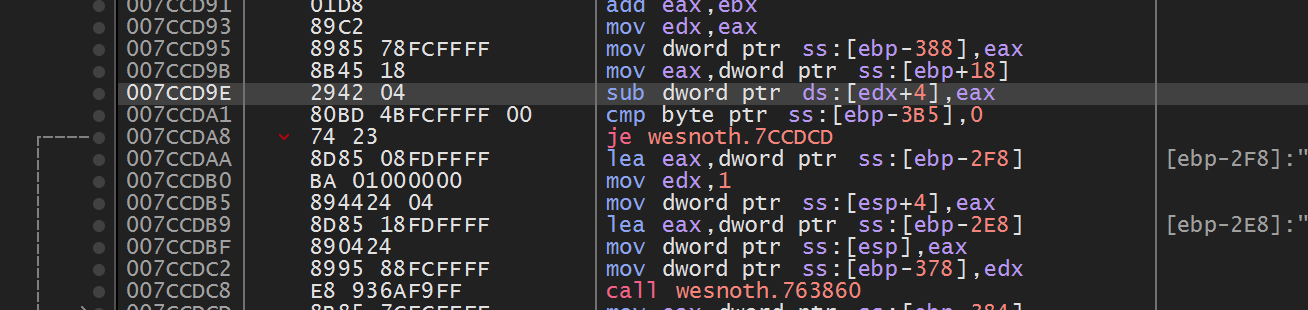
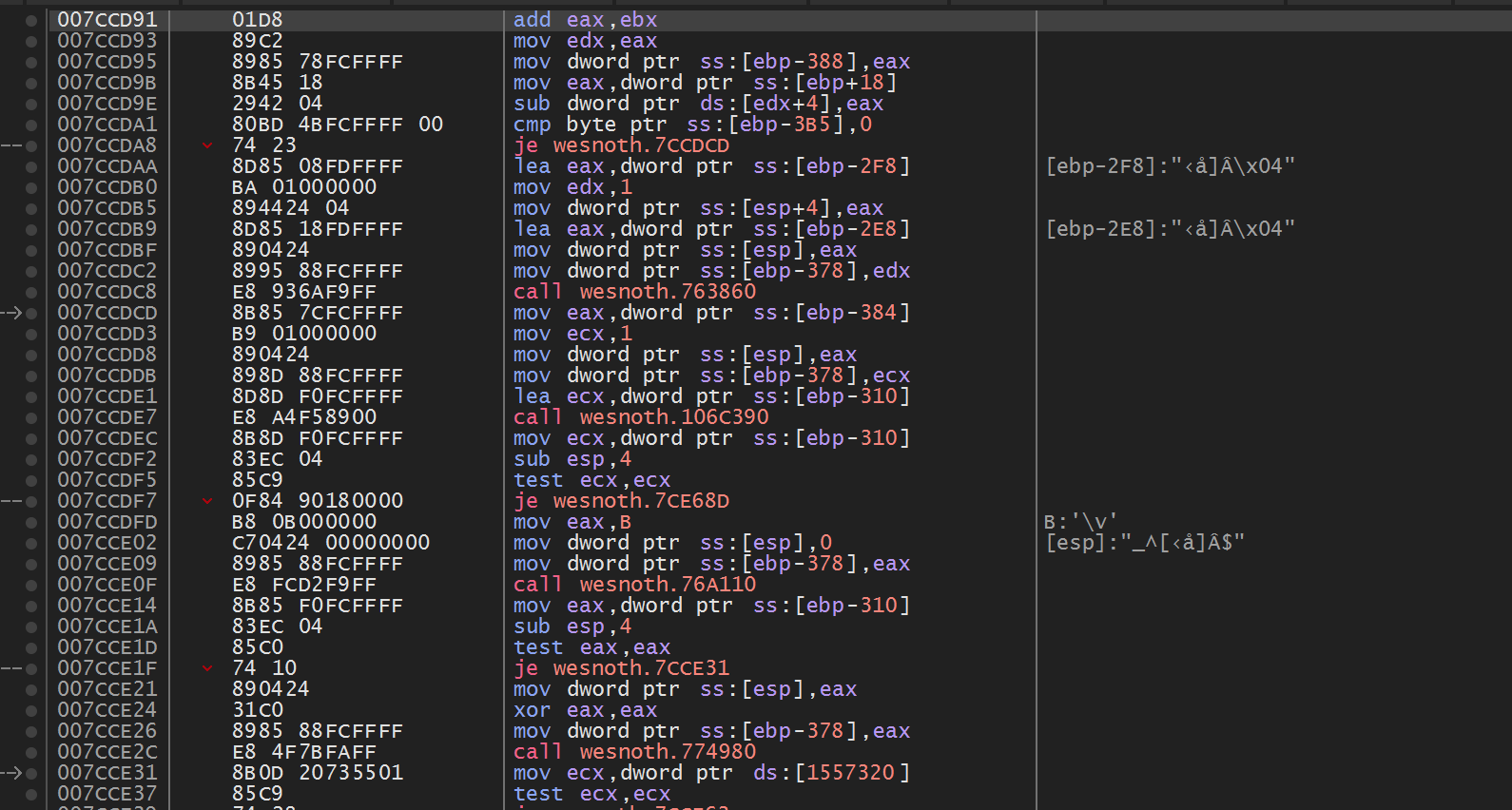
“The instruction is at RVA 0x003CCD91 inside .text, not at file offset 0x003CCD91, and Windows will add the live module base before the CPU can execute it.”
The PE map in Lesson 5.1 told us that an instruction can have one position in the EXE file and another in a running process. Suppose your debugger recorded an instruction at 0x007CCD91 yesterday. To find it after restarting the game, you need to know which part of that number belonged to the module and which part Windows chose for that run.
We will use four names for the four different positions involved:
a preferred image base is where the file would like to be loaded;
a live module base is where Windows placed it in this process run;
an RVA is a distance from the beginning of the module;
a virtual address is the final live address used by the CPU.
An RVA is not a pointer stored in the game. It is arithmetic describing a
location inside one loaded image. The PE file’s section table maps RVAs to
sections such as code or data.
Do not confuse an RVA with a file offset. A file offset counts bytes in the
EXE on disk. An RVA counts from the mapped image base after Windows has arranged
sections according to virtual addresses and alignment. They can differ.
The complete vocabulary is worth making explicit:
Name
Coordinate system
Typical formula
File offset
Bytes from the start of the file on disk
section.raw_ptr + offset_in_section
RVA
Bytes from the start of the mapped image
section.virtual_address + offset_in_section
Preferred VA
Address requested by the PE headers
preferred_image_base + RVA
Live VA
Address in this process now
live_module_base + RVA
These are coordinates in different spaces. Adding a live module base to a file
offset is the binary-analysis version of adding meters to seconds: the numbers
fit in an integer, but the operation has no useful meaning.
To translate an RVA to a file offset, first find the PE section whose virtual
range contains it. For a section with virtual start V, raw file start R,
virtual size VS, and raw size RS:
offset_in_section = RVA - V
file_offset = R + offset_in_section
The mapping is valid only when the RVA lies in the section’s mapped range and
offset_in_section < RS. A section can have more virtual bytes than raw bytes;
the loader fills that tail with zeros, so no corresponding file byte exists.
Conversely, alignment padding on disk is not necessarily meaningful mapped
memory. Header RVAs below SizeOfHeaders are a special case that commonly map
directly to the same file offset.
Example section:
VirtualAddress = 0x2000
VirtualSize = 0x0900
PointerToRawData = 0x0600
SizeOfRawData = 0x0800
RVA 0x2340 is 0x340 bytes into the section, so its file offset is
0x0600 + 0x0340 = 0x0940. RVA 0x2880 is mapped inside the virtual tail but
is beyond the 0x800 raw bytes; it represents zero-filled memory rather than a
byte stored in the file.
The same section as file offsets and as RVAsThe file stores 0x800 bytes starting at offset 0x0600. The image maps 0x900 bytes starting at RVA 0x2000. The last 0x100 are zeros.
1The two bars, drawn to scale
File section: 0x800 bytes at file offset 0x0600
File
offset 0x06000x0E00
file bytes
Mapped range: 0x900 bytes at RVA 0x2000
Image
RVA 0x20000x2900
backed by the file
0x100 zeros
The mapped range is longer than the stored bytes by 0x100.
2Offset 0x340 into the section
File section: 0x800 bytes at file offset 0x0600
File
offset 0x06000x0E00
offset 0x0940
Mapped range: 0x900 bytes at RVA 0x2000
Image
RVA 0x20000x2900
RVA 0x2340
The same distance from the start gives file offset 0x0600 + 0x340 = 0x0940 and RVA 0x2000 + 0x340 = 0x2340.
3RVA 0x2880 falls in the zero tail
File section: 0x800 bytes at file offset 0x0600
File
offset 0x06000x0E00
file bytes end here
no file byte
Mapped range: 0x900 bytes at RVA 0x2000
Image
RVA 0x20000x2900
backed by the file
RVA 0x2880 is in the zero tail
That RVA is 0x880 into the range, past the 0x800 stored bytes, so it has no file byte at all.
All 3 steps shown
The file stores 0x800 bytes starting at offset 0x0600. The image maps 0x900 bytes starting at RVA 0x2000. The last 0x100 are zeros.
Follow the 0x2340branch through the section mapping. Subtraction finds a
distance inside the section; addition then expresses it in the file’s
coordinate system:
Watch it happenAn RVA, a distance into the section, and a file offset
Two bars drawn to the same scale: the loaded section covering RVAs 0x2000 to 0x2900 with a zero-filled tail after 0x2800, and the file’s raw data from 0x0600 to 0x0E00. RVA 0x2340 is 0x0340 into the section; adding that to 0x0600 gives file offset 0x0940. RVA 0x2880 is 0x0880 in, beyond the raw data, so it has no file byte.
Read the steps
A section is stored in the file and also mapped into memory, and the two places are numbered differently. Its row says: RVA range [0x2000, 0x2900), 0x0800 bytes of raw data, stored from file offset 0x0600.
Start with an RVA: 0x2340. It is a distance from the mapped image’s base, not a position in the file. It lies inside the section’s virtual range.
Find how far into the section it is: 0x2340 − 0x2000 = 0x0340. That distance is the same in memory and in the file’s raw data.
Check that the file has a byte there: SizeOfRawData is 0x0800, and 0x0340 is below it.
Carry the same distance to the file: PointerToRawData 0x0600 + 0x0340 = 0x0940. That is where the byte lives on disk.
A different RVA, 0x2880, fails the check. Its distance into the section is 0x0880, which is not below 0x0800: it falls in the zero-filled tail that exists only in memory.
The other illustrated RVA, 0x2880, fails the raw-byte check: its 0x880 section offset lies in the zero-filled virtual tail.
This simulation needs JavaScript. The lesson text around it works through the same numbers.
A rigorous parser checks every subtraction and addition, validates section
ranges against the actual file length, and rejects overlapping or impossible
metadata. PE headers describe a file; they do not deserve blind trust merely
because Windows-shaped field names were decoded.
Resolving an RVA is useful only when the build identity and the live module
range are part of the calculation:
ASLR, Address Space Layout Randomization, changes the live base, while a game update can change the RVA. Checking both facts keeps an old note from turning into a believable but wrong address.
Old notes often show an address such as 0x007CCD91. That may be the address from one run, not a permanent location.
Windows can load an executable at a different base address each run; that is what ASLR randomizes. The useful part that usually stays the same for an exact build is the distance from the module’s beginning: the Relative Virtual Address.
ASLR makes fixed absolute addresses less predictable. Windows can relocate an
image when its PE metadata supports relocation. The module’s internal layout
for that exact file usually stays the same, so base-plus-RVA reaches the same
instruction even when the base changes.
live virtual address = live module base + RVA
RVA = observed address - observed module base
The useful invariant is algebraic: for one exact module build, an internal
location’s displacement from the module base can remain stable even when the base
changes. ASLR changes the first term, not the meaning of the second:
run A: base A + same RVA = address A
run B: base B + same RVA = address B
The RVA is stable only relative to that image layout. Recompiling or updating the
game can move the instruction inside the module, so the build identity must travel
with the RVA.
Small wrapper types can stop coordinate-space mistakes before runtime:
Optional: practise keeping the RVA inside its image before forming a live address.
Both values are integers internally, but the type names preserve their units.
The function also states two proof obligations: the RVA belongs to this image,
and addition cannot overflow the address type.
For the 32-bit Wesnoth 1.14.9 course build, the original disassembly records the instruction at 0x007CCD91. If the module was loaded at 0x00400000 during that capture, subtracting the base gives the RVA; adding a different run’s base back to that same RVA gives that run’s own live address:
Never assume the example base. Measure the module in the run you are actually debugging.
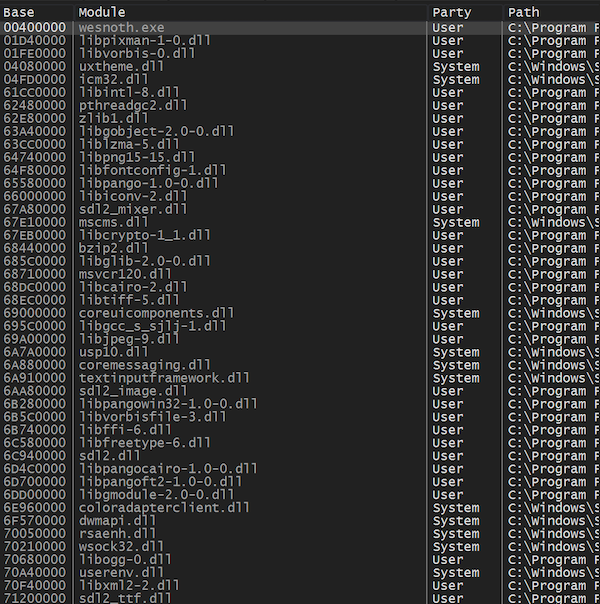
The shared Process wrapper uses CreateToolhelp32Snapshot, Module32FirstW, and Module32NextW from the windows crate. The chapter tool becomes small because those unsafe Windows boundaries already live in one reviewed module:
The two guards matter. An RVA outside the module is probably for the wrong version, and an overflowing addition is never a valid address.
ToolHelp returns information about modules in the chosen process. The snapshot
is still a moment-in-time view: a DLL can unload after enumeration. For the
course EXE this is stable during the short calculation, but reusable tooling
should handle a later read failure normally.
Open the printed live address in x64dbg. The bytes and disassembly must match the lesson before you use the address.
Repeat the process after restarting Wesnoth. If the base changes but base + RVA still reaches the expected instruction, you have separated stable location information from one-run information.
#[cfg(windows)]fn main() -> anyhow::Result<()> { use anyhow::Context; use gha_windows_labs::Process; let mut arguments = std::env::args().skip(1); let process_name = arguments.next().unwrap_or_else(|| "wesnoth.exe".to_owned()); let module_name = arguments.next().unwrap_or_else(|| process_name.clone()); let requested_rva = arguments .next() .map(|text| usize::from_str_radix(text.trim_start_matches("0x"), 16)) .transpose() .context("RVA must be hexadecimal, such as 7CCD91")?; let process = Process::open_by_name(&process_name, false)?; let (base, size) = process.module(&module_name)?; let end = base.checked_add(size).context("module range overflowed")?; println!("{} (PID {})", process.name(), process.id()); println!(" module: {module_name}"); println!(" live base: {base:#010x}"); println!(" size: {size:#010x}"); println!(" end: {end:#010x}"); if let Some(rva) = requested_rva { anyhow::ensure!(rva < size, "RVA {rva:#x} is outside the module"); let address = base.checked_add(rva).context("base + RVA overflowed")?; println!(" {base:#010x} + {rva:#010x} = {address:#010x}"); } Ok(())}#[cfg(not(windows))]fn main() { eprintln!("This live module inspector uses ToolHelp and must run on Windows.");}
An import says, “my program needs this name from another image.” An export says, “other images may ask me for this name or ordinal.”
Windows uses these tables while loading executables and DLLs. Reverse engineers inspect them to understand a game’s dependencies, plug-in interfaces, graphics libraries, and engine boundaries before reading assembly.
An export table connects three parallel ideas:
Piece
What it contains
Name pointer table
RVAs of public ASCII names such as SDL_Init
Ordinal table
Small indexes corresponding to those names
Export address table
RVAs of code, data, or forwarder strings
Not every export needs a name. A DLL can export by ordinal only. This beginner tool lists named exports and reports the total number of address entries so the difference stays visible.
An ordinal is not simply a row’s position in the address table. The export directory also stores an ordinal base, commonly 1, and an export’s real public ordinal is ordinal_base + its index in the address table. A caller asking for “ordinal 5” with a base of 1 wants functions[5 - 1], not functions[5]. The parser below reads that base once and adds it back in for every named export so the printed ordinals match what the DLL actually publishes.
functions[0]ordinal 1
functions[1]ordinal 2
functions[2]ordinal 3
functions[3]ordinal 4
functions[4]ordinal 5
With ordinal_base = 1, the export published as “ordinal 5” sits at index 4: functions[5 - 1], not functions[5].
Public ordinal versus address-table index. This step-by-step trace needs JavaScript. Here is the code and where the run ends.
ordinal_base = 1; entries = 3
index = public_ordinal - ordinal_base
check index is within the address table
entry = functions[index]
classify the entry before using it
report an RVA, forwarder, or missing export
Result: ordinal 2 selects OTHER.RealName. Follow the forwarded DLL and name instead of treating its text bytes as code.
Final values: ordinal = 2; index = 1; valid = true; entry = OTHER.RealName; type = forwarder.
Read every step of the lesson’s example
Step 1, line 1. Start with the selected inputs. Follow the highlighted operation and the changing state below.
ordinal = 2.
Step 2, line 2. 2 - 1 = 1.
ordinal = 2; index = 1.
Step 3, line 3. There are three entries, indexed zero through two.
An RVA, or relative virtual address, measures from the start of the mapped image, regardless of the live base Windows chose. A file offset measures from byte zero in the file on disk.
You cannot safely treat every RVA as a file offset. Sections can have different virtual and raw positions, and some virtual bytes have no stored file bytes at all.
The parser accepts an RVA only when it falls inside a section and its distance is smaller than SizeOfRawData. That last check prevents the parser from pretending zero-filled virtual padding exists in the file.
Treat every address-like number as belonging to a named coordinate system:
file offsets index the byte slice on disk;
RVAs index the mapped image relative to its base;
virtual addresses identify locations after the loader chooses a base;
table indexes select entries, not bytes.
Do not pass all four around as plain usize values. Small wrapper types such as FileOffset(u32) and Rva(u32) make accidental mixing visible and force conversions through one checked function.
The conversion is a partial function: some valid mapped RVAs have no file bytes, and malformed files may describe overlapping sections. Returning Option or Result is more accurate than inventing an offset.
The optional header is shaped differently for 32-bit PE32 and 64-bit PE32+. The magic value tells us which layout we have:
0x10b: PE32, data directories begin 96 bytes into the optional header;
0x20b: PE32+, data directories begin 112 bytes into the optional header.
Hard-coding one screenshot’s “export table is 0x78 after the PE signature” is brittle because that shortcut mixes header landmarks and assumes one layout.
The original helper assumes the export directory starts 96 bytes into every optional header. That matches PE32, but PE32+ puts it at 112. u32_at is the bounded four-byte reader used by the parser; magic identifies the header format.
Format-aware parsing chooses the documented landmark for the detected format, rejects unknown formats, and checks the offset calculation before reading. The complete parser also verifies that directory entry zero is declared present.
let export_directory = optional_offset + 96; // Assumes PE32.
let directory_offset = match magic {
0x10b => 96,
0x20b => 112,
_ => anyhow::bail!("unsupported PE format"),
};
let export_directory = optional_offset.checked_add(directory_offset)
.context("export-directory offset overflowed")?;
let export_rva = u32_at(bytes, export_directory)?;
Ok(export_rva)
}
Takeaway: select a format’s layout before calculating a field offset.
The program also checks NumberOfRvaAndSizes before reading directory entry zero. If the field is absent, reading entry zero would cross the file’s declared header.
An export-address entry usually holds an RVA for code or data. If the RVA points back inside the export-directory range, it is a forwarder string instead, such as KERNELBASE.VirtualQueryEx or NTDLL.RtlSomething.
The loader follows that string to another DLL export. This is how Windows can keep a familiar public name while moving the implementation behind it.
Looking a function up by name uses all three tables. The name’s row in the sorted name table
selects the same row of the ordinal table, which holds an index into the address table; the
entry there is either code or a forwarder:
Find an export by nameAn invented DLL: four sorted names, five address entries, and an export directory at RVA 0x9000 to 0x91FF. Pick a name and an ordinal base.
Name, then ordinal, then address
Name tables: the same row i in both
Names (sorted)
AddGoldi = 0
GetGoldi = 1
Queryi = 2
SetGoldi = 3
↓ row 1 gives index 0
Name ordinals
2
0
3
1
Export address table
↓ functions[0]
functions[0] to [4], RVA in hex
1A40
1B10
1C80
9140
1D00
Public ordinal = base + k
1
2
3
4
5
What the entry is
0x1A40 is outside the export directory: code in this DLLpublic ordinal 1 + 0 = 1
GetGold is row 1 of the sorted name table. Row 1 of the ordinal table holds 0, so the address entry is functions[0] = 0x1A40, published as ordinal 1 + 0 = 1.
Even a game DLL you intended to inspect might be truncated, damaged, from the wrong build, or simply not a PE file. A parser should fail with a useful message instead of panicking or allocating several gigabytes because a count field contained nonsense.
This implementation uses five guardrails:
bytes_at checks every slice boundary.
checked_add catches integer wraparound.
The optional-header magic chooses the correct layout.
Section and export counts have teaching-tool limits.
Strings must terminate within 4096 bytes.
Validate from the outside inward. Prove the DOS header range before reading its PE offset, prove the PE and optional-header ranges before reading directories, then prove section and export ranges. A later valid-looking signature cannot make an earlier out-of-bounds read safe.
Before the listing, here is the exact 40-byte structure parse_export_table reads once it has a validated pointer to it, and the order in which it validates its way there.
+0x00(unused)
+0x04(unused)
+0x08(unused)
+0x0CName (RVA)
+0x10Base (ordinal base)
+0x14NumberOfFunctions
+0x18NumberOfNames
+0x1CAddressOfFunctions
+0x20AddressOfNames
+0x24AddressOfNameOrdinals
skipped
read by parse_export_table
The IMAGE_EXPORT_DIRECTORY, all 40 bytes (EXPORT_DIRECTORY_SIZE). parse_export_table skips the first three fields and reads the seven highlighted ones directly by offset.Complete lab source: export_inspector.rs
The page wraps a few lines more tightly than cargo fmt so the whole parser remains readable on a narrow screen. The buildable source is the source of truth.
Then point it at files from your own installation:
Terminal window
.\target\release\export_inspector.exe `  "C:\Games\Wesnoth\wesnoth.exe"
.\target\release\export_inspector.exe `  "C:\Games\AssaultCube\bin_win32\openal32.dll"
.\target\release\export_inspector.exe `  "C:\Games\UrbanTerror\Quake3-UrT.exe"
An EXE may have no export table, and that is a valid result. DLLs are usually more interesting. Try a Windows DLL such as C:\Windows\System32\kernel32.dll to find forwarded exports, then compare that result with lesson 11.1.
Does the file publish named exports, ordinal-only entries, or neither?
Which names look like a supported plug-in or library boundary?
Does an entry point to code/data or to a forwarder string?
Is the file PE32 or PE32+, and does that match the game build?
Can the same DLL name from two game installations have different exports?
Do not call an export merely because its name looks interesting. A name does not reveal the complete function signature, responsibility for allocation and cleanup, calling convention, or whether the API is intended for outside use.
Reference: Microsoft’s PE and COFF format specification, especially optional-header data directories, section headers, the export directory, address table, name table, ordinal table, and forwarder RVAs.
Lesson 5.4
Instruction Reference: Values and Integer Arithmetic
Use this reference when an instruction in your own resettable lab is unfamiliar. Start with its plain-English meaning, then follow its worked trace. You can change the inputs; nothing needs to be memorized or completed before continuing.
These examples use 32-bit x86, Intel syntax: destination first. A label such as [gold] stands for a valid address in our fictional game. It is not an address to paste into another process. The forms below cover common general-purpose uses, rather than every encoding or special-register form.
The authoritative details are in Intel’s Software Developer’s Manuals, especially Volume 2. The links in this table open the relevant entry in revision 093 of the instruction reference. A mnemonic names an operation; it does not identify one fixed opcode or instruction length.
In the forms below, reg means a register, imm means a number encoded in the instruction, and r/m means either a register or a memory operand. Memory uses brackets. The operand widths must match the selected instruction form; byte ptr, word ptr, and dword ptr make one, two, or four bytes explicit.
An expression such as [esi+ecx*4+8] identifies a location. esi is the base, ecx is an index, 4 is the scale, and 8 is the displacement, a fixed extra distance in bytes. In these usual 32-bit addressing forms, the encoded scale is 1, 2, 4, or 8; some base/index combinations have encoding restrictions.
With base 0x1000, index 2, and a scale of 4, the address is 0x1000 + 2×4 + 8 = 0x1010. A mov with this memory source reads bytes there. A lea with the same expression only calculates the address.
One address calculation, two different instructionsBoth forms compute 0x1010. lea stops there; mov goes on to read the memory at that address.
1Base plus index × scale: 0x1000 + 8
Running address
0x1000base
+ 8index 2 × scale 4
0x1008
The base register holds 0x1000. The index register holds 2 and the scale is 4, so 2 × 4 = 8 bytes are added.
2Add the displacement: 0x1008 + 8
Running address
0x1008
+ 8displacement
0x1010effective address
The constant displacement adds another eight bytes, giving the effective address.
3The path splits at 0x1010
lea
Register receives
0x1010the address itself
mov
Register receives
bytes at 0x1010the contents
lea keeps the address as a number. mov uses it to read the bytes stored there.
All 3 steps shown
Both forms compute 0x1010. lea stops there; mov goes on to read the memory at that address.
Addresses do not declare record sizes. If each player occupies 16 bytes, an index must advance by 16 bytes per player, perhaps by an earlier multiplication. Also distinguish operand size from address size: reading a four-byte field does not mean that four bytes make up the whole object.
Many integer operations update bits in eflags. The trace panels use these names:
Flag
What it records for ordinary addition/subtraction
ZF, zero
The stored-width result is zero.
SF, sign
The result’s highest bit is one. That bit is the sign when the value is interpreted as signed.
CF, carry
Addition carried out of the unsigned width, or subtraction needed an unsigned borrow.
OF, overflow
The mathematical signed result cannot fit the selected signed width.
CF and OF answer different questions. Adding one to 0xFFFFFFFF wraps the 32-bit result to zero and sets CF, while signed −1 + 1 fits and does not set OF. Adding one to 0x7FFFFFFF sets OF because signed 2,147,483,648 does not fit, while the unsigned sum fits and does not set CF.
Some entries also mention PF: it reports even parity in the low result byte for these integer operations. AF records carry or borrow from bit 3 into bit 4. These two exist even when a game rule does not use them. An undefined flag is not an answer you may rely on; it is not a promise of zero. A preserved flag still describes an earlier operation.
Meaning: copy a value from the source to the destination, leaving the source available.
Common forms:mov reg, reg/imm/memory, mov memory, reg/imm. Ordinary mov does not copy memory directly to memory. Effects: write the destination register or memory at the selected width; leave arithmetic flags unchanged.
moveax, [ammo] ; load the four-byte field
movecx, eax; copy the register value
mov [display_ammo], ecx; store the copy
Copy ammo through registers into memory. This step-by-step trace needs JavaScript. Here is the code and where the run ends.
Meaning: calculate the effective address described by the source expression.
Common form:lea reg, [base+index*scale+displacement]. Effects: write a register; do not read the addressed game bytes or change arithmetic flags. It can also serve as arithmetic when the expression is useful as a number.
movesi, 0x1000; toy player-array base
movecx, 2; third player's index
shlecx, 2; pre-scale: 2 becomes 8
leaeax, [esi+ecx*4+8] ; base + 2*16 + field offset
Compute an address without reading the object. This step-by-step trace needs JavaScript. Here is the code and where the run ends.
Meaning: add the source to the destination and keep the selected-width result.
Common forms:add reg, r/m/imm, add memory, reg/imm. Effects: write the destination and set OF, SF, ZF, AF, CF, and PF from the addition. The CPU does not automatically reject an overflowing game reward.
moveax, [gold]
addeax, 10; add a reward
mov [gold], eax
Add a reward and inspect overflow. This step-by-step trace needs JavaScript. Here is the code and where the run ends.
mov eax, 0x00000064
add eax, 10
mov [gold], eax
Store 0x0000006E in gold. The mov does not repair overflow or change these flags.
Final values: case = ordinary; amount = 10; eax = 110; eax bits = 0x0000006E; ZF = 0; SF = 0; CF = 0; OF = 0; PF = 0; signed reading = 110; gold = 110.
Read every step of the lesson’s example
Step 1, line 1. Load 0x00000064 into eax. This copy leaves the comparison flags alone.
case = ordinary; amount = 10; eax = 100; eax bits = 0x00000064; ZF = 0; SF = 0; CF = 0; OF = 0; PF = 1.
Meaning: subtract the source from the destination and keep the selected-width result.
Common forms:sub reg, r/m/imm, sub memory, reg/imm. Effects: write the destination and set OF, SF, ZF, AF, CF, and PF. For subtraction, CF reports an unsigned borrow.
moveax, [gold]
subeax, 25; no affordability guard here
mov [gold], eax
Subtract a price and inspect a borrow. This step-by-step trace needs JavaScript. Here is the code and where the run ends.
mov eax, 0x00000064
sub eax, 25
mov [gold], eax
Store 0x0000004B in gold. The mov does not repair overflow or change these flags.
Final values: case = ordinary; amount = 25; eax = 75; eax bits = 0x0000004B; ZF = 0; SF = 0; CF = 0; OF = 0; PF = 1; signed reading = 75; gold = 75.
Read every step of the lesson’s example
Step 1, line 1. Load 0x00000064 into eax. This copy leaves the comparison flags alone.
case = ordinary; amount = 25; eax = 100; eax bits = 0x00000064; ZF = 0; SF = 0; CF = 0; OF = 0; PF = 1.
Common form:inc r/m. Effects: write the operand and update OF, SF, ZF, AF, and PF, while preserving CF. It differs from add ..., 1 when later code needs carry.
moveax, [coins_collected]
inceax
mov [coins_collected], eax
Count a collected coin while preserving carry. This step-by-step trace needs JavaScript. Here is the code and where the run ends.
mov eax, 0x00000004
inc eax
mov [count], eax
The stored count is 0x00000005. Check the new ZF/SF/OF when needed; do not treat the preserved CF as this operation's overflow test.
Final values: case = ordinary; eax = 5; eax bits = 0x00000005; ZF = 0; SF = 0; CF = 1; OF = 0; PF = 1; count = 5.
Read every step of the lesson’s example
Step 1, line 1. The starting comparison flags are illustrative. In particular, CF is already one.
case = ordinary; eax = 4; eax bits = 0x00000004; ZF = 0; SF = 0; CF = 1; OF = 0; PF = 1.
Common form:dec r/m. Effects: write the operand and update OF, SF, ZF, AF, and PF, while preserving CF. Zero can become the unsigned maximum if no guard prevents it.
moveax, [ammo]
deceax
mov [ammo], eax
Use one ammo while preserving carry. This step-by-step trace needs JavaScript. Here is the code and where the run ends.
mov eax, 0x00000001
dec eax
mov [count], eax
The stored count is 0x00000000. Check the new ZF/SF/OF when needed; do not treat the preserved CF as this operation's overflow test.
Final values: case = ordinary; eax = 0; eax bits = 0x00000000; ZF = 1; SF = 0; CF = 1; OF = 0; PF = 1; count = 0.
Read every step of the lesson’s example
Step 1, line 1. The starting comparison flags are illustrative. In particular, CF is already one.
case = ordinary; eax = 1; eax bits = 0x00000001; ZF = 0; SF = 0; CF = 1; OF = 0; PF = 1.
Common 32-bit forms:imul r/m32 writes the full product to edx:eax; imul reg32, r/m32 multiplies the destination by the source; imul reg32, r/m32, imm multiplies the source by the immediate. The latter two keep the low 32 bits in the named register. Effects: CF and OF tell whether that low result represents the full signed product; SF, ZF, AF, and PF are undefined. No source memory is written by these forms.
moveax, [base_reward]
imuleax, eax, 3; triple the signed reward
mov [reward], eax
Multiply a signed reward and detect truncation. This step-by-step trace needs JavaScript. Here is the code and where the run ends.
mov eax, 6
imul eax, eax, 3
mov [reward], eax
Store the low 32 bits, 0x00000012. The signed product fits the destination.
Final values: case = ordinary; factor = 3; eax = 18; ZF = undefined; SF = undefined; CF = 0; OF = 0; PF = undefined; eax bits = 0x00000012; exact product = 18; reward = 18.
Read every step of the lesson’s example
Step 1, line 1. eax holds a signed reward. This is the three-operand form: destination, source, immediate multiplier.
case = ordinary; factor = 3; eax = 6; ZF = 0; SF = 0; CF = 0; OF = 0; PF = 1.
Step 2, line 2. The exact product is 18. The destination keeps 0x00000012, read as 18; CF and OF are 0. Other arithmetic-result flags are undefined for imul.
Meaning: divide a signed double-width dividend by the source, producing a quotient and a remainder.
Common 32-bit form:idiv r/m32 divides edx:eax by that register or memory value; the quotient goes to eax, the remainder to edx. There is no immediate-divisor form. cdq first sign-extends a signed eax into edx:eax. Effects: quotient truncates toward zero; arithmetic flags are undefined. A zero divisor or a quotient that does not fit raises a divide-error exception rather than an overflow flag. The trace models the zero-divisor case; signed-minimum divided by −1 is another failing boundary.
moveax, [coin_total]
cdq; prepare the signed dividend
movecx, [player_count]
idivecx; requires a valid nonzero divisor
mov [share], eax
Share signed coins and keep the remainder. This step-by-step trace needs JavaScript. Here is the code and where the run ends.
Step 4, line 4. Signed division truncates toward zero: eax=5, edx=3. The remainder has the dividend's sign when nonzero. The arithmetic flags are undefined.
Meaning: copy a smaller value into a wider register and fill the added high bits with zero.
Common forms here:movzx reg32, r/m8 or movzx reg32, r/m16. Effects: write only the wider destination; preserve flags and source memory. Byte FF becomes 000000FF, numeric 255.
movbl, [ammo_byte]
movzxeax, bl
mov [ammo_dword], eax
Widen a byte without a sign. This step-by-step trace needs JavaScript. Here is the code and where the run ends.
mov bl, 255
movzx eax, bl
mov [expanded], eax
Store the widened value 255. The original byte and the flags are unchanged.
Final values: value = 255; bl = FF; ZF = 0; SF = 0; CF = 0; OF = 0; PF = 1; eax = 255; eax bits = 0x000000FF; expanded = 255.
Read every step of the lesson’s example
Step 1, line 1. bl contains the eight-bit pattern FF. The pattern itself does not declare a signed type.
value = 255; bl = FF; ZF = 0; SF = 0; CF = 0; OF = 0; PF = 1.
Memory: byte = FF (8 bits).
Step 2, line 2. Fill the new upper bits with zero. FF becomes 0x000000FF, read as 255.
value = 255; bl = FF; ZF = 0; SF = 0; CF = 0; OF = 0; PF = 1; eax = 255; eax bits = 0x000000FF.
Memory: byte = FF (8 bits).
Step 3, line 3. Store the widened value 255. The original byte and the flags are unchanged.
Meaning: copy a smaller signed value into a wider register while repeating its sign bit into the added high bits.
Common forms here:movsx reg32, r/m8 or movsx reg32, r/m16. Effects: write only the wider destination; preserve flags and source memory. Byte FF becomes FFFFFFFF, signed −1.
movbl, [signed_step]
movsxeax, bl
mov [movement_delta], eax
Keep the sign when widening a byte. This step-by-step trace needs JavaScript. Here is the code and where the run ends.
mov bl, 255
movsx eax, bl
mov [expanded], eax
Store the widened value -1. The original byte and the flags are unchanged.
Final values: value = 255; bl = FF; ZF = 0; SF = 0; CF = 0; OF = 0; PF = 1; eax = -1; eax bits = 0xFFFFFFFF; expanded = -1.
Read every step of the lesson’s example
Step 1, line 1. bl contains the eight-bit pattern FF. The pattern itself does not declare a signed type.
value = 255; bl = FF; ZF = 0; SF = 0; CF = 0; OF = 0; PF = 1.
Memory: byte = FF (8 bits).
Step 2, line 2. Repeat the source sign bit into the new upper bits. FF becomes 0xFFFFFFFF, read as -1.
value = 255; bl = FF; ZF = 0; SF = 0; CF = 0; OF = 0; PF = 1; eax = -1; eax bits = 0xFFFFFFFF.
Memory: byte = FF (8 bits).
Step 3, line 3. Store the widened value -1. The original byte and the flags are unchanged.
A function does more than calculate values: it chooses a path, calls other functions, and returns to the right place. These worked examples use a fictional owned, resettable 32-bit x86 game, Intel syntax, and valid toy memory labels. The traces are small teaching models; they do not execute machine code or attach to a process.
Start with values and arithmetic if registers, brackets, or ZF/SF/CF/OF are unfamiliar. Each example is already populated. Changing an input is optional exploration, not a test.
reg, imm, and r/m retain their meanings from the previous reference: register, encoded number, and register-or-memory. The forms below are common 32-bit forms, not the entire instruction set. Intel’s manuals give encoding, exception, mode, and special-form details.
Meaning: subtract for comparison, keep the flags, and discard the numeric result.
Common forms:cmp reg, r/m/imm, cmp memory, reg/imm. Effects: read operands without writing either; set OF, SF, ZF, AF, CF, and PF as a subtraction would.
moveax, [gold]
cmpeax, 25
movecx, eax; gold was not spent
Compare gold without spending it. This step-by-step trace needs JavaScript. Here is the code and where the run ends.
mov eax, 100
cmp eax, 25
mov ecx, eax
ecx receives the same 100 gold. A following jump can read the comparison flags because mov does not change them.
Meaning: compute a bitwise AND for comparison, then discard its numeric result.
Common forms:test r/m, reg or test r/m, imm. Effects: leave operands unchanged; set ZF, SF, and PF from the temporary AND, clear CF/OF, and leave AF undefined. test eax, eax asks whether the complete value is zero; test eax, 4 examines bit 2.
moveax, [status]
testeax, 4; bit 2 means stunned here
movecx, eax; all status bits survive
Inspect a status bit without clearing the others. This step-by-step trace needs JavaScript. Here is the code and where the run ends.
mov eax, 5
test eax, 4
mov ecx, eax
The original status 5 is still in both eax and ecx. The flags, not a changed status word, report the test.
Final values: status = 5; eax = 5; ZF = 0; SF = 0; CF = 0; OF = 0; PF = 0; discarded AND result = 4; ecx = 5.
Read every step of the lesson’s example
Step 1, line 1. eax contains all status bits. Testing one bit must not destroy the others.
status = 5; eax = 5; ZF = 0; SF = 0; CF = 0; OF = 0; PF = 1.
Memory: bit 3 = 0 (low four bits only); bit 2 = 1 (low four bits only); bit 1 = 0 (low four bits only); bit 0 = 1 (low four bits only).
Step 2, line 2. Compute the temporary AND result 4, then discard it. ZF=0 answers whether bit 2 is clear; CF and OF become zero.
status = 5; eax = 5; ZF = 0; SF = 0; CF = 0; OF = 0; PF = 0; discarded AND result = 4.
Memory: bit 3 = 0 (low four bits only); bit 2 = 1 (low four bits only); bit 1 = 0 (low four bits only); bit 0 = 1 (low four bits only).
Step 3, line 3. The original status 5 is still in both eax and ecx. The flags, not a changed status word, report the test.
status = 5; eax = 5; ZF = 0; SF = 0; CF = 0; OF = 0; PF = 0; discarded AND result = 4; ecx = 5.
Memory: bit 3 = 0 (low four bits only); bit 2 = 1 (low four bits only); bit 1 = 0 (low four bits only); bit 0 = 1 (low four bits only).
Takeaway: a mask can inspect a field without deleting its other bits.
Meaning: continue at another instruction unconditionally.
Common near forms:jmp label uses an encoded relative displacement; jmp reg32/memory32 reads an indirect destination. Effects: change the instruction pointer; do not create a return address or alter arithmetic flags. Memory-indirect forms read the pointer.
moveax, 5
jmp ready
moveax, 99; skipped on this path
ready: mov [ammo], eax
Skip an instruction unconditionally. This step-by-step trace needs JavaScript. Here is the code and where the run ends.
Meaning: jump only when the selected flag condition is true; otherwise continue with the next instruction.
jcc is a name for the family, not a literal mnemonic to type. Common form: a specific conditional mnemonic such as jb label. Effects: read the specified flags and potentially change the instruction pointer; preserve registers, arithmetic flags, and game memory. Short and near relative forms have different reach and encoded lengths.
moveax, [gold]
cmpeax, 25
jb cannot_buy ; unsigned gold is below cost
subeax, 25; taken only on the other path
Here cannot_buy names an exit path outside the excerpt. The interactive shows both paths completely and lets you change the conditional mnemonic.
Choose a branch by interpreting the same flags. This step-by-step trace needs JavaScript. Here is the code and where the run ends.
The result is chosen=1. A signed comparison and an unsigned comparison can legitimately choose different paths for identical bits.
Final values: case = signed; jump = jl; eax = -1; rhs = 2; ZF = 0; SF = 1; CF = 0; OF = 0; PF = 0; taken = true; chosen = 1.
Read every step of the lesson’s example
Step 1, line 1. eax holds 0xFFFFFFFF, signed -1 or unsigned 4294967295. The branch mnemonic decides which interpretation to use.
case = signed; jump = jl; eax = -1; rhs = 2; ZF = 0; SF = 0; CF = 0; OF = 0; PF = 1.
Step 2, line 2. cmp keeps eax, discards 0xFFFFFFFD, and sets ZF=0, SF=1, CF=0, OF=0, PF=0.
case = signed; jump = jl; eax = -1; rhs = 2; ZF = 0; SF = 1; CF = 0; OF = 0; PF = 0.
Step 3, line 3. jl asks for signed less. Its condition is true; jump to selected. No flags change.
case = signed; jump = jl; eax = -1; rhs = 2; ZF = 0; SF = 1; CF = 0; OF = 0; PF = 0; taken = true.
Step 4, line 6. Only the selected path writes chosen=1.
case = signed; jump = jl; eax = -1; rhs = 2; ZF = 0; SF = 1; CF = 0; OF = 0; PF = 0; taken = true; chosen = 1.
Step 5, line 7. The result is chosen=1. A signed comparison and an unsigned comparison can legitimately choose different paths for identical bits.
case = signed; jump = jl; eax = -1; rhs = 2; ZF = 0; SF = 1; CF = 0; OF = 0; PF = 0; taken = true; chosen = 1.
Mnemonic and common aliases
Condition
Interpretation after cmp left, right
je / jz
ZF = 1
equal
jne / jnz
ZF = 0
unequal
jb / jnae / jc
CF = 1
unsigned below / carry
jae / jnb / jnc
CF = 0
unsigned at least / no carry
jbe / jna
CF = 1 or ZF = 1
unsigned below or equal
ja / jnbe
CF = 0 and ZF = 0
unsigned above
jl / jnge
SF ≠ OF
signed less
jge / jnl
SF = OF
signed at least
jle / jng
ZF = 1 or SF ≠ OF
signed less or equal
jg / jnle
ZF = 0 and SF = OF
signed greater
jo / jno
OF = 1 / OF = 0
signed overflow present / absent
js / jns
SF = 1 / SF = 0
top result bit set / clear
jp / jpe, jnp / jpo
PF = 1 / PF = 0
even / odd low-byte parity
jcxz/jecxz test a counter register rather than these flags. Do not apply this table blindly to them, or to flags produced by a floating-point comparison in the next reference.
Takeaway: find the producer of the flags and the type intended by the branch before naming the condition.
The stack is a thread’s working storage for active calls and temporary data. In these ordinary 32-bit examples it grows toward lower addresses. Saving four bytes lowers esp by four; removing them advances it by four. Real functions also follow a calling convention for arguments, saved registers, alignment, and cleanup.
Meaning: save where execution should resume, then enter another function.
Common near forms:call label or call reg32/memory32. Effects: push the address immediately after the call onto the stack, update esp, and change the instruction pointer. A near call does not itself change arithmetic flags. The callee’s instructions can change registers, flags, and memory afterward.
moveax, [gold]
call grant_coin ; our helper adds one in eax
mov [gold], eax; resume here after its ret
Save a continuation before entering the helper. This step-by-step trace needs JavaScript. Here is the code and where the run ends.
Step 7, line 7. The round trip ends with 11 gold and the original esp. The saved stack bytes can remain, but they are no longer an active return address.
Meaning: read the saved return address from the stack and resume the caller there.
Common near forms:ret; ret imm16 additionally removes a fixed argument-byte count after popping the return address. Effects: update the instruction pointer and esp; leave arithmetic flags alone. Returning a value in eax is a calling-convention choice, not work performed by ret itself.
grant_coin:
addeax, 1
ret; eax was changed by add, not ret
call saves the way back; ret takes itThe caller reads gold and calls grant_coin. The stack holds the address of the instruction after the call until ret removes it.
1Before the call: gold is in eax
Registers, then the stack
registersstack: S − 4, then S
esp = S
eax = gold
freeS − 4
callerdata at S
The caller has read gold. esp points at S, the top of the caller’s stack.
2Inside grant_coin, after add
Registers, then the stack
registersstack: S − 4, then S
esp = S − 4
eax = gold + 1
return addressthe mov after the call
callerdata at S
call lowered esp by 4 and stored the address of the next mov at S − 4. The helper then added one to eax.
3ret: pop the address and resume
Registers, then the stack
registersstack: S − 4, then S
esp = S
eax = gold + 1
return addresspopped; resume there
callerdata at S
ret reads that address, raises esp by 4 and continues at mov [gold], eax.
All 3 steps shown
The caller reads gold and calls grant_coin. The stack holds the address of the instruction after the call until ret removes it.
Resume the caller from the stack. This step-by-step trace needs JavaScript. Here is the code and where the run ends.
Step 7, line 7. The round trip ends with 11 gold and the original esp. The saved stack bytes can remain, but they are no longer an active return address.
Common 32-bit forms:push reg32/memory32/imm. Effects: lower esp by four and write the saved value there; preserve ordinary arithmetic flags. These widths are specific to this example: a normal 64-bit push usually uses an eight-byte slot.
movebx, [health]
pushebx; preserve this value
movebx, 0; temporary work
popebx
mov [health], ebx
Save a temporary register value on the stack. This step-by-step trace needs JavaScript. Here is the code and where the run ends.
Meaning: copy the top stack value to a destination and remove that slot from the active stack.
Common forms:pop reg32/memory32. Effects: read stack memory, write the destination, and normally advance esp by four. Arithmetic flags survive. Special destinations involving esp need their exact manual rules; the example uses ebx. The old memory bytes are not erased.
movebx, [health]
pushebx
movebx, 0
popebx; recover the last saved value
mov [health], ebx
Recover the last saved value. This step-by-step trace needs JavaScript. Here is the code and where the run ends.
Meaning: shift bits left, filling the newly opened low positions with zeros.
Common forms:shl r/m32, imm8 or shl r/m32, cl; sal is an alias. Effects: write the operand; CF records the last bit shifted out, ZF/SF/PF describe the result, and AF is undefined for a nonzero effective count. OF has a defined shift result only for a count of one. An effective count of zero preserves value and flags. For a 32-bit operand, the count is masked to its low five bits.
moveax, [packed_value]
shleax, 1
mov [packed_value], eax
Shift a packed value left. This step-by-step trace needs JavaScript. Here is the code and where the run ends.
mov eax, 5
shl eax, 1
mov [packed], eax
Store 0x0000000A. Its signed reading is 10. Left shift keeps only the bits that fit in the selected width.
Final values: value = 5; count = 1; eax = 10; signed reading = 10; eax bits = 0x0000000A; ZF = 0; SF = 0; CF = 0; OF = 0; PF = 1; packed = 10.
Read every step of the lesson’s example
Step 1, line 1. Start with 0x00000005 (5 as signed). The illustrative previous CF and OF are both one.
value = 5; count = 1; eax = 5; signed reading = 5; eax bits = 0x00000005; ZF = 0; SF = 0; CF = 1; OF = 1; PF = 1.
Memory: bit 3 = 0 (low four bits only); bit 2 = 1 (low four bits only); bit 1 = 0 (low four bits only); bit 0 = 1 (low four bits only).
Step 2, line 2. shl shifts 1 place left, filling new positions with zero. The last bit lost becomes CF=0; OF=0.
value = 5; count = 1; eax = 10; signed reading = 10; eax bits = 0x0000000A; ZF = 0; SF = 0; CF = 0; OF = 0; PF = 1.
Memory: bit 3 = 1 (low four bits only); bit 2 = 0 (low four bits only); bit 1 = 1 (low four bits only); bit 0 = 0 (low four bits only).
Step 3, line 3. Store 0x0000000A. Its signed reading is 10. Left shift keeps only the bits that fit in the selected width.
value = 5; count = 1; eax = 10; signed reading = 10; eax bits = 0x0000000A; ZF = 0; SF = 0; CF = 0; OF = 0; PF = 1; packed = 10.
Meaning: shift bits right, filling the newly opened high positions with zeros.
Common forms:shr r/m32, imm8 or shr r/m32, cl. Effects: write the operand and use the shift flag/count rules above; for a one-bit shift, OF receives the old highest bit. An unsigned value is divided by a power of two with the discarded fractional part lost.
moveax, [packed_value]
shreax, 1
mov [packed_value], eax
Shift a bit pattern right with zero fill. This step-by-step trace needs JavaScript. Here is the code and where the run ends.
mov eax, -12
shr eax, 1
mov [packed], eax
Store 0x7FFFFFFA. Its signed reading is 2147483642. Zero-fill right shift treats the original bit pattern as unsigned.
Final values: value = -12; count = 1; eax = 2147483642; signed reading = 2147483642; eax bits = 0x7FFFFFFA; ZF = 0; SF = 0; CF = 0; OF = 1; PF = 1; packed = 2147483642.
Read every step of the lesson’s example
Step 1, line 1. Start with 0xFFFFFFF4 (-12 as signed). The illustrative previous CF and OF are both one.
value = -12; count = 1; eax = 4294967284; signed reading = -12; eax bits = 0xFFFFFFF4; ZF = 0; SF = 0; CF = 1; OF = 1; PF = 1.
Memory: bit 3 = 0 (low four bits only); bit 2 = 1 (low four bits only); bit 1 = 0 (low four bits only); bit 0 = 0 (low four bits only).
Step 2, line 2. shr shifts 1 place right, filling new positions with zero. The last bit lost becomes CF=0; OF=1.
value = -12; count = 1; eax = 2147483642; signed reading = 2147483642; eax bits = 0x7FFFFFFA; ZF = 0; SF = 0; CF = 0; OF = 1; PF = 1.
Memory: bit 3 = 1 (low four bits only); bit 2 = 0 (low four bits only); bit 1 = 1 (low four bits only); bit 0 = 0 (low four bits only).
Step 3, line 3. Store 0x7FFFFFFA. Its signed reading is 2147483642. Zero-fill right shift treats the original bit pattern as unsigned.
value = -12; count = 1; eax = 2147483642; signed reading = 2147483642; eax bits = 0x7FFFFFFA; ZF = 0; SF = 0; CF = 0; OF = 1; PF = 1; packed = 2147483642.
Meaning: shift bits right while repeating the original sign bit in the new high positions.
Common forms:sar r/m32, imm8 or sar r/m32, cl. Effects: write the operand and follow the shift flag/count rules; for a one-bit shift, OF is cleared. Signed negative values round toward minus infinity when low bits are discarded. That differs from idiv truncation toward zero: −3 shifted right once becomes −2, but −3 divided by 2 becomes −1.
moveax, [signed_delta]
sareax, 1
mov [signed_delta], eax
Shift a signed movement delta right. This step-by-step trace needs JavaScript. Here is the code and where the run ends.
mov eax, -12
sar eax, 1
mov [packed], eax
Store 0xFFFFFFFA. Its signed reading is -6. For a nonzero count, signed right shift rounds negative values downward when discarded bits are nonzero.
Final values: value = -12; count = 1; eax = 4294967290; signed reading = -6; eax bits = 0xFFFFFFFA; ZF = 0; SF = 1; CF = 0; OF = 0; PF = 1; packed = 4294967290.
Read every step of the lesson’s example
Step 1, line 1. Start with 0xFFFFFFF4 (-12 as signed). The illustrative previous CF and OF are both one.
value = -12; count = 1; eax = 4294967284; signed reading = -12; eax bits = 0xFFFFFFF4; ZF = 0; SF = 0; CF = 1; OF = 1; PF = 1.
Memory: bit 3 = 0 (low four bits only); bit 2 = 1 (low four bits only); bit 1 = 0 (low four bits only); bit 0 = 0 (low four bits only).
Step 2, line 2. sar shifts 1 place right, repeating the sign bit. The last bit lost becomes CF=0; OF=0.
value = -12; count = 1; eax = 4294967290; signed reading = -6; eax bits = 0xFFFFFFFA; ZF = 0; SF = 1; CF = 0; OF = 0; PF = 1.
Memory: bit 3 = 1 (low four bits only); bit 2 = 0 (low four bits only); bit 1 = 1 (low four bits only); bit 0 = 0 (low four bits only).
Step 3, line 3. Store 0xFFFFFFFA. Its signed reading is -6. For a nonzero count, signed right shift rounds negative values downward when discarded bits are nonzero.
value = -12; count = 1; eax = 4294967290; signed reading = -6; eax bits = 0xFFFFFFFA; ZF = 0; SF = 1; CF = 0; OF = 0; PF = 1; packed = 4294967290.
Meaning: set a result bit when its two input bits differ.
Common forms:xor reg, r/m/imm, xor memory, reg/imm. Effects: write the destination; clear CF/OF, set ZF/SF/PF from the result, and leave AF undefined. xor eax, eax produces zero and changes flags; it is not interchangeable with every use of mov eax, 0.
moveax, [status]
xoreax, 4; toggle bit 2
mov [status], eax
Toggle one status bit. This step-by-step trace needs JavaScript. Here is the code and where the run ends.
mov eax, 5
xor eax, 4
mov [status], eax
Store 0x00000001 in status. ZF describes whether the complete result is zero, not whether one chosen status bit is clear.
Final values: value = 5; eax = 1; eax bits = 0x00000001; ZF = 0; SF = 0; CF = 0; OF = 0; PF = 0; status = 1.
Read every step of the lesson’s example
Step 1, line 1. Start with 0x00000005. Previous CF and ZF are deliberately one to make flag preservation visible.
value = 5; eax = 5; eax bits = 0x00000005; ZF = 1; SF = 0; CF = 1; OF = 0; PF = 1.
Memory: bit 3 = 0 (low four bits only); bit 2 = 1 (low four bits only); bit 1 = 0 (low four bits only); bit 0 = 1 (low four bits only).
Step 2, line 2. A bit becomes one when the two input bits differ.
value = 5; eax = 1; eax bits = 0x00000001; ZF = 0; SF = 0; CF = 0; OF = 0; PF = 0.
Memory: bit 3 = 0 (low four bits only); bit 2 = 0 (low four bits only); bit 1 = 0 (low four bits only); bit 0 = 1 (low four bits only).
Step 3, line 3. Store 0x00000001 in status. ZF describes whether the complete result is zero, not whether one chosen status bit is clear.
value = 5; eax = 1; eax bits = 0x00000001; ZF = 0; SF = 0; CF = 0; OF = 0; PF = 0; status = 1.
Common form:not r/m. Effects: write the register or memory operand and preserve all arithmetic flags. This is bitwise complement, not a Boolean comparison.
moveax, [status]
noteax; invert all 32 bits here
mov [status], eax
Invert every bit in the word. This step-by-step trace needs JavaScript. Here is the code and where the run ends.
mov eax, 5
not eax
mov [status], eax
Store 0xFFFFFFFA in status. The prior comparison flags still survive.
Final values: value = 5; eax = 4294967290; eax bits = 0xFFFFFFFA; ZF = 1; SF = 0; CF = 1; OF = 0; PF = 1; status = 4294967290.
Read every step of the lesson’s example
Step 1, line 1. Start with 0x00000005. Previous CF and ZF are deliberately one to make flag preservation visible.
value = 5; eax = 5; eax bits = 0x00000005; ZF = 1; SF = 0; CF = 1; OF = 0; PF = 1.
Memory: bit 3 = 0 (low four bits only); bit 2 = 1 (low four bits only); bit 1 = 0 (low four bits only); bit 0 = 1 (low four bits only).
Step 2, line 2. Every bit flips, including the 28 upper bits absent from these boxes. Unlike and/or/xor, not leaves the flags alone.
value = 5; eax = 4294967290; eax bits = 0xFFFFFFFA; ZF = 1; SF = 0; CF = 1; OF = 0; PF = 1.
Memory: bit 3 = 1 (low four bits only); bit 2 = 0 (low four bits only); bit 1 = 1 (low four bits only); bit 0 = 0 (low four bits only).
Step 3, line 3. Store 0xFFFFFFFA in status. The prior comparison flags still survive.
value = 5; eax = 4294967290; eax bits = 0xFFFFFFFA; ZF = 1; SF = 0; CF = 1; OF = 0; PF = 1; status = 4294967290.
Meaning: advance to the next instruction without performing a game-data operation.
Common form:nop; multi-byte no-op encodings also exist. Effects: leave general registers, arithmetic flags, and game memory unchanged; execution still advances and takes time. Replacing code with no-ops must preserve whole instruction boundaries and the surrounding program’s assumptions.
moveax, [ammo]
nop
subeax, 1; this later instruction still runs
mov [ammo], eax
Do nothing for one instruction, then continue. This step-by-step trace needs JavaScript. Here is the code and where the run ends.
mov eax, 6
nop
sub eax, 1
mov [ammo], eax
The final ammo is 5. A nop is not a pause, a return, or a guarantee that later code will be safe.
Final values: ammo = 5; eax = 5; ZF = 0; SF = 0; CF = 0; OF = 0; PF = 1.
Read every step of the lesson’s example
Step 1, line 1. Load ammo. The illustrative prior CF is one.
ammo = 6; eax = 6; ZF = 0; SF = 0; CF = 1; OF = 0; PF = 1.
Step 2, line 2. nop advances to the next instruction without changing general registers, comparison flags, or game memory. Time still passes.
ammo = 6; eax = 6; ZF = 0; SF = 0; CF = 1; OF = 0; PF = 1.
Step 3, line 3. The following sub, not nop, spends one ammo and produces fresh arithmetic flags.
ammo = 6; eax = 5; ZF = 0; SF = 0; CF = 0; OF = 0; PF = 1.
Step 4, line 4. The final ammo is 5. A nop is not a pause, a return, or a guarantee that later code will be safe.
ammo = 5; eax = 5; ZF = 0; SF = 0; CF = 0; OF = 0; PF = 1.
Meaning: raise the breakpoint exception used by a debugger.
Form here:int3, the one-byte CC instruction. Effects: transfer control through exception handling; the saved instruction pointer is after that byte. Hardware and the operating system manage exception-entry state, rather than producing an ordinary arithmetic comparison result. A debugger may pause and inspect the saved context; an unhandled exception can end the program.
moveax, [ammo]
int3; owned debug build, intentional stop
subeax, 1
mov [ammo], eax
Raise a breakpoint exception before the next action. This step-by-step trace needs JavaScript. Here is the code and where the run ends.
mov eax, 6
int3
sub eax, 1
mov [ammo], eax
Inspection shows 6 ammo, not 5. Exception-entry state and the operating-system handler are outside this small model.
Final values: ammo = 6; action = pause; eax = 6; state = paused for inspection; saved next instruction = sub eax, 1.
Read every step of the lesson’s example
Step 1, line 1. The toy program loads ammo before reaching its one-byte CC breakpoint instruction.
ammo = 6; action = pause; eax = 6; state = running.
Step 2, line 2. int3 transfers control through breakpoint-exception handling. The saved instruction pointer is after int3; the later sub has not run.
ammo = 6; action = pause; eax = 6; state = breakpoint exception; saved next instruction = sub eax, 1.
Step 3, line 2. Inspection shows 6 ammo, not 5. Exception-entry state and the operating-system handler are outside this small model.
ammo = 6; action = pause; eax = 6; state = paused for inspection; saved next instruction = sub eax, 1.
Takeaway: a breakpoint is an exception with a continuation decision, not an automatic no-op.
Gold and ammo are often integers. Speed, position, and time are often floating-point numbers, which can represent fractions. This reference follows one float at a time in a fictional owned, resettable game. Every trace starts with a worked example; changing it is optional exploration.
These examples use the legacy two-operand SSE instructions in 32-bit x86, with Intel syntax. Their v... AVX relatives have different operand and upper-register rules. A real instruction reference must match the encoding you are actually reading. The links below point to the corresponding entries in revision 093 of Intel’s official instruction manual.
An XMM register holds 128 bits. A binary32, or single-precision float, occupies 32 bits. Scalar means these instructions operate on one float in the low 32 bits, rather than calculating four floats together. The rest of the register still exists; do not assume every scalar instruction clears it.
The suffix ss stands for scalar single precision. Memory labels such as [speed] denote valid four-byte fields in our toy game. xmm below means an XMM register, m32 a four-byte memory source, and r32 a general-purpose 32-bit register.
Floating-point encoding differs from signed integer encoding. Copying the four bytes of an integer does not convert its numeric value into a float. A conversion calculates a new representation. Some values need rounding because a fixed-size format cannot represent every number exactly.
MXCSR is a control/status register for SSE floating-point work. It records rounding direction, exception masks, and floating-point status. It is separate from integer ZF/SF/CF/OF. The arithmetic traces use round-to-nearest, ties-to-even, and ordinary finite binary32 inputs. They show selected effects, not a complete floating-point environment.
Meaning: copy one binary32 value between a low XMM field and another register or memory.
Legacy forms:movss xmm, xmm/m32, movss m32, xmm. Effects: register-to-register copies replace the low 32 bits and preserve the destination’s upper 96 bits. A memory load into XMM clears those upper 96 bits. A memory store writes only four bytes. Integer arithmetic flags are unchanged.
A scalar load from memory clears the upper 96 bitsThe float lands in the low 32 bits. Everything above it is set to zero.
1Before: XMM0 holds earlier values
XMM0
earlier upper bitsupper 96 bits
old floatlow 32 bits
float in memory
1.5
The 128-bit register is split into the low 32 bits that a scalar float uses and the 96 bits above.
2After the load: low = 1.5, upper bits cleared
XMM0
0 (cleared)bits 127 to 32
1.5low 32 bits
The load writes the float and zeroes the other 96 bits.
All 2 steps shown
The float lands in the low 32 bits. Everything above it is set to zero.
A scalar copy from another XMM keeps the upper 96 bitsOnly the low 32 bits are replaced. The destination’s upper bits stay as they were.
1Before: two registers with their own values
XMM0 (destination)
upper bits Aupper 96 bits
old floatlow 32 bits
XMM1 (source)
upper bits Bupper 96 bits
2.5low 32 bits
XMM1 holds 2.5 in its low 32 bits.
2After the copy: low = 2.5, upper bits A kept
XMM0 (destination)
upper bits A (preserved)upper 96 bits
2.5low 32 bits
The upper bits of XMM0 are preserved, so stale data can stay in them.
All 2 steps shown
Only the low 32 bits are replaced. The destination’s upper bits stay as they were.
movssxmm0, [speed]
movssxmm1, xmm0
movss [shown_speed], xmm1
Move one floating-point speed value. This step-by-step trace needs JavaScript. Here is the code and where the run ends.
Step 1, line 1. This legacy movss memory load reads one binary32 value into xmm0 low bits and clears its upper 96 bits. Integer comparison flags stay unchanged.
Meaning: add the source’s low float to the destination’s low float.
Legacy form:addss xmm, xmm/m32. Effects: write the low 32-bit floating result, rounded according to MXCSR; preserve the upper 96 XMM bits and integer arithmetic flags. It may record or raise floating-point exceptions. It does not write source memory.
movssxmm0, [position]
addssxmm0, [movement_step]
movss [position], xmm0
Add a floating-point movement step. This step-by-step trace needs JavaScript. Here is the code and where the run ends.
Meaning: multiply the destination’s low float by the source’s low float.
Legacy form:mulss xmm, xmm/m32. Effects: write the low binary32 result using MXCSR rounding; preserve the upper 96 bits and integer arithmetic flags. Floating-point status and possible exceptions belong to MXCSR.
movssxmm0, [speed]
mulssxmm0, [speed_factor]
movss [speed], xmm0
Scale a floating-point speed. This step-by-step trace needs JavaScript. Here is the code and where the run ends.
Meaning: convert a signed integer into one single-precision floating-point value.
Legacy 32-bit form:cvtsi2ss xmm, r32/m32. Effects: write the low binary32 value, preserve the upper 96 XMM bits and integer flags, and leave the integer source unchanged. MXCSR rounding applies when the integer cannot be represented exactly. For example, nearest, ties-to-even rounding converts 16,777,217 to 16,777,216.
moveax, [score_int]
cvtsi2ssxmm0, eax
movss [score_float], xmm0
Convert integer points into a float. This step-by-step trace needs JavaScript. Here is the code and where the run ends.
Meaning: convert a binary32 value into a signed integer by truncating toward zero.
Legacy 32-bit form:cvttss2si r32, xmm/m32. Effects: write the integer destination, preserve the float source and integer comparison flags. The tt form truncates regardless of MXCSR’s rounding direction. Thus 2.75 becomes 2, and −2.75 becomes −2.
NaN or an out-of-range result causes an invalid-operation condition. If the MXCSR invalid exception is masked, this 32-bit form writes the indefinite integer 0x80000000; if unmasked, it raises an exception. That bit pattern also represents the valid signed minimum, so checking only the output bits is insufficient. The trace explicitly assumes the invalid exception is masked.
movssxmm0, [score_float]
cvttss2sieax, xmm0
mov [score_int], eax
Truncate a float toward zero. This step-by-step trace needs JavaScript. Here is the code and where the run ends.
Meaning: compare two low binary32 values and report their ordering in integer flags.
Legacy form:comiss xmm, xmm/m32. Effects: preserve both float operands; set ZF/PF/CF as below and clear OF/SF/AF when the comparison completes. A NaN is unordered, not less, equal, or greater. comiss signals invalid operation for a NaN. With that exception masked, it produces unordered flags; with it unmasked, the exception prevents the flag update.
Completed comparison
ZF
PF
CF
left greater than right
0
0
0
left less than right
0
0
1
left equal to right
1
0
0
unordered, with invalid masked
1
1
1
movssxmm0, [speed]
comissxmm0, [limit]
jp reject_invalid ; unordered must be handled first
jb wait_for_speed ; ordered and below the limit
; otherwise: ordered and at least the limit
The two labels name exit paths outside this excerpt. Notice that jp reads PF, which marks unordered here. Once unordered is excluded, unsigned-style jb/ja conditions can describe float ordering; signed-integer jl/jg do not interpret these flags correctly.
Compare floats, including an unordered value. This step-by-step trace needs JavaScript. Here is the code and where the run ends.
movss xmm0, [speed]
comiss xmm0, [limit]
jp reject_invalid
jb wait_for_speed
; ordered and at least the limit: continue
The selected path is wait for speed. A float comparison needs its own flag interpretation.
Final values: case = below; xmm0 low = 2.5; limit = 3; ZF = 0; SF = 0; CF = 1; OF = 0; PF = 0; unordered = false; below limit = true; outcome = wait for speed.
Read every step of the lesson’s example
Step 1, line 1. Load speed 2.5; the limit remains 3.0. NaN is not an ordered number.
case = below; xmm0 low = 2.5; limit = 3; ZF = 0; SF = 0; CF = 0; OF = 0; PF = 1.
Step 2, line 2. comiss preserves both float operands and sets ZF=0, PF=0, CF=1. OF and SF are zero: do not use signed-integer jl/jg for this float ordering.
case = below; xmm0 low = 2.5; limit = 3; ZF = 0; SF = 0; CF = 1; OF = 0; PF = 0.
Step 3, line 3. jp reads PF. PF is zero, so the ordered comparison proceeds.
case = below; xmm0 low = 2.5; limit = 3; ZF = 0; SF = 0; CF = 1; OF = 0; PF = 0; unordered = false.
Step 4, line 4. jb reads CF. It jumps out to wait_for_speed because the ordered value is below the limit.
Lesson 5.2 recovered a live address by adding the current module base to a known RVA. That works for the exact build whose RVA you measured. After a game update, the gold-changing instruction may move within the module, so the old RVA can point at different code even when the base calculation is perfect.
A byte pattern searches the current module for a distinctive instruction sequence. It gives us a candidate location to check in each explicitly supported build; it does not by itself prove that the candidate is still the gold-changing instruction.
The same gold-changing instruction in two builds of Wesnoth.
Some bytes encode registers or opcodes and stay stable. Others encode addresses or displacements and may change.
The CPU sees one continuous byte stream. The disassembler groups that stream into instructions, and each instruction may contain several kinds of information:
Part
Plain-English meaning
Usually stable?
Opcode
Which operation to perform, such as subtract or call
Often
ModR/M and SIB
Which registers and addressing shape to use
Often
Displacement
A field offset or distance from another address
Sometimes
Immediate
A number stored directly inside the instruction
Depends on what the number controls
Relative target
How far a call or jump travels
Often changes when code moves
Suppose two supported builds both subtract a value and then load a nearby field. The instruction shape may stay recognizable while the relative call target between those instructions moves. A useful signature keeps the stable shape and places wildcards over the changing target bytes.
Written out, that comparison looks like this. The same two instructions, taken
from two builds of one game:
build A: 29 47 04 E8 3C 91 FF FF
build B: 29 47 04 E8 A8 2D FE FF
~~~~~~~~ ~~ ~~~~~~~~~~~
identical | these four differ
|
still the same call opcode
The first three bytes are sub dword ptr [edi+4], eax: the operation, the
registers, and the field offset, none of which the compiler had any reason to
change. E8 is a call, and the four bytes after it hold a relative distance
to the target, measured from the end of the call instruction. That distance
shifts whenever either the calling code or the called function moves, even by a
single byte, even though it still calls exactly the same function.
So the signature keeps the first four bytes and wildcards the last four:
29 47 04 E8 ?? ?? ?? ??
Wildcards are not “bytes we forgot.” Each one here has a stated reason —
“relative call displacement, changes whenever code moves” — and that written
reason is the difference between a wildcard and a shrug. Too few wildcards make
the signature fragile. Too many make it common and ambiguous.
A pattern overfits when it memorizes accidental details from one executable
instead of describing the instruction identity you meant to find. An exact
30-byte sequence may work perfectly on the build used to create it and fail
after an unrelated compiler layout change. The opposite mistake is a pattern so
loose that it matches ordinary code everywhere.
Pattern behavior
Meaning
Correct response
one match only in the design build
may be overfitted
compare another build you actually intend to support
many matches in the design build
under-specified
add stable decoded context
one decoded candidate in every declared profile
appropriately scoped
keep each build fingerprint and semantic check
When supporting two exact builds, design the candidate signature with one
build and test it against the other before calling it version-tolerant. Then
reverse the test: bytes from each build should locate the same kind of
instruction, not merely return one arbitrary address.
Do not weaken a pattern until it matches an unknown build and then declare
success. If the course supports only one build, an exact fingerprint plus a
build-specific signature is more honest than pretending the signature is
portable. The goal is a pattern that finds the same instruction in every build
you named, not the longest or shortest possible byte string.
When a moved field changes the instruction’s length
A field offset is a displacement, and moving the field can change more than the
displacement’s own bytes. mov eax, [ecx+offset] has two encodings. When the
offset fits in one signed byte (−128 to 127, so at most 0x7F here), the
compiler uses the short form: 8B 41 and that one byte, three bytes in all. A
larger offset needs the long form: 8B 81 and four displacement bytes, six in
all. The second byte is the ModR/M byte, and its top two bits say which form
follows: 41 is 01 000 001 in binary, one displacement byte, and 81 is
10 000 001, four.
So a field that moves from 0x138 to 0x140 turns 8B 81 38 01 00 00 into
8B 81 40 01 00 00. One byte differs, and 8B 81 ?? ?? ?? ?? covers both
builds, with one stated reason for all four wildcards: the field moved. A field
that moves from 0x7C to 0x84 changes the shape instead: 8B 41 7C in one
build, 8B 81 84 00 00 00 in the other, and every later byte sits three places
further on.
Predict first
Build A reads a field with 8B 41 7C, which is mov eax, [ecx+0x7C]. In build B a new 8-byte field before it moves it to 0x84.
Which pattern finds the instruction in both builds?
Answer: No single pattern: one per build, each checked by decoding. The builds encode different instruction shapes, three bytes against six. A pattern per build, each required to match once and to decode as mov eax, [ecx+offset], states that difference instead of hiding it.
The same three instructions in two buildsmov eax, [ecx+offset]; sub eax, edx; mov [ecx+offset], eax. Change the field offset in either build and compare the bytes position by position.
Same shape, different displacement
Build A
0x138 needs four bytes: long form, 14 bytes
8B
81
38
01
00
00
2B
C2
89
81
38
01
00
00
Build B
0x140 needs four bytes: long form, 14 bytes
8B
81
40
01
00
00
2B
C2
89
81
40
01
00
00
Pattern that covers both builds
Opcode and ModR/M kept, displacement wildcarded
8B
81
??
??
??
??
2B
C2
89
81
??
??
??
??
2 of 14 bytes differ, all inside the two displacements. The whole displacement is the field offset, so every byte of it becomes a wildcard for one stated reason: the field moved.
A written signature such as 29 47 04 E8 ?? ?? ?? ?? contains two different
kinds of instruction: compare this byte exactly, or accept any byte at this
position. Represent that choice in the type rather than reserving a magic
value like zero. The matcher below receives copied code bytes, a starting
offset, and that typed pattern; it returns false when the whole pattern
would run past the buffer.
The safe matcher makes wildcard meaning and range failure explicit:
The original matcher accepts an exact byte pattern and compares each byte by direct indexing. A candidate near the buffer end can panic, and the byte list has no separate way to express a wildcard.
Before: compare exact bytes through direct indexes
ifpattern[index] != bytes[offset + index] { // May pass the buffer end.
returnfalse;
}
}
true
}
Request the complete bounded window first. Then compare each byte with a PatternByte enum item: Exact requires equality, while Any still consumes one byte but accepts any value. An empty pattern is excluded by the caller’s pattern validation.
|| matches!(expected, PatternByte::Exact(value) if value == found)
})
}
Takeaway: validate a complete candidate range before comparing its contents.
saturating_add also keeps the end of the window from wrapping to a small
number.
Lesson 3.3’s checked slices and iterator chains explain
get, zip, and all step by step. The function only borrows the copied
bytes and the pattern, so it never copies the module again.
One safe comparison is not a scan yet. The next function tries every start
position where the full pattern could fit, collecting offsets in the local
buffer. If the buffer has three bytes and the pattern has two, both starts
0 and 1 must be considered; start 1 is easy to miss with an exclusive range.
For n input bytes and an m-byte pattern, this simple algorithm does at most roughly n × m comparisons. That is easy to reason about and fast enough for bounded course modules. More advanced search algorithms matter only after measurement shows this loop is the bottleneck.
The early return handles two important edge cases. An empty pattern would otherwise “match” at every offset, and subtracting a longer pattern length from the input length would underflow.
The scanner’s type is precise, but writing PatternByte::Exact eight times
for every trial is awkward. A small parser turns the familiar spaced hex form
into that type. A mistyped token becomes an error before any memory is scanned:
collect() is doing extra work here: the iterator produces Result<PatternByte> values and combines them into Result<Vec<PatternByte>>. The first invalid hex token stops the parse and returns its error. No half-parsed pattern escapes.
This is the same illustrative two-build pattern we just derived, so the four
?? tokens still mean the call’s changing relative distance. The runnable
Wesnoth lab below uses a different, exact three-byte signature from its one
pinned executable; it does not claim that hypothetical call follows the real
gold instruction.
Do not scan an entire process by default. Locate the intended module and executable section, copy that bounded region, and scan the local buffer.
The modules loaded in the Wesnoth process: scan only the one you mean to.
For a PE image, confirm:
DOS and PE signatures;
section table bounds;
executable characteristic;
virtual address plus size stays in the module.
Libraries such as goblin can parse PE files, but live in-memory images still need careful address and section validation.
This separation matters. ReadProcessMemory works at the Windows boundary and can fail because a page changed. Once the bytes are in a local Vec<u8>, the matching loop uses only checked slices: no remote pointers, no changing protections, and no partial Windows reads during comparisons.
The scan returns a list because one pattern can occur more than once. Before
turning an offset into a candidate instruction address, make the three
possible counts explicit. Returning the first entry would disguise an
ambiguous signature as a successful find.
// 🎯 “First result wins” hides ambiguity. All three match counts are
// handled explicitly so a weak pattern cannot choose code by accident.
matchmatches {
[only] => Ok(*only),
[] => anyhow::bail!("pattern was not found"),
many => anyhow::bail!("pattern is ambiguous: {} matches", many.len()),
}
}
Picking the first of five matches is not version tolerance.
The three outcomes mean different things:
zero matches means the build, range, or pattern assumption is wrong;
one match means the signature has located one candidate, which still needs semantic verification;
several matches mean the signature does not contain enough identity.
Do not “fix” ambiguity by silently lengthening the scan to another unrelated section. Extend the pattern into the instructions around the intended one until only it matches.
A two-byte pattern at the end of a three-byte buffer exercises the range
boundary that ordinary middle-of-buffer examples miss. The expected offset
is 1, so this test catches an accidental exclusive upper bound:
Follow that boundary test as two candidate windows. All byte values below are
hexadecimal; offset 1 must be included in the scan:
Include the final legal pattern start. This step-by-step trace needs JavaScript. Here is the code and where the run ends.
buffer = [10, 20, 30] hexadecimal
pattern = selected bytes
last_start = buffer_length - pattern_length
try every start from zero through last_start
compare every byte in that window
report all matches and the boundary
Result: matches 1. The last legal offset is included.
Final values: pattern = pair; pattern_length = 2; last_start = 1; start = 1; match = true; matches = 1.
Read every step of the lesson’s example
Step 1, line 1. Start with the selected inputs and follow how the next operation changes the state.
pattern = pair.
Step 2, line 2. The selected pattern occupies 2 byte(s).
pattern = pair; pattern_length = 2.
Step 3, line 3. The final legal start is 1. A negative value means no window fits.
Watch it happenSliding a two-byte pattern over a three-byte buffer
A buffer of three bytes, 10 20 30, and a two-byte pattern, 20 30. The pattern is tried at offset 0, where 10 does not equal 20, and then at offset 1, where both bytes match. Offset 1 is the final legal start, so the search must include it.
Read the steps
The scanner has copied three bytes from the game, 10 20 30, and is looking for the two-byte pattern 20 30. Both positions must match exactly; this pattern has no wildcards.
How many places can the pattern start? The last legal start is 3 − 2 = 1, so the offsets to try are 0 through 1, inclusive: two candidate windows.
Offset 0: the window holds 10 and 20. The first exact byte, 10, is not 20, so this window does not match, and the second byte is never needed.
Slide the pattern one byte to offset 1: the window holds 20 and 30.
Both exact comparisons pass: 20 = 20 and 30 = 30. This is the final legal window, and it holds the only match.
find_all returns offset 1, so the test expects [1]. If the loop stopped one start too early, with an exclusive upper bound, it would skip this window and report nothing.
A range boundary is part of correctness. Matching bytes still leaves the separate checks for build identity and instruction meaning.
Also test empty patterns, all wildcards, a pattern longer than input, no matches, overlapping matches, and multiple matches.
A useful test asks the program to do something and checks an observable result.
It does not merely repeat the code it is supposedly checking:
// ❌ This only proves that a two-item array has two items.
#[test]
fnpattern_has_the_length_we_just_wrote() {
letpattern = [0x20, 0x30];
assert_eq!(pattern.len(), 2);
}
By contrast, the boundary test above can catch a real off-by-one bug. That is
the standard to use when AI or autocomplete suggests tests too: ask what
incorrect implementation would make the test fail. If the answer is “none,”
the test is decoration.
A pattern only finds where bytes match. It does not replace target-version checks or instruction decoding.
The executable at the end of the lesson has five phases:
Process::open_by_name finds the exact target and owns its Windows process handle.
process.module returns the current base and mapped size of wesnoth.exe.
process.regions asks Windows how that module is divided and keeps readable executable regions.
Each accepted region is copied before .windows(3) compares local slices.
The program prints every match and refuses success unless the match count is exactly one.
Notice what it does not do: it does not scan every allocation, patch the result, or assume matching bytes prove the instruction’s meaning. Those are separate decisions with separate checks.
The course binary opens the live 32-bit wesnoth.exe, finds its current main-module base, visits its readable executable regions, and searches for the exact gold-subtraction instruction bytes 29 42 04. Those are measured bytes from the pinned Wesnoth build, not the illustrative 29 47 04 E8 ... sequence above. It prints every match and refuses to call the result usable unless there is exactly one.
#[cfg(windows)]fn main() -> anyhow::Result<()> { use gha_windows_labs::Process; const PATTERN: [u8; 3] = [0x29, 0x42, 0x04]; let process = Process::open_by_name("wesnoth.exe", false)?; let (base, size) = process.module("wesnoth.exe")?; let end = base .checked_add(size) .ok_or_else(|| anyhow::anyhow!("Wesnoth module range overflowed"))?; let mut matches = Vec::new(); for region in process.regions(base, end)? { if !region.readable || !region.executable { continue; } let start = region.base.max(base); let region_end = region.base.saturating_add(region.size).min(end); if start >= region_end { continue; } let bytes = process.read_bytes(start, region_end - start)?; matches.extend( bytes .windows(PATTERN.len()) .enumerate() .filter_map(|(offset, window)| (window == PATTERN).then_some(start + offset)), ); } anyhow::ensure!( !matches.is_empty(), "gold-subtraction pattern was not found" ); for address in &matches { println!("{address:#010x}: 29 42 04 ; sub dword ptr [edx+4],eax"); } anyhow::ensure!( matches.len() == 1, "pattern is ambiguous: {} matches; inspect each before patching", matches.len() ); Ok(())}#[cfg(not(windows))]fn main() { eprintln!("This live pattern scanner must run on Windows.");}
Is this the exact supported executable and correct architecture?
Many matches
Is the signature too short or too full of wildcards?
Read failure
Did the region change, or was its protection classified incorrectly?
Match points into data
Did the scan include a non-executable section?
Correct bytes, wrong behavior
Did you decode enough surrounding instructions and verify the function?
Error messages should preserve this distinction. “Scanner failed” is not actionable; “pattern matched six locations in executable regions” tells the learner exactly which assumption to revisit.
The pattern scanner in Lesson 5.7 searched executable bytes for a known instruction shape. The first gold scan from Chapter 1 asked a different question: “Which readable data locations currently hold the visible value 100?” A memory scanner answers that question by collecting candidates, then checking which of those same addresses follow the gold as it changes to 85 and 92.
That difference determines the pipeline. We describe readable memory, copy bounded chunks, interpret four bytes as a value, and retain only candidates that follow the controlled change:
The Windows calls are only the outer shell. Candidate filtering uses checked local slices.
This simulation needs JavaScript. The lesson text around it works through the same numbers.
A process does not own one giant, equally readable byte array. Windows divides its virtual address space into pages and reports neighboring pages with similar state as regions.
Region fact
Question it answers
State
Is this address range committed, reserved, or free?
Protection
Can the target read, write, or execute it? Is it guarded?
Base address
Where does the region begin?
Region size
Where must the region walk advance next?
VirtualQueryEx describes these facts; it does not copy the target bytes. ReadProcessMemory performs the copy later. Keeping “describe” and “read” as separate steps makes failures easier to explain.
A number such as 100 is also not self-identifying. The bytes 64 00 00 00 represent 100 only when interpreted as a little-endian u32. The same four bytes can be part of a pointer, an instruction, a larger number, or unrelated data. That is why the first scan returns candidates rather than an answer.
Imagine the first scan finds 40,000 addresses containing 100. You spend 15 gold and scan for 85. Most unrelated addresses do not make that exact transition, so perhaps 18 survive. Earn 7 gold and scan for 92; perhaps one remains.
The scanner never rescans the whole process after the first pass. It re-reads only the addresses that survived every earlier pass, so the candidate set only shrinks. This makes later passes faster and preserves the history needed for filters such as increased, decreased, changed, and unchanged.
How much faster is worth working out, because the same reasoning decides whether
any tool feature is usable. Suppose the game has 400 MiB of readable memory and
each candidate is a 4-byte value:
Pass
What it reads
Bytes read
first scan
every readable byte: 400 × 1,048,576
419,430,400
second scan
40,000 candidates × 4 bytes
160,000
third scan
18 candidates × 4 bytes
72
The second pass reads about 2,600 times less than the first
(419,430,400 ÷ 160,000 ≈ 2,621), and it no longer depends on how big the game
is at all, only on how many candidates survived.
The first scan’s cost grows in step with its input: give the game twice the
memory and the scan reads twice the bytes. Programmers write that as O(n),
read “order n”, where n is the size of the input. Some costs do not grow at
all: finding one candidate’s previous value in a hash table keyed by address
takes about the same time with 40 candidates or 40,000, as
Lesson 3.10 explains.
That is O(1) on average: hashing one address chooses a bucket instead of
reading the entire candidate list. Collisions and a badly overloaded table can
make individual lookups slower, so this is not a promise of identical timing.
And a loop inside a loop multiplies. Comparing every one of the
40,000 candidates with every other takes 40,000 × 40,000 = 1,600,000,000
comparisons, 40,000 times the work of reading the list once, and doubling the
candidates makes it four times worse. That is O(n²). Before adding a scan
feature, ask what happens to the work when the memory or the candidate list
doubles.
VirtualQueryEx describes ranges of a target process, but the scanner needs
only a few facts from each Windows structure. This local record holds the
range and the permission decisions without pretending that its bytes are
already available to read:
#[derive(Clone,Copy,Debug)]
structMemoryRegion {
base: usize,
size: usize,
readable: bool,
writable: bool,
executable: bool,
}
This struct is a local description, not a view into the remote process. base and size are integers because a normal local reference cannot borrow memory owned by another process. The Boolean fields are decisions already derived from Windows protection flags, so the scanning loop does not need to repeat bit-mask logic.
Use VirtualQueryEx to walk the target’s virtual address space. Keep only committed regions with readable protection, and skip guard or no-access pages.
Advance with checked math:
letnext = region.base.checked_add(region.size)
.context("memory-region walk overflowed")?;
anyhow::ensure!(next > current, "memory-region walk made no progress");
current = next;
The progress check prevents an infinite loop if Windows or a wrapper ever reports a zero-sized region. checked_add treats address overflow as an error instead of wrapping from the top of the address space back to zero.
Suppose the visible gold value is 1,000. The number becomes four little-endian
bytes, E8 03 00 00, and the scan compares that byte pattern with each
four-byte window in a copied chunk. Its base argument is the target address
where that copied chunk began, so a match at local offset 12 becomes target
address base + 12:
// 🧭 Convert the human number to the byte order used by x86 Windows memory.
letneedle = wanted.to_le_bytes();
// 🔍 Overlapping windows allow unaligned values; enumerate supplies the
// local offset that is translated back to a remote virtual address.
bytes.windows(needle.len())
.enumerate()
.filter_map(|(offset, window)| {
(window == needle)
.then(|| base.checked_add(offset))
.flatten()
})
.collect()
}
wanted.to_le_bytes() creates the exact four-byte representation used by the 32-bit Windows course games. .windows(4) yields overlapping four-byte slices, as in Lesson 3.3, so a value may start at any byte; an aligned-only scan would step by four instead. When a match appears, base + offset translates the local slice position back into the target’s virtual address.
The complete program reads 1 MiB chunks. Adjacent chunks overlap by three bytes because a four-byte value can begin in the final three positions of the earlier chunk. Without that overlap, a value split across the boundary would never exist in either local buffer as a complete four-byte window.
A[end−3]E8
A[end−2]03
A[end−1]00
B[0]00
the u32 value 1,000 (bytes E8 03 00 00), split across the boundary
For example: if the value 1,000 begins three bytes before the end of chunk A, three of its bytes are the last bytes read into chunk A's buffer and the fourth is the first byte of chunk B's buffer. The 3-byte overlap gives the scanner one buffer where a complete u32 window still exists.
After the first pass, the important fact is no longer only where a value
was found. The next pass must compare a new read with the previous read at
that same address. Store both together, then make the possible comparisons
named choices:
// ✅ An exhaustive match means adding a new filter cannot silently fall
// through to a default behavior; the compiler demands a decision here.
matchfilter {
Filter::Equal(value) => current == *value,
Filter::Increased => current > previous,
Filter::Decreased => current < previous,
Filter::Changed => current != previous,
Filter::Unchanged => current == previous,
}
}
The enum replaces a stringly typed filter:
The original helper recognizes two strings and returns false for every other spelling. A typo silently removes candidates instead of identifying an unsupported scan comparison.
false// Misspellings silently look like a filter that kept nothing.
}
An enum with data represents only supported filters. Its exhaustive match requires a decision for every variant; Equal(u32) carries the number to compare with.
Between the region query and the read, the game can free an allocation, change its protection, or exit. This is a normal race, not necessarily a bug: treat an unreadable candidate as removed, not as a reason to crash the scan. The scanner’s snapshot is always slightly behind the running process. A robust tool reports skipped work and continues with the candidates it can still read.
A scan for a common value such as zero can produce millions of matches. Refuse or require a narrower range rather than exhausting memory. Each limit prevents a specific failure:
a chunk limit, such as 1 MiB, bounds each allocation and Windows copy;
a maximum region size per read avoids one suspicious mapping monopolizing the scan;
a candidate limit bounds local memory and later re-read time;
an output limit keeps the terminal usable;
a time or cancellation limit gives control back to the learner;
a fixed list of supported value types keeps each comparison well defined.
Without these limits, perfectly memory-safe code can still make an unusable program.
Finding one candidate is still an observation, not permission to replace it.
The game may have changed the value since the last scan. This final write
checks the exact address and previous value immediately before changing four
bytes; a mismatch returns an error and leaves memory alone:
fnwrite_candidate(
process: &Process,
candidate: Candidate,
replacement: u32,
) -> anyhow::Result<()> {
// ⚠️ The game continued after the scan. Confirm the candidate still holds
// the value the last scan saw before changing anything.
The UI should show the old and new value and require an explicit action.
The second read closes a time-of-check/time-of-use gap. If the current value no longer equals candidate.previous, the address may be stale or the game may have updated that field; the write must stop rather than overwrite newer state.
A simple memory-scanner interface like the one this lesson builds.
Use a trait or enum for u8, u16, u32, i32, and f32 rather than casting everything to one type. Float searches need special handling for NaN and approximate comparisons.
Start with one type and make it correct. A small scanner with clear errors is a stronger project than a giant clone with undefined behavior.
For floating-point scans, exact byte equality is sometimes useful and sometimes misleading. NaN does not equal itself, -0.0 and 0.0 compare equal despite different bit patterns, and visible decimal text may round the stored value. A future ValueKind should state whether it compares bits, exact numeric values, or values within a tolerance.
Change the value in the game, press Enter, and type the new value. The scanner re-reads only surviving addresses. If one remains, it offers one guarded replacement and first confirms the value has not changed again.
The full program is memory_scanner.rs. It uses VirtualQueryEx, skips unreadable or oversized regions, reads at most 1 MiB per chunk, adds a three-byte overlap so a u32 cannot hide across a chunk boundary, caps candidates at 250,000, handles disappearing regions, and prints at most 25 results.
#[cfg(windows)]fn main() -> anyhow::Result<()> { use std::io; use anyhow::Context; use gha_windows_labs::Process; const CHUNK_SIZE: usize = 1024 * 1024; const MAX_REGION_SIZE: usize = 64 * 1024 * 1024; const MAX_CANDIDATES: usize = 250_000; let mut arguments = std::env::args().skip(1); let process_name = arguments .next() .context("usage: memory_scanner <process.exe> <initial_u32>")?; let initial = arguments .next() .context("missing initial value")? .parse::<u32>() .context("initial value must be an unsigned number")?; let process = Process::open_by_name(&process_name, true)?; println!( "Scanning {} (PID {}) for {initial}...", process.name(), process.id() ); let mut candidates = Vec::new(); for region in process.regions(0x1_0000, usize::MAX)? { if !region.readable || region.size == 0 || region.size > MAX_REGION_SIZE { continue; } let mut offset = 0_usize; while offset < region.size { let count = CHUNK_SIZE.min(region.size - offset); // Read three extra bytes when possible. A four-byte number can begin in // the last three bytes of a chunk, so this small overlap prevents a // match from falling through the crack between two reads. let read_count = count.saturating_add(3).min(region.size - offset); let address = region.base + offset; let Ok(bytes) = process.read_bytes(address, read_count) else { break; // the game changed this region while we were scanning }; for (inside_chunk, window) in bytes.windows(4).enumerate() { if inside_chunk >= count { break; // the next chunk owns starts beyond this boundary } if window == initial.to_le_bytes() { candidates.push(address + inside_chunk); anyhow::ensure!( candidates.len() <= MAX_CANDIDATES, "too many matches; choose a less common value" ); } } offset += count; } } println!("First scan: {} candidates", candidates.len()); println!("Change the value in the game, then press Enter."); let mut line = String::new(); io::stdin().read_line(&mut line)?; line.clear(); println!("What is the new value?"); io::stdin().read_line(&mut line)?; let new_value = line.trim().parse::<u32>().context("not a u32 value")?; candidates.retain(|address| { process .read_u32(*address) .is_ok_and(|value| value == new_value) }); println!("Next scan: {} candidates", candidates.len()); for address in candidates.iter().take(25) { println!(" {address:#010x}"); } if candidates.len() == 1 { line.clear(); println!("Type a replacement number, or press Enter without typing to stop:"); io::stdin().read_line(&mut line)?; if !line.trim().is_empty() { let replacement = line.trim().parse::<u32>().context("not a u32 value")?; let address = candidates[0]; anyhow::ensure!( process.read_u32(address)? == new_value, "the value changed before the guarded write" ); process.write_u32(address, replacement)?; println!("Changed {new_value} -> {replacement} at {address:#010x}"); } } else { println!("Repeat the experiment with another changed value to narrow the list."); } Ok(())}#[cfg(not(windows))]fn main() { eprintln!("This memory scanner uses Windows APIs and must run on Windows.");}
println!("Type a replacement number, or press Enter without typing to stop:");
io::stdin().read_line(&mutline)?;
if !line.trim().is_empty() {
letreplacement = line.trim().parse::<u32>().context("not a u32 value")?;
letaddress = candidates[0];
anyhow::ensure!(
process.read_u32(address)? == new_value,
"the value changed before the guarded write"
);
process.write_u32(address, replacement)?;
println!("Changed {new_value} -> {replacement} at {address:#010x}");
}
} else {
println!("Repeat the experiment with another changed value to narrow the list.");
}
Ok(())
}
#[cfg(not(windows))]
fnmain() {
eprintln!("This memory scanner uses Windows APIs and must run on Windows.");
}
Read the source as two different jobs. The first half discovers possible addresses in bounded chunks. The second half re-reads only those addresses after you change the game value. Keeping those jobs separate is what turns millions of raw bytes into a short, testable list.
Value type, endianness, range permissions, or target build
Candidate cap reached
Initial value is too common; start from a less common value
Good first pass, zero second pass
Entered value, timing, or a value stored in another representation
Read failures grow rapidly
Target exited or memory layout changed during the scan
One address survives but write is refused
The value changed after filtering; scan again
The refusal cases are successful safety behavior. They stop the program from writing to an address whose last read is out of date.
This interactive lab needs JavaScript. The lesson text around it still explains the same idea.
Lesson 5.9
Instruction Decoding and Disassembly
For an unfamiliar operation, use the instruction reference:
it explains operand forms, changed values and flags, with an adjustable
worked trace for each instruction.
Lesson 5.8 followed changing gold through data addresses. The next question is which machine instruction reads or writes that field. We can copy a bounded code range, but raw bytes alone do not show where one instruction ends or what operation it performs.
The CPU executes machine-code bytes. Humans prefer names such as mov, call,
and jne. A disassembler decodes bytes into instruction records and then
formats those records as assembly text.
It does not recover the original source. Compiler variable names,
comments, generic types, and most high-level structure are normally gone. A
disassembler can show that four bytes at [ebx+0x30] are subtracted, but it
cannot say that ebx points at a side’s data and 0x30 is the offset of its
gold. That link comes from the running game: the instruction runs exactly when
that side’s gold drops.
Machine code preserves operations more reliably than it preserves intent. Two different source programs can compile to similar instructions, and one source construct can compile differently across optimization levels. Assembly shows exactly what the machine does, not why the programmer wrote it.
An instruction can be described at three levels:
mechanics: which registers, memory locations, and flags can it change;
data flow: where its inputs came from and where its outputs are used;
program meaning: which game behavior it implements.
The decoder answers the first. Control-flow and data-flow analysis answer the second. Only the running target can establish the third.
A decoder answers structural questions: instruction length, operands,
registers, immediate values, memory addressing, and flow control. A
formatter chooses spelling and style, such as NASM or Intel syntax. Tooling
should use decoded fields for logic rather than parsing the displayed string
back into facts.
x86 instructions have prefixes, several opcode maps, ModR/M and SIB bytes, displacements, immediates, and different modes. Hand-decoding add is a good exercise. A complete decoder is a major engineering project.
Very roughly:
an opcode selects an operation;
a prefix modifies size, repetition, locking, or another property;
a ModR/M byte helps describe register and memory operands;
a SIB byte can describe scaled index addressing;
a displacement is an encoded offset;
an immediate is a value stored directly in the instruction.
Not every instruction contains every piece. Their variable length is why a
detour must decode whole instructions before deciding how many bytes to replace.
48
89
D8
C3
mov rax, rbx — REX prefix + opcode + ModR/M
ret — opcode only
The test bytes from decodes_simple_64_bit_function later in this lesson. Here 48 89 D8 encodes mov rax, rbx in 64-bit mode, followed by C3 for ret. For comparison, Lesson 2.3's B8 19 00 00 00 encoded mov eax, 25 in 32-bit mode. An opcode selects an operation; a prefix or ModR/M byte appears only when that instruction needs it.Match the bytes to the instruction32-bit x86 · one instruction
The opcode B8 means mov eax, imm32. Its next four bytes hold the immediate, least significant byte first. Point to or focus a byte or an assembly term to see its partner. Select one to keep the pair marked.
Instruction bytes
Assembly
eax,
Opcode ↔ mnemonicOperand bytes ↔ value
25 is 0x19. Encoding: B8 19 00 00 00.
Read the byte layout
Position
Byte
Meaning
+0
B8
Opcode: copy imm32 into EAX
+1
19
Immediate bits 0–7 (least significant)
+2
00
Immediate bits 8–15
+3
00
Immediate bits 16–23
+4
00
Immediate bits 24–31
An instruction’s length is known only after its first bytes are decoded, and the next
instruction starts right after it: B8 means four immediate bytes follow, so the instruction
after mov eax, 25 starts at 0 + 5 = 5.
Predict first
In 32-bit mode the six bytes B8 19 00 00 00 C3 are mov eax, 25 (offsets 0 to 4) and then ret (offset 5).
A disassembler is told to start at offset 2 instead of 0. What does it show?
Answer: Different instructions that look valid. The decoder treats the byte it starts on as an opcode. 00 00 decodes as add byte ptr [eax], al and 00 C3 as add bl, al, so even the ret vanishes into a wrong instruction.
Start decoding at a different byteB8 19 00 00 00 C3 is mov eax, 25 then ret in 32-bit mode. Choose where the decoder starts; nothing in the bytes marks the real starts.
Decoded from offset 2
Six bytes, offsets 0 to 5
Real split (from offset 0)
mov eax, 25offsets 0 to 4
ret5
Split from offset 2
offset 0offset 5
B8+0
19+1
00+2
00+3
00+4
C3+5
What the decoder prints from offset 2
at 2, 2 bytes
add byte ptr [eax], al
at 4, 2 bytes
add bl, al
Offset 2 is inside mov eax, 25. The bytes still decode, but as add byte ptr [eax], al, then add bl, al. The C3 of ret is now part of add bl, al, so the ret is gone.
These are complete encodings in 32-bit mode, with hexadecimal bytes and
decimal assembly operands. They are examples, not every form of each instruction:
Machine-code bytes
Assembly
How to read the bytes
B8 19 00 00 00
mov eax, 25
B8 selects EAX; the next four bytes hold 25, little-endian
83 C0 01
add eax, 1
83 plus ModR/M C0 selects addition to EAX; 01 is the immediate
83 E8 01
sub eax, 1
The same 83, with ModR/M E8, selects subtraction
31 C0
xor eax, eax
31 selects XOR; ModR/M names EAX as both operands, clearing it
39 D8
cmp eax, ebx
Compare EAX with EBX by setting flags; neither register is changed
74 02
je next_ip + 2
Jump two bytes past the next instruction address when ZF is 1
50
push eax
In this mode, decrease ESP by four and store EAX on the stack
58
pop eax
Read four stack bytes into EAX and increase ESP by four
C3
ret
Pop a return address into EIP and resume there
Notice that 83 alone does not distinguish add from sub. A ModR/M byte
has three fields: mod, reg, and r/m, containing 2, 3, and 3 bits.
Here C0 is 11 000 000, while E8 is 11 101 000. For this opcode,
11 chooses a register operand, the middle field selects addition (000)
or subtraction (101), and the final 000 names EAX. In other instructions,
the middle field can name a second register instead.
The decoder below takes any ModR/M byte apart the same way. Try C0 and E8
from the table, then 45, which turns the r/m field into a memory address.
Take a ModR/M byte apartOne byte holds three fields. Pick or type a byte and see what each field says about the instruction's operands.
ModR/M byte 45 = binary 01 000 101
0
1
0
0
0
1
0
1
mod01 = 1reg000 = 0r/m101 = 5
mod = 01
A memory operand plus an 8-bit displacement (one byte) after this byte.
reg = 000
As a register operand: AL (8-bit), AX (16-bit) or EAX (32-bit); the opcode decides the width. Or, for opcodes such as 83, an opcode extension: /0, which selects ADD.
r/m = 101
The address is EBP plus the signed 8-bit displacement that follows.
Operand form from Table 2-2:[EBP]+disp8 After this byte come an 8-bit displacement (1 byte): 1 byte.
Table 2-2, the r/m rows for mod = 01
r/m
Operand
Byte if reg = 000
000
[EAX]+disp8
40
001
[ECX]+disp8
41
010
[EDX]+disp8
42
011
[EBX]+disp8
43
100
[--][--]+disp8
44
101
[EBP]+disp8
45
110
[ESI]+disp8
46
111
[EDI]+disp8
47
Table 2-2, the reg rows
reg
r8
r16
r32
83 /digit
000
AL
AX
EAX
/0 ADD
001
CL
CX
ECX
/1 OR
010
DL
DX
EDX
/2 ADC
011
BL
BX
EBX
/3 SBB
100
AH
SP
ESP
/4 AND
101
CH
BP
EBP
/5 SUB
110
DH
SI
ESI
/6 XOR
111
BH
DI
EDI
/7 CMP
Six real instructions, decoded
Bytes
Assembly
How the bytes read
8B 45 08
mov eax, [ebp+8]
8B is MOV r32, r/m32: reg is the destination and r/m is the source. ModR/M 45 = 01 000 101: mod 01 (memory), reg 000 = EAX or /0, r/m 101 gives [EBP]+disp8.
89 D8
mov eax, ebx
89 is MOV r/m32, r32: r/m is the destination and reg is the source. ModR/M D8 = 11 011 000: mod 11 (register), reg 011 = EBX or /3, r/m 000 names EAX.
83 C0 01
add eax, 1
83 /digit imm8: the reg field picks the operation, so /0 is ADD. ModR/M C0 = 11 000 000: mod 11 (register), reg 000 = EAX or /0, r/m 000 names EAX.
83 E8 01
sub eax, 1
83 /digit imm8: /5 is SUB. ModR/M E8 = 11 101 000: mod 11 (register), reg 101 = EBP or /5, r/m 000 names EAX.
8B 04 24
mov eax, [esp]
8B is MOV r32, r/m32. The SIB byte 24 supplies the base. ModR/M 04 = 00 000 100: mod 00 (memory), reg 000 = EAX or /0, r/m 100 gives [--][--]. SIB 24 = 00 100 100: scale 1, no index, base ESP, so the address is [ESP].
8B 05 78 56 34 12
mov eax, [0x12345678]
8B is MOV r32, r/m32. The four displacement bytes are little-endian: 78 56 34 12 is 0x12345678. ModR/M 05 = 00 000 101: mod 00 (memory), reg 000 = EAX or /0, r/m 101 gives disp32.
The table reproduces the 32-bit rows of Intel's Table 2-2 (Intel SDM Volume 2, section 2.1.5). In 64-bit mode a REX prefix can extend each field to four bits, and mod 00 with r/m 101 means RIP-relative addressing instead of an absolute address. The MMX and XMM register columns of the Intel table are left out.
For complete forms and flag effects, consult
Intel’s instruction manuals.
Bytecode is a separate instruction format designed for a software interpreter;
its numeric opcodes need not match x86. The
toy CPU’s encoding table shows that distinction with
seven deliberately simple operations.
The decoder needs the byte slice, the target’s CPU bitness, and the address
where those bytes execute. That address lets it print meaningful destinations
for relative branches; it does not change the copied bytes. The function
below returns one formatted line per decoded instruction:
.context("decoder produced an out-of-range instruction")?;
letraw_hex = raw.iter()
.map(|byte| format!("{byte:02X}"))
.collect::<String>();
lines.push(format!(
"{:016X}{:<24}{}",
instruction.ip(),
raw_hex,
formatted,
));
}
Ok(lines)
}
Decoder::with_ip makes relative branches and instruction addresses meaningful.
The instruction pointer passed as start_ip does not change the input bytes.
It gives them a location so a relative branch can be reported as its real
destination. Decoding the same bytes at a different address can therefore
produce a different displayed branch target.
Decode 32-bit process code as 32-bit and 64-bit process code as 64-bit. The same bytes can mean different things in different modes.
Bitness changes default operand/address sizes and which encodings are valid. It
is a property of the code being decoded, not necessarily of the computer or the
analysis tool. A 64-bit Windows system can run the 32-bit Wesnoth course build.
The loop above is a linear sweep: decode one instruction after another. It may decode data embedded in a code section as nonsense instructions.
A control-flow disassembler begins at a known entry point and follows reachable branches and calls. That needs:
a work queue of addresses;
a set of visited addresses;
range checks;
branch-target extraction;
an explicit choice to enter callees or continue after calls.
Start linear. Add control flow only after the basic decoder and bounds are solid.
A basic block is a straight-line run of instructions with one entry and a control transfer at the end. Connecting blocks by possible jumps creates a control-flow graph. Loops appear as edges that return to an earlier block; if statements often appear as a branch whose paths later meet.
The graph still contains uncertainty. An indirect jump may obtain its destination from a table or register, exception handling can create non-obvious edges, and code may be reached only through callbacks. Mark unknown successors instead of pretending the graph is complete.
These four bytes have a known 64-bit interpretation: mov rax, rbx
followed by ret. Passing them with start address 0x1000 should
produce two formatted instructions in that order, so the test checks both
instruction boundaries and basic decoding:
Use a mature decoder for instruction truth. Spend your effort on the tool around it: safe process reads, section selection, navigation, symbols, and clear error messages.
An unfamiliar executable has thousands of functions, and nothing labels the one
behind a message such as Not enough gold. The message is easier to find: its
bytes sit in read-only data, where a text search finds them. The code that
shows it must use the string’s address, so the next search is for code that
refers to that address. Each hit is a cross-reference, and decoding the
instructions around it leads to the function you wanted.
How the address appears in code depends on bitness. 32-bit code, such as this
course’s Wesnoth build, usually stores the whole address inside the
instruction: push 0x00C4A2F0 is the bytes 68 F0 A2 C4 00, so a byte search
of .text for F0 A2 C4 00 finds it. Decode around each hit, because data can
contain the same four bytes by chance. If the loader moved the module, it has
already rewritten such addresses, so search the live code for the live address.
64-bit code usually stores a distance instead, measured from the end of the
instruction. The CPU adds it to RIP, the 64-bit instruction pointer, which
by then holds the address of the next instruction.
Predict first
A 64-bit game keeps the string at 0x1_4002_A4F0. A byte search of its code for the eight address bytes F0 A4 02 40 01 00 00 00 finds nothing.
What does the empty search show?
Answer: Nothing yet: decode each instruction and work out where its distance points. Only decoding gives each instruction its length, and so the address of the next instruction that the distance is measured from. Then every target can be compared with 0x1_4002_A4F0.
Where does this RIP-relative operand point?A 64-bit instruction stores a signed four-byte distance, lowest byte first, measured from the end of the whole instruction. Add it to the next instruction’s address and compare the result with the string.
From the stored distance to an address
The last four bytes of the instruction at 0x1_4000_1000
Stored distance
E9lowest
94
02
00highest
Work out the address
The four bytes, read lowest byte first
0x000294E9 = +169193top bit clear, so positive
↓ RIP holds this while the instruction runs
Next instruction = address + length 7
0x1_4000_1000 + 7 = 0x1_4000_1007
↓ add
Target = next instruction + distance
0x1_4002_A4F00x1_4000_1007 + 0x294E9
Compared with the string
Verdict
Lands exactly on the string at 0x1_4002_A4F0: a reference
0x1_4000_1007 + 0x294E9 = 0x1_4002_A4F0, the string’s first byte: this instruction refers to the string.
The completed binary opens the live 32-bit Wesnoth process, reads 0x50 bytes beginning at the verified lesson address 0x007CCD91, decodes with a 32-bit iced-x86 decoder, and prints the real address, raw bytes, and NASM-style instruction text:
It stops on invalid bytes or an out-of-range decode instead of silently inventing output. See the entire tool in disassembler.rs and the checked cross-process read in process.rs.
#[cfg(windows)]fn main() -> anyhow::Result<()> { use anyhow::Context; use gha_windows_labs::Process; use iced_x86::{Decoder, DecoderOptions, Formatter, Instruction, NasmFormatter}; const START: usize = 0x007C_CD91; const COUNT: usize = 0x50; let process = Process::open_by_name("wesnoth.exe", false)?; anyhow::ensure!(process.is_32_bit()?, "this address profile is 32-bit"); let bytes = process.read_bytes(START, COUNT)?; let mut decoder = Decoder::with_ip(32, &bytes, START as u64, DecoderOptions::NONE); let mut formatter = NasmFormatter::new(); let mut instruction = Instruction::default(); let mut text = String::new(); while decoder.can_decode() { decoder.decode_out(&mut instruction); anyhow::ensure!( !instruction.is_invalid(), "invalid x86 bytes at {:#010x}", instruction.ip() ); text.clear(); formatter.format(&instruction, &mut text); let start = usize::try_from(instruction.ip() - START as u64)?; let end = start .checked_add(instruction.len()) .context("decoded instruction range overflowed")?; let raw = bytes .get(start..end) .context("decoder left the input range")?; let raw = raw .iter() .map(|byte| format!("{byte:02X}")) .collect::<Vec<_>>() .join(" "); println!("{:08X} {:<24} {text}", instruction.ip(), raw); } Ok(())}#[cfg(not(windows))]fn main() { eprintln!("This live disassembler must run on Windows.");}
A debugger stops or single-steps a thread. That is perfect when you need the exact instruction and registers, but stopping changes timing. A game may stutter, a network timeout may expire, or another thread may continue while the selected thread is paused.
Event Tracing for Windows, shortened to ETW, records structured events with much less disturbance. Windows and applications can report process, thread, image-load, CPU-sampling, disk, networking, and other activity. The exact events depend on which providers and keywords a trace enables.
ETW is for questions such as:
Which thread used most of the CPU during a slow frame?
Which DLLs loaded while the game started?
Did a long pause line up with disk activity?
Was work happening on one thread or many?
ETW does not tell you the meaning of an arbitrary gold field. Use the tool that matches the question.
ETW is a producer–buffer–consumer system. Providers describe events, a session
controls which streams are active, and consumers turn the ordered records into
a model:
Buffers separate fast event production from slower analysis, but they are
finite. A trace can lose records when production outruns collection, so
“missing from this capture” does not automatically mean “never happened.”
A full session buffer cannot take the fourth recordThree slots, four arrivals. The fourth is stopped at the buffer and is not recorded.
1Records 1, 2 and 3 fill it
Session buffer
Slots
record 1
record 2
record 3
The session buffer has three slots, and each event fills one.
2Event 4 arrives: no free slot
Arrival
Fourth event
event 4dropped
Session buffer
Slots
record 1
record 2
record 3
The buffer is full, so the new record is dropped before it is stored.
3Draining later leaves a gap
Session buffer
Slots
free
free
free
What the log can say
Log
records 1 to 3 exist
event 4: unknownmay have happened
Reading frees the slots, but event 4 is gone. The log shows a gap, not proof that the event never happened.
All 3 steps shown
Three slots, four arrivals. The fourth is stopped at the buffer and is not recorded.
An event normally includes a timestamp, provider identity, event identity, process/thread context, and provider-defined fields. A keyword is a bitmask used to select groups of related events from a provider.
A general performance profile can include activity from the whole machine, not just the game. That may reveal filenames, process names, or timing from unrelated applications.
Use a clean disposable Windows VM, close unrelated programs, record only long enough to reproduce the game action, and do not publish the .etl file without reviewing it. The course helper refuses to overwrite an existing trace.
The helper launches wpr.exe directly with std::process::Command. It does not build a command string for PowerShell or cmd.exe, so the output path is passed as one argument rather than interpreted as shell code.
#[cfg(windows)]fn main() -> anyhow::Result<()> { use std::{io, path::PathBuf, process::Command}; use anyhow::{Context, ensure}; fn run_wpr(arguments: &[&std::ffi::OsStr]) -> anyhow::Result<()> { let status = Command::new("wpr.exe") .args(arguments) .status() .context("could not start wpr.exe")?; ensure!(status.success(), "wpr.exe returned {status}"); Ok(()) } let output = std::env::args_os() .nth(1) .map(PathBuf::from) .unwrap_or_else(|| PathBuf::from("gha-game.etl")); ensure!( !output.exists(), "refusing to overwrite {}", output.display() ); run_wpr(&[ std::ffi::OsStr::new("-start"), std::ffi::OsStr::new("GeneralProfile"), std::ffi::OsStr::new("-filemode"), ])?; println!("ETW recording started."); println!("Launch or exercise the game now, then press Enter to stop."); let mut answer = String::new(); if let Err(error) = io::stdin().read_line(&mut answer) { let _ = run_wpr(&[std::ffi::OsStr::new("-cancel")]); return Err(error).context("could not read Enter; the trace was cancelled"); } let stop_result = run_wpr(&[std::ffi::OsStr::new("-stop"), output.as_os_str()]); if stop_result.is_err() { let _ = run_wpr(&[std::ffi::OsStr::new("-cancel")]); } stop_result?; println!("Saved {}", output.display()); println!("Open the ETL file in Windows Performance Analyzer."); Ok(())}#[cfg(not(windows))]fn main() { eprintln!("This ETW capture helper must run on Windows.");}
Starting a trace creates system state that outlives the first wpr.exe process. If reading from the terminal fails or stopping the session fails, the helper asks WPR to cancel.
The original helper starts WPR, waits for Enter, then stops the recording. If the terminal read fails, ? returns early and the recording session remains active. run_wpr is the command wrapper from the complete helper above.
Handle that early-return boundary explicitly and request best-effort cleanup before returning the original input error. The same cleanup request is made if stopping fails. Cancellation itself can fail, so the returned error says that it was requested rather than claiming it succeeded.
An error should not leave a forgotten recorder running. Cleanup is part of correctness, just like restoring a breakpoint byte or closing a process handle.
The ignored result on -cancel is deliberate: the original error remains the most useful explanation, and cancellation is a best-effort recovery after something already went wrong.
Starting a trace, and cleaning up when something fails. This step-by-step trace needs JavaScript. Here is the code and where the run ends.
run_wpr("-start", "GeneralProfile")  # recording begins
print("Press Enter to stop.")
if read_line() fails:
    run_wpr("-cancel")  # best effort
    return Err("trace was cancelled")
stop = run_wpr("-stop", "gha-game.etl")
if stop fails: run_wpr("-cancel")
print("Saved gha-game.etl")
The helper reports the saved file. Open it in Windows Performance Analyzer. Every path above ended with the recorder not running, and cleanup is part of correctness.
Final values: recorder = stopped; etl_file = gha-game.etl saved; read_line = ok; stop = ok.
Read every step of the lesson’s example
Step 1, line 1. wpr.exe is asked to start recording with the GeneralProfile. WPR is a separate program that keeps recording after this command returns, so the recorder is now running as system state.
recorder = running; etl_file = none yet.
Step 2, line 2. The helper tells you to exercise the game and press Enter. The recording runs while you do.
recorder = running; etl_file = none yet.
Step 3, line 3. Reading Enter works. You pressed Enter, so the helper moves on to stop the recording.
recorder = running; etl_file = none yet; read_line = ok.
Step 4, line 6. wpr.exe -stop writes everything captured to gha-game.etl and ends the recording.
Step 5, line 8. The helper reports the saved file. Open it in Windows Performance Analyzer. Every path above ended with the recorder not running, and cleanup is part of correctness.
Start with broad questions before zooming into thousands of events:
In Process Lifetimes, confirm the expected executable and PID.
In CPU Usage (Sampled), filter to that process and find busy threads.
In Image Load, inspect DLLs loaded during startup.
In Disk Usage, look for long file reads that overlap a pause.
In the timeline, select only the few seconds around your action.
A stack may show system DLLs, game functions, or unresolved addresses. Symbols translate addresses into names. Without matching symbols, the timing is still real, but the function label may remain a module plus offset.
ETW writes through buffers. If a provider produces events faster than the session can deliver them, events can be lost. A controller can report buffer and event-loss statistics.
That means “I did not see an event” is weaker than “the event could not have happened.” Check whether the chosen profile included the relevant provider and whether the session lost data.
This chapter starts, stops, and consumes an ordinary diagnostic session. It does not disable providers, patch tracing APIs, alter another process’s telemetry, or hide module loads. Those actions would corrupt the very trace this lab is trying to read.
We now have three distinct observations: the scanner locates candidate data,
the debugger pauses at exact instructions, and ETW summarizes timed system
activity. The optional next lesson asks how to scan several captured regions
without letting concurrency change the result. Chapter 6 then uses verified
sites while building a small library inside an explicitly supported game
process.
This is an optional performance study after the chapter’s pattern scanner,
memory scanner, and debugger. None of them requires multiple workers. Lesson 5.7 searched one copied code range at a time; here we keep its exact-byte and wildcard comparisons
and change only how several stable ranges are searched. That separates the
concurrency question from whether a byte pattern really identifies the
intended instruction.
The real tool also caps all copied executable bytes at 128 MiB. Memory safety prevents corruption, but it does not prevent a logically unbounded allocation from exhausting the machine.
If a page changes between VirtualQueryEx and ReadProcessMemory, that one region is skipped with a diagnostic. A partial buffer never reaches a worker.
No region is handed out twice. When the index passes the slice, the worker finishes.
Two workers claim different regions from one atomic counterEach worker takes the next region number with one atomic step, so no region is scanned twice.
1The index starts at 0
Shared
Atomic region index
0next region to claim
Regions (immutable copies)
region 0
region 1
region 2
Workers
Worker 1
waiting
Worker 2
waiting
Nothing has been claimed yet. The regions are immutable copies, so scanning them needs no lock.
2Worker 1 claims: the index goes 0 → 1
Shared
Atomic region index
1next region to claim
Regions (immutable copies)
region 0Worker 1
region 1
region 2
Workers
Worker 1
claimed 0, scanning region 0
Worker 2
waiting
The atomic step hands Worker 1 the value 0 and leaves 1 behind. Worker 1 scans region 0.
3Worker 2 claims: the index goes 1 → 2
Shared
Atomic region index
2next region to claim
Regions (immutable copies)
region 0Worker 1
region 1Worker 2
region 2
Workers
Worker 1
scanning region 0
Worker 2
claimed 1, scanning region 1
Worker 2 gets 1, not 0, because the first claim already moved the counter. It scans region 1.
All 3 steps shown
Each worker takes the next region number with one atomic step, so no region is scanned twice.
This interactive lab needs JavaScript. The lesson text around it still explains the same idea.
Fetching the next index when a worker becomes free is dynamic scheduling.
It is better than permanently giving worker 1 the first quarter of regions and
worker 2 the second quarter: a worker that receives several tiny regions can
continue helping while another scans a large one.
Region sizes can still be badly uneven. If measurement later justifies splitting
one large snapshot into fixed-size chunks, adjacent chunks must overlap by
pattern.len() - 1 bytes or a pattern crossing the boundary can disappear.
The merge step must then remove duplicate addresses from the overlap. Faster
scheduling is not correct if it creates blind spots.
Why not create one thread per region? A module can contain many runs, and thread creation itself costs memory and scheduling time. The tool uses at most available_parallelism() workers and never more workers than snapshots.
A weak pattern can match thousands of locations. A per-thread limit is not enough: eight workers with a 4,096-item limit could still produce 32,768 items.
With a toy global cap of three, suppose worker 1 has recorded two matches and
worker 2 finds two more. Both cannot simply read “2 of 3 used” and then append:
that would publish four. Each must reserve one slot through the shared counter;
only one of worker 2’s two matches can obtain the remaining slot. This is the
safety promise in the table above. Cancellation is the separate progress
promise: workers stop scanning once no more slots can be reserved.
The scanner reserves each result through one atomic counter:
fetch_update performs “check below cap and increment” as one atomic operation. When the cap is full, the worker sets a shared cancellation flag. Other workers notice and stop.
The memory ordering communicates two small state transitions:
Release publishes cancellation;
Acquire makes another worker observe that published state.
The bytes themselves need no mutex or atomic because they are immutable.
Thread completion order changes from run to run. Addresses should not:
matches.sort_unstable();
matches.dedup();
anyhow::ensure!(matches.len() == 1, "expected one match");
Sorting after the merge makes logs, tests, and human review repeatable. Deduplication is defensive; clipped memory regions should not overlap, but downstream correctness should not depend on that hope.
The same design works for an offline archive or asset scanner: first collect
bounded, immutable input chunks, let workers inspect separate chunks, then
apply one global output limit and sort results. The game-specific part here is
the capture boundary, where bytes come from a changing process.
The tool searches for the verified gold-subtraction bytes:
294204; sub dword ptr [edx+4], eax
A supported build should produce one address. Zero means the build, capture, or signature assumption is wrong. More than one means the signature is ambiguous. Parallelism does not change what those counts mean.
small modules may fit in cache and finish faster on one thread.
Measure the capture and scan phases separately with Instant. If capture dominates, adding workers cannot solve that bottleneck. This is Amdahl’s law: total speedup is capped by the fraction of the work that stays serial, no matter how many workers you add to the rest. Concretely, if capture takes 80% of the run and scanning the other 20%, parallelizing the scan perfectly still only shrinks that 20%. Ten workers cannot beat roughly a 1.25x overall speedup, because the 80% you didn’t parallelize is still there.
For course-sized modules, the architecture lesson is more important than the benchmark number.