Brightness, reading palette, text size, comments and reading sound.Adds page background, hover cards, button corners, code colours, width and layout.Everything, including diagram styling, motion, inline code, depth and fine details.
Reading sound Off
Sound starts off. Play when you want it.
Original sounds, released into the public domain under CC0.
Margin comments
Hide author and reader comments without deleting them.
Page brightness
Lesson text size
Reading palette
More options
Reader finish
Modern adds semantic colours and refined controls. Soft depth adds frost and shadows.
Page background
Hover cards
Definitions, examples, tips, and lesson summaries that open over words and links. Off also removes the underlines.
Chat button
Which corner the button for asking questions about the book sits in. Top corners stop short of the lesson list and contents; at the bottom right it sits under the Notes button. It takes the colour of the chapter you are reading.
Notes button
Where the 📝 Notes button sits on lessons. Hidden leaves a thin tab on the edge; Alt + N brings it back.
Settings panel
Popover opens under the button. Side sheet slides in from the right with a dimmed page behind it.
Sidebar and header contrast
Original keeps the dark lesson list and header. Unified tints them to match the page and palette.
Reading width
How wide the lesson text column is. Standard is about 70 characters a line.
Table of contents
Light or dark for the “On this page” panel on the right, whatever the page is.
Lesson spacing
Code brightness
Syntax colours
Moving effects
System respects reduced motion while still advancing steps. On Play enables moving effects when you start a diagram. Off keeps manual steps.
Fine-tuning
Depth
Flat is the original. Soft adds faint shadows to diagram boxes, cards and buttons and lifts them slightly on hover.
Inline code
Classic keeps the badge look. Soft quiets the background and border for paragraphs full of keywords.
Floating buttons
Docked shows the Notes and chat buttons normally. Minimal makes them small icons that fade until you point at them.
Gradients
Use flat colours for headings, cards and diagram backgrounds.
Diagram background
Changes diagram surfaces; labels and role colours remain readable.
Diagram boxes
Heading rectangles
Diagram label backgrounds
Diagram frames
Diagram size
Page grid
Time per step
Semantic colours
Ligatures
What the colours mean
Terms, inputs, and data
Code and processing
Results and tips
Cautions
These colours follow your theme; their meanings stay the same. Data tables and diagram explanations use the information colour; code panels use processing. The lesson header and navigation identify its chapter. Correct answers are green; errors are red.
Alt + T palette · Alt + D page · Alt + C code · Alt + S syntax · Alt + H semantic · Alt + L ligatures · Alt + N lesson list · Alt + O on this page
7. Camera Geometry and Rendering APIs — print chapter
A tool can know a target’s position and still draw its marker in the wrong
place. The target’s coordinates describe the world; the screen describes
the picture seen by one camera. We need to account for where that camera
sits, which way it faces, and how perspective changes the apparent size
of distant objects.
Coordinates, Vectors, and Directions established the spatial
operations used here: subtract positions to form a displacement, normalize
a vector to keep its direction, and use a dot product to compare alignment.
This lesson follows that geometry through camera frames and projection.
For the worked coordinate differences and normalized alignment calculations,
see the vector lesson.
The Rust examples on this page use this small three-coordinate record:
#[derive(Clone,Copy,Debug)]
structVec3 {
x: f32,
y: f32,
z: f32,
}
implVec3 {
fnsubtract(self, other: Self) -> Self {
Self {
x: self.x - other.x,
y: self.y - other.y,
z: self.z - other.z,
}
}
}
Each field holds one f32 coordinate. subtract computes the component
differences: calling target.subtract(camera) gives the displacement from
the camera to the target. The method and record are defined here so the
camera examples can be read without copying a program from another lesson.
The cross product produces a direction perpendicular to two input directions:
a × b = (
aᵧb_z - a_zbᵧ,
a_zbₓ - aₓb_z,
aₓbᵧ - aᵧbₓ
)
Its length is the area of the parallelogram between the vectors. Camera code uses
it to construct perpendicular right, up, and forward directions. The order
matters: a × b = -(b × a).
For example, (1, 0, 0) × (0, 1, 0) = (0, 0, 1). Reverse the inputs and the
result is (0, 0, -1). Both outputs are perpendicular to the inputs, but only
one points along the intended forward axis. That is why swapping arguments in
a camera-basis calculation can make a view look mirrored rather than merely
changing its notation.
Coordinates are not properties a point owns by itself. The numbers make sense only
inside a coordinate frame: an origin and three axis directions. The point
(10, 0, 0) means “ten units along this frame’s x-axis from this frame’s origin.”
Change the frame and the same place receives different numbers.
A practical frame description answers four questions:
Where is the origin?
Which axis points right or forward?
Which axis points up?
Do positive rotations follow a left-handed or right-handed convention?
These are not cosmetic choices. If an overlay reads an engine that uses z as up
but performs math as though y were up, the result may look almost correct near
the origin and drift badly elsewhere.
Handedness tells you which way positive rotation goes
Point your right thumb along the positive axis. In a right-handedcoordinate
system, the curl of your fingers shows positive rotation around that axis. A
left-handed system reverses that convention. Handedness also fixes the direction
of a cross product: in a right-handed frame, right × up = forward for one common
choice of basis directions.
Do not infer handedness from axis labels alone. An engine may call an axis
forward while using a different sign than a math library. Confirm it with three
known movements or by reading the matrix construction code.
Engines made different choices, so a coordinate copied from one game means something
else in another. Four common ones:
Axis conventions of four engines
Engine
Up
Forward
Handedness
Bevy
+Y
−Z
right-handed
Godot
+Y
−Z
right-handed
Unity
+Y
+Z
left-handed
Unreal Engine
+Z
+X
left-handed
A tree 5 metres in front of a camera at the origin is at (0, 0, −5) in Bevy and at
(0, 0, 5) in Unity. It is the same place, with the opposite sign of z. The two
engines differ in handedness, so converting between them means flipping exactly one
axis. Unity and Unreal share a handedness, so no flip is needed, but their axes are
named differently and their units differ: Unreal counts in centimetres, and Unity
treats one unit as a metre by convention. A point 500 cm ahead, 100 cm to the right,
and 200 cm up is (500, 100, 200) in Unreal, listed as forward, right, up. Unity
lists right, up, forward, in metres: (100 ÷ 100, 200 ÷ 100, 500 ÷ 100) = (1, 2, 5).
An overlay that reads positions from one engine and draws with another’s mathematics
has to make this conversion before any of the camera work below. A picture that is
mirrored left to right, or an object that sits 100 times too far away, is what a
missing conversion looks like.
A basis is the set of directions you measure coordinates against — the
rulers you are holding up. A camera basis usually holds right, up, and
forward.
They have to be independent, meaning no one of them can be built by combining
the others. If up were just forward tilted slightly, the two would partly
measure the same thing and some positions would have no unique description at
all.
When those directions are additionally all exactly length one and all at right
angles to each other, the basis is called orthonormal. That is worth
insisting on, because it makes measuring cheap: to find how far along a
direction a point lies, you take a dot product and stop. No division, no
correction for skew.
This is the view transform in plain English. First express the point relative to
the camera, then ask how much of that displacement lies along each camera ruler:
d = world_point - camera_position
view_x = dot(d, camera_right)
view_y = dot(d, camera_up)
view_z = dot(d, camera_forward)
The sign of view_z depends on the convention. OpenGLcamera space traditionally
looks down negative z; many other descriptions use positive forward. A correct
formula with the wrong convention is still a wrong result.
atan2 handles all four directions around a circle. Ordinary atan(y / x) loses information and breaks when x is zero.
Run real numbers through it. Put the camera at the origin and a target at
(3.0, 4.0, 0.0) — three units along x, four along y, no height
difference. delta.y.atan2(delta.x) is atan2(4, 3) ≈ 53.13°, so the target
sits about 53 degrees around from the positive x axis. flat_distance is
hypot(3, 4) = 5: the straight-line distance across the ground, ignoring
height entirely. With delta.z = 0, pitch is atan2(0, 5) = 0° — level, as
expected. Raise the target to (3.0, 4.0, 5.0) instead and pitch becomes
atan2(5, 5) = 45°: the target is now as far up as it is away, a 45-degree
climb.
Two right triangles give the two anglesThe top-down triangle gives yaw; the side triangle, built on the ground distance, gives pitch. The camera is at the origin.
1Top-down: a 3 by 4 triangle
Legs
dx = 3
dy = 4
↓ from the two legs
Ground distance and yaw
√(3² + 4²) = 5Pythagoras
atan2(4, 3) ≈ 53.13°yaw, from positive x
Seen from above, the target is 3 along x and 4 along y, so it is 5 away on the ground.
2Side view: ground distance 5, height 5
Legs, then the angle
ground = 5
height = 5
atan2(5, 5) = 45°pitch, up from the ground
Seen from the side, the target is 5 along the ground and 5 up. The camera turns by the yaw, 53.13°, then tilts up by this pitch.
All 2 steps shown
The top-down triangle gives yaw; the side triangle, built on the ground distance, gives pitch. The camera is at the origin.
Yaw, pitch, and roll are easy to read, and they have two limits. Pitch to 90°, so
the view looks straight up, and yaw and roll then turn around the same line: one of
the three controls is lost, which is called gimbal lock. And blending two sets of
angles number by number can turn the long way round, since 350° blended with 10°
passes through 180°.
Engines often store a turn as a quaternion instead, four numbers that avoid
both limits. In memory, four adjacent floats whose squares add up to 1 are very
likely a quaternion. Three angles, by contrast, are usually plain numbers in
degrees or radians that wrap around.
Optional reference: the four numbers of a quaternion and slerp
A quaternion stores (x, y, z, w) for a turn of angle θ around a unit-length
axis (ax, ay, az):
(x, y, z, w) = (ax × sin(θ/2), ay × sin(θ/2), az × sin(θ/2), cos(θ/2))
No turn at all is θ = 0, so sin 0 = 0 and cos 0 = 1, giving (0, 0, 0, 1). A 90°
turn about z, the axis (0, 0, 1), has θ/2 = 45°, and sin 45° = cos 45° ≈ 0.7071,
giving (0, 0, 0.7071, 0.7071). Every quaternion that stands for a turn has length 1:
here 0.7071² + 0.7071² = 0.5 + 0.5 = 1. Applying that quaternion to (1, 0, 0) gives
(0, 1, 0), the same result as the 90° rotation in the transform section; the
math library does the multiplication.
Two turns combine by multiplying their quaternions, with no gimbal lock. To blend
them, engines use slerp, spherical interpolation, which turns at a steady speed
along the shortest way round. Halfway between no turn and the 90° turn is a 45°
turn: θ/2 = 22.5°, so the quaternion is (0, 0, 0.3827, 0.9239), and 0.3827² + 0.9239² =
0.1465 + 0.8535 = 1.
A 3D point cannot be drawn directly on a 2D monitor. The renderer transforms it through several spaces:
Scale, rotate, then translate the same vertex. This step-by-step trace needs JavaScript. Here is the code and where the run ends.
local = (x, 0, 0)
scale local uniformly
rotate around z by the selected quarter-turn
translate by (10, 5, 0)
pass the resulting world coordinate onward
report the coordinate space of the result
Result: world (10, 7, 0). Changing transform order would change what each operation acts on.
Watch it happenTurn a local corner, place it, then project it
The crate corner (1,0,0) scales to (2,0,0), turns 90 degrees to (0,2,0), and translates to (10,7,0). A schematic viewing ray intersects a projection plane, division by w gives normalized coordinates, and viewport mapping measures screen x and y from the window corner.
Read the steps
The selected crate corner starts at local position (1, 0, 0). Its origin is the crate centre. The grid shows the world reference frame.
Scale by 2. The corner moves twice as far from the same centre: (2, 0, 0).
Turn 90 degrees about z. The scaled corner rotates from positive x to positive y, giving (0, 2, 0).
Add the world placement (10, 5, 0). The centre lands there, and the corner becomes (10, 7, 0).
Describe the same vertex relative to the camera. Projection calculates clip coordinates for visibility tests. The viewing ray shows the projection plane schematically, without assigning a numeric camera position.
Divide the clip x and y coordinates by w, the fourth coordinate carried through projection. The result is normalized coordinates. The visible horizontal range here is minus 1 to plus 1.
The viewport maps that normalized position into pixel coordinates. The dashed distances show its x and y measured from the window corner. The physical vertex stayed the same; its coordinate description changed.
The crate arithmetic is the worked example below. Camera and screen geometry are schematic. The z coordinate stays zero during the crate transform.
A coordinate space is one specific choice of where the origin sits and which way each axis points. The same physical spot in the level gets different numbers in each space, so a coordinate is meaningless until you say which space it belongs to.
Model space describes a vertex relative to its own model. A character’s hand can be “half a meter from the character’s center.”
World space describes everything relative to the level’s origin.
View space moves the world so the camera behaves like the origin looking forward.
Clip space prepares points for perspective and clipping.
Screen space uses the pixel dimensions of the window.
The point is not physically moving through five worlds. We keep expressing the same point relative to a different reference frame.
The spaces can be summarized as contracts:
Space
Origin
Axes/basis
Typical units
Model/local
model pivot
model’s own orientation
model units
World
level origin
level axes
world units
View/camera
camera position
camera right/up/forward
world units
Clip
projection-defined
not yet divided by w
homogeneous
NDC
center of visible volume
API convention
usually -1..1
Screen
viewport top-left or bottom-left
pixel axes
pixels
Never add values from different spaces. world_position + model_offset is valid
only after the model offset has been rotated/scaled into world space.
A matrix is a rectangular table of numbers. By itself that is just storage.
Matrix-vector multiplication turns it into a transform: multiply each row by
the point components and add the products to make one output component.
#[derive(Clone,Copy,Debug)]
structMat4 {
values: [f32; 16],
}
To produce one number of the output, walk one row of the matrix alongside the
point, multiply each pair, and add the results:
point = (x, y, z, 1)
row 0 = (a, b, c, d)
output x = a*x + b*y + c*z + d*1
As boxes, one row multiplied term by term against the point and added:
a
b
c
d
× x
× y
× z
× 1
a·x + b·y + c·z + d·1. Four rows like this one produce the whole output point.
Do that once per row and you have the whole output point. For a 4×4 matrix that
is four multiply-and-add passes. Nothing more mysterious is happening.
Every transform a renderer uses is just a choice of numbers in those rows. Ones
down the diagonal and zeros elsewhere copy the point unchanged. Twos in the
first three diagonal entries, with the final diagonal entry still 1, double
the spatial coordinates while keeping w = 1; that scales the model. The d entry is added
no matter what the input was, which is exactly what moving something requires —
and it is why a 3D point is carried as four numbers rather than three. That
trailing 1 exists to give d something to multiply.
So a matrix is a compact way of writing “here is how to work out the new
coordinates from the old ones.” Multiplying two matrices together produces a
single matrix that performs both operations, one after the other.
You do not need to memorize sixteen formulas to use one carefully. Start with the promise:
input point in one coordinate space
× transformation matrix
= output point in another coordinate space
Matrix layout matters. Some engines store rows next to each other; others store columns next to each other. Some math libraries multiply vectors on the left and others on the right. A transposed or wrongly ordered matrix can produce believable-looking nonsense, which is why we verify it by moving the camera along one axis at a time.
Transform order matters too. Rotation followed by translation usually differs from
translation followed by rotation. In plain English, “turn the model around its own
origin, then place it in the world” is not the same operation as “place it, then turn
the whole world-space position around the origin.” Matrix multiplication records
that order, so swapping two matrices is not a harmless style change.
For one common column-vector convention, the complete transform is written:
clip = projection × view × model × local_point
The rightmost operation happens first. A row-vector engine may write the reverse
order. “Row-major versus column-major” describes storage, while “row vectors versus
column vectors” describes the multiplication convention; people often mix up
these two separate choices.
A model stores its points relative to its own centre. To draw the object, the
engine carries those points into the world in three steps, in this order:
Scale: multiply every coordinate by the scale factor.
Rotate: turn the points around the object’s centre.
Translate: add the object’s world position.
Rotating by an angle θ around the vertical z axis changes only x and y:
x' = x × cos(θ) − y × sin(θ)
y' = x × sin(θ) + y × cos(θ)
z' = z
Take a crate whose model has a corner at (1, 0, 0). Scale it by 2, turn it 90°
about z, and place it at (10, 5, 0). For 90°, cos is 0 and sin is 1:
The crate’s centre, (0, 0, 0) in the model, lands at (10, 5, 0), and the corner
ends up 2 units from it along +y, which is where a 90° turn sends the corner that
started along +x.
Objects can be built from parts. A tank has a turret, and the turret has a gun
barrel. Each part stores a local transform, its position and turn relative to
its parent, and the engine finds its world position by applying its parent’s
transform to those local numbers. Put the tank at (10, 5, 0), turned 90°, with
the turret 2 units along the tank’s own front and 1 unit up, so the turret’s local
position is (0, 2, 1):
The turret’s stored numbers, (0, 2, 1), are the same in both lines. Only its world
position changed, because its parent turned. Give the barrel a local position of
(0, 1, 0) inside the turret. Inside the tank that is (0, 2, 1) + (0, 1, 0) = (0, 3, 1),
and with the tank turned 90° the world position is (−3, 0, 1) + (10, 5, 0) = (7, 5, 1).
This matters when you read a game’s memory. A child object often stores only its
local numbers, so an overlay that wants a world position has to apply the parent’s
transform, then the grandparent’s, up to the root. Reading the local numbers alone
gives the right answer only for an object with no parent.
Each of these three steps is one matrix, and multiplying them gives one matrix per
object, its world matrix (some libraries call it the model matrix). A child’s
world matrix combines its parent’s world matrix with its own local matrix, in the
order that the library’s convention requires, as noted above.
Many engines, Bevy among them, keep two copies of every object’s transform. The
local transform is the one game code edits. The world transform is derived
from it: once per frame, in a step the engine runs late in the frame (Lesson 6.8), it
multiplies each object’s local transform by its parents’. The local copy is the
source, and the world copy is a cached answer.
Take the turret of the tank above, at (10, 7, 1) in the world while the tank sits at
(10, 5, 0), not turned. In frame 20 a movement system adds 1 to the tank’s x. The
turret’s local (0, 2, 1) does not change at all, and its world copy is not rebuilt
until the engine’s late step:
Moment in frame 20
Tank local
Turret local
Turret world copy
before the movement system
(10, 5, 0)
(0, 2, 1)
(10, 7, 1)
after it, before the world copies are rebuilt
(11, 5, 0)
(0, 2, 1)
(10, 7, 1), now stale
after the rebuild
(11, 5, 0)
(0, 2, 1)
(11, 7, 1)
A system that reads the turret’s world position between the second and third rows
gets the previous frame’s answer. A tank that moves 60 units a second advances
60 × (1 ÷ 60) = 1 unit in a frame, so a marker drawn from the stale copy trails the
turret by exactly 1 unit. A system that needs the new value in the same frame has to
run after the rebuild, or work out the world position itself from the local numbers,
as above.
Two facts follow for memory work. While the tank drives, the turret’s local numbers
stay the same and its world numbers change, so a scan for “the turret’s position”
whose value changes with every move has found the world copy. And writing to the
world copy changes nothing that lasts, because the next rebuild overwrites it from
the local transforms. To move the object, write the source.
A 3D translation cannot be represented by an ordinary 3×3 linear matrix because
linear transforms must keep the origin fixed. That restriction is easy to
confirm for yourself: multiplying any 3×3 matrix by the point (0, 0, 0)
multiplies every entry in the matrix by zero, so the answer is always
(0, 0, 0) again. No arrangement of nine numbers can shift the origin
somewhere else — and shifting everything by a fixed amount is precisely what
translation means. Homogeneous coordinates add a
fourth component so translation fits into the same matrix pipeline as rotation and
scale:
position (x, y, z) becomes (x, y, z, 1)
direction (x, y, z) becomes (x, y, z, 0)
x
y
z
1
A position: (x, y, z, 1). The translation matrix's shift term multiplies this 1, so it reaches the point.
x
y
z
0
A direction: (x, y, z, 0). The same shift term multiplies this 0 and vanishes, so translation cannot move a direction.
A translation matrix affects the position because its w is 1, but it does not
move a direction because its w is 0. This distinction is mathematical, not
just extra padding.
After projection, (x, y, z, w) also represents the same Euclidean point as
(kx, ky, kz, kw) for any nonzero k. Dividing by w chooses the familiar form
where the last component is one.
A 4×4 view-projection matrix commonly combines the camera and projection steps. The transformed w value helps determine whether a point is in front of the camera.
A perspective projection fills w with the point’s depth, so dividing by w
makes distant things small: an object twice as far away covers half as much
screen. A point behind the camera gets a negative w, and dividing by it still
gives ordinary-looking coordinates with both signs flipped, so world-to-screen
code rejects a w at or below a small positive threshold before it produces
pixels. The region such a camera can see is a frustum, a pyramid with its
tip at the camera that widens with distance. Its vertical field of viewfov_y
and the aspect ratio width / height set how much of the view space fits on
screen, through two scale factors:
y_scale = 1 / tan(fov_y / 2)
x_scale = y_scale / aspect
The angle must be in radians. A smaller field of view gives a larger scale, so
the view zooms in: at 90°, tan(45°) = 1 and y_scale = 1; at 60°,
tan(30°) ≈ 0.577 and y_scale ≈ 1.732. The division by aspect exists because
a screen’s half-width is aspect times its half-height; without it a widescreen
picture is squashed sideways instead of showing more of the scene.
Lesson 7.9 derives both formulas and the
projection matrix that uses them, starting from the view-space points this
lesson produces.
Orthographic projection: no shrinking with distance
An orthographic camera does not divide by depth. It looks at a box-shaped volume, and an object has the same
size at any depth. Two-dimensional games use it, strategy games use it so every tile
keeps its size, and editors and shadow maps use it. Its settings are the size of the
box, not a field of view.
Say an orthographic camera shows a region 20 world units wide and 15 tall, centred
on (0, 0), on an 800 × 600 screen. Across, that is 800 ÷ 20 = 40 pixels per unit, and
down it is 600 ÷ 15 = 40, the same, so nothing is stretched. A point at (5, 3) lands at:
screen_x = 400 + 5 × 40 = 600
screen_y = 300 − 3 × 40 = 180 (screen y grows downward, so up is subtracted)
Move the point nearer or farther and (600, 180) does not change. Zooming changes
the box instead: showing 10 units across, not 20, gives 800 ÷ 10 = 80 pixels per unit,
and the same point lands at (400 + 5 × 80, 300 − 3 × 80) = (800, 60), at the right edge of
the screen.
The reverse also works, because nothing was divided. A click at pixel (600, 180) is
the world point ((600 − 400) ÷ 40, (300 − 180) ÷ 40) = (5, 3). Turning a cursor
position into a world position is the first step of picking, which Lesson 7.5 builds
on.
The last step turns normalized coordinates, which run from −1 to 1, into pixels,
flipping y because screen rows count downward:
screen_x = (ndc_x + 1) × 0.5 × width
screen_y = (1 − ndc_y) × 0.5 × height
A game with several cameras, such as a split screen with a minimap, does that
once per camera inside the camera’s own viewport, with that viewport’s aspect: a
960 × 1080 half of a 1920 × 1080 window has aspect 960 ÷ 1080 = 0.889, and giving it
the window’s 1920 ÷ 1080 = 1.778 squeezes its picture to 0.889 ÷ 1.778 = 0.5 of its
width;
Lesson 7.9 works through both.
Texture coordinates: the same top-or-bottom choice
A texture is read with UV coordinates. u runs across the picture and v runs
down it or up it, both from 0 to 1, whatever the picture’s size in pixels. APIs
disagree about where v = 0 is. Direct3D, Vulkan, Metal, WebGPU, and the glTF model
format put it at the top row. Classic OpenGL puts it at the bottom row.
ExampleOne pixel, two conventions
Take a 256 × 256 texture and the pixel in column 64 and row 32, counting rows from the
top.
Convention
u
v
origin at the top left
64 ÷ 256 = 0.25
32 ÷ 256 = 0.125
origin at the bottom left
0.25
1 − 0.125 = 0.875
A model made for one convention shows its texture upside down in an engine that
expects the other. The repair is the same flip, v becomes 1 − v, applied when the
model is exported or loaded, and it is the first thing to try when a texture, or a
replaced texture from Lesson 10.4, appears upside down.
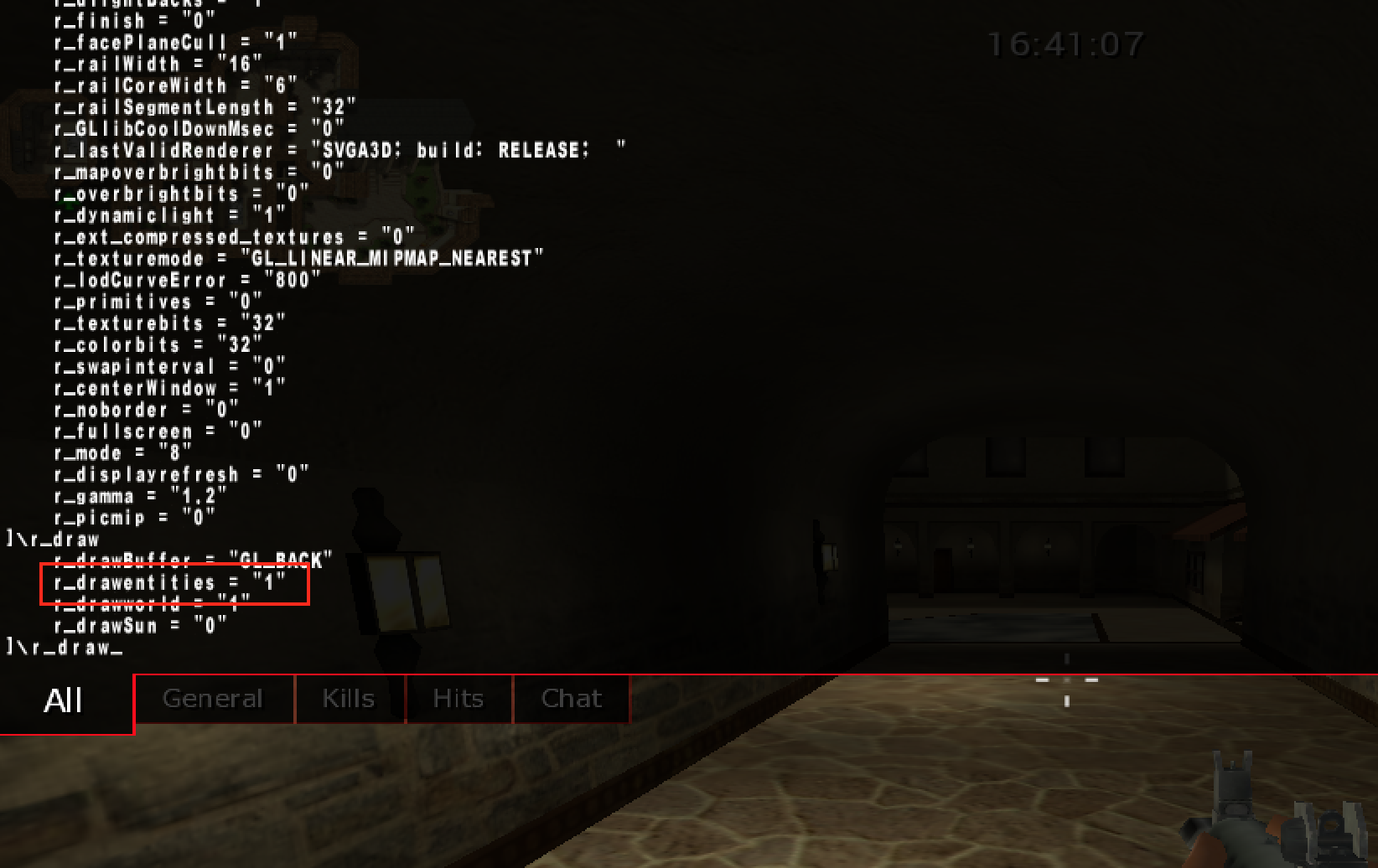
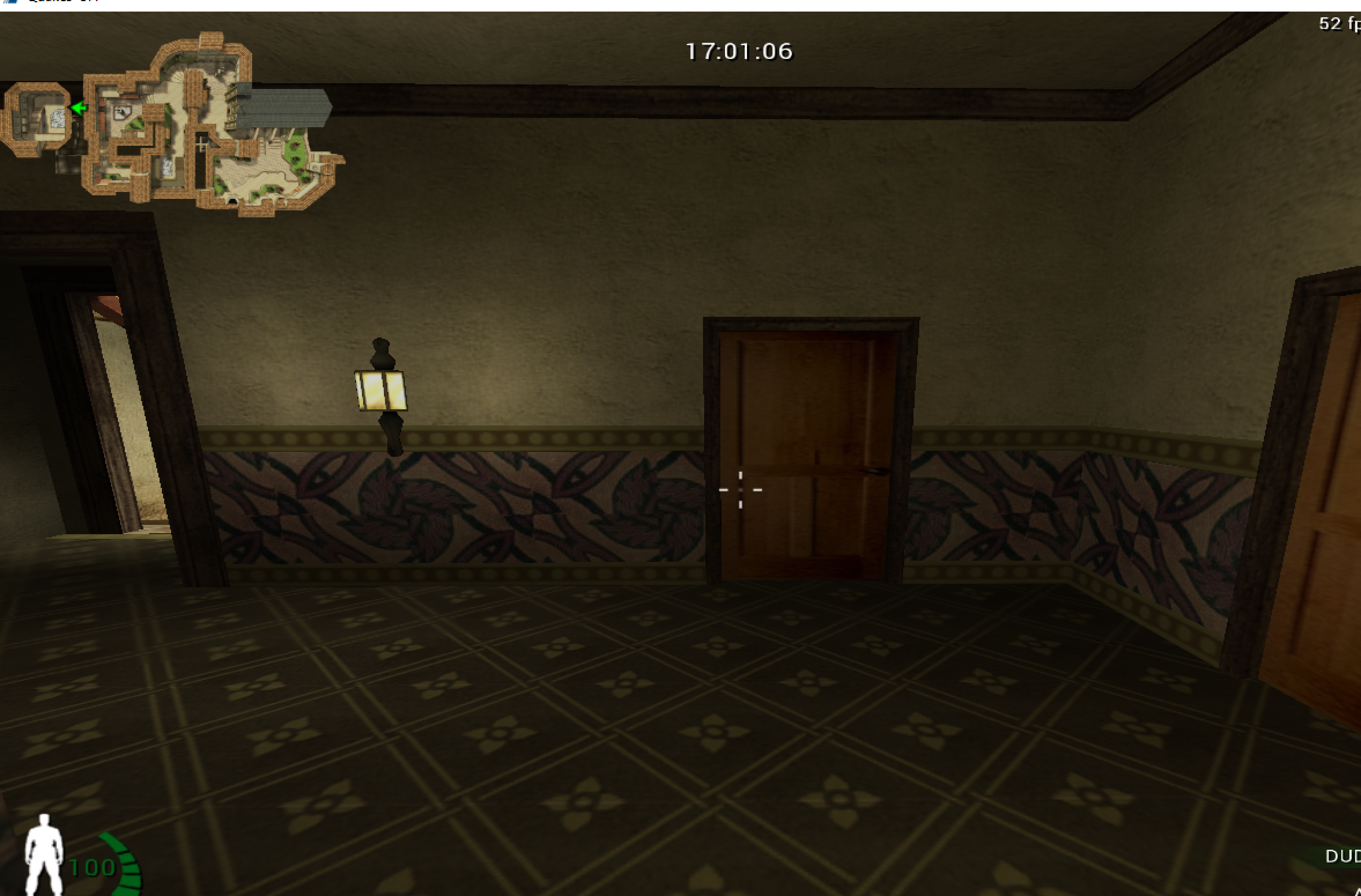
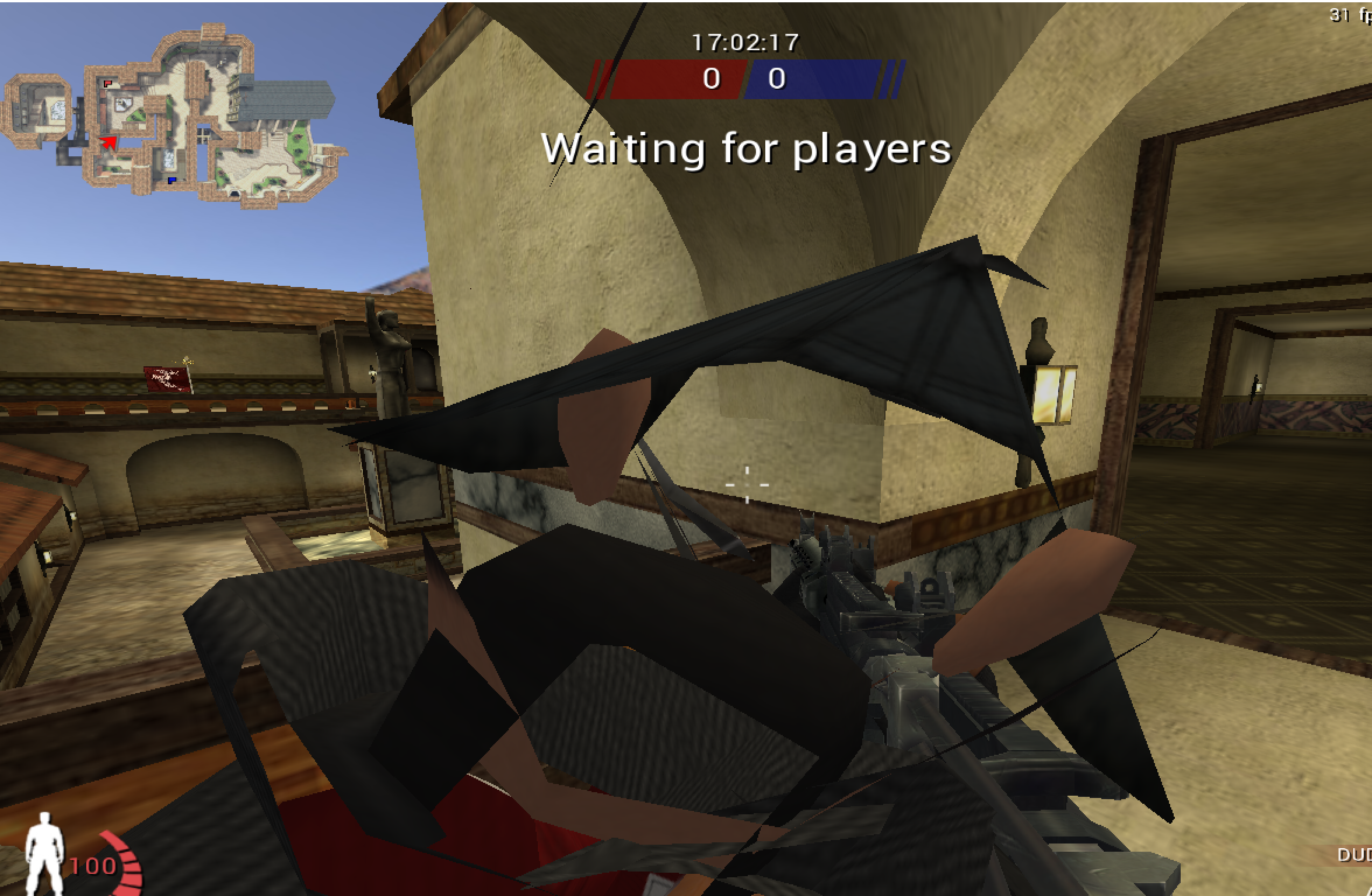
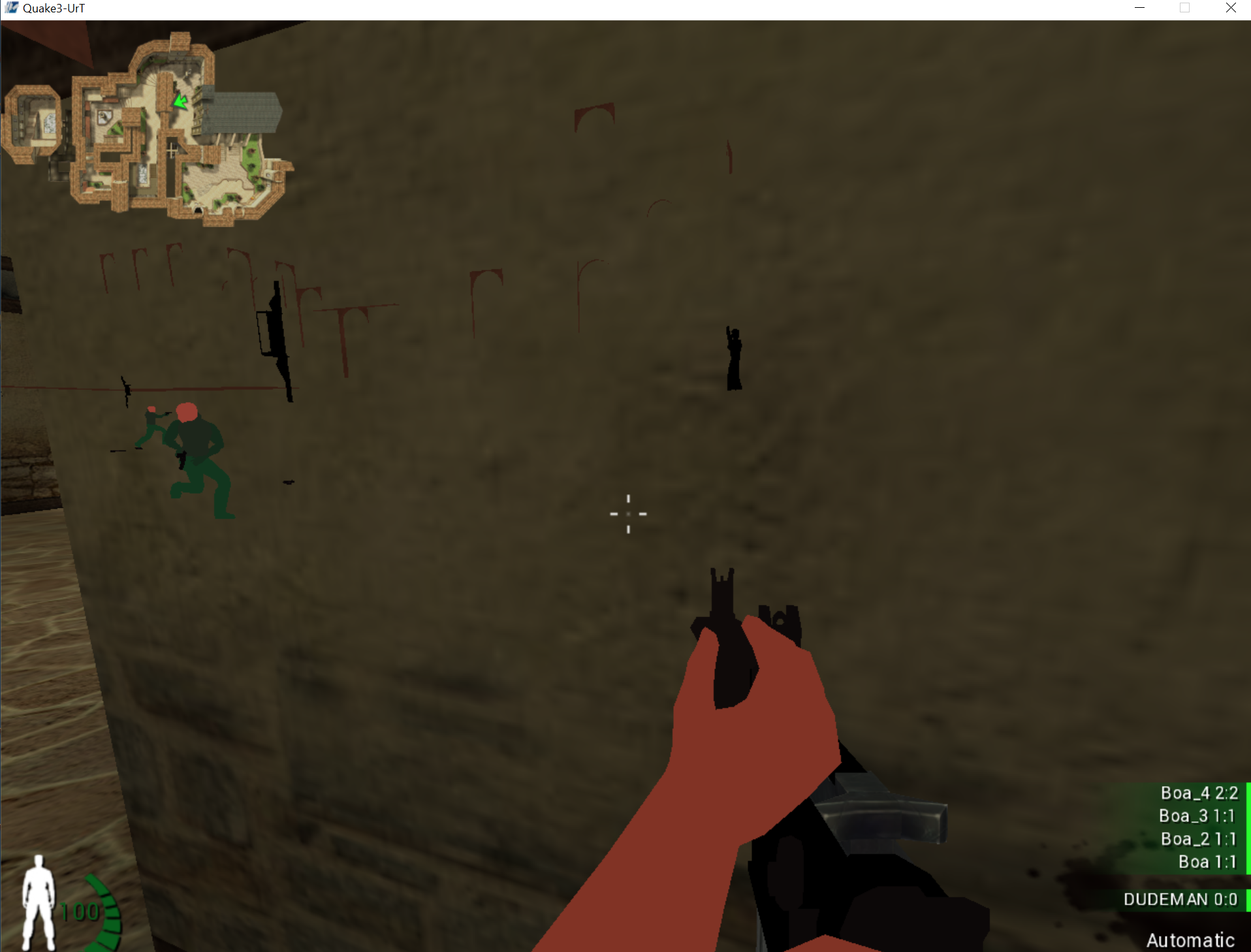
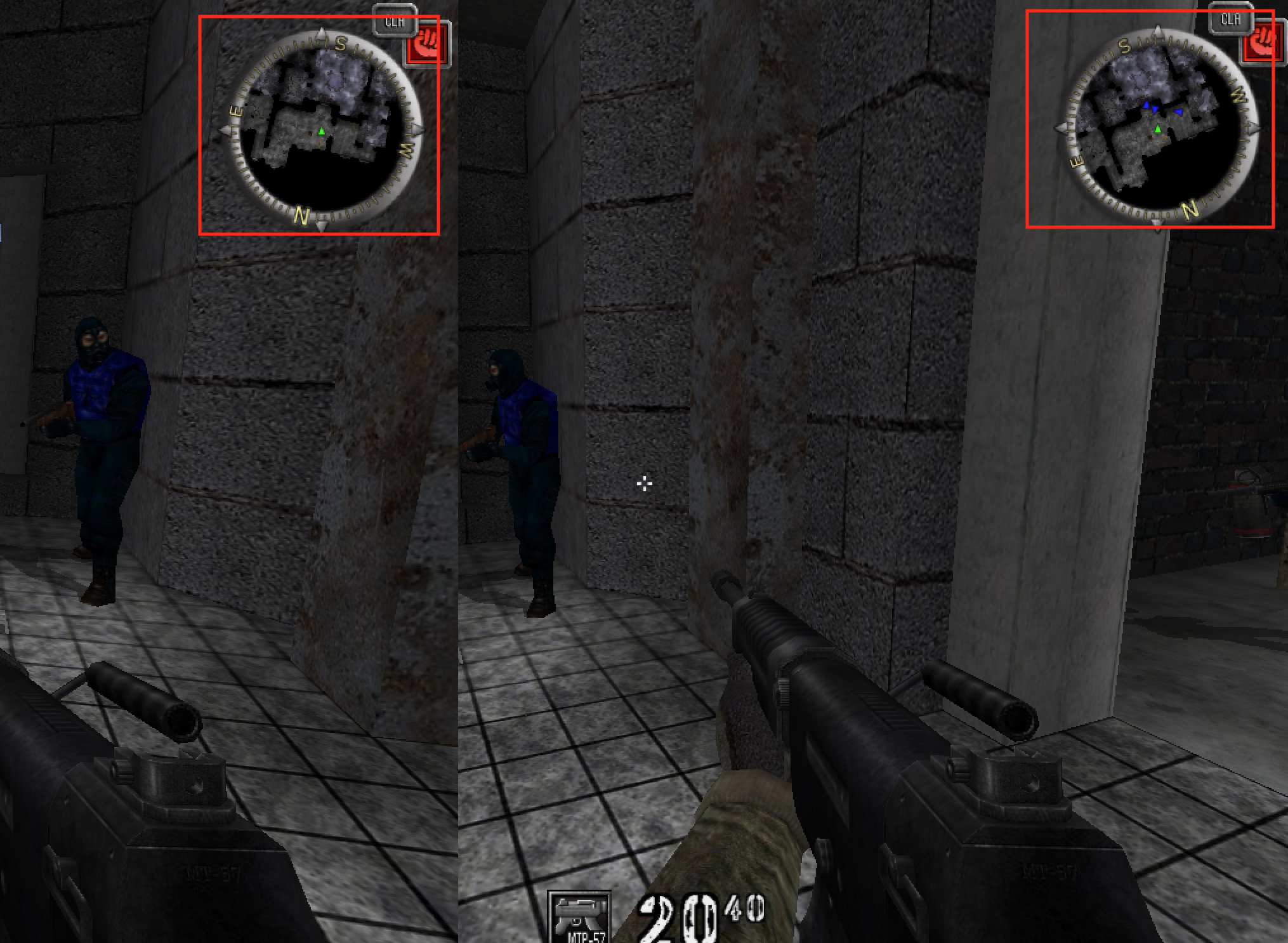
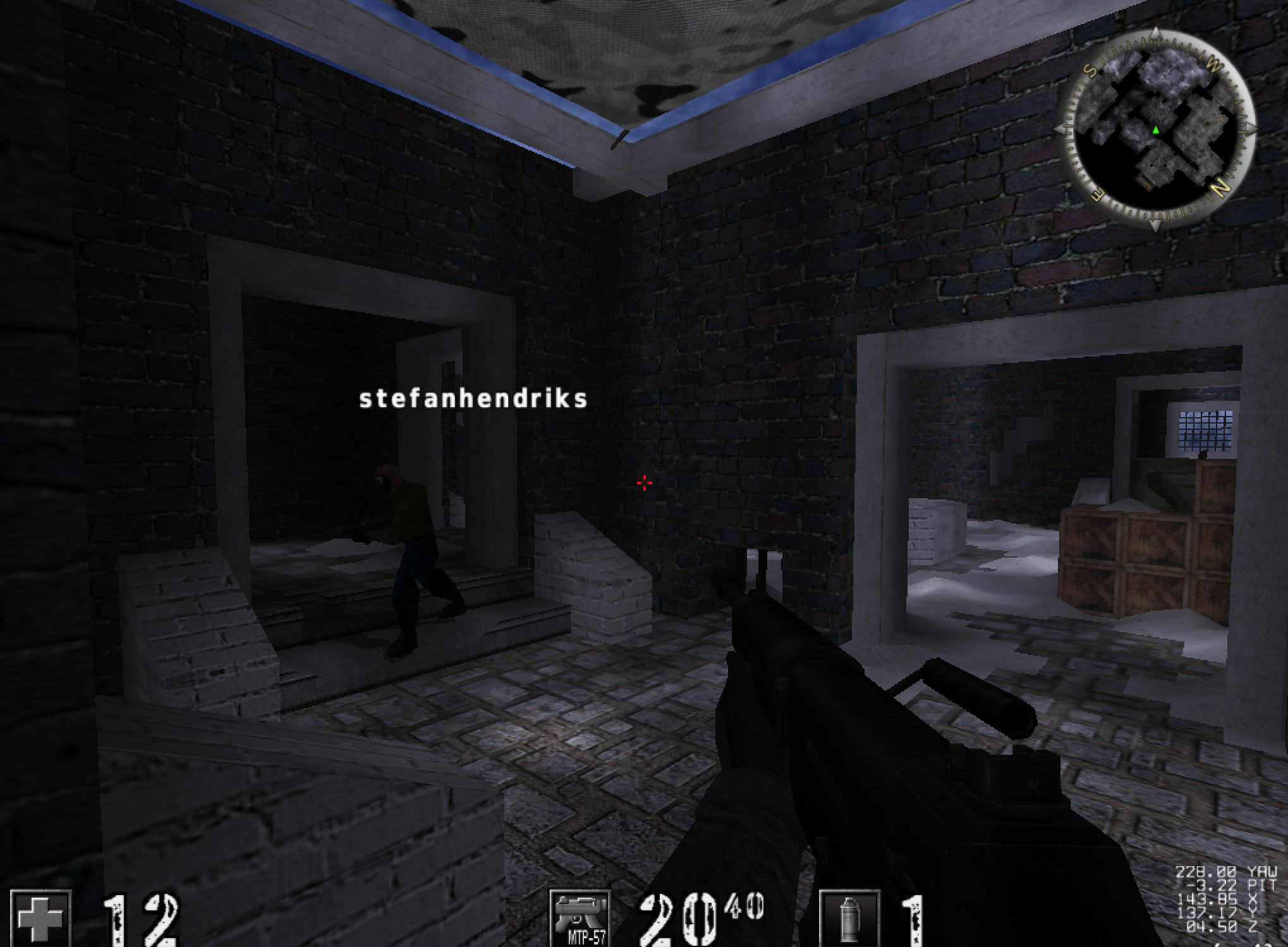
Urban Terror 4.3.4 has console variables that visibly affect rendering. In an offline local session, toggling entity drawing gives us a clean experiment.
A console command changing how entities are drawn.
When entities disappear, the game is likely checking a flag before submitting their draw work.
A frame crosses several representations before pixels appear:
game objects -> visible draw list -> vertices and materials -> GPU commands -> fragments -> framebuffer
A CPU-side flag can stop an entity before a draw call exists. Graphics state can change how an existing draw is tested. A shader can change the final color. Similar screenshots can therefore come from very different layers.
Find the earliest stage where the output first goes wrong. If no call is submitted, inspect culling or entity selection. If the call exists but pixels disappear, inspect transforms, clipping, depth, and blending. Keeping those stages separate prevents the vague conclusion that “rendering is broken.”
The names differ between graphics APIs, but the responsibilities remain useful:
the game decides which objects exist and which may be visible;
a draw submission selects geometry, shader programs, textures, and state;
a vertex shader transforms each submitted vertex and may calculate values for
later stages;
primitive assembly groups vertices into triangles, lines, or points;
clipping trims or rejects primitives outside the camera’s clip volume;
rasterization finds the pixel-sized fragments covered by each primitive;
a fragment shader computes candidate colors and other outputs;
depth/stencil tests and blending decide how candidates affect stored pixels.
A fragment is not yet a final pixel. Several triangles may produce fragments for
the same pixel, and tests may reject most of them.
One triangle, from vertices to pixelsEach stage hands its result to the next: three vertex records become one triangle, the triangle covers 16 pixel centres, and those fragments are coloured and stored.
1Vertices, joined by the indices 0, 1, 2
v0 (0, 0)
v1 (8, 0)
v2 (0, 4)
Positions are in pixels, with y growing downward. The indices 0, 1, 2 join the three vertices into one triangle.
2Rasterize: which pixel centres are inside?
8 × 4 pixels, row y = 0 at the top
A pixel is covered when its centre lies inside the triangle. The slanted edge from v1 to v2 leaves 7, 5, 3 and 1 covered pixels in the four rows: 16 fragments.
3Colour each fragment, test it, store it
shadefragment shader
testdepth: keep
write16 pixels
The fragment shader colours each fragment. Nothing nearer is stored, so all pass the depth test and 16 framebuffer pixels change.
All 3 steps shown
Each stage hands its result to the next: three vertex records become one triangle, the triangle covers 16 pixel centres, and those fragments are coloured and stored.
A mesh is usually a collection of vertices plus enough information to connect
them into primitives. A vertex is a record, not merely a position:
Attribute
What it commonly represents
position
model-space location
normal
local surface direction used for lighting
texture coordinate
location in a 2D image
color
per-vertex tint or data
bone indices/weights
how an animation skeleton moves the vertex
An index buffer stores integer vertex references. For example, two triangles
forming a square can share four vertices instead of duplicating six. In an indexed
draw, count usually says how many indices to consume—not how many unique vertices,
triangles, or objects exist. With triangle topology and no primitive restart,
count / 3 is the submitted triangle count, but clipping and degenerate triangles
mean it is still not the number of visible triangles.
A mesh says where the surface is. A material says how that surface looks: its
base colour, the image wrapped over it, and how it answers light.
The image is a texture. Each vertex carries a texture coordinate(u, v), a
position inside the image from 0 to 1 on each side, and the rasterizer blends those
coordinates across the triangle so every pixel knows where to look. On a 256 × 256
texture, (u, v) = (0.25, 0.75) points at pixel (0.25 × 256, 0.75 × 256) = (64, 192).
Whether v counts from the top or the bottom of the image differs between graphics
APIs.
Light is worked out from the normal, the direction the surface faces. The
simplest model, diffuse lighting, makes a surface brightest when it faces the
light and dark when it faces away. With N the unit normal and L the unit
direction from the surface toward the light, the brightness is the larger of 0 and
the dot product N · L (Lesson 4.4). For N = (0, 0, 1) and L = (0.6, 0, 0.8), the
dot product is 0 + 0 + 0.8 = 0.8, so a surface of colour rgb(200, 100, 50) is drawn as
(200 × 0.8, 100 × 0.8, 50 × 0.8), which is rgb(160, 80, 40). Tilt the surface until the dot
product is 0 or negative and it receives no light from that source.
Realistic engines add to this. Physically based rendering (PBR) describes a
material with a few measured-looking properties, such as how rough the surface is
and whether it is metal, usually stored as more textures, and a shader turns them
into the highlights and reflections the eye expects. A vertex colour is a tint
stored per vertex and blended across the triangle. A material also states how it
treats transparency: fully opaque, cut out wherever a texture’s alpha is low, or
blended.
A draw call does not contain every fact needed to explain its pixels. Its meaning
depends on state already bound to the graphics context:
geometry + topology + transforms + shaders + textures + render state = draw meaning
Important state includes face culling, depth comparison, depth writes, stencil
operations, blending, scissor rectangles, color masks, and the current framebuffer.
Changing depth_test_enabled is different from changing the depth comparison from
LESS to ALWAYS, and both are different from leaving the test on while disabling
depth writes.
After geometry is transformed and clipped, it produces candidate screen fragments. Each fragment carries a depth value. The depth test compares that value with the one already stored for the same screen location. When the comparison passes, the fragment may update the color and depth buffers; when it fails, the nearer surface remains.
Depth is therefore not a distance flag stored on one entity. It is a per-fragment comparison performed after projection. If depth testing is disabled or changed to always pass, later fragments can appear on top even when their geometry is behind a wall.
There are two related operations:
depth test: compare the candidate fragment’s stored depth with the current
depth-buffer value;
depth write: if the fragment survives, optionally replace the stored value.
Transparent objects often keep the depth test but disable depth writes and render
back-to-front. Turning off the test entirely is not equivalent.
Perspective depth is normally nonlinear. More of the depth buffer’s numeric
precision is concentrated near the camera. With the traditional mapping, making
the near plane extremely small compared with the far plane wastes precision and
can cause two nearby surfaces to alternate visibility, called z-fighting.
Modern engines may use a floating-point reversed-z buffer, where farther values and
the comparison direction are reversed to improve precision. Never hard-code “small
depth means near” until the projection and comparison convention are confirmed.
The depth buffer answers “which submitted fragment wins at this sample?” It does
not answer whether an object is logically visible to gameplay. Collision queries,
portals, fog-of-war systems, and server state may use entirely different data;
Lesson 9.2 shows
why a server should not send a hidden enemy’s position at all.
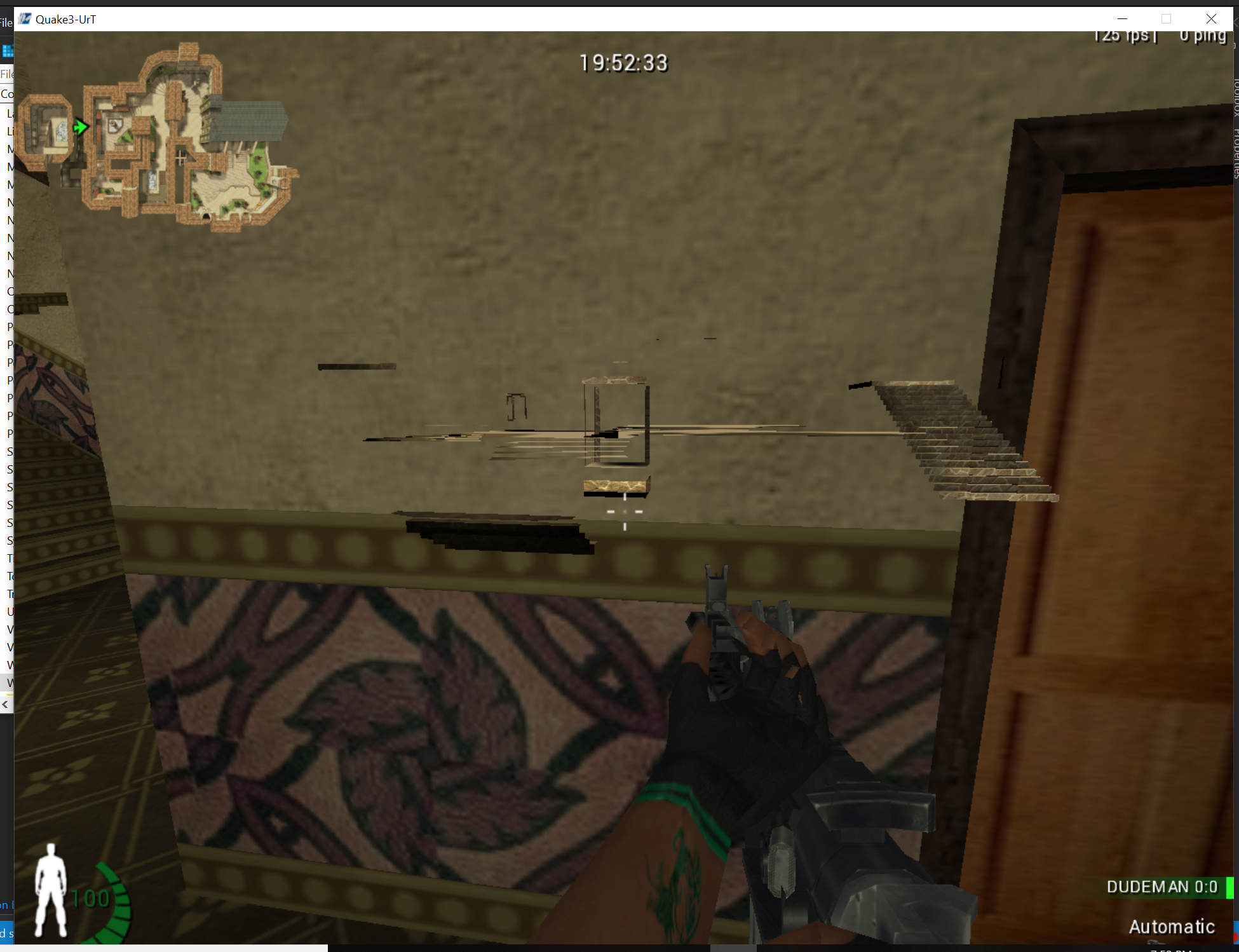
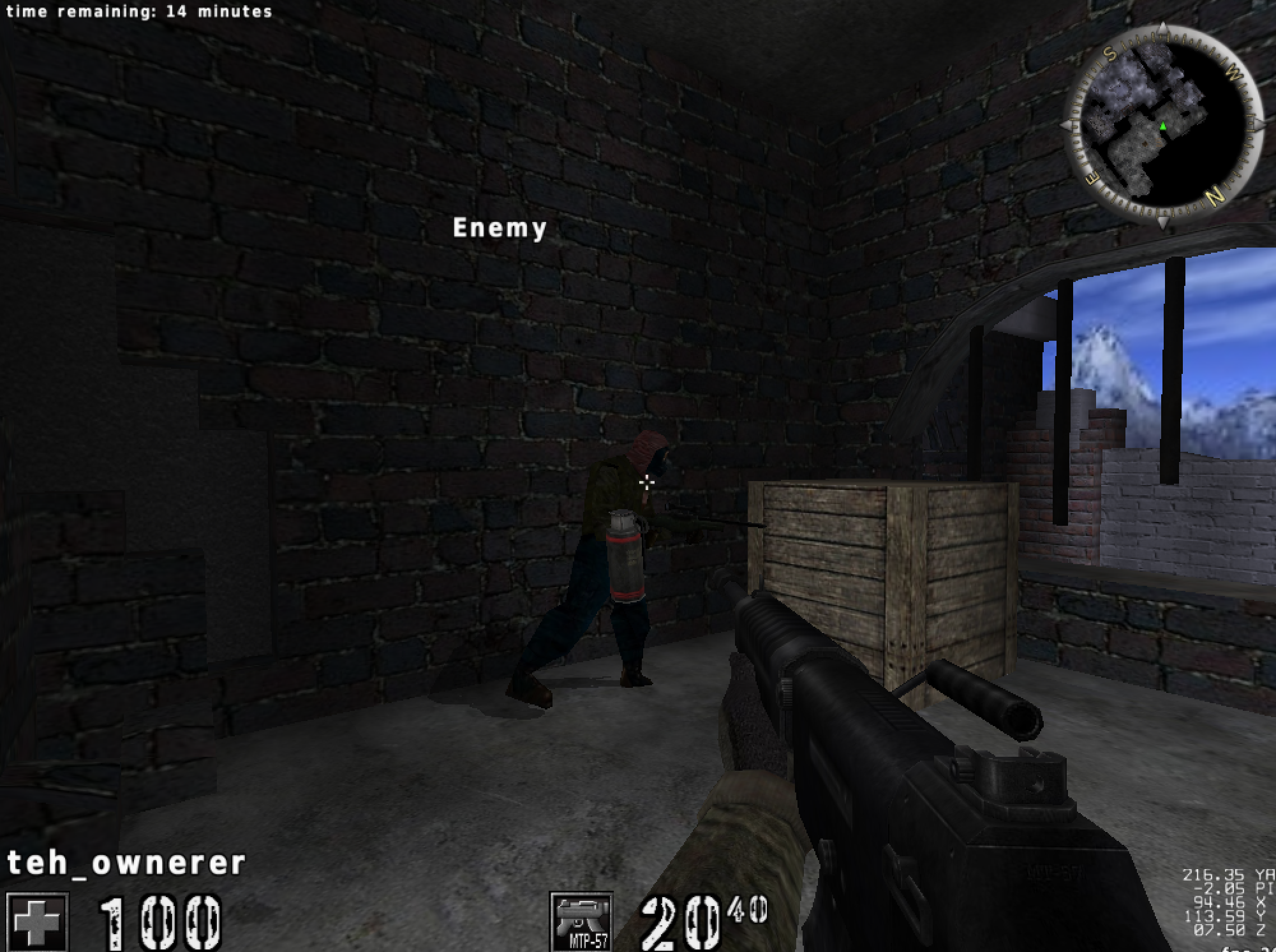
A depth-test experiment in the offline target.
That visual result shows the depth-test behavior changed; it does not prove which objects a call represents. You still need classification tests.
When a see-through surface is drawn over the pixels already stored, the new colour
and the old one are mixed by the new colour’s alpha, from 0 (invisible) to 1
(solid):
A red fragment rgb(255, 0, 0) with alpha 0.25 over a blue-ish background
rgb(0, 0, 200) gives red 255 × 0.25 + 0 × 0.75 = 63.75, green 0, and
blue 0 × 0.25 + 200 × 0.75 = 150, which rounds to rgb(64, 0, 150): the
background shows through, tinted.
Because the mix uses what is already there, order matters. Swap two see-through
layers and the result changes. So engines draw all the solid objects first, with depth
writes on, and then the see-through ones from the farthest to the nearest, with depth
writes off, as described above. Other blend modes combine colors differently: additive
blending simply adds the colours, which suits glows and sparks.
Two-dimensional games rely on exactly this. A sprite is a picture with transparent
edges, and sprites are drawn in layer order, back to front.
The cheapest triangle is one that is never drawn, so engines throw work away early.
Frustum culling skips objects outside the camera’s view volume (the frustum from
Lesson 7.1). Each object gets a bounding sphere (Lesson 4.4), and the sphere is tested
against the volume’s edges. In a flat example, put the camera at the origin looking
along +x with a 90° view, so the visible wedge is where |y| ≤ x. An object of
radius 1 centred at (10, 12) is (12 − 10) ÷ √2 = 1.41 beyond the upper edge, which
is more than its radius, so it is skipped entirely. One centred at (10, 10.5) is only
0.5 ÷ √2 = 0.35 beyond it, less than its radius, so it still crosses the edge and is
drawn. A debug view that draws the frustum and highlights the skipped objects shows
which ones were culled.
Back-face culling skips triangles that face away from the camera. A triangle with
normal (0, 0, 1) seen from a camera in the direction (0, 0, −1) has a dot product
of −1, which is negative, so its back is showing and it is not drawn.
Levels of detail swap a model for a cheaper one as it gets far away, and a
visibility range hides an object past a set distance.
All of this happens before any draw call exists, which is why the symptom “an object is
absent from the visible list” in the table below points at the game, not the GPU.
Culling is the last of several decisions. Before it, the engine has already asked three
questions about each object:
Its own setting. An object is visible, hidden, or inherited, which means it
follows its parent.
The result after its parents. The engine combines each object’s setting with its
parent’s, from the root down. An inherited object under a hidden parent is hidden, so
hiding the tank hides its turret and its barrel. This result is another value derived
once per frame from the settings, like the world transform in Lesson 7.1.
The view. For each camera, the object must lie inside the camera’s view volume
(the culling above) and share at least one render layer with it.
A render layer is one bit of a number. Every object and every camera carries a mask,
a number whose set bits name the layers it belongs to or can see, and a camera draws an
object only if the two masks share a set bit. The test is a bitwise AND, which
compares two numbers bit by bit and keeps a bit only where both have it: 011 AND 101
is 001, so 3 AND 5 is 1. A result that is not zero means the masks share a layer. Take
three layers: the world is bit 0 (value 1), the first-person weapon is bit 1 (value 2),
and the minimap icon is bit 2 (value 4).
ExampleWhich camera draws which object
The main camera’s mask is 1 + 2 = 3, which is 011 in binary, and the minimap camera’s
mask is 1 + 4 = 5, which is 101.
Object
Mask
Main camera: 3 AND mask
Minimap camera: 5 AND mask
tree
1 (001)
1, drawn
1, drawn
weapon
2 (010)
2, drawn
0, not drawn
icon
4 (100)
0, not drawn
4, drawn
The weapon is drawn by the main camera only and the icon by the minimap only, although
all three objects live in the same world. An object that fails one of these three
questions never reaches a draw call, so it is absent from the visible list, which is
the first row of the table at the end of this lesson.
This builder needs JavaScript. Here is the lesson’s worked example.
camera mask AND object mask: with the lesson’s numbers, 011 AND 010, which gives 010. Camera mask 011 (main camera) AND object mask 010 (weapon) = 010. That is not zero, so the two masks share a layer (the first-person weapon) and the camera draws the object.
When an object that should appear does not, the cause is usually one of these, and each
leaves a different trace:
An object that should appear does not
Cause
What it looks like
Its own setting, or a parent’s, is hidden
gone from every camera at every distance
It shares no render layer with the camera
drawn by one camera and absent from another
It is behind the camera or past the camera’s far limit
appears when the camera turns round or moves closer; an object 1,500 units away is never drawn by a camera whose far limit is 1,000
Its scale is 0 on every axis
everything collapses to one point, which has no area to draw; a scale of 0 on one axis flattens it into a sheet that vanishes when seen edge-on
Its triangles are wound the wrong way (Explanation: A triangle lists its three corners in an order, clockwise or anticlockwise as seen from one side. The renderer treats one direction, usually anticlockwise, as the front, so a mesh whose corners are listed the other way has its outside counted as the back.) for back-face culling
the outside is invisible and the inside shows
A lit material has no light
drawn, but dark or black, so against a dark background it looks absent
In 2D, its depth lies outside the camera’s depth range
a camera that sees depths from −1,000 to 0 never draws a sprite at depth 5
Most frames are not drawn in one sweep. The engine renders the scene several times
for different purposes, and each sweep is a pass: shadows, then the solid
objects, the sky, the see-through objects, full-screen effects, and finally menus
and text. The shadow pass stores the depth seen from the light, and a pixel is in
shadow only if the stored depth is less than its own distance minus a small
bias, so a surface 7.50 from the light with a bias of 0.05 is compared with
7.45 and does not shadow itself. Fog keeps the share
(fog end − distance) ÷ (fog end − fog start) of a surface’s own colour, 0.5 for a
surface 30 away in fog from 10 to 50.
Lesson 7.4 follows each pass,
because the same object can be drawn in more than one of them.
An ordinary picture keeps each colour channel in 8 bits, which is 256 levels from 0 to
1, so nothing can be brighter than 1.0. Lighting can produce more. Say a sunlit wall
comes out at 1.4 and a lamp at 12.0. In an 8-bit picture both are cut off at 1.0 and
look equally bright. HDR rendering draws into a texture whose channels are wider
and floating-point, commonly 16 bits each, so the difference survives until the
tone-mapping step at the end of the frame compresses the result into the 0 to 1
range of the display. A simple tone-mapping formula, c ÷ (1 + c), turns a value of
4.0 into 0.8, a value of 1.0 into 0.5, and a value of 0.5 into 0.33, so bright values
are squeezed more than dim ones. With it, the wall becomes 1.4 ÷ 2.4 = 0.58 and
the lamp 12 ÷ 13 = 0.92: still different, and both displayable.
The wider pixels cost memory. A 1920 × 1080 picture has 1920 × 1080 = 2,073,600 pixels.
With 4 channels of 1 byte it takes 2,073,600 × 4 = 8,294,400 bytes, about 8.3 MB. With
4 channels of 2 bytes it takes 2,073,600 × 8 = 16,588,800 bytes, about 16.6 MB.
HDR is also what makes bloom mean something. Bloom is a full-screen effect that
blurs the brightest parts of the picture and adds them back, and it blurs only the
part of each pixel above a threshold, here 1.0. The wall has 1.4 − 1.0 = 0.4 above it and the lamp has
12.0 − 1.0 = 11.0, so the lamp glows 11.0 ÷ 0.4 = 27.5 times as strongly. In the 8-bit
picture both had 0 above the threshold, and nothing could glow.
The edge of a diagonal shape comes out as stair-steps, because each pixel is either
inside the shape or outside it. Anti-aliasing hides the steps. Three common methods
work in different places:
MSAA
Multisample anti-aliasing tests coverage at several points inside each pixel. With
4 sample points per pixel, written 4×, a triangle that covers 3 of the 4 points of an
edge pixel contributes 3 ÷ 4 = 0.75 of its colour. Over a blue background
rgb(0, 0, 200), a red triangle rgb(255, 0, 0) covering
3 of 4 points gives 0.75 × (255, 0, 0) + 0.25 × (0, 0, 200) = (191.25, 0, 50), drawn as
rgb(191, 0, 50).
The shader still runs once per pixel, so the extra cost is memory: colour and depth are
stored for every sample. The colour samples alone take 2,073,600 pixels × 4 samples ×
4 bytes = 33,177,600 bytes, about 33.2 MB, which is four times the 8.3 MB of one sample
per pixel. MSAA smooths the edges of triangles but not sharp patterns that a shader or
a texture draws inside a triangle.
FXAA
Fast approximate anti-aliasing works on the finished picture. It looks for pixels
where the brightness changes sharply from one neighbour to the next and blurs across
those edges. It stores no extra samples and costs one full-screen pass over the
2,073,600 pixels, so it is cheap, and it also smooths edges drawn by shaders and
textures. Its price is that it blurs text and fine texture detail too, because it cannot
tell the edge of a shape from a sharp line in a picture.
TAA
Temporal anti-aliasing shifts the camera by a fraction of a pixel on every frame,
called jitter, and blends each pixel with the same pixel’s colour from earlier
frames. With 8 different jitter positions, a pixel has been sampled at 8 places after
8 frames, for the cost of keeping one extra copy of the picture. To find where a pixel
was last frame, the engine needs a motion vector for it. Where the vectors are wrong,
such as behind a transparent surface, old colours linger and leave a ghost trail behind
a moving object.
Many engines keep two worlds. The main world holds the game: positions, health, and
what is hidden. The render world holds what drawing needs: meshes, materials,
lights, and the final transforms. Once per frame an extract step copies the data
that drawing needs from the first into the second. The renderer then works only from
its copy, so the game can start simulating the next frame while the renderer is still
drawing this one. That overlap is called pipelined rendering.
Suppose simulating a frame takes 6 ms and drawing it takes 8 ms. The extract copy takes
a little time of its own, which the figures ignore:
Arrangement
Time per frame
Frames per second
one stage after the other
6 + 8 = 14 ms
1000 ÷ 14 = 71
overlapped
the slower stage, 8 ms
1000 ÷ 8 = 125
Overlapping has a price. What is drawn comes from the state copied at extract, so it is
one frame behind the simulation that is already working on the next one.
For memory work this means a game’s positions can exist twice, once in each world. The
render copy is overwritten from the main copy at every extract, so editing it changes
the picture only until the next extract, while editing the main copy changes state used by the simulation and future drawing. A hook on a draw call (Lesson 7.10) sees the render copy, and
the movement and damage calculations read the main one. Lesson 8.8 shows how to avoid mixing values from
different frames.
A 2D game does not need a different machine. A sprite is a quad, two triangles
made from four vertices, with a texture on it, drawn by an orthographic camera
(Lesson 7.1) with alpha blending and layers (above).
Many small pictures are packed into one large image, a sprite sheet or texture
atlas, so that one texture serves many sprites. Picking a frame means choosing the
texture coordinates for its rectangle. Take a 256 × 256 sheet of 4 × 4 frames, each
64 × 64 pixels. Frame number 5, counting from 0, is in column 5 mod 4 = 1 and row
5 ÷ 4 = 1 (dropping the remainder), so it covers pixels x from 64 to 128 and y from 64
to 128. As texture coordinates that is u from 64 ÷ 256 = 0.25 to 0.5 and v from
0.25 to 0.5. Animation is choosing the frame from the clock: at 8 frames per second,
the frame number is the whole part of time × 8, wrapped around the number of frames.
Flipping a sprite swaps its left and right u values.
Scaling a sprite into a box while keeping its shape uses the smaller of the two
ratios. A 64 × 32 sprite fitted into a 100 × 100 box has ratios 100 ÷ 64 = 1.5625 and
100 ÷ 32 = 3.125, so it is scaled by 1.5625 and ends up 100 × 50.
A tilemap is a grid of tile numbers. Drawing it means turning each number into a
quad that points at the right part of the atlas. A screen of 20 × 15 tiles is 300
quads, which is 600 triangles, and the engine can send all of them to the GPU as one
draw call from one atlas instead of 300 separate calls. This is the same grid Lesson 4.5 reads as game state, now seen as pictures.
Pixel-art games often draw the whole scene into a small texture, such as 320 × 180,
and then enlarge it by a whole number, 4, to 1280 × 720. Whole-number scaling keeps
every pixel a crisp square, which is called pixel snapping.
Graphics state is shared. If you change a setting for one draw:
save the previous state;
apply the temporary state;
perform the one draw;
restore the previous state.
Forgetting restoration can break the entire frame, menus, or later effects.
A restore guard returns the previous graphics state when its owner leaves scope:
structRestoreOnDrop<F: FnOnce()>(Option<F>);
impl<F: FnOnce()> DropforRestoreOnDrop<F> {
fndrop(&mutself) {
ifletSome(restore) = self.0.take() {
restore();
}
}
}
The actual graphics calls may need FFI, but the “restore no matter how this scope exits” pattern stays in ordinary safe code.
Older OpenGL behaves like a state machine: many calls change context state that later draw calls inherit. Treat each temporary change as a scoped transaction. Capture the exact old value, apply the experiment, perform the intended draw, and restore even on early return. “Set it back to the usual default” is weaker than restoring the value that was actually present.
Also restore state on the same thread and context where it was captured. OpenGL
context state belongs to a current context; a worker thread cannot safely repair
render-thread state merely because it has the same function pointers.
Use the earliest observable difference to narrow the cause:
Visibility failures by stage
Symptom
Likely stage
object absent from visible list
game filtering or CPU culling
draw call absent
submission/batching path
vertices leave clip volume
transform, camera, or clipping
fragments exist but fail depth
depth state or existing occluder
fragments pass but write no color
color mask, shader discard, stencil
color appears but looks wrong
shader inputs, texture, lighting, blend, color space
This table is a diagnostic order, not proof. Some engines merge or reorder stages,
and GPU-driven pipelines can construct visible lists on the GPU.
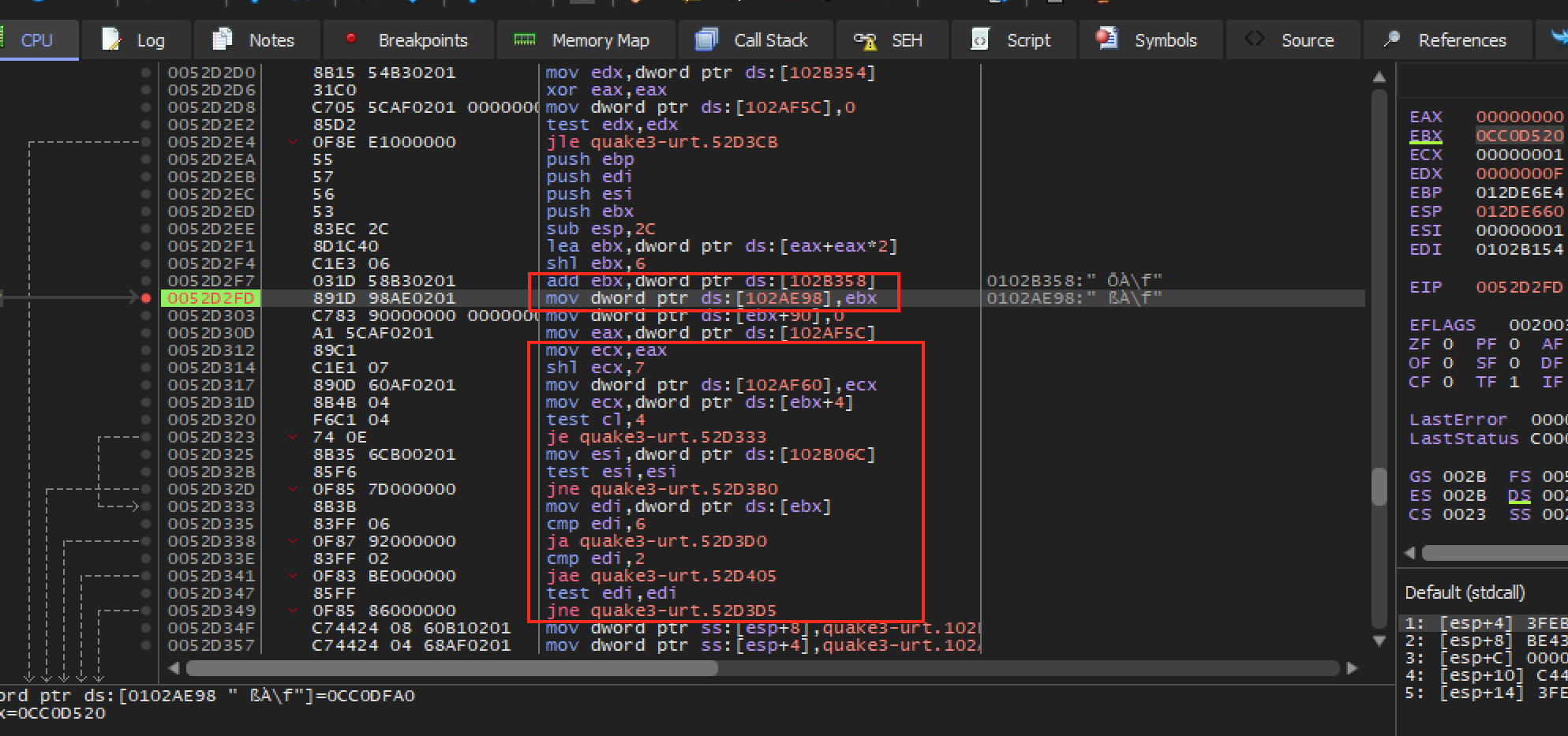
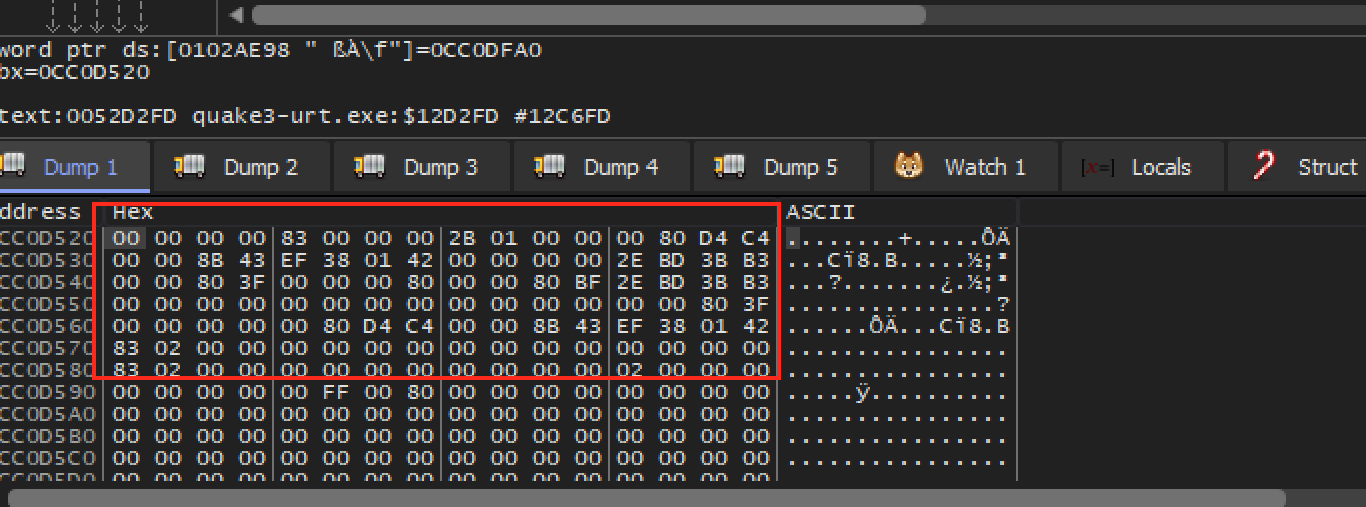
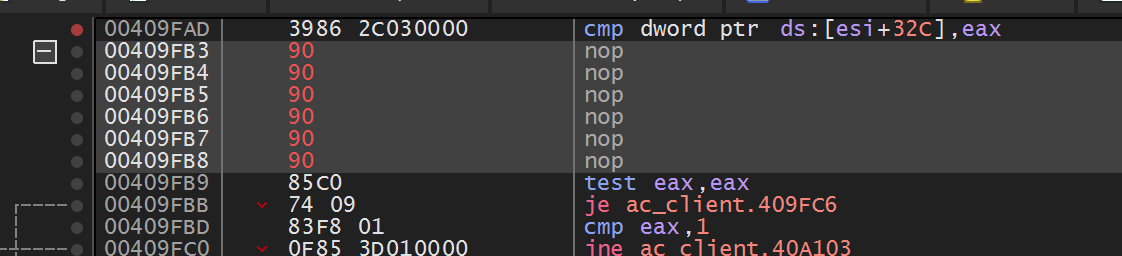
The flag trace above leads to an exact-build in-process feature: the Urban Terror
4.3.4 memory wallhack, which detours the entity loop and writes the render flag
for every entity. It is in
Lesson 8.8, after the
DLL and detour lessons that its installation depends on.
Lesson 7.2 showed that a draw submission combines geometry with the graphics
state already in effect. To learn which submissions correlate with an entity,
we need to observe calls without changing the frame they produce. OpenGL
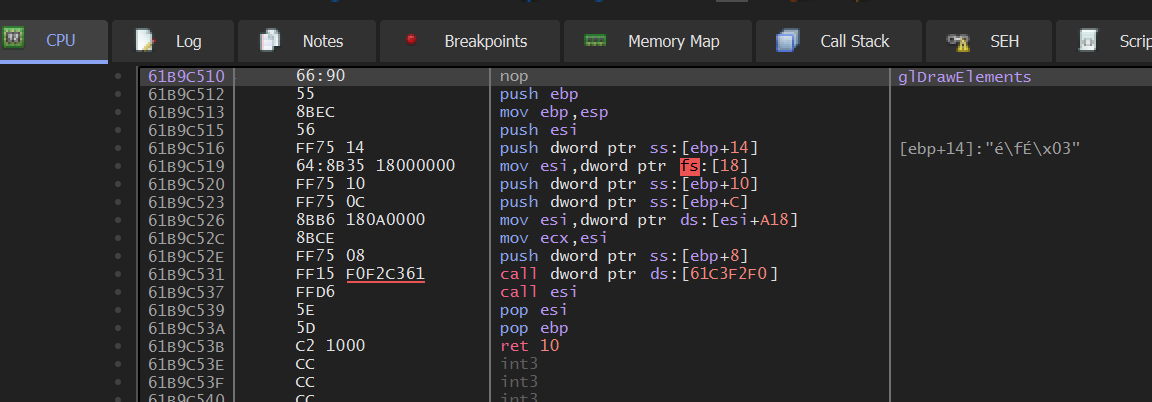
applications call functions such as glDrawElements. First consider a
whole-call wrapper: it sits between the caller and the real function:
game calls glDrawElements
→ wrapper copies a small sample of the arguments
→ wrapper calls the real glDrawElements
→ frame continues
If the game makes a draw with count = 9, the wrapper records that value and
then passes the same arguments to OpenGL. The picture should remain identical;
only the separate observation log changes. The wrapper must preserve the
exact ABI and forward every normal call.
The pinned Urban Terror implementation in
Lesson 8.8
instead detours an instruction insideglDrawElements, so it has a
narrower restoration opportunity. Keep that difference visible when comparing the two designs.
Observe a draw without holding up rendering. This step-by-step trace needs JavaScript. Here is the code and where the run ends.
receive DrawElements(count = 9)
copy a compact sample
try to enqueue without waiting
if full: increment dropped count
forward the original arguments once
report submitted draws and stored samples
Result: one draw forwarded, one sample accepted. CPU submission does not establish GPU completion.
glDrawElements(mode, count, element_type, indices) asks OpenGL to consume an
ordered sequence of vertex indices:
Argument
Meaning
mode
how index results form primitives, such as triangles or lines
count
number of indices to read
element_type
width/format of each index, such as 16- or 32-bit unsigned
indices
byte offset into a bound index buffer, or an address in old client-memory mode
The call does not directly identify a model. OpenGL combines those indices with
the currently bound vertex attributes, textures, transforms, and other state. One
character may require several draws—body, head, weapon, shadow—and one draw may
contain many instances or a batch of unrelated objects.
With GL_TRIANGLES, every complete group of three indices describes one submitted
triangle. The indices may repeat vertices, and some triangles may be degenerate,
clipped, back-face culled, or hidden by depth. Therefore:
count / 3 = maximum submitted triangle groups
count / 3 ≠ visible triangle count
count ≠ unique vertex count
For example, this index buffer holds nine indices, so a call with count = 9
submits 9 ÷ 3 = 3 triangles:
00
11
22
32
41
53
62
73
84
triangle 0
triangle 1
triangle 2
nine indices, but only five different vertices: 0, 1, 2, 3, 4
Each box holds one index, and the label above it is its position in the buffer. Triangles 0 and 1 share the edge from vertex 1 to vertex 2, and triangles 1 and 2 share the edge from vertex 2 to vertex 3, so count (9) is not the number of vertices (5).
The indices parameter is especially easy to misread. If an element-array buffer
is bound, a small value such as 0x120 is an offset into GPU-managed buffer state,
not a process pointer that should be dereferenced.
The CPU usually records commands faster than the GPU completes them. A draw call
returning does not mean its pixels are finished. Reads that force the GPU to catch
up can stall both processors. The hook sees submitted work: it runs when the
CPU queues a draw, not when the GPU finishes its pixels.
CPU frame N+1: build and submit commands ──────────────►
The render thread has a deadline: finish enough work for the next frame. A hook adds work to a path that may execute thousands of times per second. Even memory-safe code can cause stutter if it allocates, waits for a lock, formats strings, or writes files there.
Split the design into two rates:
the capture path copies a tiny fixed-size sample and returns immediately;
the analysis path runs later on a worker and may aggregate, label, or save bounded results.
The render thread’s work ends at try_send; everything slow happens on the
worker’s schedule. Measure both dropped samples and time spent in the hook. A
dropped sample leaves a gap in the log, while blocking slows the very frames you
are trying to measure.
For a 32-bit Windows OpenGL 1.x target, the calling convention is significant:
usestd::ffi::c_void;
typeGlDrawElements = unsafeextern"system"fn(
mode: u32,
count: i32,
element_type: u32,
indices: *constc_void,
);
The exact signature comes from the OpenGL API, not from guessing registers.
In an older fixed-function renderer, transforms and arrays may be ordinary OpenGL
state. In a modern renderer, shader programs and buffer objects carry the same
roles. Hooking the draw call still works, but the state needed to explain a draw
changes with the API version and engine.
The wrapper needs a way to reach the real OpenGL function after it has
intercepted a call. Store the resolved function pointer once during setup;
every draw can then forward through that saved pointer without another
lookup on the render thread:
Initialization must resolve and store the real function before the wrapper can forward calls. Avoid resolving it recursively through your own wrapper.
The failure is recursion: a function calls itself. Recursion is useful when
each call handles a smaller case and a base case eventually returns. Here
there is no smaller case. If ORIGINAL_DRAW_ELEMENTS accidentally points to
draw_elements_hook, the call path is:
game → draw_elements_hook → stored "original" → draw_elements_hook → ...
No call reaches OpenGL, so no call can return. Each nested call keeps a
stack frame for its return address and local values, as
Lesson 3.8 explained.
The thread’s finite stack (often 1 MiB by default for a Windows executable,
but configurable) eventually fills and Windows raises a stack-overflow
exception, usually on the first draw. Resolving the real function before
installing the wrapper breaks this cycle. The failure table at the end of the
lesson calls this “Infinite recursion.”
The count argument may correlate with a model in one exact build:
Filtering draw calls by their count argument.
But count alone is fragile. Different objects can share a vertex count, and model updates can change it.
Collect features such as:
draw mode;
element count;
bound texture;
shader or fixed-function state;
model/view transform;
call site.
Then change one visible object and compare the samples.
Capture the smallest feature vector that can answer the current question:
#[derive(Clone,Copy,Debug)]
structDrawFingerprint {
call_site: usize,
mode: u32,
index_count: i32,
index_type: u32,
texture: u32,
frame_number: u64,
}
call_site distinguishes engine submission paths, but compiler inlining and
updates can change it. texture can identify a material in one scene, but skins,
quality settings, and atlases can change it. A feature can be trusted to
identify a category only after changing one thing at a time — the model, the
map, a graphics setting — leaves it pointing at the same objects.
This is a classification problem. A threshold such as count > 500 separates the examples you observed, not necessarily the concept “player.” Test it against weapons, detailed scenery, menus, different models, and different graphics settings. Report false positives (something your classifier caught that is not a player) and false negatives (a player your classifier missed) instead of quietly turning a correlation into a definition.
A shader is a small GPU program invoked many times in parallel. The vertex
shader and fragment shader of
Lesson 7.2’s pipeline
are the two central here: the first turns one vertex into a clip-space position
plus values to interpolate, and the second turns one covered sample into a
color, depth, or other output.
Values such as texture coordinates and normals are interpolated across a triangle.
The fragment shader usually does not receive the original vertex value. This is why
a draw’s texture, program, uniforms, and vertex layout are part of its identity.
Older fixed-function OpenGL calls hide these programs behind predefined state, but
the pipeline still performs equivalent transformations and color calculations.
A shader works only with what the draw has bound for it:
Interpolated inputs, the per-vertex values blended across the triangle.
Uniforms, values that are the same for every invocation of one draw, such as the
matrices, a light’s colour, or the time since the game started.
Textures and buffers, images it can sample at a (u, v) position and arrays of
data it can read, bound before the draw as part of the state from Lesson 7.2.
A small fragment shader that turns a texture grey shows how little a shader can be. It
weights the red, green, and blue of the pixel by how bright the eye finds each:
// Fragment shader, in GLSL: turn the texture's colour into grey.
For a pixel of (200, 100, 50), the grey is 0.299 × 200 + 0.587 × 100 + 0.114 × 50 =
59.8 + 58.7 + 5.7 = 124.2, so the pixel becomes about (124, 124, 124). A shader that
reads the time as a uniform can animate: a brightness of 0.5 + 0.5 × sin(time) is
0.5 at time 0 and 1.0 at time 1.5708 (a quarter of a turn in radians), and it
repeats.
Shaders are written in a shading language: GLSL for OpenGL, HLSL for Direct3D, WGSL
for WebGPU. A driver, or the engine ahead of time, compiles them to the GPU’s own
instructions. Engines that support several graphics APIs often write a shader once and
translate it for each.
Each on/off switch in a shader’s source doubles the programs that can be
compiled, so three switches give 2 × 2 × 2 = 8 variants. Instancing draws
many copies of one mesh in one call, with a 4 × 4 matrix of 16 four-byte floats,
64 bytes, per copy. A compute shader does not draw at all: it reads and writes
buffers for work such as particles. And every draw costs CPU time even when the
GPU’s share is tiny: at 5 microseconds each, 10,000 draws take 50 ms, three
16.67 ms frames. If halving the window’s pixel count leaves the frame time
unchanged, the CPU is the limit.
Lesson 7.11
works through these beside the bound state that each Direct3D draw carries.
OpenGL is a state machine: a call changes settings that remain active until
another call changes them. Two depth settings show how much a later draw
inherits:
glDepthRange(near, far) controls where a fragment’s depth lands in the
depth buffer after projection, by remapping the normalized -1..1 range onto
whatever window-space interval you pass in. The default call is
glDepthRange(0.0, 1.0): keep every fragment’s real depth. Calling
glDepthRange(0.0, 0.0) instead collapses that mapping to a single point —
every fragment’s stored depth becomes 0.0, the value reserved for the
nearest possible surface, no matter how far away the vertex actually was.
GL_LEQUAL passes a fragment whose depth is less than or equal to the stored
depth, and no stored depth is below 0.0, so a collapsed fragment passes that
test. A strict test such as GL_LESS would reject it wherever 0.0 is already
stored, for example from an earlier collapsed draw. Switching glDepthFunc to
GL_ALWAYS removes the comparison altogether: the test passes unconditionally,
whatever is already in the buffer. The wrapper makes both calls, flattening the
depth and then skipping the test, so highlighted geometry is drawn through walls
however the game left its depth function.
The exact-build Urban Terror 4.3.4 wallhack applies that combination to
player-sized draws from a cave inside glDrawElements. The cave saves the flags
and every general-purpose register before calling its helper, because the
interrupted OpenGL function expects them unchanged; it fills the sixth replaced
byte with a nop so no fragment of the old instruction remains; it restores
normal depth state on the next non-highlighted draw; and it is switched off
before its code patch is removed, so GL_ALWAYS is never left active. It is in
Lesson 8.8,
after the DLL loading and detour lessons that its installation depends on.
State restoration must match what was changed. A robust typed wrapper queries or
tracks the previous depth function, depth range, enabled client arrays, color, and
bindings. Restoring guessed “defaults” works only until another legitimate render
pass enters with different state. A middle-of-function cave, like that one, has fewer safe options,
which is a real limitation of that interception point rather than an implementation
detail to ignore.
“Set the color to red” sounds simple, but the final framebuffer value may combine:
vertex color
× sampled texture
× material/light result
→ fragment output
→ blending with the existing framebuffer
→ display conversion
Multiplication is only one common model; a shader can compute anything. In the
fixed-function path used here, disabling selected arrays and textures reduces the
number of active contributors so the diagnostic color is easier to interpret.
Alpha does not automatically mean transparency. Blending must be enabled with specific source/destination blend factors and a combination formula, and draw order still matters. Likewise, RGB
values may be interpreted as linear light or sRGB-encoded display values. A debug
color only needs to be distinctive, but exact color comparison requires knowing
the framebuffer’s color-space conversion.
Before changing a draw’s color, turn what we observed into an explicit
category. In this course build, the first trial labels a draw with more than
500 indices as OtherPlayer; all other draws remain Unknown. This index-count classifier will be judged by the colored results, not assumed true because it compiled:
For this exact Urban Terror build, count > 500 is the original course filter. It is intentionally simple so the color result can help you test what the filter catches.
Keep the classifier pure. It should not call OpenGL or change memory, which makes it easy to test with recorded samples.
Purity also makes uncertainty visible. Return Unknown when the sample does not
match any category. A confident-looking wrong label is harder to diagnose than
an explicit unknown.
recorded draw state ──► pure classifier ──► category
A colored result gives immediate feedback, but “some players turned red” is not enough. Count four outcomes across a small labeled capture:
Outcome
Name
player colored
true positive
non-player colored
false positive
player left unchanged
false negative
non-player left unchanged
true negative
Changing a threshold usually trades false positives against false negatives. Add independent features only when experiments show they help: call site, texture, model transform, or another stable render property. Avoid piling on conditions that merely memorize one map and graphics setting.
Precision asks “when the classifier says player, how often is it right?” Recall
asks “of all player draws, how many did it find?” If a denominator is zero, report
the metric as undefined instead of inventing a perfect score.
Keep the recorded samples separate from the classifier implementation. Then a new classifier can be scored against the same samples, so a change in precision or recall comes from the classifier and not from a different capture.
This board needs JavaScript to move things around. Here is the lesson’s sorting:
Coloured, not a player
Crate with a player-sized vertex count. The rule coloured it but it is not a player: a false positive. A vertex count is a quick first filter, not a durable identifier.
Coloured player
Player, standing. The rule coloured it and it really is a player: a true positive.
Player, running. Coloured and really a player: a true positive.
Player, far away. Coloured and really a player: a true positive.
Player, aiming. Coloured and really a player: a true positive.
Player left unchanged
Player drawn in the shadow pass. A player draw the rule left unchanged: a false negative. The same player appears in several passes, and a filter that recognises one does not recognise them all.
Player portrait in the HUD. Another pass of the same player (the HUD portrait) that the rule did not recognise: a false negative.
Not coloured and not a player
Wall. Not a player and not coloured: a true negative. Correct, and it does not show up in precision or recall.
Sky. Not a player and not coloured: a true negative.
Floor. Not a player and not coloured: a true negative.
Each channel is a fraction of full brightness, so a paint program shows it as that
fraction times 255. Here 0.95 × 255 = 242.25 (242), 0.25 × 255 = 63.75 (64), and
0.12 × 255 = 30.6 (31): rgb(242, 64, 31)the other-player colour,
a strong red-orange that is easy to tell from a game’s own palette.
At the hook boundary:
capture the current texture/color/depth state;
apply the debug state;
forward exactly one draw;
restore every captured value.
The state must cover both server-side values such as enable flags and client array
state such as color or texture-coordinate arrays. Capturing only the visible color
is insufficient if the original draw obtains its color from a bound array.
A colour-coded model in the offline lab.
Understand the build-specific Urban Terror fallback
The pure classifier and restoration of the original whole-draw state above are the general
lesson. The following fallback is an optional exact-build in-process case.
It applies the hook lifecycle from Lesson 8.3 at a less
convenient point inside the draw function.
The clean design above wraps one whole draw: capture, change, draw, restore. The
course’s Urban Terror 4.3.4 cave is different. It runs in the middle of
glDrawElements, so it cannot surround the call and restore a snapshot after
that same draw. Instead, it applies a debug state to player-sized draws and
puts assumed engine defaults back on the next ordinary draw.
For comparison, a whole-call wrapper can make the color transition explicit
around one call:
// SAFETY: every pointer was resolved from the current opengl32.dll and this
// hook runs on the thread with the current OpenGL context.
unsafe {
gl_disable_client_state(GL_TEXTURE_COORD_ARRAY);
gl_disable_client_state(GL_COLOR_ARRAY);
gl_enable(GL_COLOR_MATERIAL);
gl_color4f(1.0, 0.6, 0.6, 1.0);
original(mode, count, element_type, indices);
gl_enable_client_state(GL_TEXTURE_COORD_ARRAY);
gl_enable_client_state(GL_COLOR_ARRAY);
gl_disable(GL_COLOR_MATERIAL);
gl_color4f(1.0, 1.0, 1.0, 1.0);
}
The first gl_color4f call sets the highlight, (1.0, 0.6, 0.6), which is
rgb(255, 153, 153)light red because 0.6 × 255 = 153. The
last one resets the colour to rgb(255, 255, 255)white.
The pinned Urban Terror cave runs insideglDrawElements, so it cannot
literally use that whole-call wrapper. For player-sized draws, its companion
depth calls use depth_range(0.0, 0.0) and depth_func(GL_ALWAYS) so the
highlighted geometry passes the depth test. On the next ordinary draw, the
fallback sets depth_range(0.0, 1.0) and depth_func(GL_LEQUAL) along with
the color defaults shown above. Player-sized models should appear through
walls in bright red. If the HUD, world, or later effects stay tinted, those
assumed defaults did not match the state owned by that render pass.
Try count <= 500, count > 500, and no filter while logging samples. The visual differences let you prove which calls your classifier actually catches instead of treating the threshold as magic.
The compiled DLL uses a naked x86 cave inside Urban Terror’s glDrawElements
path. It resolves all seven required OpenGL exports, switches to
OPENGL_CHAMS, and applies this documented fallback from the render thread.
Inject it and press F3 to toggle
chams; press End to restore normal rendering and the original instruction:
Read the full implementation in opengl_hooks.rs, especially apply_urban_terror_gl_state and urban_terror_opengl_cave. Nothing is hidden behind a placeholder.
OpenGL is a state machine. A color or depth change remains active until another call changes it. If the menu turns orange, the wrapper did not restore something.
Keep state changes in the narrowest possible scope and test:
normal models before the target draw;
the target model;
normal models after it;
menus and text;
level reloads.
Also test early returns and errors. Scope guards help with CPU state, but graphics
APIs may require restoration on the render thread while the correct context is
current. A guard dropped on another thread is not equivalent cleanup.
Most frames are not drawn in one sweep. The engine renders the scene several times
for different purposes, in order, and each sweep is a pass. A pass starts by
clearing its target to a clear colour, and clearing depth to its farthest value, so
the last frame’s picture is not left behind:
Shadows. The shadow pass draws the scene’s depth as seen from the light into a
texture called a shadow map. In the main pass, each pixel’s position is converted
to the light’s view and compared with the stored depth: if something nearer was
stored, the pixel is in shadow. A surface point 7.50 away from the light would be
compared with its own stored depth, 7.50, and rounding could make it shadow itself,
so the test uses a small bias: shadowed only if the stored depth is less than
7.50 − 0.05 = 7.45. It is not, so the point is lit.
Sky and fog. A skybox is a cube texture drawn so that it always looks
infinitely far away. Fog blends a surface toward a haze colour with distance. With
the fog starting at 10 and ending at 50, a surface 30 away has the factor
(50 − 30) ÷ (50 − 10) = 0.5, so a surface of rgb(200, 100, 50) in haze
rgb(150, 150, 150) is drawn as rgb(175, 125, 100).
Post-processing. The finished picture is stored as a texture and a full-screen
rectangle is drawn with a shader that reads it. Bloom blurs the brightest parts and
adds them back, and colour grading remaps colours. Tone mapping compresses
HDR (high dynamic range) values, where lighting can produce colours above 1.0, into
the 0 to 1 range a display can show, as
Lesson 7.2 works through with numbers.
Render to texture. A pass can draw into an off-screen texture, not the screen.
The texture can then be used as a mirror, a security-camera monitor, a minimap, or a
screen shown inside the 3D world.
More than one camera. Each camera draws into its own rectangle, or its own
texture. Split-screen is two cameras drawing into the left and right halves of one
window.
Forward and deferred. A forward renderer lights each object as it draws it. A
deferred renderer first draws position, normal, and colour for every pixel into
extra textures, then lights the pixels in one later pass, which makes many lights
affordable but handles see-through surfaces less easily.
The same player may appear in several passes: shadow, depth prepass, main color,
outline, reflection, or HUD portrait. A filter that recognizes one of those draws
does not automatically recognize the object everywhere. Conversely, a call site
may draw many categories through a shared material pass.
When color appears twice, through a mirror, or only in a shadow, add the current
framebuffer, shader/program, and pass position to the draw sample before changing the category predicate.
The exact-build result has four observable checks:
the normal frame is unchanged with classification disabled;
only the intended offline model category changes color;
the exact-build fallback leaves no visible state leak across the tested frame,
while a reusable whole-draw wrapper restores captured state after every call;
unknown samples remain unknown instead of being forced into a category.
Use AssaultCube 1.2.0.2. Enable nametags, start a single-player deathmatch with eight bots, open the console with ~, and run idlebots 1. AssaultCube displays a name when the crosshair passes over a player, which means the game already computes a target-under-crosshair result.
AssaultCube showing a target's name.
Searching for the visible name and breaking on reads can lead from text back to the target-selection logic.
For a centered crosshair with no weapon offset, the geometric query begins at the
camera position and travels along the camera’s forward direction. A ray is:
point(t) = origin + t × direction, where t ≥ 0
If direction has length one, t is distance in world units. If it is not
normalized, t is merely a scale parameter. Keep that contract consistent when
comparing hit distances.
This builder needs JavaScript. Here is the lesson’s worked example.
origin x + t × direction x: with the lesson’s numbers, 2 + 10 × 0.6, which gives 8. The ray starts at x = 2 and each unit of t moves it 0.6 in x, so after t = 10 it is at x = 8. With a direction of length one, an x of 0.6 pairs with a y of ±0.8 (0.6² + 0.8² = 1), so t really is a distance in world units.
#[derive(Clone,Copy,Debug)]
structRay {
origin: Vec3,
direction: Vec3, // invariant: finite and normalized
}
implRay {
fnpoint_at(self, distance: f32) -> Vec3 {
Vec3 {
x: self.origin.x + self.direction.x * distance,
y: self.origin.y + self.direction.y * distance,
z: self.origin.z + self.direction.z * distance,
}
}
}
Crosshairs away from screen center require unprojection: transform a near and
far screen point back through the inverse view-projection matrix, divide each by
its homogeneous w, then normalize the direction between them. A rendered weapon
muzzle may not be the ray origin; many games aim from the camera but spawn a
projectile from the weapon, then reconcile the two paths.
A collision system rarely tests every triangle directly. It commonly uses:
The broad phase quickly rejects distant regions. The narrow phase computes more
exact intersections. The query then chooses the smallest nonnegative hit parameter
and filters hits by collision masks and excluded entities.
A sphere intersection illustrates the math. For sphere center c, radius r,
ray origin o, and normalized direction d, substitute o + td into the sphere
equation:
m = o - c
b = dot(m, d)
c_term = dot(m, m) - r²
discriminant = b² - c_term
Each symbol has a plain-English meaning worth holding on to. m is the vector
from the sphere’s centre to the ray’s origin. b is the negative of how
far along the normalized ray the centre projects: the closest point is at
t = -b when that value is nonnegative.
c_term compares the origin’s distance from the centre against the radius, so
it is negative exactly when the ray starts inside the sphere.
The discriminant then answers one geometric question: how close does the ray
pass to the centre, compared with the radius?
discriminant < 0 the ray passes wide of the sphere -> no hit
discriminant = 0 the ray grazes the surface -> one touch point
discriminant > 0 the ray passes through it -> enters and exits
That is why two roots appear when it is positive — one where the ray enters and
one where it leaves. The nearer ray hit
is t = -b - sqrt(discriminant), provided t ≥ 0. If the origin is inside the
sphere, the nearer root may be negative and the farther root must be considered.
Production engines use several shape types and acceleration structures, but this
same “generate candidates, reject invalid roots, choose nearest” reasoning applies.
A mouse cursor is a crosshair that can move. Picking is the question “which object
is under the cursor?”, and games use it to select units, press buttons, drag items, and
click on the world. It works like the centred crosshair, with one extra step to find the
ray.
Step 1: pixel to normalized coordinates. This reverses the conversion at the end of
Lesson 7.1. On an 800 × 600 window, a cursor at pixel (600, 150) has
ndc_x = 2 × 600 ÷ 800 − 1 = 0.5
ndc_y = 1 − 2 × 150 ÷ 600 = 0.5
Step 2: build the ray. For a perspective camera at the origin looking along +z, with
a 90° vertical field of view (tan 45° = 1) and aspect 800 ÷ 600 = 1.3333, the ray
leaves the camera in the direction
A camera that is turned adds one more step, rotating that direction by the camera’s own
axes (Lesson 7.1). An orthographic camera is simpler: every ray points straight
forward, and the ray’s origin is the world point under the cursor, such as the (5, 3)
that Lesson 7.1 found for the pixel (600, 180).
Step 3: test the candidates. The broad phase keeps the objects whose bounding shapes
the ray might cross, and each is tested, nearest hit wins. For a box that lines up with
the axes the test works one axis at a time. In a flat example, a ray starts at (0, 0)
and heads in the direction (1, 0.5), and a box spans x from 4 to 6 and y from 1.5 to 3:
x range: t from 4 ÷ 1 = 4 to 6 ÷ 1 = 6
y range: t from 1.5 ÷ 0.5 = 3 to 3 ÷ 0.5 = 6
enters at the later start = max(4, 3) = 4
leaves at the earlier end = min(6, 6) = 6
4 ≤ 6, so the ray hits the box, first at t = 4, the point (4, 2)
Move the box up so that y spans 3.5 to 5 and the y range becomes t from 7 to 10, so the
ray would have to enter at 7 but has already left at min(6, 10) = 6. Entering after
leaving means a miss.
Two other methods are common:
Colour picking. Each object is drawn into an off-screen texture in its own flat
colour that encodes its number. Object 300 is 300 = 0 × 65536 + 1 × 256 + 44, so its
colour is (0, 1, 44). Reading the one pixel under the cursor and decoding the
colour gives the object, already corrected for anything in front of it. It costs an
extra pass and a read-back from the GPU.
Sprite picking. In 2D, convert the cursor to a world point as in Lesson 7.1 and
test whether it falls inside each sprite’s rectangle, taking the topmost layer.
Dragging builds on the same query. When the button goes down, the game picks the object.
While the mouse moves, it casts the ray again each frame and moves the object to where the
ray meets a floor or a plane. When the button comes up, it drops the object. Many engines
also have a debug view that draws the ray and the thing it hit, which is the quickest way
to see why a click picked the wrong object.
Lesson 7.9 runs the opposite way, from a world point to a pixel. The “target under the
crosshair” value this lesson hunts for is the result of this computation.
Rendering visibility and collision visibility differ
The renderer may omit a distant object, draw a transparent surface, or use a
different level-of-detail mesh. A gameplay ray can still collide with its collision
shape. The reverse can also occur: foliage may be visible but configured not to
block shots.
Question
Likely data source
what pixel is visible?
depth/render buffers
what geometry blocks a shot?
physics/collision query
which entity gets a nametag?
UI selection result
which entity receives damage?
weapon/gameplay logic
These results may agree most of the time without being the same variable.
Compare the value the query returns while aiming at:
empty space;
a wall;
yourself, if possible;
a teammate;
an opponent;
a dead player.
One non-zero value does not automatically mean “valid opponent.”
Also vary distance, partial cover, transparent surfaces, camera mode, and weapon.
The purpose is to learn the query’s contract: maximum range, ignored object types,
collision mask, and whether it returns the nearest hit or the first accepted entity.
The crosshair may point at empty space, a teammate, or an opponent. A single
boolean such as enemy_under_cursor would hide which step failed. Record
the selected entity, its relationship to the player, and the two properties
that matter for a visible, living target:
#[derive(Clone,Copy,Debug,Eq,PartialEq)]
structEntityId(u32);
#[derive(Clone,Copy,Debug,Eq,PartialEq)]
enumRelation {
SelfPlayer,
Teammate,
Opponent,
Unknown,
}
#[derive(Debug)]
structCrosshairObservation {
target: Option<EntityId>,
relation: Relation,
alive: bool,
visible: bool,
}
Use Option<EntityId> because “nothing selected” is a normal state, not an error.
Once the observation has been named, the decision can be a small pure
function. For an opponent that is both alive and visible, it returns a
candidate entity ID; for every other combination it returns Hold. No
input is sent to the game in this step:
This function does not press a button. It turns a CrosshairObservation into a testable intent. Keeping action separate makes accidental behavior less likely.
The visible field needs an exact definition. It might mean “the game’s existing
crosshair query selected this entity,” “a collision ray reached its hitbox,” or
“its projected point is inside the viewport.” Name the field after the check that
actually produced it; those definitions are not interchangeable.
The ray, collision, and target-observation model above can be tested without
injection. The pinned hook below applies the DLL lifecycle from
Lesson 8.3 and the Windows input boundary from
Lesson 6.9. Follow the target-specific evidence before
writing to its memory.
Search Cheat Engine for one idle bot’s name. For each remaining text address, use Find out what accesses this address, look away, then look back at the bot. The useful address is accessed heavily only while the nametag is visible.
In x64dbg, the relevant 1.2.0.2 code is:
0x0040_AD9D call 0x0046_07C0 ; returns target-under-crosshair in eax
0x0040_ADA2 ... ; resume here after the five-byte call
0x0040_ADA6 conditional jump used by the nametag path
When the crosshair is over a player, eax/edi is non-zero. Looking at empty space produces zero. Replace the five-byte call at 0x0040AD9D with a verified detour, execute the original call inside the cave, then publish the result to a typed handler:
The worker thread turns only state transitions into mouse events: send MOUSEEVENTF_LEFTDOWN when the atomic changes from false to true and MOUSEEVENTF_LEFTUP when it changes back. With the DLL loaded in the offline bot match, moving the crosshair onto a bot should fire; moving away should release the button.
Here is the complete windows-crate input boundary used by that worker:
This comparison is edge detection. Holding a target does not send thousands
of repeated down events; only a false-to-true or true-to-false change produces
input. The build-checked cave, original call bytes, detour installer, input
function, and DLL worker are in
game_hooks.rs and
dll.rs.
//! Exact x86 hooks used by the version-pinned course targets.#![cfg(target_arch = "x86")]use std::{ ptr, sync::atomic::{AtomicBool, Ordering},};use anyhow::{Context, Result};use windows::Win32::UI::Input::KeyboardAndMouse::{ INPUT, INPUT_0, INPUT_MOUSE, MOUSEEVENTF_LEFTDOWN, MOUSEEVENTF_LEFTUP, MOUSEINPUT, SendInput,};use super::{LocalPatch, input_structure_size, near_jump};const WESNOTH_PLAYER_ROOT: usize = 0x017E_ED18;const WESNOTH_GAME_OFFSET: usize = 0x0A90;const WESNOTH_GOLD_OFFSET: usize = 0x0004;const WESNOTH_TERRAIN_HOOK: usize = 0x00CC_AF8A;const WESNOTH_TERRAIN_RESUME: usize = 0x00CC_AF90;const AC_TRIGGER_HOOK: usize = 0x0040_AD9D;const AC_TRIGGER_ORIGINAL: usize = 0x0046_07C0;const AC_TRIGGER_RESUME: usize = 0x0040_ADA2;const AC_RECOIL_STORE: usize = 0x0045_BAAD;const AC_RADAR_FILTER: usize = 0x0040_9FB3;const URT_RENDER_HOOK: usize = 0x0052_D2FD;const URT_RENDER_RESUME: usize = 0x0052_D303;pub static TARGET_UNDER_CROSSHAIR: AtomicBool = AtomicBool::new(false);/// Resolves Wesnoth's two pointers and writes the live gold field.////// # Safety/// Call only inside 32-bit Wesnoth 1.14.9 after a local match has started.unsafe fn set_wesnoth_gold(amount: u32) -> Result<()> { // SAFETY: the caller verified the target build; volatile access makes the // actual memory operation visible at this exact point. let player = unsafe { ptr::read_volatile(WESNOTH_PLAYER_ROOT as *const u32) } as usize; anyhow::ensure!( player != 0, "start a Wesnoth match before using the terrain hook" ); let side_pointer_address = player .checked_add(WESNOTH_GAME_OFFSET) .context("Wesnoth side-pointer address overflowed")?; // SAFETY: the verified player structure owns a 32-bit pointer at +0xA90. let side = unsafe { ptr::read_volatile(side_pointer_address as *const u32) } as usize; anyhow::ensure!(side != 0, "Wesnoth side pointer is null"); let gold_address = side .checked_add(WESNOTH_GOLD_OFFSET) .context("Wesnoth gold address overflowed")?; // SAFETY: the verified side structure owns its four-byte gold field at +4. unsafe { ptr::write_volatile(gold_address as *mut u32, amount) }; Ok(())}pub fn write_wesnoth_gold(amount: u32) -> Result<()> { // SAFETY: the DLL worker calls this only after matching wesnoth.exe. The // pointer resolver still rejects the normal "no active match" null state. unsafe { set_wesnoth_gold(amount) }}extern "C" fn wesnoth_cave_body() { // A naked cave cannot return `Result`, so the worker verifies the target and // this tiny body simply leaves the game unchanged if the match is not ready. // SAFETY: the cave is installed only after the exact Wesnoth hook bytes // match; the helper checks every nullable pointer in the live chain. let _ = unsafe { set_wesnoth_gold(888) };}#[unsafe(naked)]unsafe extern "C" fn wesnoth_terrain_cave() { core::arch::naked_asm!( "pushfd", "pushad", "call {body}", "popad", "popfd", // Replay the behavior of the six bytes replaced at the hook site. "mov eax, dword ptr [ecx]", "lea esi, [esi]", "jmp {resume}", body = sym wesnoth_cave_body, resume = const WESNOTH_TERRAIN_RESUME, );}extern "C" fn record_crosshair_target(value: u32) { TARGET_UNDER_CROSSHAIR.store(value != 0, Ordering::Release);}#[unsafe(naked)]unsafe extern "C" fn assaultcube_trigger_cave() { core::arch::naked_asm!( // The removed instruction was this call. Run it first so EAX contains // the game's real target-under-crosshair result. "call {original}", "pushfd", "pushad", "push eax", "call {record}", "add esp, 4", "popad", "popfd", "jmp {resume}", original = const AC_TRIGGER_ORIGINAL, record = sym record_crosshair_target, resume = const AC_TRIGGER_RESUME, );}#[unsafe(naked)]unsafe extern "C" fn urban_terror_render_cave() { core::arch::naked_asm!( "pushfd", "pushad", "mov dword ptr [ebx + 4], 0x0D", "popad", "popfd", // Replay the complete instruction that the detour replaced. "mov dword ptr [0x0102AE98], ebx", "jmp {resume}", resume = const URT_RENDER_RESUME, );}fn six_byte_detour(hook: usize, cave: usize) -> Result<[u8; 6]> { let jump = near_jump(hook, cave)?; let mut replacement = [0x90_u8; 6]; replacement[..5].copy_from_slice(&jump); Ok(replacement)}pub fn install_wesnoth_terrain_hook() -> Result<LocalPatch> { // mov eax,[ecx] ; lea esi,[esi+eiz] const ORIGINAL: [u8; 6] = [0x8B, 0x01, 0x8D, 0x74, 0x26, 0x00]; let cave = wesnoth_terrain_cave as *const () as usize; let replacement = six_byte_detour(WESNOTH_TERRAIN_HOOK, cave)?; LocalPatch::apply(WESNOTH_TERRAIN_HOOK, &ORIGINAL, &replacement)}pub fn install_assaultcube_trigger_hook() -> Result<LocalPatch> { // call 0x004607C0, encoded relative to the end of this instruction. const ORIGINAL: [u8; 5] = [0xE8, 0x1E, 0x5A, 0x05, 0x00]; let cave = assaultcube_trigger_cave as *const () as usize; let replacement = near_jump(AC_TRIGGER_HOOK, cave)?; LocalPatch::apply(AC_TRIGGER_HOOK, &ORIGINAL, &replacement)}pub fn install_urban_terror_memory_wallhook() -> Result<LocalPatch> { // mov dword ptr [0x0102AE98],ebx const ORIGINAL: [u8; 6] = [0x89, 0x1D, 0x98, 0xAE, 0x02, 0x01]; let cave = urban_terror_render_cave as *const () as usize; let replacement = six_byte_detour(URT_RENDER_HOOK, cave)?; LocalPatch::apply(URT_RENDER_HOOK, &ORIGINAL, &replacement)}pub fn enable_assaultcube_no_recoil() -> Result<LocalPatch> { // fstp dword ptr [ebx+0x44] -> fstp st(0), nop LocalPatch::apply(AC_RECOIL_STORE, &[0xD9, 0x5B, 0x44], &[0xDD, 0xD8, 0x90])}pub fn enable_assaultcube_show_all_radar() -> Result<LocalPatch> { // 0F 85 is a six-byte near JNE. Capture its four-byte destination exactly, // NOP the full branch, and let LocalPatch restore all six captured bytes. LocalPatch::apply_masked( AC_RADAR_FILTER, &[Some(0x0F), Some(0x85), None, None, None, None], &[0x90; 6], )}pub fn send_left_mouse(pressed: bool) -> Result<()> { let flags = if pressed { MOUSEEVENTF_LEFTDOWN } else { MOUSEEVENTF_LEFTUP }; let input = INPUT { r#type: INPUT_MOUSE, Anonymous: INPUT_0 { mi: MOUSEINPUT { dx: 0, dy: 0, mouseData: 0, dwFlags: flags, time: 0, dwExtraInfo: 0, }, }, }; // SAFETY: `input` is a fully initialized INPUT value and the structure size // is the one expected by this build of Windows. let sent = unsafe { SendInput(&[input], input_structure_size()) }; anyhow::ensure!(sent == 1, "SendInput sent {sent} of 1 mouse event"); Ok(())}
//! DLL entry points and the small hotkey worker used by the course labs.#![cfg(target_arch = "x86")]use std::{ ffi::c_void, path::Path, sync::{ OnceLock, atomic::{AtomicBool, Ordering}, }, thread, time::Duration,};use anyhow::{Context, Result};use windows::Win32::{ Foundation::{HINSTANCE, HMODULE}, System::{LibraryLoader::DisableThreadLibraryCalls, SystemServices::DLL_PROCESS_ATTACH}, UI::Input::KeyboardAndMouse::{GetAsyncKeyState, VK_END, VK_F1, VK_F2, VK_F3, VK_F4, VK_F5},};use windows::core::BOOL;use super::{ LocalPatch, OPENGL_CHAMS, OPENGL_OFF, OPENGL_WALLHACK, TARGET_UNDER_CROSSHAIR, assaultcube_aim_once, assaultcube_update_esp, enable_assaultcube_no_recoil, enable_assaultcube_show_all_radar, enable_wesnoth_map_reveal, install_assaultcube_esp_hook, install_assaultcube_trigger_hook, install_urban_terror_memory_wallhook, install_urban_terror_opengl_hook, install_wesnoth_stat_hook, install_wesnoth_terrain_hook, run_flare_farming_bot, run_wyrmsun_macro, send_left_mouse, set_urban_terror_opengl_mode, write_wesnoth_gold,};static STARTED: OnceLock<()> = OnceLock::new();static STOP: AtomicBool = AtomicBool::new(false);fn pressed_once(virtual_key: i32) -> bool { // SAFETY: GetAsyncKeyState accepts any virtual-key integer and returns a // value. The low bit means the key was pressed since the previous query. unsafe { GetAsyncKeyState(virtual_key) & 1 != 0 }}fn toggle( slot: &mut Option<LocalPatch>, install: impl FnOnce() -> Result<LocalPatch>,) -> Result<()> { if let Some(mut patch) = slot.take() { patch.restore()?; } else { *slot = Some(install()?); } Ok(())}fn current_process_name() -> Result<String> { let executable = std::env::current_exe().context("Windows did not report the game path")?; let name = Path::new(&executable) .file_name() .context("the game path has no file name")? .to_string_lossy() .into_owned(); Ok(name)}fn run_assaultcube() -> Result<()> { let mut trigger = None; let mut no_recoil = None; let mut radar = None; let mut esp = None; let mut aimbot_enabled = false; let mut mouse_down = false; while !STOP.load(Ordering::Acquire) { if pressed_once(VK_F1.0.into()) { if trigger.is_some() && mouse_down { send_left_mouse(false)?; mouse_down = false; } toggle(&mut trigger, install_assaultcube_trigger_hook)?; if trigger.is_none() { TARGET_UNDER_CROSSHAIR.store(false, Ordering::Release); } } if pressed_once(VK_F2.0.into()) { toggle(&mut no_recoil, enable_assaultcube_no_recoil)?; } if pressed_once(VK_F3.0.into()) { toggle(&mut radar, enable_assaultcube_show_all_radar)?; } if pressed_once(VK_F4.0.into()) { aimbot_enabled = !aimbot_enabled; } if pressed_once(VK_F5.0.into()) { toggle(&mut esp, install_assaultcube_esp_hook)?; } if aimbot_enabled { assaultcube_aim_once()?; } if esp.is_some() { assaultcube_update_esp()?; } let wants_mouse_down = trigger.is_some() && TARGET_UNDER_CROSSHAIR.load(Ordering::Acquire); if wants_mouse_down != mouse_down { send_left_mouse(wants_mouse_down)?; mouse_down = wants_mouse_down; } if pressed_once(VK_END.0.into()) { break; } thread::sleep(Duration::from_millis(8)); } if mouse_down { send_left_mouse(false)?; } // Dropping these values restores the original instructions in reverse // lexical order after the worker has stopped using them. drop(esp); drop(radar); drop(no_recoil); drop(trigger); Ok(())}fn run_wesnoth() -> Result<()> { write_wesnoth_gold(999)?; let mut terrain = None; let mut stat = None; let mut map = None; while !STOP.load(Ordering::Acquire) { if pressed_once(VK_F1.0.into()) { toggle(&mut terrain, install_wesnoth_terrain_hook)?; } if pressed_once(VK_F2.0.into()) { toggle(&mut stat, install_wesnoth_stat_hook)?; } if pressed_once(VK_F3.0.into()) { toggle(&mut map, enable_wesnoth_map_reveal)?; } if pressed_once(VK_END.0.into()) { break; } thread::sleep(Duration::from_millis(20)); } drop(map); drop(stat); drop(terrain); Ok(())}fn run_urban_terror() -> Result<()> { let mut memory_wallhook = None; let mut opengl_hook = None; let mut opengl_mode = OPENGL_OFF; while !STOP.load(Ordering::Acquire) { if pressed_once(VK_F1.0.into()) { toggle(&mut memory_wallhook, install_urban_terror_memory_wallhook)?; } if pressed_once(VK_F2.0.into()) { if opengl_mode == OPENGL_WALLHACK { set_urban_terror_opengl_mode(OPENGL_OFF)?; drop(opengl_hook.take()); opengl_mode = OPENGL_OFF; } else { if opengl_hook.is_none() { opengl_hook = Some(install_urban_terror_opengl_hook(OPENGL_WALLHACK)?); } set_urban_terror_opengl_mode(OPENGL_WALLHACK)?; opengl_mode = OPENGL_WALLHACK; } } if pressed_once(VK_F3.0.into()) { if opengl_mode == OPENGL_CHAMS { set_urban_terror_opengl_mode(OPENGL_OFF)?; drop(opengl_hook.take()); opengl_mode = OPENGL_OFF; } else { if opengl_hook.is_none() { opengl_hook = Some(install_urban_terror_opengl_hook(OPENGL_CHAMS)?); } set_urban_terror_opengl_mode(OPENGL_CHAMS)?; opengl_mode = OPENGL_CHAMS; } } if pressed_once(VK_END.0.into()) { break; } thread::sleep(Duration::from_millis(8)); } set_urban_terror_opengl_mode(OPENGL_OFF)?; drop(opengl_hook); drop(memory_wallhook); Ok(())}fn run_lab() -> Result<()> { let process = current_process_name()?.to_ascii_lowercase(); match process.as_str() { "wesnoth.exe" => run_wesnoth(), "ac_client.exe" => run_assaultcube(), "quake3-urt.exe" => run_urban_terror(), "flare.exe" => run_flare_farming_bot(&STOP), "wyrmsun.exe" => run_wyrmsun_macro(&STOP), _ => anyhow::bail!("{process:?} is not a configured course target"), }}/// Windows calls this under the loader lock. Do only the one documented,/// loader-safe optimization here; the injector calls `gha_start` afterward.#[unsafe(no_mangle)]pub extern "system" fn DllMain(instance: HINSTANCE, reason: u32, _reserved: *mut c_void) -> BOOL { if reason == DLL_PROCESS_ATTACH { // SAFETY: `instance` is the module Windows is currently attaching. let _ = unsafe { DisableThreadLibraryCalls(HMODULE(instance.0)) }; } BOOL::from(true)}/// Exported with the Windows thread-procedure signature so the injector can/// call it safely after LoadLibraryW has returned and released the loader lock.#[unsafe(no_mangle)]pub extern "system" fn gha_start(_argument: *mut c_void) -> u32 { if STARTED.set(()).is_err() { return 1; // already running } STOP.store(false, Ordering::Release); let started = thread::Builder::new() .name("gha-tool-worker".into()) .spawn(|| { if let Err(error) = run_lab() { eprintln!("game lab stopped: {error:#}"); } }); if started.is_err() { return 2; } 0}#[unsafe(no_mangle)]pub extern "system" fn gha_stop(_argument: *mut c_void) -> u32 { STOP.store(true, Ordering::Release); 0}
Always send the final mouse-up event when disabling or unloading the feature. Otherwise Windows can keep the button logically held down.
Crosshair-triggered firing in AssaultCubeSilent demonstration · 4 seconds
The original trigger demonstration connects a target under the crosshair to firing. Watch when the target enters the crosshair; the implementation above turns changes in that result into mouse-down and mouse-up edges.
The implementation is tied to the offline bot-match state model. A multiplayer server may own hit and firing decisions, so a crosshair result read from the local client does not decide what the server accepts.
The lasting skill is finding an existing semantic result—“the object under the crosshair”—and representing its normal, missing, and invalid states cleanly.
An aim-assistance experiment contains three different problems:
Snapshot — where are the camera and candidates right now?
Decision — which candidate is valid and closest to the crosshair?
Action — where and when should the verified view-angle update happen?
Keep these layers separate. Most of the interesting work belongs in safe, testable code.
Each arrow has to hold up its end of the deal, and the arrows before the maths
are the ones that quietly break.
If the snapshot mixed two frames together, flawless trigonometry will aim
confidently at where something used to be. If validation mistook a reused entity
slot for a live one, the ranking step will happily pick a target that no longer
exists. Neither failure looks like a maths error — the numbers are all
beautifully computed — which is what makes them hard to find.
Maths cannot repair a bad snapshot. It can only give the wrong answer more decimal places.
Use AssaultCube’s local debug commands and memory scanning to find yaw and pitch. Rotate only horizontally while searching for yaw, then only vertically for pitch.
A yaw candidate in memory.
Validate:
one full turn changes yaw by the expected range;
looking up and down changes pitch;
standing still keeps both stable;
values are finite;
the sign and zero direction match your formulas.
Write the convention beside the values, for example:
yaw_degrees: increases clockwise when viewed from above
pitch_degrees: positive means looking down
forward_at_zero: +Y
up_axis: +Z
This prevents “fixes” such as unexplained +90 or sign changes from leaking into
generic math. Convert from the engine convention at one boundary, perform the
calculation in one documented convention, then convert back.
Aim calculations need a stable set of facts about each player rather than a
long-lived pointer into game memory. This record keeps identity, body and
head positions, team, and health together. Its first filter rejects dead
players, teammates, and invalid head coordinates before the angle math runs:
In AssaultCube 1.2.0.2, the HUD can display a bot’s name when the crosshair
selects it. Tracing that UI path and the code that walks player objects gives
a way to check the entity-list globals. For this pinned build, the verified
starting facts are:
local player pointer: 0x0050_9B74
entity-list pointer: 0x0050_F4F8
current player count: 0x0050_F500
entity-list stride: 4 bytes (one 32-bit pointer)
Enable dbgpos 1 and showstats 1, search for the displayed yaw as a float, and follow its writer back to [0x509B74]. Viewing the object as floats confirms these offsets:
First prove the layout by adding 1.0 to (*local).yaw once per update. Your view should spin smoothly. If it does not, stop—the build or layout is wrong.
Take a camera position and one target point from those snapshots. Their
difference is the direction to aim; atan2 turns its horizontal components
into yaw, while the vertical component against horizontal distance gives
pitch. The function returns None when either point is invalid or both
points coincide, because then no direction exists:
The original helper divides by the forward axis to estimate yaw and pitch, then subtracts the current yaw directly. It loses quadrant information and can ask for a nearly full turn when the short turn crosses the angle wrap point. For this comparison the caller supplies validated, distinct positions and finite current angles; angles_to above shows the position checks.
Use atan2 to retain both axis signs, hypot for horizontal distance, and angle normalization to keep yaw error within one half-turn of zero. Preserve current yaw when the target is directly above or below, because that direction has no unique horizontal heading.
Yaw asks for the direction of the horizontal projection. Pitch asks how far the
full vector rises above that projection. Using total 3D distance as the second
pitch argument would measure a different angle.
When horizontal = 0, the target is directly above or below. Pitch remains
defined, but yaw is mathematically unconstrained because every horizontal heading
points to the same vertical line. Preserve the current yaw in that case rather
than letting an arbitrary atan2(0, 0) result cause a snap.
For a normalized current forward vector f and target direction d, the dot
product from Lesson 4.4 gives
the true angle between them with no yaw wraparound:
angular_error = acos(clamp(dot(f, d), -1, 1))
A field-of-view cone does not need the angle itself. Compare the dot product with
the cosine of the cone’s half-angle:
That one-line body looks like a trick until you read it as three separate
moves. The goal is to take a raw difference, which can land anywhere in
−360 to +360, and fold it into −180 to +180.
desired - current the raw difference, somewhere in -360..+360
+ 180.0 shift it so the range you want becomes 0..360
.rem_euclid(360.0) wrap it into 0..360
- 180.0 shift back, giving -180..+180
Run the earlier example through it. Turning from 179° to -179°:
-179 - 179 = -358
-358 + 180 = -178
(-178).rem_euclid(360) = 182
182 - 180 = 2
Two degrees, and the sign says which way to turn.
rem_euclid rather than % is the part worth remembering. Rust’s % takes
its sign from the left operand, so -178 % 360 is -178, and the formula
would hand back -358 — the long way round, which is the exact bug the
function exists to prevent. rem_euclid always returns a non-negative
remainder, which is what makes the wrap correct for negative inputs.
This interactive lab needs JavaScript. The lesson text around it still explains the same idea.
The function receives copied player snapshots, the camera position and
current angles, and a maximum yaw/pitch score. It rejects invalid targets,
computes the desired view for each survivor, and returns the lowest-scoring
player with those desired angles. If none passes the limit, it returns
None:
This is an iterator pipeline: filter invalid players, calculate candidates,
enforce the chosen yaw/pitch limit, then select the smallest score. The
angular_error helper here measures a practical two-axis camera turn with
hypot(yaw_delta, pitch_delta); it is not the exact three-dimensional angle
between two direction vectors. For a true circular field-of-view cone, use
the normalized-vector dot product from the previous section.
Be precise about the score. Nearest world distance, smallest angular error, and
smallest screen-pixel distance answer different questions:
Score
Favors
Important limitation
world distance
physically nearest target
may be far from crosshair
angular error
smallest camera rotation
ignores viewport aspect/FOV shape
pixel distance
nearest rendered marker
depends on current projection and resolution
weighted score
chosen trade-off
weights need units and testing
Do not compare mixed units directly. If a score is
angle_degrees + distance_metres, its weights silently claim that one degree is
worth one metre. Normalize each term or state the conversion intentionally.
Tie-breaking must also be stable. If two scores differ only by floating-point
noise, prefer the current target or a stable entity ID. Otherwise the choice can
oscillate every frame.
The next section aims at a character’s head, and a head is wherever the animation
has put it this frame. An animation describes how some values change over time.
The values can be a door’s angle, a button’s colour, the frame of a sprite, or the
transforms of a whole skeleton.
Keyframes and interpolation. An animation does not store a value for every frame.
It stores values at a few moments, called keyframes, and the engine fills in the
rest by interpolating between them (Lesson 4.4). A door keyed at 0° at time 0.0 s and
90° at 1.0 s is at 90 × 0.25 = 22.5° a quarter of a second in. Add easing and the same
moment gives 90 × 0.4375 = 39.375° with the ease-out curve from Lesson 4.4. Turns are
blended as quaternions (Lesson 7.1). A sprite animation is the same idea with whole
frames, picked from a sprite sheet by the clock (Lesson 7.2).
Skeletons and skinning. A 3D character is a mesh attached to a skeleton: a
hierarchy of bones, each with a transform relative to its parent bone (Lesson 7.1),
so turning the upper arm carries the forearm and hand. Every vertex lists up to four
bones and a weight for each, and the weights add up to 1. Animation changes the
bones’ transforms every frame, and the vertex shader moves each vertex by blending what
its bones did. To see the blend, use only movement. A vertex starts at (0, 1, 0) with
weight 0.75 on the upper arm and 0.25 on the forearm. In this pose the upper arm moves
its points by (2, 0, 0) and the forearm by (6, 0, 0):
The vertex goes mostly where the upper arm goes and is pulled a little toward the
forearm, which is why a bent elbow bends smoothly instead of tearing. Real bones use
full transforms, not just a move, but the weighted blend is the same. A skeleton of 60
bones, with one 64-byte matrix each (Lesson 7.1), is 60 × 64 = 3,840 bytes of pose that
is rebuilt every frame.
Choosing and blending clips. A character has many clips: idle, walk, run, jump.
An animation graph or state machine (Lesson 1.3) decides which clip plays and when
to switch. A switch is a cross-fade: for 0.2 s the pose is pose_A × (1 − w) + pose_B × w,
with the weight w rising from 0 to 1, so at 0.1 s it is an even half and half. A mask
restricts a clip to some bones, such as a wave that plays on the arm while the legs keep
walking. An animation event is a marker at one moment in a clip that runs code, such
as the footstep sound 0.3 s into the walk.
Morph targets. A face cannot be posed with bones alone. A morph target, or
blend shape, stores the changed positions of vertices for one expression as offsets from
the base mesh. A vertex at (0, 0, 0) with a smile offset of (0, 0.2, 0) and a smile
weight of 0.5 is drawn at (0, 0.1, 0). Many targets can be mixed at once.
For reading memory, this means a character’s pose is per-frame state, built from a clock
value (seconds into the clip) and the bones’ matrices. It is not a fixed fact stored next
to the character’s position.
An entity’s position often refers to its feet, collision-cylinder center, or model
pivot. A head position may come from a bone transform, tagged attachment point, or
fixed offset. Animation changes bone positions each frame.
A model is rigged once in a resting posture called the bind pose — arms
down, standing straight — and every vertex is authored relative to its bone as
that bone sits in that one fixed posture. bone_bind_inverse undoes the
bone’s original resting transform, leaving the vertex expressed purely
relative to the bone, with the authoring pose divided back out. skeleton_pose
then reapplies the bone’s current, animated transform, and entity_world
places the whole rig in the level. Skip the bind-inverse step and every point
stays glued to the character’s resting pose no matter how the animation
actually moves.
The exact matrix order depends on convention. The important distinction is that a
bone’s local coordinates are not world coordinates until the hierarchy has been
accumulated. A constant z offset may work for one stance and fail while crouching,
jumping, or using a different model.
For an instantaneous hitscan query, aim at the current coherent target point. For
a projectile with constant speed s, target position p, target velocity v, and
shooter position o, solve for a positive time t:
|p + vt - o| = s t
(v·v - s²)t² + 2((p-o)·v)t + (p-o)·(p-o) = 0
Get from one line to the other by squaring both sides — legal here because
both sides are distances, so neither can be negative. Write q = p - o for
the target’s position relative to the shooter, so the constraint reads
|q + vt| = st. Squaring a vector’s length turns it into a dot product with
itself (|x|² = x·x), which expands like ordinary multiplication:
(q + vt)·(q + vt) = (st)²
q·q + 2t(q·v) + t²(v·v) = s²t²
Move everything to one side and group by power of t and you have a standard
quadratic at² + bt + c = 0:
a = v·v - s²
b = 2(q·v)
c = q·q
which is exactly the formula above with q written back out as p - o. The
quadratic formula then gives up to two candidate times. Choose the smallest
positive finite root, then aim at p + vt. If there is no
positive root, the constant-velocity target is not interceptable at that projectile
speed. Gravity, drag, network interpolation, and launch delay require a richer
model; do not hide them inside a guessed multiplier.
Add tests for targets above, below, behind, at the same position, and outside the allowed error.
Add convention tests with known basis directions. If the engine says forward is
+Y at 90°, encode that as a test. Also check NaN, infinity, a vertical target,
wrap boundaries on both sides, and deterministic tie-breaking.
The validated snapshots, angle calculations, and synthetic tests above are
the core of this lesson. The pinned AssaultCube implementation below puts
those calculations inside the DLL and hook boundary from
Lesson 8.3. Keep the target check, worker lifetime, and verified-byte restoration procedure from that lesson around this game-specific code.
The in-process update resolves the list, chooses the nearest live entity, and writes the calculated angles:
/// # Safety
/// Call only in AssaultCube 1.2.0.2 while a local bot match is active.
unsafefnupdate_aimbot() -> anyhow::Result<()> {
// 🛡️ SAFETY: exact-build globals verified before the feature was enabled.
letlocal = unsafe { LOCAL_PLAYER.read() };
anyhow::ensure!(!local.is_null(), "local player is unavailable");
// 📏 SAFETY: exact-build entity globals; count is bounded before iteration.
// 🎯 SAFETY: `local` is the verified live player object for this tick.
unsafe {
(*local).yaw = desired.yaw;
(*local).pitch = desired.pitch;
}
}
Ok(())
}
Run it every few milliseconds in the injected worker. In a local match with idle bots, the view should lock to the nearest live player and switch after that bot dies. The +90° correction is target-specific and comes from AssaultCube starting forward at 90 degrees.
Notice that this exact implementation ranks horizontal world distance, while
best_target above ranks angular error. That is an intentional contrast, not two names for the same target-ranking calculation. Replace the score only after deciding which behavior the
tool should implement.
Aim following a selected AssaultCube targetSilent demonstration · 4 seconds
The original aim demonstration shows the camera turning toward a selected player. Compare that visible turn with the position difference, desired yaw and pitch, and live angle update explained above.
The full compiled implementation is assaultcube_tools.rs. It bounds the player count to 32, rejects null pointers and non-finite coordinates, skips dead entities, chooses the closest live target, and performs the real volatile yaw/pitch writes. dll.rs owns the F4 state and stops the update loop before cleanup.
On screen, recoil looks like the weapon pushing the camera. In code, it is
usually one or more numbers added to a view model over time.
The game may keep separate values for:
the player’s intended yaw and pitch from the mouse;
an immediate weapon kick;
a recovery amount that eases back toward zero;
random spread used by projectile calculations;
camera shake used only for presentation;
the weapon model’s animation.
Those systems can produce similar movement while controlling different things.
Removing a camera kick should not be assumed to remove projectile spread, and
changing the weapon animation should not be assumed to change aim.
This diagram deliberately gives rendered view and shot direction separate paths.
If two systems read the same base aim but add different offsets, changing one will
not necessarily change the other.
An angle describes rotation. Yaw usually turns left and right around a
vertical axis. Pitch looks up and down. Games may store degrees, radians, fixed
point units, or normalized values, so the number 90.0 has meaning only after
measurement.
In an offline AssaultCube session, log view angles while:
standing still;
moving the mouse;
firing one shot;
firing a burst;
switching weapons.
Recoil may change the same yaw and pitch values as the mouse, or it may update separate kick values that are combined later.
Log time as well as values. A single before-and-after pair shows total
movement; a short time series shows whether the kick happens instantly and how
recovery behaves across later frames.
Give each sample a monotonic timestamp and, when available, the frame or
simulation tick. Wall-clock timestamps can jump; a monotonic clock measures
elapsed duration. Each sample also needs the weapon, fire mode, and whether the
shot was accepted. Otherwise a reload or dry-fire sample can be mistaken for zero
recoil.
The logged view angle mixes player input with weapon effects. Give the
weapon’s temporary kick its own two-axis value so it can be compared across
shots without treating every camera movement as recoil. The validity check
rejects non-finite readings and values outside this lab’s expected range:
#[derive(Clone,Copy,Debug,Default)]
structRecoil {
yaw: f32,
pitch: f32,
}
implRecoil {
fnis_reasonable(self) -> bool {
self.yaw.is_finite()
&& self.pitch.is_finite()
&& self.yaw.abs() <= 90.0
&& self.pitch.abs() <= 90.0
}
}
Do not assume the units are degrees. Compare known view changes and weapon differences.
is_finite rejects NaN and infinity. Those special floating-point values can
spread through later math and make comparisons or drawing unreliable. The
90.0 limits are a lab sanity check, not proof of the game’s real unit system.
Name samples with units:
#[derive(Clone,Copy,Debug)]
structTimedKick {
seconds_after_shot: f32,
yaw_degrees: f32,
pitch_degrees: f32,
}
Degrees per frame and degrees per second are different quantities. A per-frame
recovery constant produces different behavior when frame rate changes unless the
engine runs that update on a fixed simulation tick.
A simple model keeps a kick displacement x and velocity v. Firing adds an
impulse; each update pulls the displacement toward zero and damps velocity:
on shot: v ← v + impulse
update: acceleration = -stiffness × x - damping × v
v ← v + acceleration × dt
x ← x + v × dt
This damped-spring model explains overshoot and smooth return. Other games use a
fixed curve, exponential decay, a table of weapon-specific offsets, or direct
angle changes. Fit the simplest model supported by measured samples rather than
assuming every recovery is a spring.
For exponential recovery, x(t) = x₀e^(-kt). Equal fractions disappear in equal
time intervals. For linear recovery, equal absolute amounts disappear. Plotting a
few samples makes the difference visible.
Repeat the same shot many times. Compute mean kick to expose a fixed pattern and
the spread around that mean to expose randomness. If shot number inside a burst
matters, group by shot index instead of averaging the whole magazine together.
A temporary debugger patch can show whether one instruction contributes to recoil. Keep a copy of the original bytes so you can restore them, change one instruction, and compare the same controlled shot.
A candidate recoil instruction.
If weapon animation still moves but the camera does not, you may have isolated view kick. If accuracy changes too, the instruction controls more than presentation.
The measured recoil layers above establish what the patch should change. The
automated PatchPlan version below applies the verified patch lifecycle from
Lesson 8.3. Its byte check, write, and restoration must all
refer to the same pinned build.
The firing path begins around 0x0046363A; after breaking on the live pitch field while firing, the recoil store is found at 0x0045BAAD. Replace its complete three-byte instruction with:
These bytes pop the pending x87 value with fstp st(0) and pad the remaining byte, so the recoil value is discarded instead of being stored to [ebx+0x44], the pitch field.
The older x87 floating-point unit behaves like a small stack of number
registers. The original store removes its top value after writing it. Merely
NOPing the whole instruction would leave that value on the x87 stack and could
break later calculations. fstp st(0) discards the value while preserving the
original stack effect; nop fills the final byte so the patch length remains
three.
Use a verified patch:
letplan = PatchPlan::new(
RECOIL_STORE,
&ORIGINAL_RECOIL_STORE,
&NO_RECOIL,
)?;
letmutno_recoil = plan.apply(&process)?;
Fire a single shot before and after enabling it. Ammo and firing animation should still work, but the camera should no longer kick upward. Restore the original three bytes and confirm recoil returns.
Recoil behavior during AssaultCube firingSilent demonstration · 11 seconds
The original no-recoil demonstration shows firing with the camera effect altered. Watch camera motion separately from ammunition and firing animation; changing one recoil store does not establish that every weapon effect has changed.
Spread adds a random offset to the direction of a shot. The offset is usually a random
point inside a small circle around the aim direction, and picking that point fairly is
easier to get wrong than it looks.
The obvious recipe is a random distance r = R × u, with u chosen evenly between 0
and 1, at a random angle. It bunches the shots near the middle. Half of the values of
u fall below 0.5, so half of the shots land inside the circle of radius 0.5 × R, but
that circle has only (0.5)² = 25% of the area. The fix is to take a square root, r = R × √u,
because the area inside a radius grows as the radius squared:
spread radius R = 2 degrees
u = 0.25 -> r = 2 × √0.25 = 2 × 0.5 = 1.0 degree (the naive recipe gives 0.5)
v = 0.125 -> angle = 360° × 0.125 = 45°
offset = (r × cos 45°, r × sin 45°) = (0.7071, 0.7071) degrees
The two values u and v come from a pseudo-random number generator. A game that seeds
it with the same number gets the same “random” sequence every time, which is how replays
and networked games keep every machine in agreement. Two runs that start from the same
seed repeat their spread exactly, and runs that start from different seeds do not.
The spread offset is added to the shot direction, not to the camera, which is why the
diagram above gives them separate paths.
The camera has more layers than recoil. Each calculates a position or viewing direction: shake adds an offset, follow tracks a subject, orbit rotates around a point, and zoom changes the framing.
Shake is a short random offset that fades. With an amplitude of 4 pixels that fades
to 0 over 0.5 s, the largest offset at 0.1 s is 4 × (1 − 0.1 ÷ 0.5) = 3.2 pixels, at 0.25 s it is
2.0, and at 0.5 s it is 0. Many games track a “trauma” value from 0 to 1 and shake by its
square, so a light hit of 0.5 shakes at only 0.25 of the maximum. Shake is presentation:
it moves the picture, not the aim.
Follow cameras trail the player. A top-down 2D camera eases toward the player with
the smoothing from Lesson 4.4, and often has a dead zone, a box around the screen’s centre
inside which the player can move without moving the camera.
Orbit cameras circle a target. With z up, the camera sits at the target plus
distance × (cos(pitch) × cos(yaw), cos(pitch) × sin(yaw), sin(pitch)) and always looks back at
the target. For a target at the origin, a distance of 10, a yaw of 90°, and a pitch of
30°, that is 10 × (0.866 × 0, 0.866 × 1, 0.5) = (0, 8.66, 5).
First-person cameras sit at the character’s head and take yaw and pitch from the
mouse. Pitch is clamped just short of straight up or down, so the view cannot flip over
(Lesson 7.1). The weapon in the player’s hand, the view model, is often drawn with its
own field of view, narrower than the world’s, so it does not look stretched.
Free and pan cameras are for editors: a free camera moves along its own forward
and right directions, and a 2D pan camera moves opposite to the drag.
Zoom narrows the field of view for a perspective camera, which Lesson 7.1 showed
scales the picture by 1.732 when it goes from 90° to 60°. For an orthographic camera,
zooming shrinks the box of visible world, so halving its width doubles the pixels per unit.
This builder needs JavaScript. Here is the lesson’s worked example.
amplitude × (1 − time since hit ÷ fade time): with the lesson’s numbers, 4 × (1 − 0.1 ÷ 0.5), which gives 3.2. 4 px × (1 − 0.1 ÷ 0.5) = 3.2 px. The largest offset at 0.1 s is 3.2 px, and it shrinks in a straight line to 0 at 0.5 s. Shake is presentation: it moves the picture, not the aim.
Do not label the first changing float “recoil.” Trace when it is produced and where it is combined.
Composition order matters for 3D rotations. Adding small yaw/pitch offsets is a
common approximation, but full orientations may be matrices or quaternions. Large
rotations do not generally commute: applying yaw then pitch can differ from pitch
then yaw. Identify where the engine converts or combines its representation before
assigning meaning to one component.
//! Exact x86 hooks used by the version-pinned course targets.#![cfg(target_arch = "x86")]use std::{ ptr, sync::atomic::{AtomicBool, Ordering},};use anyhow::{Context, Result};use windows::Win32::UI::Input::KeyboardAndMouse::{ INPUT, INPUT_0, INPUT_MOUSE, MOUSEEVENTF_LEFTDOWN, MOUSEEVENTF_LEFTUP, MOUSEINPUT, SendInput,};use super::{LocalPatch, input_structure_size, near_jump};const WESNOTH_PLAYER_ROOT: usize = 0x017E_ED18;const WESNOTH_GAME_OFFSET: usize = 0x0A90;const WESNOTH_GOLD_OFFSET: usize = 0x0004;const WESNOTH_TERRAIN_HOOK: usize = 0x00CC_AF8A;const WESNOTH_TERRAIN_RESUME: usize = 0x00CC_AF90;const AC_TRIGGER_HOOK: usize = 0x0040_AD9D;const AC_TRIGGER_ORIGINAL: usize = 0x0046_07C0;const AC_TRIGGER_RESUME: usize = 0x0040_ADA2;const AC_RECOIL_STORE: usize = 0x0045_BAAD;const AC_RADAR_FILTER: usize = 0x0040_9FB3;const URT_RENDER_HOOK: usize = 0x0052_D2FD;const URT_RENDER_RESUME: usize = 0x0052_D303;pub static TARGET_UNDER_CROSSHAIR: AtomicBool = AtomicBool::new(false);/// Resolves Wesnoth's two pointers and writes the live gold field.////// # Safety/// Call only inside 32-bit Wesnoth 1.14.9 after a local match has started.unsafe fn set_wesnoth_gold(amount: u32) -> Result<()> { // SAFETY: the caller verified the target build; volatile access makes the // actual memory operation visible at this exact point. let player = unsafe { ptr::read_volatile(WESNOTH_PLAYER_ROOT as *const u32) } as usize; anyhow::ensure!( player != 0, "start a Wesnoth match before using the terrain hook" ); let side_pointer_address = player .checked_add(WESNOTH_GAME_OFFSET) .context("Wesnoth side-pointer address overflowed")?; // SAFETY: the verified player structure owns a 32-bit pointer at +0xA90. let side = unsafe { ptr::read_volatile(side_pointer_address as *const u32) } as usize; anyhow::ensure!(side != 0, "Wesnoth side pointer is null"); let gold_address = side .checked_add(WESNOTH_GOLD_OFFSET) .context("Wesnoth gold address overflowed")?; // SAFETY: the verified side structure owns its four-byte gold field at +4. unsafe { ptr::write_volatile(gold_address as *mut u32, amount) }; Ok(())}pub fn write_wesnoth_gold(amount: u32) -> Result<()> { // SAFETY: the DLL worker calls this only after matching wesnoth.exe. The // pointer resolver still rejects the normal "no active match" null state. unsafe { set_wesnoth_gold(amount) }}extern "C" fn wesnoth_cave_body() { // A naked cave cannot return `Result`, so the worker verifies the target and // this tiny body simply leaves the game unchanged if the match is not ready. // SAFETY: the cave is installed only after the exact Wesnoth hook bytes // match; the helper checks every nullable pointer in the live chain. let _ = unsafe { set_wesnoth_gold(888) };}#[unsafe(naked)]unsafe extern "C" fn wesnoth_terrain_cave() { core::arch::naked_asm!( "pushfd", "pushad", "call {body}", "popad", "popfd", // Replay the behavior of the six bytes replaced at the hook site. "mov eax, dword ptr [ecx]", "lea esi, [esi]", "jmp {resume}", body = sym wesnoth_cave_body, resume = const WESNOTH_TERRAIN_RESUME, );}extern "C" fn record_crosshair_target(value: u32) { TARGET_UNDER_CROSSHAIR.store(value != 0, Ordering::Release);}#[unsafe(naked)]unsafe extern "C" fn assaultcube_trigger_cave() { core::arch::naked_asm!( // The removed instruction was this call. Run it first so EAX contains // the game's real target-under-crosshair result. "call {original}", "pushfd", "pushad", "push eax", "call {record}", "add esp, 4", "popad", "popfd", "jmp {resume}", original = const AC_TRIGGER_ORIGINAL, record = sym record_crosshair_target, resume = const AC_TRIGGER_RESUME, );}#[unsafe(naked)]unsafe extern "C" fn urban_terror_render_cave() { core::arch::naked_asm!( "pushfd", "pushad", "mov dword ptr [ebx + 4], 0x0D", "popad", "popfd", // Replay the complete instruction that the detour replaced. "mov dword ptr [0x0102AE98], ebx", "jmp {resume}", resume = const URT_RENDER_RESUME, );}fn six_byte_detour(hook: usize, cave: usize) -> Result<[u8; 6]> { let jump = near_jump(hook, cave)?; let mut replacement = [0x90_u8; 6]; replacement[..5].copy_from_slice(&jump); Ok(replacement)}pub fn install_wesnoth_terrain_hook() -> Result<LocalPatch> { // mov eax,[ecx] ; lea esi,[esi+eiz] const ORIGINAL: [u8; 6] = [0x8B, 0x01, 0x8D, 0x74, 0x26, 0x00]; let cave = wesnoth_terrain_cave as *const () as usize; let replacement = six_byte_detour(WESNOTH_TERRAIN_HOOK, cave)?; LocalPatch::apply(WESNOTH_TERRAIN_HOOK, &ORIGINAL, &replacement)}pub fn install_assaultcube_trigger_hook() -> Result<LocalPatch> { // call 0x004607C0, encoded relative to the end of this instruction. const ORIGINAL: [u8; 5] = [0xE8, 0x1E, 0x5A, 0x05, 0x00]; let cave = assaultcube_trigger_cave as *const () as usize; let replacement = near_jump(AC_TRIGGER_HOOK, cave)?; LocalPatch::apply(AC_TRIGGER_HOOK, &ORIGINAL, &replacement)}pub fn install_urban_terror_memory_wallhook() -> Result<LocalPatch> { // mov dword ptr [0x0102AE98],ebx const ORIGINAL: [u8; 6] = [0x89, 0x1D, 0x98, 0xAE, 0x02, 0x01]; let cave = urban_terror_render_cave as *const () as usize; let replacement = six_byte_detour(URT_RENDER_HOOK, cave)?; LocalPatch::apply(URT_RENDER_HOOK, &ORIGINAL, &replacement)}pub fn enable_assaultcube_no_recoil() -> Result<LocalPatch> { // fstp dword ptr [ebx+0x44] -> fstp st(0), nop LocalPatch::apply(AC_RECOIL_STORE, &[0xD9, 0x5B, 0x44], &[0xDD, 0xD8, 0x90])}pub fn enable_assaultcube_show_all_radar() -> Result<LocalPatch> { // 0F 85 is a six-byte near JNE. Capture its four-byte destination exactly, // NOP the full branch, and let LocalPatch restore all six captured bytes. LocalPatch::apply_masked( AC_RADAR_FILTER, &[Some(0x0F), Some(0x85), None, None, None, None], &[0x90; 6], )}pub fn send_left_mouse(pressed: bool) -> Result<()> { let flags = if pressed { MOUSEEVENTF_LEFTDOWN } else { MOUSEEVENTF_LEFTUP }; let input = INPUT { r#type: INPUT_MOUSE, Anonymous: INPUT_0 { mi: MOUSEINPUT { dx: 0, dy: 0, mouseData: 0, dwFlags: flags, time: 0, dwExtraInfo: 0, }, }, }; // SAFETY: `input` is a fully initialized INPUT value and the structure size // is the one expected by this build of Windows. let sent = unsafe { SendInput(&[input], input_structure_size()) }; anyhow::ensure!(sent == 1, "SendInput sent {sent} of 1 mouse event"); Ok(())}
A radar normally does not own the authoritative player state. It reads a list
of entities, rejects entries it should not show, transforms surviving world
positions into radar coordinates, and asks a drawing system to render markers.
That creates several separate questions:
enumeration which entity records are visited?
validation which records are active and usable?
filtering which valid entities are allowed on this radar?
projection where should each marker appear?
drawing which icon, color, and size should be used?
If an opponent is absent, do not immediately assume its position is missing.
The radar loop may read the opponent correctly and skip it at the filtering
step. A breakpoint on the team field helps locate that decision.
“Position” is incomplete without a coordinate space. A radar marker commonly passes through these spaces:
world space: both players have coordinates in the map;
local-relative space: subtract the local player’s position;
view-aligned space: rotate so the local facing direction becomes radar-up;
radar space: scale into pixels or normalized marker units;
clipped space: clamp or reject markers outside the radar shape.
Put the space and unit into variable and field names: world_metres, relative_xy, or radar_pixels. A sign error can look like a wrong pointer, and a degrees-versus-radians error can look like corrupt data. Test known directions first: directly north, east, south, and west of the local player.
There are two common display conventions:
north-up: world north remains at the top; the local-player arrow rotates;
heading-up: the local player’s forward direction remains at the top; the
world and other markers rotate by the negative heading.
The code later in this lesson implements heading-up. Applying -yaw is an inverse
rotation: it undoes the local orientation so coordinates are expressed in the
player’s basis.
In an offline AssaultCube match with bots, compare:
a teammate that appears on radar;
an opponent that does not.
The radar loop probably visits both and applies a condition before drawing.
Use two contrasting entities because one example cannot distinguish a team filter from an alive, range, or icon check. A
teammate and opponent that are both alive, active, and nearby differ mainly by
team, which makes the experiment more specific.
Find the local player’s team value, then compare nearby player records. Validate it by switching teams in a local setup if the target supports that.
Set a read breakpoint on a confirmed remote player’s team field while the radar is visible.
A radar-related branch in the code.
The logic may resemble:
for each player:
skip if inactive
skip if it is the local player
skip if not on local team
draw radar marker
The list order, object layout, and exact checks are target-specific. Repeatedly
inspect the same two records and note which branch chooses different paths.
Two records with different team IDs can reach the same drawing function, so
first state the filter we think the radar uses. The function below receives
one copied entity plus the local player’s ID and team. It returns true only
for a distinct, active, living teammate with a usable position:
This plain function helps verify your reconstructed team filter against several recorded entities.
Keep “allowed to appear” separate from “has a drawable marker.” An entity can pass
team and alive filters but still fail coordinate validation, be outside range, or
have no icon. One boolean that merges all stages is difficult to reverse because a
missing marker no longer tells you which filter or coordinate check rejected it.
Axis order and yaw sign must be confirmed for the target.
The subtraction must happen before rotation because the radar is centered on the local player. Rotation and uniform scaling can be exchanged mathematically, but clipping usually happens after both because it is defined in radar coordinates. Writing the stages separately makes those assumptions visible.
The 2D rotation is the matrix:
[x'] [ cos θ -sin θ ] [x]
[y'] = [ sin θ cos θ ] [y]
Its columns are the rotated basis directions. Rotation preserves length because
the basis remains orthonormal: x'² + y'² = x² + y² apart from floating-point
rounding. If marker distance changes while only yaw changes, the transform or units
are wrong.
If pixels_per_world_unit = s, then a relative displacement (x, y) becomes
(sx, sy). A radar with radius R pixels displays an unclamped world radius of
R / s. Doubling s zooms in and halves the visible world range.
Choose one out-of-range policy:
reject the marker;
clamp it to the edge and mark it as out-of-range;
switch to a directional arrow.
For a circular radar, clamp a pixel offset p to radius R:
Clamping x and y independently would clamp to a square, distort direction near
corners, and make diagonal markers appear farther from the center.
Rotate a marker, then clamp its radius. This step-by-step trace needs JavaScript. Here is the code and where the run ends.
relative = enemy - local_origin
rotate relative by negative heading
apply uniform scale one
measure pixel offset length
if too far: multiply by radius / length
report the marker and range status
Result: marker (2.971, -7.428), at the radius-eight edge. Its direction is preserved.
Watch it happenA radar rotates a relative vector, then clamps its length
An accepted teammate position E minus local position L gives a relative vector. Negative-yaw rotation aligns the heading with radar-up while preserving length. Uniform scale produces a pixel offset outside radius R. Multiplication by R over its length moves the marker radially to the edge, where a dashed ring marks it out of range.
Read the steps
Copy the teammate and local-player facts into one observation. The map positions are schematic. L names the local position and E the entity position.
This record passes the identity, active, alive, team, and coordinate checks. A failed record would stop here.
Subtract L from E. The same displacement starts at the radar centre, so L becomes the origin for drawing.
Rotate by negative yaw for this heading-up convention. The heading arrow becomes radar-up. The entity displacement turns with it and keeps the same length.
Multiply both offset coordinates by the same pixels-per-world-unit scale s. The vector shortens together in this drawing, preserving its direction.
The scaled point lies beyond radius R. Multiply its entire vector by R divided by its length. The marker slides straight toward the centre until it meets the circular edge.
Draw the bounded marker with an out-of-range flag. The dashed ring distinguishes a clamped marker from an entity that is truly at that position. Height can have a separate symbol.
Positions, yaw, scale, and radius are schematic. The lesson gives the operations symbolically. Confirm axis order and yaw sign for the target before using them.
Show elevation separately from horizontal position
A top-down radar discards one world axis. That is a projection, not proof that
height is irrelevant. Floors above and below may share the same 2D position.
Common encodings use an up/down arrow, brightness, marker shape, or a height limit.
Keep the height policy as a separate setting from the team/visibility filter, so
changing how height is drawn cannot change which markers appear.
Instead of patching the game’s team condition, use your copied snapshots to print or draw a separate local observer. That leaves the game’s own marker filtering and drawing untouched and makes your model easy to compare.
The radar pipeline and pure team filter above explain what the branch controls.
The following automated branch patch applies the verified patch ownership
from Lesson 8.3 to one pinned build.
This is the exercise the original course called the radar hack.
In AssaultCube 1.2.0.2, breaking on the team field while the radar draws leads through 0x00415322 and eventually to the six-byte team comparison at 0x00409FB3. NOPing that comparison lets the existing radar draw path handle every player:
0F 85 is the opcode for a six-byte near jne. Its remaining four bytes
hold a signed relative destination. The masked verifier checks the opcode and
captures all six live bytes, so restoration returns the exact original branch
destination instead of guessing it.
jne means “jump when the previous comparison was not equal.” Replacing the
whole branch with NOPs forces execution to fall through to the next instruction.
It does not change the entity list or team field; it changes only this decision
in the radar path. That difference is why instruction-level explanations must
name both the data and the control flow.
Join a local team game with bots. Before the patch, the radar shows teammates. After the patch, it should also show the opposing team. Restore the original bytes and verify the team filter returns.
As with fog of war, the concrete patch is tied to AssaultCube’s offline local state. A server-owned visibility model would require a different explanation of where the authoritative state lives.
//! Exact x86 hooks used by the version-pinned course targets.#![cfg(target_arch = "x86")]use std::{ ptr, sync::atomic::{AtomicBool, Ordering},};use anyhow::{Context, Result};use windows::Win32::UI::Input::KeyboardAndMouse::{ INPUT, INPUT_0, INPUT_MOUSE, MOUSEEVENTF_LEFTDOWN, MOUSEEVENTF_LEFTUP, MOUSEINPUT, SendInput,};use super::{LocalPatch, input_structure_size, near_jump};const WESNOTH_PLAYER_ROOT: usize = 0x017E_ED18;const WESNOTH_GAME_OFFSET: usize = 0x0A90;const WESNOTH_GOLD_OFFSET: usize = 0x0004;const WESNOTH_TERRAIN_HOOK: usize = 0x00CC_AF8A;const WESNOTH_TERRAIN_RESUME: usize = 0x00CC_AF90;const AC_TRIGGER_HOOK: usize = 0x0040_AD9D;const AC_TRIGGER_ORIGINAL: usize = 0x0046_07C0;const AC_TRIGGER_RESUME: usize = 0x0040_ADA2;const AC_RECOIL_STORE: usize = 0x0045_BAAD;const AC_RADAR_FILTER: usize = 0x0040_9FB3;const URT_RENDER_HOOK: usize = 0x0052_D2FD;const URT_RENDER_RESUME: usize = 0x0052_D303;pub static TARGET_UNDER_CROSSHAIR: AtomicBool = AtomicBool::new(false);/// Resolves Wesnoth's two pointers and writes the live gold field.////// # Safety/// Call only inside 32-bit Wesnoth 1.14.9 after a local match has started.unsafe fn set_wesnoth_gold(amount: u32) -> Result<()> { // SAFETY: the caller verified the target build; volatile access makes the // actual memory operation visible at this exact point. let player = unsafe { ptr::read_volatile(WESNOTH_PLAYER_ROOT as *const u32) } as usize; anyhow::ensure!( player != 0, "start a Wesnoth match before using the terrain hook" ); let side_pointer_address = player .checked_add(WESNOTH_GAME_OFFSET) .context("Wesnoth side-pointer address overflowed")?; // SAFETY: the verified player structure owns a 32-bit pointer at +0xA90. let side = unsafe { ptr::read_volatile(side_pointer_address as *const u32) } as usize; anyhow::ensure!(side != 0, "Wesnoth side pointer is null"); let gold_address = side .checked_add(WESNOTH_GOLD_OFFSET) .context("Wesnoth gold address overflowed")?; // SAFETY: the verified side structure owns its four-byte gold field at +4. unsafe { ptr::write_volatile(gold_address as *mut u32, amount) }; Ok(())}pub fn write_wesnoth_gold(amount: u32) -> Result<()> { // SAFETY: the DLL worker calls this only after matching wesnoth.exe. The // pointer resolver still rejects the normal "no active match" null state. unsafe { set_wesnoth_gold(amount) }}extern "C" fn wesnoth_cave_body() { // A naked cave cannot return `Result`, so the worker verifies the target and // this tiny body simply leaves the game unchanged if the match is not ready. // SAFETY: the cave is installed only after the exact Wesnoth hook bytes // match; the helper checks every nullable pointer in the live chain. let _ = unsafe { set_wesnoth_gold(888) };}#[unsafe(naked)]unsafe extern "C" fn wesnoth_terrain_cave() { core::arch::naked_asm!( "pushfd", "pushad", "call {body}", "popad", "popfd", // Replay the behavior of the six bytes replaced at the hook site. "mov eax, dword ptr [ecx]", "lea esi, [esi]", "jmp {resume}", body = sym wesnoth_cave_body, resume = const WESNOTH_TERRAIN_RESUME, );}extern "C" fn record_crosshair_target(value: u32) { TARGET_UNDER_CROSSHAIR.store(value != 0, Ordering::Release);}#[unsafe(naked)]unsafe extern "C" fn assaultcube_trigger_cave() { core::arch::naked_asm!( // The removed instruction was this call. Run it first so EAX contains // the game's real target-under-crosshair result. "call {original}", "pushfd", "pushad", "push eax", "call {record}", "add esp, 4", "popad", "popfd", "jmp {resume}", original = const AC_TRIGGER_ORIGINAL, record = sym record_crosshair_target, resume = const AC_TRIGGER_RESUME, );}#[unsafe(naked)]unsafe extern "C" fn urban_terror_render_cave() { core::arch::naked_asm!( "pushfd", "pushad", "mov dword ptr [ebx + 4], 0x0D", "popad", "popfd", // Replay the complete instruction that the detour replaced. "mov dword ptr [0x0102AE98], ebx", "jmp {resume}", resume = const URT_RENDER_RESUME, );}fn six_byte_detour(hook: usize, cave: usize) -> Result<[u8; 6]> { let jump = near_jump(hook, cave)?; let mut replacement = [0x90_u8; 6]; replacement[..5].copy_from_slice(&jump); Ok(replacement)}pub fn install_wesnoth_terrain_hook() -> Result<LocalPatch> { // mov eax,[ecx] ; lea esi,[esi+eiz] const ORIGINAL: [u8; 6] = [0x8B, 0x01, 0x8D, 0x74, 0x26, 0x00]; let cave = wesnoth_terrain_cave as *const () as usize; let replacement = six_byte_detour(WESNOTH_TERRAIN_HOOK, cave)?; LocalPatch::apply(WESNOTH_TERRAIN_HOOK, &ORIGINAL, &replacement)}pub fn install_assaultcube_trigger_hook() -> Result<LocalPatch> { // call 0x004607C0, encoded relative to the end of this instruction. const ORIGINAL: [u8; 5] = [0xE8, 0x1E, 0x5A, 0x05, 0x00]; let cave = assaultcube_trigger_cave as *const () as usize; let replacement = near_jump(AC_TRIGGER_HOOK, cave)?; LocalPatch::apply(AC_TRIGGER_HOOK, &ORIGINAL, &replacement)}pub fn install_urban_terror_memory_wallhook() -> Result<LocalPatch> { // mov dword ptr [0x0102AE98],ebx const ORIGINAL: [u8; 6] = [0x89, 0x1D, 0x98, 0xAE, 0x02, 0x01]; let cave = urban_terror_render_cave as *const () as usize; let replacement = six_byte_detour(URT_RENDER_HOOK, cave)?; LocalPatch::apply(URT_RENDER_HOOK, &ORIGINAL, &replacement)}pub fn enable_assaultcube_no_recoil() -> Result<LocalPatch> { // fstp dword ptr [ebx+0x44] -> fstp st(0), nop LocalPatch::apply(AC_RECOIL_STORE, &[0xD9, 0x5B, 0x44], &[0xDD, 0xD8, 0x90])}pub fn enable_assaultcube_show_all_radar() -> Result<LocalPatch> { // 0F 85 is a six-byte near JNE. Capture its four-byte destination exactly, // NOP the full branch, and let LocalPatch restore all six captured bytes. LocalPatch::apply_masked( AC_RADAR_FILTER, &[Some(0x0F), Some(0x85), None, None, None, None], &[0x90; 6], )}pub fn send_left_mouse(pressed: bool) -> Result<()> { let flags = if pressed { MOUSEEVENTF_LEFTDOWN } else { MOUSEEVENTF_LEFTUP }; let input = INPUT { r#type: INPUT_MOUSE, Anonymous: INPUT_0 { mi: MOUSEINPUT { dx: 0, dy: 0, mouseData: 0, dwFlags: flags, time: 0, dwExtraInfo: 0, }, }, }; // SAFETY: `input` is a fully initialized INPUT value and the structure size // is the one expected by this build of Windows. let sent = unsafe { SendInput(&[input], input_structure_size()) }; anyhow::ensure!(sent == 1, "SendInput sent {sent} of 1 mouse event"); Ok(())}
Lesson 7.9
World-to-Screen Projection and Overlays
World-to-screen uses the view-projection transform
Where would this 3D point appear on the 2D screen?
The reliable answer uses the game’s view-projection matrix. Hand-tuned angle formulas can teach geometry, but a matrix handles camera rotation, field of view, aspect ratio, and perspective together.
A simple viewport diagram.
The matrix is not magic screen-coordinate data. It is a compact composition of
specific coordinate changes. If its convention, snapshot time, or viewport does
not match the rendered frame, the resulting pixels can be precise arithmetic and
still describe the wrong image.
“World to screen” is not one mysterious jump. It is a pipeline of smaller
changes, and every stage answers a different question:
world space
where the entity exists in the game world
↓ view transform
camera space
where the entity is relative to the camera
↓ projection transform
clip space (x, y, z, w)
a perspective-aware position before division
↓ divide x, y, and z by w
normalized device coordinates
a small standard cube used for clipping
↓ viewport transform
screen pixels
where the overlay may draw
This tour chooses a world point (2, 1, -4) and a camera at (1, 0, 0)
looking along negative Z. Its right and up directions match the world axes.
Subtracting the camera position gives (1, 1, -4). Choose an 800-by-800
viewport so the aspect ratio is one. A 90-degree vertical field of view
gives 1 / tan(45°) = 1. Choose near and far distances of one and nine;
the depth formula below then gives (9 + 1) / (1 - 9) = -1.25 and
2 × 9 × 1 / (1 - 9) = -2.25. These settings make every conversion visible.
Watch it happenA camera ray places a marker on the viewport
Change the simulation
Try changing the camera, field of view or nearer depth. The muted marker shows the nearer point when it passes clipping; the coloured marker shows twice that depth.
The inverse camera pose makes the point camera-relative. Its ray crosses a projection plane; dividing by depth gives normalized coordinates. The viewport maps those coordinates to pixels. Doubling depth moves the marker halfway toward the centre, with the first marker retained as a small grey reference.
Read the steps
Choose a world point (2,1,−4), a camera at (1,0,0), and an 800 by 800 square viewport. The camera looks down negative Z; its right and up axes match the world.
The inverse camera pose subtracts (1,0,0). The point becomes (1,1,−4) relative to the camera. The whole top view shifts left while the point–camera relationship stays the same.
A 90-degree vertical view gives f=1/tan(45°)=1. Square aspect is 800/800=1. Thus clip X and Y stay 1, while W=−view Z=4. Near 1 and far 9 give clip Z=(−1.25×−4)−2.25=2.75.
The anchor passes clipping: W is positive, X=1 and Y=1 lie between −4 and 4, and Z=2.75 also lies between −4 and 4. This accepted point may continue to the viewport.
Divide by W=4. Normalized X and Y are 1/4=0.25; normalized Z is 2.75/4=0.6875. The ray intersects the projection plane one quarter of a horizontal unit from its centre.
Map normalized coordinates into pixels. X=(0.25+1)×800/2=500. Screen Y points down, so Y=(1−0.25)×800/2=300. The marker appears right of and above the centre.
Double the depth from 4 to 8 without changing relative X or Y. W becomes 8, so both normalized offsets halve to 1/8=0.125. The pixel moves to (450,350), closer to the centre.
Declared convention: column vectors, negative Z forward, OpenGL depth. The muted dot is the first valid marker; the coloured dot is the farther point.
Naming the stages makes bugs easier to locate. A marker that rotates the wrong
way usually points to the view transform. A marker that stretches after a
resolution change points to the viewport or aspect ratio. A point behind the
camera that appears mirrored points to the perspective divide or clipping.
The w value is not another world direction;
Why perspective uses w shows how it carries depth.
Reject unusable w values before dividing, then reject points outside the
target API’s depth interval. OpenGL commonly uses -1..=1 after projection;
Direct3D commonly uses 0..=1. The matrix and convention must come from the
same game pipeline.
A camera pose says where the camera exists in world space. Rendering needs the
opposite question: where does the world appear relative to the camera? Therefore
the view matrix is the inverse of the camera’s world transform.
For an orthonormal camera basis, inverse rotation is its transpose. The translation
is not simply -camera_position; it is the negative position expressed along the
camera basis. In dot-product form, that is the view transform from
Lesson 7.1: subtract the camera
position, then take the dot product of the result with each camera axis.
If positions track correctly until the camera rotates, the translation may be
right while the basis order, handedness, or inverse operation is wrong.
Far-away objects look smaller. After the matrix transformation, perspective division divides the transformed x, y, and z by w:
ndc_x = clip_x / clip_w
ndc_y = clip_y / clip_w
This creates perspective because the projection matrix is built so that the
resulting w carries the point’s distance from the camera: dividing by w
divides by depth. Ignoring signs and API details, for a symmetric perspective
camera:
screen_x ∝ view_x / view_depth
screen_y ∝ view_y / view_depth
Double the depth while keeping the sideways offset unchanged and the point moves
half as far from the screen center, so an object twice as far away covers half
as much screen. A perspective matrix stores this division in w so the GPU can
delay it until after clipping.
If w is zero, the division is undefined. In the convention used in this
lesson, where a point in front of the camera has a positive w, a negative w
puts the point behind the camera — and the division still yields a perfectly
ordinary-looking coordinate, with both signs flipped. This is the classic
overlay bug: an enemy standing directly behind the player gets drawn on screen
in front, mirrored to the opposite side, with the box sliding the wrong way as
they move. Nothing crashes and no number looks obviously wrong, so
world-to-screen code must skip any point whose w is at or below a small
positive threshold before producing pixels, as the clip_w test in
Transform a point does.
The vertical field of view fov_y determines how much of the world fits from top
to bottom. The aspect ratio is width / height. A common perspective scale is:
y_scale = 1 / tan(fov_y / 2)
x_scale = y_scale / aspect
Here is where that comes from. Picture the frustum at some depth d straight
ahead of the camera. Half the vertical field of view is the angle from the
center line up to the top edge of what the camera sees, so — for a right
triangle with that angle and an adjacent side of length d — the frustum’s
half-height at that depth is d × tan(fov_y / 2). A point sitting exactly on
that top edge has view_y = d × tan(fov_y / 2), and it needs to land at the
very top of the screen, NDC y = 1. Since screen_y is proportional to
view_y / view_depth, the scale factor that sends tan(fov_y / 2) to 1 is
its reciprocal: y_scale = 1 / tan(fov_y / 2).
Concrete numbers make the zoom effect visible. At fov_y = 90°, half the angle
is 45° and tan(45°) = 1, so y_scale = 1. Narrow the field of view to
60°: half the angle is 30°, tan(30°) ≈ 0.577, and y_scale ≈ 1.732 — a
bigger multiplier, so the same view_y / view_depth now produces a larger NDC
value and the scene looks zoomed in. A smaller field of view makes
tan(fov_y / 2) smaller, so the scale grows and the view zooms in.
One practical trap sits in that formula. Trigonometric functions take
radians (Explanation: A radian measures an angle by the arc it covers on a circle of radius 1. A full turn is 2π = 6.2832 radians, so a quarter turn, 90°, is 6.2832 ÷ 4 = 1.5708 radians.),
not degrees. Passing 90.0 where 1.5708 was expected produces a scale that
is wrong by a wide margin, and the symptom is a scene that looks nothing like a
camera view rather than an obviously wrong number. Convert at the boundary and
put the unit in the variable name.
x_scale reuses that number instead of deriving a separate one. At the same
depth d, the frustum’s half-width must be aspect times its half-height,
because aspect is defined as width / height. Dividing y_scale by aspect
shrinks the horizontal scale by exactly that factor, so the wider half-width
still maps to NDC x = 1. Skip that division and a widescreen monitor
squashes the image horizontally instead of showing more of the scene.
Multiplying a view-space point gives clip_w = -view_z, so points in front have
positive w. This exact matrix is not portable to a left-handed or Direct3D depth
convention. Its purpose is to show where assumptions live.
In homogeneous clip space, the standard OpenGL visible volume satisfies:
-w ≤ x ≤ w
-w ≤ y ≤ w
-w ≤ z ≤ w
For a Direct3D-style depth range, z is commonly constrained by 0 ≤ z ≤ w while x
and y use the same bounds. A triangle crossing a plane is clipped into a smaller
polygon; it is not discarded merely because one vertex is outside.
Point labels are simpler: if their single anchor lies outside, reject or clamp the
label according to the chosen off-screen-label behavior. Do not use a point-label boundary check to reason
about whether an entire triangle should render.
The playground below uses one declared convention so every sign and axis has a
meaning. It deliberately treats forward as positive +Z, unlike the -Z
projection example above; this makes the depth control read naturally and shows
why formulas cannot be separated from their coordinate convention. Move the
point sideways, vertically, and through depth; then change
the vertical field of view. Watch how camera-space coordinates become NDC and
finally pixels.
Interactive projection model
Move one camera-space point through perspective
Convention: the camera looks along +Z, +X points right, +Y points up, and the viewport is 1280 × 720.
Top view of the camera frustumViewport after the perspective divide
The projection routine needs three separate pieces of data: sixteen matrix
values, a screen position for successful projections, and the renderer’s
accepted depth range. Naming them here keeps a Direct3D depth convention
from accidentally being applied to an OpenGL matrix:
#[derive(Clone,Copy,Debug)]
structMat4 {
values: [[f32; 4]; 4],
}
#[derive(Clone,Copy,Debug)]
structScreenPoint {
x: f32,
y: f32,
depth: f32,
}
#[derive(Clone,Copy,Debug)]
enumDepthConvention {
OpenGl,
Direct3D,
}
implDepthConvention {
fncontains(self, z: f32) -> bool {
matchself {
Self::OpenGl => (-1.0..=1.0).contains(&z),
Self::Direct3D => (0.0..=1.0).contains(&z),
}
}
}
First determine whether the target stores matrices row-major or column-major. Test with a known point while the camera is stationary.
There are three independent questions:
are consecutive values a row or a column (storage layout)?
does the math use row or column vectors (multiplication convention)?
is the candidate already view × projection, projection × view, or one
component only (composition)?
A wrong answer to the first and a wrong answer to the second can cancel, and
neither the identity matrix nor a still camera reveals it. Validate identity,
translation, and a known 90-degree rotation together rather than repeatedly
transposing until one screenshot looks plausible.
Optional reference: how two layout mistakes cancel
Those three interact in a way that actively hides mistakes. Transposing a
matrix swaps its rows and columns, and switching between row-vector and
column-vector multiplication has precisely the same effect on the arithmetic.
Two wrong answers therefore cancel, and the transform appears to work — for
the wrong reasons:
storage layout read wrong -> effectively transposes the matrix
multiplication convention wrong -> transposes it straight back
on screen -> correct, and still wrong
What makes this hard to catch is that the easiest test cannot detect it. The
identity matrix is symmetric, so transposing it changes nothing and it passes
under every combination of the three choices. A camera sitting still is nearly
as forgiving. A translation matrix and a 90-degree rotation matrix are not
symmetric, so under a cancelled pair of mistakes they are the first things to
break.
returnNone; // behind the camera or too close to project
}
letndc_x = clip_x / clip_w;
letndc_y = clip_y / clip_w;
letndc_z = clip_z / clip_w;
if !ndc_x.is_finite() || !ndc_y.is_finite() || !ndc_z.is_finite() {
returnNone;
}
if !depth_convention.contains(ndc_z) {
returnNone; // closer than the near plane or beyond the far plane
}
Some(ScreenPoint {
// 🗺️ Convert normalized coordinates from -1..1 into screen pixels.
// `midpoint` expresses the halfway step without overflowing the sum.
x: ndc_x.midpoint(1.0) * width,
y: (-ndc_y).midpoint(1.0) * height,
depth: ndc_z,
})
}
The positive-w front-facing test belongs to the projection convention described above. Some
pipelines use a different sign. Determine the front-facing half-space with a point
known to be directly ahead. The small epsilon avoids enormous coordinates near the
camera plane, but it is a policy threshold in clip-space units, not a universal
constant.
The y flip assumes an upper-left pixel origin. OpenGL’s traditional viewport origin
is lower-left, and UI/window systems commonly use upper-left. Confirm which layer
the overlay draws into.
A camera is an object with a position and a turn like any other, plus a projection
and a few settings: which surface it draws into (the window, or an off-screen image),
which rectangle of that surface (its viewport), and when it draws compared with
the other cameras (its order). A split screen, a minimap, a rear-view mirror, and
a security monitor inside the game each use another camera. A camera that draws into
an off-screen image makes a texture that a material can then show on a mirror or a
monitor. Every formula in this lesson works for each camera separately, using that camera’s viewport rather than the whole window.
ExampleA 1920 × 1080 window with two players and a minimap
Camera
Viewport (x, y, width, height)
Aspect
Centre of its picture
player 1
(0, 0, 960, 1080)
960 ÷ 1080 = 0.889
(480, 540)
player 2
(960, 0, 960, 1080)
960 ÷ 1080 = 0.889
(960 + 480, 540) = (1440, 540)
minimap
(1664, 0, 256, 256)
256 ÷ 256 = 1
(1664 + 128, 128) = (1792, 128)
The window’s own aspect is 1920 ÷ 1080 = 1.778. Give player 1’s camera that value
instead of 0.889, and its horizontal scale, y_scale ÷ aspect, comes out
0.889 ÷ 1.778 = 0.5 times what it should be, so the picture is squeezed to half its
width. And a world point that projects to the middle of player 2’s picture belongs at
pixel x = 1440, not at 480.
The minimap’s viewport lies inside player 2’s, so the minimap must draw later. The
camera with the lower order draws first, and a later camera can paint over what is
already there instead of clearing it, which is how a minimap sits on top of the main
picture. Which objects each camera draws is decided by the layer filters, culling, and visibility tests in Lesson 7.2.
In memory, a game with several cameras can hold several view-projection matrices. The
one that belongs to the picture you draw over is the one that changes when you turn
that player’s view, and its viewport is the rectangle to use in the pixel conversion
above. world_to_screen counts pixels from the top left of the viewport whose
width and height it receives, so add the viewport’s own origin to get window
pixels: for player 2, the centre of the picture is (480, 540) inside the
viewport and (960 + 480, 540) in the window.
ndc_z is produced by the projection and perspective divide. For a perspective
camera it is nonlinear with view-space distance. Two points separated by one metre
near the camera can have a much larger depth-buffer difference than two points one
metre apart near the far plane.
Use Euclidean or view-space distance for range labels. Use projected depth to test
the clip range or compare against a compatible depth buffer. Do not display
ndc_z as metres.
If all markers move incorrectly, the likely problem is matrix layout or coordinate conventions—not a random “scale constant.”
Camera, matrix, players, and viewport size should come from roughly the same frame. If the game updates them while an external tool is reading, markers may jitter.
Use one bounded read pass:
structFrameSnapshot {
matrix: Mat4,
viewport: (f32, f32),
depth_convention: DepthConvention,
players: Vec<PlayerSnapshot>,
}
Validate every float and cap player count.
“Roughly the same frame” is measurable. Attach a sequence number before and after
the read when the target exposes one, and retry if it changed. Without a sequence,
read the matrix twice around the entity batch and reject the sample if it changed
materially. This does not create atomicity, but it detects many torn snapshots.
A correct projection may still return None for a point behind the camera
or outside the view. Build labels only from valid player snapshots whose
positions survive world_to_screen; the result is a list of text and screen
points that the overlay can draw without touching game memory again:
An external transparent overlay is usually easier to reason about than calling an internal text function:
observer reads owned snapshots
→ world_to_screen returns pixels
→ overlay draws labels
→ overlay clears and repeats
The overlay should ignore mouse input, match the target’s client area, and stop when the target closes.
Match the client area, not the outer window rectangle. Borders and title bars
shift the origin. DPI scaling can make logical UI units differ from physical pixels,
and borderless/fullscreen modes may change which coordinate system the compositor
uses. Recalculate when the window moves, resizes, changes monitor, or changes DPI.
The world-to-screen function and separate overlay already let you test the
geometry. This exact-build in-game implementation applies the detours and DLL
lifecycle from Lesson 8.3 to the game’s own print path.
The original 1.2.0.2 lab uses the same globals and player layout as the aimbot, plus these confirmed facts:
virtual screen: 2400 × 1800
screen center: (1200, 900)
print-text function: 0x0041_9880
final print hook: 0x0040_BE7E
hook resume: 0x0040_BE83
player name: 16 bytes at player + 0x225
For this specific virtual viewport, the experimentally calibrated projection is:
Iterate players 1..count, calculate each desired angle, and publish the projected position and name pointer into fixed atomic slots. The render hook reads those slots and calls 0x00419880 with the confirmed x, y, and text arguments. The player object owns the fixed 16-byte name field for the frame; the code never scans past that verified field while calculating its address.
The overwritten bytes at 0x0040BE7E are themselves a five-byte near call to 0x00419880. The installer calculates those expected bytes, refuses an unknown build, and replaces the call with a near jump to this compiled cave:
#[unsafe(naked)]
unsafeextern"C"fnassaultcube_esp_cave() {
core::arch::naked_asm!(
// Replay the original print call with an empty string, then add labels.
Start with the literal text Enemy at (0x100, 0x100) to prove the print call. Then use one bot, calibrate left/center/right, add pitch, add its name, and finally loop through all players. The finished result is the named ESP shown below.
AssaultCube with a player name drawn by the overlay.
The matrix-based overlay earlier in this lesson is the more general technique. This target-specific section keeps the exact reverse-engineered internal print route so readers can reproduce the original game hack.
Build and inject the course DLL, enter a local AssaultCube bot match, and press F5. Press F5 again or End to drop LocalPatch and restore the exact original call:
The entire working update loop, projection, internal x86 calling convention, cave, and installer are in assaultcube_tools.rs. The F5 worker logic is in dll.rs.
//! DLL entry points and the small hotkey worker used by the course labs.#![cfg(target_arch = "x86")]use std::{ ffi::c_void, path::Path, sync::{ OnceLock, atomic::{AtomicBool, Ordering}, }, thread, time::Duration,};use anyhow::{Context, Result};use windows::Win32::{ Foundation::{HINSTANCE, HMODULE}, System::{LibraryLoader::DisableThreadLibraryCalls, SystemServices::DLL_PROCESS_ATTACH}, UI::Input::KeyboardAndMouse::{GetAsyncKeyState, VK_END, VK_F1, VK_F2, VK_F3, VK_F4, VK_F5},};use windows::core::BOOL;use super::{ LocalPatch, OPENGL_CHAMS, OPENGL_OFF, OPENGL_WALLHACK, TARGET_UNDER_CROSSHAIR, assaultcube_aim_once, assaultcube_update_esp, enable_assaultcube_no_recoil, enable_assaultcube_show_all_radar, enable_wesnoth_map_reveal, install_assaultcube_esp_hook, install_assaultcube_trigger_hook, install_urban_terror_memory_wallhook, install_urban_terror_opengl_hook, install_wesnoth_stat_hook, install_wesnoth_terrain_hook, run_flare_farming_bot, run_wyrmsun_macro, send_left_mouse, set_urban_terror_opengl_mode, write_wesnoth_gold,};static STARTED: OnceLock<()> = OnceLock::new();static STOP: AtomicBool = AtomicBool::new(false);fn pressed_once(virtual_key: i32) -> bool { // SAFETY: GetAsyncKeyState accepts any virtual-key integer and returns a // value. The low bit means the key was pressed since the previous query. unsafe { GetAsyncKeyState(virtual_key) & 1 != 0 }}fn toggle( slot: &mut Option<LocalPatch>, install: impl FnOnce() -> Result<LocalPatch>,) -> Result<()> { if let Some(mut patch) = slot.take() { patch.restore()?; } else { *slot = Some(install()?); } Ok(())}fn current_process_name() -> Result<String> { let executable = std::env::current_exe().context("Windows did not report the game path")?; let name = Path::new(&executable) .file_name() .context("the game path has no file name")? .to_string_lossy() .into_owned(); Ok(name)}fn run_assaultcube() -> Result<()> { let mut trigger = None; let mut no_recoil = None; let mut radar = None; let mut esp = None; let mut aimbot_enabled = false; let mut mouse_down = false; while !STOP.load(Ordering::Acquire) { if pressed_once(VK_F1.0.into()) { if trigger.is_some() && mouse_down { send_left_mouse(false)?; mouse_down = false; } toggle(&mut trigger, install_assaultcube_trigger_hook)?; if trigger.is_none() { TARGET_UNDER_CROSSHAIR.store(false, Ordering::Release); } } if pressed_once(VK_F2.0.into()) { toggle(&mut no_recoil, enable_assaultcube_no_recoil)?; } if pressed_once(VK_F3.0.into()) { toggle(&mut radar, enable_assaultcube_show_all_radar)?; } if pressed_once(VK_F4.0.into()) { aimbot_enabled = !aimbot_enabled; } if pressed_once(VK_F5.0.into()) { toggle(&mut esp, install_assaultcube_esp_hook)?; } if aimbot_enabled { assaultcube_aim_once()?; } if esp.is_some() { assaultcube_update_esp()?; } let wants_mouse_down = trigger.is_some() && TARGET_UNDER_CROSSHAIR.load(Ordering::Acquire); if wants_mouse_down != mouse_down { send_left_mouse(wants_mouse_down)?; mouse_down = wants_mouse_down; } if pressed_once(VK_END.0.into()) { break; } thread::sleep(Duration::from_millis(8)); } if mouse_down { send_left_mouse(false)?; } // Dropping these values restores the original instructions in reverse // lexical order after the worker has stopped using them. drop(esp); drop(radar); drop(no_recoil); drop(trigger); Ok(())}fn run_wesnoth() -> Result<()> { write_wesnoth_gold(999)?; let mut terrain = None; let mut stat = None; let mut map = None; while !STOP.load(Ordering::Acquire) { if pressed_once(VK_F1.0.into()) { toggle(&mut terrain, install_wesnoth_terrain_hook)?; } if pressed_once(VK_F2.0.into()) { toggle(&mut stat, install_wesnoth_stat_hook)?; } if pressed_once(VK_F3.0.into()) { toggle(&mut map, enable_wesnoth_map_reveal)?; } if pressed_once(VK_END.0.into()) { break; } thread::sleep(Duration::from_millis(20)); } drop(map); drop(stat); drop(terrain); Ok(())}fn run_urban_terror() -> Result<()> { let mut memory_wallhook = None; let mut opengl_hook = None; let mut opengl_mode = OPENGL_OFF; while !STOP.load(Ordering::Acquire) { if pressed_once(VK_F1.0.into()) { toggle(&mut memory_wallhook, install_urban_terror_memory_wallhook)?; } if pressed_once(VK_F2.0.into()) { if opengl_mode == OPENGL_WALLHACK { set_urban_terror_opengl_mode(OPENGL_OFF)?; drop(opengl_hook.take()); opengl_mode = OPENGL_OFF; } else { if opengl_hook.is_none() { opengl_hook = Some(install_urban_terror_opengl_hook(OPENGL_WALLHACK)?); } set_urban_terror_opengl_mode(OPENGL_WALLHACK)?; opengl_mode = OPENGL_WALLHACK; } } if pressed_once(VK_F3.0.into()) { if opengl_mode == OPENGL_CHAMS { set_urban_terror_opengl_mode(OPENGL_OFF)?; drop(opengl_hook.take()); opengl_mode = OPENGL_OFF; } else { if opengl_hook.is_none() { opengl_hook = Some(install_urban_terror_opengl_hook(OPENGL_CHAMS)?); } set_urban_terror_opengl_mode(OPENGL_CHAMS)?; opengl_mode = OPENGL_CHAMS; } } if pressed_once(VK_END.0.into()) { break; } thread::sleep(Duration::from_millis(8)); } set_urban_terror_opengl_mode(OPENGL_OFF)?; drop(opengl_hook); drop(memory_wallhook); Ok(())}fn run_lab() -> Result<()> { let process = current_process_name()?.to_ascii_lowercase(); match process.as_str() { "wesnoth.exe" => run_wesnoth(), "ac_client.exe" => run_assaultcube(), "quake3-urt.exe" => run_urban_terror(), "flare.exe" => run_flare_farming_bot(&STOP), "wyrmsun.exe" => run_wyrmsun_macro(&STOP), _ => anyhow::bail!("{process:?} is not a configured course target"), }}/// Windows calls this under the loader lock. Do only the one documented,/// loader-safe optimization here; the injector calls `gha_start` afterward.#[unsafe(no_mangle)]pub extern "system" fn DllMain(instance: HINSTANCE, reason: u32, _reserved: *mut c_void) -> BOOL { if reason == DLL_PROCESS_ATTACH { // SAFETY: `instance` is the module Windows is currently attaching. let _ = unsafe { DisableThreadLibraryCalls(HMODULE(instance.0)) }; } BOOL::from(true)}/// Exported with the Windows thread-procedure signature so the injector can/// call it safely after LoadLibraryW has returned and released the loader lock.#[unsafe(no_mangle)]pub extern "system" fn gha_start(_argument: *mut c_void) -> u32 { if STARTED.set(()).is_err() { return 1; // already running } STOP.store(false, Ordering::Release); let started = thread::Builder::new() .name("gha-tool-worker".into()) .spawn(|| { if let Err(error) = run_lab() { eprintln!("game lab stopped: {error:#}"); } }); if started.is_err() { return 2; } 0}#[unsafe(no_mangle)]pub extern "system" fn gha_stop(_argument: *mut c_void) -> u32 { STOP.store(true, Ordering::Release); 0}
Player labels following the AssaultCube viewSilent demonstration · 10 seconds
The original ESP recording shows labels moving with the view. Follow one label while the camera turns: a stable label requires the player position, camera state, projection, and draw location to agree each frame.
To draw a 2D rectangle around a 3D bounds, transform all eight corners of an
axis-aligned box and take the min/max of the surviving screen coordinates. Two
opposite corners are insufficient after rotation. If the box crosses the near
plane, some corners have unusable w; a rigorous result clips its edges against
the near plane before taking bounds. Simply dropping those corners can make the box
collapse or jump.
An oriented bounding box requires its local corners to pass through the object’s
world transform first. A skeletal model may need pose-derived bounds because its
rest-pose box no longer tightly encloses the animation.
Engine developers draw overlays with this same projection to see what the game cannot
show on its own. A gizmo, or debug drawing, is a shape drawn for a single frame: a
line, an arrow, a box around a collision shape, a circle for a light’s reach, the axes
of an object, or a text label. The code calls something like line(a, b, colour) on
every frame, the engine projects the two ends to pixels, and the line is drawn on top.
When the code stops calling, the line is gone. Nothing was added to the game world.
The axes gizmo is the simplest. By convention red, green, and blue stand for the x,
y, and z directions. For an object at (10, 5, 0), with each axis drawn 1 unit long,
the engine projects four points and draws three lines from the first:
origin (10, 5, 0) -> pixel A
x end (11, 5, 0) -> pixel B red line A to B
y end (10, 6, 0) -> pixel C green line A to C
z end (10, 5, 1) -> pixel D blue line A to D
A bounding-box gizmo projects the box’s eight corners, as above, and joins them with 12
edges. A text gizmo puts a label at one projected point, which is what the labels of
the overlay in this lesson are. An editor’s transform gizmo adds interaction: the
three arrows are picked with the mouse ray from Lesson 7.5, and dragging moves the
selected object along the chosen axis.
This is why a gizmo is a useful check on your own work. If the axes drawn at a player’s
feet do not stay glued to the player when the camera turns, the projection, the snapshot,
or the viewport is wrong, and the failure table below tells you which to suspect.
Keep the observer in an offline match with bots. The transferable skill is the 3D-to-2D transformation pipeline used in editors, accessibility tools, debug HUDs, and visualization software.
Lesson 7.3 found glDrawElements by its exported name, and the Urban Terror
wallhack in Lesson 8.8
detours an instruction inside it. OpenGL is a C API: opengl32.dll exports that
function, so GetProcAddress can hand you its entry address. Lesson 8.4
used the import table as a different redirection point for named functions.
An export is a function a DLL makes findable by name. Ask
GetProcAddress for Present in d3d11.dll, or inspect that DLL’s export
list: the method is not there. Neither are DrawIndexed and Draw. The
public names are mostly creators such as D3D11CreateDevice, not the method
that runs once per frame. Lesson 5.3 showed where a PE file stores its
export list; this lookup now uses that file-format detail.
This is not obfuscation. Direct3D is built on COM, the Component Object
Model — Microsoft’s convention for handing out objects whose methods are reached
through a table of function pointers rather than by name. COM does not expose
methods as exports. It exposes objects.
A C++ object may begin with a pointer to a table of function addresses,
called a vtable. A COM interface pointer uses that arrangement as a
published ABI contract, rather than leaving it for us to infer from
disassembly. Lesson 3.8 showed the same memory shape in a game object:
Picture a numbered control panel. Button 8 on an IDXGISwapChain is labeled
Present by the interface contract, but the panel does not contain a universal
street address for the code behind it. One object supplies a vtable pointer;
slot 8 in that table supplies the function pointer for this implementation.
The panel picture helps with the stable number. The two real memory reads
below are what locate the code in this process:
swap_chain -> 0x0000_01F4_8A20_0000 the object
read [swap_chain] -> 0x0000_7FFA_1C30_5000 its vtable
vtable + 8 * 8 -> 0x0000_7FFA_1C30_5040 the slot for method 8
read that slot -> 0x0000_7FFA_1C28_9A10 the function that runs
Two lookups, the same shape as the virtual call you traced in Chapter 3. The
difference is that here the layout is a contract. Microsoft cannot reorder the
methods of a published interface without breaking every compiled program that
uses it, which is what makes a vtable index a usable, stable fact.
Each slot is one pointer wide: eight bytes in a 64-bit process, four in a
32-bit one. Get that wrong and every index lands halfway between two entries.
A COM method address takes two memory readsThe first field of the object points to a table of method pointers. Slot 8 of that table is the method.
1Read 1: the first field is the vtable address
Swap-chain object
0x000001F48A200000
0x00007FFA1C305000first field: read 1
other fields
The swap-chain object lives at 0x000001F48A200000. Reading its first field gives 0x00007FFA1C305000, the start of the vtable.
2Slot 8 is at offset 0x40
vtable
0x00007FFA1C305000
slots 0–78 slots × 8 bytes = 0x40
slot 80x00007FFA1C305040
Eight slots of eight bytes put slot 8 at 0x00007FFA1C305000 + 0x40 = 0x00007FFA1C305040.
3Read 2: slot 8 holds the Present code address
Slot 8, then the code it names
slot 8read 2
Present implementation0x00007FFA1C289A10
Reading slot 8 gives 0x00007FFA1C289A10, where the Present implementation starts.
All 3 steps shown
The first field of the object points to a table of method pointers. Slot 8 of that table is the method.
COM dispatch keeps the hidden receiver. This step-by-step trace needs JavaScript. Here is the code and where the run ends.
receiver = selected_swap_chain
table = read_pointer(receiver)
entry = table + 8 * 8
present = read_pointer(entry)
present(receiver, sync_interval, flags)
record which instance was called
Result: Present received swap chain A. A slot number locates a pointer; it is not a universal function address.
You will find lists of “magic” Direct3D vtable indices online. Take the number
as a hint and derive it yourself, because the derivation takes a minute and
tells you immediately when a list is talking about a different interface.
The method order follows the inherited interface layout: a vtable begins with the methods of the interfaces it
inherits, in inheritance order, each in declaration order. IDXGISwapChain
inherits like this:
slot 0QueryInterface
slot 1AddRef
slot 2Release
slot 3SetPrivateData
slot 4SetPrivateDataInterface
slot 5GetPrivateData
slot 6GetParent
slot 7GetDevice
slot 8Present
IUnknown
IDXGIObject
IDXGIDeviceSubObject
IDXGISwapChain
IDXGISwapChain's vtable. Each inherited interface contributes its methods in declaration order before Present gets its own slot.
3 + 4 + 1 = 8. Present is index 8, and now you know why, which means you
can work out ResizeBuffers the same way instead of searching for it.
The same count applied to ID3D11DeviceContext gives IUnknown (3) plus
ID3D11DeviceChild (4) = 7, then the context’s own methods in declaration
order: VSSetConstantBuffers, PSSetShaderResources, PSSetShader,
PSSetSamplers, VSSetShader, and then DrawIndexed at index 12.
Written out as slots:
7VSSetConstantBuffers
8PSSetShaderResources
9PSSetShader
10PSSetSamplers
11VSSetShader
12DrawIndexed
ID3D11DeviceContext's own methods start at slot 7, right after IUnknown (3 slots) and ID3D11DeviceChild (4 slots).
For the older API, IDirect3DDevice9 inherits only IUnknown, so its own
methods begin at index 3 and are simply counted down the header:
Present at 17, Reset at 16, EndScene at 42, DrawIndexedPrimitive at 82.
Interface
Method
Index
Runs
IDirect3DDevice9
EndScene
42
once per frame, before presenting
IDirect3DDevice9
DrawIndexedPrimitive
82
once per indexed draw
IDXGISwapChain
Present
8
once per frame
ID3D11DeviceContext
DrawIndexed
12
once per indexed draw
Confirm any of these against the SDK header for the version you are targeting
before relying on it. A number copied from a forum post may have been counted
for a different interface or SDK version, and a hook installed at the wrong
index replaces whichever method actually lives in that slot.
Here is a useful lab technique. To learn where Present lives in your own
running program, create a small temporary swap chain inside that same
process and inspect its vtable. You need not first find the main window’s swap
chain.
Objects of one interface implementation commonly share a vtable. A temporary
object therefore gives a candidate function address for that implementation.
Confirm that the real swap chain in this process uses the same method entry
before relying on it; another implementation may use a different table.
There are now three distinct ways to find code: a named export asks a DLL for a
public function, a byte pattern searches for an instruction sequence, and this
temporary COM object supplies the address of its own method. Only the last
one tells us where this object’s Present implementation lives. It still
requires a compatibility check against the actual object and runtime. Lesson 5.7 expands the byte-pattern case.
Do not copy that absolute pointer from a separate helper process into a
game. Each process has its own virtual address space, and a graphics runtime
or driver can expose a different implementation. To study a separate offline
target, inspect its own swap chain or create the probe inside its process using
the DLL lifecycle from Chapter 6. A module-relative address may
be translated only after confirming the same module build and method body in
both processes. Microsoft’s virtual-address documentation
explains why identical numbers alone do not identify the same object.
The target here is your own program. Write a minimal Direct3D 11 program —
a window, a device, a swap chain, a clear-and-present loop — and hook that.
Every mistake is then yours to observe, and nothing depends on a specific game
build.
The vtable commonly lives on a protected page: the program can read the slot,
but a normal write fails. VirtualProtect temporarily makes the pointer-sized
slot writable. Save both the original pointer and the previous protection,
write the replacement, then restore the protection immediately. A shared
vtable slot can affect every object using that table in this process, so the
experiment must also restore the pointer when it ends:
// 🛡️ SAFETY: `slot` points into the vtable read from a live swap chain, the
// index was derived from the interface declaration, and the original pointer
Restore the previous protection rather than leaving the page writable. A page
you widened stays widened for the life of the process. This short code shows
the two protection changes and the pointer swap; a complete hook guard must
also roll back if the second protection change fails. Lesson 8.3 applies the
same verification and rollback reasoning to patched instruction bytes.
A COM method has a hidden first parameter — the interface pointer, the same
this you met in Lesson 3.8 — and uses the system convention:
typePresentFn = unsafeextern"system"fn(
swap_chain: *mutc_void, // the hidden `this`
sync_interval: u32,
flags: u32,
) -> HRESULT;
Forget the first parameter and every argument shifts by one position. The call
still runs, sync_interval reads whatever was in the this register, and the
failure looks like a rendering glitch rather than a signature mistake.
Return the HRESULT you received from the original. Callers check it, and
Present genuinely can fail — a lost device returns an error the game is
expecting to handle.
//! A portable model of the install / forward / restore lifecycle used when a//! tool hooks a method through an object's function-pointer table.//!//! Direct3D reaches every method through a COM vtable, so a tool that wants to//! observe `Present` or `DrawIndexed` replaces one entry in a table of//! function pointers. The Windows details — page protection, calling//! conventions, COM reference counts — are not modelled here. What is modelled//! is the part that actually goes wrong: the bookkeeping around the swap.//!//! Nothing here loads a graphics API, touches another process, or leaves this//! program. The "vtable" is an ordinary array of safe Rust function pointers.//!//! ```text//! cargo run --bin vtable_hook_lab//! cargo test --bin vtable_hook_lab//! ```use std::sync::Mutex;/// One entry in the toy table. A real `Present` would carry a device pointer/// and flags; the frame number stands in for all of that.type PresentFn = fn(frame: u32) -> u32;/// The toy interface. A COM vtable is a fixed array of function pointers, and/// the object holds a pointer to it, so several objects of the same interface/// share one table — which is exactly why a tool can read the layout from a/// device it created itself.#[derive(Debug)]struct Vtable { slots: [PresentFn; SLOT_COUNT],}const SLOT_COUNT: usize = 4;/// Chosen the way a real index is chosen: by counting methods in declaration/// order, inherited ones first. See the lesson for the derivation.const PRESENT_SLOT: usize = 2;/// The implementation the graphics runtime would provide.fn real_present(frame: u32) -> u32 { frame + 1}fn unused_slot(frame: u32) -> u32 { frame}/// The original pointer, saved so the replacement can forward to it.static ORIGINAL_PRESENT: Mutex<Option<PresentFn>> = Mutex::new(None);/// Frames the replacement observed, standing in for a telemetry sink.static OBSERVED_FRAMES: Mutex<Vec<u32>> = Mutex::new(Vec::new());/// The replacement. It records one small fact and forwards.fn hooked_present(frame: u32) -> u32 { if let Ok(mut observed) = OBSERVED_FRAMES.lock() { observed.push(frame); } // Copy the pointer out and release the lock *before* calling through it. // Holding a lock across a forwarded call is how a hook deadlocks itself: // the original is free to re-enter the hooked path, and would then wait // for a lock this thread already holds. let original = ORIGINAL_PRESENT.lock().ok().and_then(|slot| *slot); match original { Some(original) => original(frame), // A replacement installed without a saved original cannot forward. // Returning a plausible value would hide the mistake. None => frame, }}#[derive(Clone, Copy, Debug, PartialEq, Eq)]enum HookError { /// The slot already holds this replacement. AlreadyInstalled, /// The slot holds something that is not this replacement, so restoring /// would discard whatever is there now. SlotChanged, /// Nothing was installed. NotInstalled,}fn is_same_function(left: PresentFn, right: PresentFn) -> bool { std::ptr::fn_addr_eq(left, right)}/// Saves the original and writes the replacement into the slot.fn install(vtable: &mut Vtable) -> Result<(), HookError> { let current = vtable.slots[PRESENT_SLOT]; // Installing twice would save our own replacement as "the original", and // the replacement would then forward to itself forever. The stack overflow // happens on the next frame, far from the second install. if is_same_function(current, hooked_present) { return Err(HookError::AlreadyInstalled); } *ORIGINAL_PRESENT.lock().expect("lock is not poisoned") = Some(current); vtable.slots[PRESENT_SLOT] = hooked_present; Ok(())}/// Puts the original pointer back, but only if the slot is still ours.fn restore(vtable: &mut Vtable) -> Result<(), HookError> { let mut saved = ORIGINAL_PRESENT.lock().expect("lock is not poisoned"); let Some(original) = *saved else { return Err(HookError::NotInstalled); }; // Someone installed after us. Writing our saved pointer now would erase // their replacement and leave them forwarding to a function no longer in // the table. if !is_same_function(vtable.slots[PRESENT_SLOT], hooked_present) { return Err(HookError::SlotChanged); } vtable.slots[PRESENT_SLOT] = original; *saved = None; Ok(())}fn fresh_vtable() -> Vtable { reset_lab_state(); Vtable { slots: [unused_slot, unused_slot, real_present, unused_slot], }}fn reset_lab_state() { *ORIGINAL_PRESENT.lock().expect("lock is not poisoned") = None; OBSERVED_FRAMES .lock() .expect("lock is not poisoned") .clear();}fn observed_frames() -> Vec<u32> { OBSERVED_FRAMES .lock() .expect("lock is not poisoned") .clone()}/// Calls through the table the way the game's render loop would.fn present_through_vtable(vtable: &Vtable, frame: u32) -> u32 { (vtable.slots[PRESENT_SLOT])(frame)}fn main() { let mut vtable = fresh_vtable(); println!("1. Before installing"); println!(" present(10) -> {}", present_through_vtable(&vtable, 10)); println!(" observed frames: {:?}", observed_frames()); println!("\n2. After installing"); install(&mut vtable).expect("a fresh table accepts one install"); println!(" present(10) -> {}", present_through_vtable(&vtable, 10)); println!(" present(11) -> {}", present_through_vtable(&vtable, 11)); println!(" observed frames: {:?}", observed_frames()); println!(" the return value is unchanged, so the game sees no difference"); println!("\n3. Installing twice is refused"); println!(" second install: {:?}", install(&mut vtable)); println!(" without that guard the replacement would forward to itself"); println!("\n4. Another tool installs after us"); let ours = vtable.slots[PRESENT_SLOT]; vtable.slots[PRESENT_SLOT] = unused_slot; // stands in for a second hook println!(" restore now: {:?}", restore(&mut vtable)); vtable.slots[PRESENT_SLOT] = ours; println!("\n5. Restoring cleanly"); println!(" restore: {:?}", restore(&mut vtable)); println!(" present(10) -> {}", present_through_vtable(&vtable, 10)); println!(" restore again: {:?}", restore(&mut vtable));}#[cfg(test)]mod tests { use super::{ HookError, PRESENT_SLOT, fresh_vtable, install, is_same_function, observed_frames, present_through_vtable, real_present, restore, unused_slot, }; #[test] fn a_hook_forwards_without_changing_the_result() { let mut vtable = fresh_vtable(); let before = present_through_vtable(&vtable, 10); install(&mut vtable).expect("fresh table"); let after = present_through_vtable(&vtable, 10); assert_eq!(before, after, "the game must observe the same behavior"); assert_eq!(observed_frames(), vec![10]); } #[test] fn installing_twice_is_refused() { let mut vtable = fresh_vtable(); install(&mut vtable).expect("fresh table"); assert_eq!(install(&mut vtable), Err(HookError::AlreadyInstalled)); // The saved original must still be the runtime's function, not ours. present_through_vtable(&vtable, 1); assert_eq!(observed_frames(), vec![1]); } #[test] fn restore_puts_the_exact_original_back() { let mut vtable = fresh_vtable(); install(&mut vtable).expect("fresh table"); restore(&mut vtable).expect("still ours"); assert!(is_same_function(vtable.slots[PRESENT_SLOT], real_present)); present_through_vtable(&vtable, 5); assert!( observed_frames().is_empty(), "a restored table must not reach the replacement" ); } #[test] fn restore_refuses_to_clobber_a_later_hook() { let mut vtable = fresh_vtable(); install(&mut vtable).expect("fresh table"); vtable.slots[PRESENT_SLOT] = unused_slot; // a second tool installed assert_eq!(restore(&mut vtable), Err(HookError::SlotChanged)); assert!( is_same_function(vtable.slots[PRESENT_SLOT], unused_slot), "the other tool's entry must survive" ); } #[test] fn restoring_twice_reports_that_nothing_is_installed() { let mut vtable = fresh_vtable(); install(&mut vtable).expect("fresh table"); restore(&mut vtable).expect("still ours"); assert_eq!(restore(&mut vtable), Err(HookError::NotInstalled)); }}
Install, forward, restore. Each step has a failure that a single successful
test run will not reveal, so
vtable_hook_lab.rs
models the bookkeeping as plain safe Rust with no graphics API involved:
Terminal window
cd rust-labs
cargo run --bin vtable_hook_lab
cargo test --bin vtable_hook_lab
Installing twice saves your own replacement as “the original.” The
replacement then forwards to itself, and the stack overflows on the next frame
— far from the second install, which is what makes it confusing. Refuse the
second install by checking whether the slot already holds your function.
Restoring blindly discards whoever installed after you. If another tool
hooked the same slot later, writing your saved pointer back removes their
replacement and leaves them forwarding to a function no longer in the table.
Restore only when the slot still holds your own function.
Holding a lock across the forwarded call deadlocks — that is, two paths end
up each waiting for something the other holds, and neither ever continues. The
original is free to re-enter the hooked path. Copy the original pointer out, release the lock, then
call — the lab does exactly this and says why in a comment.
The device can be recreated underneath you. A resolution change or an
alt-tab causes ResizeBuffers, and in Direct3D 9 a lost device causes Reset.
Cached textures, render targets, and fonts created against the old device are
invalid afterwards. Treat those calls as the signal to drop and rebuild
anything you allocated.
Present is not guaranteed to be your thread. Whatever the replacement
touches is shared with the render thread, so it needs the discipline from
Lesson 6.11: copy a small fixed-size sample, return, and analyze elsewhere. A
lock, an allocation, or a file write on this path is a frame-time cost paid
thousands of times per second.
Hooking Present tells you that a frame was submitted. It is the natural place
to draw an overlay, count frames, or take a screenshot, and it is the mechanism
behind capture software, frame-rate counters, debug HUDs, and graphics
debuggers such as RenderDoc and PIX.
It tells you nothing about which objects are in that frame. For that you need
the draw calls and the state bound around them, which is the next lesson. And
as in Lesson 7.3, submission is not completion: Present returning does not
mean the GPU has finished, and forcing it to catch up so you can measure
something will change the thing you are measuring.
Keep this to a program you wrote or an offline single-player session on a
version you have pinned. The transferable skill is COM interface dispatch and
reversible hook lifecycle management, which is the same machinery used by
capture tools, profilers, accessibility overlays, and the graphics debuggers
above.
Lesson 7.3 made this point for OpenGL and it holds here: a draw call asks the
GPU to consume indices using whatever is currently bound. It does not say
“draw the player.” One character can take several draws — body, weapon, shadow
— and one draw can cover many unrelated objects batched together.
What changes between the two APIs is not that idea. It is how much of the
surrounding state you can see from inside the call.
The Direct3D 11 indexed draw looks compact because buffers, shaders, and
topology are already bound to the context. Its function type has the hidden
COM object pointer first, followed by a count and two offsets. Those three
numbers choose geometry within the bound buffers; they do not identify a
game object by themselves:
typeDrawIndexedFn = unsafeextern"system"fn(
context: *mutc_void, // the hidden `this`
index_count: u32,
start_index_location: u32,
base_vertex_location: i32,
);
Argument
Meaning
index_count
how many indices to read from the bound index buffer
start_index_location
where in that buffer to begin
base_vertex_location
a value added to every index after it is read
Predict first
The bound index buffer holds six indices: 0, 1, 2, 2, 1, 3. The game calls DrawIndexed(3, 3, 4), so index_count is 3, start_index_location is 3 and base_vertex_location is 4.
Which vertices does the GPU fetch?
Answer: Vertices 6, 5 and 7. Start at position 3 and read 3 indices: 2, 1, 3. Adding the base vertex 4 to each gives 2 + 4 = 6, 1 + 4 = 5 and 3 + 4 = 7.
Which vertices does DrawIndexed fetch?The bound index buffer holds six indices: two triangles that share an edge. Change the three arguments and follow each index to the vertex the GPU reads.
Indices read, base added, vertices fetched
Bound index buffer
Six indices
position 0position 5
0
1
2
2
1
3
DrawIndexed(3, 3, 4)
↓ add 4 to each
Vertices fetched: index + base
62 + 4
51 + 4
73 + 4
Triangles submitted
3 ÷ 3 = 1 triangle
Read 3 indices from position 3: 2, 1, 3. Adding 4 to each fetches vertices 6, 5, 7.
Imagine two DrawIndexed(6, 0, 0) calls in one frame. Before the first, the
context has a character texture and depth testing bound. Before the second,
the program binds a UI texture and a state that ignores world depth. The same
three draw arguments can now produce different images. If the character’s
triangles are hidden behind a wall, the first call may produce no visible
pixels at all. The draw arguments tell you which indices were submitted; the
bound buffers, topology, shaders, textures, and depth state explain how those
indices are used. This is the state-bound idea from OpenGL again, with
Direct3D’s own way of storing and querying the state.
Identical draw arguments, different bound state. This step-by-step trace needs JavaScript. Here is the code and where the run ends.
arguments = DrawIndexed(6, 0, 0)
bind the selected pass state
incoming_depth = 0.8; stored_depth = 0.3
test according to the bound comparison
write the pass color only if accepted
report what the arguments did not identify
Result: the earlier pixel remains. Identical index arguments did not establish identical pixels or an object category.
Note that base_vertex_location is signed. That is not a quirk; it exists
so several meshes can share one vertex buffer, with each mesh addressed by a
positive or negative shift from a common origin. If you log it as u32 a
perfectly ordinary negative offset appears as a number near four billion, and
you will be tempted to treat a normal draw as corrupt.
FF
FF
FF
FF
as i32: −1, an ordinary negative vertex shift
misread as u32: 4,294,967,295
For example, base_vertex_location = −1. The bits never change; only the reading does.
The same arithmetic from Lesson 7.3 applies to the counts:
index_count / 3 = triangles submitted, for a triangle list
index_count / 3 ≠ triangles you can see
index_count ≠ unique vertex count
Submitted triangles can still be degenerate, back-face culled, clipped, or
covered by something nearer. Depth testing happens long after this call
returns.
The Direct3D 9 equivalent carries more:
DrawIndexedPrimitive(
primitive_type, // triangle list, strip, fan, line list...
base_vertex_index,
min_vertex_index,
num_vertices,
start_index,
primitive_count // primitives, not indices
)
Two differences matter when you port a note from one to the other.
primitive_count counts primitives, where Direct3D 11’s index_count
counts indices — for a triangle list they differ by a factor of three, and
mixing them up is the most common reason a ported filter matches nothing.
primitive_type is an argument in Direct3D 9; in Direct3D 11 the topology is
bound state set earlier by IASetPrimitiveTopology, so the draw call does not
mention it at all.
Direct3D 9 keeps render state on the device as a large set of individually
settable values. Inside a DrawIndexedPrimitive hook you can ask the device
what is currently set — GetRenderState, GetTexture, GetTransform — and
get an answer immediately.
Direct3D 11 replaces most of that with immutable state objects created up
front and bound as a unit: a blend state, a depth-stencil state, a rasterizer
state. From a DrawIndexed hook you retrieve what is bound with the context’s
Get calls — OMGetBlendState, OMGetDepthStencilState, PSGetShader,
IAGetVertexBuffers — and then read the description back off the object.
Two practical consequences follow, and they catch people out:
Those Get calls hand you a reference. COM Get* methods call AddRef
on what they return, increasing the object’s reference count by one. Each
successful query therefore creates one matching Release obligation. On a
path that runs thousands of times per second, forgetting even one release
causes a steady leak. Put the returned pointer in a Rust wrapper whose
Drop calls Release; then an early return cannot skip cleanup. Lesson 6.4
later applies the same ownership idea to Windows handles.
Querying costs more than logging. Retrieving several state objects per
draw, on a thread with a frame deadline, is real work. Sample rather than
record everything — one draw in a hundred, or only draws whose index count
falls in a range you care about.
You cannot ask a draw call what it is drawing. You can group draws by
properties that tend to correlate with what they are, then test whether the
grouping holds:
Observable
What it often distinguishes
bound pixel shader
material family: skin, foliage, UI, particles
bound texture
a specific asset
index count
large static geometry versus small dynamic meshes
depth-stencil state
world geometry versus UI drawn without depth
blend state
opaque geometry versus transparent effects
draw order within a frame
rendering passes: depth, opaque, transparent, UI
Every one of these is a proxy: an observable clue that may correlate with
the category we care about, without being the category itself. A shader shared
by characters and crates does not distinguish them. Lesson 15.8 later returns
to the risks of treating a proxy as proof.
Test a grouping by changing something you control — move, equip a different
weapon, walk into another room — and check that the group changes the way the
label says it should. A label that matched in one frame can be an accident of
what that frame happened to draw.
The bound pixel shader in the table above is one compiled program among many
that a game can choose from, and the number of draws in a frame has a cost of
its own.
Variants, instancing, and shaders that do not draw
Variants. One shader source can have switches, written as #ifdef lines, such
as “has a normal map” or “has fog.” Each combination compiles to a separate
program, so three switches give 2 × 2 × 2 = 8 variants. Engines compile the ones a
scene needs, which is why a game can hitch the first time something new appears.
Instancing. To draw 1,000 copies of one tree mesh, the game makes one draw call
with 1,000 instances. A buffer holds each copy’s transform, a 4 × 4 matrix of 16
four-byte floats, which is 64 bytes, so 1,000 copies take 64,000 bytes. Earlier we saw
that one draw can contain many objects; instancing is the deliberate version of it.
Compute shaders. A compute shader is not part of drawing. It is a general GPU
program that runs once for each item in a grid of work, reading and writing buffers.
Engines use it for particles, culling, mesh deformation, and post-processing.
Post-processing shaders. A fragment shader run over a full-screen rectangle, reading
the finished picture as a texture, produces effects such as bloom and colour grading
(Lesson 7.2).
Extending the standard material. Engines let a game add its own shader code and
extra vertex data, such as a per-vertex wind weight, to a standard material instead of
rewriting it.
Each draw call costs the CPU something even if the GPU’s share is tiny, because the
driver checks the bound state and builds the commands. Suppose, as an illustration, one
draw costs 5 microseconds of CPU time. Then 10,000 draws cost 10,000 × 5 = 50,000
microseconds, which is 50 ms, three frames of the 16.67 ms budget from Lesson 4.1, with
the GPU waiting. Instancing, merging meshes that share a material, texture atlases, and
culling (Lesson 7.2) all exist to cut the number of draws.
A stress test finds the limit by multiplying one thing, such as cubes, sprites,
lights, animated characters, or text, and watching the frame time. If 1,000 cubes take
4 ms and 4,000 take 16 ms, each costs 0.004 ms and the 16.67 ms budget runs out at about
16.67 ÷ 0.004 = 4,167 cubes. Halving the window’s pixel count tells you which processor
is the limit: if the frame time does not change, the CPU, not the GPU, is the bottleneck.
DrawIndexed fires many times per frame; Present fires once. Recording draws
without frame boundaries produces a stream you cannot reason about, because you
cannot tell where one frame’s ordering ends.
Number the frames in the Present hook from Lesson 7.10, and tag each draw
sample with the current frame number. The draw index within a frame is then
meaningful, which is what makes “the UI is the last eleven draws” a statement
you can check rather than an impression.
Frame 412's draws, grouped by what the bound state implies. The boundaries come from watching blend and depth-stencil state change, not from asking the draw call what it drew.
Bound both the samples per frame and the frames retained, exactly as in Lesson 6.11. An unbounded recorder attached to a render loop will consume memory faster
than you expect and will change the frame times you were trying to measure.
Direct3D 12 does not submit draws through a context. Commands are recorded into
command lists ahead of time and handed to a queue with ExecuteCommandLists,
often built on several threads at once.
Hooking the submission point therefore tells you that a batch of pre-recorded
work was queued, not what is in it. Present still works as a frame boundary
because the swap chain interface is unchanged, but per-draw observation means
dealing with recorded command lists rather than intercepting individual calls.
The vtable reasoning from Lesson 7.10 transfers directly; the assumption that
one hook sees one draw does not.
Use your own Direct3D program or an offline single-player session on a pinned
version, and keep the analysis window separate as in Lesson 7.9. The
transferable skill — reading submitted GPU work and correlating it with bound
state — is what graphics debuggers, frame profilers, and capture tools do, and
it is the practical way to understand what a renderer is actually asking the
GPU to do.
Lesson 8.8 uses these graphics observations alongside memory snapshots,
feature toggles, and verified restoration and shutdown order to assemble one reliable local tool.