Brightness, reading palette, text size, comments and reading sound.Adds page background, hover cards, button corners, code colours, width and layout.Everything, including diagram styling, motion, inline code, depth and fine details.
Reading sound Off
Sound starts off. Play when you want it.
Original sounds, released into the public domain under CC0.
Margin comments
Hide author and reader comments without deleting them.
Page brightness
Lesson text size
Reading palette
More options
Reader finish
Modern adds semantic colours and refined controls. Soft depth adds frost and shadows.
Page background
Hover cards
Definitions, examples, tips, and lesson summaries that open over words and links. Off also removes the underlines.
Chat button
Which corner the button for asking questions about the book sits in. Top corners stop short of the lesson list and contents; at the bottom right it sits under the Notes button. It takes the colour of the chapter you are reading.
Notes button
Where the 📝 Notes button sits on lessons. Hidden leaves a thin tab on the edge; Alt + N brings it back.
Settings panel
Popover opens under the button. Side sheet slides in from the right with a dimmed page behind it.
Sidebar and header contrast
Original keeps the dark lesson list and header. Unified tints them to match the page and palette.
Reading width
How wide the lesson text column is. Standard is about 70 characters a line.
Table of contents
Light or dark for the “On this page” panel on the right, whatever the page is.
Lesson spacing
Code brightness
Syntax colours
Moving effects
System respects reduced motion while still advancing steps. On Play enables moving effects when you start a diagram. Off keeps manual steps.
Fine-tuning
Depth
Flat is the original. Soft adds faint shadows to diagram boxes, cards and buttons and lifts them slightly on hover.
Inline code
Classic keeps the badge look. Soft quiets the background and border for paragraphs full of keywords.
Floating buttons
Docked shows the Notes and chat buttons normally. Minimal makes them small icons that fade until you point at them.
Gradients
Use flat colours for headings, cards and diagram backgrounds.
Diagram background
Changes diagram surfaces; labels and role colours remain readable.
Diagram boxes
Heading rectangles
Diagram label backgrounds
Diagram frames
Diagram size
Page grid
Time per step
Semantic colours
Ligatures
What the colours mean
Terms, inputs, and data
Code and processing
Results and tips
Cautions
These colours follow your theme; their meanings stay the same. Data tables and diagram explanations use the information colour; code panels use processing. The lesson header and navigation identify its chapter. Correct answers are green; errors are red.
Alt + T palette · Alt + D page · Alt + C code · Alt + S syntax · Alt + H semantic · Alt + L ligatures · Alt + N lesson list · Alt + O on this page
8. In-Process Tools, Input, and Integration — print chapter
Game Hacking Academy
Chapter 8: In-Process Tools, Input, and Integration
An external tool uses Windows to cross a process boundary. An in-process library is loaded into the target and shares its virtual address space.
The previous lesson reconstructed a DLL function’s contract: how arguments
arrive, what the result means, and who owns pointed-to data. The preceding
chapter showed how code and imports become a running image. Here we
create the other side of that boundary: a Rust library loaded as a guest
inside one exact game build. We will follow its loading and cleanup, learn
how detours and import hooks redirect calls, and give the tool input and menus.
The chapter closes by putting those pieces into an architecture with one owner
for each resource and an explicit cleanup path.
The two routes reach the same bytes through different doors:
That makes pointer access direct, but not automatically safe. An address discovered in a debugger can still be null, stale, misaligned, or wrong for this game version.
Sharing an address space removes one copying boundary; it does not create shared ownership. The game still owns its objects, decides when they move or disappear, and may update them from other threads. Your DLL is a guest that can observe an address only while the assumptions that justified it remain true.
An external tool receives a copy through WindowsThe tool lives in its own address space. It never touches the game’s bytes, only a copy that Windows hands over.
1The game owns its bytes in its own address space
Game process
Game-owned bytes
player data
The game process holds the data it is using.
2The tool asks Windows to read them
Tool process
Request
read the game’s bytes
Game process
Game-owned bytes
player data
The request goes through Windows, with the game’s handle.
3The tool receives a local copy
Tool process
Local copy
copy of the player data
Game process
Game-owned bytes
player data
The copy belongs to the tool. Later changes in the game do not appear in it.
All 3 steps shown
The tool lives in its own address space. It never touches the game’s bytes, only a copy that Windows hands over.
A guest DLL runs inside the game’s address spaceThe DLL shares the game’s address space, so it reads the game’s own bytes. The game still owns their lifetime.
1The DLL is loaded into the game process
Game process (one address space)
Game
game code and data
guest DLL
Its code now runs inside the game, next to the game’s own data.
2It reads the game-owned bytes directly
Game process (one address space)
Game-owned bytes
player data
↓ same addresses
Guest DLL
reads player data directly
There is no copy and no request: the DLL follows pointers into the same memory.
3The game still owns the bytes’ lifetime
Game process (one address space)
Game-owned bytes
freed by the game
↓ still reading
Guest DLL
pointer now dangles
If the game frees them, the DLL’s pointer now points at memory that is no longer valid.
All 3 steps shown
The DLL shares the game’s address space, so it reads the game’s own bytes. The game still owns their lifetime.
Before dereferencing, state the contract in four parts:
which exact build and game state define the layout;
which object owns the bytes;
which thread may change or destroy them;
how long this particular pointer remains valid.
Resolve short-lived pointers near the point of use. Copy the few fields you need into a local snapshot, validate them, then release the borrowed view of game memory.
The safe path has distinct stages instead of one giant startup function:
Code must outlive its worker. This step-by-step trace needs JavaScript. Here is the code and where the run ends.
copy a game view into an owned snapshot
worker reads its own snapshot
request the worker to stop
join before releasing worker-owned data
unload only after worker execution ends
report the lifetime relation
Result: shutdown preserves the worker’s data and code lifetimes.
Watch it happenA guest DLL loads, owns work, and leaves cleanly
The course DLL moves into a target address space, finishes its small loader callback, and starts through gha_start. A valid game view is copied into the worker’s owned snapshot. Stopping joins the worker, releases owned state, and unloads the DLL while game objects remain.
Read the steps
Windows maps the course DLL into the target process. The DLL now shares its address space; the game still owns its objects.
The loader calls DllMain while holding the loader lock. The tiny callback does loader-safe work and returns. It does not start the worker.
After loading returns, the host calls the separate gha_start export. Startup is an explicit operation, outside DllMain.
Startup checks the supported build before using its layouts. A failed identity check refuses work without borrowing game objects.
The worker owns its local snapshot and feature state. It copies fields from a currently valid game object, then releases the borrowed view.
A stop request closes new work. The owner joins the worker before releasing anything that the worker could still use.
Cleanup restores owned changes and releases the local resources. Only then can the DLL leave the process. The game objects remain.
Borrowed game objects and owned worker resources have different lifetimes. Cleanup follows those owners.
Each stage earns the capabilities used by the next one, and shutdown releases them in a controlled order.
The first artifact is a library that Windows can load, not a standalone
executable with a main function. Start with Cargo’s library template;
the following configuration then asks Rust to emit a C-compatible dynamic
library and includes the Windows types used at its boundary:
Terminal window
cargo new --lib wesnoth_lab
cd wesnoth_lab
Configure Cargo:
[lib]
crate-type = ["cdylib"]
[dependencies]
windows = { version = "0.62", features = [
"Win32_Foundation",
"Win32_System_SystemServices",
] }
cdylib tells the compiler to build a Windows DLL with a C-compatible boundary.
Windows calls DllMain while holding the loader lock. Many operations are unsafe there: starting complicated work, loading other DLLs, waiting on threads, or calling code that might do those things.
usestd::ffi::c_void;
usewindows::Win32::{
Foundation::{HINSTANCE, HMODULE},
System::{
LibraryLoader::DisableThreadLibraryCalls,
SystemServices::DLL_PROCESS_ATTACH,
},
};
usewindows::core::BOOL;
#[unsafe(no_mangle)]
pubextern"system"fnDllMain(
instance: HINSTANCE,
reason: u32,
_reserved: *mutc_void,
) -> BOOL {
ifreason == DLL_PROCESS_ATTACH {
// 🛡️ SAFETY: Windows supplied the module that it is currently attaching.
Normally the compiler mangles a function’s name so it can tell apart two functions with the same short name in different modules. #[no_mangle] turns that off and exports the bare name DllMain instead. If another object linked into the same DLL also exports a symbol named DllMain, or if some other code calls this export assuming a different signature, the linker or loader cannot catch the mismatch the way Rust’s type checker normally would. Rust 2024 marks #[unsafe(no_mangle)] to make that unchecked, program-wide promise visible at the call site instead of leaving it implicit.
For Wesnoth 1.14.9, 32-bit Windows, use the same chain as the external tool. Only the two offsets and the root address are fixed; the two pointer values in between are whatever Wesnoth allocated this run:
The resolver below reads both live pointer values in that order. The constants
identify the known root and field offsets; the returned gold pointer belongs
only to the current verified match, and the worker uses it for one write.
// 🛡️ SAFETY: `gha_start` enables this only after the build and match checks.
letgold = unsafe { wesnoth_gold_pointer()? };
// ✅ SAFETY: the resolver returned the live, aligned four-byte gold field.
unsafe { gold.write(amount) };
Ok(())
}
Call set_wesnoth_gold(999) from the worker started by gha_start. Return to the local match and trigger a UI refresh. If no match is active, the function must return an error instead of dereferencing zero.
This is a real internal memory hack: the DLL shares Wesnoth’s address space and writes the live gold field directly. The three raw dereferences are isolated and explained instead of being scattered through the thread loop.
The matching injector performs two remote calls. First it runs LoadLibraryW
in Wesnoth. Then it maps the same DLL locally without running it, finds the
relative offset of gha_start, adds that offset to the DLL base returned by
Wesnoth, and starts a second remote thread at that export.
That second step is important. LoadLibraryW returning means Windows finished
the loader-lock portion of loading. Only then does gha_start create the
worker. The complete implementation is in
injector.rs, and the DLL entry points are
in dll.rs.
#[cfg(windows)]mod app { use std::{ffi::c_void, os::windows::ffi::OsStrExt, path::Path, time::Duration}; use anyhow::{Context, Result}; use gha_windows_labs::{OwnedHandle, Process}; use windows::{ Win32::{ Foundation::{FreeLibrary, HMODULE, WAIT_FAILED, WAIT_OBJECT_0, WAIT_TIMEOUT}, System::{ LibraryLoader::{ DONT_RESOLVE_DLL_REFERENCES, GetModuleHandleW, GetProcAddress, LoadLibraryExW, }, Memory::{ MEM_COMMIT, MEM_RELEASE, MEM_RESERVE, PAGE_READWRITE, VirtualAllocEx, VirtualFreeEx, }, Threading::{ CreateRemoteThread, GetExitCodeThread, LPTHREAD_START_ROUTINE, PROCESS_CREATE_THREAD, PROCESS_QUERY_INFORMATION, PROCESS_VM_OPERATION, PROCESS_VM_READ, PROCESS_VM_WRITE, WaitForSingleObject, }, }, }, core::{PCWSTR, s, w}, }; const ALLOWED_TARGETS: &[&str] = &[ "wesnoth.exe", "ac_client.exe", "Quake3-UrT.exe", "flare.exe", "wyrmsun.exe", ]; struct RemoteAllocation<'a> { process: &'a Process, address: *mut c_void, } impl Drop for RemoteAllocation<'_> { fn drop(&mut self) { // SAFETY: this allocation belongs to this process and is released once. let _ = unsafe { VirtualFreeEx(self.process.raw_handle(), self.address, 0, MEM_RELEASE) }; } } struct LocalModule(HMODULE); impl Drop for LocalModule { fn drop(&mut self) { // SAFETY: this process owns the reference returned by LoadLibraryExW. let _ = unsafe { FreeLibrary(self.0) }; } } fn wait_for_thread(thread: &OwnedHandle, description: &str) -> Result<u32> { let timeout_ms = u32::try_from(Duration::from_secs(10).as_millis())?; // SAFETY: the thread handle remains live for the wait. let wait = unsafe { WaitForSingleObject(thread.raw(), timeout_ms) }; if wait == WAIT_TIMEOUT { anyhow::bail!("{description} did not finish within 10 seconds"); } if wait == WAIT_FAILED { return Err(windows::core::Error::from_thread().into()); } anyhow::ensure!(wait == WAIT_OBJECT_0, "unexpected wait result: {}", wait.0); let mut exit_code = 0_u32; // SAFETY: the thread has finished and the output pointer is writable. unsafe { GetExitCodeThread(thread.raw(), &mut exit_code) }?; Ok(exit_code) } fn wide_absolute_path(path: &Path) -> Result<Vec<u16>> { let absolute = path .canonicalize() .with_context(|| format!("cannot find DLL at {}", path.display()))?; let mut wide: Vec<u16> = absolute.as_os_str().encode_wide().collect(); wide.push(0); // LoadLibraryW expects a zero-terminated UTF-16 string. Ok(wide) } fn as_bytes(wide: &[u16]) -> &[u8] { // SAFETY: a u16 slice is contiguous; its byte view is exactly twice as long. unsafe { std::slice::from_raw_parts(wide.as_ptr().cast(), wide.len() * 2) } } pub fn run() -> Result<()> { let mut arguments = std::env::args().skip(1); let process_name = arguments .next() .context("usage: injector <allowed-process.exe> <absolute-or-relative-dll-path>")?; let dll_path = arguments.next().context("missing DLL path")?; anyhow::ensure!( ALLOWED_TARGETS .iter() .any(|allowed| allowed.eq_ignore_ascii_case(&process_name)), "{process_name:?} is not one of the course targets" ); let entry = Process::find(&process_name)?; let access = PROCESS_CREATE_THREAD | PROCESS_QUERY_INFORMATION | PROCESS_VM_OPERATION | PROCESS_VM_READ | PROCESS_VM_WRITE; let process = Process::open_with_access(entry, access)?; anyhow::ensure!( process.is_32_bit()?, "the course DLLs require a 32-bit target" ); let wide_path = wide_absolute_path(Path::new(&dll_path))?; let path_bytes = as_bytes(&wide_path); // Reserve and commit readable/writable memory inside the game. // SAFETY: the process handle is live; null asks Windows to choose the address. let remote_address = unsafe { VirtualAllocEx( process.raw_handle(), None, path_bytes.len(), MEM_COMMIT | MEM_RESERVE, PAGE_READWRITE, ) }; anyhow::ensure!(!remote_address.is_null(), "VirtualAllocEx failed"); let remote_path = RemoteAllocation { process: &process, address: remote_address, }; process.write_exact(remote_path.address as usize, path_bytes)?; // kernel32 is already loaded in this injector. Resolve LoadLibraryW there. // For the same architecture, this system DLL export is usable by the target. // SAFETY: both names are static zero-terminated strings. let kernel32 = unsafe { GetModuleHandleW(w!("kernel32.dll")) }?; // SAFETY: `kernel32` is live and the exported name is valid ASCII. let load_library = unsafe { GetProcAddress(kernel32, s!("LoadLibraryW")) } .context("kernel32 did not export LoadLibraryW")?; // CreateRemoteThread expects the same address with the thread-procedure type. // On 32-bit Windows both signatures use the system ABI and one pointer argument. // SAFETY: this 32-bit course injector and target use the Windows system // ABI; LoadLibraryW accepts one pointer and its HMODULE result fits u32. let thread_start: LPTHREAD_START_ROUTINE = Some(unsafe { std::mem::transmute::< unsafe extern "system" fn() -> isize, unsafe extern "system" fn(*mut c_void) -> u32, >(load_library) }); // SAFETY: the start address is LoadLibraryW and its argument points to the // zero-terminated UTF-16 path that remains allocated until the thread exits. let thread = unsafe { CreateRemoteThread( process.raw_handle(), None, 0, thread_start, Some(remote_path.address.cast_const()), 0, None, ) }?; let thread = OwnedHandle::from_raw(thread)?; let module_handle = wait_for_thread(&thread, "the LoadLibraryW thread")?; anyhow::ensure!(module_handle != 0, "LoadLibraryW returned null"); // Map the same DLL in this injector without running DllMain. That lets // us ask Windows where the exported `gha_start` function sits relative // to the DLL base. The relative offset is identical in the game even // when ASLR chooses a different base address there. // SAFETY: `wide_path` is still a zero-terminated UTF-16 path. let local_module = unsafe { LoadLibraryExW( PCWSTR(wide_path.as_ptr()), None, DONT_RESOLVE_DLL_REFERENCES, ) } .context("could not map the DLL locally to find gha_start")?; let local_module = LocalModule(local_module); // SAFETY: the module is live and the export name is zero-terminated. let local_start = unsafe { GetProcAddress(local_module.0, s!("gha_start")) } .context("the DLL does not export gha_start")?; let local_start_address = local_start as *const () as usize; let local_base = local_module.0.0 as usize; let start_offset = local_start_address .checked_sub(local_base) .context("gha_start was below the local DLL base")?; let remote_start_address = (module_handle as usize) .checked_add(start_offset) .context("remote gha_start address overflowed")?; // SAFETY: this is the `gha_start` RVA in the same 32-bit DLL image. // SAFETY: this address is the verified gha_start RVA in the same // 32-bit DLL image, whose export uses LPTHREAD_START_ROUTINE's ABI. let remote_start: LPTHREAD_START_ROUTINE = Some(unsafe { std::mem::transmute::<usize, unsafe extern "system" fn(*mut c_void) -> u32>( remote_start_address, ) }); // SAFETY: gha_start has the documented LPTHREAD_START_ROUTINE ABI and // accepts a null argument. The DLL stays loaded in the target. let start_thread = unsafe { CreateRemoteThread(process.raw_handle(), None, 0, remote_start, None, 0, None) }?; let start_thread = OwnedHandle::from_raw(start_thread)?; let start_result = wait_for_thread(&start_thread, "the gha_start thread")?; anyhow::ensure!( start_result == 0, "gha_start returned error code {start_result}" ); println!( "Injected and started {} in {} (PID {}). Module handle: {module_handle:#010x}", Path::new(&dll_path).display(), process.name(), process.id() ); Ok(()) }}#[cfg(windows)]fn main() -> anyhow::Result<()> { app::run()}#[cfg(not(windows))]fn main() { eprintln!("The injector uses Windows APIs and must be built on Windows.");}
With a local match already active, the worker resolves the chain and writes
999. This is the proof for the lesson: the injected library has executed
inside Wesnoth and changed a live, spendable game value.
Background threads must stop before the DLL unloads. Use an atomic stop flag or a channel, wait for workers to exit from outside DllMain, restore patches, and then unload.
The important lesson is architectural: loading, running, stopping, and unloading are separate states. Model them deliberately instead of relying on global booleans and timing luck.
enumLabState {
Loaded,
Running,
Stopping,
Stopped,
}
The type system cannot make an unknown game address safe, but it can make the rest of the lifecycle much harder to mix up.
Lifecycle states should control capabilities. Loaded may allow only bookkeeping, Running may own workers and patches, Stopping may request cleanup but reject new work, and Stopped must own nothing that points into executable code. This is stronger than a single started: bool, which cannot distinguish “never started” from “cleanup still in progress.”
Lesson 8.1 built a DLL with a tiny DllMain and an explicit gha_start, but that file is still on disk. To run it inside the course game, the injector must ask the target process to load the exact DLL, wait for loading to finish, and only then call its start function. Every temporary handle and allocation needs an owner along the way.
This injector accepts only the exact target builds used in the book. Put the allowlist in code so a mistyped command cannot select an unrelated process.
This chapter covers the classic Windows loader sequence. Protected-process work and anti-cheatbypasses are separate subjects and are outside this tool’s contract.
It is worth knowing that this is one route among several, so you do not mistake
it for the only one. The approaches differ along three axes: who allocates the
memory in the target, what causes the target to start executing it, and —
the important one — whether the Windows loader is involved at all.
This route uses the loader. You hand the target a path and ask it to run
LoadLibraryW, and the loader then maps the sections, applies relocations,
resolves imports, prepares thread-local storage, runs DllMain, and adds the
module to the process’s module list.
That last step is easy to overlook and is precisely why this book takes this
route. Because the loader registers the module, your DLL appears in the
inventory that Lesson 12.1 builds, GetModuleHandle can find it, and unloading
runs through the same bookkeeping in reverse. Every step is observable and
reversible.
Routes that avoid the loader have to do the loader’s job themselves — walking
the relocation table, resolving each import by hand, and handling TLS — which
is where the PE structure from Lesson 5.1 stops being background reading. They
exist mainly so that a module does not appear in that list, which is a goal
about avoiding detection rather than about understanding the program, and it is
not what this book is for.
Every box can fail and must clean up what earlier boxes created.
The copied path is only needed while the DLL loadsWaiting for the loader separates the release of the path buffer from the loaded DLL’s lifetime and its explicit start.
InjectorCourse target
1
DataCopy the NUL-terminated UTF-16 path
Step 1: Injector to Course target
The path has to exist in the target’s memory, because the loader runs there and reads it from there.
2
RequestRun LoadLibraryW on that path
Step 2: Injector to Course target
The loader reads the path and maps the DLL into the target.
3
AloneLoader maps the DLL
Step 3: Course target (alone)
This work happens inside the target, on the target’s time.
4
ReplyWait finishes: loading is done
Step 4: Course target to Injector
The injector waits for the loader, so it knows the path is no longer being read.
5
ControlRelease the path buffer
Step 5: Injector to Course target
The path was temporary workspace. Freeing it does not unload the DLL.
6
RequestCall gha_start
Step 6: Injector to Course target
Starting the DLL’s work is a separate, explicit step after loading.
All 6 steps shown
Waiting for the loader separates the release of the path buffer from the loaded DLL’s lifetime and its explicit start.
RemoteAllocation ties remote-memory release to one Rust owner’s lifetime. It stores the
process handle and remote address, then its Drop method releases the address
whether the caller finishes normally or returns early with an error.
structRemoteAllocation<'a> {
process: &'aProcess,
address: *mutstd::ffi::c_void,
}
implDropforRemoteAllocation<'_> {
fndrop(&mutself) {
// SAFETY: this allocation belongs to this process and is released once.
Process::write_exact checks the returned byte count from WriteProcessMemory. RemoteAllocation::drop pairs the successful allocation with VirtualFreeEx even when a later ? returns early.
Every step can fail, and cleanup still happens. This step-by-step trace needs JavaScript. Here is the code and where the run ends.
let process = open_process(pid)?;
let addr = VirtualAllocEx(process, path_len);
ensure!(!addr.is_null(), "VirtualAllocEx failed");
let remote = RemoteAllocation { process, addr };
process.write_exact(addr, path_bytes)?;
let load = GetProcAddress(kernel32, "LoadLibraryW")?;
let thread = CreateRemoteThread(process, load, addr)?;
let module = wait_for_thread(&thread)?;
ensure!(module != 0, "LoadLibraryW returned null");
// scope ends: remote is dropped, VirtualFreeEx runs
The function ends. remote is dropped, VirtualFreeEx releases the path block, and the handles close. The path was only needed while LoadLibraryW ran.
Step 7, line 7. CreateRemoteThread starts a thread in the game that runs LoadLibraryW with the path as its argument. The handle is wrapped so it also closes automatically.
Step 10, line 10. The function ends. remote is dropped, VirtualFreeEx releases the path block, and the handles close. The path was only needed while LoadLibraryW ran.
letmodule_handle = wait_for_thread(&thread, "the LoadLibraryW thread")?;
anyhow::ensure!(module_handle != 0, "LoadLibraryW returned null");
Two things about that sequence deserve an explanation, because both look wrong
the first time you read them.
Why does the sample pass a locally resolved LoadLibraryW address to the
game?GetProcAddress returns an address in the injector’s process. DLLs
often map at the same base in both processes, which makes this common course
shortcut work, but that is an assumption to check, not a Windows guarantee.
Microsoft documents that a DLL can load at a different base when its preferred
one is unavailable, and CreateRemoteThread can even succeed with an invalid
start address before the new thread faults. For a reusable injector, find the
target process’s actual system-DLL base, resolve or verify the export at that
base, and refuse to start the thread if the address is not established. The
buildable course injector currently relies on the shared-base assumption in
this exact lab. Never apply its locally obtained address to arbitrary game DLLs.
See DLL memory protection
and CreateRemoteThread.
Why can LoadLibraryW be used as a thread start routine in this 32-bit lab?
Both use the Windows system calling convention and take one pointer argument.
Here the HMODULE result fits in the thread’s 32-bit DWORD exit code. The
remote allocation holding the wide path is the argument. The code requires a
nonzero exit code before calculating the DLL-relative gha_start address.
This return-value shortcut does not carry over unchanged to a 64-bit injector.
The seven arguments of that CreateRemoteThread call, with the value this lab
passes for each:
CreateRemoteThread, argument by argument
hProcesshandlerequired
The game’s process handle, opened with the rights this step needs, including the
right to create a thread.
lpThreadAttributesoptionaldefault None
Security settings for the new thread’s handle. None takes the defaults, and the
handle cannot be inherited by child processes.
dwStackSizebytesdefault 0
The new thread’s stack size. Zero uses the default of the game’s executable.
lpStartAddressaddress in the gamerequired
Where the thread begins running. Here it is LoadLibraryW, which is why the
same-base assumption above matters.
lpParameteraddress in the game
The one pointer handed to the start routine: the remote allocation that holds the
wide DLL path.
dwCreationFlagsflagsdefault 0
Zero starts the thread at once. CREATE_SUSPENDED would create it paused.
lpThreadIdoptionaldefault None
Where to store the new thread’s ID. The lab does not need it.
return valuethread handle
The handle of the new thread, which the lab wraps in an owned type so it is always
closed. A thread that starts is not a thread that succeeded: the lab still waits
for it and reads its exit code.
The wrapper methods are small unsafe boundaries over:
A 32-bit DLL loads into a 32-bit process. A 64-bit DLL loads into a 64-bit process. Check both the loader and target architecture before allocating anything.
For the versions in this book, install the 32-bit compilation target and build the DLL for it:
Pass the absolute DLL produced under target\i686-pc-windows-msvc\release\. A 64-bit injector may still need extra care to inspect a 32-bit target, so the simplest course setup builds the injector as 32-bit too.
When the DLL loads, Windows calls its DllMain under the loader lock. The course DLL does only one small thing there: DisableThreadLibraryCalls. The injector then finds the exported gha_start address by its DLL-relative offset and starts a second remote thread after LoadLibraryW has returned. That guarantees the real worker and hook installation happen outside DllMain and outside the loader lock.
Build both injector and DLL for i686-pc-windows-msvc.
Start one allowed game in the exact version and enter an offline/local match.
Run the injector with the process name and absolute DLL path. The course code uses the locally resolved LoadLibraryW address under the shared-base assumption described above.
Require a nonzero LoadLibraryW thread result and a zero gha_start thread result. If either check fails, stop instead of trying another address or retrying blindly.
Inspect the target’s module list and confirm that the expected DLL actually loaded. Confirm its log prints the matched target profile and verified original bytes. These independent observations test the result; they do not make the shared-base assumption a general guarantee.
Trigger the visible result: Wesnoth gold becomes 999, AssaultCube recoil disappears, or Urban Terror renders the local wallhack.
Toggle the feature off, verify the original bytes are restored, and exit the game normally.
If the loader thread returns zero, inspect the target PID, both architectures, the canonical DLL path, and the Windows error. If the target exits or faults before a loader result is available, the remote start address may have been invalid; treat that as a failed experiment and do not rerun it unchanged. Do not suggest “run as administrator” until the earlier facts are correct.
The completed tool performs a real injection into the course games with exact target checks, owned handles, bounded waits, and cleanup. Its local-system-DLL address assumption remains a limitation of this version.
The complete buildable source is injector.rs. It includes the allowlist, architecture check, UTF-16 conversion, allocation, both remote threads, gha_startRVA calculation under ASLR, timeout handling, exit-code checks, and cleanup. Its shared process/handle wrappers are in process.rs and handle.rs.
#[cfg(windows)]mod app { use std::{ffi::c_void, os::windows::ffi::OsStrExt, path::Path, time::Duration}; use anyhow::{Context, Result}; use gha_windows_labs::{OwnedHandle, Process}; use windows::{ Win32::{ Foundation::{FreeLibrary, HMODULE, WAIT_FAILED, WAIT_OBJECT_0, WAIT_TIMEOUT}, System::{ LibraryLoader::{ DONT_RESOLVE_DLL_REFERENCES, GetModuleHandleW, GetProcAddress, LoadLibraryExW, }, Memory::{ MEM_COMMIT, MEM_RELEASE, MEM_RESERVE, PAGE_READWRITE, VirtualAllocEx, VirtualFreeEx, }, Threading::{ CreateRemoteThread, GetExitCodeThread, LPTHREAD_START_ROUTINE, PROCESS_CREATE_THREAD, PROCESS_QUERY_INFORMATION, PROCESS_VM_OPERATION, PROCESS_VM_READ, PROCESS_VM_WRITE, WaitForSingleObject, }, }, }, core::{PCWSTR, s, w}, }; const ALLOWED_TARGETS: &[&str] = &[ "wesnoth.exe", "ac_client.exe", "Quake3-UrT.exe", "flare.exe", "wyrmsun.exe", ]; struct RemoteAllocation<'a> { process: &'a Process, address: *mut c_void, } impl Drop for RemoteAllocation<'_> { fn drop(&mut self) { // SAFETY: this allocation belongs to this process and is released once. let _ = unsafe { VirtualFreeEx(self.process.raw_handle(), self.address, 0, MEM_RELEASE) }; } } struct LocalModule(HMODULE); impl Drop for LocalModule { fn drop(&mut self) { // SAFETY: this process owns the reference returned by LoadLibraryExW. let _ = unsafe { FreeLibrary(self.0) }; } } fn wait_for_thread(thread: &OwnedHandle, description: &str) -> Result<u32> { let timeout_ms = u32::try_from(Duration::from_secs(10).as_millis())?; // SAFETY: the thread handle remains live for the wait. let wait = unsafe { WaitForSingleObject(thread.raw(), timeout_ms) }; if wait == WAIT_TIMEOUT { anyhow::bail!("{description} did not finish within 10 seconds"); } if wait == WAIT_FAILED { return Err(windows::core::Error::from_thread().into()); } anyhow::ensure!(wait == WAIT_OBJECT_0, "unexpected wait result: {}", wait.0); let mut exit_code = 0_u32; // SAFETY: the thread has finished and the output pointer is writable. unsafe { GetExitCodeThread(thread.raw(), &mut exit_code) }?; Ok(exit_code) } fn wide_absolute_path(path: &Path) -> Result<Vec<u16>> { let absolute = path .canonicalize() .with_context(|| format!("cannot find DLL at {}", path.display()))?; let mut wide: Vec<u16> = absolute.as_os_str().encode_wide().collect(); wide.push(0); // LoadLibraryW expects a zero-terminated UTF-16 string. Ok(wide) } fn as_bytes(wide: &[u16]) -> &[u8] { // SAFETY: a u16 slice is contiguous; its byte view is exactly twice as long. unsafe { std::slice::from_raw_parts(wide.as_ptr().cast(), wide.len() * 2) } } pub fn run() -> Result<()> { let mut arguments = std::env::args().skip(1); let process_name = arguments .next() .context("usage: injector <allowed-process.exe> <absolute-or-relative-dll-path>")?; let dll_path = arguments.next().context("missing DLL path")?; anyhow::ensure!( ALLOWED_TARGETS .iter() .any(|allowed| allowed.eq_ignore_ascii_case(&process_name)), "{process_name:?} is not one of the course targets" ); let entry = Process::find(&process_name)?; let access = PROCESS_CREATE_THREAD | PROCESS_QUERY_INFORMATION | PROCESS_VM_OPERATION | PROCESS_VM_READ | PROCESS_VM_WRITE; let process = Process::open_with_access(entry, access)?; anyhow::ensure!( process.is_32_bit()?, "the course DLLs require a 32-bit target" ); let wide_path = wide_absolute_path(Path::new(&dll_path))?; let path_bytes = as_bytes(&wide_path); // Reserve and commit readable/writable memory inside the game. // SAFETY: the process handle is live; null asks Windows to choose the address. let remote_address = unsafe { VirtualAllocEx( process.raw_handle(), None, path_bytes.len(), MEM_COMMIT | MEM_RESERVE, PAGE_READWRITE, ) }; anyhow::ensure!(!remote_address.is_null(), "VirtualAllocEx failed"); let remote_path = RemoteAllocation { process: &process, address: remote_address, }; process.write_exact(remote_path.address as usize, path_bytes)?; // kernel32 is already loaded in this injector. Resolve LoadLibraryW there. // For the same architecture, this system DLL export is usable by the target. // SAFETY: both names are static zero-terminated strings. let kernel32 = unsafe { GetModuleHandleW(w!("kernel32.dll")) }?; // SAFETY: `kernel32` is live and the exported name is valid ASCII. let load_library = unsafe { GetProcAddress(kernel32, s!("LoadLibraryW")) } .context("kernel32 did not export LoadLibraryW")?; // CreateRemoteThread expects the same address with the thread-procedure type. // On 32-bit Windows both signatures use the system ABI and one pointer argument. // SAFETY: this 32-bit course injector and target use the Windows system // ABI; LoadLibraryW accepts one pointer and its HMODULE result fits u32. let thread_start: LPTHREAD_START_ROUTINE = Some(unsafe { std::mem::transmute::< unsafe extern "system" fn() -> isize, unsafe extern "system" fn(*mut c_void) -> u32, >(load_library) }); // SAFETY: the start address is LoadLibraryW and its argument points to the // zero-terminated UTF-16 path that remains allocated until the thread exits. let thread = unsafe { CreateRemoteThread( process.raw_handle(), None, 0, thread_start, Some(remote_path.address.cast_const()), 0, None, ) }?; let thread = OwnedHandle::from_raw(thread)?; let module_handle = wait_for_thread(&thread, "the LoadLibraryW thread")?; anyhow::ensure!(module_handle != 0, "LoadLibraryW returned null"); // Map the same DLL in this injector without running DllMain. That lets // us ask Windows where the exported `gha_start` function sits relative // to the DLL base. The relative offset is identical in the game even // when ASLR chooses a different base address there. // SAFETY: `wide_path` is still a zero-terminated UTF-16 path. let local_module = unsafe { LoadLibraryExW( PCWSTR(wide_path.as_ptr()), None, DONT_RESOLVE_DLL_REFERENCES, ) } .context("could not map the DLL locally to find gha_start")?; let local_module = LocalModule(local_module); // SAFETY: the module is live and the export name is zero-terminated. let local_start = unsafe { GetProcAddress(local_module.0, s!("gha_start")) } .context("the DLL does not export gha_start")?; let local_start_address = local_start as *const () as usize; let local_base = local_module.0.0 as usize; let start_offset = local_start_address .checked_sub(local_base) .context("gha_start was below the local DLL base")?; let remote_start_address = (module_handle as usize) .checked_add(start_offset) .context("remote gha_start address overflowed")?; // SAFETY: this is the `gha_start` RVA in the same 32-bit DLL image. // SAFETY: this address is the verified gha_start RVA in the same // 32-bit DLL image, whose export uses LPTHREAD_START_ROUTINE's ABI. let remote_start: LPTHREAD_START_ROUTINE = Some(unsafe { std::mem::transmute::<usize, unsafe extern "system" fn(*mut c_void) -> u32>( remote_start_address, ) }); // SAFETY: gha_start has the documented LPTHREAD_START_ROUTINE ABI and // accepts a null argument. The DLL stays loaded in the target. let start_thread = unsafe { CreateRemoteThread(process.raw_handle(), None, 0, remote_start, None, 0, None) }?; let start_thread = OwnedHandle::from_raw(start_thread)?; let start_result = wait_for_thread(&start_thread, "the gha_start thread")?; anyhow::ensure!( start_result == 0, "gha_start returned error code {start_result}" ); println!( "Injected and started {} in {} (PID {}). Module handle: {module_handle:#010x}", Path::new(&dll_path).display(), process.name(), process.id() ); Ok(()) }}#[cfg(windows)]fn main() -> anyhow::Result<()> { app::run()}#[cfg(not(windows))]fn main() { eprintln!("The injector uses Windows APIs and must be built on Windows.");}
In an offline game, the main danger is self-inflicted:
patching the wrong build, splitting an instruction, losing restoration bytes,
or unloading while the cave still runs. Write the safety model before writing
the jump:
Question
Wesnoth detour answer
What are we protecting?
the original instructions and a recoverable local match
What change is allowed?
one verified hook span in the exact supported build
What checks validate it?
executable fingerprint, architecture, decoded whole instructions, and exact current bytes
When must it refuse?
any mismatch, unreachable cave, bad length, or failed protection change
How does it recover?
stop users, restore captured bytes, flush the instruction cache, restore page protection, then unload
This is a game-hacking safety contract, not an enterprise threat model. Its job
is to prevent an experiment from turning uncertainty into a write.
The trusted core should stay small: target-profile selection, instruction
decoding, the patch writer, and the restoration record. A menu theme, log
formatter, or hotkey label should not be able to bypass byte verification. When
more code can validate a patch, there are more places where a bug can create a
wrong write.
Before writing to a process, describe exactly which address will change,
which bytes must already be there, and which same-length bytes will replace
them. A PatchPlan is only that description: constructing or validating it
cannot modify the game. Equal lengths also mean the planned overwrite cannot
silently spill beyond the verified instruction span:
#[derive(Debug)]
structPatchPlan {
hook: usize,
expected: Vec<u8>,
replacement: Vec<u8>,
}
implPatchPlan {
fnvalidate(&self) -> Result<(), &'staticstr> {
ifself.expected.is_empty() {
returnErr("expected bytes cannot be empty");
}
ifself.expected.len() != self.replacement.len() {
returnErr("replacement must preserve the hook span");
}
Ok(())
}
}
Restoration needs the bytes that were replacedThe Wesnoth 1.14.9 hook span is six bytes at 0x00CCAF8A. The jump bytes are worked out under “Trace the jump” below.
1Verify: live bytes equal plan.expected
Hook span at 0x00CCAF8A
Live bytes
8B+0
01+1
8D+2
74+3
26+4
00+5
↓ equal
plan.expected
8B+0
01+1
8D+2
74+3
26+4
00+5
The six live bytes match the profile, so this is the supported build and the same-length replacement may be written.
2Apply: keep a copy, write the jump
Hook span at 0x00CCAF8A
Live bytes
E9+0
71+1
60+2
53+3
6E+4
90+5
AppliedPatch.original
8B+0
01+1
8D+2
74+3
26+4
00+5
Execution
Path
jumpat the hook
cave0x6F201000
resume0x00CCAF90
AppliedPatch holds the six original bytes for as long as the jump sends execution through the cave.
3Restore from the saved copy
Hook span at 0x00CCAF8A
Live bytes
8B+0
01+1
8D+2
74+3
26+4
00+5
AppliedPatch
active: false
restore writes the saved bytes back and sets active to false. The cave may be freed only once no thread can still be running in it.
All 3 steps shown
The Wesnoth 1.14.9 hook span is six bytes at 0x00CCAF8A. The jump bytes are worked out under “Trace the jump” below.
The planner performs no raw memory access. A disassembler should determine the whole-instruction span; never choose it by counting five arbitrary bytes.
The plan’s expected bytes are a build identity check at the precise hook
site. Copy that many live bytes, compare them before any write, and return an
error if the running executable disagrees with the chosen profile:
The original helper writes the replacement immediately, then runs the feature. It neither checks the live instructions nor retains an owner that can restore them when the feature stops or returns an error. This is a teaching wrapper excerpt: AppliedPatch::apply must capture verified original bytes and install through a code-writing boundary; the buildable in-process lab below uses LocalPatch for that role.
process.write_exact(plan.hook, &plan.replacement)?; // No check or restoration owner.
run_feature_until_stopped()?;
Ok(())
}
Validate before writing, then hold an AppliedPatch owner for the whole enabled period. Explicit restoration reports a failure; dropping the owner provides a final best-effort attempt if an earlier operation fails.
Once the replacement is installed, cleanup needs the original bytes even if
the caller returns early. AppliedPatch owns that restoration record. An
explicit restore can report an error, while Drop makes one final
best-effort attempt when the guard leaves scope:
structAppliedPatch<'a> {
process: &'aProcess,
address: usize,
original: Vec<u8>,
active: bool,
}
implAppliedPatch<'_> {
fnrestore(&mutself) -> anyhow::Result<()> {
ifself.active {
// 🔁 Restore bytes before clearing the flag. If the write fails,
// `active` stays true so Drop can make one final best-effort attempt.
Drop is a final safety net, not the only cleanup path. Call restore explicitly and report failures while the program can still react.
Verified installation owns its undo bytes. This step-by-step trace needs JavaScript. Here is the code and where the run ends.
capture expected and current byte span
if current != expected: reject
save the verified original span
install the planned replacement
restore saved bytes on exit
compare the final span with the original
Result: the byte span matches the original after success. Real code must also report restoration errors and drain in-flight execution.
Final values: match = yes; finish = success; current = 8B 01 8D 74 26 00; installed = false; owns_saved_bytes = true; result = success.
Read every step of the lesson’s example
Step 1, line 1. Start with the selected inputs. Follow the highlighted operation and the changing state below.
match = yes; finish = success.
Step 2, line 1. The original six-byte example is the lesson’s span; the replacement is represented symbolically.
match = yes; finish = success; current = 8B 01 8D 74 26 00; installed = false; owns_saved_bytes = false.
Step 3, line 3. Retain the verified bytes before modifying the span.
match = yes; finish = success; current = 8B 01 8D 74 26 00; installed = false; owns_saved_bytes = true.
Step 4, line 4. The applied patch owns its cleanup record.
match = yes; finish = success; current = jump plus padding; installed = true; owns_saved_bytes = true.
Step 5, line 5. Normal shutdown restores the saved span.
match = yes; finish = success; current = 8B 01 8D 74 26 00; installed = false; owns_saved_bytes = true; result = success.
Step 6, line 6. Result: the byte span matches the original after success. Real code must also report restoration errors and drain in-flight execution.
match = yes; finish = success; current = 8B 01 8D 74 26 00; installed = false; owns_saved_bytes = true; result = success.
A 5-byte relative jump stores a signed 32-bit displacement measured from the end of the jump:
rel32 = to − (from + 5), where from is the jump’s own address and to is the cave’s.
This helper turns that formula into five instruction bytes. It checks that the
destination fits the jump’s signed 32-bit displacement instead of truncating
an out-of-range address.
fnrel32(from: usize, to: usize) -> Option<i32> {
// 🧭 The CPU measures a near jump from the address *after* its five bytes.
letnext_instruction = from.checked_add(5)?;
// 📏 Use a wider signed type for subtraction so targets below `from` work
// without unsigned wraparound; the final conversion enforces rel32 range.
0x6F201000 − 0x00CCAF8F = +1,850,957,937 (0x6E536071). It fits in a signed 32-bit number, so near_jump writes E9 71 60 53 6E, lowest byte first, and the 90 fills the sixth byte.
The target, DLL, pointer size, instruction decoder, and calling convention must
agree: a 32-bit DLL loads only into a 32-bit process, and a 64-bit DLL only into
a 64-bit one. Register roles, stack-slot widths, and alignment also differ, and
Lesson 8.10 shows how a displaced instruction-pointer-relative operand changes meaning
when it is copied. This is why copying a detour from a video or another game
version is unreliable.
applying and restoring in a practice process you wrote;
repeated enable/disable cycles.
After every restoration test, read the hook span again and compare it with the
captured original bytes. “The feature looks disabled” does not show that the
machine code returned to its starting state; comparing the bytes does.
The first end-to-end target should be a tiny program with one known function.
After the practice target works, reproduce the original Wesnoth terrain-description hook:
hook site: 0x00CC_AF8A
resume address: 0x00CC_AF90
hook span: 6 complete bytes
trigger: right-click a tile → Terrain Description
visible result: player gold becomes 888 before the text appears
At 0x00CCAF8A, the supported 1.14.9 profile expects these exact six bytes:
8B 01 8D 74 26 00
They contain the instructions represented as:
moveax, dword ptr [ecx]
leaesi, [esi]
0x00CCAF8A8B
0x00CCAF8B01
0x00CCAF8C8D
0x00CCAF8D74
0x00CCAF8E26
0x00CCAF8F00
mov eax, dword ptr [ecx]
lea esi, [esi]
The six original bytes at the hook site. 0x00CCAF8A plus this 6-byte span lands exactly on the resume address, 0x00CCAF90.
The replacement has to fit in that same six-byte span:
0x00CCAF8AE9
rel32 to the cave, 4 bytes
0x00CCAF8F90
opcode
computed at install time
filler
The patched bytes, still six bytes long. rel32 is not written here because it depends on where the DLL happens to load; near_jump computes it once the cave's real address is known.
Suppose the DLL placed terrain_cave at 0x6F201000. Then:
displacement = 0x6F201000 - (0x00CCAF8A + 5)
= 0x6F201000 - 0x00CCAF8F
= 0x6E536071
0x00CCAF8AE9
71
60
53
6E
90
jmp
0x6E536071, little endian
nop
Two things follow from that. Because the value is relative, the same five bytes
mean different destinations at different addresses, so a working jump cannot be
copied to another location and still land anywhere sensible. And because the
value is signed, jumping backward is perfectly ordinary: a cave at a lower
address simply produces a negative displacement.
The CPU therefore goes to our DLL instead. Our cave borrows control, preserves
the interrupted computation, changes gold, performs the behavior we removed,
and gives control back at 0x00CCAF90. The original function never returns to
the hook address, so there is no loop.
This is a tiny example of control-flow redirection, a computer-science idea
used by debuggers, profilers, hot-patching systems, instrumentation tools, and
game hooks.
The cave interrupts a function in the middle of its work. That function had
values sitting in registers and a comparison result sitting in the flags, and
it expects to find all of them untouched when execution resumes. Everything the
cave does — including the ordinary Rust inside cave_body — is free to
overwrite them. pushad copies all eight general-purpose registers onto the
stack and pushfd copies the flags; popfd and popad restore them in the
opposite order, so the interrupted function never notices that anything
happened.
esp+32flags, from pushfd
esp+28eax
esp+24ecx
esp+20edx
esp+16ebx
esp+12esp as it was before pushad
esp+8ebp
esp+4esi
esp →edi
pushfd
pushad, in the order it pushes them
The cave's stack after pushfd and pushad, with esp at the bottom. popad then popfd take everything back in the opposite order.
There is no universal “save every register” rule. pushfd/pushad is easy to
understand for this small 32-bit teaching cave. In a performance-sensitive
hook, inspect which values are live and preserve exactly what the inserted code
may change. The stack must also be balanced: every push needs a matching
pop, and the called function’s convention must agree with the cave.
The cave now needs a complete owner: one function changes the gold field, one preserves and restores the interrupted CPU state, and one installs a verified, reversible jump.
This is the actual cave from the build-checked Windows project:
detour[..5].copy_from_slice(&jump); // E9 plus signed rel32
// 🧹 LocalPatch refuses a different build, makes the code page writable,
// writes all six bytes, flushes the instruction cache, restores the page
// protection, and owns ORIGINAL so Drop can restore it later.
LocalPatch::apply(HOOK, &ORIGINAL, &detour)
}
Here is the important difference between “the address worked once” and a hook
whose assumptions are visible:
The original helper follows the lab’s local player and side pointers, then writes gold using unchecked integer addition. These constants describe one verified offline build. This is unsafe code: the caller must guarantee that every addressed field stays live, initialized, aligned and accessible for the entire operation.
Before: follow unchecked local object addresses
/// # Safety
/// Call only inside the verified 32-bit build while these local fields remain
/// initialized, live, aligned and accessible. Serialize this operation with
/// game updates and guarantee exclusive writable access to the gold field.
unsafefnset_gold(amount: u32) -> Result<()> {
// SAFETY: the caller guarantees the root slot is live and aligned.
// SAFETY: the caller must guarantee the local gold field remains writable.
unsafe { *((side + GOLD_OFFSET) as *mutu32) = amount };
Ok(())
}
Checked arithmetic and null checks reject obvious invalid addresses before access. They do not prove pointer validity, prevent concurrent game writes or make volatile access safe; the caller’s lifetime and build guarantees remain necessary.
Improved code
/// # Safety
/// Call only inside the verified 32-bit build while these local fields remain
/// initialized, live, aligned and accessible. Serialize this operation with
/// game updates and guarantee exclusive writable access to the gold field.
unsafefnset_gold(amount: u32) -> Result<()> {
// SAFETY: the caller guarantees the root slot is live and aligned.
anyhow::ensure!(side != 0, "current side pointer is null");
let gold_address = side.checked_add(GOLD_OFFSET)
.context("gold address overflowed")?;
// SAFETY: the caller guarantees exclusive writable access to this live field.
unsafe { ptr::write_volatile(gold_address as *mut u32, amount) };
Ok(())
}
Takeaway: arithmetic checks supplement an unsafe memory contract; they cannot replace it.
The complete cave above is buildable source. The definitions of LocalPatch and
near_jump, including
VirtualProtect, FlushInstructionCache, and automatic restoration, are part
of the project. The exact cave above lives in game_hooks.rs.
use std::{ffi::c_void, mem::size_of, ptr};use anyhow::{Context, Result};use windows::Win32::System::{ Diagnostics::Debug::FlushInstructionCache, Memory::{PAGE_EXECUTE_READWRITE, PAGE_PROTECTION_FLAGS, VirtualProtect}, Threading::GetCurrentProcess,};/// A patch applied inside the current process.////// The original bytes are owned by this value. Calling `restore`, or simply/// dropping the value, puts those bytes back.#[derive(Debug)]pub struct LocalPatch { address: usize, original: Vec<u8>, active: bool,}fn read_local(address: usize, count: usize) -> Result<Vec<u8>> { anyhow::ensure!(address != 0, "cannot read address zero"); anyhow::ensure!(count != 0, "cannot read an empty instruction span"); let mut bytes = vec![0_u8; count]; // SAFETY: callers use a supported-game profile. The bytes are copied // immediately into owned memory and are never exposed as a borrowed slice. unsafe { ptr::copy_nonoverlapping(address as *const u8, bytes.as_mut_ptr(), count); } Ok(bytes)}fn write_local_code(address: usize, bytes: &[u8]) -> Result<()> { anyhow::ensure!(address != 0, "cannot patch address zero"); anyhow::ensure!(!bytes.is_empty(), "cannot write an empty patch"); let mut old_protection = PAGE_PROTECTION_FLAGS::default(); // SAFETY: the supported-game profile supplies the live instruction range; // Windows validates the page and returns its previous protection. unsafe { VirtualProtect( address as *const c_void, bytes.len(), PAGE_EXECUTE_READWRITE, &mut old_protection, )?; } // SAFETY: VirtualProtect made the verified instruction range writable. unsafe { ptr::copy_nonoverlapping(bytes.as_ptr(), address as *mut u8, bytes.len()); FlushInstructionCache( GetCurrentProcess(), Some(address as *const c_void), bytes.len(), )?; } let mut ignored = PAGE_PROTECTION_FLAGS::default(); // SAFETY: restore the protection returned for the exact same range. unsafe { VirtualProtect( address as *const c_void, bytes.len(), old_protection, &mut ignored, )?; } Ok(())}impl LocalPatch { /// Applies a patch only when every original byte matches. pub fn apply(address: usize, expected: &[u8], replacement: &[u8]) -> Result<Self> { anyhow::ensure!( expected.len() == replacement.len(), "expected and replacement instruction spans differ" ); let found = read_local(address, expected.len())?; anyhow::ensure!( found == expected, "bytes at {address:#010x} do not match the supported game build" ); write_local_code(address, replacement)?; Ok(Self { address, original: found, active: true, }) } /// Applies a patch with a mask. `Some(byte)` must match; `None` captures /// the live byte without guessing it. This is useful for a branch whose /// opcode is known but whose four-byte relative destination is recorded at /// runtime and restored exactly. pub fn apply_masked( address: usize, expected: &[Option<u8>], replacement: &[u8], ) -> Result<Self> { anyhow::ensure!( expected.len() == replacement.len(), "mask and replacement instruction spans differ" ); let found = read_local(address, expected.len())?; for (index, (actual, wanted)) in found.iter().zip(expected).enumerate() { if let Some(wanted) = wanted { anyhow::ensure!( actual == wanted, "byte {index} at {address:#010x} is {actual:#04x}, expected {wanted:#04x}" ); } } write_local_code(address, replacement)?; Ok(Self { address, original: found, active: true, }) } /// Restores the captured bytes. Calling this more than once is harmless. pub fn restore(&mut self) -> Result<()> { if self.active { write_local_code(self.address, &self.original) .with_context(|| format!("could not restore patch at {:#010x}", self.address))?; self.active = false; } Ok(()) }}impl Drop for LocalPatch { fn drop(&mut self) { if let Err(error) = self.restore() { eprintln!("warning: {error:#}"); } }}/// Builds the five bytes used by an x86 near jump (`E9` plus `rel32`).pub fn near_jump(from: usize, to: usize) -> Result<[u8; 5]> { relative_instruction(0xE9, from, to)}/// Builds the five bytes used by an x86 near call (`E8` plus `rel32`).pub fn near_call(from: usize, to: usize) -> Result<[u8; 5]> { relative_instruction(0xE8, from, to)}fn relative_instruction(opcode: u8, from: usize, to: usize) -> Result<[u8; 5]> { let next = from.checked_add(5).context("jump address overflowed")?; let difference = (to as i128) - (next as i128); let displacement = i32::try_from(difference).context("jump is outside x86 rel32 range")?; let mut instruction = [0_u8; 5]; instruction[0] = opcode; instruction[1..].copy_from_slice(&displacement.to_le_bytes()); Ok(instruction)}/// Returns the size Windows expects when an [`INPUT`](windows::Win32::UI::Input::KeyboardAndMouse::INPUT) value is sent.#[must_use]pub fn input_structure_size() -> i32 { i32::try_from(size_of::<windows::Win32::UI::Input::KeyboardAndMouse::INPUT>()) .expect("INPUT fits in an i32 on Windows")}#[cfg(test)]mod tests { use super::{near_call, near_jump}; #[test] fn near_jump_handles_forward_and_backward_destinations() { assert_eq!(near_jump(0x1000, 0x1010).unwrap(), [0xE9, 0x0B, 0, 0, 0]); assert_eq!( near_jump(0x1010, 0x1000).unwrap(), [0xE9, 0xEB, 0xFF, 0xFF, 0xFF] ); assert_eq!(near_call(0x1000, 0x1010).unwrap(), [0xE8, 0x0B, 0, 0, 0]); }}
//! Exact x86 hooks used by the version-pinned course targets.#![cfg(target_arch = "x86")]use std::{ ptr, sync::atomic::{AtomicBool, Ordering},};use anyhow::{Context, Result};use windows::Win32::UI::Input::KeyboardAndMouse::{ INPUT, INPUT_0, INPUT_MOUSE, MOUSEEVENTF_LEFTDOWN, MOUSEEVENTF_LEFTUP, MOUSEINPUT, SendInput,};use super::{LocalPatch, input_structure_size, near_jump};const WESNOTH_PLAYER_ROOT: usize = 0x017E_ED18;const WESNOTH_GAME_OFFSET: usize = 0x0A90;const WESNOTH_GOLD_OFFSET: usize = 0x0004;const WESNOTH_TERRAIN_HOOK: usize = 0x00CC_AF8A;const WESNOTH_TERRAIN_RESUME: usize = 0x00CC_AF90;const AC_TRIGGER_HOOK: usize = 0x0040_AD9D;const AC_TRIGGER_ORIGINAL: usize = 0x0046_07C0;const AC_TRIGGER_RESUME: usize = 0x0040_ADA2;const AC_RECOIL_STORE: usize = 0x0045_BAAD;const AC_RADAR_FILTER: usize = 0x0040_9FB3;const URT_RENDER_HOOK: usize = 0x0052_D2FD;const URT_RENDER_RESUME: usize = 0x0052_D303;pub static TARGET_UNDER_CROSSHAIR: AtomicBool = AtomicBool::new(false);/// Resolves Wesnoth's two pointers and writes the live gold field.////// # Safety/// Call only inside 32-bit Wesnoth 1.14.9 after a local match has started.unsafe fn set_wesnoth_gold(amount: u32) -> Result<()> { // SAFETY: the caller verified the target build; volatile access makes the // actual memory operation visible at this exact point. let player = unsafe { ptr::read_volatile(WESNOTH_PLAYER_ROOT as *const u32) } as usize; anyhow::ensure!( player != 0, "start a Wesnoth match before using the terrain hook" ); let side_pointer_address = player .checked_add(WESNOTH_GAME_OFFSET) .context("Wesnoth side-pointer address overflowed")?; // SAFETY: the verified player structure owns a 32-bit pointer at +0xA90. let side = unsafe { ptr::read_volatile(side_pointer_address as *const u32) } as usize; anyhow::ensure!(side != 0, "Wesnoth side pointer is null"); let gold_address = side .checked_add(WESNOTH_GOLD_OFFSET) .context("Wesnoth gold address overflowed")?; // SAFETY: the verified side structure owns its four-byte gold field at +4. unsafe { ptr::write_volatile(gold_address as *mut u32, amount) }; Ok(())}pub fn write_wesnoth_gold(amount: u32) -> Result<()> { // SAFETY: the DLL worker calls this only after matching wesnoth.exe. The // pointer resolver still rejects the normal "no active match" null state. unsafe { set_wesnoth_gold(amount) }}extern "C" fn wesnoth_cave_body() { // A naked cave cannot return `Result`, so the worker verifies the target and // this tiny body simply leaves the game unchanged if the match is not ready. // SAFETY: the cave is installed only after the exact Wesnoth hook bytes // match; the helper checks every nullable pointer in the live chain. let _ = unsafe { set_wesnoth_gold(888) };}#[unsafe(naked)]unsafe extern "C" fn wesnoth_terrain_cave() { core::arch::naked_asm!( "pushfd", "pushad", "call {body}", "popad", "popfd", // Replay the behavior of the six bytes replaced at the hook site. "mov eax, dword ptr [ecx]", "lea esi, [esi]", "jmp {resume}", body = sym wesnoth_cave_body, resume = const WESNOTH_TERRAIN_RESUME, );}extern "C" fn record_crosshair_target(value: u32) { TARGET_UNDER_CROSSHAIR.store(value != 0, Ordering::Release);}#[unsafe(naked)]unsafe extern "C" fn assaultcube_trigger_cave() { core::arch::naked_asm!( // The removed instruction was this call. Run it first so EAX contains // the game's real target-under-crosshair result. "call {original}", "pushfd", "pushad", "push eax", "call {record}", "add esp, 4", "popad", "popfd", "jmp {resume}", original = const AC_TRIGGER_ORIGINAL, record = sym record_crosshair_target, resume = const AC_TRIGGER_RESUME, );}#[unsafe(naked)]unsafe extern "C" fn urban_terror_render_cave() { core::arch::naked_asm!( "pushfd", "pushad", "mov dword ptr [ebx + 4], 0x0D", "popad", "popfd", // Replay the complete instruction that the detour replaced. "mov dword ptr [0x0102AE98], ebx", "jmp {resume}", resume = const URT_RENDER_RESUME, );}fn six_byte_detour(hook: usize, cave: usize) -> Result<[u8; 6]> { let jump = near_jump(hook, cave)?; let mut replacement = [0x90_u8; 6]; replacement[..5].copy_from_slice(&jump); Ok(replacement)}pub fn install_wesnoth_terrain_hook() -> Result<LocalPatch> { // mov eax,[ecx] ; lea esi,[esi+eiz] const ORIGINAL: [u8; 6] = [0x8B, 0x01, 0x8D, 0x74, 0x26, 0x00]; let cave = wesnoth_terrain_cave as *const () as usize; let replacement = six_byte_detour(WESNOTH_TERRAIN_HOOK, cave)?; LocalPatch::apply(WESNOTH_TERRAIN_HOOK, &ORIGINAL, &replacement)}pub fn install_assaultcube_trigger_hook() -> Result<LocalPatch> { // call 0x004607C0, encoded relative to the end of this instruction. const ORIGINAL: [u8; 5] = [0xE8, 0x1E, 0x5A, 0x05, 0x00]; let cave = assaultcube_trigger_cave as *const () as usize; let replacement = near_jump(AC_TRIGGER_HOOK, cave)?; LocalPatch::apply(AC_TRIGGER_HOOK, &ORIGINAL, &replacement)}pub fn install_urban_terror_memory_wallhook() -> Result<LocalPatch> { // mov dword ptr [0x0102AE98],ebx const ORIGINAL: [u8; 6] = [0x89, 0x1D, 0x98, 0xAE, 0x02, 0x01]; let cave = urban_terror_render_cave as *const () as usize; let replacement = six_byte_detour(URT_RENDER_HOOK, cave)?; LocalPatch::apply(URT_RENDER_HOOK, &ORIGINAL, &replacement)}pub fn enable_assaultcube_no_recoil() -> Result<LocalPatch> { // fstp dword ptr [ebx+0x44] -> fstp st(0), nop LocalPatch::apply(AC_RECOIL_STORE, &[0xD9, 0x5B, 0x44], &[0xDD, 0xD8, 0x90])}pub fn enable_assaultcube_show_all_radar() -> Result<LocalPatch> { // 0F 85 is a six-byte near JNE. Capture its four-byte destination exactly, // NOP the full branch, and let LocalPatch restore all six captured bytes. LocalPatch::apply_masked( AC_RADAR_FILTER, &[Some(0x0F), Some(0x85), None, None, None, None], &[0x90; 6], )}pub fn send_left_mouse(pressed: bool) -> Result<()> { let flags = if pressed { MOUSEEVENTF_LEFTDOWN } else { MOUSEEVENTF_LEFTUP }; let input = INPUT { r#type: INPUT_MOUSE, Anonymous: INPUT_0 { mi: MOUSEINPUT { dx: 0, dy: 0, mouseData: 0, dwFlags: flags, time: 0, dwExtraInfo: 0, }, }, }; // SAFETY: `input` is a fully initialized INPUT value and the structure size // is the one expected by this build of Windows. let sent = unsafe { SendInput(&[input], input_structure_size()) }; anyhow::ensure!(sent == 1, "SendInput sent {sent} of 1 mouse event"); Ok(())}
Build it as 32-bit because the naked function uses x86 registers and the target
stores four-byte pointers:
Press F1 to install the cave. Right-click a tile and choose Terrain
Description. Gold becomes 888 before the description is shown. Press F1
again to restore all six original bytes; repeat the menu action and gold should
stay unchanged. Press End to stop the worker and restore any remaining
patch.
The first hook changes a game value at a terrain-description event. The next case starts from a different observation: the game passes a live text pointer to its print function. The patch manager, checked relative jump, saved bytes, and verified restoration procedure stay the same; the cave changes what it reads and writes.
Now use the real target. On the Den of Onis map, right-click a Ford tile and open Terrain Description. Search for a distinctive part of the description, then change the first letter of each candidate until the displayed text changes. In the book’s run, the live string began at 0x10CE996B.
Set a read breakpoint on one byte of that string and open the description again. Step out until you reach 0x005ED114. Here edx leads to the text object, and the call at 0x005ED129 prints it. The original print target is 0x005E9630; execution continues at 0x005ED12E.
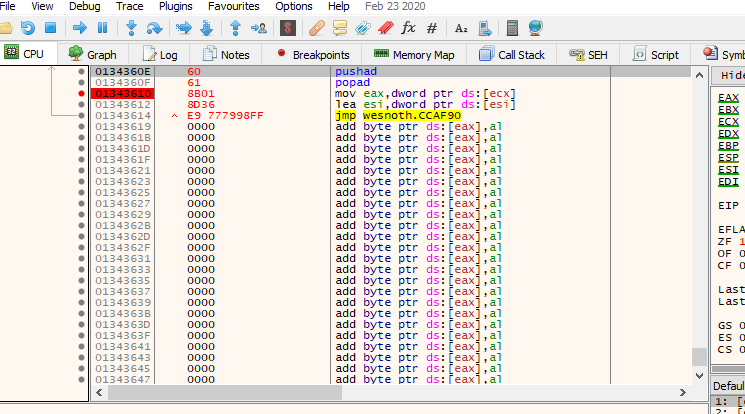
For the debugger-only experiment, place a cave at 0x01343E1B, replace the five-byte call at 0x005ED129 with a relative jump, and assemble:
pushad
moveax, dword ptr [edx]
incbyte ptr [eax]
popad
call0x005E9630
jmp0x005ED12E
This deliberately changes the first byte each time the description is drawn: A becomes B, then C, and so on. It is visible proof that the cave receives the live text pointer and still replays the original call.
The installer reuses the checked near_jump helper from the first hook. Before writing, verify that the five original bytes still encode the expected call. When disabling the hack, restore those exact saved bytes. Close and reopen the description between tests so each character change is obvious.
Turn the text cave into the complete second-player gold patch
The finished hook keeps the same five-byte patch point, original print call, and resume address. Instead of incrementing one letter, it follows Wesnoth’s verified in-process pointer chain and writes the second player’s gold as decimal text:
[0x017EED18] → player object
player + 0x0A90 → game/side object
game + 0x0274 → second player's gold
[EDX] → start of the live output text buffer
The helper checks every pointer, caps the displayed value at 999, converts it into at most three ASCII digits, and copies exactly three bytes into the existing buffer. The naked cave supplies the live EDX, preserves flags and registers, replays the original print call, and resumes the game:
Inject the 32-bit DLL into wesnoth.exe, open the terrain description during the two-player local scenario, and press F2. The first three characters change to the other player’s live gold. Press F2 again or End to restore the original call bytes.
The complete helper, decimal conversion, cave, and installer are in wesnoth_hooks.rs. The hotkey and patch lifetime are in dll.rs.
The first hook redirects a verified instruction span; the second redirects a verified call. Both restore exactly what they displaced. Lesson 8.4 changes a different boundary: an imported function pointer rather than instruction bytes.
To transfer either example to another build, start from the observation that
led to the hook: which action reaches the instruction, and which register or
pointer holds the value at that moment? Then re-measure the complete
instruction span, expected bytes, cave reachability, displaced behavior,
resume address, and restoration result in that build. The Wesnoth addresses
above are evidence for one 32-bit version, not reusable offsets.
The detours in Lesson 8.3 changed instruction bytes at a verified site. Sometimes a program already calls a function through a table of imported addresses. In that case, one verified table entry can change the destination while leaving the call instruction in place.
Your program can call MessageBoxW without knowing where user32.dll will load. The PE import data says, “I need this named function.” The Windows loader finds its live address and writes that address into the Import Address Table, or IAT.
Later, a normal imported call follows the pointer stored in that table:
your call site → MessageBoxW IAT slot → live user32!MessageBoxW
If a program deliberately replaces its own slot, the same call site follows the replacement:
your call site → MessageBoxW IAT slot → hooked_message_box
└→ saved original MessageBoxW
This lab changes only the IAT of the course executable itself. It does not target another process, hide from security software, or bypass protections.
During the lab, the call still begins at the same instruction; only the pointer in the table chooses a different route:
When the patch owner is dropped, it puts the saved original pointer back into that same IAT slot.
The call reaches the real functionThe call instruction stays in place. Before the hook, its IAT slot holds MessageBoxW.
Call siteIAT slotMessageBoxW
1
Requestcall through the MessageBoxW slot
Step 1: Call site to IAT slot
The code does not hold the function’s address; it reads it from the import address table slot.
2
DataSlot value: MessageBoxW
Step 2: IAT slot to MessageBoxW
The slot holds the real destination, so the call lands in MessageBoxW.
All 2 steps shown
The call instruction stays in place. Before the hook, its IAT slot holds MessageBoxW.
The same call reaches the replacementInstallation changes the verified slot value. The call instruction itself is untouched.
Call siteIAT slothooked_message_boxMessageBoxW
1
Requestcall through the same slot
Step 1: Call site to IAT slot
Identical instruction, identical slot address.
2
DataSlot value: hooked_message_box
Step 2: IAT slot to hooked_message_box
Installation replaced the slot’s contents after checking it still held the expected original.
3
RequestCall the saved original
Step 3: hooked_message_box to MessageBoxW
The replacement can still reach the real function through the address it saved before installing.
All 3 steps shown
Installation changes the verified slot value. The call instruction itself is untouched.
Removal restores the saved slotWriting the saved original back returns the route to the first picture.
Call siteIAT slotMessageBoxW
1
AloneRestore the saved slot value
Step 1: IAT slot (alone)
Removal puts back exactly the value that installation saved.
2
Requestcall through the same slot
Step 2: Call site to IAT slot
Still the same unchanged instruction.
3
DataSlot value: MessageBoxW
Step 3: IAT slot to MessageBoxW
The call reaches MessageBoxW again.
All 3 steps shown
Writing the saved original back returns the route to the first picture.
// 🛡️ SAFETY: the signature and Windows ABI match MessageBoxW.
unsafe {
original(
window,
w!("Hook reached the replacement IAT entry."),
caption,
style,
)
}
}
extern "system" tells the compiler to use the calling convention Windows expects. If the convention, parameter sizes, or return type are wrong, the stack or registers can be interpreted incorrectly.
get the current executable base with GetModuleHandleW(NULL);
verify MZ and PE\0\0;
require optional-header magic 0x10B;
read the import-directory RVA from data-directory entry 1;
walk 20-byte import descriptors until the all-zero terminator;
find user32.dll;
walk its lookup names and IAT slots together;
find MessageBoxW by name.
Step 7 is the one that surprises people: each imported DLL has two parallel
arrays, not one. The compiler writes them as identical lists of equal length,
and the loader overwrites only one of them.
index lookup table (names) address table (IAT)
0 "MessageBoxW" 0x7FF8_1234_5000 <- written by the loader
1 "MessageBoxA" 0x7FF8_1234_5100
2 ordinal 0x201 0x7FF8_1234_5200
3 0 (terminator) 0
Before the module is loaded, both arrays hold the same name references. During
loading, Windows resolves each name and writes the resulting live address into
the matching IAT slot, leaving the lookup table alone. That is exactly why you
walk the two together: the lookup table still records which function this
entry is, while the IAT records where that function currently lives.
Searching the IAT by itself gives you addresses with no names attached;
searching the lookup table by itself gives you names with nothing to patch.
(Some binaries ship without the separate lookup table. In a loaded image,
the IAT has already been overwritten with live function addresses, so it
cannot be treated as a list of name RVAs. This name-based lab refuses that
case with a clear error. Handling it would require a different, independently
verified way to identify the desired slot.)
The important matching loop is:
anyhow::ensure!(
original_thunk != 0,
"loaded image has no import-name lookup table"
);
letnames = original_thunk;
forindexin0..2048_usize {
// 📏 Bound the thunk walk even if a malformed image omits its zero terminator.
letname_cell = names
.checked_add(index * 4)
.context("name thunk overflowed")?;
letname_value = u32_at(image, name_cell)?;
ifname_value == 0 {
break;
}
ifname_value & 0x8000_0000 != 0 {
// 🔍 The high bit marks an ordinal import; there is no name pointer to read.
continue; // this one was imported by number, not by name
VirtualProtect temporarily makes the four-byte slot writable. The code immediately restores the old page protection:
The helper below receives a validated PE32 import slot and the replacement
32-bit function pointer. It performs exactly those three operations and
returns success only after the original page protection is restored:
Changing one pointer is not the whole lifecycle. The owning guard below
remembers the original destination and puts it back when the guard is
dropped, so the third message box in this lab uses the normal import again:
structIatPatch {
slot: *mutu32,
original: u32,
}
implDropforIatPatch {
fndrop(&mutself) {
// 🧹 SAFETY: this owner restores the same slot exactly once.
eprintln!("could not restore MessageBoxW IAT slot: {error:#}");
}
// 🔒 Publish “no callable original” only after the slot restoration
// attempt, so the replacement cannot observe cleanup out of order.
ORIGINAL_MESSAGE_BOX.store(0, Ordering::Release);
}
}
This is RAII applied to reverse engineering: owning the modification also means owning the cleanup.
If restoring page protection fails after the pointer write, the slot may
already contain the replacement even though write_slot returns an error.
A complete installer must retain enough state to retry or roll back that
partial installation; the returned Result alone does not undo it.
An import slot is a pointer with ownership. This step-by-step trace needs JavaScript. Here is the code and where the run ends.
save original = MessageBoxW
optionally replace the import slot
the caller reads the current slot
our wrapper forwards to the saved original
restore only if the slot still contains our replacement
report where the next call goes
Result: the next call follows original. Restoring blindly could erase another owner’s change.
Final values: install = yes; other = no; slot = original; first_route = our_wrapper; original_calls = 1; restored = true.
Read every step of the lesson’s example
Step 1, line 1. Start with the selected inputs and follow how the next operation changes the state.
install = yes; other = no.
Step 2, line 2. The call instruction remains unchanged; only the imported pointer changes.
install = yes; other = no; slot = our_wrapper.
Step 3, line 3. The caller follows the pointer currently in the slot.
Watch it happenOne import slot redirects a call and then restores it
A call reads a four-byte IAT slot. It first reaches MessageBoxW, then the slot’s pointer changes so the call reaches a replacement that forwards to the saved original. Cleanup puts the original pointer back and the next call takes the normal route.
Read the steps
The loader has resolved user32.dll!MessageBoxW. The first call reads the import slot and reaches the real function.
Matching the import name selects its four-byte IAT slot in this PE32 image. Bounds checks establish that this slot belongs to the loaded executable.
The patch owner saves the slot’s original pointer. The replacement will use that same callable original, and cleanup will write it back.
The installer temporarily makes the slot writable, writes the replacement pointer, and restores its protection. Only the destination stored in the slot changes.
The next imported call follows the changed slot into the replacement. With the matching ABI, it forwards to the saved original and supplies the replacement message.
Successful cleanup restores the saved pointer to the slot. The third call again follows the normal route. A failed restoration remains owned work.
The lab changes one PE32 pointer, preserves the original destination, and owns restoration. This is an offline call-route illustration.
Run this from windows-labs in the Windows VM. The three message boxes let
you observe the original import, the redirected call, and the restored call
in that order.
Terminal window
cargo run --release --target i686-pc-windows-msvc --bin iat_hook_lab
You should see three message boxes:
the untouched call displays “The normal import runs first.”
the hooked call displays “Hook reached the replacement IAT entry.”
after IatPatch is dropped, the restored call displays “The original import is restored.”
Those three visible states prove interception and restoration. The full buildable source—including bounded PE parsing and every unsafe invariant—is iat_hook_lab.rs.
#[cfg(all(windows, target_arch = "x86"))]mod lab { use std::{ ffi::c_void, sync::atomic::{AtomicUsize, Ordering}, }; use anyhow::{Context, Result}; use windows::{ Win32::{ Foundation::HWND, System::{ LibraryLoader::GetModuleHandleW, Memory::{PAGE_PROTECTION_FLAGS, PAGE_READWRITE, VirtualProtect}, }, UI::WindowsAndMessaging::{MB_OK, MESSAGEBOX_RESULT, MESSAGEBOX_STYLE, MessageBoxW}, }, core::{PCWSTR, w}, }; type RawMessageBoxW = unsafe extern "system" fn(HWND, PCWSTR, PCWSTR, MESSAGEBOX_STYLE) -> MESSAGEBOX_RESULT; static ORIGINAL_MESSAGE_BOX: AtomicUsize = AtomicUsize::new(0); unsafe extern "system" fn hooked_message_box( window: HWND, _text: PCWSTR, caption: PCWSTR, style: MESSAGEBOX_STYLE, ) -> MESSAGEBOX_RESULT { let address = ORIGINAL_MESSAGE_BOX.load(Ordering::Acquire); if address == 0 { return MESSAGEBOX_RESULT(0); } // SAFETY: install() stores the original MessageBoxW IAT target before the // hook can run, and the signature exactly matches the imported function. let original: RawMessageBoxW = unsafe { std::mem::transmute(address) }; // SAFETY: the saved function pointer and all arguments obey MessageBoxW's ABI. unsafe { original( window, w!("Rust reached the replacement IAT entry."), caption, style, ) } } fn u16_at(bytes: &[u8], offset: usize) -> Result<u16> { let end = offset.checked_add(2).context("offset overflowed")?; Ok(u16::from_le_bytes( bytes .get(offset..end) .context("u16 outside image")? .try_into()?, )) } fn u32_at(bytes: &[u8], offset: usize) -> Result<u32> { let end = offset.checked_add(4).context("offset overflowed")?; Ok(u32::from_le_bytes( bytes .get(offset..end) .context("u32 outside image")? .try_into()?, )) } fn c_string_at(bytes: &[u8], offset: usize) -> Result<&[u8]> { let tail = bytes.get(offset..).context("string RVA outside image")?; let end = tail .iter() .position(|byte| *byte == 0) .context("unterminated import name")?; Ok(&tail[..end]) } unsafe fn write_slot(slot: *mut u32, value: u32) -> Result<()> { let mut old = PAGE_PROTECTION_FLAGS::default(); // SAFETY: slot points to the four-byte IAT cell found inside this module. unsafe { VirtualProtect(slot.cast::<c_void>(), 4, PAGE_READWRITE, &mut old)? }; // SAFETY: VirtualProtect made this validated IAT cell writable. unsafe { slot.write_volatile(value) }; let mut ignored = PAGE_PROTECTION_FLAGS::default(); // SAFETY: restore the exact protection returned by the first call. unsafe { VirtualProtect(slot.cast::<c_void>(), 4, old, &mut ignored)? }; Ok(()) } struct IatPatch { slot: *mut u32, original: u32, } impl Drop for IatPatch { fn drop(&mut self) { // SAFETY: the patch owns this validated slot and restores it once. if let Err(error) = unsafe { write_slot(self.slot, self.original) } { eprintln!("could not restore MessageBoxW IAT slot: {error:#}"); } ORIGINAL_MESSAGE_BOX.store(0, Ordering::Release); } } unsafe fn install() -> Result<IatPatch> { // SAFETY: a null module name asks Windows for the current executable. let module = unsafe { GetModuleHandleW(PCWSTR::null()) }?; let base = module.0 as usize; // Every loaded PE image maps at least its first header page. Read that // page first, validate it, then use SizeOfImage for the bounded view. // SAFETY: base is the current loaded module and its header page is mapped. let header = unsafe { std::slice::from_raw_parts(base as *const u8, 4096) }; anyhow::ensure!(header.get(..2) == Some(b"MZ"), "missing MZ header"); let pe = usize::try_from(u32_at(header, 0x3c)?)?; anyhow::ensure!( header.get(pe..pe + 4) == Some(b"PE\0\0"), "missing PE header" ); let optional = pe.checked_add(24).context("optional-header overflowed")?; anyhow::ensure!(u16_at(header, optional)? == 0x10b, "this lab expects PE32"); let image_size = usize::try_from(u32_at(header, optional + 56)?)?; anyhow::ensure!( (4096..=512 * 1024 * 1024).contains(&image_size), "bad image size" ); // SAFETY: SizeOfImage describes the mapped extent of the current module. let image = unsafe { std::slice::from_raw_parts(base as *const u8, image_size) }; let import_rva = usize::try_from(u32_at(image, optional + 96 + 8)?)?; anyhow::ensure!(import_rva != 0, "the executable has no import directory"); for descriptor_index in 0..256_usize { let descriptor = import_rva .checked_add(descriptor_index * 20) .context("descriptor offset overflowed")?; let original_thunk = usize::try_from(u32_at(image, descriptor)?)?; let name_rva = usize::try_from(u32_at(image, descriptor + 12)?)?; let first_thunk = usize::try_from(u32_at(image, descriptor + 16)?)?; if original_thunk == 0 && name_rva == 0 && first_thunk == 0 { break; } if !c_string_at(image, name_rva)?.eq_ignore_ascii_case(b"user32.dll") { continue; } // In a loaded image FirstThunk holds resolved addresses. Without // OriginalFirstThunk, this name-based lookup has no trustworthy // import-name table, so it cannot identify a slot by name. anyhow::ensure!( original_thunk != 0, "user32.dll has no OriginalFirstThunk; cannot match MessageBoxW by name" ); let names = original_thunk; for index in 0..2048_usize { let name_cell = names .checked_add(index * 4) .context("name thunk overflowed")?; let name_value = u32_at(image, name_cell)?; if name_value == 0 { break; } if name_value & 0x8000_0000 != 0 { continue; // imported by ordinal, so it has no name to compare } let import_name = usize::try_from(name_value)? .checked_add(2) .context("import name overflowed")?; if c_string_at(image, import_name)? != b"MessageBoxW" { continue; } let slot_rva = first_thunk .checked_add(index * 4) .context("IAT overflowed")?; anyhow::ensure!(slot_rva + 4 <= image_size, "IAT slot outside image"); let slot = (base + slot_rva) as *mut u32; // SAFETY: the validated slot points to one aligned PE32 thunk cell. let original = unsafe { slot.read_volatile() }; anyhow::ensure!(original != 0, "MessageBoxW IAT slot was null"); ORIGINAL_MESSAGE_BOX.store(original as usize, Ordering::Release); // SAFETY: slot is a validated four-byte IAT cell in our own process. unsafe { write_slot(slot, hooked_message_box as *const () as usize as u32)? }; return Ok(IatPatch { slot, original }); } } anyhow::bail!("MessageBoxW was not found in this executable's IAT") } pub fn run() -> Result<()> { // SAFETY: literals are valid zero-terminated UTF-16 and no window owner is needed. unsafe { MessageBoxW( None, w!("The normal import runs first."), w!("GHA IAT lab"), MB_OK, ) }; // SAFETY: install parses and writes only this executable's validated IAT slot. let patch = unsafe { install()? }; // SAFETY: the call is redirected through the temporary IAT patch. unsafe { MessageBoxW( None, w!("You should not see this sentence."), w!("GHA IAT lab"), MB_OK, ) }; drop(patch); // SAFETY: dropping the patch restored the original imported function. unsafe { MessageBoxW( None, w!("The original import is restored."), w!("GHA IAT lab"), MB_OK, ) }; Ok(()) }}#[cfg(all(windows, target_arch = "x86"))]fn main() -> anyhow::Result<()> { lab::run()}#[cfg(not(all(windows, target_arch = "x86")))]fn main() { eprintln!("Build this self-hooking lab for i686-pc-windows-msvc.");}
An injected course DLL lives inside the game process, so the same idea can observe an imported graphics or file function used by that exact build. Before changing a game IAT:
prove the function is actually imported by the main executable;
use the exact function signature;
reject an unknown PE format or module version;
keep the hook tiny and non-blocking;
restore the original slot before unloading the DLL.
The Urban Terror OpenGL chapter uses an instruction detour because its verified draw path is not expressed as a convenient main-executable IAT slot. Choose a hook based on the real call path, not because one technique sounds fashionable.
Lesson 6.9 compared the ways Windows delivers input to a program
and the ways a tool can read or send it. This lesson follows that input inside the
game once it has arrived. A game never asks the hardware whether
the W key is down while it is deciding where to move. It keeps a small amount of
input state, refreshes it once per frame, and turns it into actions.
Input passes through three layers, and each one changes what the value means:
The device layer is what the operating system reports: a key went down, the mouse
moved 12 counts (Explanation: A count is the smallest step a mouse can report. A mouse set to 800 counts per inch reports 800 counts when it moves one inch, so 12 counts is 12 ÷ 800 = 0.015 inch.), a stick reads 0.8. The state layer is the engine’s own copy of
those facts, refreshed once per frame. The action layer converts them using the player’s bindings and settings. Movement and jump code then consume named actions rather than physical keys. The same jump can therefore come from a keyboard, a controller, or a remapped key without changing the jump calculation.
For every button the engine can answer three questions on every frame:
Is it down now? This stays true for as long as the button is held.
Was it just pressed? This is true on the single frame where it went from up to down.
Was it just released? This is true on the single frame where it went from down to up.
The last two are called input edges. The engine finds them by keeping last frame’s
copy of the state and comparing: a button is just pressed when it is down now and
was not down last frame. A lamp that the button toggles shows why the difference matters:
Down now, just pressed, just releasedEach frame compares this frame’s state with last frame’s. Click a frame to press or release the button there. 1 = down, ✓ = yes.
Key at frames 1 to 8 (1 = down)
Eight frames
Each frame compares now with the frame before
Down now
frame 1frame 8
0
0
1
1
1
0
0
0
Down last frame
0
0
0
1
1
1
0
0
Just pressed
–
–
✓
–
–
–
–
–
Just released
–
–
–
–
–
✓
–
–
A lamp the button toggles
Toggle on every down sample
3 toggles, lamp ends on
Toggle only on just pressed
1 toggle, lamp ends on
The key is down in 3 frames but changes from up to down once. A press is “down now and not down before”, so a held key reports one press, not one per frame.
The engine collects the operating system’s events once, at the start of each frame.
A press that arrives while a frame is being processed therefore waits for the next
frame’s collection:
ExampleA key held for 150 ms at 60 frames a second
A frame is 1000 ÷ 60 = 16.67 ms, so frame 6 starts at 6 × 16.67 = 100.0 ms. The key
goes down at 105 ms, during frame 6, and comes up at 255 ms, during frame 15:
Frame
Starts at
Down now
Just pressed
Just released
6
100.0 ms
no
no
no
7
116.7 ms
yes
yes
no
8 to 15
133.3 to 250.0 ms
yes
no
no
16
266.7 ms
no
no
yes
The game saw the press 116.7 − 105 = 11.7 ms after it happened, and it saw the key
down on frames 7 to 15, which is 9 frames and 9 × 16.67 = 150 ms, the time it was
really held. The delay between the press and the game noticing is at most one
frame.
Holding a key also makes the operating system send repeated key-down events, which
is how a text box types a held letter many times. Games ignore the repeats: the key
is simply still down.
Optional: how long must a tool hold a key for a game to see it?
It depends on how the game reads the keyboard. A game that collects events, as above,
sees even a very short press, because the down and the up wait in the queue until the
next frame. A game that polls, asking “is the key down right now?” once per frame, sees
a press only if one of its polls lands inside it. Polls are one frame apart, which is
1000 ÷ 60 = 16.67 ms at 60 frames a second.
A press that lasts D ms and starts at a random moment contains a poll with probability
D ÷ 16.67. A 5 ms press is seen 5 ÷ 16.67 = 0.30, which is 30% of the time. A 10 ms
press is seen 10 ÷ 16.67 = 0.60, or 60% of the time. A press of 16.67 ms or more is always
seen, if every frame lasts 16.67 ms. Frames vary, so a tool that must be seen holds the key
for the longest frame it expects, such as 2 frames, 2 × 16.67 = 33.3 ms.
Lesson 6.8 showed that a fixed step is a slice of game time, so a frame can run
zero, one, or several steps. An edge lasts one frame, so a step that runs on a
different frame never sees it:
ExampleA press that no step sees
The game draws at 144 frames a second, so a frame is 1000 ÷ 144 = 6.94 ms, and runs
movement and collision updates in 60 Hz steps, which are due every 16.67 ms. The engine runs the steps
that are owed at the start of each frame:
Frame
Starts at
Steps run
Just pressed in this frame
3
20.8 ms
1 (the one due at 16.7 ms)
no
4
27.8 ms
0
yes
5
34.7 ms
1 (the one due at 33.3 ms)
no
The press is visible on frame 4 only, and frame 4 runs no step. By frame 5 the edge
is gone, and the step that runs there sees nothing. If instead two steps had run
on frame 4, both would have seen the same press, and a jump would have happened
twice.
The repair is to keep a press available until a simulation step can consume it. The input
system turns a press into an event or an intent, such as “jump requested”, that
stays in the queue until a step consumes it, exactly once. Many engines suggest
doing this for input-sensitive updates that run in fixed steps.
A thumbstick reports two axes, each a number from −1.0 (all the way one way)
through 0 (centred) to +1.0. A trigger reports one axis from 0 to 1. A stick that
nobody is touching rarely reads exactly 0, because springs and sensors are not
perfect, so a resting stick might report 0.06. Without a fix, the character would
drift.
The fix is a dead zone: a range around 0 that the game treats as 0. With a
dead zone d of 0.15, any value whose size is below 0.15 becomes 0. Simply cutting
the range would make the output jump from 0 to 0.15 when the stick leaves the
zone, so engines usually rescale the rest of the range to start from 0:
out=sign(v)1−d∣v∣−dwhen ∣v∣≥d,otherwise 0
With d = 0.15 a reading of 0.5 becomes (0.5 − 0.15) ÷ (1 − 0.15) = 0.35 ÷ 0.85 =
0.41, a reading of 0.15 becomes 0, a reading of 1.0 stays 1.0, and the resting 0.06
becomes 0. As a function, in the two languages this book uses:
Rust
fndead_zone(v: f32, d: f32) -> f32 {
ifv.abs() < d {
0.0
} else {
v.signum() * (v.abs() - d) / (1.0 - d)
}
}
Lua
localfunctiondead_zone(v, d)
ifmath.abs(v) < dthen
return0
end
localsign = v < 0 and -1 or 1
returnsign * (math.abs(v) - d) / (1 - d)
end
Both return 0.4118 for dead_zone(0.5, 0.15) and −0.4118 for dead_zone(-0.5, 0.15),
because the sign is kept and only the size is rescaled.
This interactive lab needs JavaScript. The lesson text around it still explains the same idea.
A stick has two axes, so there is a second choice: apply the dead zone to each
axis separately, or to the stick’s overall distance from the centre. They differ
when the stick sits diagonally with a small push.
Optional: per-axis and radial dead zones for a small diagonal push
Take a reading of 0.12 on both axes:
Per-axis dead zone
Each axis is checked alone. 0.12 is below 0.15 on both, so both become 0 and the
output is (0, 0). A small diagonal push is ignored completely, and the stick feels
dead in the diagonals while a straight push of 0.2 still works.
Radial dead zone
The dead zone applies to the distance from the centre: √(0.12² + 0.12²) = 0.12 ×
1.414 = 0.17. That is above 0.15, so it counts. Rescaled, (0.17 − 0.15) ÷ 0.85 =
0.023, kept in the same direction, which is 0.023 × 0.707 = 0.016 on each axis. The
output is (0.016, 0.016), a small push that still points the right way.
Keyboard movement has a related trap. Pressing W and D together is the vector (1, 1),
whose length is √(1² + 1²) = 1.414. Used as it is, walking diagonally would be 41%
faster than walking straight. Engines normalise the result by dividing by its
length, which gives (0.707, 0.707) and a length of 1 again. A game that forgets this
lets a player move faster by strafing, a flaw that older games are well known for.
walk(1.0, 1.0) returns (0.707, 0.707), whose length is 1. walk(0.6, 0.0) is left
alone, because a length below 1 is a gentle push, and shrinking it would make a half-pressed
stick as fast as a full one.
A keyboard key has two identities. Its position is a fixed place on the board,
reported as a scan code or key code. The character it types depends on the
layout the player has selected. On a QWERTY keyboard the top letter row reads Q W E
R T Y. On an AZERTY keyboard, the layout common in France, the same row reads A Z E
R T Y, so the physical key where QWERTY has W types Z:
QWERTY
AZERTY
Label on the key in the W position
W
Z
Scan code of that physical key
0x11
0x11
Windows virtual-key code it produces
0x57 (W)
0x5A (Z)
Games bind movement to key positions, so the four keys under the left hand are
forward, left, back, and right on any layout, with different letters printed on them.
Text boxes want the opposite: they read characters, so a French player types French.
A game that checks the virtual-key code for W breaks on the AZERTY keyboard, because
the key that sends it is somewhere else.
Languages with thousands of characters are typed through an input method editor,
or IME. The player composes a word in a pending buffer, sees suggestions, and
confirms one. The game receives the pending text, so it can show it underlined, and
then the final text once the player confirms. While composing, the keys go to the
IME rather than to the game as ordinary key events, which is why a text box needs
to switch IME mode on, and gameplay must not.
The mouse: where it is, how far it moved, and the wheel
The mouse reports three different things, and a game uses them for different jobs:
Cursor position, in window coordinates: the origin is the top left corner of
the window and y grows downward, counted in pixels. It is used for clicking and
hovering over menus. Its logical pixels become physical pixels through the
display’s scale factor, as in
Lesson 6.9’s window properties.
Motion, the distance moved since the last report, such as +12 counts across
and −3 up. It is used for looking around, and the turn is the motion times a
sensitivity: 12 counts at 0.1° a count turn the view by 12 × 0.1 = 1.2°.
The wheel. On Windows one notch of a traditional wheel is 120 units, so 3
notches report 360 units, which a game reads as 3 lines. A touchpad reports
small, smooth amounts in pixels instead, so engines tell the two units apart and
scale each one differently.
A game that looks around with the mouse takes control of the cursor. In a locked
mode the cursor is hidden and cannot reach the window’s edge. Windows has no
built-in lock, so many engines move the cursor back to the centre after every read,
and others read the mouse’s raw movement directly:
ExampleA look-around loop in a 1280 × 720 window
The centre is at (1280 ÷ 2, 720 ÷ 2) = (640, 360). The mouse moves, and the
engine reads the cursor at (652, 357). The motion is (652 − 640, 357 − 360) =
(+12, −3), the engine turns the view by it, and then it places the cursor back at
(640, 360) for the next frame.
A confined mode keeps the cursor visible but inside the window, which suits
strategy games that scroll when the pointer reaches an edge.
A touch screen reports every finger separately. A finger gets an identifier when
it lands and keeps it until it lifts, and the engine reports its position each
frame. Gestures are not part of the hardware: the game builds them by comparing
fingers. A pinch compares the distance between two of them. If the fingers start
200 pixels apart and end 300 pixels apart, the zoom factor is 300 ÷ 200 = 1.5.
A controller has an identifier of its own, which is how a local multiplayer game
tells player 2’s pad from player 1’s. Its buttons are named by position, such as
south, east, west, and north, because the same four buttons are labelled A, B, X,
and Y on one maker’s pad and cross, circle, square, and triangle on another’s.
Vibration requests add up: two rumbles of strength 0.3 and 0.5 running at once
drive the motor at 0.3 + 0.5 = 0.8.
When the player switches windows while holding a key, the game never receives the
key-up. If it kept the old state, the key would look held when the player came
back. Engines therefore watch for a focus-lost event and clear their input state
when it arrives. A tool that polls the hardware directly, as in Lesson 6.9, still
sees the keys while the game is out of focus, which is why such a tool must check
for focus itself.
The link between a key and an action is a table the game keeps in a settings file:
[bindings]
move_forward = KeyW, StickLeftUp
jump = Space, ButtonSouth
fire = MouseLeft, TriggerRight
A rebinding screen is a small loop on top of the same table: wait for the next
press, store its key code against the chosen action, and write the file. For a
tool this table matters in two ways. Editing the file changes what a key does
without touching the game’s memory, as in Chapter 9, and an action can be
requested by making the game receive the event that its binding turns into an
action, rather than by faking the keyboard.
The state layer is usually a few small structures: an array with one entry per key,
a second array holding last frame’s copy for the edge test, a pair of numbers for
mouse motion, and the axis values as floats. A Windows game that indexes its key
array by virtual-key code finds W at index 0x57, which is 87, the ASCII code of the
letter W.
Windows VM
You can find such an array with the same filtering idea as the gold scan in
Lesson 1.9, except that the value is not shown on screen:
Start a scan for a one-byte value with the type unknown, while the key is up.
Hold the key and keep holding it, then scan for values that changed.
Release the key and scan for values that changed again.
Repeat the hold and the release until a handful of addresses are left.
Hold the key and read the survivors: the right one holds a non-zero value while
the key is down and 0 when it is up. If the game keeps one entry per key, the
neighbouring bytes belong to the neighbouring key codes.
Input at a glance
Kind
What the game gets
When it changes
A common mistake
Button
down now, just pressed, just released
on a press or a release
reading an edge in a step that did not run that frame
Axis
a number from −1 to 1
continuously
no dead zone, so the character drifts
Key position
a scan code
when that physical key moves
binding to a letter instead, which breaks on other layouts
Typed text
a string of characters
after composing
using key codes for a text box
Cursor
window coordinates
whenever the pointer moves
using it for looking around, where it runs out of room
A useful game-tool menu answers four questions clearly:
What features exist?
What state is each feature in?
Which changes have actually reached the worker?
How does everything return to normal during shutdown?
The menu should not own a process handle, execute pointer chains while
painting a checkbox, or patch memory sixty times per second. Its job is to edit
ordinary settings and send deliberate commands to a worker. That separation
makes the interface responsive and the low-level code reviewable. 🎛️
A checkbox edits settings; a command carries a copyThe checkbox edits ordinary settings. The worker receives a deliberate command and owns the resources that carry it out.
MenuSettingsChannelWorker
1
DataCheckbox changes a Settings value
Step 1: Menu to Settings
The menu owns this Settings value, so changing it is an ordinary edit.
2
DataSend a command carrying a Settings copy
Step 2: Menu to Channel
The command holds its own copy, so the worker never reads the menu’s live value.
3
DataCommand arrives
Step 3: Channel to Worker
The worker receives it on its own thread, when it is ready.
4
AloneApply process effects and own cleanup
Step 4: Worker (alone)
Opening handles, touching the process and releasing them again all stay with the worker.
All 4 steps shown
The checkbox edits ordinary settings. The worker receives a deliberate command and owns the resources that carry it out.
This board needs JavaScript to move things around. Here is the lesson’s sorting:
The menu window
The "Show names" checkbox. A checkbox only edits an ordinary setting (show_names). The menu’s job is to edit settings, so this belongs here.
The field-of-view slider. A slider borrows one setting for a moment and changes it when you drag. That is ordinary UI work, so it stays in the menu.
Remembering the last settings sent (last_applied). The menu keeps what it last submitted so it can say "Nothing changed" instead of resending identical settings.
Sending Command::Shutdown when the window closes. on_exit in the menu only sends the command. The worker does the actual cleanup, and the main thread waits for it.
The worker
The process handle. The worker is the only place that should own Windows handles, so the low-level code can be reviewed in one place.
Reading and writing game memory. The menu must not patch memory sixty times per second. Low-level work waits for a deliberate command and runs in the worker.
Walking a pointer chain. The lesson says the menu should not execute pointer chains while painting a checkbox. That work belongs to the worker.
Restoring changed bytes at shutdown. On Shutdown the worker restores what it changed, unhooks only its own hooks and closes its handles. The window vanishing proves nothing; joining the worker does.
This tutorial builds a separate desktop window. That is the best first menu:
it is easy to debug, does not run under loader lock, and can stay open beside
Wesnoth, AssaultCube, or another local course target. Integrating the same
widgets into an injected renderer is a later graphics-backend problem.
use std::{ sync::mpsc::{self, Receiver, Sender}, thread,};use eframe::egui;#[derive(Clone, Copy, Debug, Default, PartialEq, Eq)]enum OverlayMode { #[default] Off, TeamOnly, AllActors,}#[derive(Clone, Debug, PartialEq)]struct Settings { overlay: OverlayMode, show_names: bool, show_distance: bool, field_of_view: f32, observation_only: bool,}impl Default for Settings { fn default() -> Self { Self { overlay: OverlayMode::Off, show_names: true, show_distance: true, field_of_view: 75.0, observation_only: true, } }}#[derive(Debug)]enum Command { Apply(Settings), RestoreDefaults, Shutdown,}struct MenuApp { settings: Settings, last_applied: Settings, commands: Sender<Command>, status: String,}impl MenuApp { fn new(commands: Sender<Command>) -> Self { Self { settings: Settings::default(), last_applied: Settings::default(), commands, status: "Ready — no target changes have been requested.".into(), } } fn apply_if_changed(&mut self) { if self.settings == self.last_applied { self.status = "Nothing changed.".into(); return; } // 📬 The UI sends owned data. The worker never borrows widget state. match self.commands.send(Command::Apply(self.settings.clone())) { Ok(()) => { self.last_applied = self.settings.clone(); self.status = "Settings sent to the tool worker.".into(); } Err(_) => self.status = "Worker stopped; no settings were applied.".into(), } }}impl eframe::App for MenuApp { fn ui(&mut self, ui: &mut egui::Ui, _frame: &mut eframe::Frame) { egui::CentralPanel::default().show(ui, |ui| { ui.heading("Game Hacking Academy — lab menu"); ui.label("A separate settings window for the offline target."); ui.separator(); egui::ComboBox::from_label("Overlay mode") .selected_text(format!("{:?}", self.settings.overlay)) .show_ui(ui, |ui| { ui.selectable_value(&mut self.settings.overlay, OverlayMode::Off, "Off"); ui.selectable_value( &mut self.settings.overlay, OverlayMode::TeamOnly, "Teammates only", ); ui.selectable_value( &mut self.settings.overlay, OverlayMode::AllActors, "All local actors", ); }); ui.checkbox(&mut self.settings.show_names, "Show names"); ui.checkbox(&mut self.settings.show_distance, "Show distance"); ui.add( egui::Slider::new(&mut self.settings.field_of_view, 30.0..=140.0) .text("Field of view"), ); // 🔒 Observation-only is the safe default and stays visually clear. ui.checkbox( &mut self.settings.observation_only, "Observation only (no writes or synthetic input)", ); ui.add_space(8.0); ui.horizontal(|ui| { if ui.button("Apply changes").clicked() { self.apply_if_changed(); } if ui.button("Restore defaults").clicked() { self.settings = Settings::default(); let _ = self.commands.send(Command::RestoreDefaults); self.last_applied = self.settings.clone(); self.status = "Defaults restored.".into(); } }); ui.separator(); ui.label(&self.status); ui.small("Tip: the worker owns process handles; this window owns only settings."); }); } fn on_exit(&mut self, _gl: Option<&eframe::glow::Context>) { // 🧹 Give the worker one explicit cleanup path before the sender drops. let _ = self.commands.send(Command::Shutdown); }}fn lab_worker(commands: Receiver<Command>) { while let Ok(command) = commands.recv() { match command { Command::Apply(settings) => { // 🧪 Replace this print with the book's verified local-lab // adapter. Keep every raw handle and memory write in that worker. println!("apply: {settings:?}"); } Command::RestoreDefaults => println!("restore defaults"), Command::Shutdown => { // 🧹 Restore patches and release held input here, then exit. println!("worker shutdown"); break; } } }}fn main() -> eframe::Result { let (command_tx, command_rx) = mpsc::channel(); let worker = thread::spawn(move || lab_worker(command_rx)); let options = eframe::NativeOptions { viewport: egui::ViewportBuilder::default() .with_inner_size([620.0, 470.0]) .with_min_inner_size([440.0, 360.0]), centered: true, ..Default::default() }; let result = eframe::run_native( "GHA tool menu", options, Box::new(move |_creation| Ok(Box::new(MenuApp::new(command_tx)))), ); // ✅ `on_exit` stops the worker; joining proves cleanup completed. let _ = worker.join(); result}
The buildable course version lives in
menu_lab.rs. It uses
eframe 0.36, whose egui UI is well suited to tools that redraw interactive
controls every frame:
[dependencies]
eframe = { version = "0.36", default-features = false, features = [
"default_fonts",
"glow",
] }
From the windows-labs directory, run:
Terminal window
cargo run --bin menu_lab
The first build downloads and compiles the windowing and OpenGL support, so it
will take longer than later runs.
Avoid one unrelated global boolean per feature. A settings value is easier to
copy, compare, validate, save, and send:
#[derive(Clone,Copy,Debug,Default,PartialEq,Eq)]
enumOverlayMode {
#[default]
Off,
TeamOnly,
AllActors,
}
#[derive(Clone,Debug,PartialEq)]
structSettings {
overlay: OverlayMode,
show_names: bool,
show_distance: bool,
field_of_view: f32,
observation_only: bool,
}
The enum is important. Three booleans named overlay_off, team_overlay, and
all_overlay could all become true at once. One OverlayMode value can hold
exactly one variant. ✅
observation_only defaults to true. A safe default is a design feature, not a
warning paragraph the user has to remember.
In a retained UI toolkit, you create a checkbox object and the framework keeps
it. In egui’s immediate mode, your ui function describes the interface
again each frame:
The checkbox borrows show_names for this call. It reads the current value,
draws the correct box, and changes the value if the user clicks. The MenuApp
stores the setting between frames; the widget does not.
This is why low-level work must not happen unconditionally in ui:
This intentionally bad menu variant draws a slider and immediately writes its current value to the owned lab process. It assumes a Process in self.process and a verified FOV_ADDRESS; the real course menu below only sends commands. Immediate-mode UI redraws repeatedly, so repainting the bad variant repeats that side effect.
Make the user event explicit: clicking Apply sends one command to the worker. The worker still validates the request and reports whether it was applied; queuing a command is not proof that a write succeeded.
An event-driven tool waits for something meaningful to happen, then runs the
small handler that owns that event. Describe each interaction before choosing
colors, icons, or panel layouts:
User event
UI command
Worker result
Visible feedback
clicks Apply changes
Apply(settings)
accepted or rejected
exact status and reason
clicks Restore defaults
RestoreDefaults
features disabled and state restored
“Restored” only after acknowledgement
presses Escape
close the menu
no game-state change
menu disappears
closes the app
Shutdown
keys released, patches restored, handles closed
window exits after worker joins
This table prevents a common UI logic bug: the button changes its label or
color, but no one can say whether the worker completed the requested action.
The worker owns the game-hacking side effect; the menu owns the request and the
truthful report of its result.
Apply(Settings) owns a snapshot. The UI can keep changing its copy without
racing with the worker. The worker is the only place that should own Windows
handles and call the verified adapters from earlier lessons.
The course lab intentionally prints settings instead of modifying a game:
Replace only that adapter with a version-checked game bridge. The UI
architecture stays the same whether the worker reads a snapshot, controls an
overlay, or applies the guarded Wesnoth gold change from Chapter 3.
Keep both the currently edited value and the last value sent:
The method below implements the decision in that diagram. It sends a command
only when settings differ from the last sent values; a successful send
updates the remembered copy and the message the user sees. The worker still
has to report whether it actually applied the command.
self.status = "Settings sent to the tool worker.".into();
}
}
This is state synchronization in miniature. settings is the proposed
state. last_applied is the last state the UI knows it submitted. In a more
advanced tool, the worker can answer with an acknowledgement so the menu shows
“applied,” “rejected,” or “target closed” instead of guessing.
Use the rising-edge helper from Lesson 6.9 for VK_INSERT. PollingGetAsyncKeyState(VK_INSERT) and toggling on every frame while it is negative
will make the menu flicker open and closed. Toggle only when the key changes
from up to down:
ifinsert_edge.pressed_now(VK_INSERT) {
menu_open = !menu_open;
}
When the menu is open, decide who owns input:
a separate menu window receives input only while the user focuses it;
an injected overlay should ask egui whether it wants pointer or keyboard
input before forwarding those events to the game;
closing the menu must release any synthetic key or mouse button the worker
still owns;
losing target focus should pause active input features.
Do not “fix” focus by continuously forcing the game window to the foreground.
Let the user choose which application receives input.
use verbs such as Apply changes and Restore defaults;
group read-only, overlay, and input features separately;
show units on numbers (degrees, pixels, milliseconds);
disable controls that cannot currently work and explain why;
display the target build and connection state near the top;
keep dangerous actions behind an explicit confirmation;
never use color as the only sign of success or failure.
keep Stop, Restore defaults, and Escape easy to reach;
preserve keyboard navigation and readable contrast at every theme setting;
remember cosmetic preferences without silently remembering an unsafe active feature.
The full example sets a minimum window size. Otherwise, a narrow window can
wrap a label such as Restore defaults into a column of one-letter lines
while the button is still technically present. Desktop tool menus need enough
width for their actual text and controls.
MenuApp::on_exit sends Command::Shutdown. The worker should then:
stop accepting new feature commands;
release held keys and mouse buttons;
restore bytes or graphics state it changed;
unhook only hooks it installed;
close its owned handles;
report completion and exit.
The main thread joins the worker before returning. A window disappearing is not
proof that cleanup finished; joining turns cleanup into something the program
actually waits for.
Once this separate menu behaves correctly, reuse its Settings and Command
types in an overlay. The overlay-specific layer must additionally:
track the game client rectangle with GetClientRect and ClientToScreen;
respond to DPI and resize changes;
switch between click-through mode when closed and interactive mode when open;
save and restore the game’s graphics state if drawing inside its renderer;
keep the target’s update thread free of file I/O, sleeping, and channel waits.
Build the control model first. Each feature still needs an owner, a defined set of commands, and a way to restore any bytes it changes when the menu moves into the game. The tool-architecture lesson combines those responsibilities with snapshots, feature lifecycles, version checks, and failure handling. Chapter 7
then follows the camera and drawing state that an in-game display would need.
Lesson 8.6 put the menu in its own window, which is the right default: it
cannot corrupt the game’s graphics state, and you can close the game without
losing it.
But you have already met a function that draws text inside the game. In
Lesson 3.11 you traced Wesnoth’s print function; Lesson 8.3 then used its call
site for a verified, reversible text hook. In Lesson 7.9 you called
AssaultCube’s print function at 0x0041_9880 to label players. That function already knows
the font, the scale, the screen size, and the right moment in the frame to
draw. Calling it is the cheapest way to put a menu on screen, because the
hard graphics work is done and you are only supplying strings.
The trade is that you are now running inside the game’s render path, so
the hook must finish quickly. A file read, sleep, or blocking channel receive
there delays the game’s next frame; Lesson 6.11 measures the same cost in a
per-frame recorder.
Before borrowing the game’s text function, it helps to know what it sits on top of. A
game’s interface is drawn by the same pipeline as its world (Lesson 7.2), in a last pass
that ignores the 3D camera: flat rectangles and text, placed in screen units.
Text. A font is turned into a glyph atlas, a texture holding every character as a
small image (the atlas idea from Lesson 7.2). To draw “Gold”, the engine draws one quad
per letter, each showing that letter’s rectangle in the atlas, and moves along by each
letter’s advance width. If the advances of G, o, and l are 12, 9, and 4 pixels, the
letter d starts 12 + 9 + 4 = 25 pixels to the right of where the G started.
Layout. Elements sit in boxes. Anchoring pins a box to part of the screen: a
200 × 50 box anchored to the bottom-right corner of a 1280 × 720 screen with a 20-pixel
margin is at x = 1280 − 20 − 200 = 1060 and y = 720 − 20 − 50 = 650. In a flex
layout, boxes in a row share the space by weight: in a 600-pixel row, three boxes with
weights 1, 2, and 1 get 150, 300, and 150 pixels. A grid layout assigns boxes to rows
and columns, and size limits keep a box between a smallest and a largest size.
Scaling. Interfaces are usually designed for a reference size, such as 1920 × 1080, and
scaled by the smaller of width ÷ 1920 and height ÷ 1080. On a 1280 × 720 screen both
are 0.6667, so a 300-pixel button is drawn 200 pixels wide. The window’s scale factor from
Lesson 6.9 multiplies the result again.
Stretchable art. A button picture with decorated corners cannot simply be stretched.
Nine-slice drawing cuts it into a 3 × 3 grid: the four corners keep their size, the
four edges stretch in one direction, and the centre stretches in both. Drawing a picture
with 16-pixel corners as a 200 × 60 button gives four 16 × 16 corners, top and bottom
edges 200 − 32 = 168 wide, side edges 60 − 32 = 28 tall, and a 168 × 28 centre.
Order and clipping. Elements are drawn back to front by a layer number. Clipping
hides whatever falls outside a box, which is how a scrolling list works: the items are
moved up by the scroll amount, and only the part inside the list’s box is drawn.
Input and focus. A click is tested against each box’s rectangle, the 2D picking of
Lesson 7.5, and the topmost box under the cursor gets it. For a keyboard or gamepad, the
game keeps a focus, the element that will respond, and moves it to the nearest
element in the direction pressed. A text box keeps a string and a cursor position and
receives typed characters. Sliders, checkboxes, and buttons are each a small state
machine: a value, and whether they are hovered, pressed, or focused.
Popups. A context menu is a box created at the cursor when the right button is
pressed and sized to fit its items. If it would run off the screen it is moved back: a 150
pixel wide menu opened at x = 1200 on a 1280 pixel screen is placed at
min(1200, 1280 − 150) = 1130.
Where it is drawn. Most interface is drawn over the finished 3D picture. It can also be
drawn into a texture and placed on a surface in the world, such as a screen on a wall, and
a label that follows an object uses the projection from Lesson 7.9.
Lesson 8.6 contrasts the two ways such code is written: an immediate-mode interface
redraws every element on every frame from the current state, and a retained-mode
interface keeps a tree of elements in memory and changes them when something happens.
Hook a per-frame site, then call the text function
The obvious idea is to hook the text function itself. That is the one thing
that cannot work:
The hook calls the text function, and the text function runs the hook again:
recursion with no base case, the same failure as a wrapper that forwards to
itself in Lesson 7.3. Every nested
call adds a stack frame, so the stack overflows while the hook is still trying
to draw its first menu line.
Hook a site that runs once per frame instead, and call the text function
from there as an ordinary function.
Lesson 7.9 already identified such a site in AssaultCube: the final print hook
at 0x0040_BE7E, resuming at 0x0040_BE83. Drawing there puts your lines in
the same pass as the game’s own HUD, so they inherit its ordering and never
appear underneath the world:
Your text, the game’s font and frameAssaultCube’s HUD site 0x0040BE7E jumps to your detour once per frame; the print function at 0x00419880 does the drawing.
Calling a function you found is Lesson 6.7’s problem, not a new one. Before
the first call, answer its four parts:
which arguments it takes, and in what order — typically a screen position
and a string;
where those arguments go, which for a 32-bit game usually means cdecl on
the stack, or thiscall with the renderer object in ecx;
what it returns, if anything;
whether it copies the string or merely stores the pointer.
That last question is the one that bites. If the function keeps the pointer and
draws later in the frame, a string you built on the stack is gone by then:
// ❌ The buffer dies at the end of this function. If the game reads the
// pointer later in the frame, it reads freed stack space.
letline = format!("radar [on]");
draw_text(10, 10, line.as_ptr());
Keep an owned buffer alive for at least as long as the frame, and give the
function a pointer into that:
// ✅ `lines` outlives the call, and the trailing zero is explicit because a
// C-style text function reads until it finds one.
structMenuText {
lines: Vec<std::ffi::CString>,
}
CString is the same tool Lesson 3.11 used at the C boundary, and for the same
reason: it guarantees the terminating zero and rejects interior zero bytes
instead of silently truncating your text.
Many engines let a string carry its own formatting. The mechanism is nearly
always the same: a marker byte the renderer watches for, followed by an index
that selects a palette entry. AssaultCube uses the form feed character,
0x0C, followed by a digit.
0C
33
52
61
64
61
72
marker (form feed)
palette index '3'
visible text: Radar
AssaultCube's colour marker in front of the string Radar. The marker and index are consumed by the renderer, not drawn, so these 7 bytes show only 5 visible characters.
Two consequences follow, and both matter.
The marker and index are consumed, not drawn, so the string’s byte length
is larger than the number of visible characters. That is the same distinction
Lesson 3.11 drew between bytes, code units, scalars, and what a reader sees; a
menu that lines up columns by counting bytes will be crooked.
And the exact marker is a fact about one build. Confirm it by drawing a string
containing a candidate byte and watching what happens, rather than trusting the
number above.
//! The state machine behind an in-game text menu, with no graphics API in//! sight.//!//! Drawing the menu is the easy half: you call the game's own text function//! once per line. The half that actually goes wrong is the bookkeeping —//! a cursor that wraps in both directions, keys that must fire once per press//! rather than once per frame, and a render path that must not allocate.//!//! Everything here is portable safe Rust, so the rules can be tested without//! attaching to anything.//!//! ```text//! cargo run --bin text_menu_lab//! cargo test --bin text_menu_lab//! ```/// One switchable feature in the menu.#[derive(Clone, Copy, Debug, PartialEq, Eq)]struct MenuItem { label: &'static str, enabled: bool,}/// What the reader pressed this frame. A real build fills this in from/// `GetAsyncKeyState`; the lab supplies it directly so the rules stay testable.#[derive(Clone, Copy, Debug, Default, PartialEq, Eq)]struct KeyFrame { up: bool, down: bool, toggle: bool,}/// Level-to-edge conversion. `GetAsyncKeyState` reports whether a key *is*/// down, which is true on every frame of a single press. A menu needs to know/// when it *became* down, so the previous frame has to be remembered.#[derive(Clone, Copy, Debug, Default)]struct EdgeDetector { previous: KeyFrame,}impl EdgeDetector { const fn new() -> Self { Self { previous: KeyFrame { up: false, down: false, toggle: false, }, } } /// Returns the keys that went from up to down between the last frame and /// this one. fn edges(&mut self, current: KeyFrame) -> KeyFrame { let edges = KeyFrame { up: current.up && !self.previous.up, down: current.down && !self.previous.down, toggle: current.toggle && !self.previous.toggle, }; self.previous = current; edges }}#[derive(Debug)]struct Menu { items: Vec<MenuItem>, cursor: usize, open: bool, /// Reused every frame so the render path never allocates. lines: Vec<String>,}/// The marker byte an engine looks for when it embeds colour in a string. The/// value is build-specific: confirm it against your target rather than/// trusting this constant.const COLOUR_MARKER: char = '\u{0c}';const COLOUR_SELECTED: char = '3';const COLOUR_ENABLED: char = '0';const COLOUR_DISABLED: char = '4';impl Menu { fn new(labels: &[&'static str]) -> Self { let items: Vec<MenuItem> = labels .iter() .map(|label| MenuItem { label, enabled: false, }) .collect(); let capacity = items.len(); Self { items, cursor: 0, open: false, lines: Vec::with_capacity(capacity), } } /// Moves the cursor up one row, wrapping to the bottom. /// /// The wrap is the part people get wrong. `(cursor - 1) % len` looks /// right and underflows on an unsigned cursor the moment it is zero, /// which panics in debug and produces an enormous index in release. /// Handling the zero case explicitly says exactly what should happen. fn move_up(&mut self) { let Some(last) = self.items.len().checked_sub(1) else { return; }; self.cursor = if self.cursor == 0 { last } else { self.cursor - 1 }; } /// Moves the cursor down one row, wrapping to the top. fn move_down(&mut self) { if self.items.is_empty() { return; } let next = self.cursor + 1; self.cursor = if next == self.items.len() { 0 } else { next }; } fn toggle_selected(&mut self) { if let Some(item) = self.items.get_mut(self.cursor) { item.enabled = !item.enabled; } } /// Applies one frame of input. Only edges act, so holding a key moves the /// cursor exactly one row. fn update(&mut self, edges: KeyFrame) { if !self.open { return; } if edges.up { self.move_up(); } if edges.down { self.move_down(); } if edges.toggle { self.toggle_selected(); } } fn is_enabled(&self, label: &str) -> bool { self.items .iter() .any(|item| item.label == label && item.enabled) } /// Builds the lines to hand to the game's text function. /// /// Returns a borrowed slice and clears rather than reallocates, because /// this runs on the render thread once per frame. fn render(&mut self) -> &[String] { self.lines.clear(); if !self.open { return &self.lines; } for (index, item) in self.items.iter().enumerate() { let state_colour = if item.enabled { COLOUR_ENABLED } else { COLOUR_DISABLED }; let marker = if index == self.cursor { '>' } else { ' ' }; let colour = if index == self.cursor { COLOUR_SELECTED } else { state_colour }; self.lines.push(format!( "{COLOUR_MARKER}{colour}{marker} {} [{}]", item.label, if item.enabled { "on" } else { "off" } )); } &self.lines }}fn main() { let mut menu = Menu::new(&["Radar", "Crosshair info", "Frame counter"]); let mut keys = EdgeDetector::new(); menu.open = true; println!("1. Opened, cursor on the first row"); for line in menu.render() { println!(" {}", line.replace(COLOUR_MARKER, "^")); } println!("\n2. Holding Down for three frames moves exactly one row"); let held = KeyFrame { up: false, down: true, toggle: false, }; for _ in 0..3 { let edges = keys.edges(held); menu.update(edges); } println!(" cursor is now {}", menu.cursor); println!("\n3. Releasing and pressing again moves another row"); let _ = keys.edges(KeyFrame::default()); menu.update(keys.edges(held)); println!(" cursor is now {}", menu.cursor); println!("\n4. Toggling the selected row"); let _ = keys.edges(KeyFrame::default()); menu.update(keys.edges(KeyFrame { up: false, down: false, toggle: true, })); for line in menu.render() { println!(" {}", line.replace(COLOUR_MARKER, "^")); } println!( " the worker would now ask: Radar enabled? {}", menu.is_enabled("Radar") ); println!("\n5. Wrapping upward from the first row"); menu.cursor = 0; menu.move_up(); println!(" cursor wrapped to {}", menu.cursor);}#[cfg(test)]mod tests { use super::{EdgeDetector, KeyFrame, Menu}; fn press(down: bool, up: bool, toggle: bool) -> KeyFrame { KeyFrame { up, down, toggle } } #[test] fn the_cursor_wraps_in_both_directions() { let mut menu = Menu::new(&["a", "b", "c"]); menu.cursor = 0; menu.move_up(); assert_eq!(menu.cursor, 2, "moving up from the first row wraps to last"); menu.move_down(); assert_eq!( menu.cursor, 0, "moving down from the last row wraps to first" ); } #[test] fn a_held_key_moves_exactly_one_row() { let mut menu = Menu::new(&["a", "b", "c"]); let mut keys = EdgeDetector::new(); menu.open = true; for _ in 0..10 { let edges = keys.edges(press(true, false, false)); menu.update(edges); } assert_eq!(menu.cursor, 1, "holding Down must not scroll every frame"); } #[test] fn releasing_and_pressing_again_moves_a_second_row() { let mut menu = Menu::new(&["a", "b", "c"]); let mut keys = EdgeDetector::new(); menu.open = true; menu.update(keys.edges(press(true, false, false))); menu.update(keys.edges(KeyFrame::default())); menu.update(keys.edges(press(true, false, false))); assert_eq!(menu.cursor, 2); } #[test] fn a_closed_menu_ignores_input_and_draws_nothing() { let mut menu = Menu::new(&["a", "b"]); let mut keys = EdgeDetector::new(); menu.update(keys.edges(press(true, false, true))); assert_eq!(menu.cursor, 0); assert!(!menu.is_enabled("a")); assert!(menu.render().is_empty()); } #[test] fn toggling_changes_only_the_selected_row() { let mut menu = Menu::new(&["a", "b"]); let mut keys = EdgeDetector::new(); menu.open = true; menu.update(keys.edges(press(false, false, true))); assert!(menu.is_enabled("a")); assert!(!menu.is_enabled("b")); } #[test] fn rendering_reuses_its_buffer() { let mut menu = Menu::new(&["a", "b", "c"]); menu.open = true; let first = menu.render().len(); let capacity_after_first = menu.lines.capacity(); let second = menu.render().len(); assert_eq!(first, second); assert_eq!( capacity_after_first, menu.lines.capacity(), "the render path must not reallocate every frame" ); } #[test] fn every_line_carries_a_colour_marker() { let mut menu = Menu::new(&["a", "b"]); menu.open = true; assert!( menu.render() .iter() .all(|line| line.starts_with(super::COLOUR_MARKER)) ); }}
Everything above is about getting characters on screen. The part that actually
misbehaves is the bookkeeping, so
text_menu_lab.rs
models it in portable safe Rust with no graphics API involved:
Terminal window
cd rust-labs
cargo run --bin text_menu_lab
cargo test --bin text_menu_lab
A wrapping cursor underflows if you write the obvious thing
When cursor is 0, 0 - 1 on an unsigned integer panics in a debug build.
A release build wraps it to usize::MAX, and % len then keeps the result
inside the list, but usually on the wrong row:
Predict first
A release build wraps 0 - 1 on usize to usize::MAX = 18,446,744,073,709,551,615. The menu has 3 rows and the cursor is on row 0.
Pressing up runs (cursor - 1) % len. Which row is selected?
Answer: Row 0. The digits of 18,446,744,073,709,551,615 add up to 87 = 3 × 29, so the number is a multiple of 3 and the remainder is 0. The cursor does not move at all.
Moving the cursor up from row 0The obvious code is (cursor - 1) % len on usize. Change the number of rows, the cursor and the build.
Pressing up with the cursor on row 0
3 menu rows
Before
row 0
row 1
row 2
(cursor - 1) % len
row 0
row 1
row 2
Explicit check
row 0
row 1
row 2
The arithmetic on usize
cursor - 1
0 − 1 wraps to usize::MAX = 18,446,744,073,709,551,615
% len
18,446,744,073,709,551,615 % 3 = 0
18,446,744,073,709,551,615 % 3 = 0. The remainder keeps the index inside the list, but it is row 0, not the last row, 2.
Handle the boundary explicitly and the intent is visible:
GetAsyncKeyState answers “is this key down right now?”, which is true on
every frame of one press, so a menu that acts on it scrolls the whole list in a
fraction of a second. Act on the edge instead, the frame where the key
changed from up to down, as
Lesson 8.6’s menu hotkey
does:
letpressed = current.down && !previous.down;
The lab test holds the key for ten frames and asserts the cursor moved exactly
one row.
The render path runs thousands of times per second. Clear and reuse one buffer
rather than allocating a fresh Vec per frame; the lab asserts the buffer’s
capacity is unchanged after a second render.
The menu should also own only its own state. Keep
Lesson 8.6’s split:
the menu produces settings and commands, and the worker reads them. A menu that
writes game memory while the render thread draws puts a second writer on the
same data.
Move a menu cursor through its boundary. This step-by-step trace needs JavaScript. Here is the code and where the run ends.
rows = 4; cursor = selected_row
delta = -1 for up, +1 for down
shifted = cursor + delta + rows
next = shifted % rows
cursor = next
highlight the valid selected row
Result: row 0 moves up to row 3. Wrapping did not create an unsigned underflow or an out-of-list index.
Final values: cursor = 0; direction = up; delta = -1; shifted = 3; next = 3; selected_row = 3.
Read every step of the lesson’s example
Step 1, line 1. Start with the selected inputs. Follow the highlighted operation and the changing state below.
cursor = 0; direction = up.
Step 2, line 2. Calculate the direction using a signed temporary value.
cursor = 0; direction = up; delta = -1.
Step 3, line 3. Add the row count before taking the remainder, keeping this intermediate nonnegative.
Closing the menu is a display change. Unloading the tool is a lifetime change
with a fixed order: stop the worker, wait for it to leave the hooked path,
restore the displaced bytes, then release the DLL. While an in-flight frame is
still executing the detour, the hook is draining: no new calls should enter,
but the current call must finish before its code is removed.
Lesson 8.10 applies the same rule to a
general hook manager.
Combined tools running in AssaultCubeSilent demonstration · 12 seconds
The original multihack recording combines features from the preceding AssaultCube lessons. Compare their visible effects with the independent settings a menu exposes: changing a setting and drawing that setting are separate responsibilities.
This is the same offline, version-pinned lab used since Chapter 7, and the same
menu model as Lesson 8.6 rendered somewhere else. The transferable skill —
calling a function you recovered, with a contract you proved, from a hook that
runs at a known point in a frame — is what a debug HUD, a benchmarking overlay,
and an accessibility tool all do.
Lesson 8.8
Render Snapshots and Feature Integration
The tool-architecture lesson gave snapshots, commands,
features, and cleanup separate owners. Rendering adds a timing constraint:
positions and the camera that projects them must describe the same captured
update. A well-organized tool can still draw incorrect markers if those values
come from different moments.
This lesson applies that architecture to radar, overlays, aim analysis, and
render hooks. The snippets describe interfaces inside a combined tool; the
complete dispatcher and patch owners are linked below.
Read and validate target data once per update. Features consume the same owned
snapshot. In this excerpt, PlayerSnapshot is a local record of the player’s
identity, position, and other validated fields; Mat4 holds the camera
transform. Neither type borrows a pointer into the game:
structFrameSnapshot {
local: PlayerSnapshot,
players: Vec<PlayerSnapshot>,
matrix: Mat4,
viewport: (f32, f32),
}
Every feature receives the same owned set of fields from one bounded
observation pass. If the radar reads the player list on one pass while the
overlay independently reads the camera matrix a few milliseconds later, the
features describe different updates, and markers can land where enemies used
to be. Bundling the fields means both features use the same captured values.
It does not make the reads atomic: the game can update an entity between
two reads within that pass. Validate the resulting snapshot and, if the game
exposes a tick or generation counter, check it before and after the copy or
retry when it changes.
The camera matrix and viewport travel with the players for that exact reason.
Projecting this frame’s positions through last frame’s camera is wrong in a way
that looks almost right — everything is drawn slightly behind where it belongs,
worst when you turn quickly, which makes it easy to blame the projection maths
instead of the timing.
Vec<PlayerSnapshot> is owned rather than borrowed, so nothing here points back
into the game. A feature holding a reference into an entity the game then frees
is the stale-pointer failure from Lesson 1.8, arriving through the back door.
Copy once, then let every feature read from the copy.
One owned snapshot, two readersThe tool captures players and the camera once. Radar and overlay both read that same captured set.
1One owned FrameSnapshot
FrameSnapshot
Contents
players
camera
It holds the players and the camera captured for this frame.
2Radar and overlay read that copy
FrameSnapshot
Contents
players
camera
Radar and overlay
↓ both read
Readers
Radar
Overlay
Both draw from the snapshot, not from the live game, so the two views agree.
3Not proof the game stood still
Live game while capturing
Time
capture startscapture ends
read players
game changes
read camera
The snapshot is consistent with itself, but the live game may have changed while the capture was running.
All 3 steps shown
The tool captures players and the camera once. Radar and overlay both read that same captured set.
This board needs JavaScript to move things around. Here is the lesson’s sorting:
Travels in the snapshot
The local player record (PlayerSnapshot). A local record of identity, position and other validated fields. It borrows no pointer into the game.
The list of players (an owned Vec). Owned rather than borrowed, so nothing points back into the game and every feature reads the same copy.
The camera matrix from the same update. Positions and the camera that projects them must describe the same update, so the matrix travels with the players.
The viewport size. It travels with the matrix and players so a feature can project this frame’s positions without asking the game again.
Keep out of it
A reference into a game entity. If the game frees the entity, the reference is the stale-pointer failure from Lesson 1.8. Copy once, then read from the copy.
Last frame’s camera matrix. Projecting this frame’s positions through last frame’s camera draws everything slightly behind where it belongs, worst when you turn quickly.
A camera matrix the overlay reads on its own, later. If the radar reads players now and the overlay reads the camera a few milliseconds later, the two describe different updates and markers land where enemies used to be.
A radar overlay needs a different per-frame action from a recoil patch, but
both must answer the same lifecycle questions: when is it enabled, what does
it do with this frame’s snapshot, and how does it undo its own changes? The
interface below makes those moments explicit for every feature:
Only patching or hooking features need setup or restoration in enable and
disable. A pure observer still implements those required methods, but they
can return Ok(()); its useful work lives in update. The owner checks the
result before reporting that a toggle succeeded.
Three booleans named show_teammates, show_opponents, and
show_everyone could all become true after a sequence of clicks. Yet the
overlay can display only one of those modes at a time. Store that choice as
one enum value, alongside the independent radar and debug switches:
#[derive(Clone,Copy,Debug,Eq,PartialEq)]
enumOverlayMode {
Off,
Teammates,
Opponents,
Everyone,
}
#[derive(Debug)]
structSettings {
overlay: OverlayMode,
show_radar: bool,
show_debug_values: bool,
}
An enum prevents impossible combinations such as three different overlay booleans being true at the same time.
A key press should request a change, not let the input thread reach into a
feature while the update loop is using it. The input side can send a small
command; the update loop then applies it to its own Settings. For example,
CycleOverlay takes Off to Teammates and eventually back to Off:
enumCommand {
ToggleRadar,
CycleOverlay,
ToggleDebugValues,
Stop,
}
// The update loop uses true to leave the loop and enter cleanup.
The input thread sends commands through a channel. The update loop owns and
changes the settings, avoiding shared mutable globals. A true return means
it should stop taking frames and enter cleanup. The menu receives an
acknowledgement after an enabled feature has actually changed state.
If a frame lacks a valid projection matrix, the overlay may fail while the
radar and debug reader can continue. Each feature’s update returns a result.
The owner records the error, marks that feature disabled, and calls its
restoration path. Subsequent updates skip it; an error message alone would
leave it running again on the next frame.
That local decision is valid only when the rest of the snapshot remains sound.
A closed process or an invalid entity list stops every consumer. A missing
camera may disable only screen projection. If a failing feature cannot restore
its hook or patch, keep that failure visible and enter the shared shutdown
path rather than treating a disabled checkbox as successful cleanup.
Do not unload code while another thread may still execute it. Restoration must
also happen on the thread or render boundary that owns the changed state.
Stop the worker, wait for it to finish, and remove only the hooks this tool
installed. A render callback may still be executing after the menu closes.
Keep verified graphics facts with their target build
An offset is a fact about one supported executable, not a universal property
of an overlay. A profile joins build identity, module-relative locations,
object layouts, and expected instruction bytes. Each feature receives verified
facts from that profile rather than embedding another copy of an address.
A profile should make the supported game and version obvious. These constants join the concrete labs used by this combined tool; the complete project uses Option<usize> for facts a game does not need.
At startup, verify an original instruction signature at every address you plan to use. The finished DLL dispatches by the current executable and exposes only hotkeys that belong to that exact game:
Target
F1
F2
F3
F4
F5
Wesnoth 1.14.9
terrain gold cave
second-player stat text
reveal map
—
—
AssaultCube 1.2.0.2
triggerbot
no recoil
reveal radar
aimbot
internal ESP
Urban Terror 4.3.4
memory wallhook
OpenGL wallhack
OpenGL chams
—
—
End stops the worker and restores every active patch. Flare and Wyrmsun, the offline automation targets from Chapter 4, use their dedicated in-game loops instead of this function-key table.
Load one supported profile after fingerprinting the target. Features receive
verified addresses and layouts instead of hardcoding them. If a profile has
no address for a capability, that control must remain unavailable; None is
not an invitation to reuse an address from another game.
The complete dispatcher and lifecycles are in dll.rs. The patch-owning primitives are in local_patch.rs; dropping each LocalPatch restores the bytes it captured only after an exact pre-patch verification.
use std::{ffi::c_void, mem::size_of, ptr};use anyhow::{Context, Result};use windows::Win32::System::{ Diagnostics::Debug::FlushInstructionCache, Memory::{PAGE_EXECUTE_READWRITE, PAGE_PROTECTION_FLAGS, VirtualProtect}, Threading::GetCurrentProcess,};/// A patch applied inside the current process.////// The original bytes are owned by this value. Calling `restore`, or simply/// dropping the value, puts those bytes back.#[derive(Debug)]pub struct LocalPatch { address: usize, original: Vec<u8>, active: bool,}fn read_local(address: usize, count: usize) -> Result<Vec<u8>> { anyhow::ensure!(address != 0, "cannot read address zero"); anyhow::ensure!(count != 0, "cannot read an empty instruction span"); let mut bytes = vec![0_u8; count]; // SAFETY: callers use a supported-game profile. The bytes are copied // immediately into owned memory and are never exposed as a borrowed slice. unsafe { ptr::copy_nonoverlapping(address as *const u8, bytes.as_mut_ptr(), count); } Ok(bytes)}fn write_local_code(address: usize, bytes: &[u8]) -> Result<()> { anyhow::ensure!(address != 0, "cannot patch address zero"); anyhow::ensure!(!bytes.is_empty(), "cannot write an empty patch"); let mut old_protection = PAGE_PROTECTION_FLAGS::default(); // SAFETY: the supported-game profile supplies the live instruction range; // Windows validates the page and returns its previous protection. unsafe { VirtualProtect( address as *const c_void, bytes.len(), PAGE_EXECUTE_READWRITE, &mut old_protection, )?; } // SAFETY: VirtualProtect made the verified instruction range writable. unsafe { ptr::copy_nonoverlapping(bytes.as_ptr(), address as *mut u8, bytes.len()); FlushInstructionCache( GetCurrentProcess(), Some(address as *const c_void), bytes.len(), )?; } let mut ignored = PAGE_PROTECTION_FLAGS::default(); // SAFETY: restore the protection returned for the exact same range. unsafe { VirtualProtect( address as *const c_void, bytes.len(), old_protection, &mut ignored, )?; } Ok(())}impl LocalPatch { /// Applies a patch only when every original byte matches. pub fn apply(address: usize, expected: &[u8], replacement: &[u8]) -> Result<Self> { anyhow::ensure!( expected.len() == replacement.len(), "expected and replacement instruction spans differ" ); let found = read_local(address, expected.len())?; anyhow::ensure!( found == expected, "bytes at {address:#010x} do not match the supported game build" ); write_local_code(address, replacement)?; Ok(Self { address, original: found, active: true, }) } /// Applies a patch with a mask. `Some(byte)` must match; `None` captures /// the live byte without guessing it. This is useful for a branch whose /// opcode is known but whose four-byte relative destination is recorded at /// runtime and restored exactly. pub fn apply_masked( address: usize, expected: &[Option<u8>], replacement: &[u8], ) -> Result<Self> { anyhow::ensure!( expected.len() == replacement.len(), "mask and replacement instruction spans differ" ); let found = read_local(address, expected.len())?; for (index, (actual, wanted)) in found.iter().zip(expected).enumerate() { if let Some(wanted) = wanted { anyhow::ensure!( actual == wanted, "byte {index} at {address:#010x} is {actual:#04x}, expected {wanted:#04x}" ); } } write_local_code(address, replacement)?; Ok(Self { address, original: found, active: true, }) } /// Restores the captured bytes. Calling this more than once is harmless. pub fn restore(&mut self) -> Result<()> { if self.active { write_local_code(self.address, &self.original) .with_context(|| format!("could not restore patch at {:#010x}", self.address))?; self.active = false; } Ok(()) }}impl Drop for LocalPatch { fn drop(&mut self) { if let Err(error) = self.restore() { eprintln!("warning: {error:#}"); } }}/// Builds the five bytes used by an x86 near jump (`E9` plus `rel32`).pub fn near_jump(from: usize, to: usize) -> Result<[u8; 5]> { relative_instruction(0xE9, from, to)}/// Builds the five bytes used by an x86 near call (`E8` plus `rel32`).pub fn near_call(from: usize, to: usize) -> Result<[u8; 5]> { relative_instruction(0xE8, from, to)}fn relative_instruction(opcode: u8, from: usize, to: usize) -> Result<[u8; 5]> { let next = from.checked_add(5).context("jump address overflowed")?; let difference = (to as i128) - (next as i128); let displacement = i32::try_from(difference).context("jump is outside x86 rel32 range")?; let mut instruction = [0_u8; 5]; instruction[0] = opcode; instruction[1..].copy_from_slice(&displacement.to_le_bytes()); Ok(instruction)}/// Returns the size Windows expects when an [`INPUT`](windows::Win32::UI::Input::KeyboardAndMouse::INPUT) value is sent.#[must_use]pub fn input_structure_size() -> i32 { i32::try_from(size_of::<windows::Win32::UI::Input::KeyboardAndMouse::INPUT>()) .expect("INPUT fits in an i32 on Windows")}#[cfg(test)]mod tests { use super::{near_call, near_jump}; #[test] fn near_jump_handles_forward_and_backward_destinations() { assert_eq!(near_jump(0x1000, 0x1010).unwrap(), [0xE9, 0x0B, 0, 0, 0]); assert_eq!( near_jump(0x1010, 0x1000).unwrap(), [0xE9, 0xEB, 0xFF, 0xFF, 0xFF] ); assert_eq!(near_call(0x1000, 0x1010).unwrap(), [0xE8, 0x0B, 0, 0, 0]); }}
The flag trace and frame-local state model in
Lesson 7.2 can be understood with the
debugger alone. This pinned in-process implementation applies the verified
detour and DLL lifecycle from Lesson 8.3 to the rendering
boundary. Keep those ownership and restoration steps intact while following
the exact build-specific addresses below.
Exact-build reference: the Urban Terror 4.3.4 memory wallhack
The r_drawentities trace in this exact build leads through the call at 0x0052F71F. Inside the entity loop, ebx holds the current render entity at 0x0052D2FD. The field at [ebx+4] cycles through values such as 0x0D, 0x40, 0x82, and 0x83.
Hook this exact point:
hook: 0x0052_D2FD
resume: 0x0052_D303
change: write 0x0D to dword ptr [ebx+4]
replay: mov dword ptr [0x0102_AE98], ebx
A 32-bit detour cave has the same shape as the Wesnoth cave:
#[cfg(target_arch ="x86")]
#[unsafe(naked)]
unsafeextern"C"fnrender_flag_cave() {
core::arch::naked_asm!(
"pushfd",
"pushad",
"mov dword ptr [ebx + 4], 0x0D",
"popad",
"popfd",
"mov dword ptr [0x0102_AE98], ebx",
"jmp {resume}",
resume = const0x0052_D303,
);
}
Install a six-byte verified detour at 0x0052D2FD, enter a local game, enable cg_thirdperson, and add bots. The local player and bots should render through walls, as in
Lesson 7.2’s depth-test experiment. Values 0x83 and 0x40 should not create the same effect; that comparison is how you prove 0x0D is the relevant render state.
Restore the original six hook bytes when the feature is disabled. This memory-based wallhack is intentionally kept as a full target-specific lab before the more general OpenGL approach below.
The DLL already contains the complete verified implementation. Build and inject it into Quake3-UrT.exe, enter a local bot match, and press F1 to toggle this memory wallhook. Press End to stop and restore all six bytes. See install_urban_terror_memory_wallhook and the Urban Terror hotkey worker in dll.rs.
//! Exact x86 hooks used by the version-pinned course targets.#![cfg(target_arch = "x86")]use std::{ ptr, sync::atomic::{AtomicBool, Ordering},};use anyhow::{Context, Result};use windows::Win32::UI::Input::KeyboardAndMouse::{ INPUT, INPUT_0, INPUT_MOUSE, MOUSEEVENTF_LEFTDOWN, MOUSEEVENTF_LEFTUP, MOUSEINPUT, SendInput,};use super::{LocalPatch, input_structure_size, near_jump};const WESNOTH_PLAYER_ROOT: usize = 0x017E_ED18;const WESNOTH_GAME_OFFSET: usize = 0x0A90;const WESNOTH_GOLD_OFFSET: usize = 0x0004;const WESNOTH_TERRAIN_HOOK: usize = 0x00CC_AF8A;const WESNOTH_TERRAIN_RESUME: usize = 0x00CC_AF90;const AC_TRIGGER_HOOK: usize = 0x0040_AD9D;const AC_TRIGGER_ORIGINAL: usize = 0x0046_07C0;const AC_TRIGGER_RESUME: usize = 0x0040_ADA2;const AC_RECOIL_STORE: usize = 0x0045_BAAD;const AC_RADAR_FILTER: usize = 0x0040_9FB3;const URT_RENDER_HOOK: usize = 0x0052_D2FD;const URT_RENDER_RESUME: usize = 0x0052_D303;pub static TARGET_UNDER_CROSSHAIR: AtomicBool = AtomicBool::new(false);/// Resolves Wesnoth's two pointers and writes the live gold field.////// # Safety/// Call only inside 32-bit Wesnoth 1.14.9 after a local match has started.unsafe fn set_wesnoth_gold(amount: u32) -> Result<()> { // SAFETY: the caller verified the target build; volatile access makes the // actual memory operation visible at this exact point. let player = unsafe { ptr::read_volatile(WESNOTH_PLAYER_ROOT as *const u32) } as usize; anyhow::ensure!( player != 0, "start a Wesnoth match before using the terrain hook" ); let side_pointer_address = player .checked_add(WESNOTH_GAME_OFFSET) .context("Wesnoth side-pointer address overflowed")?; // SAFETY: the verified player structure owns a 32-bit pointer at +0xA90. let side = unsafe { ptr::read_volatile(side_pointer_address as *const u32) } as usize; anyhow::ensure!(side != 0, "Wesnoth side pointer is null"); let gold_address = side .checked_add(WESNOTH_GOLD_OFFSET) .context("Wesnoth gold address overflowed")?; // SAFETY: the verified side structure owns its four-byte gold field at +4. unsafe { ptr::write_volatile(gold_address as *mut u32, amount) }; Ok(())}pub fn write_wesnoth_gold(amount: u32) -> Result<()> { // SAFETY: the DLL worker calls this only after matching wesnoth.exe. The // pointer resolver still rejects the normal "no active match" null state. unsafe { set_wesnoth_gold(amount) }}extern "C" fn wesnoth_cave_body() { // A naked cave cannot return `Result`, so the worker verifies the target and // this tiny body simply leaves the game unchanged if the match is not ready. // SAFETY: the cave is installed only after the exact Wesnoth hook bytes // match; the helper checks every nullable pointer in the live chain. let _ = unsafe { set_wesnoth_gold(888) };}#[unsafe(naked)]unsafe extern "C" fn wesnoth_terrain_cave() { core::arch::naked_asm!( "pushfd", "pushad", "call {body}", "popad", "popfd", // Replay the behavior of the six bytes replaced at the hook site. "mov eax, dword ptr [ecx]", "lea esi, [esi]", "jmp {resume}", body = sym wesnoth_cave_body, resume = const WESNOTH_TERRAIN_RESUME, );}extern "C" fn record_crosshair_target(value: u32) { TARGET_UNDER_CROSSHAIR.store(value != 0, Ordering::Release);}#[unsafe(naked)]unsafe extern "C" fn assaultcube_trigger_cave() { core::arch::naked_asm!( // The removed instruction was this call. Run it first so EAX contains // the game's real target-under-crosshair result. "call {original}", "pushfd", "pushad", "push eax", "call {record}", "add esp, 4", "popad", "popfd", "jmp {resume}", original = const AC_TRIGGER_ORIGINAL, record = sym record_crosshair_target, resume = const AC_TRIGGER_RESUME, );}#[unsafe(naked)]unsafe extern "C" fn urban_terror_render_cave() { core::arch::naked_asm!( "pushfd", "pushad", "mov dword ptr [ebx + 4], 0x0D", "popad", "popfd", // Replay the complete instruction that the detour replaced. "mov dword ptr [0x0102AE98], ebx", "jmp {resume}", resume = const URT_RENDER_RESUME, );}fn six_byte_detour(hook: usize, cave: usize) -> Result<[u8; 6]> { let jump = near_jump(hook, cave)?; let mut replacement = [0x90_u8; 6]; replacement[..5].copy_from_slice(&jump); Ok(replacement)}pub fn install_wesnoth_terrain_hook() -> Result<LocalPatch> { // mov eax,[ecx] ; lea esi,[esi+eiz] const ORIGINAL: [u8; 6] = [0x8B, 0x01, 0x8D, 0x74, 0x26, 0x00]; let cave = wesnoth_terrain_cave as *const () as usize; let replacement = six_byte_detour(WESNOTH_TERRAIN_HOOK, cave)?; LocalPatch::apply(WESNOTH_TERRAIN_HOOK, &ORIGINAL, &replacement)}pub fn install_assaultcube_trigger_hook() -> Result<LocalPatch> { // call 0x004607C0, encoded relative to the end of this instruction. const ORIGINAL: [u8; 5] = [0xE8, 0x1E, 0x5A, 0x05, 0x00]; let cave = assaultcube_trigger_cave as *const () as usize; let replacement = near_jump(AC_TRIGGER_HOOK, cave)?; LocalPatch::apply(AC_TRIGGER_HOOK, &ORIGINAL, &replacement)}pub fn install_urban_terror_memory_wallhook() -> Result<LocalPatch> { // mov dword ptr [0x0102AE98],ebx const ORIGINAL: [u8; 6] = [0x89, 0x1D, 0x98, 0xAE, 0x02, 0x01]; let cave = urban_terror_render_cave as *const () as usize; let replacement = six_byte_detour(URT_RENDER_HOOK, cave)?; LocalPatch::apply(URT_RENDER_HOOK, &ORIGINAL, &replacement)}pub fn enable_assaultcube_no_recoil() -> Result<LocalPatch> { // fstp dword ptr [ebx+0x44] -> fstp st(0), nop LocalPatch::apply(AC_RECOIL_STORE, &[0xD9, 0x5B, 0x44], &[0xDD, 0xD8, 0x90])}pub fn enable_assaultcube_show_all_radar() -> Result<LocalPatch> { // 0F 85 is a six-byte near JNE. Capture its four-byte destination exactly, // NOP the full branch, and let LocalPatch restore all six captured bytes. LocalPatch::apply_masked( AC_RADAR_FILTER, &[Some(0x0F), Some(0x85), None, None, None, None], &[0x90; 6], )}pub fn send_left_mouse(pressed: bool) -> Result<()> { let flags = if pressed { MOUSEEVENTF_LEFTDOWN } else { MOUSEEVENTF_LEFTUP }; let input = INPUT { r#type: INPUT_MOUSE, Anonymous: INPUT_0 { mi: MOUSEINPUT { dx: 0, dy: 0, mouseData: 0, dwFlags: flags, time: 0, dwExtraInfo: 0, }, }, }; // SAFETY: `input` is a fully initialized INPUT value and the structure size // is the one expected by this build of Windows. let sent = unsafe { SendInput(&[input], input_structure_size()) }; anyhow::ensure!(sent == 1, "SendInput sent {sent} of 1 mouse event"); Ok(())}
The comparison isolates how one CPU-side flag changes GPU behavior. It does not prove that every build uses the same flag, address, or rendering path, so keep the executable fingerprint and original bytes beside the result.
Turn the wrapper into the actual Urban Terror wallhack
The API signature, draw-count interpretation, and sampling design in
Lesson 7.3 stand on their own. The exact-build detour below applies the DLL and patch lifecycle
from Lesson 8.3 to one verified OpenGL instruction. Recheck
the displaced instruction span and restoration path before running it.
Exact-build reference: the Urban Terror 4.3.4 OpenGL wallhack
In Urban Terror 4.3.4, resolve glDrawElements from opengl32.dll. The historical build hooks the instruction at glDrawElements + 0x16 and resumes six bytes later. This is not a function-entry wrapper: it is a real code cave in the middle of the OpenGL function. At this point in this 32-bit build, EBX holds count.
Resolve these two OpenGL functions with GetProcAddress:
Lesson 7.3 explains why this pair matters:
glDepthRange(0.0, 0.0) flattens every highlighted fragment to the nearest depth,
and GL_ALWAYS stops the depth test from rejecting it.
The six bytes we replace are one whole x86 instruction:
Before and after the patch, the six bytes at glDrawElements + 0x16 look like
this:
+0x168B
+0x17B6
+0x1818
+0x190A
+0x1A00
+0x1B00
mov into esi from [esi + displacement]
displacement 0xA18, lowest byte first
Before: one whole instruction. Read lowest byte first, 18 0A 00 00 is 0x18 + 0x0A × 256 = 24 + 2,560 = 2,584, which is 0xA18.
+0x16E9
+0x17??
+0x18??
+0x19??
+0x1A??
+0x1B90
jmp to the cave: E9 plus a 4-byte distance
nop
After: the four ?? bytes hold the distance from +0x1B, the byte right after the jump (0x16 + 5 = 0x1B), to the cave, so they depend on where the DLL loaded. The cave returns to +0x1C (0x16 + 6 = 22 + 6 = 28 = 0x1C), so the nop never runs; it only fills the sixth byte so no fragment of the old instruction is left behind.
The installer refuses to patch if those bytes do not match. It writes a five-byte near jump plus one NOP, and LocalPatch owns the saved bytes so dropping the patch restores them:
The cave saves the CPU flags and all general-purpose registers, passes the live EBX value to an ordinary helper, replays the displaced instruction, and returns to the byte immediately after it:
#[unsafe(naked)]
unsafeextern"C"fnurban_terror_opengl_cave() {
core::arch::naked_asm!(
"pushfd",
"pushad",
"push ebx",
"call {apply}",
"add esp, 4",
"popad",
"popfd",
"mov esi, dword ptr [esi + 0xA18]",
"jmp dword ptr [{resume}]",
apply = symapply_urban_terror_gl_state,
resume = symDRAW_RETURN,
);
}
Why save everything? The original OpenGL function expects its registers and flags to have particular values when it resumes. The compiler is free to use registers while apply_urban_terror_gl_state runs. Saving and restoring them makes the helper almost invisible to the interrupted function.
The helper changes the live OpenGL state. A later non-highlighted draw restores normal depth state:
// 🛡️ SAFETY: these pointers were resolved from this process's opengl32.dll,
// and the game reached the cave on its OpenGL render thread.
unsafe {
ifhighlighted {
depth_range(0.0, 0.0);
depth_func(GL_ALWAYS);
} else {
depth_range(0.0, 1.0);
depth_func(GL_LEQUAL);
}
}
}
Build the DLL for 32-bit Windows, inject it into Quake3-UrT.exe, enter a local match, and press F2. Geometry with count > 500 is forced to the near plane and uses GL_ALWAYS, producing the player/weapon-through-wall result shown below. Press F2 again or End to restore normal state and the original six code bytes.
The complete compiled implementation—including export lookup, the naked cave, exact-byte verification, both graphics modes, and restoration—is in opengl_hooks.rs. The hotkey worker is in dll.rs.
//! DLL entry points and the small hotkey worker used by the course labs.#![cfg(target_arch = "x86")]use std::{ ffi::c_void, path::Path, sync::{ OnceLock, atomic::{AtomicBool, Ordering}, }, thread, time::Duration,};use anyhow::{Context, Result};use windows::Win32::{ Foundation::{HINSTANCE, HMODULE}, System::{LibraryLoader::DisableThreadLibraryCalls, SystemServices::DLL_PROCESS_ATTACH}, UI::Input::KeyboardAndMouse::{GetAsyncKeyState, VK_END, VK_F1, VK_F2, VK_F3, VK_F4, VK_F5},};use windows::core::BOOL;use super::{ LocalPatch, OPENGL_CHAMS, OPENGL_OFF, OPENGL_WALLHACK, TARGET_UNDER_CROSSHAIR, assaultcube_aim_once, assaultcube_update_esp, enable_assaultcube_no_recoil, enable_assaultcube_show_all_radar, enable_wesnoth_map_reveal, install_assaultcube_esp_hook, install_assaultcube_trigger_hook, install_urban_terror_memory_wallhook, install_urban_terror_opengl_hook, install_wesnoth_stat_hook, install_wesnoth_terrain_hook, run_flare_farming_bot, run_wyrmsun_macro, send_left_mouse, set_urban_terror_opengl_mode, write_wesnoth_gold,};static STARTED: OnceLock<()> = OnceLock::new();static STOP: AtomicBool = AtomicBool::new(false);fn pressed_once(virtual_key: i32) -> bool { // SAFETY: GetAsyncKeyState accepts any virtual-key integer and returns a // value. The low bit means the key was pressed since the previous query. unsafe { GetAsyncKeyState(virtual_key) & 1 != 0 }}fn toggle( slot: &mut Option<LocalPatch>, install: impl FnOnce() -> Result<LocalPatch>,) -> Result<()> { if let Some(mut patch) = slot.take() { patch.restore()?; } else { *slot = Some(install()?); } Ok(())}fn current_process_name() -> Result<String> { let executable = std::env::current_exe().context("Windows did not report the game path")?; let name = Path::new(&executable) .file_name() .context("the game path has no file name")? .to_string_lossy() .into_owned(); Ok(name)}fn run_assaultcube() -> Result<()> { let mut trigger = None; let mut no_recoil = None; let mut radar = None; let mut esp = None; let mut aimbot_enabled = false; let mut mouse_down = false; while !STOP.load(Ordering::Acquire) { if pressed_once(VK_F1.0.into()) { if trigger.is_some() && mouse_down { send_left_mouse(false)?; mouse_down = false; } toggle(&mut trigger, install_assaultcube_trigger_hook)?; if trigger.is_none() { TARGET_UNDER_CROSSHAIR.store(false, Ordering::Release); } } if pressed_once(VK_F2.0.into()) { toggle(&mut no_recoil, enable_assaultcube_no_recoil)?; } if pressed_once(VK_F3.0.into()) { toggle(&mut radar, enable_assaultcube_show_all_radar)?; } if pressed_once(VK_F4.0.into()) { aimbot_enabled = !aimbot_enabled; } if pressed_once(VK_F5.0.into()) { toggle(&mut esp, install_assaultcube_esp_hook)?; } if aimbot_enabled { assaultcube_aim_once()?; } if esp.is_some() { assaultcube_update_esp()?; } let wants_mouse_down = trigger.is_some() && TARGET_UNDER_CROSSHAIR.load(Ordering::Acquire); if wants_mouse_down != mouse_down { send_left_mouse(wants_mouse_down)?; mouse_down = wants_mouse_down; } if pressed_once(VK_END.0.into()) { break; } thread::sleep(Duration::from_millis(8)); } if mouse_down { send_left_mouse(false)?; } // Dropping these values restores the original instructions in reverse // lexical order after the worker has stopped using them. drop(esp); drop(radar); drop(no_recoil); drop(trigger); Ok(())}fn run_wesnoth() -> Result<()> { write_wesnoth_gold(999)?; let mut terrain = None; let mut stat = None; let mut map = None; while !STOP.load(Ordering::Acquire) { if pressed_once(VK_F1.0.into()) { toggle(&mut terrain, install_wesnoth_terrain_hook)?; } if pressed_once(VK_F2.0.into()) { toggle(&mut stat, install_wesnoth_stat_hook)?; } if pressed_once(VK_F3.0.into()) { toggle(&mut map, enable_wesnoth_map_reveal)?; } if pressed_once(VK_END.0.into()) { break; } thread::sleep(Duration::from_millis(20)); } drop(map); drop(stat); drop(terrain); Ok(())}fn run_urban_terror() -> Result<()> { let mut memory_wallhook = None; let mut opengl_hook = None; let mut opengl_mode = OPENGL_OFF; while !STOP.load(Ordering::Acquire) { if pressed_once(VK_F1.0.into()) { toggle(&mut memory_wallhook, install_urban_terror_memory_wallhook)?; } if pressed_once(VK_F2.0.into()) { if opengl_mode == OPENGL_WALLHACK { set_urban_terror_opengl_mode(OPENGL_OFF)?; drop(opengl_hook.take()); opengl_mode = OPENGL_OFF; } else { if opengl_hook.is_none() { opengl_hook = Some(install_urban_terror_opengl_hook(OPENGL_WALLHACK)?); } set_urban_terror_opengl_mode(OPENGL_WALLHACK)?; opengl_mode = OPENGL_WALLHACK; } } if pressed_once(VK_F3.0.into()) { if opengl_mode == OPENGL_CHAMS { set_urban_terror_opengl_mode(OPENGL_OFF)?; drop(opengl_hook.take()); opengl_mode = OPENGL_OFF; } else { if opengl_hook.is_none() { opengl_hook = Some(install_urban_terror_opengl_hook(OPENGL_CHAMS)?); } set_urban_terror_opengl_mode(OPENGL_CHAMS)?; opengl_mode = OPENGL_CHAMS; } } if pressed_once(VK_END.0.into()) { break; } thread::sleep(Duration::from_millis(8)); } set_urban_terror_opengl_mode(OPENGL_OFF)?; drop(opengl_hook); drop(memory_wallhook); Ok(())}fn run_lab() -> Result<()> { let process = current_process_name()?.to_ascii_lowercase(); match process.as_str() { "wesnoth.exe" => run_wesnoth(), "ac_client.exe" => run_assaultcube(), "quake3-urt.exe" => run_urban_terror(), "flare.exe" => run_flare_farming_bot(&STOP), "wyrmsun.exe" => run_wyrmsun_macro(&STOP), _ => anyhow::bail!("{process:?} is not a configured course target"), }}/// Windows calls this under the loader lock. Do only the one documented,/// loader-safe optimization here; the injector calls `gha_start` afterward.#[unsafe(no_mangle)]pub extern "system" fn DllMain(instance: HINSTANCE, reason: u32, _reserved: *mut c_void) -> BOOL { if reason == DLL_PROCESS_ATTACH { // SAFETY: `instance` is the module Windows is currently attaching. let _ = unsafe { DisableThreadLibraryCalls(HMODULE(instance.0)) }; } BOOL::from(true)}/// Exported with the Windows thread-procedure signature so the injector can/// call it safely after LoadLibraryW has returned and released the loader lock.#[unsafe(no_mangle)]pub extern "system" fn gha_start(_argument: *mut c_void) -> u32 { if STARTED.set(()).is_err() { return 1; // already running } STOP.store(false, Ordering::Release); let started = thread::Builder::new() .name("gha-tool-worker".into()) .spawn(|| { if let Err(error) = run_lab() { eprintln!("game lab stopped: {error:#}"); } }); if started.is_err() { return 2; } 0}#[unsafe(no_mangle)]pub extern "system" fn gha_stop(_argument: *mut c_void) -> u32 { STOP.store(true, Ordering::Release); 0}
The wallhack after count filtering, in the offline lab.
The threshold is a confirmed property of this lesson build, not a universal player detector. Log counts while toggling third-person and adding/removing bots so you can see exactly which models it includes.
OpenGL state stays set until another call changes it. This middle-of-function cave cannot surround one typed glDrawElements call, so it restores the normal state when the next non-highlighted draw arrives and when the feature is disabled. Pressing End also disables the mode before removing the code patch. That ordering prevents the game from being left with GL_ALWAYS active.
The complete dispatcher and feature lifecycles bring the separate effects
into one DLL, called the multihack in the original course. Test the
connections as well as each effect:
radar and overlay consumers use the same captured player values;
camera and viewport changes cannot silently mix with an older frame;
a disabled feature is skipped until the user deliberately enables it again;
each render callback restores the graphics state it changed;
each hook restores only its own verified original bytes;
an unsupported game or build exposes no active feature controls;
shutdown waits for workers and callbacks before unloading code.
Keep a log of target, build, feature, address, expected bytes, found bytes,
action, and restoration result, separate from the visible menu. Those records
let a failed cleanup remain inspectable even after its UI closes.
The next lesson draws the menu inside the game’s frame. Each feature still needs one owner, commands that report their outcome, and verified restoration of any changed bytes.
Lesson 8.9
Tool Architecture, Commands, and Cleanup
Several small labs can work on their own and still fail when combined.
The input thread changes settings while a worker is reading them. Two features
install a patch at the same address. Closing a menu leaves a worker running
inside a DLL that is about to unload. These failures come from the connections
between components, even when each component’s main calculation is correct.
The DLL, hook, input, and menu lessons have supplied the pieces. This lesson
gives each piece an owner and a place in the tool’s control flow. We will use
a small monitor of a local player’s health and gold to express the design;
the same separation of ownership, observations, and commands later supports camera snapshots and rendering features.
Five prototypes can each work alone and still fail when combined. Common causes include:
each feature reads the same memory separately;
two features try to own the same patch;
global booleans get out of sync;
shutdown happens while a worker is still running;
one feature’s error crashes every other feature.
Adding conditions to each feature does not settle who owns shared resources.
An explicit architecture does: it names the stages, the data crossing between
them, and the component responsible for cleanup.
A module is cohesive when its pieces belong to the same job. Modules are
coupled when one needs to know another’s internal details. In plain English:
keep related work together, and keep the number of secret dependencies small.
One useful project split is:
target.rs identify the executable, build, modules, and supported addresses
observe.rs turn verified Win32 reads into local snapshots
decide.rs compute alarms and feature decisions from a snapshot
apply.rs own guarded writes, patches, hooks, and restoration
ui.rs turn user events into commands and display acknowledgements
main.rs connect those pieces and control their lifetime
Each file has one main reason to change. A new game build mostly changes
target.rs. A redesigned menu mostly changes ui.rs. An additional check before restoring changed bytes belongs in apply.rs, not in every checkbox handler.
This board needs JavaScript to move things around. Here is the lesson’s sorting:
observe.rs
Copy health and gold out of the live game object. An observer resolves live game objects and copies the few fields it needs, so nothing else borrows pointers into the game.
Check the copied values are in range. The observer checks ranges while it copies, then hands back ordinary Rust values that later stages can trust.
Return a ToolSnapshot of plain numbers. The snapshot is the output of observing. Once it exists its fields stay valid even if the game destroys the object they came from.
decide.rs
A rule: "given this snapshot, what does the feature propose?". A pure rule takes a snapshot and returns a proposal. It makes no Windows calls, so you can test it without launching the game.
Choose what each enabled feature proposes. The loop asks decide.rs what each enabled feature proposes, from the one validated snapshot.
apply.rs
Compare live bytes with the expected original instruction before patching. Guarded writes belong to apply.rs. A changed build must produce a clear rejection, not a plausible value from the wrong place.
Write the patch. Only the apply stage owns guarded writes, patches and hooks, so a safer restoration rule is changed in one file.
Restore the original bytes on shutdown. Whoever makes a change must be able to undo it. Restoration lives with the code that wrote the patch, not in every checkbox handler.
The main path should show the tool’s control flow clearly:
That outline is intentionally free of addresses and Windows calls. Those facts
live behind smaller interfaces, so you can review the tool’s overall logic
without mentally executing every unsafe operation.
An observer captures the few fields this monitor needs. It resolves live game
objects, copies the fields, checks their ranges, and returns ordinary Rust
values. Other features receive this local value rather than borrowing pointers
into the game:
#[derive(Clone,Copy,Debug)]
structToolSnapshot {
capture_id: u64, // a local identifier for this observation pass
health: u32,
gold: u32,
}
capture_id identifies a tool observation; it does not claim that the game
stopped updating while those two fields were read. If the target supplies a
tick or generation counter, the observer can check it before and after the
copy and retry when it changes. Without that mechanism, validate what was
captured and describe its limits honestly.
A health display and a gold-change logger can now consume the same values.
If each reads independently, they may describe different moments. Copying
also separates lifetimes: once the snapshot exists, its fields remain valid
even if the game destroys the object from which they came.
A value logger and a guarded patch do different work, but both must answer
the same lifecycle questions: when is the feature enabled, what does it do
with this observation, and how does it undo its own changes? The interface
below makes those moments explicit:
Only patching or hooking features need setup or restoration in enable and
disable. A pure observer still implements those required methods, but they
can simply return Ok(()). Its useful work lives in update. Returning a
Result lets the owner distinguish a successful toggle from a failed one.
Three booleans named show_health, show_gold, and show_both could all
become true after several clicks. Yet the display should select one mode.
Store that choice as an enum alongside independent switches:
#[derive(Clone,Copy,Debug,Eq,PartialEq)]
enumDisplayMode {
Off,
Health,
Gold,
Both,
}
#[derive(Debug)]
structSettings {
display: DisplayMode,
watch_health: bool,
log_changes: bool,
}
One DisplayMode value cannot hold two variants at once. The independent
watch_health and log_changes switches may both be enabled because those
activities can run together. The enum permits only one display mode at a time, while separate switches permit both activities. Each handler receives a state the types can represent without contradictory display modes.
A key press should request a change, not let the input thread reach into a
feature while the worker is using it. The input side sends a small command;
the worker applies it to its own settings:
enumCommand {
ToggleHealthWatch,
CycleDisplay,
ToggleLogging,
Stop,
}
// Called by the worker; true requests an orderly stop after this command.
CycleDisplay advances one variant at a time and wraps back to Off.
Stop returns true, which the worker uses to leave its update loop and
start cleanup. A stop command is a lifecycle decision; changing the label on
a menu cannot stop a thread.
The input thread sends commands through a channel. The worker owns and changes
the settings, avoiding shared mutable globals. If a command enables a patch,
the worker sends an acknowledgement only after the patch owner reports success.
The menu can then distinguish requested state from applied state.
A malformed gold observation may stop the gold display while a valid health
display can continue. A closed target invalidates every feature. Decide
whether an error belongs to one feature or to the shared observation before
choosing what to stop.
Keep an enabled flag beside each feature. This update helper disables a
failing feature, so the next pass cannot silently run it again:
// A cleanup failure is not safe to hide behind a disabled checkbox.
slot.feature.disable().with_context(|| {
format!("{} could not restore its changes", slot.feature.name())
})?;
}
}
Ok(())
}
Box<dyn Feature> owns an implementation behind the common interface.
The loop skips disabled slots. An update error is logged and the slot is
disabled before restoration starts. If restoration succeeds, other features
continue; if it fails, ? returns that error to the owner, which enters the
tool’s shutdown path. The owner must retain resources needed to retry cleanup
rather than unload code that may still be reachable through a hook.
Release each part after its last user stopsThe owner stops new work, waits for the worker, then restores the game and releases the DLL last.
Owner (main.rs)Input threadUpdate workerGame process
1
ControlStop accepting commands
Step 1: Owner (main.rs) to Input thread
No new command can start work that would need the hooks or the handles.
2
ControlSignal: stop after this update
Step 2: Owner (main.rs) to Update worker
The worker finishes the snapshot it is on instead of being cut off halfway through a write.
3
Replyjoin returns: worker finished
Step 3: Update worker to Owner (main.rs)
Now no thread is running feature code or passing through the patches.
4
DataDisable features: restore bytes
Step 4: Owner (main.rs) to Game process
Each feature’s disable writes back the bytes its patch saved; a failure is reported, not hidden.
5
AloneClose handles, then unload
Step 5: Owner (main.rs) (alone)
The DLL’s code is released last, after its last user has gone.
All 5 steps shown
The owner stops new work, waits for the worker, then restores the game and releases the DLL last.
Unloading while a worker still runsThe same parts in the wrong order: the DLL is released while a thread can still execute its code.
Owner (main.rs)Input threadUpdate workerGame process
1
DataRestore bytes, unload the DLL
Step 1: Owner (main.rs) to Game process
The owner skipped stopping and joining the worker.
2
AloneNext loop iteration
Step 2: Update worker (alone)
The worker thread still exists, and its next instruction is in the DLL’s code pages.
3
ControlRuns released code: crash
Step 3: Update worker to Game process
Those pages went away with the DLL, so the game process stops with an access violation.
All 3 steps shown
The same parts in the wrong order: the DLL is released while a thread can still execute its code.
Do not unload code while another thread may still execute it. Stop accepting
new commands first, request worker shutdown, and wait for those workers to
finish before restoring their patches and releasing handles. A restoration
failure must remain visible; a vanished window is not proof that cleanup
completed.
An offset is a fact about one supported game build, not a universal property
of a health or gold feature. Put build identity and discovered locations together
in a profile, so changing the supported build does not silently change
feature logic:
structTargetProfile {
build_id: String,
modules: ModuleOffsets,
layouts: Layouts,
signatures: Signatures,
}
The excerpt’s ModuleOffsets, Layouts, and Signatures are the project’s
records for module-relative locations, field layouts, and expected instruction
bytes. Their exact fields depend on the supported target. Keep those facts
together instead of scattering them through display and input code.
Load one profile only after fingerprinting the executable. At every address
that will be patched, compare the live bytes with the expected original
instruction signature before enabling the feature. A changed build must
produce a clear rejection, not a plausible-looking value from the wrong field.
Reusing proven work is normal engineering. Rebuilding everything wastes time;
adding a dependency for every five-line problem creates a different kind of
fragility. Make the decision in this order:
Can the standard library or an existing project abstraction do it clearly?
Is there a maintained crate whose API, license, and safety model fit?
Is there a small licensed example you can adapt and test?
If not, what is the smallest implementation you can own confidently?
When a dependency is large, isolate it behind a small interface. When copied
functionality needs heavy modification in several places, either make one
reusable project module or choose a library that already owns that problem.
When configuration changes more often than low-level mechanics, a scripting
layer such as Lua may be a better boundary than recompiling the whole tool.
Reading other projects shows how several tools model the same problem. Test
their assumptions against your target, then write the smallest design that
fits. When code is actually reused, preserve its required
license notices and attribution; when only an idea is reused, explain it in
your own structure and words.
Porting a small licensed tool can be good practice. Begin with its
tests or observable behavior, reproduce one behavior at a time, and explain
why your ownership and error model differ. This teaches the boundary
instead of rewarding blind copy-and-paste.
Do not make every test launch AssaultCube and call ReadProcessMemory. Put a
small trait between the instruction-byte comparison and the Windows memory-read API. The real tool uses
a Process-backed reader; a fast test uses bytes stored inside the test:
This test answers a game-hacking question: “Does the tool refuse to patch when
the live instruction bytes do not match the supported build?” It does not need
a running match to answer that. Separate Windows-only checks can verify handle
ownership and byte copying. When one fails, you know whether the problem is the
comparison with the supported build or the ReadProcessMemory call. 🧪
A one-shot memory scanner can print its matches directly. A long-running
in-process menu should log the same fields for every state change:
target_game, target_build, feature, address, expected_bytes,
found_bytes, action, and restored. Those log entries show which patch was
enabled and whether its original bytes were restored. Keep them separate from
the visible menu so closing or redesigning the UI does not erase the log needed
to debug a failed cleanup.
Combining separate features into one DLL is what the original course called
the multihack. The useful engineering question is whether the combination
preserves each feature’s resource owner and completes its shutdown and restoration.
A multifeature tool is ready when:
starting it twice does not double-hook;
every feature can be toggled repeatedly;
disabling restores its changes;
target closure stops the tool cleanly;
unknown versions are rejected;
one feature error does not corrupt the rest;
the offline target behaves normally after exit.
The next hook lesson examines the live control-flow changes that this owner
must verify and restore. Chapter 7 then applies the same architecture to
rendering: the camera, player positions, and viewport must belong to the same
captured update, and every draw must leave the game’s graphics state intact.
Lesson 8.10
Hooks as Live Control-Flow Changes
The tool now has an owner for its commands, features, and cleanup. A hook
adds a harder lifetime problem: it changes a path that the game itself can
enter while the tool is starting or stopping.
A detour is installed into code that other threads may already be executing.
Its correctness depends on whole x86-64 instructions, the calling convention,
executable-page protections, a valid trampoline, and ownership that can undo
the change. We will treat those as one live contract.
Lesson 2.9 replaced a verified span of instructions with a jump to a code
cave, then resumed the original path. Writing that jump is the easy part.
The hard part is that you are editing a program while it runs. Another thread
may be executing the very bytes you are half-way through rewriting. A call may
already be inside your replacement at the moment you decide to remove it. The
game may throw away the object you hooked and build a fresh one.
In the vocabulary of Chapter 2, a detour replaces one edge in the game’s
control-flow graph — it changes where a single instruction leads. Every
difficulty in this lesson comes from doing that to a graph other threads are
walking at the same time.
The installation invariant is:
The hook is either completely absent or completely working. There is never a
moment when a call can find half of it.
“Completely working” means four things are true at once, for every call: the
instructions it lands on are whole, the registers and stack are as the caller
expects, everything the hook touches is still alive, and there is a correct way
back.
Model installation and removal explicitly:
Watch it happenA live call must finish before its hook can be released
The original route remains until the trampoline and callback state are prepared. Peer threads are held for complete publication. One call enters owned callback work; draining closes new work and waits for that call to leave. Active users reaches zero before original bytes are restored and resources released.
Read the steps
The exact supported build and original bytes are verified. Calls still follow the original path. Preparation failure leaves that path unchanged.
Preparation makes a trampoline from whole instructions, relocates address-dependent operands, and validates the route back. Its owner also retains the original bytes and callback state.
The declared rendezvous holds peer threads while the complete detour is published. The cache is flushed and protections are restored before peers resume. There is no usable half patch.
One pictured call enters the callback, so active users becomes 1. The callback’s bounded work uses its still-owned state; forwarding uses the validated trampoline.
Draining refuses new callback work, while this existing call keeps its state and trampoline alive. It finishes its work, forwards through the trampoline, and returns; active users reaches 0.
With no remaining users, the same thread-safety mechanism restores and verifies the exact original bytes. Only then are the trampoline and callback state released. Calls take the original route again.
One moving dot is one pictured active call, giving the temporary count 1. The guarantee is that all users reach zero before resources are released.
There should be no HalfPatched state visible to executing threads.
Resources stay alive until the active callbacks reach zeroA separate drain example counts 2, 1, 0 active callbacks. Removal then restores the exact original bytes.
RemoverHook callbacks
1
ControlRequest removal: block new callbacks
Step 1: Remover to Hook callbacks
New callback work is refused from this moment, so the count can only go down.
2
AloneActive callbacks: 2, then 1, then 0
Step 2: Hook callbacks (alone)
While two calls are still running inside the hook, its code and data must stay alive. Each caller that returns lowers the count by one.
3
DataRestore the exact original site bytes
Step 3: Remover to Hook callbacks
At 0, nothing is running inside the hook, so it is now safe to put the original bytes back.
4
AloneRelease the hook’s resources
Step 4: Remover (alone)
The hook’s memory is freed last, after nothing can reach it.
All 4 steps shown
A separate drain example counts 2, 1, 0 active callbacks. Removal then restores the exact original bytes.
A detour can replace the bytes of an operation that the original path still
needs to perform. Its trampoline must execute the displaced work with its
original meaning, then continue at the first whole instruction after the
replaced span. Saving and restoring a register does not perform that work.
Consider a toy path that loads gold, adds a bonus, and stores the result.
The detour replaces the addition with a jump. Its observer temporarily uses
EAX, so preserving the incoming value prevents that scratch calculation
from changing the bonus’s input. Replay means executing the displaced
addition exactly once before continuation. Try the three deliberate mistakes:
no replay, two replays, or leaving the temporary register change in place.
Preserve the input, replay the displaced work once. This step-by-step trace needs JavaScript. Here is the code and where the run ends.
mov eax, [gold]
jmp observer
observer: push eax
add eax, 10 ; temporary observer work
pop eax
add eax, bonus ; displaced operation
; no second replay
jmp continuation
continuation: mov [gold], eax
The successful case preserves one register and replays one addition. It is
only a computation model. A real trampoline also has to preserve live flags
and required machine state, relocate address-dependent operands, satisfy the
calling convention, and survive concurrent entry. The five contracts above
remain necessary even if the toy’s final number matches.
There is a third operation at removal: restore the original patch-site
bytes after callers can no longer enter or remain in the detour. That puts
the original code path back. Replaying displaced work during a call,
preserving machine state during observer work, and restoring bytes during
removal happen at different times and solve different problems.
Restoration cheatsheet: preserve live register/flag inputs; replay displaced work exactly once; restore original patch bytes only during safe removal. These are three separate jobs.
x86-64 instructions have variable length. Decode complete instructions until
their total size can hold the chosen branch encoding. Every displaced
instruction has to be kept, because the trampoline runs it later, and any
operand that depends on the instruction’s own address has to be identified:
RIP-relative memory operands;
relative calls and jumps;
conditional branches;
instructions whose behavior depends on the original address.
Copying such bytes to a trampoline without relocation changes their target.
You can watch it happen with a RIP-relative load. At the original site, the
instruction means “read the global sitting 0x2F1A bytes past the end of this
instruction”:
Copy those seven bytes into a trampoline at a different address. The
displacement is unchanged, but the address it is measured from is not:
The bytes are byte-for-byte identical and the instruction is entirely valid. It
just reads somewhere else now. Relative calls and conditional branches fail in
exactly the same way, and the symptom is rarely a crash at the hook — it is a
wrong value, or a jump into unrelated code, surfacing much later.
The trampoline builder must either rewrite the operand correctly or reject the
site. “Unsupported instruction” is a valid, reliable outcome.
ExecutableBlock stands for the owning wrapper around the trampoline’s
executable allocation; its implementation depends on the allocation strategy
used by the detour tool. This sketch describes the state that must stay alive,
rather than supplying another complete hook library. The saved original
bytes belong to the same owner, so restoration cannot outlive its evidence.
The preparation stage can verify:
exact target build and module identity;
current bytes equal expected;
all displaced instructions decode completely;
relative operands can be relocated;
trampoline and return address are reachable;
callback ABI matches the target function;
a dry-run decode of the final patch succeeds.
If a precondition fails, publish nothing: release unused prepared resources
and report the failed check. Only a verified preparation may reach the owner
that publishes the change. If verification fails after that owner has changed
the bytes, roll back its change under the same thread-safety mechanism used
for installation. As a flow:
Publication must have a real thread-safety mechanism
A multi-byte detour is not magically atomic. Another thread must not fetch the
first half of the new jump while the second half still contains old bytes. Pick
one publication mechanism and name it in the design:
Mechanism
What makes the patch indivisible to observers
Important limit
cooperative safe point
game-owned worker threads park at a known boundary before publication
only works when you control or can instrument those workers
thread rendezvous
peer threads are paused, their instruction pointers are checked or moved away from the patch span, and they resume only after verification
naïve suspension can deadlock when a stopped thread owns a lock the installer needs
framework-managed transaction
a mature detour library relocates affected instruction pointers and publishes through its documented transaction API
the library’s guarantees still need to match the target architecture and process
With peer threads unable to execute the patch span, the publisher changes the
page protection, writes the complete detour, calls Windows
FlushInstructionCache for the modified range, restores the original page
protection, rereads the bytes, and only then releases the rendezvous. The same
sequence applies in reverse during removal. VirtualProtect only changes page
permissions; it does not make a five-byte jump atomic or synchronize other
cores.
A callback can indirectly call the hooked function again. That is re-entry.
Choose and document a policy:
Policy
Behavior
Suitable use
Allow
Nested calls execute callback again
Callback is pure and recursion is expected
Bypass nested
Nested call uses original path
Logging or observation that may call related code
Reject
Nested entry returns a defined error
Fixture where recursion is invalid
A thread-local depth counter can implement “bypass nested” in a local fixture.
It is not a substitute for process-wide lifetime tracking during removal.
The hooked thread may be the render thread or simulation thread. A callback
should capture a small owned event and return. Do not perform blocking I/O,
wait for another thread that may need the current thread, hold a global lock
through the original function, or let a panic cross the callback boundary.
A bounded queue makes overload visible. Count dropped events rather than
silently allocating without limit.
Set the state to Draining, stop publishing new work, wait for the active count
to reach zero using a bounded policy, restore the exact original bytes, verify
them, then release trampoline and callback state. If draining times out, keep
the still-valid resources and report the incomplete shutdown; freeing them is
not recovery.
Detour: a deliberate replacement of one control-flow edge.
Trampoline: relocated displaced instructions followed by a return edge.
Relocation: adjusting address-dependent instructions for a new location.
Re-entry: the hooked path is entered again before an earlier call returns.
Draining: refusing new work while existing users finish.
Publish: make prepared state visible to other threads.
A hook works only while its instruction, ABI, identity, concurrency, and
lifetime contracts all hold. Installation prepares and validates before
publication; removal drains active calls before freeing anything. Rollback and
the stress cases above test the transitions where those contracts are easiest
to break.
With the hook’s lifetime established, we can use it to observe rendering.
The next chapter connects the game’s coordinate frames to the draw calls and
pixels that a rendering tool works with.