Brightness, reading palette, text size, comments and reading sound.Adds page background, hover cards, button corners, code colours, width and layout.Everything, including diagram styling, motion, inline code, depth and fine details.
Reading sound Off
Sound starts off. Play when you want it.
Original sounds, released into the public domain under CC0.
Margin comments
Hide author and reader comments without deleting them.
Page brightness
Lesson text size
Reading palette
More options
Reader finish
Modern adds semantic colours and refined controls. Soft depth adds frost and shadows.
Page background
Hover cards
Definitions, examples, tips, and lesson summaries that open over words and links. Off also removes the underlines.
Chat button
Which corner the button for asking questions about the book sits in. Top corners stop short of the lesson list and contents; at the bottom right it sits under the Notes button. It takes the colour of the chapter you are reading.
Notes button
Where the 📝 Notes button sits on lessons. Hidden leaves a thin tab on the edge; Alt + N brings it back.
Settings panel
Popover opens under the button. Side sheet slides in from the right with a dimmed page behind it.
Sidebar and header contrast
Original keeps the dark lesson list and header. Unified tints them to match the page and palette.
Reading width
How wide the lesson text column is. Standard is about 70 characters a line.
Table of contents
Light or dark for the “On this page” panel on the right, whatever the page is.
Lesson spacing
Code brightness
Syntax colours
Moving effects
System respects reduced motion while still advancing steps. On Play enables moving effects when you start a diagram. Off keeps manual steps.
Fine-tuning
Depth
Flat is the original. Soft adds faint shadows to diagram boxes, cards and buttons and lifts them slightly on hover.
Inline code
Classic keeps the badge look. Soft quiets the background and border for paragraphs full of keywords.
Floating buttons
Docked shows the Notes and chat buttons normally. Minimal makes them small icons that fade until you point at them.
Gradients
Use flat colours for headings, cards and diagram backgrounds.
Diagram background
Changes diagram surfaces; labels and role colours remain readable.
Diagram boxes
Heading rectangles
Diagram label backgrounds
Diagram frames
Diagram size
Page grid
Time per step
Semantic colours
Ligatures
What the colours mean
Terms, inputs, and data
Code and processing
Results and tips
Cautions
These colours follow your theme; their meanings stay the same. Data tables and diagram explanations use the information colour; code panels use processing. The lesson header and navigation identify its chapter. Correct answers are green; errors are red.
Alt + T palette · Alt + D page · Alt + C code · Alt + S syntax · Alt + H semantic · Alt + L ligatures · Alt + N lesson list · Alt + O on this page
9. Network Messages, Authority, and IPC — print chapter
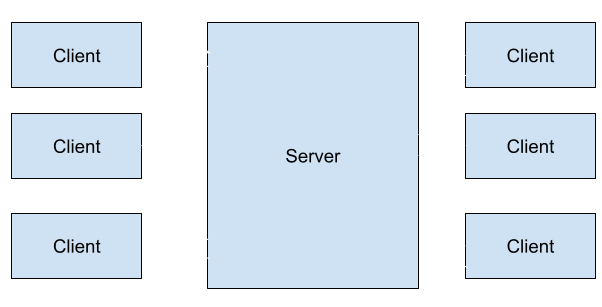
A client is the game program running on a player’s device. It reads the player’s keyboard or controller, draws the world, and exchanges messages with another program over the network.
A server is a program that receives requests from clients and provides a service to them. A game server might keep track of who has joined a match, calculate player movement and damage, and send the resulting positions and health to the connected players. The computer running that program is also often called “the server.” The program can run on a rented machine, on one player’s computer, or beside your client on the same computer during a local test.
Imagine a match where the server calculates movement. It stores a player at (10, 15). The player’s client sends “move north.” The server checks whether the destination is inside the map and free of a wall. If the move is possible, it changes its stored position to (10, 14) and sends that position to the clients. Each client updates the character it draws. If a wall blocks the move, the server keeps (10, 15) and reports that position instead.
In this example
Client program
Server program
Input
Notices the north key press and sends a move request.
Receives the request and identifies the player who sent it.
Simulation
May predict movement to make the controls feel responsive.
Checks the destination and updates the match’s stored position.
Display
Draws the player at the latest known or predicted position.
Sends position updates; a dedicated server usually draws no game window.
This is one common arrangement, called a server-authoritative simulation: the server’s accepted position is the one the clients eventually use. Other games give the server a smaller job, such as hosting a lobby or forwarding players’ inputs. A server does not necessarily simulate every part of a game, and the clients do not necessarily hold identical or complete copies of its data.
This chapter follows that message from intent to bytes, from captured bytes
to a parsed event, and from one event to a legal session transition. A local
chat client and proxy put the pieces together. The final lessons ask how two
programs on one computer can exchange equally well-defined messages without
using a network socket.
The client’s “move north” is an intent: a request for a change, not the final truth. The reply reports what the server actually accepted. If a wall blocked the move, the reply might still say (10, 15), and the client would correct its display.
These programs have separate memory. Changing a position in the client’s memory does not directly change the server’s stored position. They communicate by sending bytes. A client may display a predicted move while it waits, then correct that display when the server’s reply arrives. The next question is how the reply’s bytes become one complete message at the other end.
In a peer-to-peer arrangement, players’ programs can exchange messages
directly. A lobby service may still introduce them, and a relay may carry bytes
when a direct connection is unavailable. Neither service must calculate the match.
A player who hosts a server on their own computer still runs a client/server
arrangement if that server accepts movement and sends the final positions.
The location of the program does not change its job.
Example arrangement
Message path
Who calculates the accepted position here?
Dedicated game server
Each client talks to the server program.
The server program.
Player hosts the game server
Clients talk to the server on a player’s computer.
That server program.
Peers exchange inputs
Players exchange the same ordered input history.
Each peer runs the agreed deterministic simulation.
The last row describes one particular design, often called lockstep.
Peer-to-peer does not automatically mean lockstep: another design can give one
peer responsibility for an object or use different ways to resolve conflicts.
Always ask two separate questions: where do messages go, and whose result is
accepted? Direct communication alone does not prove which copy owns a gold value.
The same movement request, three arrangements. This step-by-step trace needs JavaScript. Here is the code and where the run ends.
start at (10, 15)
request move north
deliver input to the selected participants
check destination against the shared map
accept (10, 14) or keep (10, 15)
draw the accepted position
Each player draws (10, 14). The server’s accepted result determines the final position, even when that program runs on a player’s computer.
Final values: arrangement = dedicated; destination = clear; position = (10, 14); calculator = dedicated server program; blocked = false.
Read every step of the lesson’s example
Step 1, line 1. The worked match begins at the same position in each arrangement.
arrangement = dedicated; destination = clear; position = (10, 15); calculator = dedicated server program.
Step 2, line 2. The player requests north; this request does not itself establish the final position.
arrangement = dedicated; destination = clear; position = (10, 15); calculator = dedicated server program.
Step 3, line 3. The client sends the request to the dedicated server program.
arrangement = dedicated; destination = clear; position = (10, 15); calculator = dedicated server program.
Step 4, line 4. dedicated server program checks the destination. A wall keeps the player in place.
arrangement = dedicated; destination = clear; position = (10, 15); calculator = dedicated server program; blocked = false.
Step 5, line 5. The calculation accepts (10, 14).
arrangement = dedicated; destination = clear; position = (10, 14); calculator = dedicated server program; blocked = false.
Step 6, line 6. Each player draws (10, 14). The server’s accepted result determines the final position, even when that program runs on a player’s computer.
arrangement = dedicated; destination = clear; position = (10, 14); calculator = dedicated server program; blocked = false.
Topology cheatsheet: client/server identifies service roles; peer-to-peer
describes communication between participants; authority identifies the accepted
result. A topology label alone cannot answer all three questions.
TCP is a common transport for a connection between the two programs. It delivers an ordered stream of bytes. A program calls read to take some bytes that have arrived from that stream. TCP does not preserve the game’s message boundaries for that call.
One call to read may return:
half of one message;
exactly one message;
one message plus part of the next;
several messages.
Concretely: if the sender writes two length-prefixed messages back to back, the
receiver has no say in how they turn up.
read #1 -> 00 00 00 02 41 42 00 00 one message, plus half a header
read #2 -> 00 03 43 44 45 the remainder
000
100
200
302
441
542
600
700
800
903
1043
1144
1245
length 2
AB
length 3
CDE
read #1: 8 bytes
read #2: 5 bytes
The 4 + 2 + 4 + 3 = 13 bytes on the wire, numbered from 0. In ASCII, 41 42 is AB and 43 44 45 is CDE. Read #1 stops after box 7, halfway through the second length field, so the receiver must keep boxes 6 and 7 until read #2 brings boxes 8 and 9.
Neither read lands on a message boundary. The receiver has to hold what it has
in a buffer, remove complete messages when enough bytes have arrived, and keep
the leftover for next time. A parser that assumes one read equals one message
works flawlessly over a fast loopback connection while you are testing, then
breaks the moment timing changes.
// Check an untrusted size before allocating its payload buffer.
iflength > max_size {
returnErr(io::Error::new(
io::ErrorKind::InvalidData,
"frame is too large",
));
}
letmutpayload = vec![0_u8; length];
// A successful result contains one complete payload, without the header.
stream.read_exact(&mutpayload)?;
Ok(payload)
}
stream supplies incoming bytes and max_size is the caller’s permitted payload
limit. A successful call returns one payload as a Vec<u8>; a truncated header
or payload produces an I/O error through ?. For a header 00 00 00 02 followed
by 41 42, the returned vector contains just 41 42. The maximum size prevents
a bad length field from requesting absurd amounts of memory. This blocking
helper also needs an appropriate timeout on a real socket so a peer cannot
make it wait indefinitely.
TCP reliability ends at delivering an ordered byte stream to the receiving socket. It does not prove the application parsed a complete message, accepted the request, saved the state, or sent a meaningful reply. The application must provide those guarantees. An acknowledgment can report acceptance, a request ID can identify a repeated request, and a timeout can tell the client when to stop waiting. Decide whether a retry repeats the same request or starts a new one before implementing it.
The same integer has more than one possible byte order. Decimal 258 is
1 × 256 + 2, so as a four-byte number it has one byte worth 256 (01), one byte
worth 1 (02), and two zero bytes. Wesnoth’s four-byte frame length is big
endian, which puts the byte worth the most first:
+000
+100
+201
+302
× 16,777,216
× 65,536
× 256
× 1
1 × 256 + 2 × 1 = 258
Big endian, the order Wesnoth sends on the wire.
On little-endian x86 memory, a native u32 with the same value would usually
appear in the opposite order:
+002
+101
+200
+300
× 1
× 256
× 65,536
× 16,777,216
2 × 1 + 1 × 256 = 258
Little endian, the order of a native u32 in x86 memory: the same value with its four bytes reversed.
Read with the wrong order, the wire bytes 00 00 01 02 become 0x02010000,
which is 2 × 16,777,216 + 1 × 65,536 = 33,619,968: a frame length of more than
33 million bytes. Network code must follow the protocol, not the host CPU’s default. That is why the reader uses u32::from_be_bytes rather than a pointer cast.
A packet is a chunk of bytes sent across a network. That part is
straightforward.
A protocol specifies how programs communicate: how to separate messages,
decode their fields, order the conversation, and respond to invalid input.
Both programs need matching answers to these four questions:
Where does one message end and the next begin? A TCP connection is one
long stream of bytes with no natural gaps, so something has to mark the
boundaries.
What is each part of a message? Which bytes are the length, which are the
message type, which are the payload, and how each of those is encoded.
Which messages are allowed right now? A login reply makes no sense before
a login request. People routinely forget this is part of the protocol at all.
What happens when something is wrong? An unknown message type, a length
that does not fit, a message arriving out of turn.
None of that can be worked out by staring at the bytes, because none of it is
written in them. Both programs have to know it in advance. That is precisely why
reverse engineering a protocol means recovering those four answers — and why a
byte layout on its own only ever answers the second one.
A simple framed message might contain:
[4-byte length][1-byte kind][payload bytes...]
A typed message models the decoded meaning:
enumMessage {
Chat { sender: String, text: String },
Move { unit_id: u32, x: i32, y: i32 },
Ping,
}
This enum is a declaration fragment, not a network reader. After framing and
validation, a parser can turn a move’s fields into Message::Move with a unit
ID and two coordinates; the game logic receives named values instead of raw
byte offsets. The bytes are untrusted until parsing succeeds.
Several layers cooperate when the bot sends one chat message:
chat meaning: sender and text
serialization: WML fields and tags
compression: gzip bytes
framing: four-byte length plus payload
transport: ordered TCP byte stream
network: loopback IP packets
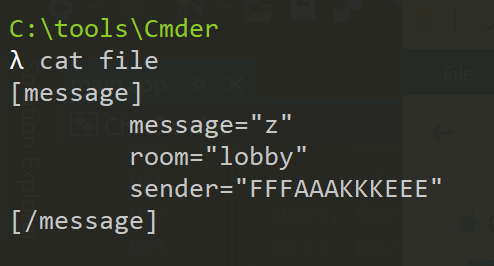
WML, Wesnoth Markup Language, is Wesnoth’s own tagged text format for structured data — chat messages, maps, units, and more all get written as bracketed tags such as [message] and [/message] wrapping quoted key="value" fields. It is the serialization format this chapter keeps reversing.
When something fails, ask which layer broke. A correct TCP connection does not prove the WML is valid. A valid gzip stream does not prove the length prefix used the right byte order.
The receiver undoes the layers in the opposite order, and each step has its own
way to fail:
Serialization turns structured values into bytes. Framing tells the receiver where one serialized message ends. Transport moves bytes between endpoints. Keeping those jobs separate makes both the explanation and the code easier to test.
Watch it happenRecover bytes before accepting a message
Two TCP reads deliver thirteen bytes. Eight bytes supply one complete AB frame and half the next header. The remaining five bytes complete the CDE frame. A separate Wesnoth example then expands gzip into WML, validates a typed chat message, and checks session rules before accepting it.
Read the steps
Read #1 supplies eight bytes. Copy them into the buffer; do not treat that read as one game message.
The first four bytes name length 2. Remove that header and the two payload bytes, 41 42, which spell AB. Keep the two leftover zeros: they are only half of the next header.
Read #2 supplies five more bytes. Append them after the saved pair. The header is now 00 00 00 03 and all three payload bytes have arrived.
Remove the second header and its three-byte payload, 43 44 45, which spells CDE. Both frames are recovered and the receiver buffer is empty.
Framing is only the first layer. For a separate Wesnoth message, the complete payload contains gzip bytes. Decompression expands those bytes into WML text.
The WML parser validates tags and fields. It creates Message::Chat with named sender and text values; malformed data cannot cross this step.
The session checks whether this chat message is allowed now. Only a permitted typed message becomes an accepted event for the game logic.
Read boundaries and message boundaries differ. The later gzip example is separate from the plain ASCII AB/CDE frames.
A multiplayer service handles more than packets. It may keep durable account
and inventory records in a database, reuse expensive results in a cache,
and build a search index for queries such as finding a match by region and
mode. Those are different access patterns: keep data across restarts, avoid
repeating work, and find selected records efficiently. They are not three names
for the authoritative state of a running match.
Processing is asynchronous when the sender can continue before the work
finishes. A request can enter a queue, then a worker handles it later. A queue
acknowledgment might mean “received”; it does not by itself mean “validated,
applied, and saved.” The protocol must say which stage each reply confirms.
There are also two common ways to process a sequence of events:
Processing style
Game-service example
What it must account for
Stream processing
Update a match’s statistics as accepted events arrive
Ordering, late events, duplicates, and how quickly the result is needed
Batch processing
Recompute a leaderboard from a collected set of finished-match results
Which results belong to the batch, when it runs, and how to repeat it safely
“Stream processing” here means processing ongoing events; it does not mean the
TCP byte stream discussed earlier. A service can obtain events from many
connections, files, or queues. A batch deliberately waits for a group of data
and processes that group together. Neither approach implies that a game can
wait for a leaderboard job before processing a player’s movement or damage.
For example, a match event might carry match_id, event_id, and a score
change. If a sender retries it after a lost acknowledgment, the receiver must
recognise the same event rather than add the score twice. Event identity and
retry behaviour belong to the model and protocol, not to whether TCP delivered
the underlying bytes correctly.
Bound queues as well as messages: an unbounded queue consumes memory when
input arrives faster than it can be processed, and its results grow
increasingly stale. Whether a full queue may discard something depends on
what the message means, which
Lesson 9.7 works through for a relay.
A player logs in, joins match 42, and buys an item for 300 coins. The game
backend is the set of services behind those actions. Separating their jobs
explains why a working socket alone cannot prove a successful purchase.
Authentication establishes the player’s identity. A session lets later
requests refer to that authenticated login; it can outlive one TCP connection.
A matchmaker groups compatible players and arranges a match location. It
does not calculate their movement. Microsoft’s PlayFab matchmaking overview
illustrates that service role.
An API gateway routes requests to the appropriate service. Middleware
performs shared checks along that route: validate the session, bound the
request, enforce its permissions, and record its outcome. A load balancer can
spread these entry requests across equivalent gateway instances. The
authoritative match server owns match 42’s accepted positions and damage;
route its commands to that owner instead of a randomly chosen empty worker.
These are logical jobs, which a small project can combine in one program.
Login, match allocation and asset delivery have different owners. These are logical service roles, not a requirement to deploy every box separately. Choose a tab and step through it to see who answers each request:
Log in: the database owns the accountIdentity comes from the durable account record. After that, every request carries a session instead of the password.
ClientGatewayDatabase
1
RequestLog in: name and password
Step 1: Client to Gateway
The client talks to the gateway, the single public entry point. It never talks to the database itself.
2
AloneMiddleware checks the request
Step 2: Gateway (alone)
Shared checks run before any service sees it: bound the size, enforce permissions, record the outcome.
3
RequestLook up the account
Step 3: Gateway to Database
The database is the durable owner of account records and balances. The gateway asks it; it does not keep a copy it would trust more.
4
ReplyAccount found, password matches
Step 4: Database to Gateway
The stored (hashed) password agrees with what was sent, so the player is authenticated.
5
ReplySession token
Step 5: Gateway to Client
A session lets later requests refer to this login. It can outlive one TCP connection, so a dropped socket does not mean logging in again.
All 5 steps shown
Identity comes from the durable account record. After that, every request carries a session instead of the password.
Join match 42: one match server owns the worldThe matchmaker only arranges a place to play. The authoritative match server that owns match 42 decides positions and damage.
ClientGatewayMatch-makerOwner recordMatch server
1
RequestJoin match 42 with the session
Step 1: Client to Gateway
The request names the match and carries the token from the login.
2
AloneMiddleware validates the session
Step 2: Gateway (alone)
An unknown or expired session stops here, before any matchmaking work.
3
RequestFind or allocate match 42
Step 3: Gateway to Match-maker
The matchmaker groups compatible players and arranges a match location. It does not calculate their movement.
4
ControlWhich worker owns match 42?
Step 4: Match-maker to Owner record
A coordination record says which worker owns the match. If that worker fails, a replacement needs a new ownership generation so the old one cannot write late.
5
ReplyOwner: this match server
Step 5: Owner record to Match-maker
The answer names one owner. Commands must go to it, not to a random empty worker.
6
ReplyMatch 42 runs on that server
Step 6: Match-maker to Gateway
The gateway learns where the match lives.
7
ReplyAddress of the match server
Step 7: Gateway to Client
The client now knows where to send its game commands.
8
RequestGame command: move north
Step 8: Client to Match server
Commands go to the owner of match 42, which checks them against the rules.
9
ReplyAccepted position (10, 14)
Step 9: Match server to Client
The server keeps the accepted state; each client draws what the server accepted. A wall would have left the position at (10, 15).
All 9 steps shown
The matchmaker only arranges a place to play. The authoritative match server that owns match 42 decides positions and damage.
Download a patch: assets come from the CDNLarge files that are the same for every player come from a content delivery network, not from the match server or the database.
ClientCDN edgeObject storage
1
RequestGet patch file v12
Step 1: Client to CDN edge
The patch is a versioned file, so any nearby copy is as good as the original.
2
AloneCache lookup: no copy yet
Step 2: CDN edge (alone)
This edge has not served the file before, so it must go to the origin once.
3
RequestFetch the file by its key
Step 3: CDN edge to Object storage
Object storage keeps larger files addressed by keys, such as versioned patches and replay recordings. It is the origin, the owner of the original bytes.
4
DataFile bytes
Step 4: Object storage to CDN edge
The origin returns the file.
5
DataFile bytes, copy kept at the edge
Step 5: CDN edge to Client
The edge stores a copy for later requests that are eligible for caching.
6
RequestThe next player asks for v12
Step 6: Client to CDN edge
A different player, near the same edge, asks for the same file.
7
DataServed from the edge
Step 7: CDN edge to Client
A cache hit avoids the origin fetch. Personal account responses follow separate rules: an old cached balance must never authorize a new purchase.
All 7 steps shown
Large files that are the same for every player come from a content delivery network, not from the match server or the database.
Three questions, three ownersEach kind of data has one place that is allowed to answer authoritatively. The gateway routes; it owns none of them.
ClientGatewayMatch serverDatabaseCache
1
RequestAsk: move north
Step 1: Client to Gateway
A request to change the world. The gateway checks it and routes it, but does not decide the result.
2
RequestRoute to the match’s owner
Step 2: Gateway to Match server
Positions and damage belong to the authoritative match server for that match.
3
ReplyAccepted position (10, 14)
Step 3: Match server to Client
Owner of positions: the match server. Its answer is the truth the clients show.
4
RequestAsk: what is my balance?
Step 4: Client to Gateway
A question about money, which must be exactly right.
5
RequestRead the balance
Step 5: Gateway to Database
Owner of balances and inventory: the database, in protected, durable storage.
6
ReplyBalance: 1,000 coins
Step 6: Database to Client
A current, authoritative answer. A cached value could be old, so it is never used to approve spending.
7
RequestAsk: how many players in the lobby?
Step 7: Client to Gateway
A question where a slightly old answer is harmless.
8
RequestRead the cached count
Step 8: Gateway to Cache
A cache holds a reusable result that can be rebuilt. It owns no original data.
9
ReplyCount, possibly a few seconds old
Step 9: Cache to Client
Fast and cheap, and good enough for a label. If it is lost, it is rebuilt from the real data.
All 9 steps shown
Each kind of data has one place that is allowed to answer authoritatively. The gateway routes; it owns none of them.
A database keeps structured, durable account balances and inventory.
Object storage keeps larger files addressed by keys, such as versioned
patches and replay recordings. A cache reuses a result that can be rebuilt;
a CDN, or content delivery network, brings eligible asset copies closer to
players. An asset cache hit can avoid an origin fetch, as Cloudflare’s request lifecycle
explains. Personal account responses need separate authorization and cache
rules. A cached lobby count is useful; its old balance must not authorize a
new purchase.
The player has 1,000 coins. Request P7 asks for the 300-coin item. Validate the
server’s price and current balance, debit to 700, grant the item, and record
P7’s result inside one transaction: either that whole change commits or
none does. Concurrent requests also need appropriate isolation or locking;
merely surrounding unsafe read-then-write logic with a transaction is
insufficient. PostgreSQL’s isolation guide
explains these concurrency guarantees and possible transaction retries.
If the reply is lost, retry the same request ID. Idempotency means that
repeat has the same effect: return the recorded result, without another debit
or item. Scope the ID to its account, reject a changed payload under the same
ID, and save the receipt atomically with the effect.
Purchase P7 commits its debit, item and receipt together; retrying P7 returns that receipt. The separate leaderboard example may display an older score until its derived view catches up. The order of the steps is the point, so step through each tab:
Buy an item: one transaction, three changesThe player has 1,000 coins and asks for a 300-coin item with request P7. The debit, the item and the receipt commit together or not at all.
ClientGatewayGame serviceDatabase
1
RequestBuy the item for 300 coins (P7)
Step 1: Client to Gateway
P7 is the request ID. The client states what it wants, but not what it costs: the server knows the price.
2
RequestForward P7 for this account
Step 2: Gateway to Game service
After the middleware checks, the request reaches the service that owns purchases.
3
ControlBegin transaction
Step 3: Game service to Database
From here to the commit, the changes are all-or-nothing.
4
RequestRead the price (300) and the balance (1,000)
Step 4: Game service to Database
The server’s own price decides the cost. The read is protected by isolation or a lock, so a second request cannot spend the same coins in between.
5
AloneDebit to 700, add item, record P7
Step 5: Database (alone)
1,000 − 300 = 700. Three changes: the coins, the item, and the receipt for P7. None of them is visible to anyone else yet.
6
ControlCommit
Step 6: Game service to Database
Only now do all three changes become visible together. A crash before this point would have undone every one of them.
7
ReplyCommitted
Step 7: Database to Game service
The purchase is durable.
8
ReplyItem granted, balance 700 (P7)
Step 8: Game service to Gateway
The reply is sent only after the commit, so the player never sees an effect that could still vanish.
9
ReplyItem granted, balance 700 (P7)
Step 9: Gateway to Client
The client shows the new balance.
All 9 steps shown
The player has 1,000 coins and asks for a 300-coin item with request P7. The debit, the item and the receipt commit together or not at all.
Retry after a lost reply: the receipt answersThe reply to P7 never arrives, so the client sends P7 again. Idempotency means the repeat has the same effect as one request: no second debit, no second item.
ClientGatewayGame serviceDatabase
1
AloneThe reply to P7 never arrives
Step 1: Client (alone)
The purchase did commit, but the client cannot know that: the network lost the answer.
2
RequestRetry the same request ID: P7
Step 2: Client to Gateway
Because the ID is the same, the server can tell this is a repeat and not a second purchase.
3
RequestForward P7
Step 3: Gateway to Game service
The retry takes the same route as the original.
4
RequestLook up the receipt for P7
Step 4: Game service to Database
The ID is scoped to the account. A changed payload under the same ID would be rejected, not merged.
5
ReplyReceipt found: item granted, balance 700
Step 5: Database to Game service
The receipt was saved in the same transaction as the effect, so it exists exactly when the purchase does.
6
ReplyThe recorded result of P7
Step 6: Game service to Gateway
The service returns the stored result. It does not debit again and does not grant a second item.
7
ReplyItem granted, balance 700 (P7)
Step 7: Gateway to Client
The client finally gets its answer. The balance is still 700, not 400.
All 7 steps shown
The reply to P7 never arrives, so the client sends P7 again. Idempotency means the repeat has the same effect as one request: no second debit, no second item.
Leaderboard: allowed to lag, in a known wayAn accepted score is durable at once, but the leaderboard is a derived view. It may show the old score until it catches up, which is fine for a ranking and wrong for a balance.
Match serverDatabaseCachePlayer
1
RequestSave the accepted score: 10 to 12
Step 1: Match server to Database
The score is a fact the match server has accepted. The database stores it durably.
2
ReplyCommitted: the score is 12
Step 2: Database to Match server
Anyone who reads the database now sees 12.
3
RequestOpen the leaderboard
Step 3: Player to Cache
The page reads a derived view held in a cache, not the database, so the database stays free for important work.
4
DataShows 10: an older view
Step 4: Cache to Player
The view has not heard about the 12 yet. Showing a clearly dated value is acceptable here.
5
ControlRebuild the view from the new score
Step 5: Database to Cache
Eventual consistency promises that the view converges once updates stop and propagation succeeds. It does not promise how long that takes.
6
RequestRefresh the leaderboard
Step 6: Player to Cache
The player asks again, some time later.
7
DataShows 12
Step 7: Cache to Player
The view caught up. The same lag would not be acceptable for authorizing a purchase, which needs a current protected decision.
All 7 steps shown
An accepted score is durable at once, but the leaderboard is a derived view. It may show the old score until it catches up, which is fine for a ranking and wrong for a balance.
Consistency describes which writes a read can observe. A strongly
consistent read respects completed writes within its promised scope. A weaker
read can return an older replica or cache value. Eventual consistency
promises convergence when updates stop and propagation succeeds, not a fixed
maximum delay. Currency authorization needs a current protected decision;
a leaderboard can tolerate a clearly dated older view. Cosmos DB’s consistency definitions
show why these guarantees must be stated explicitly.
Optional: explore the smaller concurrency problem below. Starting at 1,000,
a reward of 500 and purchase of 300 should leave 1,200. Overlapping reads and
writes can lose one change. Its local lock illustrates ordering; a backend
must enforce its database transaction rules across all participating processes.
This simulation needs JavaScript. The lesson text around it works through the same numbers.
Sharding partitions work or records by a key: independent matches can run
on different workers. A shared world crossing shard boundaries additionally
needs ownership handoffs and ordered cross-boundary actions. Moving a job to
another process also adds a message boundary, possible failures, and delay, so
start with a small correct local service and distribute work when measurements
justify it. Azure’s sharding pattern
describes the partitioning tradeoff.
Coordination records which worker owns match 42. On failure, a replacement
needs recoverable state and a new ownership generation; an expired worker
must be prevented from committing late writes. Electing a replacement alone
cannot reconstruct lost match state. Leader-election guidance
explains leases and their failure limits. Retried result events also need
persistent event IDs to avoid awarding the same win twice.
A toy 60-tick-per-second server has about 16.7 milliseconds per simulation
step. That budget is distinct from network round-trip delay. Keep slow replay
uploads and leaderboard work outside the movement path. Measure queue depth,
bytes per player, and slow-tail latency before optimizing. Spatial indexes can
reduce repeated full-world searches; smaller state deltas reduce bandwidth,
while compression spends CPU time. Extra workers cannot repair an undefined
ownership rule or an overloaded shared database.
UDP preserves datagram boundaries but does not guarantee delivery, order, or uniqueness. Fast games often tolerate those tradeoffs for time-sensitive state.
A later position update can make an older one useless, so freshness may matter more than retransmission. In contrast, a one-time inventory change may need explicit ordering and acknowledgment. Choose behavior per message kind instead of labeling an entire game “reliable” or “unreliable.”
Do not assume a game uses only one protocol. It might use TCP for login/chat and UDP for movement.
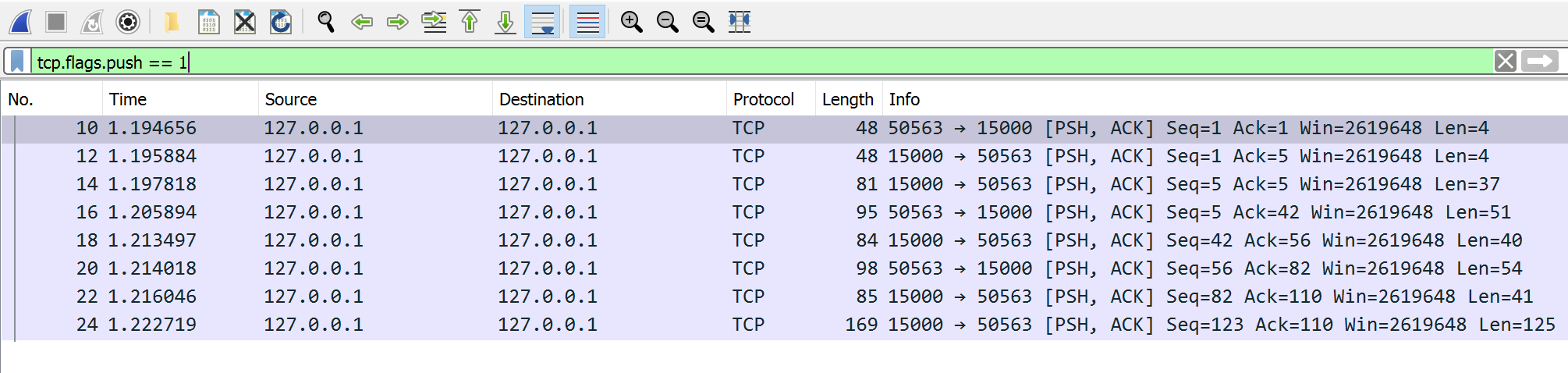
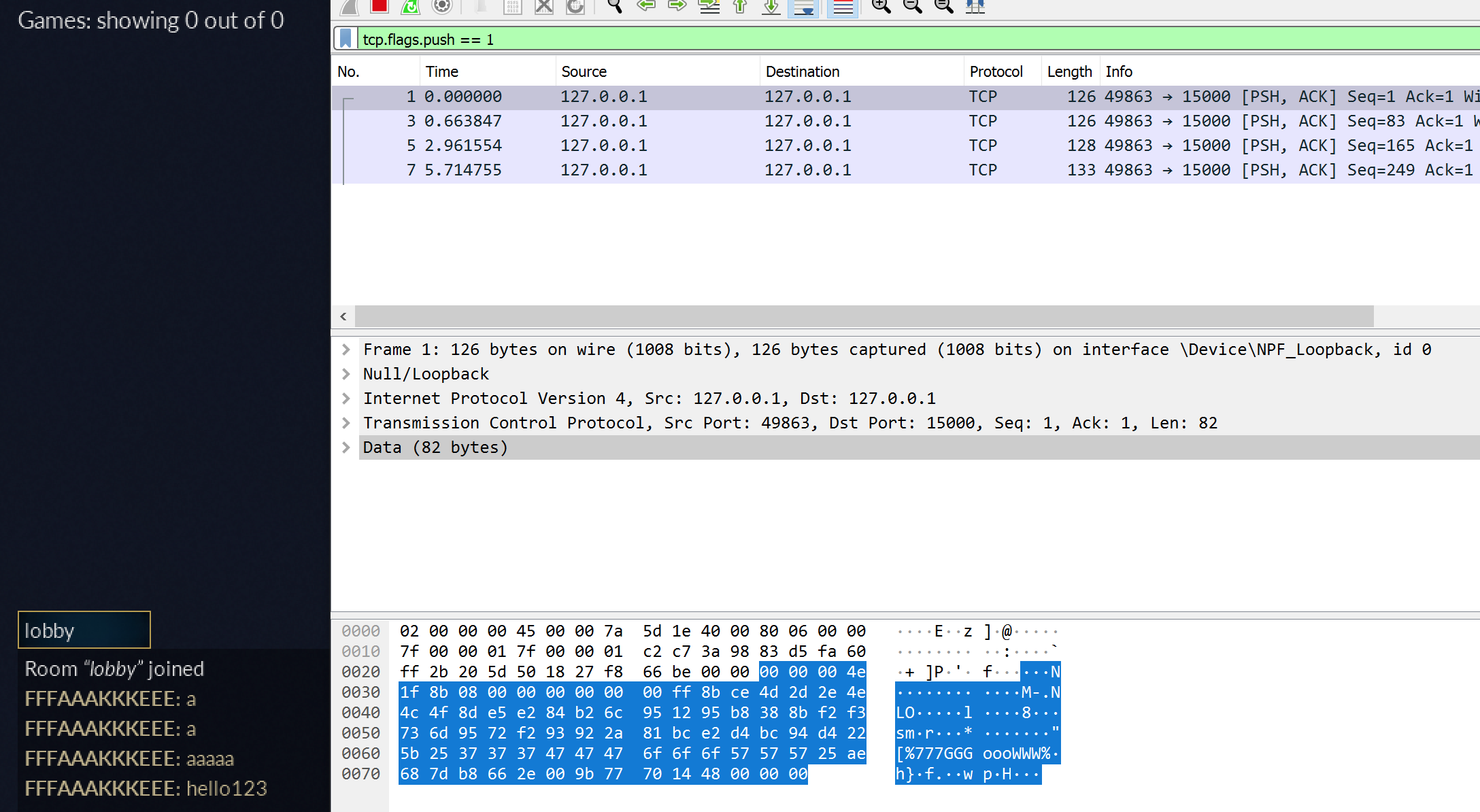
127.0.0.1 means the same computer; 15000 selects the server’s listening
port. We use loopback and a local test server for this section. A successful
result is a connected stream; framing and protocol checks still remain.
If a protocol uses modern encryption correctly, a packet capture shows encrypted bytes, addresses, sizes, and timing—not readable messages. Do not try to defeat encryption or certificate checks.
The capture, replay, and proxy examples use loopback or a local test server. That keeps timing, state changes, and failures observable while you learn what each protocol layer contributes.
Now that the message boundary and its byte order have a purpose, Lesson 9.3 records a real local exchange and asks which captured bytes correspond to one controlled action.
Lesson 9.2
What the Server Can See
The server receives requests and runs the shared simulation. It can see
the accepted position, inventory, cooldowns, and command history. It does
not directly see what a player was thinking or every program on their
computer. Build checks around what the server actually knows.
Validation checks types, ranges, and current game state before data can
change the world.
For a movement command, check the input’s finite numeric values and allowed
range. Then simulate movement using server-owned speed, collision, and
time. A client-reported final position cannot replace those steps.
The permitted range must match the movement being simulated. A knockback, vehicle,
or teleport ability changes what movement is possible. Checking only a
single speed ceiling can mistake a valid ability for cheating.
A purchase needs the player’s identity, the item’s current price, and
their server-owned balance. Apply the debit and reward together. Otherwise,
two concurrent requests could both spend the same old balance, like the
lost-update problem in the threading lessons.
A rate limit bounds work or requests within a period. Limit expensive
queries, parser allocation, and accepted actions separately. Receiving a
burst after network delay does not mean the player earned extra simulation
time.
Lesson 9.1 separated framing, parsing, and permitted messages in each session state.
Keep that order here. Reject an invalid length before allocating its
claimed buffer. Reject an action in the wrong session state before changing
the world. Handle duplicates according to the action’s documented retry
behavior.
Record the original server timing as well as the command’s claimed timing.
Source’s lag-compensation checks in Lesson 9.10 illustrate why the server
must bound and compare those claims rather than accepting arbitrary history.
Fog of war limits what a client learns: hide game information until the player
is entitled to observe it. A server that sends every hidden enemy position
and merely hides the corresponding drawing has already disclosed the data.
In the toy picture, a wall blocks the observer’s sightline. The server
knows the enemy’s position but sends none to this client. The enemy moves
above the wall. Only after the new sightline clears the wall does its
position enter the client’s observation.
The server withholds what the observer cannot seeIn the toy wall example the server knows the enemy position, but a wall blocks the sightline, so it sends nothing about the enemy.
ServerThis client
1
AloneEnemy position is known here
Step 1: Server (alone)
The server simulates the whole world, including the enemy.
2
AloneSightline crosses the wall
Step 2: Server (alone)
The observer’s line of sight to the enemy is blocked.
3
ControlSend nothing about the enemy
Step 3: Server to This client
A hack on this client cannot reveal what the client was never given.
All 3 steps shown
In the toy wall example the server knows the enemy position, but a wall blocks the sightline, so it sends nothing about the enemy.
The position is disclosed once the view is clearWhen the enemy moves above the wall and the sightline clears, the position becomes part of this client’s observation.
ServerThis client
1
AloneEnemy moves above the wall
Step 1: Server (alone)
The world changes on the server.
2
AloneSightline is clear
Step 2: Server (alone)
Nothing blocks the observer’s view of the enemy now.
3
DataEnemy position enters the observation
Step 3: Server to This client
Only now does the server send the position to this client.
All 3 steps shown
When the enemy moves above the wall and the sightline clears, the position becomes part of this client’s observation.
Filter state before sending the message. This step-by-step trace needs JavaScript. Here is the code and where the run ends.
read the selected inputs
evaluate each stated condition
combine the required conditions
perform the effect only when accepted
otherwise retain the old state
report the result and its limits
Result: the outgoing record has no hidden-enemy position. Client drawing cannot recover an absent field.
Final values: position = 8; wall = yes; line_clear = false; accepted = false; sent_position = absent.
Read every step of the lesson’s example
Step 1, line 1. Start with the selected inputs and follow how the next operation changes the state.
position = 8; wall = yes.
Step 2, line 2. The server can retain an entity while omitting its position from this client’s record.
position = 8; wall = yes; line_clear = false.
Step 3, line 3. Accept only when the required conditions all hold.
A wall hides an enemy until the server finds a clear sightline.
Read the steps
The server knows where the enemy is. A wall blocks this observer, so the client has no enemy position.
The enemy moves above the wall. The server updates its geometric visibility test.
The new sightline clears the wall. This position now qualifies for disclosure.
Only now does a position update cross into the client observation.
The client draws the received enemy. Hiding a label would not have removed information; withholding the position did.
This toy sightline shows the policy boundary. Production visibility also handles latency and geometry.
Real visibility systems must account for more than this one line.
Animation, sound, team information, latency, and other players’ perspectives
can make an entity relevant. Reveal it early enough to avoid visible
pop-in, but do not disclose unrelated hidden state.
Lesson 7.8 applies the same server-owned visibility decision to radar markers.
A replay records enough accepted state and input to inspect a past
sequence. Store the game version and the timing used to apply commands alongside it. A video
from one client can omit information available to the server and include
prediction or interpolation differences.
Replay review helps distinguish an impossible state from an unusual but
legal tactic. It also reveals what a check was unable to observe. A replay
that omits raw input edges cannot prove the timing of those omitted edges.
Machine learning fits a model to examples instead of using only hand-
written checks. It can rank large numbers of replay segments for review.
Its training labels can contain mistakes, and a new game update can change
the input distribution. Test on held-out legitimate matches, different
devices, and the updated game. A model score is a signal with measured
limits, not an explanation of guilt by itself.
Lesson 9.1 showed that one game message can arrive across two TCP reads. A packet capture lets us inspect the bytes on the way, but its packet rows are not automatically game-message rows. We will send one distinctive lobby message, then follow its bytes in both directions.
An application message is not the same thing as an IP packet or TCP segment.
Each layer has a different job:
game protocol message login, chat, lobby update
TCP byte stream ordered, reliable bytes between two sockets
IP packet routed data between host addresses
link/loopback capture what the capture interface records
TCP may split one game message across several segments or combine bytes from
several messages in one segment. Retransmissions can repeat packet data. The
receiving application sees an ordered stream, so protocol parsing needs its own
framing rule such as a length prefix or delimiter.
This board needs JavaScript to move things around. Here is the lesson’s sorting:
Game protocol message
A login message. Login, chat and lobby updates are game protocol messages. That is the level your parser works at.
A length prefix saying where a message ends. The receiver sees an ordered stream, so protocol parsing needs its own framing rule such as a length prefix or a delimiter.
TCP byte stream
Bytes arrive in order, none missing. That is the TCP promise: an ordered, reliable stream of bytes between two sockets.
The four-tuple: source address and port, destination address and port. A TCP connection is identified by these four values, which is why one connection reads differently in each direction.
One game message split across several segments. TCP may split one message across several segments or combine bytes from several messages into one. A segment boundary is not a message boundary.
IP packet
Routing data between host addresses. Moving data between hosts by address is the IP packet’s job.
Capture
The row you see in the capture tool. A capture records bytes and timing at one point. A row there is not automatically a game message, and it cannot say why it was sent.
A socket is an operating-system object representing one endpoint. A TCP
connection is identified by source address, source port, destination address,
and destination port—the four-tuple used below.
Our capture stays local. To understand the wider journey, imagine a client
joining match 42 and downloading its map from assets.example. Configuration,
name lookup, delivery, and game permission solve different parts of that trip.
On a typical IPv4 LAN, DHCP gives a device an address lease and network
configuration; options can supply a router and DNS servers. It configures the
device, not the remote game’s identity. DHCP
and its options specify that exchange.
Static configuration and other address-assignment systems are also possible.
DNS resolves a name such as assets.example to records including IP
addresses. A resolver can reuse an answer until its cache lifetime expires;
name resolution does not deliver the map. The client then connects to the
chosen endpoint. DNS concepts
explain this separate lookup.
HTTP is the web’s request/response protocol. HTTPS carries that exchange
over an authenticated, encrypted connection. A CDN can serve a cached map
from an edge location. A cache miss may require
an origin fetch; DNS answer caching and content caching have different
lifetimes. Account requests still need their own authentication and cache
policy. Cloudflare’s request journey
shows these boundaries.
DHCP: a device joins the LANA device with no address asks the network for a lease. The reply also names the router and the DNS servers.
New deviceDHCP server
1
ControlDISCOVER (broadcast)
Step 1: New device to DHCP server
The device has no address yet, so it shouts to everyone on the LAN: is there a DHCP server?
2
ControlOFFER: 192.168.1.40
Step 2: DHCP server to New device
The server proposes an address and a lease time, plus the router and DNS server addresses.
3
ControlREQUEST: I accept 192.168.1.40
Step 3: New device to DHCP server
The device accepts one offer. If several servers answered, this tells the others to withdraw.
4
ControlACK: lease confirmed
Step 4: DHCP server to New device
The lease is now recorded. The device configures itself; it has learned nothing about any game server yet.
All 4 steps shown
A device with no address asks the network for a lease. The reply also names the router and the DNS servers.
DNS: from a name to an addressA resolver follows the name to the CDN and returns one address. Nothing is downloaded yet.
ClientResolverSite's DNSCDN's DNS
1
Requestassets.example?
Step 1: Client to Resolver
The client asks the resolver it was configured with (often learned through DHCP).
2
AloneCheck cache: nothing fresh
Step 2: Resolver (alone)
A cached answer that has not expired would end the lookup here.
3
Requestassets.example?
Step 3: Resolver to Site's DNS
The resolver asks the name servers responsible for the name. Root and top-level referrals are left out to keep the picture short.
4
ReplyCNAME assets.example.cdn.example
Step 4: Site's DNS to Resolver
The site points its name at the CDN’s name. The site’s DNS does not hold the file or the final address.
5
Requestassets.example.cdn.example?
Step 5: Resolver to CDN's DNS
The resolver now asks the CDN’s name servers about the CDN’s own name.
6
ReplyA 203.0.113.7 · TTL 30 s
Step 6: CDN's DNS to Resolver
The CDN chooses an edge near the resolver and sets a short lifetime, so it can steer players elsewhere soon.
7
Reply203.0.113.7
Step 7: Resolver to Client
The resolver remembers the answer for 30 seconds and returns it. The client has an address, not the map.
All 7 steps shown
A resolver follows the name to the CDN and returns one address. Nothing is downloaded yet.
CDN edge with a fresh copyAfter the connection and TLS handshake, a nearby edge answers from its cache.
ClientCDN edge
1
RequestHTTPS: GET /maps/42.bin
Step 1: Client to CDN edge
The client connects to 203.0.113.7, completes the TLS handshake, then asks for the map.
2
AloneCache lookup: fresh copy found
Step 2: CDN edge (alone)
The edge may reuse a stored copy while the origin’s cache rules say it is still fresh.
3
Reply200 OK + map bytes
Step 3: CDN edge to Client
The map arrives from a nearby machine; the origin never saw this request.
All 3 steps shown
After the connection and TLS handshake, a nearby edge answers from its cache.
CDN edge without a copyA miss climbs the cache hierarchy toward the origin, and each cache may keep the answer on the way back.
ClientCDN edgeRegional cacheOrigin
1
RequestHTTPS: GET /maps/42.bin
Step 1: Client to CDN edge
The request is the same as before; the client cannot tell hit from miss.
2
AloneCache lookup: miss
Step 2: CDN edge (alone)
The edge has no usable copy.
3
RequestGET /maps/42.bin
Step 3: CDN edge to Regional cache
A larger regional cache is asked before the distant origin.
4
RequestGET /maps/42.bin (miss too)
Step 4: Regional cache to Origin
The regional cache also misses, so it fetches from the origin storage.
5
Reply200 OK + map bytes
Step 5: Origin to Regional cache
The origin supplies the file. The regional cache stores a copy if the response headers allow it.
6
Reply200 OK + map bytes
Step 6: Regional cache to CDN edge
The edge receives the file and can store it too.
7
Reply200 OK + map bytes
Step 7: CDN edge to Client
The player waits for the whole chain once. The next nearby request is a hit until the copy expires.
All 7 steps shown
A miss climbs the cache hierarchy toward the origin, and each cache may keep the answer on the way back.
An IPv4 lease configures the client. DNS returns an address; only the later HTTPS connection retrieves the asset from the CDN, with an origin fetch on a cache miss.
A LAN, or local area network, joins nearby devices through links such as
Ethernet or Wi-Fi. In this example, an Ethernet frame carries an IP packet,
which carries a UDP datagram, which carries game bytes. This wrapping is
encapsulation. A switch forwards link frames; a router forwards the IP
packet onto another link with a new link frame. Physical signaling carries the
bits on each link.
The OSI model names seven conceptual layers: application, presentation,
session, transport, network, data link, and physical. The Internet’s TCP/IP
model commonly groups application work, transport, Internet/IP, and link
work. These models describe responsibilities, not seven mandatory headers.
Our existing layer board remains useful: identify the job before assigning a
name. Internet host requirements
organize the protocol suite by these responsibilities.
The journey of one game messageHeaders are added on the way down, then removed on the way up. Play it step by step, or change the message size.
A 24-byte message becomes a 32-byte datagram, a 52-byte IP packet and a 70-byte frame: 46 of 70 bytes (66%) are wrapping.
Sending computer
1
User spaceGame code calls send()
The message sits in the program’s own memory. The program hands it to the socket API; it builds no headers itself.
2
KernelThe kernel copies it into the socket’s send buffer
The operating system copies the bytes out of the program’s memory into a buffer owned by the socket. send() can return once the copy is made; that says nothing about arrival.
3
KernelThe transport layer adds its header
UDP adds 8 bytes: ports, length, checksum. TCP adds 20: ports, sequence and acknowledgement numbers, flags, window, checksum. The result is a datagram (UDP) or a segment (TCP).
4
KernelThe IP layer adds the IP header
Twenty bytes with the source and destination addresses, a time-to-live and the protocol number. The kernel also consults its routing table to choose the next hop and the outgoing interface. The result is a packet.
5
KernelThe packet waits in an output queue
When several packets are ready, a queue decides which one the card gets next. Linux calls this the queueing discipline, or qdisc. Other systems have comparable queues under other names.
6
KernelThe link layer wraps it in an Ethernet frame
A 14-byte header holds the next hop’s MAC address, this card’s MAC address and the EtherType (0x0800 means IPv4). A 4-byte check sequence goes at the end, usually computed by the card. A frame shorter than 64 bytes is padded.
7
Network cardThe driver hands the frame to the card, which sends bits
The driver places a descriptor for the frame in a ring buffer in memory. The card reads the frame by direct memory access and turns each byte into signals on the cable or radio: bits.
Between the computers
8
On the wireA switch forwards the frame
A switch reads only the Ethernet header and sends the frame out of the port where the destination MAC address was last seen. The IP packet inside is untouched.
9
On the wireA router moves the packet onto the next link
The router throws away the old Ethernet header and check sequence, lowers the IP time-to-live by one, recalculates the IP header checksum and wraps the same packet in a new frame. The transport header and the data are not touched.
Receiving computer
10
Network cardThe receiving card accepts the frame
The card checks the destination MAC address and the check sequence; a damaged frame is dropped. A good frame is written into a ring buffer in memory by direct memory access, and the card raises an interrupt.
11
KernelAn interrupt, then deferred processing
The CPU pauses its work to run a short interrupt handler, which schedules the longer work for later. On Linux that is a softirq run by ksoftirqd; on Windows it is a deferred procedure call. That work empties the ring buffer.
12
KernelThe Ethernet header is removed
The EtherType says the payload is IPv4, so the packet goes to the IP layer. The link header and trailer have done their one-hop job.
13
KernelThe IP header is checked and removed
The kernel verifies the header checksum and that the destination address is this computer, then reads the protocol number (17 means UDP, 6 means TCP) to choose the transport layer.
14
KernelThe transport layer finds the socket
The destination port (for TCP, the whole four-tuple) identifies the socket. TCP also acknowledges, reorders and discards duplicates. The data is placed in the socket’s receive buffer.
15
User spaceGame code calls recv()
The kernel copies the bytes from the receive buffer into the program’s memory. Only now does the program see them. With TCP, one recv() need not return exactly what one send() sent, so the game must mark its own message boundaries.
All 15 steps shown
Complete journey shown.
The same layers, named two ways. The OSI model is a teaching map; real stacks follow the TCP/IP grouping.
Maximum data in one Ethernet frame: 1,500 bytes of IP packet, so 1460 bytes of TCP data or 1,472 bytes of UDP data without fragmentation.
The same game bytes are wrapped inside a UDP datagram or TCP segment, an IP packet and an Ethernet frame. A router replaces the link wrapper for the next hop. The OSI/TCP-IP mapping is conceptual, not a literal count of wire headers.
Choose the delivery contract, then the application protocol
If middle bytes are lost, TCP recovers them before exposing later bytes in
its ordered stream. UDP can deliver a later datagram without the missing
one; the game decides whether to replace stale state or add its own recovery.
Neither transport acknowledgment proves the server accepted a purchase.
TCP and UDP
specify those different contracts.
One lost packet: TCP waits, UDP moves onFive messages leave one per tick and need one tick to arrive. Packet 3 is lost on its first try. Choose other packets, or move through time.
TCP Gives the game bytes in order, so one missing packet holds back everything after it.
TCP timeline. Columns are ticks of time; messages are numbered from 1.
Row
0
1
2
3
4
5
6
7
Sent
1
2
3✕
4
5
3↻
Arrives
1
2
4
5
3
Held back
4
45
Game receives
1
2
345
UDP Gives the game each datagram as it arrives, in whatever order, and never resends.
UDP timeline. Columns are ticks of time; messages are numbered from 1.
Row
0
1
2
3
4
5
6
7
Sent
1
2
3✕
4
5
Arrives
1
2
4
5
Game receives
1
2
4
5
1 sent
1✕ lost on the way
1↻ sent again by TCP
1 reaches the computer
1 held back
1 handed to the game
TCP resends message 3 and gives the game all 5 in order, finishing at tick 7. Messages that had already arrived were held back: message 4 waits 3 ticks; message 5 waits 2 ticks. UDP gives the game messages 1, 2, 4 and 5 as each arrives and never delivers 3 on its own: the game decides whether to ask again or move on to newer data.
The timer is a simplification: real TCP can resend sooner when later packets arrive and the receiver keeps repeating the same acknowledgement. The ordering rule is real. TCP also needs a three-packet handshake before its first data; UDP can send at tick 0.
What each wrapper costs: a 8-byte UDP header or a 20-byte TCP header
UDP · 8 bytes
Source port16 bitsDestination port16 bits
Length16 bitsChecksum16 bits
TCP · 20 bytes without options
Source port16 bitsDestination port16 bits
Sequence number32 bits
Acknowledgement number32 bits
Offset4 bitsReserved + flags12 bitsWindow16 bits
Checksum16 bitsUrgent pointer16 bits
Options0 to 40 more bytes, only when needed
Source port
Identifies the sending socket on its computer.
Destination port
Identifies the receiving socket on its computer.
Length
Header plus data, in bytes.
Checksum
Detects corrupted bits in the header and data.
Sequence number
Position in the byte stream of the first data byte in this segment.
Acknowledgement number
The next byte the sender of this segment expects to receive.
Offset
Header length in 32-bit words; 5 means 20 bytes.
Reserved + flags
Flag bits such as SYN, ACK, FIN and RST say what kind of segment this is.
Window
How many more bytes the sender of this segment will accept (flow control).
Urgent pointer
Used only with the URG flag, which is rarely used.
TCP application messages still need framing: a lost packet changes timing, not message boundaries.
A socket is the local operating-system endpoint already introduced above.
A WebSocket is a two-way framed-message protocol, useful for browser lobby
chat. The RFC 6455 handshake uses
HTTP/1.1 Upgrade; wss protects the exchange with TLS, Transport Layer Security, which
authenticates the server and protects data in transit. HTTP/3 also has a WebSocket mapping,
so an Upgrade handshake is not universal. Game authorization remains separate.
QUIC v1 runs over UDP but supplies its own reliable streams and loss
recovery, using TLS 1.3 for connection security. HTTP/3 maps HTTP requests
and responses onto QUIC. Loss affecting one stream need not block unrelated
stream delivery, although streams share connection congestion limits. QUIC is
not “unreliable HTTP,” and HTTP/3 is not a synonym for every game’s UDP
protocol. The standards are QUIC v1,
QUIC with TLS, and HTTP/3.
Two message paths, two socket typesBoth end at a socket, but the layers above it differ. Point at a layer to read what it does.
Secure WebSocket (RFC 6455)
HTTP/3 (RFC 9114)
Game message
The text or bytes your game sends, such as "join lobby 7". Your own rules decide what it means and who may send it.
WebSocket frame
A small header (opcode, length, a mask on frames the client sends) followed by the message. Frames keep message boundaries that raw TCP does not have.
TLS 1.3 record
Encrypts and authenticates the frames. The server’s certificate proves who it is.
TCP connection
Delivers the TLS bytes reliably and in order. One lost packet holds back everything after it on this connection.
TCP socket
The program’s endpoint for this connection, named by local and remote address and port. A socket is an operating-system object, not a message format.
IP packets and link frames
Routers move the packets; each link wraps them in its own frame.
Game request
An HTTP request such as a map download or an account call.
HTTP/3 frames
HEADERS and DATA frames carried on one request stream.
QUIC streams
Independent ordered byte streams inside one QUIC connection. Loss on one stream need not stall the others.
QUIC packets with TLS 1.3
QUIC does its own loss recovery, congestion control and encryption. TLS 1.3 is part of its handshake.
UDP socket
A datagram endpoint. Each QUIC packet travels inside one UDP datagram.
IP packets and link frames
The same delivery path as before.
Application meaning
Protection
Delivery
Routing and links
Inside one QUIC datagram (after the handshake)
UDP header Visible to the network
Source port, destination port, length and checksum. Routers, firewalls and address translators read these, so they cannot be hidden.
Flags byte Header-protected
Says this is a short-header packet and holds the key phase and packet-number length. Some of its bits are masked by header protection.
Destination connection ID Visible to the network
Lets the receiver find the connection even if the sender’s address changed, for example when a phone moves from Wi-Fi to mobile data.
Packet number Header-protected
Counts packets so the receiver can acknowledge them. Header protection hides it from observers.
STREAM frame Encrypted and authenticated
Stream ID, offset, length and a slice of that stream’s data. The offset lets the receiver put slices back in order even if packets arrive out of order.
Other frames Encrypted and authenticated
Acknowledgements, flow-control updates and more can share the same packet with STREAM frames.
Authentication tag Encrypted and authenticated
A checksum only the two endpoints can compute. If any protected byte changed on the way, the packet is rejected.
Handshake packets use a longer header with version and both connection IDs; this is the layout most packets have afterwards. Sizes follow QUIC version 1 (RFC 9000 and RFC 9001).
To compare how these protocols begin, step through one conversation for each.
HTTP/1.1 over TCPA connection first, then one request and one response.
ClientServer
1
ControlTCP handshake: SYN
Step 1: Client to Server
HTTP/1.1 normally runs on TCP, so the connection is set up first. The three handshake packets are drawn as one step here.
2
RequestGET /lobby HTTP/1.1
Step 2: Client to Server
The request names a method, a path and headers. HTTP itself is readable text.
3
Reply200 OK + body
Step 3: Server to Client
The response carries a status code, headers and the content. The connection can stay open for the next request.
All 3 steps shown
A connection first, then one request and one response.
HTTPS: HTTP inside TLS 1.3The same request, after both sides have agreed on keys.
ClientServer
1
ControlTCP handshake first
Step 1: Client to Server
TLS rides on a TCP connection, so TCP is set up before any TLS message.
2
EncryptedClientHello + key share
Step 2: Client to Server
The client offers its supported algorithms and a public key share.
3
EncryptedServerHello + key share + certificate
Step 3: Server to Client
Both sides combine the key shares into the same session keys. The certificate proves the server’s identity, and it already travels encrypted.
4
EncryptedFinished
Step 4: Client to Server
The client checks the certificate and confirms the handshake. Now encrypted application data can flow.
5
EncryptedEncrypted: GET /lobby
Step 5: Client to Server
The HTTP request is the same text as before, but an observer on the path sees only encrypted bytes.
6
EncryptedEncrypted: 200 OK + body
Step 6: Server to Client
The response is protected in the same way.
All 6 steps shown
The same request, after both sides have agreed on keys.
HTTP/3 over QUIC and UDPQUIC joins the transport handshake and TLS 1.3, then carries independent streams.
ClientServer
1
EncryptedInitial: ClientHello + key share
Step 1: Client to Server
QUIC runs over UDP datagrams and includes TLS 1.3 in its own handshake, so transport and security start together.
2
EncryptedInitial/Handshake + certificate
Step 2: Server to Client
The server answers with its key share and certificate, protected as the handshake proceeds.
3
EncryptedFinished + first request
Step 3: Client to Server
The client can send its HTTP/3 request on a new stream as soon as the keys are ready.
4
EncryptedStream 0: HTTP response
Step 4: Server to Client
Each request uses its own stream, identified by a stream ID.
5
EncryptedStream 4: another request
Step 5: Client to Server
Streams are independent. A lost packet carrying one stream need not stall the other stream, although both share the connection’s congestion limits.
All 5 steps shown
QUIC joins the transport handshake and TLS 1.3, then carries independent streams.
WebSocket: upgrade, then both waysAn HTTP request turns the connection into a two-way message channel.
ClientServer
1
RequestGET /chat + Upgrade: websocket
Step 1: Client to Server
The handshake is an ordinary HTTP/1.1 request that asks to switch protocols. With wss it runs inside TLS.
2
Reply101 Switching Protocols
Step 2: Server to Client
The server agrees. From now on the same connection carries WebSocket frames, not HTTP messages.
3
DataFrame: join lobby 7
Step 3: Client to Server
The client sends a framed message whenever it likes.
4
DataFrame: lobby 7 roster
Step 4: Server to Client
The server can reply at any moment; no new request is needed.
5
DataFrame: player joined
Step 5: Server to Client
The server can also push a message nobody asked for. That is why it suits live chat.
All 5 steps shown
An HTTP request turns the connection into a two-way message channel.
TCP: connect, send, closeReliable ordered bytes need a handshake, acknowledgements and a teardown.
ClientServer
1
ControlSYN
Step 1: Client to Server
The client proposes a connection and its starting sequence number.
2
ControlSYN + ACK
Step 2: Server to Client
The server agrees, proposes its own starting number and acknowledges the client’s.
3
ControlACK
Step 3: Client to Server
The client acknowledges the server’s number. Both sides now agree on the connection.
4
DataData: 100 bytes (seq 1–100)
Step 4: Client to Server
Every byte has a sequence number so the receiver can put bytes in order and spot gaps.
5
ControlACK 101
Step 5: Server to Client
The acknowledgement names the next byte the server expects, which confirms bytes 1 to 100.
6
ControlFIN
Step 6: Client to Server
The client has nothing more to send and starts closing its direction.
7
ControlACK + FIN
Step 7: Server to Client
The server acknowledges and closes its own direction too.
8
ControlACK
Step 8: Client to Server
The final acknowledgement finishes the close. The client keeps the connection record briefly to catch stray late packets.
All 8 steps shown
Reliable ordered bytes need a handshake, acknowledgements and a teardown.
UDP: just send a datagramNo setup, no acknowledgements, no automatic resend.
ClientServer
1
DataDatagram: position update #41
Step 1: Client to Server
There is no handshake. The first packet already carries game data.
2
DataDatagram: world snapshot
Step 2: Server to Client
Any reply is another independent datagram, sent when the server decides to send it.
3
DataDatagram: position update #42
Step 3: Client to Server
If a datagram vanishes nothing is resent for you. The game’s own sequence numbers can show the gap.
All 3 steps shown
No setup, no acknowledgements, no automatic resend.
SMTP: mail moves between serversA short text conversation hands the message from one mail server to the next.
Sender’s appSender’s serverRecipient’s server
1
RequestEHLO, MAIL FROM, RCPT TO
Step 1: Sender’s app to Sender’s server
SMTP is a text conversation. The client names itself, the sender and the recipient before any message is sent.
2
DataDATA: headers + body
Step 2: Sender’s app to Sender’s server
Then the message itself, ending with a line that holds only a dot.
3
Reply250 OK, queued
Step 3: Sender’s server to Sender’s app
The server accepts responsibility for delivering the message.
4
RequestRelay: the same SMTP commands
Step 4: Sender’s server to Recipient’s server
The server finds the recipient domain’s mail server through DNS and repeats the conversation with it.
5
Reply250 OK, accepted
Step 5: Recipient’s server to Sender’s server
The receiving server takes the message.
6
AloneStore in the recipient’s mailbox
Step 6: Recipient’s server (alone)
Reading mail later uses other protocols such as IMAP. SMTP only moves the message along.
All 6 steps shown
A short text conversation hands the message from one mail server to the next.
FTP: commands and files on separate connectionsOne connection carries commands; a second connection carries each file.
ClientServer
1
ControlControl: USER, PASS
Step 1: Client to Server
Commands travel on the control connection (port 21). Plain FTP sends the password unencrypted; SFTP and FTPS are the protected options.
2
ControlControl: 230 logged in
Step 2: Server to Client
Numeric reply codes say what happened.
3
ControlControl: PASV
Step 3: Client to Server
The client asks the server to open a port for a data connection.
4
ControlControl: 227 use this data port
Step 4: Server to Client
The reply holds the address and port for the data connection.
5
ControlControl: RETR map42.bin
Step 5: Client to Server
The client names the file it wants.
6
DataData connection: file bytes
Step 6: Server to Client
The file travels on the second connection, separate from the commands.
7
ControlControl: 226 transfer complete
Step 7: Server to Client
The control connection reports the end of the transfer.
All 7 steps shown
One connection carries commands; a second connection carries each file.
Publishing the map might use FTP,
which separates control and data connections, or SFTP,
which transfers files over encrypted SSH. SFTP is different from FTPS,
FTP secured with TLS. A web server might use FastCGI
to pass requests to a persistent application worker; the player’s side still
uses HTTP. Web3 applications may use blockchain-backed records,
but a ledger is not a replacement for sockets or real-time match transport.
Likewise, Base64 only encodes bytes:
an encoded login value has not thereby been encrypted.
With those boundaries separate, return to the controlled local capture. We can
now ask which interface, direction, and protocol layer produced each row.
A network trace records bytes and timing at one capture point. It does not contain the sender’s variable names, the receiver’s interpretation, or any record of which UI action caused which packet. That link comes from changing one thing at a time:
capture a quiet baseline;
perform exactly one distinctive local action;
repeat the action with one changed input;
compare both directions and several repetitions;
confirm the candidate fields in the open-source client or server.
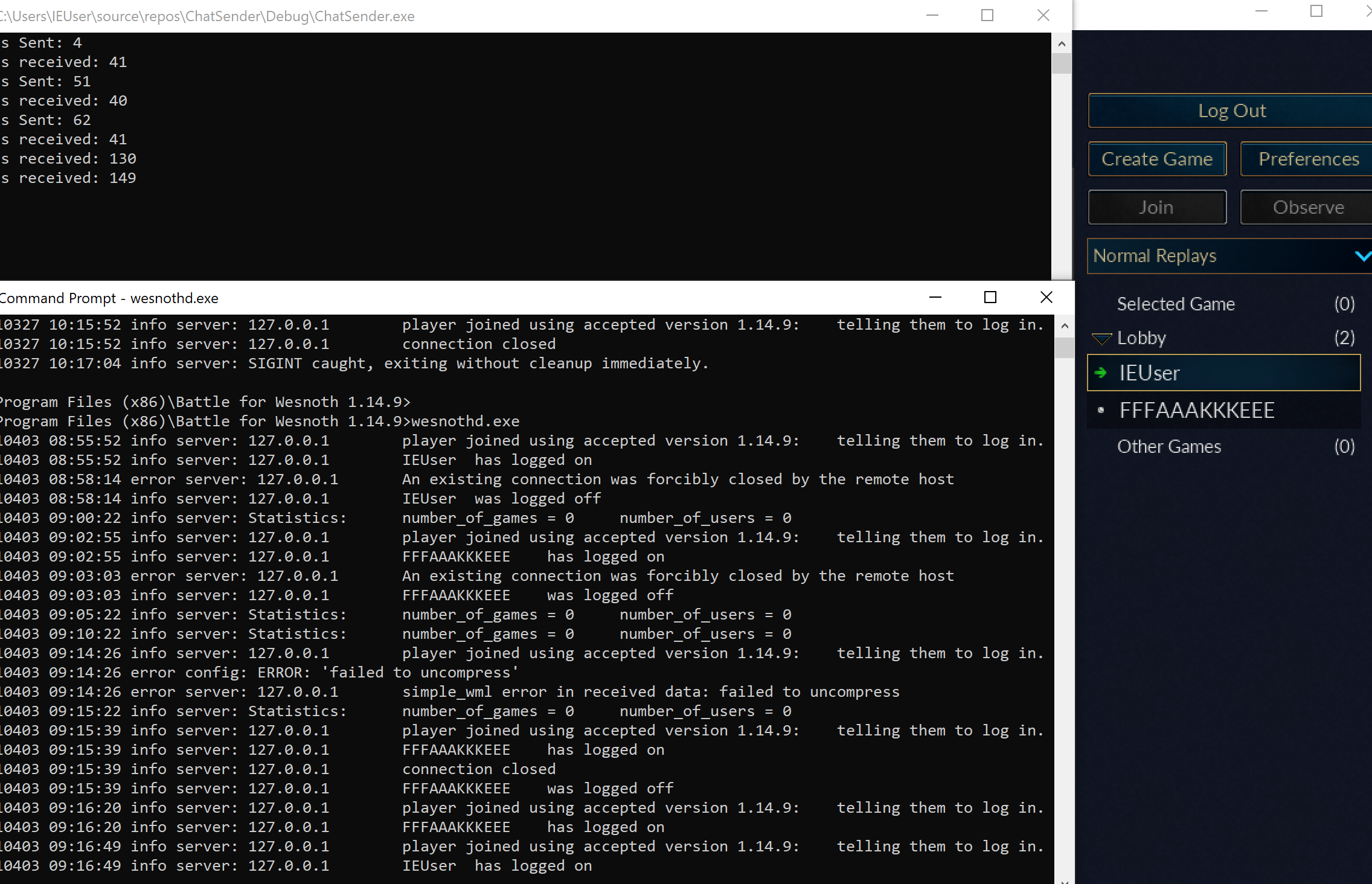
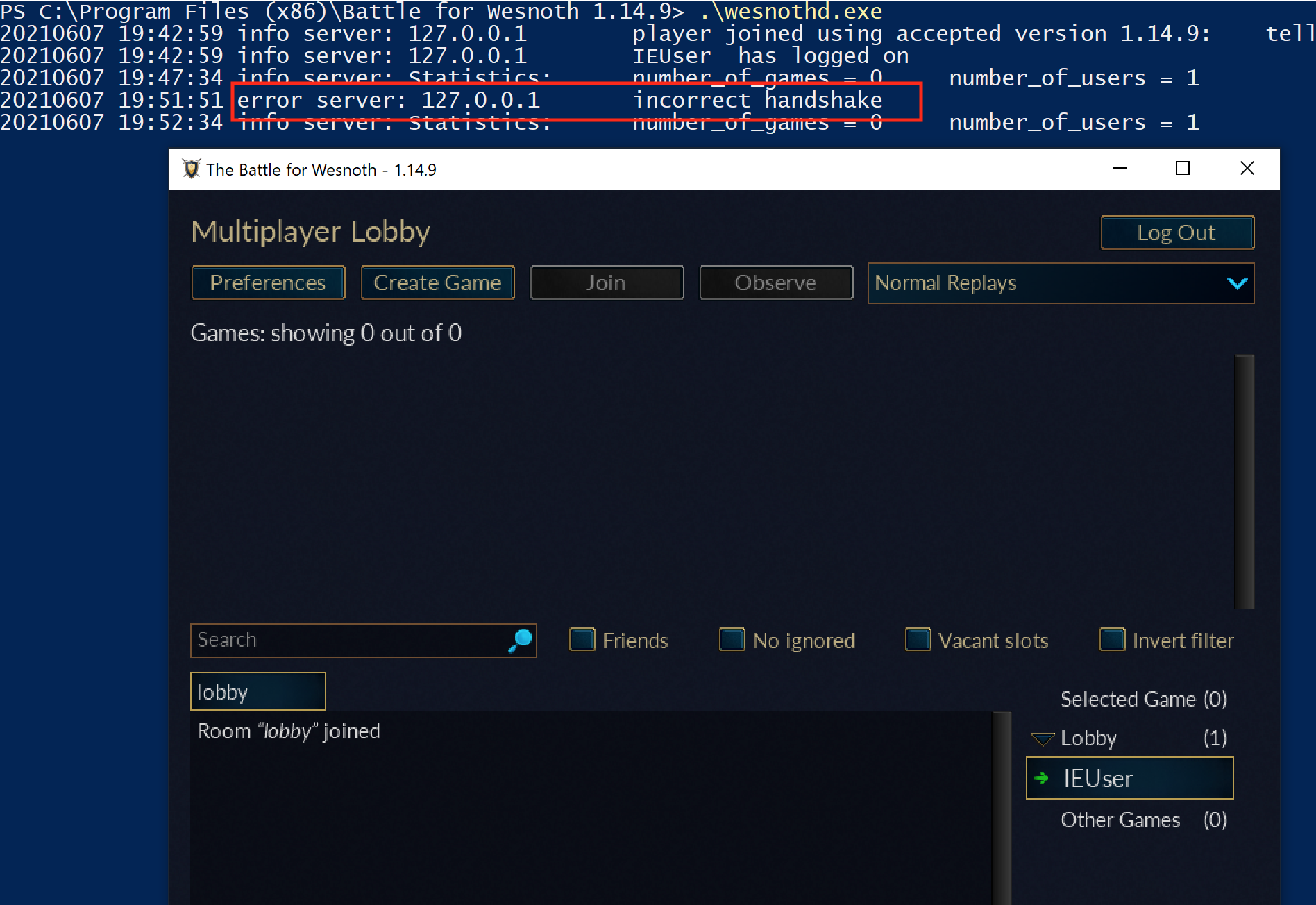
Use the course’s local Wesnoth server setup or your own toy client and server. Keep both endpoints inside the lab VM.
A local multiplayer lobby: client and server on the same machine.
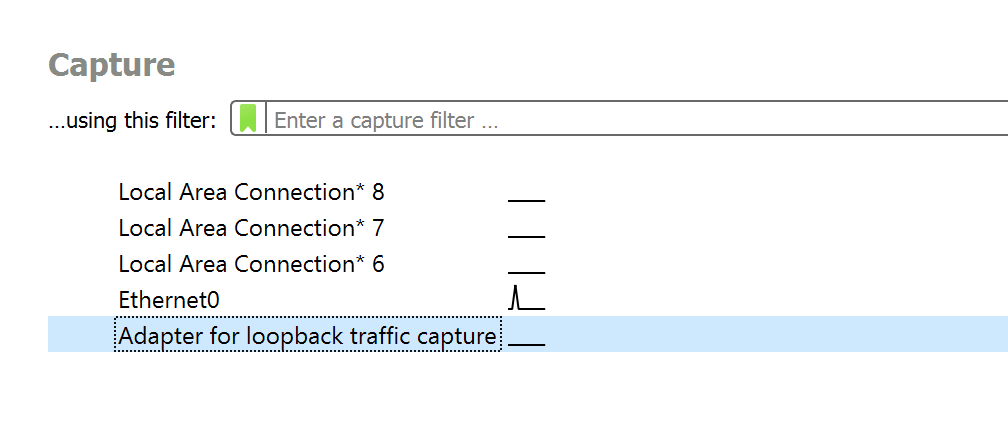
Start Wireshark, choose the loopback adapter (Tip: On Windows the loopback adapter comes from Npcap, which the Wireshark installer offers. Wireshark lists it as “Adapter for loopback traffic capture”; older versions called it “Npcap Loopback Adapter”.) when client and server share the machine, and begin capture before connecting.
Capturing on the wrong interface produces an empty-looking experiment. Traffic
to 127.0.0.1 stays on the loopback path rather than crossing the physical Wi-Fi
or Ethernet adapter.
The Wireshark interface, where the capture starts.
Filter by the known local port. Wireshark has two filter boxes, and each has its
own syntax for the same job:
Display filter (hides rows afterwards)
tcp.port == 15000
Capture filter (never records the rest)
tcp port 15000
A display filter can be changed at any time, because everything was recorded. A
capture filter keeps the file small, but a packet it dropped cannot be
recovered, so use the display filter while you are still learning what to look
for.
For the Wesnoth 1.14.9 lab, keep 15000: that is wesnothd’s default listening port. Launch wesnothd.exe, choose Connect to Server in the game, and enter localhost:15000.
Perform the actions at known times, so each burst of packets can be matched to the action just before it:
00:00 connect
00:02 enter username
00:05 join lobby
00:08 send "hello-17"
00:12 disconnect
A distinctive message such as hello-17 is easier to find than “hi.”
One connection has one four-tuple, and each direction reads it the other way round:
client IP : client port → server IP : server port
server IP : server port → client IP : client port
The client port is often temporary. The server port is the stable listening port.
The server first owns a listening socket on port 15000. Accepting a client
creates a separate connected socket while the listener remains available for
other clients. The client normally receives an ephemeral local port selected by
Windows.
Wireshark’s “Follow TCP Stream” view reassembles TCP bytes for easier inspection (Tip: To open it, right-click any packet of the connection and choose Follow, then TCP Stream. The shortcut is Ctrl+Alt+Shift+T.).
Follow TCP Stream shows the reassembled bytes of one connection.
Remember: this is still a stream, not necessarily a list of messages. Look for:
fixed-size headers;
length fields;
magic bytes;
repeated separators;
readable text;
compressed-looking regions;
request/response pairs.
“Follow TCP Stream” performs reassembly for inspection. Your client still
has to handle partial reads: read() may return fewer bytes than requested even
when more bytes will arrive later. read_exact is appropriate only after a
validated frame length tells you exactly how many bytes belong to the next
piece.
Reassembly also chooses an order from sequence numbers and removes retransmitted overlap. Preserve the original packet capture alongside any exported stream fixture so later questions about direction, timing, or retransmission can still be answered.
Repeat the same action with exactly one changed input:
Capture A: send "red"
Capture B: send "blue"
Compare lengths and differing byte ranges. If only one region changes, it may contain the text. If the whole payload changes, compression or encryption may be involved.
Add this display filter so Wireshark shows client/server data rather than every TCP acknowledgement:
tcp.port == 15000 && tcp.flags.push == 1
The first client payload in a Wesnoth 1.14.9 connection is exactly four zero bytes:
00 00 00 00
Replay only those four bytes from a tiny TCP client. The local server responds with 41 bytes across the observed replies, proving that the zeros begin protocol negotiation. The next client frame identifies version 1.14.9; the following frame logs in with the chosen username.
After the four-byte frame length, both of those later frames begin with gzip magic bytes 1F 8B. For example, a captured version frame begins:
00 00 00 2F 1F 8B 08 00 ...
└─ length 47 ┘ └─ gzip data
Do the same controlled capture with usernames IEUser and FFFAAAKKKEEE. The second name makes repeated-character compression easier to notice. Put together, the Wesnoth 1.14.9 connection works like this:
target: Wesnoth 1.14.9 + local wesnothd
transport: TCP
server: 127.0.0.1:15000
negotiation: 00 00 00 00
normal frame: u32 big-endian compressed length + gzip(Simple WML)
login order: negotiation → version → username → lobby
The controlled captures from Wesnoth 1.14.9 reveal this frame:
u32 big-endian compressed length
gzip-compressed Simple WML payload
The first four bytes do not include themselves in the length. If the header ends in 4E, the following gzip member is 78 bytes and the complete TCP payload is 4 + 78 = 82 bytes. The length is big endian, so 78, hexadecimal0x0000004E, appears on the wire as 00 00 00 4E; u32::from_be_bytes states that order directly.
The header is a claim from the sender, not permission to allocate whatever
it asks for:
Predict first
This receiver refuses any length above its limit, MAX_FRAME = 1,048,576 bytes. Its buffer holds the header FF FF FF FF and then four payload bytes.
What should it do now?
Answer: Refuse the frame now. FF FF FF FF is 255 × 16,777,216 + 255 × 65,536 + 255 × 256 + 255 = 4,294,967,295, which is above 1,048,576. The header alone decides it, so the receiver refuses before allocating or waiting.
What a receiver does with a length-prefixed frameThe first four bytes are a big-endian length; the limit is MAX_FRAME, 1,048,576 bytes. Change the claim and how many payload bytes have arrived.
Header, payload, decision
Receive buffer
Header = 5
byte 0byte 3
00×256³
00×256²
00×256
05×1
Payload bytes
48'H'
65'e'
6C'l'
6C'l'
6F'o'
Receiver’s decision
Take 4 + 5 = 9 bytes: one complete framenothing is left over
The header says 5 and 5 payload bytes are here, so 4 + 5 = 9 bytes form one complete frame.
Code that allocates from that claim could request nearly four gigabytes.
First reject any length above the configured maximum; only then wait for
the advertised number of payload bytes, with a bounded buffer and a way to
stop a stalled connection. Having only some payload bytes so far does not
by itself prove a network frame is false, because TCP may deliver the rest later.
After a complete frame is assembled, the parser checks its exact
length before decoding it. This separates byte validation from the
later question of whether the decoded chat message makes sense.
A protocol message has several nested layers. Each layer decodes the representation produced by the one outside it:
TCP byte stream
-> frame: one length plus exactly that many bytes
-> compressed payload: one gzip member
-> document: Simple WML text and tree structure
-> game meaning: a lobby chat message
Lesson 9.1 introduced these layers;
here each one becomes its own parsing step. Only the last, the game-level
schema, says that sender, room, and message form a chat event.
This separation is a debugging tool. If the first four bytes advertise an impossible
size, inspect framing. If decompression fails, inspect the wrapper and payload. If
WML is malformed, inspect serialization. If valid WML is ignored by the game,
inspect the expected message fields and connection state. Calling every failure a
“packet problem” hides the layer that actually broke.
The four-byte length at the front of the captured frame must be read before
the compressed body, and every read must stop at the captured buffer’s end.
A cursor pairs the borrowed bytes with the next unread position. If a read
fails, the position stays where it was, so an error cannot leave a parser
halfway through a claimed field:
This cursor replaces direct indexing and hopeful conversion:
The original parser takes four header bytes, trusts their length, and indexes the payload. This is a failure example: a short header or a length beyond the captured buffer can panic; extra bytes are silently accepted.
letlength = u32::from_be_bytes(bytes[0..4].try_into().unwrap()); // Short header panics.
letpayload = &bytes[4..4 + lengthasusize]; // Trusts the claimed boundary.
Ok(payload)
}
The bounded cursor makes every read fallible and advances only after a valid range has been obtained. Requiring the cursor to finish at the end rejects trailing bytes in this one-frame format.
let length = u32::from_be_bytes(bytes[0..4].try_into().unwrap()); // Short header panics.
let payload = &bytes[4..4 + length as usize]; // Trusts the claimed boundary.
let mut cursor = Cursor { bytes, position: 0 };
let length = cursor.u32_be()? as usize;
let payload = cursor.take(length)?;
if cursor.position != bytes.len() {
return Err(ParseError::TrailingBytes);
}
Ok(payload)
}
Takeaway: treat malformed input as a parse error, and check the complete frame boundary.
The lifetime 'a says every slice returned by the cursor borrows from the original input. The cursor owns only a position number; it does not copy payloads or create references that outlive the frame.
take is the one place that advances parsing state. checked_add stops a hostile count from wrapping the end to a small position, and get returns None for a range past the buffer. Later field readers get a simple promise: success consumes exactly the requested bytes; failure consumes nothing and returns an error.
try_into() converts a four-byte slice into [u8; 4], the fixed-size array required by from_be_bytes. The conversion can only succeed after take(4), but keeping the error path explicit makes the invariant visible instead of using unwrap().
Every read checks its boundary. Now decompress only the advertised bytes and cap the output:
compressed_len limits how many bytes the parser accepts from the frame;
the take(MAX_FRAME + 1) wrapper limits how many bytes decompression may produce.
Both matter because a small compressed input can expand into a very large output. Reading one byte beyond the limit lets the parser distinguish “exactly at the limit” from “too large” without allocating an unbounded vector.
There is a third limit outside this pure function: the connection’s accumulated
input buffer. A peer could advertise a legal one-megabyte frame and then send one
byte every few seconds. The stream reader needs a maximum buffered size, read
timeouts or cancellation, and a policy for a connection that never finishes its
frame. Parsing bounds protect completed inputs; transport bounds protect the time
and memory spent waiting for them.
The trailing-byte check makes this function parse one complete frame. Without it, a valid prefix could hide extra bytes that the caller mistakenly ignores. A streaming connection reader should split the stream into exact frame slices first and call this parser once per slice.
Decompressing a captured chat frame reveals readable Simple WML:
[message]
message="a"
room="lobby"
sender="FFFAAAKKKEEE"
[/message]
That is the actual structure we will rebuild.
Simple WML nests these bracketed tags and quoted fields as a tree. This lesson
handles the one chat-message shape
needed by our local Wesnoth proxy. If you extend the tool to inspect maps,
units, or arbitrary add-on messages, use a real tokenizer that handles escaping,
nested nodes, repeated fields, and comments instead of adding more substring
searches.
The receiver also has an expected schema, even when no formal schema file
exists. That schema includes field names, allowed repetitions, value types, and
which fields are required. The sender writes one version of that agreement; the
receiver reads according to the version it understands.
When a game update adds a field, ask two different compatibility questions:
Can the new reader still understand old messages?
Can the old reader safely ignore or default the new field?
Those questions are not the same. A tolerant tree format may ignore an unknown
optional field, but renaming a required field can break both directions. For a
versioned research tool, keep captured fixtures from every supported game build and
record which message shape each fixture uses instead of guessing that one parser is
universal.
With the gzip encoder available, the next function accepts a chat field as
text and rejects quotes or line breaks that would change the simple WML
structure. Only validated fields go into the message before compression
and length framing:
validate values before placing them inside quoted WML fields;
serialize the typed message into UTF-8 text;
finish the gzip stream so its footer is present;
convert the compressed size to u32 without truncation;
reserve one vector for header plus payload;
append the big-endian length and compressed bytes.
Vec::with_capacity is an optimization, not a safety requirement. It avoids reallocating as the two pieces are appended. u32::try_fromis a correctness requirement because as u32 could silently discard high bits for an oversized buffer.
GzEncoder produces the correct gzip wrapper; a plain zlib stream is not interchangeable here. The first two compressed bytes should be 1F 8B.
Gzip and zlib can both use the DEFLATE compression algorithm but wrap it in different headers and checksums. “Same compression algorithm” does not mean “same wire format.” Matching the observed wrapper is part of implementing the protocol.
Feed the serializer one sender and one message, then give its frame to the
decoder. If the resulting WML still contains both values, the length,
compression wrapper, UTF-8 text, and field quoting agree between these two
functions for this case:
Also test an empty input, a truncated gzip member, an oversized length, invalid UTF-8 after decompression, extra trailing bytes, and rejected quote/newline characters.
A round trip proves that the encoder produces something this decoder accepts. It does not prove compatibility by itself, because two functions could share the same mistake. Keep at least one captured fixture from the real local session and verify that the decoder accepts it. Then send an encoded message to the controlled server and confirm that another capture has the expected four-byte prefix and gzip header.
Use a small failure matrix:
Test input
Expected failure
Fewer than four bytes
Truncated while reading the length
Length larger than remaining bytes
Truncated while taking the payload
Length above the cap
TooLarge before decompression
Valid frame plus one extra byte
TrailingBytes
Broken gzip checksum
InvalidGzip
Decompressed non-UTF-8 bytes
InvalidUtf8
Quote inside a simple field
Rejected before serialization
Comparing one changed message field.
The goal is not merely to make one capture parse. It is to define exactly which byte strings are accepted and how malformed data fails.
The buildable protocol module is wesnoth_protocol.rs. It contains bounded frame reads, gzip encode/decode, output-size caps, strict trailing-byte checks, WML field sanitation, send_wml, encode_chat, and round-trip/error tests. Both the real chatbot and proxy import this same implementation instead of copying a shortened lesson version.
Start with the pure functions that accept and return byte vectors; they are easiest to test. Next read the exact stream functions that repeatedly call read_exact for a header and payload. Finally read send_wml, which owns the complete serialization-and-write transaction.
This order keeps three kinds of failure distinct:
transport failure: the socket closed or timed out;
framing failure: the advertised message length was impossible;
content failure: gzip, UTF-8, or WML data was invalid.
Preserving those categories in error messages is part of the explanation. If everything becomes “chat failed,” a learner cannot tell whether to inspect Wireshark, the frame cursor, or the message serializer.
This interactive lab needs JavaScript. The lesson text around it still explains the same idea.
A chat message before the greeting may be invalid even when its length and UTF-8 text parse perfectly. That makes protocol reversing a state-machine problem as well as a byte-parsing problem.
Replay processes the saved frames in order. A record changes the modeled
session only after both its bytes and its transition have passed validation:
If any stage fails, the record and old state remain available for diagnosis;
the replay never needs to invent a replacement state.
A message log and a session state are different things
The capture is an ordered log of the frames that crossed the connection. The session state is a model produced by applying their messages in order:
initial state + message 1 + message 2 + ... -> current modeled state
For a five-frame capture of one short session, starting from Connected:
frame 0Greeting v1
frame 1LobbyJoined
frame 2Chat
frame 3MatchStarted
frame 4Goodbye
→ Greeted
→ InLobby
stays InLobby
→ InMatch
→ Closed
The boxes are the log; the labels under them are the state after each frame is applied. The log never stores a state, so a corrected rule can rebuild every state from the same five frames.
Keep the raw log immutable and rebuild the model from it. If a parser or transition rule changes, you can replay the same log and see exactly which frame now produces a different result. Editing the stored “current state” by hand loses that history.
Not every message is an event that happened exactly once: a snapshot can repeat a whole state, and a retransmitted request may appear twice. Store direction, sequence identifiers, and timing with each frame; without them, duplicate bytes cannot be told apart from duplicate actions. The real-time section below defines those message kinds and identifiers.
Receiving a well-formed Chat message is different from being ready to
accept it. A connection begins in Connected, reaches a lobby only after
greeting and room messages, and can then accept chat. These enums keep the
connection state and the parsed message as separate facts:
The parser creates Message values. The session machine decides whether each value makes sense now.
A valid Chat arrives while ConnectedThe bytes parse into a Chat, but this state only accepts a greeting, so the gate refuses it and the state stays Connected.
ParserSession state
1
DataChat { text: "hello" }
Step 1: Parser to Session state
Parsing already succeeded: the bytes are a well-formed Chat. The parser says what the message is, not whether it is allowed now.
2
Alone(Connected, Chat): no accepting arm
Step 2: Session state (alone)
The session machine pairs the current state with the message. Nothing in the match lets a Chat through before the lobby is reached.
3
ControlErr(IllegalTransition)
Step 3: Session state to Parser
The caller gets an error naming the state and the message. The session is still Connected and nothing was delivered.
All 3 steps shown
The bytes parse into a Chat, but this state only accepts a greeting, so the gate refuses it and the state stays Connected.
The same Chat arrives while InLobbyIdentical bytes, identical parsed value. The current state is the only difference, and this state accepts a Chat without moving.
ParserSession state
1
DataChat { text: "hello" }
Step 1: Parser to Session state
The same parsed message as before. Nothing about the bytes changed.
2
Alone(InLobby, Chat): accepted
Step 2: Session state (alone)
This state has an arm for a Chat, so the pairing is legal. The message is allowed because of where the session is.
3
ReplyOk(()) · state stays InLobby
Step 3: Session state to Parser
A chat line does not move the session anywhere. It stays InLobby until a message that triggers a transition arrives.
All 3 steps shown
Identical bytes, identical parsed value. The current state is the only difference, and this state accepts a Chat without moving.
Now pair the current state with one parsed message. A version-1 greeting
moves Connected to Greeted; an unsupported version returns a precise
error; a chat message in the lobby leaves the state unchanged. The match
below makes every accepted transition visible in one place:
Each arrow is one arm of the match. A message with no arrow out of the
current state, such as Chat while Greeted, falls through to the last arm and
returns IllegalTransition. A Greeting with any version other than 1 is
refused by its own arm with UnsupportedVersion, and Goodbye is accepted in
every state, including Closed itself.
This is longer than a chain of if statements, but every state and message variant has an explicit case. Adding a variant makes an exhaustive match stop compiling until you decide how to handle it.
Unchanged bytes can be invalid in a new session phase. This step-by-step trace needs JavaScript. Here is the code and where the run ends.
state = Connected
read the next recorded event
check which events are allowed in this state
update state for an accepted transition
deliver Chat only from InLobby
report the stopping phase
Result: Closed, 1 delivered chat event(s), sequence accepted. Replaying bytes does not recreate their original session context.
Final values: order = normal; event = Goodbye; state = Closed; delivered = 1; accepted = true.
Read every step of the lesson’s example
Step 1, line 1. Start with the selected inputs and follow how the next operation changes the state.
order = normal.
Step 2, line 2. Read Greeting while Connected.
order = normal; event = Greeting; state = Connected.
Step 3, line 4. Accept the event and retain its resulting phase.
order = normal; event = Greeting; state = Greeted; delivered = 0.
Step 4, line 2. Read Join while Greeted.
order = normal; event = Join; state = Greeted; delivered = 0.
Step 5, line 4. Accept the event and retain its resulting phase.
order = normal; event = Join; state = InLobby; delivered = 0.
Step 6, line 2. Read Chat while InLobby.
order = normal; event = Chat; state = InLobby; delivered = 0.
Step 7, line 4. Accept the event and retain its resulting phase.
order = normal; event = Chat; state = InLobby; delivered = 1.
Step 8, line 2. Read Match while InLobby.
order = normal; event = Match; state = InLobby; delivered = 1.
Step 9, line 4. Accept the event and retain its resulting phase.
order = normal; event = Match; state = InMatch; delivered = 1.
Step 10, line 2. Read Goodbye while InMatch.
order = normal; event = Goodbye; state = InMatch; delivered = 1.
Step 11, line 4. Accept the event and retain its resulting phase.
order = normal; event = Goodbye; state = Closed; delivered = 1.
Step 12, line 6. Result: Closed, 1 delivered chat event(s), sequence accepted. Replaying bytes does not recreate their original session context.
order = normal; event = Goodbye; state = Closed; delivered = 1; accepted = true.
Watch it happenReplay five frames into a session state
Five unchanged frames are Greeting v1, LobbyJoined, Chat, MatchStarted and Goodbye. A separate state marker moves from Connected to Greeted, InLobby, InMatch and Closed. The Chat frame is delivered without moving the state marker out of InLobby.
Read the steps
Keep the five captured frames unchanged. The replay starts in Connected; the state marker is separate from the log.
Frame 0: version 1 is supported, so Connected becomes Greeted.
Frame 1: the lobby message is legal after the greeting. Move from Greeted to InLobby.
Frame 2: chat is legal in the lobby. Deliver the chat, but keep the session in InLobby. A message need not change the state.
Frame 3: the match-start message is legal in the lobby. Move from InLobby to InMatch.
Frame 4: Goodbye closes the session. The state moves to Closed while every original frame remains in the log.
The result is a model built from the log. Changing a rule means replaying these same five frames, rather than editing a stored state by hand.
The log records messages. Applying legal messages produces state; chat can be accepted without a state transition.
Replay takes recorded frames and the parser used for this protocol version.
It starts from Connected, validates each frame’s size and delay, parses its
bytes, and applies the resulting message to the session state. The returned
state is the result of those messages under the current transition function; the error names
the frame where interpretation stopped:
The test does not sleep for after_ms. It validates timing metadata deterministically. A separate integration test can use a virtual clock to exercise timeouts.
Deterministic replay requires controlling every input that affects a transition: message order, clock readings, random choices, configuration, and initial state. If the same fixture sometimes reaches different states, one of those inputs is still hidden. Pass it into the model instead of reading a real clock or global setting from inside apply.
For example, imagine a lobby rule that closes a connection if no greeting arrives within five seconds. The same captured Greeting should be accepted at 4,900 ms and rejected at 5,100 ms when a test supplies those times to a virtual clock. Reading the wall clock inside apply would make the result depend on how fast the test machine runs, so that timeout test needs a clock-aware version of the model rather than the small replay above.
The expected outcome is a precise error at a precise frame, never an out-of-bounds read or an infinite wait. Replaying Greeting twice, for example, stops at frame 1 with an IllegalTransition error for state Greeted, because the state machine has no Greeting arrow out of Greeted.
A length larger than the available payload has to fail before any message is decoded:
000
100
200
309
443
544
645
7??
8??
9??
10??
11??
12??
length field: 9
3 payload bytes present
6 bytes the frame claims but does not have
The big-endian length 00 00 00 09 promises 9 payload bytes, but only 3 follow, so 9 − 3 = 6 are missing. A parser that trusted the length would read 6 bytes past the end of the frame; a checked slice turns that into an error for this frame instead.
For messages that may be retried, test idempotence explicitly. Applying the same acknowledgment twice should either preserve the same state or return a clear duplicate error; it should not create a second match, grant a reward twice, or move backward in the session.
Lesson 9.1’s purchase retry showed the server side: it remembers each request identifier and returns the earlier result, or rejects the repeat as a duplicate. In a replay, that identifier is what makes “same request” testable. A repeated Chat with identical text could instead be a new message, so matching bytes alone is not a safe duplicate rule.
Clicking through a live session tests one run once. A replay sends the same frames through a changed parser, framing code, or session rule again in milliseconds. Keep live-network code at the edge and feed the bytes it receives into the same parser and state machine tested by replay. That design keeps transport separate from parsing and makes the protocol model reproducible. 🌐
The Wesnoth lobby replay above checked whether each message was legal in one conversation. A fast action game adds a second question: which version of the world should the client draw while messages are still travelling? The same capture, framing, and state-machine discipline applies, but ticks and sequence numbers become part of the state.
Real-time games replicate a simulation, not just variables
Most action games advance the world in discrete ticks. If a server runs at
60 ticks per second, one simulation step is approximately:
tick duration = 1 second / 60 = 16.67 milliseconds
The client samples input, labels it, and sends a command. The server processes
commands during its own ticks and periodically sends a snapshot or delta. The
client then draws frames between confirmed server states:
A field’s meaning depends on the kind of message carrying it. In Lesson 9.1’s move north, (10, 14) in the request is a desired destination, an intent; the same (10, 14) in the server’s reply is an accepted position. An acknowledgment confirms that a command arrived or was applied. A snapshot reports enough state to stand alone, while a delta reports only changes from an identified earlier state, its baseline. Equal-looking bytes can have different authority.
Several similar-looking states can therefore coexist:
State
Purpose
Important label
Last confirmed state
What the server has accepted
Server tick or snapshot ID
Predicted state
Immediate response to local input
Last locally simulated command
Interpolated state
Smooth display of remote objects
Render timestamp between snapshots
Historical state
Rewind or lag-compensation query
Past server tick or time
This explains why a coordinate found in memory can be correct yet appear to
“snap back.” You may have found the predicted or rendered copy while a later
server snapshot replaced it. Three facts tell the copies apart: which thread
writes the field, whether its updates follow input or incoming packets, and which
tick or sequence number travels beside it.
Packet arrival order is not automatically simulation order. UDP packets can
arrive late or twice; even over TCP, one stream can contain application events
whose own timestamps refer to different moments. Protocols commonly carry:
a monotonically increasing sequence number;
a server tick or timestamp;
an acknowledgment of the newest processed command;
a bit mask acknowledging several earlier packets;
a baseline ID telling which snapshot a delta modifies.
Sequence numbers often wrap. For an unsigned N-bit counter, comparisons must
use modular arithmetic and accept only a bounded forward window, not a plain
incoming > current test.
Work through one 16-bit wraparound. The last accepted sequence number is
65534, and the next two packets carry 65535 and then 0:
current incoming naive: incoming > current (incoming - current) mod 65536
65534 65535 65535 > 65534 -> accept 1 -> accept
65535 0 0 > 65535 -> reject 1 -> accept
The naive test gets the first packet right and the second one wrong. 0 really
is one step newer than 65535, but as a plain integer it is smaller, so the
packet is thrown away. It gets worse from there: current never advances past
65535, so every sequence number after the wrap looks old in the same way, and
the connection appears to stop receiving updates entirely.
The modular test asks a different question — how far forward is incoming from
current, counting the wrap? (0 - 65535) mod 65536 is 1, a single step
ahead, so the packet is accepted and current moves on. Accept only while that
distance stays inside an agreed window such as 1..=32767. A distance of
32768 is exactly halfway around a 16-bit counter and cannot be classified as
newer or older from the sequence number alone, so this rule refuses it. A
genuinely old packet computes a distance near 65536, which also falls outside
the window. The exact window is part of the protocol contract and deserves
boundary tests; RFC 1982’s serial-number arithmetic
explains the half-range limit.
Applying a delta to the wrong baseline may parse perfectly and still create
nonsense. Robust tooling keeps the baseline ID with the bytes, refuses missing
dependencies, and bounds how long incomplete state may wait.
The live bot in Lesson 9.6 returns to the simpler Wesnoth lobby conversation. It uses the same separation between framed bytes, decoded messages, and legal session actions that replay made visible.
Run wesnothd.exe on your own computer, connect a client named ChatBot, and make it answer \wave with Hello! in the lobby.
This is not a toy protocol. It uses the exact flow we reversed from Wesnoth 1.14.9:
Keep transport, decoding, session meaning, and behavior as separate layers. One
incoming message should travel through the pipeline before any reply is built:
A parsed message still needs session context. This step-by-step trace needs JavaScript. Here is the code and where the run ends.
read the selected inputs
evaluate each stated condition
combine the required conditions
perform the effect only when accepted
otherwise retain the old state
report the result and its limits
Result: one greeting reply is prepared for serialization, compression and framing.
Watch it happenTurn a lobby command into a framed reply
A bounded gzip frame expands into a WML message whose text is backslash wave and room is lobby. The validated chat event reaches a handler, which creates Hello! from ChatBot. The reply is serialized, compressed and framed with a four-byte length before entering TCP.
Read the steps
Read the four-byte big-endian length, enforce the frame limit, and keep collecting until the whole gzip payload is available.
Decompress the complete payload. The WML text now has message and room fields; compressed bytes are no longer passed to the behavior layer.
Parse and validate the WML. The client is already in the lobby, where this chat message is permitted. Build an owned Chat event containing the text \wave.
Pass the event to the command handler. Its text matches \wave; ordinary chat would finish here without producing a reply.
The bot constructs Hello! with room lobby and sender ChatBot. These fields are new outbound data; the received frame is not copied back unchanged.
Serialize the reply as WML, compress it with gzip, and place its byte count in a four-byte big-endian header. The encoder supplies the actual compressed length.
Write all bytes of that new frame to the TCP stream. The header and complete compressed reply leave together; transport can still split them across reads.
This shows the layered client design. The compact prototype below recognizes its command with a text test.
This separation lets a malformed frame fail before it reaches chat behavior,
and it lets the command handler work with events instead of raw network bytes:
A well-formed command reaches the handlerEach layer passes on only what it has checked: a complete frame, then named fields, then an event.
TCP streamread_frameDecoderCommand handler
1
Datau32 length, then that many bytes
Step 1: TCP stream to read_frame
read_frame reads the four-byte big-endian length, checks it against MAX_FRAME (1,048,576), then reads exactly that many bytes.
2
Dataone complete gzip payload
Step 2: read_frame to Decoder
Only a complete frame is passed on; a partial read never reaches the decoder.
3
DataChat event: text "\wave"
Step 3: Decoder to Command handler
gunzip and the WML parser turn bytes into named fields, so the handler receives an event, not bytes.
4
Replynew framed reply: Hello!
Step 4: Command handler to TCP stream
The text matches \wave, so the handler builds new reply fields; they are serialized, compressed and framed before writing.
All 4 steps shown
Each layer passes on only what it has checked: a complete frame, then named fields, then an event.
A malformed payload stops at the decoderThe frame is complete, but its bytes are not valid gzip. The error ends the chain before any behavior runs.
TCP streamread_frameDecoderCommand handler
1
Datau32 length, then that many bytes
Step 1: TCP stream to read_frame
The length is within MAX_FRAME and all its bytes arrive, so framing succeeds.
2
Dataone complete payload
Step 2: read_frame to Decoder
The decoder receives the whole payload.
3
Alonegunzip fails: return an error
Step 3: Decoder (alone)
No Chat event is built, so the command handler never runs and no reply is sent.
All 3 steps shown
The frame is complete, but its bytes are not valid gzip. The error ends the chain before any behavior runs.
Before reading protocol bytes, the client needs a connection that cannot
silently drift to another host or wait forever for a stalled local server.
connect_local accepts one socket address, checks that it is the course
loopback endpoint, then sets finite connect, read, and write waits:
Lesson 9.4’s encode_wesnoth_frame performs the gzip compression and adds the four-byte big-endian length. write_all matters because one write may send only part of a buffer.
byte 0-3`u32` length, big-endian
byte 4..gzip-compressed WML, that many bytes
The frame read_frame parses below. It trusts only the four-byte header at first, then reads exactly length more bytes before decompressing.
The two helpers implement the strip in opposite directions. send_wml
frames text and writes all bytes; read_frame reads the four-byte length,
checks the cap, then reads that many payload bytes before a decoder sees
them. A short TCP read is normal, so both paths use the exact-read/write
operations:
The opening negotiation is special, so collect its replies until a short quiet period. The historical capture received 41 bytes.
This quiet-period reader is only for the unframed negotiation reply. It
collects successive TCP reads until the server closes or pauses briefly,
while the size cap prevents an unexpected reply from growing forever.
After login, read_frame uses the protocol’s length field instead:
The parser and frame writer now have a concrete job. The course server first
expects four zero negotiation bytes, then a version message and a login
message in compressed WML frames. log_in sends them in that order and reads
each reply before advancing; a nickname is validated before it enters WML:
If the server rejects the version, compare the decompressed frame with the one produced by the official 1.14.9 client. Do not randomly change compressed bytes; fix the WML and recompress it.
Once the login succeeds, the client announces itself and loops over framed
server messages. A decoded \wave event will produce the reply described
above; ordinary messages leave the connection running:
Limit message length, respond at most once per command frame, add a short send rate limit, and exit cleanly when the local server closes. A parser error should print the frame size and stop; it should not enter an automatic reconnect storm.
The full client is wesnoth_chatbot.rs. The framing/parser it imports is wesnoth_protocol.rs. Together they implement the real loopback connection, timeouts, four-zero negotiation, version frame, login frame, lobby receive loop, \wave recognition, and Hello! reply.
The reusable gzip/WML framing stays in one tested protocol module; this file owns the session state. That split is intentional: byte framing should not know what \wave means, and chat behavior should not reimplement gzip.
An external client answering Wesnoth chatSilent demonstration · 11 seconds
The original external-client demonstration shows a chat command receiving a reply. The visible exchange depends on the earlier connection, negotiation, login, frame decoding, and command handling; a valid message alone is not a complete client.
This bot owns its own server connection. Lesson 9.7 puts a relay between the official client and the same local server, so we can observe an existing conversation before choosing one bounded change.
A local TCP proxy accepts a client connection, opens a connection to your local server, and relays bytes both ways.
Begin as a transparent relay. If the protocol fails before you modify anything, fix the relay first.
This first version treats bytes as bytes. Only after it passes the normal
Wesnoth login should the proxy switch to the framed, message-aware upstream
path below. The two modes have different failure behavior: a transparent relay
does not need to decode; a message-aware relay must decide what to do when
decoding fails.
A proxy is easy to connect to the wrong service if an address is copied from
a different test. Validate both endpoints as loopback addresses before
opening either connection; this helper returns the accepted address so the
caller cannot forget which one passed the check:
This course proxy is intentionally not a general remote interception tool.
This board needs JavaScript to move things around. Here is the lesson’s sorting:
Accepted
127.0.0.1:15000 (the local Wesnoth server). 127.0.0.1 is the IPv4 loopback address, so this endpoint stays on the same computer.
127.0.0.1:27015 (the proxy’s own address). Same loopback address. The check looks at the IP address, not the port.
[::1]:15000 (IPv6 localhost). The check accepts the IPv6 localhost address too, so this one passes as well.
Refused with an error
192.168.1.20:15000 (another computer on the network). It is not loopback. This proxy is intentionally not a general remote interception tool, so the check refuses before opening any connection.
8.8.8.8:15000 (a public internet address). Not loopback, so it is refused before anything connects.
0.0.0.0:27015 (every network interface). The code compares with the localhost addresses exactly, and 0.0.0.0 is not one of them, so it is refused.
One direction can reach EOF while the other still has data to send. A reliable
local Wesnoth proxy should use shutdown(Write) on the destination after that
relay finishes, then let the server-to-client relay deliver any remaining game
messages before both sockets close.
Keep parsing off the relay’s critical path. If the parser cannot keep up, drop log entries rather than blocking the connection.
This tee is for observation. It cannot decide where to insert a new
message, because a TCP read does not identify a frame boundary. The insertion
path therefore waits for a complete bounded frame and handles parse errors
explicitly.
Bound the parser’s queue as well as each frame. What a full queue may discard
depends on the message meaning: a newer position snapshot may replace an older
one under a documented policy, but discarding an unprocessed item grant loses
the item. The tee can drop its log copies only because the relay still
forwards every original frame; the forwarding path itself never drops game
bytes to keep up.
The original lab used proxy port 27015 and server port 15000. Start wesnothd.exe, start the local proxy, then tell Wesnoth to connect to localhost:27015. Reaching the normal lobby through the proxy proves both directions work.
For injection, one task must own the upstream writer so two threads cannot interleave bytes. After the special four-zero negotiation has passed, have the client-to-server path read one complete Wesnoth frame at a time. Forward the original bytes unchanged, but inspect a decoded copy:
usestd::io::Write;
fnforward_with_chat_hook(
client: &mutTcpStream,
server: &mutTcpStream,
) -> anyhow::Result<()> {
loop {
// 📦 `read_frame` returns one complete length-prefixed message. A plain
// `read` here could split one frame or combine several frames.
letoriginal = read_frame(client)?;
// A decode error stops this modified upstream path before sending this frame.
// The transparent relay above has no such dependency on parsing.
letdecoded = decode_wesnoth_frame(&original)?;
// 📦 Preserve the legitimate game packet exactly as captured and send
// it first; inspecting a copy must not silently replace normal traffic.
server.write_all(&original)?;
ifdecoded.contains("message=\"\\wave\"") {
// 🔒 This task is the sole owner of `server`, so the original and
// injected frames cannot be interleaved by the reverse relay.
letinjected = encode_chat("ChatBot", "Hello!")?;
server.write_all(&injected)?;
}
server.flush()?;
}
}
Keep the server-to-client direction as an ordinary transparent relay. The handshake needs one small state flag because its first four zero bytes are not a gzip frame; forward those four bytes directly before switching the upstream parser into framed mode.
The contains check is enough only for this controlled one-command fixture.
It could match that text inside an unrelated WML field. A general proxy
should parse the WML tree from Lesson 9.4 and inspect the actual chat-message
field and session state before inserting a response. The complete lab below
uses the same narrow shortcut, so do not treat it as a general message router.
Now send \wave from the real Wesnoth client. The server receives both the original command and the injected Hello! message on the already authenticated connection. This is the practical advantage of the proxy: the official client performs its own login while the proxy observes and modifies the loopback traffic.
an undecodable frame in the message-aware mode returns a clear error before
that frame is forwarded; proxy_pair then shuts down both sockets before
waiting for the reverse relay. A separate transparent mode could relay bytes
without decoding them;
non-loopback endpoints are rejected;
the only modification is the documented \wave response;
removing both decoding and injection returns the proxy to byte-for-byte
transparent behavior.
Connect the official Wesnoth 1.14.9 client to localhost:27015. Type \wave after login and confirm the injected Hello! appears. The complete two-direction relay is wesnoth_proxy.rs. It binds only to loopback, forwards the unframed negotiation, parses bounded upstream frames, preserves each original frame, injects through the single upstream writer, half-closes both directions, and keeps the server-to-client stream transparent.
println!("Wesnoth proxy listening on 127.0.0.1:27015 -> 127.0.0.1:15000");
println!("Connect the official 1.14.9 client to localhost:27015.");
forconnectioninlistener.incoming() {
letclient = connection?;
anyhow::ensure!(
client.peer_addr()?.ip().is_loopback(),
"client is not loopback"
);
ifletErr(error) = proxy_pair(client) {
eprintln!("session ended: {error:#}");
}
}
Ok(())
}
Only the upstream task writes to the server. That single-writer rule prevents the original frame and injected frame from being interleaved. The downstream task stays byte-for-byte transparent, so one experimental hook cannot accidentally rewrite both directions.
The proxy needs TCP because its two endpoints are network clients. When two cooperating programs run on the same computer, they can exchange the same kind of bounded message through shared memory or a named pipe instead. Lessons 9.8 and 9.9 compare those local transports.
The proxy copied messages between sockets. A supported game add-on and a separate visualizer could instead agree on a local shared byte region. The message still needs a layout and a lifetime; only the transport changes.
Two running programs can both use the address 0x00400000, yet those numbers can refer to completely different physical storage. Each process has its own virtual address space.
That separation is a safety feature. A map helper should not need to patch a game process merely to receive a supported event from a mod. Windows provides interprocess communication, or IPC, for programs that intentionally cooperate.
Named shared memory is one IPC option:
The two views do not need the same virtual address. Windows connects both views to the same file-mapping object.
The programs share bytes through one kernel-managed object, not pointers to
each other’s private address spaces:
The views may have different addresses, but they expose the same mapped bytes.
The small protocol is what turns those bytes back into a trustworthy value.
A file-mapping object tells Windows what storage is shared, how large it is, and which protections are allowed.
A view maps some or all of that object into one process’s virtual address space.
A handle names the mapping object.
A pointer from MapViewOfFile names the beginning of one process’s view.
Closing the handle and unmapping the view are separate cleanup operations. The lab uses OwnedHandle for the first and a small MappedView type with Drop for the second.
Paging-file-backed means no ordinary file is required
CreateFileMappingW normally accepts a file handle. Passing INVALID_HANDLE_VALUE asks Windows for storage backed by the system paging file instead. We must provide a nonzero maximum size—in this lab, 4096 bytes.
The name starts with Local\, so it lives in the current logon session’s local namespace. We do not use Global\, which can require extra privilege and makes the scope wider than this lab needs.
Memory has no built-in String type. Both programs must agree on a layout:
0..4little-endian `u32` text length
4..4+lenUTF-8 text
4+len..zeroed
The shared-memory wire format. HEADER_BYTES is 4; everything from 4 + len onward is left as zero padding.
The four-byte length makes embedded zero bytes unambiguous and lets the reader reject impossible sizes before creating a string slice.
This is the beginning of serialization: turning structured information into an agreed byte representation.
The original reader treats the first zero byte as the end of UTF-8 text. A legitimate embedded zero therefore shortens the message. The improved format uses the four-byte length header shown above; the writer must use that same format too.
.unwrap_or(bytes.len()); // A zero inside the text looks like its end.
Ok(std::str::from_utf8(&bytes[..end])?)
}
Validate that a complete header exists before slicing, then check its declared length against the remaining mapping. The length describes payload bytes, not the mapping’s zero padding.
"shared-memory length is larger than its mapping");
let payload = &bytes[HEADER_BYTES..HEADER_BYTES + length];
Ok(std::str::from_utf8(payload)?)
}
Takeaway: agree on an explicit length format at both ends, and validate the header before trusting it.
One hazard is worth naming here, even though this one-shot lab sidesteps it by
writing only once. Shared memory gives two processes access to the same bytes.
It gives them no agreement about when. Nothing prevents a reader from
arriving in the middle of a write:
The new length arrives before the new textThe mapping holds READY (5 bytes). The writer is replacing it with RUNNING (7 bytes) and stores the new length first.
1READY is published
Shared mapping
Bytes 0 to 3: length
05= 5
00
00
00
Bytes 4 to 10: text
R52
E45
A41
D44
Y59
00zero
00zero
A little-endian u32 length of 5, then the five text bytes. The rest of the mapping is zero.
2Length 7 stored, text not yet
Shared mapping
Bytes 0 to 3: length
07= 7
00
00
00
Bytes 4 to 10: text
R52
E45
A41
D44
Y59
00zero
00zero
What the reader returns
read_text
READY + two zero bytesneither the old nor the new message
If the reader copies now, 7 fits in the mapping and zero bytes are valid UTF-8, so both checks in read_text pass.
3Both sides take one named mutex
Shared mapping
Bytes 0 to 3: length
07= 7
00
00
00
Bytes 4 to 10: text
R52
U55
N4E
N4E
I49
N4E
G47
Order
Writer
lock
length and text
unlock
Reader
lock: waits
copy 11 bytes
unlock
The reader waits while the writer holds the mutex, so it copies all of READY or all of RUNNING, never a mix.
All 3 steps shown
The mapping holds READY (5 bytes). The writer is replacing it with RUNNING (7 bytes) and stores the new length first.
The reader’s length check passes, the UTF-8 decode very likely succeeds, and
the text returned is simply wrong — or is half of the previous message. Writing
the payload before the length narrows that window without closing it, since the
CPU and the compiler may reorder the two stores anyway. Closing it takes a
sequence number the reader checks before and after copying, or a real
synchronization object.
The figure shows the smallest case: old payload READY (five bytes), new
payload RUNNING (seven bytes), and a reader that copies in the gap between
publishing the length and finishing the text. Both checks in read_text
succeed, yet the message is not one the writer ever meant to publish. Seeing
the same bytes does not give either program an agreed moment to read them.
A wake-up does not protect a shared record. This step-by-step trace needs JavaScript. Here is the code and where the run ends.
record = {health: 100, gold: 80}
reader attempts to copy health
writer updates health and gold together
reader attempts to copy gold
release the shared mutex if used
publish only the copied observation
Result: copied health 100 and gold 80 belong to the same protected record.
MapViewOfFile returns a raw pointer. The compiler cannot prove how many bytes it covers, whether the view is writable, or when Windows unmaps it. MappedView establishes those facts once, then ordinary methods return bounded slices.
The writer receives &mut [u8]; the reader receives &[u8]. That is semantic highlighting at the type-system level: mutability shows which side is allowed to change data.
cargo run --release --target i686-pc-windows-msvc `
--bin shared_memory_lab -- write "AssaultCube local observer ready"
Leave it waiting. In window two:
Terminal window
cd windows-labs
cargo run --release --target i686-pc-windows-msvc `
--bin shared_memory_lab -- read
Return to window one and press Enter. The mapping object disappears after the last handle closes, so another reader should then receive a clear “open the writer first” error.
A Wesnoth add-on or game build could publish a tiny turn/event record. A separate visualizer could read it. The producer defines the shared-memory contract, so both sides agree on its layout and lifetime.
The one-shot lab avoids concurrent writes. A concurrent design could hold the same named mutex while the writer updates a record and while the reader copies it; the reader would then avoid mixing old and new fields. Both sides also need a shared format version and an agreed sequence-number meaning. A notification event alone announces readiness; it does not by itself protect the copy. Never put passwords or secret tokens in a mapping protected only by a convenient name.
Shared memory in Lesson 9.8 gave two programs views of the same bytes, but a concurrent writer needed an additional timing agreement. For one request followed by one reply, a named pipe gives us a connection with an explicit read/write order.
A named pipe server creates a known pipe name and waits. A client opens that name. After they connect, both sides can exchange bytes through ordinary Windows read and write calls.
This resembles a tiny network service, but the lab keeps both programs on the same Windows machine:
named_pipe_lab server
⇅ one bounded request and response
named_pipe_lab client
Named pipes are useful when a supported game plug-in, launcher, capture helper, or your own engine build needs to talk to a separate tool without sharing raw pointers.
One bounded exchange has a clear beginning, two validated messages, and a clear
end:
The pipe transports bytes. Both programs still need to agree on the length field,
message kinds, payload encoding, and which requests to reject.
Windows pipes can operate in byte mode or message mode.
Byte mode is a stream. One read can receive part of a write or data from several writes.
Message mode preserves message boundaries. A read receives one message, provided the buffer is large enough.
The lab selects PIPE_TYPE_MESSAGE when creating the server and PIPE_READMODE_MESSAGE for both ends.
It still adds a four-byte length header. Why use both? Message mode keeps transport boundaries, while the length header validates the application protocol. The receiver can reject a damaged or unexpected frame instead of trusting every byte Windows delivered.
byte 0-3`u32` length, little-endian
byte 4..UTF-8 text, up to 1024 bytes
The pipe frame read_frame validates below. FRAME_BYTES (1028) reserves room for the header plus the maximum payload.
“Local” does not mean “automatically trustworthy.” Another program in the same account or session might know or guess the pipe name.
The receiver checks all of these facts before making a String:
At least four header bytes arrived.
The declared text length is no more than 1024 bytes.
The received frame size equals 4 + declared length.
The text bytes are valid UTF-8.
The first check that fails rejects the frame, and the later ones never run. Try the edge of
the limit: 1,028 bytes whose header says 1,024 pass, because the limit is on the text length.
The four checks on one pipe frameA frame is a little-endian u32 text length, then the text. Change what one read returned; the first failed check rejects the frame.
The frame and the checks
What one read returned
Header = 5
byte 0byte 3
05×1
00×256
00×256²
00×256³
Text bytes
5 bytes after the header
Checks, in order
1. bytes_read ≥ 4
9 ≥ 4: the header is complete
2. length ≤ 1,024
5 ≤ 1,024
3. bytes_read = 4 + length
9 = 4 + 5
4. valid UTF-8
valid: the text can become a String
Result
Accept: return the 5-byte text
All four checks pass: 9 bytes arrived, the header says 5, and 9 = 4 + 5. The limit applies to the text length, so 5 ≤ 1,024 is allowed.
The server accepts one client, handles one request, sends one fixed reply, and exits. Small limits make the behavior easy to reason about.
This byte-stream counterexample shows why a single successful read need not contain a complete payload. The Windows lab below chooses message mode and still checks lengths.
One byte-stream message can arrive in pieces. This step-by-step trace needs JavaScript. Here is the code and where the run ends.
promised_payload_bytes = 8
copied = read(first_fragment)
remaining = promised_payload_bytes - copied
read again until remaining == 0
parse only the complete bounded payload
report read calls and assembled bytes
Result: eight bytes assembled in 2 read call(s). A disconnected or malformed sender must fail instead of inventing missing bytes.
Final values: first = 3; expected = 8; copied = 8; read_calls = 2; remaining = 0; parsed = true.
Read every step of the lesson’s example
Step 1, line 1. Start with the selected inputs. Follow the highlighted operation and the changing state below.
first = 3.
Step 2, line 1. The length prefix already promised eight payload bytes.
Named pipes can support remote clients. This lab includes PIPE_REJECT_REMOTE_CLIENTS, so Windows rejects them automatically.
This original creation helper chooses message mode and duplex access, but does not explicitly reject remote clients. This helper extracts the creation step from the complete lab below, using its pipe name and FRAME_BYTES buffer limit; OwnedHandle closes the created pipe. Accepting and parsing the request happens later.
Before: create a pipe without rejecting remote clients
Add the local-only capability boundary to the creation mode. It rejects remote clients at the Windows pipe boundary; it does not replace the normal access check for local clients.
1, FRAME_BYTES as u32, FRAME_BYTES as u32, 0, None,
)
};
let pipe = OwnedHandle::from_raw(pipe)?;
Ok(pipe)
}
Takeaway: restrict who can reach a channel when creating it, then validate each received message.
The program does not call ImpersonateNamedPipeClient, duplicate tokens, start a process as another identity, or change privileges. Those operations solve different identity and access-control problems; they are not part of this message channel.
#[cfg(windows)]mod app { use anyhow::{Context, ensure}; use gha_windows_labs::OwnedHandle; use windows::{ Win32::{ Foundation::{ERROR_PIPE_CONNECTED, GENERIC_READ, GENERIC_WRITE}, Storage::FileSystem::{ CreateFileW, FILE_ATTRIBUTE_NORMAL, FILE_SHARE_MODE, OPEN_EXISTING, PIPE_ACCESS_DUPLEX, ReadFile, WriteFile, }, System::Pipes::{ ConnectNamedPipe, CreateNamedPipeW, PIPE_READMODE_MESSAGE, PIPE_REJECT_REMOTE_CLIENTS, PIPE_TYPE_MESSAGE, PIPE_WAIT, SetNamedPipeHandleState, }, }, core::w, }; const MAX_TEXT_BYTES: usize = 1_024; const FRAME_BYTES: usize = MAX_TEXT_BYTES + 4; fn frame(text: &str) -> anyhow::Result<Vec<u8>> { ensure!( text.len() <= MAX_TEXT_BYTES, "message is longer than {MAX_TEXT_BYTES} UTF-8 bytes" ); let mut bytes = Vec::with_capacity(text.len() + 4); bytes.extend_from_slice(&(text.len() as u32).to_le_bytes()); bytes.extend_from_slice(text.as_bytes()); Ok(bytes) } fn read_frame(handle: &OwnedHandle) -> anyhow::Result<String> { let mut buffer = [0_u8; FRAME_BYTES]; let mut bytes_read = 0_u32; // SAFETY: buffer is writable, bytes_read is a valid output pointer, // and this synchronous lab does not supply an OVERLAPPED structure. unsafe { ReadFile(handle.raw(), Some(&mut buffer), Some(&mut bytes_read), None) }?; let bytes_read = bytes_read as usize; ensure!( bytes_read >= 4, "pipe message did not contain a length header" ); let declared = u32::from_le_bytes(buffer[..4].try_into()?) as usize; ensure!( declared <= MAX_TEXT_BYTES, "pipe length header is too large" ); ensure!( bytes_read == declared + 4, "pipe frame length did not match its header" ); Ok(std::str::from_utf8(&buffer[4..bytes_read]) .context("pipe message was not valid UTF-8")? .to_owned()) } fn write_frame(handle: &OwnedHandle, text: &str) -> anyhow::Result<()> { let bytes = frame(text)?; let mut bytes_written = 0_u32; // SAFETY: bytes remains readable during the synchronous call and // bytes_written is a valid output pointer. unsafe { WriteFile(handle.raw(), Some(&bytes), Some(&mut bytes_written), None) }?; ensure!( bytes_written as usize == bytes.len(), "Windows wrote only part of the pipe frame" ); Ok(()) } fn server() -> anyhow::Result<()> { let mode = PIPE_TYPE_MESSAGE | PIPE_READMODE_MESSAGE | PIPE_WAIT | PIPE_REJECT_REMOTE_CLIENTS; // SAFETY: the pipe name is static. The server allows one synchronous, // message-mode connection and supplies no custom security pointer. let pipe = unsafe { CreateNamedPipeW( w!(r"\\.\pipe\gha-local-game-ipc-v1"), PIPE_ACCESS_DUPLEX, mode, 1, FRAME_BYTES as u32, FRAME_BYTES as u32, 0, None, ) }; let pipe = OwnedHandle::from_raw(pipe)?; println!("Server is waiting for one local client..."); // A client can connect between CreateNamedPipeW and ConnectNamedPipe. // In that harmless race, Windows reports ERROR_PIPE_CONNECTED. // SAFETY: pipe owns a valid server-pipe handle and this synchronous // call deliberately supplies no OVERLAPPED structure. match unsafe { ConnectNamedPipe(pipe.raw(), None) } { Ok(()) => {} Err(error) if error.code() == ERROR_PIPE_CONNECTED.to_hresult() => {} Err(error) => return Err(error.into()), } let message = read_frame(&pipe)?; println!("Client said: {message}"); write_frame(&pipe, "ACK: the local game-tool message arrived")?; println!("Replied once; the server will now close the pipe."); Ok(()) } fn client(message: &str) -> anyhow::Result<()> { // SAFETY: the path is static. This opens only the local course pipe, // requests read/write data access, and does not inherit the handle. let pipe = unsafe { CreateFileW( w!(r"\\.\pipe\gha-local-game-ipc-v1"), GENERIC_READ.0 | GENERIC_WRITE.0, FILE_SHARE_MODE(0), None, OPEN_EXISTING, FILE_ATTRIBUTE_NORMAL, None, ) } .context("start `named_pipe_lab server` in another window first")?; let pipe = OwnedHandle::from_raw(pipe)?; let read_mode = PIPE_READMODE_MESSAGE; // SAFETY: pipe is a connected named-pipe handle and read_mode remains // valid for the duration of the call. unsafe { SetNamedPipeHandleState(pipe.raw(), Some(&read_mode), None, None) }?; write_frame(&pipe, message)?; println!("Server replied: {}", read_frame(&pipe)?); Ok(()) } pub fn run() -> anyhow::Result<()> { let mut arguments = std::env::args().skip(1); match arguments.next().as_deref() { Some("server") => server(), Some("client") => { let message = arguments.collect::<Vec<_>>().join(" "); let message = if message.is_empty() { "Wesnoth helper connected" } else { &message }; client(message) } _ => anyhow::bail!("usage: named_pipe_lab server | named_pipe_lab client <message>"), } }}#[cfg(windows)]fn main() -> anyhow::Result<()> { app::run()}#[cfg(not(windows))]fn main() { eprintln!("This local named-pipe lab must run on Windows.");}
A client can open the pipe after CreateNamedPipeW creates it but just before the server calls ConnectNamedPipe. Windows then returns ERROR_PIPE_CONNECTED. That does not mean the connection failed—it means the client already won the race.
The match arm accepts only that documented condition and returns every other error:
The client may connect in the narrow interval before the server calls
ConnectNamedPipe. In that case Windows reports ERROR_PIPE_CONNECTED,
which means the connection already exists rather than that it failed.
The match below accepts both successful outcomes and propagates other errors:
A larger tool could add a version number and an enum of allowed messages such as TurnStarted, MapLoaded, or PlayerPositionFromSupportedMod. It should authenticate sensitive clients, set an explicit security descriptor, rate-limit messages, keep bounded queues, and separate parsing from actions.
Do not accept a command string and pass it to PowerShell or cmd.exe. Define a small message enum and reject unknown variants. Data should select one defined action, not become code.
You press forward. Your player moves immediately, yet the server has not
received the input. Later, a reply may adjust that movement. To understand
why, follow the input across the pieces of the game that own each decision.
Lesson 9.1 introduced client and server messages. Source gives
us a concrete engine in which those messages connect to objects and time.
Source is Valve’s game-engine family behind Half-Life 2, Counter-Strike:
Source, Team Fortress 2, Left 4 Dead, and the original Counter-Strike: Global
Offensive. They share architectural ideas, but their engine branches differ.
Counter-Strike 2 uses Source 2, a later engine family. An interface name or
memory layout from Source 1 is not a promise about Counter-Strike 2.
Valve’s public Source SDK 2013 supplies game code and interfaces for
Half-Life 2, Half-Life 2: Deathmatch, and Team Fortress 2. An SDK, or software
development kit, gives developers code and tools for building compatible
software. This repository lets us inspect the game side of the boundary. It
does not supply every implementation inside a shipping engine.
This lesson follows the SDK revision beginning b8cfb12. Treat its named
interfaces and defaults as facts about that revision. Keep experiments in
your own offline SDK mod. A mod supplies changed game content or behavior
while using the engine’s supported loading contracts.
A launcher starts the engine and selects the game to load. The engine
provides common services such as files, rendering, sound, and networking.
Game-specific code defines weapons and entities, calculates movement and damage,
and decides how those objects respond to input and contact.
On Windows, this game code commonly comes in client.dll and server.dll.
A DLL is a library loaded into a process while it runs, as introduced in
Lesson 8.1. Other operating systems use their own shared-library
formats for the same architectural division.
The client library handles the player’s input, local presentation, and
prediction. The server library calculates movement, collisions, damage, and
other changes to the match state; it sends the accepted results to clients.
Some movement code is shared so both sides can
compute comparable results. Rendering a player and deciding whether that
player can pass a wall are separate responsibilities.
A listen server hosts the simulation inside a game that also has a local
player. A dedicated server runs the hosting side without that local
player’s view. Even a local game can retain the client/server division. The
boundary describes who owns a decision, whether its messages cross the
Internet or stay on one machine.
The engine cannot call an arbitrary function inside a loaded library and
hope its arguments fit. The two sides need an agreed set of operations.
That set is an interface: a contract describing which methods an object
provides and how to call them.
Source modules expose a factory named CreateInterface. A factory is a
function that supplies an object through an agreed interface. The caller
passes the requested name. The module searches its registered interfaces
and returns a pointer to the matching object, or a null pointer if it cannot
provide one. A separate, optional status output receives IFACE_OK or
IFACE_FAILED.
Each name carries a version suffix. In this revision, VClient017 names the
client game interface and VEngineServer023 the engine services offered to
server code. The suffix is part of the requested contract: the returned
object’s virtual methods follow that version’s C++ calling contract, which a
neighbouring version can change. CreateInterface itself is an ordinary
export, found by name the way
Lesson 8.1’s injector finds gha_start.
This explains a startup failure that otherwise looks mysterious: a library
loads successfully, but it cannot provide the interface the engine asks for.
Loading bytes and agreeing on their callable contract are different checks.
Once the libraries connect, the server can create an entity, an object
the game tracks: a player, door, projectile, or another piece of the world.
Its full object contains more information than a client needs. Some fields
are server bookkeeping. Others describe what the client must display.
A SendTable declares properties that server game code makes available
for network encoding. A corresponding RecvTable describes how client
game code receives those properties. These are descriptions of fields and
their encoding, rather than a copy of the whole C++ object. Nested tables
let one class reuse another class’s networked fields.
Think of a door whose server object stores its position, opening state, and
internal scheduling data. The client needs enough state to place and draw
the door. It does not need every scheduling field. The property declarations
make that selection explicit. The engine can also limit which entities and
updates are relevant to a particular client.
Only the selected door properties cross the networkThe server door holds position, opening state and scheduling. Position and opening state are sent; scheduling stays on the server.
Server doorSendTableRecvTableClient door
1
AloneDoor holds position, open state, scheduling
Step 1: Server door (alone)
The server’s door object has more state than any client needs.
2
DataPosition and opening state
Step 2: Server door to SendTable
The SendTable names which fields become network properties. These two are on the list.
3
AloneScheduling stays here
Step 3: Server door (alone)
Fields that are not on the list never leave the server.
4
DataNetwork properties
Step 4: SendTable to RecvTable
The chosen values are sent to the client in a compact form.
5
DataUpdate the client’s door
Step 5: RecvTable to Client door
The RecvTable describes how those values land in the client’s copy of the door.
6
AloneDraw the door
Step 6: Client door (alone)
The client draws what it was told, with no knowledge of the server’s scheduling.
All 6 steps shown
The server door holds position, opening state and scheduling. Position and opening state are sent; scheduling stays on the server.
Floating-point properties can trade precision for bandwidth through
quantization: representing a range with a limited set of codes. As an
illustration, four bits give 2⁴ = 16 codes. Spread those codes across a
chosen range from 0 to 15, including both ends. The spacing is
(15 − 0) ÷ (16 − 1) = 1. Values between the available steps need an
encoding rule that chooses a representable value.
The SDK’s SendPropFloat accepts a bit count, range, and flags. Some settings
use an unscaled float instead. The four-bit example explains the trade;
it does not describe every Source float on the wire. A client-side value can
therefore differ slightly from the server’s value even when both sides work
correctly.
Now the player presses a movement key. The client game interface’s
CreateMove produces a user command, one record of player input for
simulation. Source names that record CUserCmd.
Its command_number identifies a command in the sequence. Its tick_count
records the tick when the client created it. A tick is one step of the
simulation clock. Command numbers and tick numbers have different jobs,
even when a small example gives them matching values.
The record includes view angles and the intended movement values
forwardmove, sidemove, and upmove. It also includes weapon selection
and mouse movement. These inputs describe what the player requests. They
do not establish the final position, damage, or inventory result.
The buttons field packs several requests into one integer. In this SDK,
attack uses bit 0 and jump uses bit 1. Their values are 2⁰ = 1 and
2¹ = 2. Requesting both sets the combined mask 1 | 2 = 3, whose two
lowest bits are on. The server can test each bit separately.
This memory object is not the packet format. Command encoding records
changes relative to another command, and decoding rebuilds the record.
Fields used for local prediction bookkeeping do not all become raw packet
bytes. Keeping object layout and wire encoding separate matters just as it
did for the message parsers earlier in this chapter.
A tick advances the world; prediction advances the local estimate
The SDK’s default tick interval is 0.015 seconds. Multiply by 1000 to get
15 milliseconds per tick. Divide one second by the interval to get
1 ÷ 0.015 ≈ 66.67 simulation steps per second. A game can supply its own
interval, so this default is not every Source game’s rate.
The server game interface exposes GameFrame for simulation work and
GetTickInterval for its interval. Drawing frames happens on another
schedule. A faster renderer can draw additional views between simulation
ticks; it does not give the player additional accepted movement.
Waiting for a network reply before showing every step would make movement
feel delayed. Prediction lets the client run its local player’s movement
using input commands immediately. The server still runs its own simulation,
and its results are authoritative in the sense of
Lesson 9.1: they are the state the client
must reconcile with.
Use a deliberately small movement model to see the reconciliation. Start
at x = 0. Each accepted forward command adds one position unit. Commands
1 and 2 request +1, giving 0 + 1 = 1, then 1 + 1 = 2. These are toy
displacements, not Source’s velocity and collision formulas. The scene’s
15-millisecond clock comes from the SDK default.
A barrier now closes on the server and prevents movement past x = 2.
The client has not received that update. Command 3 requests another +1.
The client predicts 2 + 1 = 3; server collision keeps the position at 2.
Before the reply arrives, command 4 requests −1. The client’s current
prediction becomes 3 − 1 = 2.
Acknowledge commands, then replay only the pending ones. This step-by-step trace needs JavaScript. Here is the code and where the run ends.
client predicts all four commands
server executes the acknowledged prefix
receive server position and barrier
drop commands through the acknowledgement
replay the remaining commands from server state
report the corrected predicted position
Result: server snapshot 2, 1 pending command(s), corrected prediction 1. Replaying an already acknowledged command would apply its effect twice.
Step 6, line 6. Result: server snapshot 2, 1 pending command(s), corrected prediction 1. Replaying an already acknowledged command would apply its effect twice.
Watch it happenCorrect prediction without discarding pending input
A toy client starts at position zero and predicts three positive moves to positions one, two, and three. A newly closed server barrier blocks the third move at two. A fourth negative move is still pending. A snapshot acknowledges command three at position two, removes the first three pending commands, updates the barrier, and replays the fourth move to position one.
Read the steps
This is a toy one-axis track starting at x = 0. Each positive command requests one position unit; it is not a literal Source movement field. The SDK default tick is 0.015 seconds, or 15 milliseconds.
Command 1 requests +1. The client predicts 0 + 1 = 1 immediately. The numbered command travels to the server, which accepts position 1. Keep the command until it is acknowledged.
Command 2 requests +1. Both copies reach 1 + 1 = 2. The pending queue now contains commands 1 and 2 because the client has not received their acknowledgment yet.
The server barrier closes, limiting this toy position to 2. The client still has the old open copy and predicts 2 + 1 = 3 for command 3. The server blocks that move and stays at 2.
Before the snapshot arrives, command 4 requests −1. The client predicts 3 − 1 = 2 and keeps all four commands. The server snapshot reports x = 2 and acknowledges commands through 3.
Apply the authoritative state at command 3: x = 2, with the closed barrier. Remove acknowledged commands 1, 2, and 3 from the pending queue. Command 4 still needs to be replayed.
Replay the remaining command 4 on that restored state. Its −1 move gives 2 − 1 = 1. The corrected client ends at 1; the outline marks the old prediction at 2. Keep command 4 pending until its own acknowledgment.
The positions and steps are a toy fixture. Motion is slowed. Source movement also uses velocity and collision; its 15 ms default tick does not imply one-unit displacement.
The server reply acknowledges command 3 and reports position 2. An
acknowledgment identifies the input already covered by the returned
state. The client starts from that authoritative position and drops commands
1 through 3 from its pending history. Command 4 is still pending, so it
replays that −1: 2 − 1 = 1.
That replay preserves the player’s newer input while correcting the earlier
prediction. Simply replacing the displayed position would lose pending
movement. Replaying commands already acknowledged would repeat work the
server’s state already contains.
Snapshots smooth other players; lag compensation checks past positions
A snapshot describes server state at a point in simulation time.
It may be encoded as changes from an earlier known snapshot. Snapshot
delivery, tick rate, and rendering rate are separate schedules.
For another player’s movement, the client usually has received states
rather than that player’s newest input. Interpolation draws intermediate
positions between received states. Showing a slightly older timeline gives
the renderer states on both sides of the time it wants to draw. That makes
motion smooth instead of jumping whenever a message arrives.
Prediction estimates the local player’s response to input. Interpolation
fills the visible gaps between other entities’ received states. Neither
makes a client observation newer than the information actually received.
This delay also matters when a player fires. The target they saw may occupy
an earlier position than the server’s current position. Lag compensation
temporarily uses recorded earlier player states for the relevant server-side
hit check, then restores the current simulation. The server still performs
the hit check, and the world does not permanently travel backward because a
packet arrived.
In this SDK, the initial target tick is the command’s tick_count minus
the interpolation delay expressed in ticks. The server also checks that
time against its latency estimate. A discrepancy greater than 0.2 seconds
uses a latency-based target instead. The inspected sv_maxunlag default is
1 second and bounds the allowed correction. This is a bound on the decision;
it is not a promise that every past state remains available for exactly one
second.
Console variables have permissions as well as values
Games need settings without recompiling each change. A console variable,
or ConVar, is a named setting with a value and flags describing how it may
be used. The developer console exposes these settings and named commands.
FCVAR_CHEAT restricts certain development controls to permitted cheat
contexts, including the server’s sv_cheats setting. FCVAR_REPLICATED
marks a server-controlled setting enforced on connected clients. Flags
describe permissions and ownership as well as storage behavior.
A server can ask for a client’s variable through StartQueryCvarValue.
The request returns a cookie, an identifier for matching a later reply
to that request. It does not return the variable’s value immediately.
OnQueryCvarValueFinished supplies the later status and value. The
FCVAR_SERVER_CANNOT_QUERY flag forbids that query for the marked variable.
For a defender, a client-reported setting is evidence about what the client
reported, not a replacement for the server-side movement, inventory, and
damage checks of Lesson 9.2.
A timeout or failed query is not automatically proof of cheating either.
Those entities need geometry, models, textures, and sounds. VPK, short
for Valve PacK, bundles resource files behind a directory tree. An entry
identifies where its bytes live, possibly in a companion archive. Some
bytes can be stored with the directory as preload data. This lets the file
system locate a resource without treating every small asset as a separate
loose file.
A BSP is a compiled map. The name comes from binary space partitioning,
which divides space to organize geometry queries. A Source BSP contains
sections called lumps, holding map data such as geometry, visibility,
and starting entity definitions. It can also contain embedded resources.
The inspected header starts with VBSP, then a version and a directory of
64 lump descriptors. Each descriptor provides an offset, length, and
version-related metadata. Different game branches can interpret sections
differently. Reading a file therefore starts with identifying its format
and validating its bounded sections, not treating its bytes as a live
entity object. Chapter 9 develops that file-validation work.
An offline observer built with supported interfaces can record command
numbers, simulation ticks, received properties, and prediction corrections.
Those records answer different questions. A rendered location describes a
view; a server result describes an accepted simulation step; a package
entry locates stored content.
For your own mod, keep module versions explicit and record which side owns
each value. Start work after DLL loading has finished, stop workers before
unloading, and release their handles when stopping tools.
For defenders, validate player requests against server-owned state and keep
work per client bounded. Interpolation, quantization, and correction explain
some ordinary discrepancies, so one mismatch needs context. Chapter 15 builds on this separation between requests,
observations, and decisions.